Page 125 of 687

123
uuIndicators uDriver Information Interface Wa rning and Information Messages
Instrument Panel
MessageConditionExplanation
●Appears if there is a problem with the real time AWD
with intelligent control systemTM.
●The engine drives the front wheels only in this state.
Have your vehicle checked by a dealer.
●Appears when the differential temperature is too high.●Stop in a safe place, change to (P, and idle the
engine until the message disappears. If the message
does not disappear, have your vehicle checked by a
dealer.
2 Real Time AWD with Intelligent Control
SystemTM P. 488
MessageConditionExplanation
●Appears when there is a problem with the power
tailgate system.●Manually open or close the power tailgate.●Have your vehicle checked by a dealer.
MessageConditionExplanation
●Appears while you are custom izing the settings and the
shift position changed out of
(P.2 Customized Features P. 138
Models with power tailgate
Models with color audio system
20 CR-V HYBRID HMIN-31TPG6000.book 123 ページ 2019年11月28日 木曜日 午後1時50分
Page 128 of 687
126
uuGauges and Driver Information Interface uDriver Information Interface
Instrument Panel
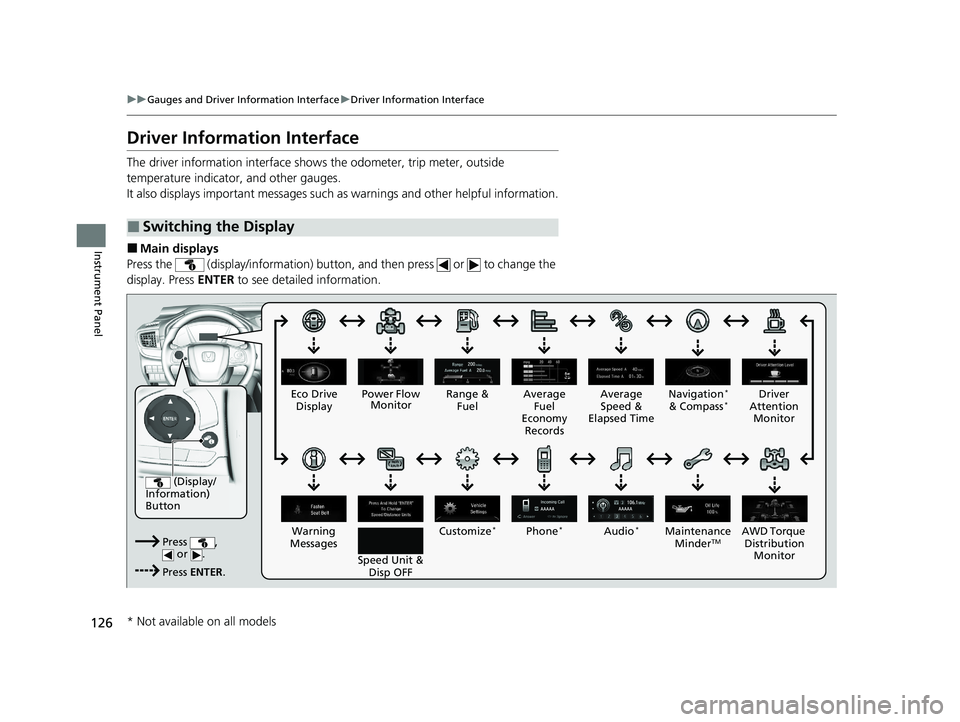
Driver Information Interface
The driver information interface shows the odometer, trip meter, outside
temperature indicator, and other gauges.
It also displays important messages such as warnings and other helpful information.
■Main displays
Press the (display/information) button, and then press or to change the
display. Press ENTER to see detailed information.
■Switching the Display
(Display/
Information)
Button
Press , or .
Press ENTER . Eco Drive
Display
Audio
*Phone*
Speed Unit & Disp OFF
Warning
Messages Average
Fuel
Economy Records
Driver
Attention Monitor
Range &
Fuel Average
Speed &
Elapsed Time Navigation*
& Compass*
Customize*
Power Flow Monitor
AWD Torque Distribution Mo
nitor
Maintenance
MinderTM
* Not available on all models
20 CR-V HYBRID HMIN-31TPG6000.book 126 ページ 2019年11月28日 木曜日 午後1時50分
Page 139 of 687
Continued137
uuGauges and Driver Information Interface uDriver Information Interface
Instrument Panel
■Compass*
Shows the compass screen.
■Turn-by-Turn Directions
When driving guidance is provided by the navigation system* or Android Auto, turn-
by-turn directions to your destination appear.
2 Refer to the Navigation System Manual
2 Android AutoTM P. 333
Show the current audio information.
2Audio System Basic Operation P. 268
Show the current phone information.
2Bluetooth ® HandsFreeLink ® P. 419
■Navigation*
■Audio*
■Phone*
1 Navigation*
You can select whether to have the turn-by-turn
display come on or not dur ing the route guidance.
2 Customized Features P. 366
* Not available on all models
20 CR-V HYBRID HMIN-31TPG6000.book 137 ページ 2019年11月28日 木曜日 午後1時50分
Page 140 of 687
uuGauges and Driver Information Interface uDriver Information Interface
138
Instrument Panel
Use the driver information interfac e to customize certain features.
■How to customize
Select the screen by pressing the button while the power mode is in ON,
and the vehicle is at a complete stop, and the shift position is in
(P. Select , then
press the ENTER button.
■Customized Features
Models with color audio system1Customized Features
To customize other features, press the /
button.
2 List of customizable options P. 141
2 Example of customization settings P. 145
Put the transmission into
( P before you attempt to
change any customized setting.
34
ENTER Button
Press to set your
selection.
Button
Press to go to Vehicle
Settings. Button
Press to go to the next
display.4
Button
Press to go back to the
previous display.3
20 CR-V HYBRID HMIN-31TPG6000.book 138 ページ 2019年11月28日 木曜日 午後1時50分
Page 150 of 687

148
Controls
Clock
Adjusting the Clock
The clock is automatically updated through the audio system.
You can adjust the time manually in the audio/information screen, with the power
mode is in ON.
■Using the MENU/CLOCK button
1. Press and hold the MENU/CLOCK button.
u Adjust Clock is selected.
2. Rotate to change hour, then press .
3. Rotate to change minute, then press
.
4. To enter the selection, rotate and select
Set , then press .
■Adjusting the Time
1Adjusting the Clock
The clock in the driver information interface is
automatically adjusted along with the audio system’s
clock display.Models with Display Audio
All models
1Using the MENU/CLOCK button
These indications are used to show how to operate
the selector knob.
Rotate to select.
Press to enter.
You can customize the clock display to show the 12
hour clock or 24 hour clock. 2 Customized Features P. 359Selector Knob
MENU/CLOCK Button
Models with color audio system
20 CR-V HYBRID HMIN-31TPG6000.book 148 ページ 2019年11月28日 木曜日 午後1時50分
Page 151 of 687
149
uuClock uAdjusting the Clock
Controls
■Using the Settings menu on the audio/
information screen
1. Select Settings .
2. Select Clock.
3. Select Clock Adjustment .
4. Select or to change hour.
5. Select or to change minute, then
select OK.
Models with Display Audio1Using the Settings menu on the audio/information screen
You can customize the clock display to show the 12
hour clock or 24 hour clock a nd turn the clock display
on and off. 2 Customized Features P. 366
You can also adjust the clock by touching the clock
displayed on the upper right corner of the display.
1. Touch the clock on the display for a few seconds.
2. Select Settings .
3. Select Clock .
4. Select Clock Adjustment .
5. Select or to change hour.
6. Select or to change minute, then select OK.
You cannot adjust the time while the vehicle is
moving.
34
34
34
34
20 CR-V HYBRID HMIN-31TPG6000.book 149 ページ 2019年11月28日 木曜日 午後1時50分
Page 156 of 687

uuLocking and Unlocking the Doors uLocking/Unlocking the Doors from the Outside
154
Controls
■Unlocking the doors and tailgate
Grab the driver’s door handle: u The driver’s door unlocks.
u Some exterior lights flash twice and the
beeper sounds twice.
Grab the front passenger’s door handle:
u All the doors and tailgate unlock.
u Some exterior lights flash twice and the
beeper sounds twice.
Press the tailgate outer handle: u The tailgate unlocks.
u Some exterior lights flash twice and the
beeper sounds twice.
2 Opening/Closing the Tailgate P. 165
1Using the Smart Entry with Push Button Start System
•After locking the door, you have up to 2 seconds
during which you can pull the door handle to
confirm whether the door is locked. If you need to
unlock the door immediately after locking it, wait
at least 2 seconds befo re gripping the handle,
otherwise the door will not unlock.
•The door might not open if you pull it immediately
after gripping the door handle. Grip the handle
again and confirm that th e door is unlocked before
pulling the handle.
•Even within the 32 inches (80 cm) radius, you may
not be able to lock/unlock the doors and the
tailgate with the smart entry remote if it is above or
below the outside handle.
•The smart entry remote may not operate if it is too
close to the door and door glass.
The light flashes, and beeper sounds and unlock
settings can be custom ized using the driver
information interface
* or audio/information screen*.
2 Customized Features P. 138
2 Customized Features P. 366
You can also unlock and open with the power
tailgate. 2 Using the Tailgate Outer Handle P. 171Models with color audio system
Models with Display Audio
Models with power tailgate
Outer Handle
* Not available on all models
20 CR-V HYBRID HMIN-31TPG6000.book 154 ページ 2019年11月28日 木曜日 午後1時50分
Page 157 of 687

Continued155
uuLocking and Unlocking the Doors uLocking/Unlocking the Doors from the Outside
Controls
■Locking the doors and tailgate (Walk
away auto lock ®)
When you walk away from the vehicle while
carrying the smart entry remote, the doors
and tailgate will automatically lock.
The auto lock function activates when all
doors and tailgate are closed, and the smart
entry remote is within about 5 feet (1.5 m)
radius of the outside door handle.
Exit vehicle while carry ing smart entry remote
and close door(s) and tailgate.
1. While within about 5 feet (1.5 m) radius of
the vehicle.
u The beeper sounds; the auto lock
function will be activated.
2. Carry the smart entry remote beyond about
5 feet (1.5 m) from the vehicle and remain
outside this range for 2 or more seconds.
u Some exterior lights flash; the beeper
sounds; all doors and tailgate will then
lock.1Locking the doors and tailg ate (Walk away auto lock®)
The auto lock function is set to OFF as the factory
default setting. The auto lo ck function can be set to
ON using the driver information interface
* or audio/
information screen*.
If you set the auto lock function to ON using the
driver information interface
* or audio/information
screen*, only the smart entry remote that was used to
unlock the driver’s door prio r to the setting change
can activate auto lock.
2 Customized Features P. 138
2 Customized Features P. 366
After the auto lock function has been activated, when
you stay within the locking/unlocking operation range,
the indicator on the smart en try remote will continue to
flash until the doors and tailgate are locked.
When you stay beside the vehicle within the
operation range, the door s and tailgate will
automatically lock approx imately 30 seconds after
the auto lock function activating beeper sounds.
When you open a door or tailgate after the auto lock
function activating beeper sounds, the auto lock
function will be canceled.
Models with color audio system
Models with Display Audio
The activation range of
the auto lock function is
about 5 feet (1.5 m)
* Not available on all models
20 CR-V HYBRID HMIN-31TPG6000.book 155 ページ 2019年11月28日 木曜日 午後1時50分