Page 339 of 595
337Continued
Features
Bluetooth® HandsFreeLink ®
Bluetooth® HandsFreeLink ® (HFL) allows you to place and receive phone calls using
your vehicle’s audio system, without handling your cell phone.
Using HFL
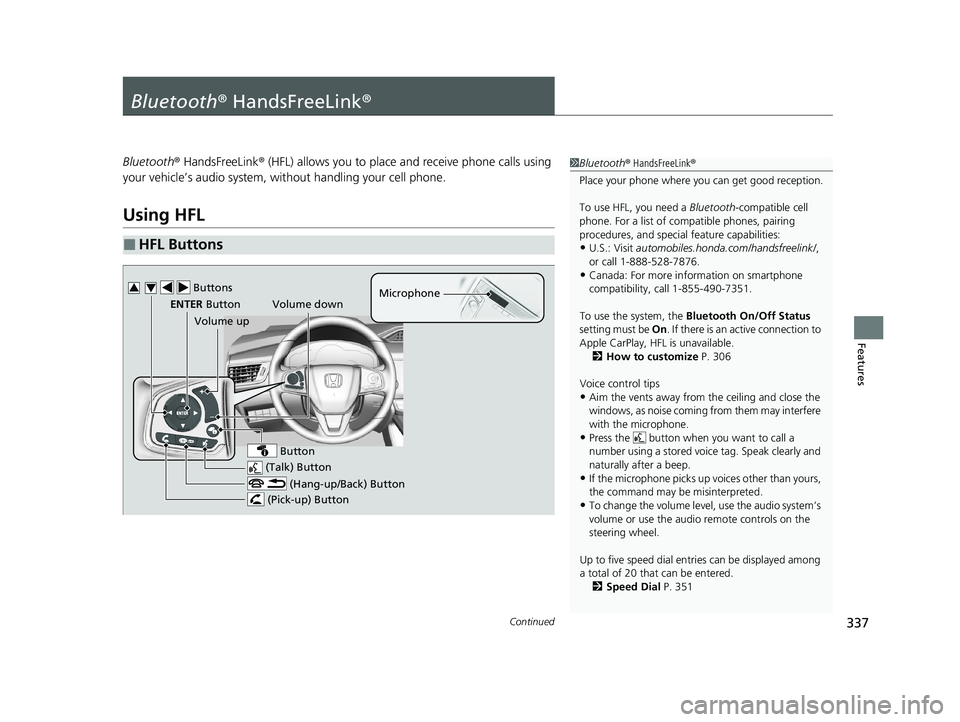
■HFL Buttons
1 Bluetooth ® HandsFreeLink ®
Place your phone where y ou can get good reception.
To use HFL, you need a Bluetooth-compatible cell
phone. For a list of compatible phones, pairing
procedures, and special feature capabilities:
•U.S.: Visit automobiles.honda.com /handsfreelink/,
or call 1-888-528-7876.
•Canada: For more info rmation on smartphone
compatibility, call 1-855-490-7351.
To use the system, the Bluetooth On/Off Status
setting must be On. If there is an active connection to
Apple CarPlay, H FL is unavailable.
2 How to customize P. 306
Voice control tips
•Aim the vents away from the ceiling and close the
windows, as noise coming from them may interfere
with the microphone.
•Press the button when you want to call a
number using a stored voic e tag. Speak clearly and
naturally after a beep.
•If the microphone picks up vo ices other than yours,
the command may be misinterpreted.
•To change the volume level, use the audio system’s
volume or use the audio remote controls on the
steering wheel.
Up to five speed dial entries can be displayed among
a total of 20 that can be entered.
2 Speed Dial P. 351
(Talk) Button
Volume up Microphone
(Hang-up/Back) Button
(Pick-up) Button
ENTER Button
Button
Buttons34
Volume down
20 CLARITY PHEV-31TRW6200.book 337 ページ 2019年9月24日 火曜日 午後12時9分
Page 374 of 595
372
Driving
Before Driving
Driving Preparation
Check the following items before you start driving.
• Make sure there are no obstructions on th e windows, door mirrors, exterior
lights, or other parts of the vehicle.
u Remove any frost, snow, or ice.
u Remove any snow on the roof, as this can slip down and obstruct your field of
vision while driving. If frozen solid , remove ice once it has softened.
u When removing ice from around the wheel s, be sure not to damage the wheel
or wheel components.
• Make sure the hood is securely closed.
u If the hood opens while driving, your front view will be blocked.
• Make sure the tires are in good condition.
u Check air pressures, and check for damage and excessive wear.
2Checking and Maintaining Tires P. 503
•Make sure there are no people or ob jects behind or around the vehicle.
u There are blind spots from the inside.
• Disconnect the charging cable.
■Exterior Checks1Exterior Checks
NOTICE
When doors are frozen s hut, use warm water around
the door edges to melt any ice. Do not try to force
them open, as this can damage the rubber trim
around the doors. When done, wipe dry to avoid
further freezing.
Do not pour warm water into the key cylinder.
You will be unable to insert the key if the water
freezes in the hole.
Heat from the engine and exhaust can ignite
flammable material s left under the hood, causing a
fire. If you’ve parked y our vehicle for an extended
period, inspect and remove any debris that may have
collected, such as dried grass and leaves that have
fallen or have been carried in for use as a nest by a
small animal. Also check under the hood for leftover
flammable materials after you or someone else has
performed maintenance on your vehicle.
20 CLARITY PHEV-31TRW6200.book 372 ページ 2019年9月24日 火曜日 午後12時9分
Page 477 of 595

475
Maintenance
This chapter discusses basic maintenance.
Before Performing MaintenanceInspection and Maintenance ............ 476
Safety When Performing Maintenance ..477Parts and Fluids Used in Maintenance Service ........................................... 478
Maintenance Minder
TM..................... 479
Maintenance Under the Hood Maintenance Items Under the Hood .. 484
Opening the Hood ........................... 485
Recommended Engine Oil ................ 486
Oil Check ......................................... 487
Adding Engine Oil ............................ 488
Changing the Engine Oil and Oil Filter ...489 Engine Coolant ................................ 492
Cooling System ................................ 494
Transmission Fluid ............................ 496
Brake Fluid ....................................... 496
Refilling Window Washer Fluid......... 497
Replacing Light Bulbs ....................... 498Checking and Maintaining Wiper
Blades .......................................... 500
Checking and Maintaining Tires
Checking Tires ................................. 503
Tire and Loading Information Label .. 504
Tire Labeling .................................... 504
DOT Tire Quality Grading (U.S. Vehicles).. 506
Wear Indicators ............................... 508
Tire Service Life ................................ 508
Tire and Wheel Replacement ........... 509
Tire Rotation .................................... 510
Winter Tires ..................................... 511
12-Volt Battery ................................. 512
Remote Transmitter Care Replacing the Button Battery ........... 514
Climate Control System Maintenance.. 515CleaningInterior Care .................................... 517
Exterior Care.................................... 519
Accessories and Modifications ........ 523
20 CLARITY PHEV-31TRW6200.book 475 ページ 2019年9月24日 火曜日 午後12時9分
Page 497 of 595
495
uuMaintenance Under the Hood uCooling System
Maintenance
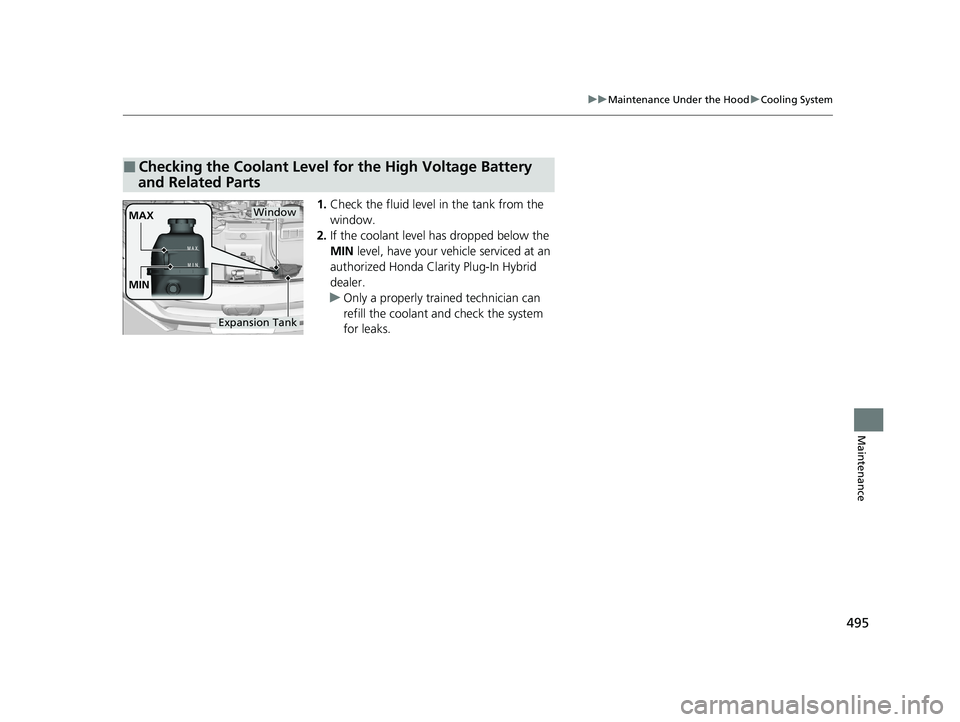
1. Check the fluid level in the tank from the
window.
2. If the coolant level has dropped below the
MIN level, have your ve hicle serviced at an
authorized Honda Clarity Plug-In Hybrid
dealer.
u Only a properly trained technician can
refill the coolant and check the system
for leaks.
■Checking the Coolant Level for the High Voltage Battery
and Related Parts
MAX
MINWindow
Expansion Tank
20 CLARITY PHEV-31TRW6200.book 495 ページ 2019年9月24日 火曜日 午後12時9分
Page 499 of 595
497
uuMaintenance Under the Hood uRefilling Window Washer Fluid
Maintenance
Refilling Window Washer Fluid
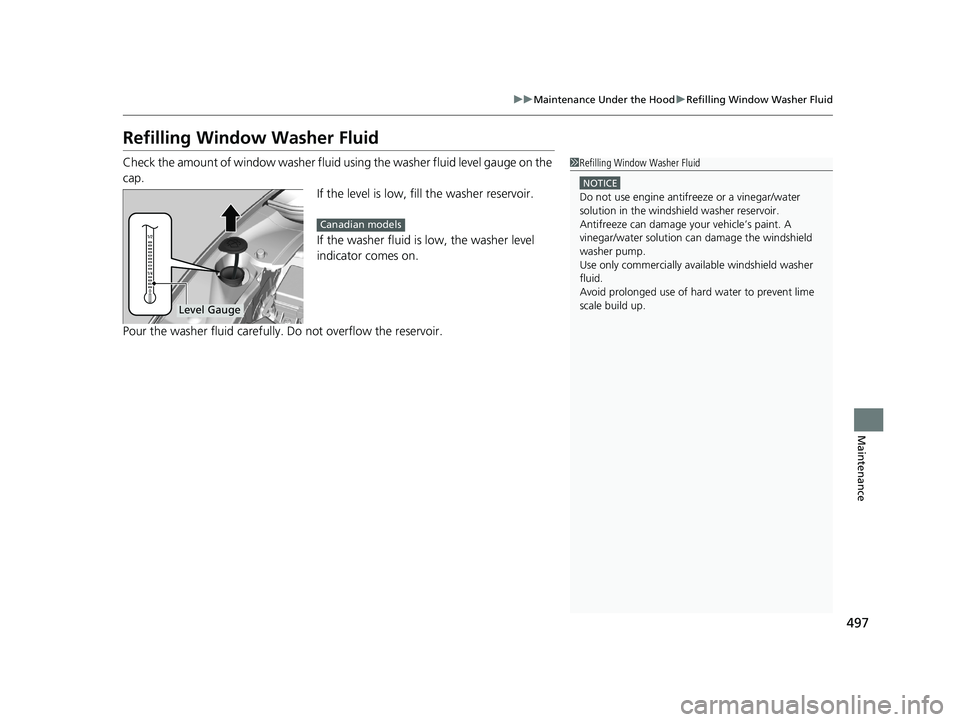
Check the amount of window washer fluid using the washer fluid level gauge on the
cap. If the level is low, fill the washer reservoir.
If the washer fluid is low, the washer level
indicator comes on.
Pour the washer fluid carefully. Do not overflow the reservoir.1Refilling Window Washer Fluid
NOTICE
Do not use engine antifreeze or a vinegar/water
solution in the windshield washer reservoir.
Antifreeze can damage y our vehicle’s paint. A
vinegar/water solution ca n damage the windshield
washer pump.
Use only commercially avai lable windshield washer
fluid.
Avoid prolonged use of hard water to prevent lime
scale build up.
Level Gauge
Canadian models
20 CLARITY PHEV-31TRW6200.book 497 ページ 2019年9月24日 火曜日 午後12時9分
Page 502 of 595
500
Maintenance
Checking and Maintaining Wiper Blades
Checking Wiper Blades
If the wiper blade rubber has deteriorated, it will leave streaks and the hard surfaces
of the blade may scratch the window glass.
Changing the Wiper Blade Rubber
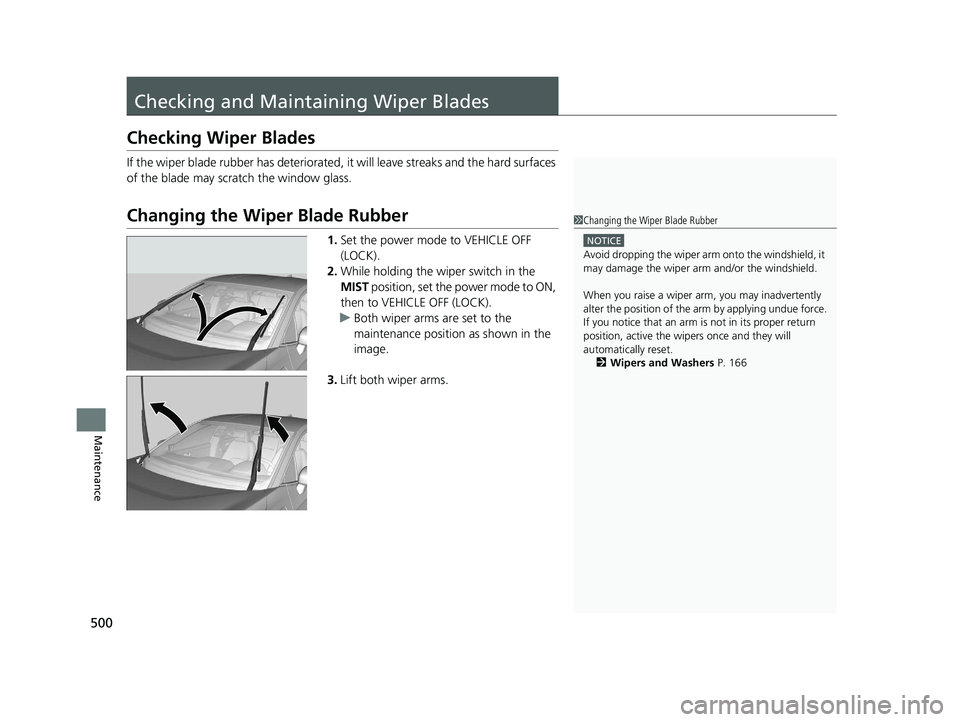
1. Set the power mode to VEHICLE OFF
(LOCK).
2. While holding the wiper switch in the
MIST position, set the power mode to ON,
then to VEHICLE OFF (LOCK).
u Both wiper arms are set to the
maintenance position as shown in the
image.
3. Lift both wiper arms.
1Changing the Wiper Blade Rubber
NOTICE
Avoid dropping the wiper arm onto the windshield, it
may damage the wiper arm and/or the windshield.
When you raise a wiper arm, you may inadvertently
alter the position of the arm by applying undue force.
If you notice that an arm is not in its proper return
position, active the wipers once and they will
automatically reset. 2 Wipers and Washers P. 166
20 CLARITY PHEV-31TRW6200.book 500 ページ 2019年9月24日 火曜日 午後12時9分
Page 514 of 595
512
Maintenance
12-Volt Battery
Checking the 12-Volt Battery
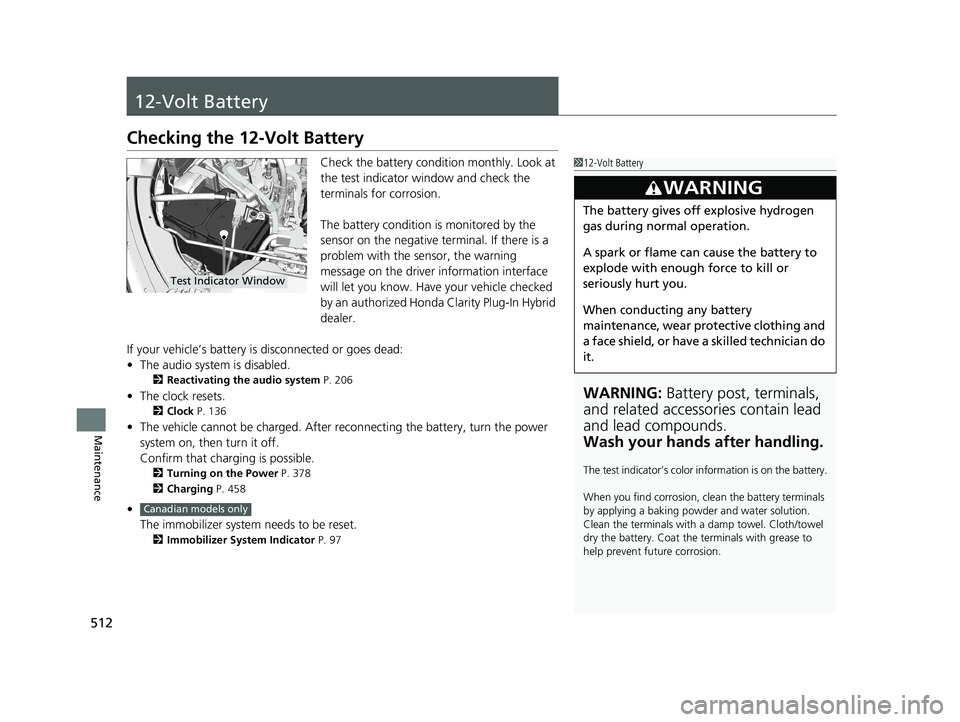
Check the battery condition monthly. Look at
the test indicator window and check the
terminals for corrosion.
The battery condition is monitored by the
sensor on the negative terminal. If there is a
problem with the sensor, the warning
message on the driver information interface
will let you know. Have your vehicle checked
by an authorized Honda Clarity Plug-In Hybrid
dealer.
If your vehicle’s battery is disconnected or goes dead:
• The audio system is disabled.
2 Reactivating the audio system P. 206
•The clock resets.
2 Clock P. 136
•The vehicle cannot be charged. After reconnecting the batte ry, turn the power
system on, then turn it off.
Confirm that charging is possible.
2 Turning on the Power P. 378
2 Charging P. 458
•
The immobilizer system needs to be reset.
2 Immobilizer System Indicator P. 97
112-Volt Battery
WARNING: Battery post, terminals,
and related accessories contain lead
and lead compounds.
Wash your hands after handling.
The test indicator’s color in formation is on the battery.
When you find corrosion, cl ean the battery terminals
by applying a baking powder and water solution.
Clean the terminals with a damp towel. Cloth/towel
dry the battery. Coat the terminals with grease to
help prevent future corrosion.
3WARNING
The battery gives off explosive hydrogen
gas during normal operation.
A spark or flame can cause the battery to
explode with enough force to kill or
seriously hurt you.
When conducting any battery
maintenance, wear prot ective clothing and
a face shield, or have a skilled technician do
it.
Test Indicator Window
Canadian models only
20 CLARITY PHEV-31TRW6200.book 512 ページ 2019年9月24日 火曜日 午後12時9分
Page 518 of 595
516
uuClimate Control System Maintenance uDust and Pollen Filter
Maintenance
Dust and Pollen Filter
The climate control system is equipped wi th a dust and pollen filter that collects
pollen, dust, and other debris in the air. The Maintenance MinderTM messages will let
you know when to replace the filter.
We recommend that you replace the dust and pollen filter sooner when using your
vehicle in areas with high concentrations of dust.
1Dust and Pollen Filter
If the airflow from the climate control system
deteriorates noticeably, and the windows fog up
easily, the filter may need to be replaced. Please
contact an authorized Honda Clarity Plug-In Hybrid
dealer for replacement.
20 CLARITY PHEV-31TRW6200.book 516 ページ 2019年9月24日 火曜日 午後12時9分