Page 20 of 675

18
Quick Reference Guide
Features (P 211)
Audio Remote Controls
(P 216)
●
(+ / ( - Bar
Press to adjust the volume up/down.
● / Button
Press or to cycle through the audio
mode as follows:
FM AM USB iPod Bluetooth®Audio
FM AM SiriusXM ®
*USB iPod
Bluetooth ®Audio Pandora®*Apps
ENTER Button
/ / / Button34(+ / (- Bar
Button
34
34
Models with color audio system
Models with Display Audio
● ENTER Button
•When listening to the radio and
SiriusXM ®*
aPress ENTER to switch the display to a
preset list you stored in the preset
buttons.
bPress or to select a preset, then
press ENTER .
•When listening to a USB flash drive
aPress ENTER to display the folder list.
bPress or to select a folder.
cPress ENTER to display a list of tracks in
that folder.
dPress or to select a track, then
press ENTER .
Models with Display Audio
34
34
34
•When listening to an iPod
aPress ENTER to display the iPod music
list.
bPress or to select a category.
cPress ENTER to display a list of items in
the category.
dPress or to select an item, then
press ENTER .
uPress ENTER and press or
repeatedly until a desired item you
want to listen to is displayed.
• When listening to Internet Radio
*
aPress ENTER to display the station list.
bPress or to select an item, then
press ENTER .
•When listening to Bluetooth®Audio
aPress ENTER to display the track list.
bPress or to select a track, then
press ENTER .
34
34
34
34
34
20 CIVIC 2D HCM (KA KL KC)-31TBG6400.book 18 ページ 2019年6月4日 火曜 日 午前8時32分
Page 21 of 675
19
Quick Reference Guide
● / Button
● Button
Press to change contents.
2 Driver Information Interface (P112)
Radio: Press to change the preset station.
Press and hold to select the next or
previous strong station.
USB device: Press to skip to the beginning of
the next song or return to the
beginning of the current song.
Press and hold to change a folder.
* Not available on all models
20 CIVIC 2D HCM (KA KL KC)-31TBG6400.book 19 ページ 2019年6月4日 火曜 日 午前8時32分
Page 22 of 675
20
Quick Reference Guide
Audio system (P 212)
(P 219)Models with color audio system
(Seek/Skip) Button
RADIO Button
Driver Information Interface
(Day/Night) Button
MEDIA Button
Preset Buttons (1-6)
(Seek/Skip) Button
VOL
/ (Volume/Power) Knob
Audio/Information Screen
(Back) Button
(Sound) Button
MENU/CLOCK Button
LIST/SELECT
(List/Selector) Knob
(Phone) Button
20 CIVIC 2D HCM (KA KL KC)-31TBG6400.book 20 ページ 2019年6月4日 火曜
日 午前8時32分
Page 102 of 675
100
uuIndicators uDriver Information Interface Wa rning and Information Messages
Instrument Panel
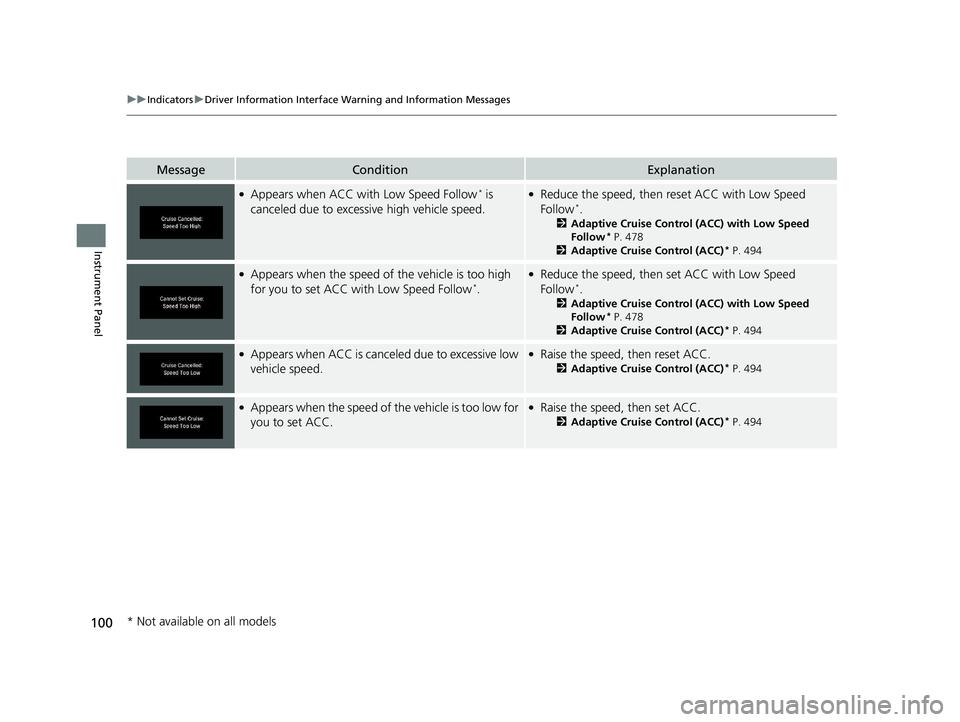
MessageConditionExplanation
●Appears when ACC with Low Speed Follow* is
canceled due to excessi ve high vehicle speed.●Reduce the speed, then reset ACC with Low Speed
Follow*.
2 Adaptive Cruise Control (ACC) with Low Speed
Follow* P. 478
2 Adaptive Cruise Control (ACC)* P. 494
●Appears when the speed of the vehicle is too high
for you to set ACC with Low Speed Follow*.
●Reduce the speed, then set ACC with Low Speed
Follow*.
2 Adaptive Cruise Control (ACC) with Low Speed
Follow* P. 478
2 Adaptive Cruise Control (ACC)* P. 494
●Appears when ACC is canceled due to excessive low
vehicle speed.●Raise the speed, then reset ACC.
2Adaptive Cruise Control (ACC)* P. 494
●Appears when the speed of the vehicle is too low for
you to set ACC.●Raise the speed, then set ACC.
2 Adaptive Cruise Control (ACC)* P. 494
* Not available on all models
20 CIVIC 2D HCM (KA KL KC)-31TBG6400.book 100 ページ 2019年6月4日 火 曜日 午前8時32分
Page 117 of 675
Continued115
uuGauges and Driver Information Interface uDriver Information Interface
Instrument Panel
■Trip computer
Press the ( TRIP) knob to change the display.
Shows the total number of miles or kilome ters that your vehicle has accumulated.
Shows the total number of miles or kilomete rs driven since the last reset. Meters A
and B can be used to measure two separate trips.
■Resetting a trip meter
To reset a trip meter, display it, then pr ess and hold the knob. The trip meter is
reset to 0.0.
■Odometer
■Trip Meter
Odometer
Outside temperature Trip ATrip B
(
TRIP )
Knob
1 Trip Meter
Switch between trip meter A and trip meter B by
pressing the knob.
20 CIVIC 2D HCM (KA KL KC)-31TBG6400.book 115 ページ 2019年6月4日 火 曜日 午前8時32分
Page 118 of 675

uuGauges and Driver Information Interface uDriver Information Interface
116
Instrument Panel
Shows the estimated average fuel economy of each trip meter in mpg or l/100 km.
The display is updated at set intervals. Wh en a trip meter is reset, the average fuel
economy is also reset.
Shows the estimated distance you can trave l on the remaining fuel. This estimated
distance is based on the ve hicle’s current fuel economy.
Shows the time elapsed since Trip A or Trip B was reset.
Shows the average speed in mph or km/h since Trip A or Trip B was reset.
Shows the remaining oil life and Maintenance Minder
TM.
2 Maintenance MinderTM P. 545
■Average Fuel Economy
■Range
■Elapsed Time
■Average Speed
■Engine Oil Life
1Average Fuel Economy
You can change when to reset the average fuel
economy.
2 Customized Features P. 123, 335
1Elapsed Time
You can change when to reset the elapsed time.
2 Customized Features P. 123, 335
1Average Speed
You can change when to reset the average speed.
2 Customized Features P. 123, 335
20 CIVIC 2D HCM (KA KL KC)-31TBG6400.book 116 ページ 2019年6月4日 火 曜日 午前8時32分
Page 126 of 675
124
uuGauges and Driver Information Interface uDriver Information Interface
Instrument Panel
■Customization flow
Press the button.
ENTERVehicle Settings
“Trip A” Reset Timing
Language Selection
Adjust Outside Temp. Display
3
4
TPMS Calibration
ENTER
“Trip B” Reset Timing
Fuel Efficiency Backlight3
4
ACC Forward Vehicle Detect Beep
3
4
Tachometer
ENTER
Forward Collision Warning Distance
3
4
3
4
Lane Keeping Assist Suspend Beep
Road Departure Mi tigation Setting
Adjust Alarm Volume
Speed/Distance Units
3
4
ENTER
Driver Assist System Setup
Meter Setup
20 CIVIC 2D HCM (KA KL KC)-31TBG6400.book 124 ページ 2019年6月4日 火 曜日 午前8時32分
Page 129 of 675

127
uuGauges and Driver Information Interface uDriver Information Interface
Continued
Instrument Panel
*1:Default SettingSetup Group Customizable Features
Description Selectable Settings
Meter Setup
Language SelectionChanges the displayed language.English*1/Français /Español
Adjust Outside Temp.
DisplayAdjusts the temperature reading by a few degrees.-5°F ~ ±0°F*1 ~ +5°F
“Trip A” Reset Timing
Changes the setting of how the distance, average
fuel economy, average speed , and elapsed time of
trip A is reset.When Refueled /IGN OFF /
Manually Reset*1
“Trip B” Reset Timing
Changes the setting of how the distance, average
fuel economy, average speed , and elapsed time of
trip B is reset.When Refueled /IGN OFF /
Manually Reset*1
Adjust Alarm VolumeChanges the volume setting for buzzers, warnings,
turn signals, and other alerting systems.High /Mid*1/Low
Fuel Efficiency BacklightTurns the ambient meter feature on and off.ON*1/OFF
Speed/Distance UnitsSelects the trip computer units.mph∙miles*1/ km/ h∙km
TachometerSelects whether the tachometer comes on the driver
information interface.ON*1/OFF
20 CIVIC 2D HCM (KA KL KC)-31TBG6400.book 127 ページ 2019年6月4日 火 曜日 午前8時32分


