Page 92 of 675

90
uuIndicators u
Instrument Panel
*1:Models with the smart entry system have an ENGINE START/STOP button instead of an ignition switch.
IndicatorNameOn/BlinkingExplanationMessage
Adaptive Cruise
Control (ACC)
with Low Speed
Follow
* Indicator
(Amber)
●Comes on for a few seconds when
you turn the ignition switch to ON
(w*1, then goes off.●Comes on if there is a problem
with ACC with Low Speed
Follow
*.
●Comes on while driving - Have your
vehicle checked by a dealer.
●Comes on if the ACC with Low
Speed Follow* is deactivated
temporarily after the battery has
been disconnected, then re-
connected.●Drive a short distance at more than 12
mph (20 km/h). The indicator should go
off. If it does not, have your vehicle
checked by a dealer.
●Comes on if there is a problem
with ACC with Low Speed
Follow
*.●Indicator may come on
temporarily when the Maximum
Load Limit is exceeded.
●ACC with Low Speed Follow* has
been automatically canceled.
●Make sure the total load is within the
Maximum Load Limit.
2 Maximum Load Limit P. 429●Stays on constantly - Have your vehicle
checked by a dealer.—
Adaptive Cruise
Control (ACC)
with Low Speed
Follow
* Indicator
(Green)
●Comes on when you press the
MAIN button.
2Adaptive Cruise Control (ACC) with
Low Speed Follow* P. 478
2 Adaptive Cruise Control (ACC)* P. 494—
* Not available on all models
20 CIVIC 2D HCM (KA KL KC)-31TBG6400.book 90 ページ 2019年6月4日 火曜 日 午前8時32分
Page 93 of 675
91
uuIndicators u
Continued
Instrument Panel
*1:Models with the smart entry system have an ENGINE START/STOP button instead of an ignition switch.
IndicatorNameOn/BlinkingExplanationMessage
Lane Keeping
Assist System
(LKAS ) Indicator
(Amber)●Comes on for a few seconds
when you turn the ignition switch
to ON
(w*1, then goes off.●Comes on if there is a problem
with the LKAS.
●Stays on constantly - Have your vehicle
checked by a dealer.
Lane Keeping
Assist System
( LKAS ) Indicator
(Green)●Comes on when you press the
MAIN button.
2Lane Keeping Assist System (LKAS)
P. 509—
20 CIVIC 2D HCM (KA KL KC)-31TBG6400.book 91 ページ 2019年6月4日 火曜 日 午前8時32分
Page 94 of 675
92
uuIndicators u
Instrument Panel
*1:Models with the smart entry system have an ENGINE START/STOP button instead of an ignition switch.
IndicatorNameOn/BlinkingExplanationMessage
Collision
Mitigation
Braking
System
TM
(CMBSTM)
Indicator
●Comes on for a few seconds when
you turn the ignition switch to ON
(w*1, then goes off.●Comes on when you deactivate
the CMBSTM. A driver information
interface message appears for five
seconds.
●Comes on if there is a problem
with the CMBSTM.
●Stays on constantly without the
CMBSTM off - Have your vehicle checked
by a dealer.
2 Collision Mitigation Braking
SystemTM (CMBSTM) P. 468
●Comes on if the CMBSTM is
deactivated temporarily after the
battery has been disconnected,
then re-connected.●Drive a short distance at more than 12
mph (20 km/h). The indicator should go
off. If it does not, have your vehicle
checked by a dealer.
20 CIVIC 2D HCM (KA KL KC)-31TBG6400.book 92 ページ 2019年6月4日 火曜 日 午前8時32分
Page 96 of 675

94
uuIndicators uDriver Information Interface Wa rning and Information Messages
Instrument Panel
Driver Information Interface Warning and Information Messages
The following messages appear only on the driver information interface. Press the (display/information) button to see the mess age
again with the system message indicator on.
MessageConditionExplanation
●Appears if either door or the trunk is not completely
closed.
●Appears if either door or the trunk is opened while
driving. The b eeper sounds.
●Goes off when both doors and the trunk are closed.
●Appears when the washer fluid gets low.●Refill the washer fluid.
2Refilling Window Washer Fluid P. 565
●Appears when the scheduled maintenance is due
soon.
●Consequently, Maintenance Due Now and
Maintenance Past Due follow.
2Maintenance Minder Messages on the Driver
Information Interface P. 547
●Appears when there is a pr oblem with the sensor on
the battery.●Have your vehicle ch ecked by a dealer.
2Checking the Battery P. 588
●Appears along with the battery charging system
indicator when the batte ry is not charging.●Turn off the climate control sy stem and rear defogger to
reduce electricity consumption.
2 If the Charging System Indicator Comes On P. 632
●Appears when the engine coolant temperature gets
abnormally high.
2 Overheating P. 630
Canadian models
20 CIVIC 2D HCM (KA KL KC)-31TBG6400.book 94 ページ 2019年6月4日 火曜 日 午前8時32分
Page 110 of 675
108
uuIndicators uDriver Information Interface Wa rning and Information Messages
Instrument Panel
MessageConditionExplanation
●Appears when the starter system has a problem.●As a temporary measure, press and hold the ENGINE
START/STOP button for up to 15 seconds while pressing
the brake pedal and clutch pedal (manual transmission
only), and manually start the engine.
Have your vehicle checked by a dealer.
●Appears as soon as a problem is detected in the
smart entry system or push button starting system.●Appears constantly - Have your vehicle checked by a
dealer.
MessageConditionExplanation
●Appears if there is a pr oblem with the headlights.●Appears while driving - The headlights may not be on.
When conditions allow you to drive safely, have your
vehicle checked by a deal er as soon as possible.
Models with smart entry system
U.S.
Canada
Models with LED headlights
20 CIVIC 2D HCM (KA KL KC)-31TBG6400.book 108 ページ 2019年6月4日 火 曜日 午前8時32分
Page 111 of 675
109
uuIndicators uDriver Information Interface Wa rning and Information Messages
Instrument Panel
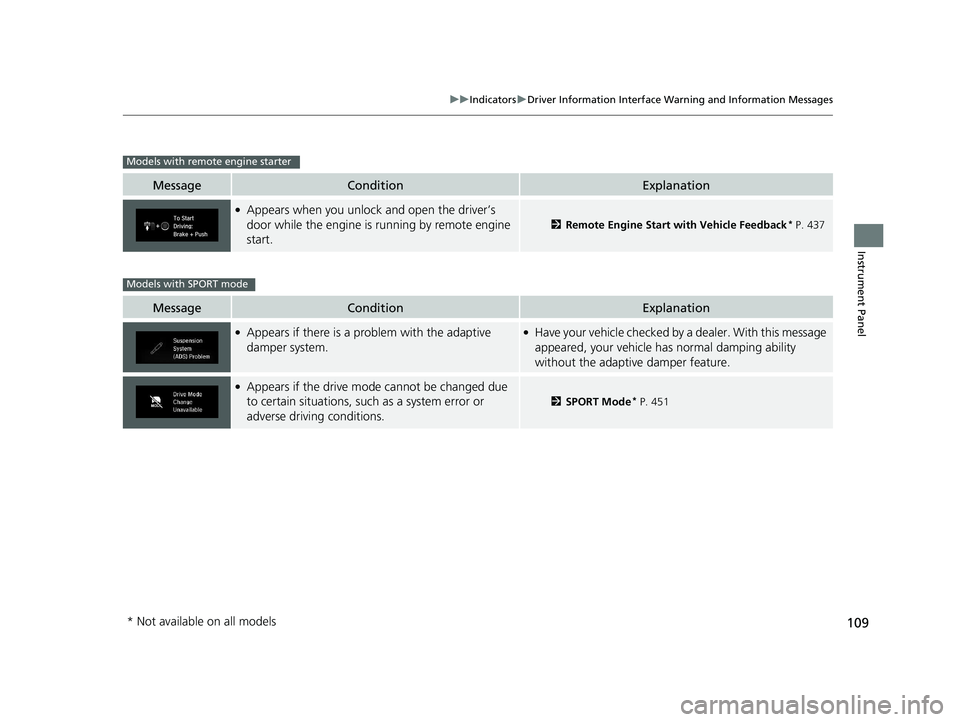
MessageConditionExplanation
●Appears when you unlock and open the driver’s
door while the engine is running by remote engine
start.
2Remote Engine Start with Vehicle Feedback* P. 437
MessageConditionExplanation
●Appears if there is a problem with the adaptive
damper system.●Have your vehicle checked by a dealer. With this message
appeared, your vehicle ha s normal damping ability
without the adaptive damper feature.
●Appears if the drive mode cannot be changed due
to certain situations, such as a system error or
adverse driving conditions.
2 SPORT Mode* P. 451
Models with remote engine starter
Models with SPORT mode
* Not available on all models
20 CIVIC 2D HCM (KA KL KC)-31TBG6400.book 109 ページ 2019年6月4日 火 曜日 午前8時32分
Page 200 of 675

uuInterior Lights/Interior Convenience Items uInterior Convenience Items
198
Controls
■When charging does not start
Perform one of the solution s in the following table.
IndicatorCauseSolution
Green
&
AmberBlinking
simulta- neously
There is an obstacle(s) between
the charging area and the
device.Remove the
obstacle(s).
The device is not within the
charging area. Move the device to the
center of the charging
area where is
located.
AmberBlinkingThe wireless charger is faulty.Contact a dealer for
repairs.
1
Wireless Charger*
This system consumes a lot of power. Do not use the
system for a long time when the engine is not
running. This may weaken the battery, making it
difficult to start the engine.
When using the wireless charger, check the user’s manual
that came with the compatible device you want to charge.
3CAUTION
Metal objects between the charge pad
and the device to be charged will get
hot and can burn you.
• Always remove foreign objects from
the charge pad before charging the
device.
• Be sure the surface is clear of dust and
other debris before charging.
• Do not spill liquids (i. e. water, drinks,
etc.) on the charger and the device.
• Do not use oil, grease, alcohol,
benzine or thinner for cleaning the
charge pad.
• Do not cover the system with towels,
clothing, or other objects while
charging etc.
• Avoid spraying aerosols which may
come in contact with the charge pad
surface.
* Not available on all models
20 CIVIC 2D HCM (KA KL KC)-31TBG6400.book 198 ページ 2019年6月4日 火 曜日 午前8時32分
Page 217 of 675
215
uuAudio System uAudio System Theft Protection
Features
Audio System Theft Protection
The audio system is disabled when it is disconnected from the power source, such as
when the battery is disconnected or goes dead. In certain conditions, the system
may display a code entry screen. If this occurs, reactivate the audio system.
■Reactivating the audio system
1. Turn the ignition switch to ON
(w*1.
2. Turn on the audio system.
3. Press and hold the audio system powe r button for more than two seconds.
u The audio system is reac tivated when the audio co ntrol unit establishes a
connection with the vehicl e control unit. If the control unit fails to recognize
the audio unit, you must go to a deal er and have the audio unit checked.
*1: Models with the smart entry system have an ENGINE START/STOP button instead of an
ignition switch.
20 CIVIC 2D HCM (KA KL KC)-31TBG6400.book 215 ページ 2019年6月4日 火 曜日 午前8時32分