2020 HONDA ACCORD SEDAN tire pressure
[x] Cancel search: tire pressurePage 26 of 728
24
Quick Reference Guide
VSA® On and Off (P 497)
●The Vehicle Stability AssistTM (VSA ®)
system helps stabilize the vehicle during
cornering, and helps maintain traction
while accelerating on loose or slippery
road surfaces.
●VSA ® comes on automatically every time
you start the engine.
●To partially disable or fully restore VSA ®
function, press and ho ld the button until
you hear a beep.
CMBSTM On and Off
(P 516)
●When a possible collision is likely
unavoidable, the CMBSTM can help you to
reduce the vehicle sp eed and the severity
of the collision.
●The CMBSTM is turned on every time you
start the engine.
●To turn the CMBSTM on or off, use the
safety support switch.
Tire Pressure Monitoring
System (TPMS)
(P 499)
●Detects a change in tire conditions and
overall dimensions due to decrease in tire
pressures.
●The TPMS is turned on automatically
every time you start the engine.
●A calibration procedure must be
performed when certain conditions arise.
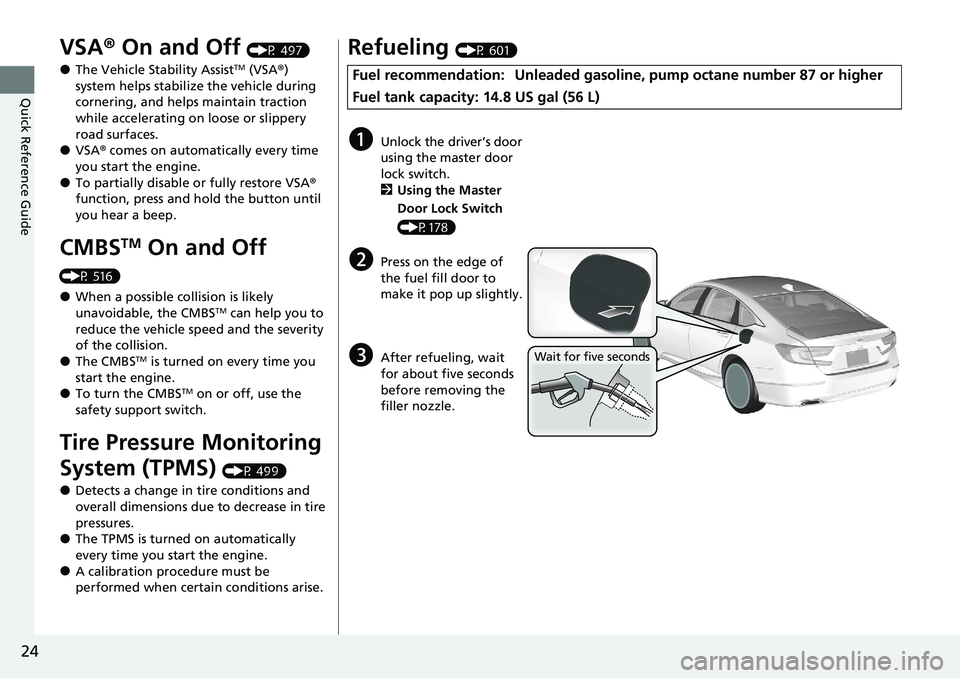
Refueling (P 601)
Fuel recommendation: Unleaded gasoli ne, pump octane number 87 or higher
Fuel tank capacity: 14.8 US gal (56 L)
aUnlock the driver’s door
using the master door
lock switch.
2 Using the Master
Door Lock Switch
(P178)
bPress on the edge of
the fuel fill door to
make it pop up slightly.
cAfter refueling, wait
for about five seconds
before removing the
filler nozzle.Wait for five seconds
Page 29 of 728

27
Quick Reference Guide
Maintenance (P 607)
Under the Hood (P 618)
●Check engine oil, engine coolant, and windshield washer
fluid. Add when necessary.
●Check brake fluid and clutch* fluid.●Check the battery condition monthly.
aPull the hood release handle under the corner of the
dashboard.
bLocate the hood latch lever, push it to the side, and then
raise the hood. Once you have raised the hood slightly, you
can release the lever.
cWhen finished, close the hood and make sure it is firmly
locked in place.
Lights (P 635)
●Inspect all lights regularly.
Wiper Blades (P 643)
●Replace blades if they leave streaks
across the windshield.
Tires (P 646)
●Inspect tires and wheels regularly.●Check tire pressures regularly.●Install snow tires for winter
driving.
* Not available on all models
Page 33 of 728

31
Quick Reference Guide
I’m seeing an amber
indicator of a tire with an
exclamation point. What is
that?The Tire Pressure Monitoring System (TPMS) needs attention. If
you recently inflated or changed a tire, you have to recalibrate
the system.
2 Tire Pressure Monitoring System (TPMS) (P499)
Pressing the electric
parking brake switch does
not release the parking
brake. Why?Press the electric parking brake switch with the brake pedal
depressed.
Depressing the accelerator
pedal does not release the
parking brake
automatically. Why?●Fasten the driver’s seat belt.
●Check if the transmission is in (P* or (N. If so, select any other
position.
Why does the gear position
automatically change to
(P
when I open the driver’s
door to check for parking
space lines when
reversing?
●Fasten the driver’s seat belt.
●Close the driver’s door and manually change the gear
position.
2 When opening the driver’s door (P479)
Why do I hear a screeching
sound when I apply the
brake pedal?The brake pads may need to be replaced. Have your vehicle
inspected by a dealer.
Models with electronic gear selector
* Not available on all models
Page 37 of 728

35
uuFor Safe Driving uImportant Safety Precautions
Safe Driving
■Pay appropriate attention to the task of driving safely
Engaging in cell phone conversation or other activities that keep you from paying
close attention to the road, other vehicles, and pedestrians could lead to a crash.
Remember, situations can change quickly, and only you can decide when it is safe to
divert some attention away from driving.
■Control your speed
Excessive speed is a major factor in crash injuries and deaths. Generally, the higher
the speed, the greater the risk, but serious injuries can also occur at lower speeds.
Never drive faster than is safe for current conditions, regardless of the maximum
speed posted.
■Keep your vehicle in safe condition
Having a tire blowout or a mechanical failure can be extremely hazardous.
To reduce the possibility of such problems, check your tire pressures and condition
frequently, and perform all regul arly scheduled maintenance.
■Do not leave children unattended in the vehicle
Children, pets and people needing assistan ce left unattended in the vehicle may be
injured if they activate one or more of the vehicle controls. They may also cause the
vehicle to move, resulting in a crash in wh ich they and/or another person(s) can be
injured or killed. Also, depending on the am bient temperature, the temperature of
the interior may reach extreme levels, which can result in harm or death.
Even if the climate control system is on, never leave them in the vehicle unattended
as the climate control system can shut off at any time.
Page 80 of 728

78
Instrument Panel
Indicators
ECON Mode Indicator
M (sequential mode
*/
7-speed manual shift
mode
*) Indicator*/
Gear Selection
Indicator
*
P. 84
Parking Brake and
Brake System
Indicator (Red)
Parking Brake and
Brake System
Indicator (Amber)
U.S.
Canada
U.S.
Canada Automatic Brake
Hold System Indicator
Automatic Brake Hold
IndicatorU.S.
Canada
*1 : When you set the power mode to ON, these indicators come on to indicate that system checks are being performed. They go off a few seconds later or after the engine
has started. If an indicator does not come on or turn off, ther e may be a malfunction in the corresponding system. To resolve the issue, follow the instructions in the
owner's manual.
P. 79*1
Malfunction Indicator
Lamp
Charging System
Indicator
Anti-lock Brake System
( ABS ) Indicator
Seat Belt Reminder
Indicator
Low Fuel Indicator
Vehicle Stability AssistTM (VSA®) System Indicator
Vehicle Stability Assist
TM (VSA®) OFF Indicator
Supplemental Restraint
System Indicator
Auto High-Beam
Indicator
Low Tire Pressure/TPMS
Indicator
Electric Power Steering
(EPS) System Indicator
Turn Signal and Hazard
Warning Indicators
Lights On Indicator High Beam Indicator
Fog Light Indicator*
System Message Indicator Adaptive Cruise Control
(
ACC ) with Low Speed
Follow Indicator
(Amber)
*/Adaptive Cruise
Control ( ACC) Indicator
(Amber)
*
Lane Keeping Assist
System ( LKAS) Indicator
(Amber)
Safety Support Indicator
(Amber)
Safety Support Indicator
(Green/Gray)
P. 80
P.82
P.82
P.83
P.84
*1
*1 *1 *1
P.
93
*1
*1
Gear Position Indicator*P. 84
Transmission System
I
ndicator*P. 85, 87
Shift Up Indicator
*P. 88
Shift Down Indicator
*P. 88
P. 89
P.89
P.90
P.90
P.90
P.91
*1
*1
*1
*1
P. 92
*1P.92
P.94
P.99
*1
P.94
P.94
P.94 Security System Alarm
Indi
cator P.96
P.96
P.100
P.101
P.104
*1Adaptive Cruise Control
(ACC ) with Low Speed
Follow Indicator (Green)
*/
Adaptive Cruise Control
( ACC ) Indicator (Green)
*
P.100
*1Lane Keeping Assist
System ( LKAS) Indicator
(Green)P. 100
*1
Immobilizer System
IndicatorP.95
SPORT Mode Indicator*P.98
P.97
* Not available on all models
Page 95 of 728

93
uuIndicators u
Continued
Instrument Panel
IndicatorNameOn/BlinkingExplanationMessage
Low Tire
Pressure/TPMS
Indicator
●May come on briefly if the power
mode is set to ON and the vehicle is
not moved within 45 seconds, to
indicate the calibration process is
not yet complete.
●Comes on and stays on when:
-One or more tires’ pressures are
determined to be significantly low.
- The system has not been
calibrated.
●Comes on while driving - Stop in a safe
place, check tire pres sures, and inflate the
tire(s) if necessary.
●Stays on after the ti res are inflated to
the recommended pressures - The
system needs to be calibrated.
2 TPMS Calibration P. 500
●Blinks for about one minute, and
then stays on if there is a problem
with the TPMS, or when a compact
spare tire is temporarily installed.●Blinks and remains on - Have your
vehicle checked by a dealer. If the vehicle
is fitted with a compact spare, get your
regular tire repaired or replaced and put
back on your vehicle as soon as you can.
●Comes on if the TPMS is deactivated
temporarily after the battery has
been disconnected, then re-
connected.●Drive a short distance at more than 12 mph
(20 km/h). The indicator should go off. If it
does not, have your vehicle checked by a
dealer.
Page 380 of 728

378
uuCustomized Features u
Features
*1:Default Setting
Setup
GroupCustomizable FeaturesDescriptionSelectable Settings
SettingsVehicle
Settings
TPMS
CalibrationCancels/Calibrates the tire pressure
monitoring system (TPMS).Cancel /Calibrate
Driver Assist
System
Setup
Forward
Collision
Warning
Distance
Changes CMBSTM alert distance.Long /Normal*1/Short
ACC
Forward
Vehicle
Detect BeepCauses the system to beep when the system
detects a vehicle, or when the vehicle goes out
of the ACC with Low Speed Follow range.
On /Off*1
Road
Departure
Mitigation
Setting
Changes the setting fo r the road departure
mitigation system.Normal*1/ Wide /Warning
Only /Narrow
Lane
Keeping
Assist
Suspend
Beep
Causes the system to beep when LKAS is
suspended.On /Off*1
Traffic Sign
Recognition
SystemDisplays traffic sign icon on the driver
information interface.Small Icon On*1/Small Icon
Off
Driver
Attention
MonitorChanges the setting for the driver attention
monitor.Tactile and Audible Alert*1/
Tactile Alert /Off
Page 396 of 728

394
uuCustomized Features u
Features
*1:Default SettingSetup
Group Customizable Features Description Selectable Settings
Display
Day ModeAdjusts the settings of
the audio/information
screen.
2 Display Setup P. 260
—Night Mode
Sound Bass / Treble Treble
Adjusts the settings of the audio speakers’ sound.
2Adjusting the Sound P. 294—
Midrange
Bass
Subwoofer*
Balance / Fader
DTS Neural Surround
*
Speed Volume Compensation
Vehicle
TPMS CalibrationCancels/Calibrates the tire pressure monitoring
system (TPMS).Calibrate
/Cancel
Driver Assist
System Setup
Blind Spot Info*Changes the setting for the blind spot information.Audible And Visual
Alert*1/Visual Alert
Head-up Warning*Turns the head-up warning on and off.ON*1/OFF
Traffic Sign
Recognition SystemSelect On/Off to indicate small displaying traffic
sign icon on the driver information interface and
the head-up display
*.
Small Icons ON*1/
Small Icons OFF
* Not available on all models