2020 GMC YUKON HDMI
[x] Cancel search: HDMIPage 29 of 116
GMC Infotainment System (U.S./Canada 2.6) (GMNA-Localizing-U.S./Canada-
13583174) - 2020 - CRC - 4/15/19
28 Rear Seat Infotainment
Rear Seat
Infotainment
Rear Seat Infotainment
(RSI) System
If equipped, the system includes a
Blu-ray/DVD/CD player, two USB
ports, HDMI/MHL input, wireless
headphones, and a remote control.
The remote control is used to select
the same or a different source for
each screen from the rear seats.
Video can be viewed from the front
by touching Video on the Home
Page, if the vehicle is in P (Park).
Audio will be heard over the
speakers. If another display icon is
selected, the video on the rear
screen will continue to play but the
audio on the speakers will change
to the source selected.
To resume play of the video where it
left off, Pseudo Resume must be
on. See“Player Setup BD/DVD"
later in this section. The RSI system may not operate
properly until the temperature is
above
−20 °C (−4 °F) and below
55 °C (131 °F).
System Operation
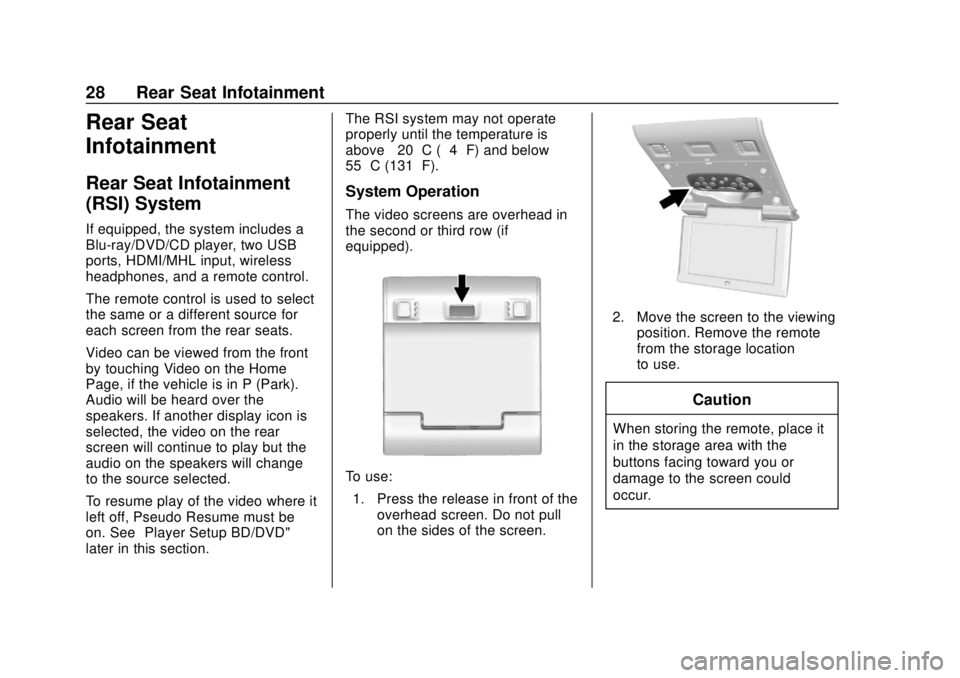
The video screens are overhead in
the second or third row (if
equipped).
To use:
1. Press the release in front of the overhead screen. Do not pull
on the sides of the screen.
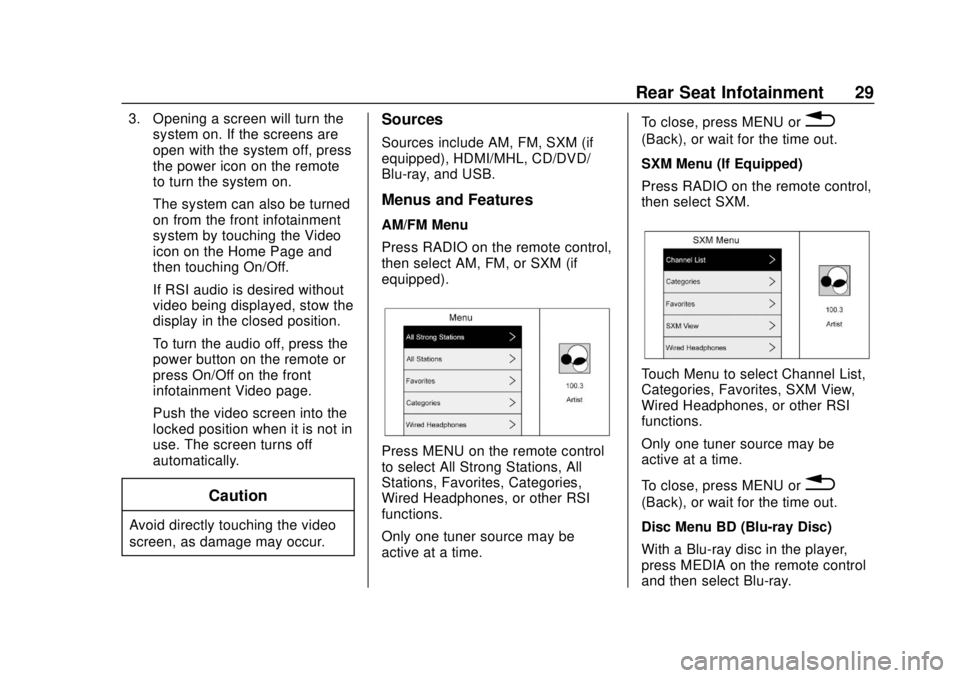
2. Move the screen to the viewingposition. Remove the remote
from the storage location
to use.
Caution
When storing the remote, place it
in the storage area with the
buttons facing toward you or
damage to the screen could
occur.
Page 30 of 116
GMC Infotainment System (U.S./Canada 2.6) (GMNA-Localizing-U.S./Canada-
13583174) - 2020 - CRC - 4/15/19
Rear Seat Infotainment 29
3. Opening a screen will turn thesystem on. If the screens are
open with the system off, press
the power icon on the remote
to turn the system on.
The system can also be turned
on from the front infotainment
system by touching the Video
icon on the Home Page and
then touching On/Off.
If RSI audio is desired without
video being displayed, stow the
display in the closed position.
To turn the audio off, press the
power button on the remote or
press On/Off on the front
infotainment Video page.
Push the video screen into the
locked position when it is not in
use. The screen turns off
automatically.
Caution
Avoid directly touching the video
screen, as damage may occur.
Sources
Sources include AM, FM, SXM (if
equipped), HDMI/MHL, CD/DVD/
Blu-ray, and USB.
Menus and Features
AM/FM Menu
Press RADIO on the remote control,
then select AM, FM, or SXM (if
equipped).
Press MENU on the remote control
to select All Strong Stations, All
Stations, Favorites, Categories,
Wired Headphones, or other RSI
functions.
Only one tuner source may be
active at a time. To close, press MENU or
0
(Back), or wait for the time out.
SXM Menu (If Equipped)
Press RADIO on the remote control,
then select SXM.
Touch Menu to select Channel List,
Categories, Favorites, SXM View,
Wired Headphones, or other RSI
functions.
Only one tuner source may be
active at a time.
To close, press MENU or
0
(Back), or wait for the time out.
Disc Menu BD (Blu-ray Disc)
With a Blu-ray disc in the player,
press MEDIA on the remote control
and then select Blu-ray.
Page 38 of 116
GMC Infotainment System (U.S./Canada 2.6) (GMNA-Localizing-U.S./Canada-
13583174) - 2020 - CRC - 4/15/19
Rear Seat Infotainment 37
of the headphones. Change the
channel on the headphones to the
desired screen source.
One user can listen to the audio
from SCREEN 1 and view the
source on the overhead display
while another user can listen to a
separate audio source by changing
the channel on the wireless
headphones or setting their wired
headphones to SCREEN 2 in
the MENU.
RSI Controls Available from
the Front Screen
To access the RSI, touch the Video
icon from the Home Page. The
Video app may also be touched
from the applications tray if it has
been stored in one of the five
locations.
Sourcing to DVD/BD
This allows for watching a DVD/BD
video on the front screen when the
vehicle is in P (Park).
After a disc is inserted, it will
automatically begin playing. To
resume play of the video where itleft off, Pseudo Resume must be
on. See "Player Setup BD/DVD"
previously in this section.
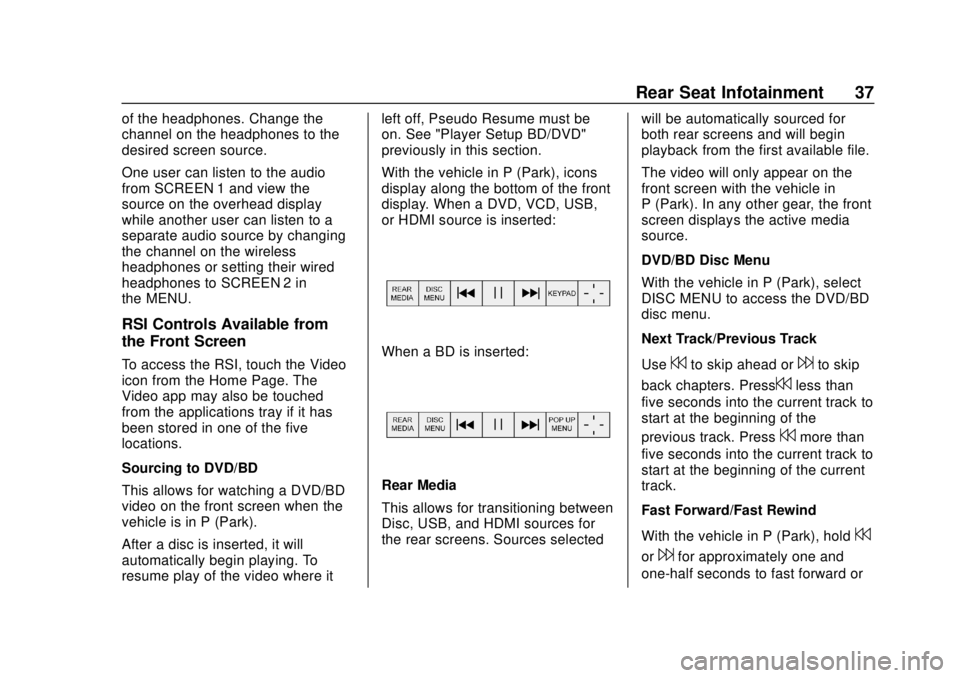
With the vehicle in P (Park), icons
display along the bottom of the front
display. When a DVD, VCD, USB,
or HDMI source is inserted:When a BD is inserted:
Rear Media
This allows for transitioning between
Disc, USB, and HDMI sources for
the rear screens. Sources selected
will be automatically sourced for
both rear screens and will begin
playback from the first available file.
The video will only appear on the
front screen with the vehicle in
P (Park). In any other gear, the front
screen displays the active media
source.
DVD/BD Disc Menu
With the vehicle in P (Park), select
DISC MENU to access the DVD/BD
disc menu.
Next Track/Previous Track
Use
7to skip ahead or6to skip
back chapters. Press
7less than
five seconds into the current track to
start at the beginning of the
previous track. Press
7more than
five seconds into the current track to
start at the beginning of the current
track.
Fast Forward/Fast Rewind
With the vehicle in P (Park), hold
7
or6for approximately one and
one-half seconds to fast forward or
Page 39 of 116
GMC Infotainment System (U.S./Canada 2.6) (GMNA-Localizing-U.S./Canada-
13583174) - 2020 - CRC - 4/15/19
38 Rear Seat Infotainment
fast rewind. If7or6are held for
approximately six seconds, the rate
of fast forward or fast rewind will
increase.
Play/Pause
Touch
rto play orjto pause,
depending on the current selection.
Keypad for DVD/VCD/USB
With the vehicle in P (Park), select
to display the DVD keypad. DVD
keypad functionality is disc
dependent and may not be available
on all DVDs. Up to four digits can
be entered. Select Clear to remove
one digit in the entry field. Touch
and hold Clear to remove all digits
in the entry field.
Pop-Up Menu (BD Only)
This displays the pop-up menu
contents for the BD. Make a
selection or use the interaction
selector to exit pop-up menu view. Cursor
Use to navigate and select items in
the disc menu. Press the up, down,
right, or left arrows, or ENTER.
Touch the cursor to close the
interaction selector and display a
vertical menu of cursors. The cursor
will time out and close.
Enter
Touch the cursor to close the
interaction selector and display a
vertical menu of cursors. The cursor
will time out and close.
Sourcing USB/VCD/HDMI with
Video
This allows for watching videos on
the front screen from devices
plugged into the rear module when
in P (Park).
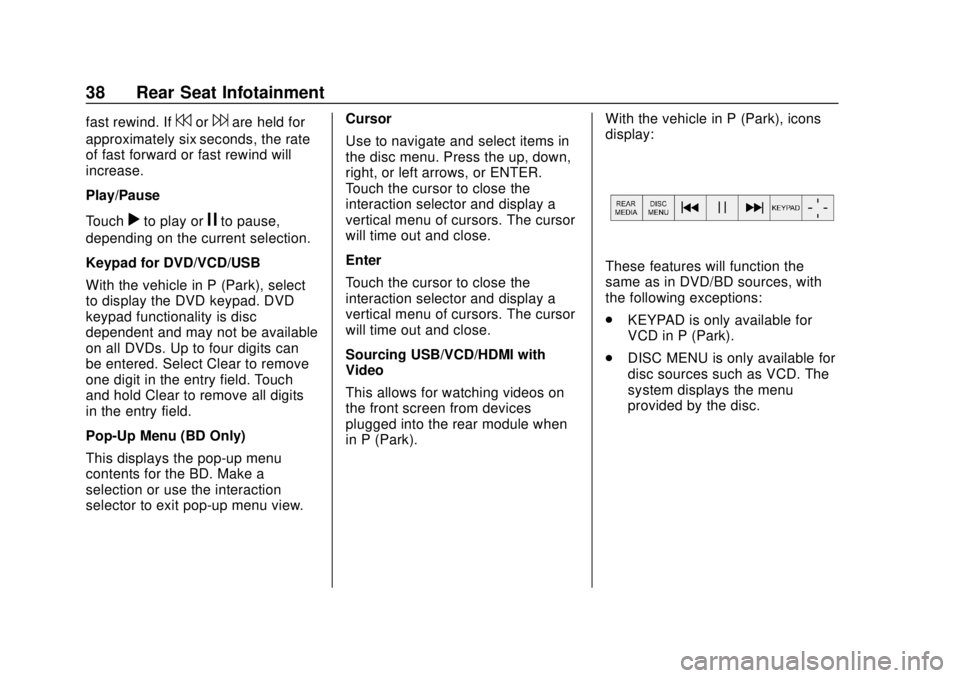
With the vehicle in P (Park), icons
display:
These features will function the
same as in DVD/BD sources, with
the following exceptions:
.
KEYPAD is only available for
VCD in P (Park).
. DISC MENU is only available for
disc sources such as VCD. The
system displays the menu
provided by the disc.
Page 40 of 116
GMC Infotainment System (U.S./Canada 2.6) (GMNA-Localizing-U.S./Canada-
13583174) - 2020 - CRC - 4/15/19
Rear Seat Infotainment 39
Sourcing DVD/BD/USB/VCD/AUX
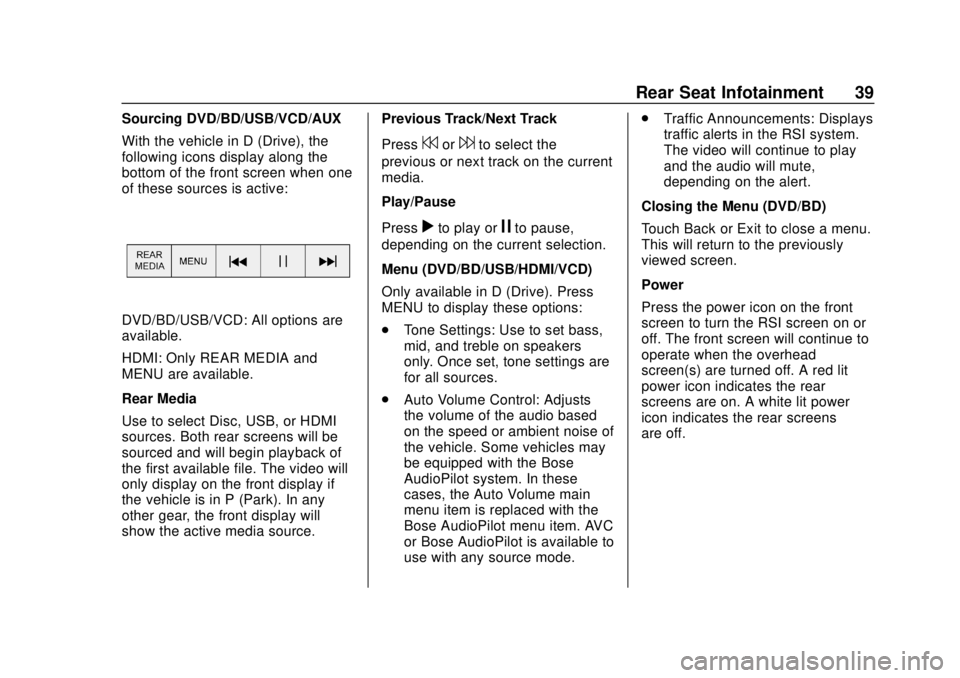
With the vehicle in D (Drive), the
following icons display along the
bottom of the front screen when one
of these sources is active:
DVD/BD/USB/VCD: All options are
available.
HDMI: Only REAR MEDIA and
MENU are available.
Rear Media
Use to select Disc, USB, or HDMI
sources. Both rear screens will be
sourced and will begin playback of
the first available file. The video will
only display on the front display if
the vehicle is in P (Park). In any
other gear, the front display will
show the active media source.Previous Track/Next Track
Press
7or6to select the
previous or next track on the current
media.
Play/Pause
Press
rto play orjto pause,
depending on the current selection.
Menu (DVD/BD/USB/HDMI/VCD)
Only available in D (Drive). Press
MENU to display these options:
. Tone Settings: Use to set bass,
mid, and treble on speakers
only. Once set, tone settings are
for all sources.
. Auto Volume Control: Adjusts
the volume of the audio based
on the speed or ambient noise of
the vehicle. Some vehicles may
be equipped with the Bose
AudioPilot system. In these
cases, the Auto Volume main
menu item is replaced with the
Bose AudioPilot menu item. AVC
or Bose AudioPilot is available to
use with any source mode. .
Traffic Announcements: Displays
traffic alerts in the RSI system.
The video will continue to play
and the audio will mute,
depending on the alert.
Closing the Menu (DVD/BD)
Touch Back or Exit to close a menu.
This will return to the previously
viewed screen.
Power
Press the power icon on the front
screen to turn the RSI screen on or
off. The front screen will continue to
operate when the overhead
screen(s) are turned off. A red lit
power icon indicates the rear
screens are on. A white lit power
icon indicates the rear screens
are off.
Page 43 of 116
GMC Infotainment System (U.S./Canada 2.6) (GMNA-Localizing-U.S./Canada-
13583174) - 2020 - CRC - 4/15/19
42 Rear Seat Infotainment
5. From the smart device’s DLNAapplication, select Rear Seat 1
or 2 as the screen to display
the desired video, audio,
or picture files on the RSI.
Once the connection process is
done for the first time, the Wi-Fi
connection will be made whenever
the device is within Wi-Fi range or
the smart device Wi-Fi is turned on.
Select Menu from the remote control
to access the options to switch
Wi-Fi band, disconnect the smart
device from the RSI Wi-Fi, or to
remove all DLNA passwords that
have been saved.
Supported DLNA media types are:
. Video: .mp4 and .mpg
. Audio: .mp3 and .aac
. Picture: .jpeg and .jpg
Viewing the Other Display
While the left or right screen is
connected by DLNA, the other
screen can access the same source by selecting View Screen 1 or View
Screen 2 in the Wireless
Display menu.
Connecting Wireless Android
Devices
Many Android devices come with
pre-installed audio and video
players that support WiFi streaming;
consult your smart device manual
for more information. Android
devices will also support various
DLNA applications to allow the
device to connect to the RSI
wirelessly. Search the Google Play
store for DLNA applications to install
on the Android device.
Connecting Wireless Apple
Devices
Apple will support various DLNA
apps to allow the device to connect
to the RSI wirelessly. Search the
App Store for DLNA applications to
install on the Apple device.Auxiliary Inputs
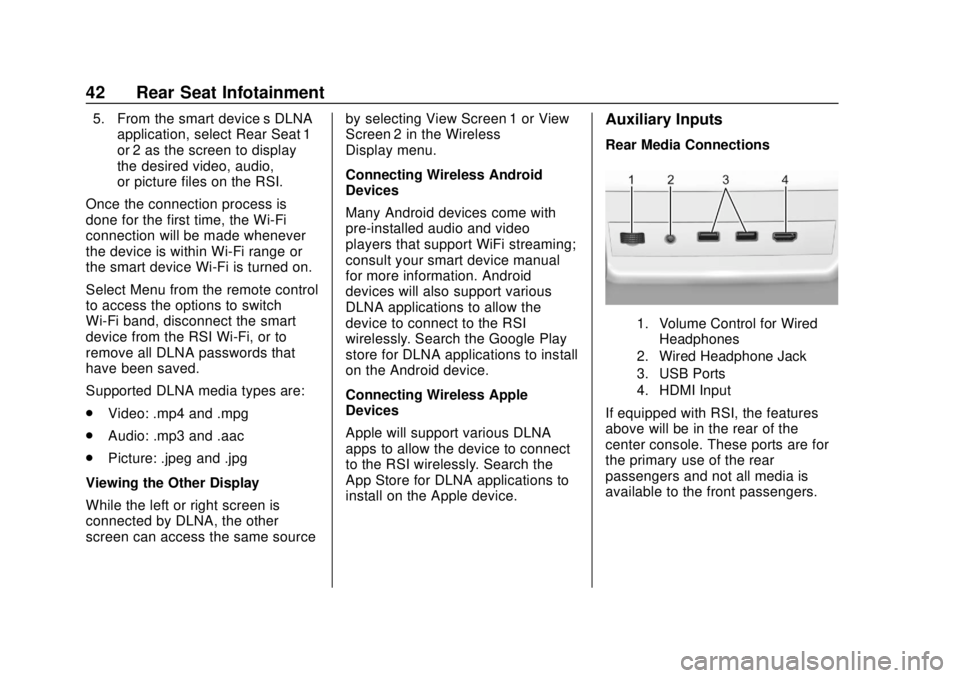
Rear Media Connections
1. Volume Control for Wired
Headphones
2. Wired Headphone Jack
3. USB Ports
4. HDMI Input
If equipped with RSI, the features
above will be in the rear of the
center console. These ports are for
the primary use of the rear
passengers and not all media is
available to the front passengers.
Page 44 of 116
GMC Infotainment System (U.S./Canada 2.6) (GMNA-Localizing-U.S./Canada-
13583174) - 2020 - CRC - 4/15/19
Rear Seat Infotainment 43
HDMI Input
An HDMI cable is required to
connect an HDMI device to the RSI
hub. The RSI HDMI input allows
connection to:
.Video games, disc players,
cameras, smartphones, tablets,
and A/V dongles that have HDMI
(version 1.4a) outputs.
. Smart devices that support
Mobile High-Definition Link
(MHL) version 2.0.
. Apple devices. A supporting
HDMI cable from Apple is
required.
For certain HDMI devices that
support USB charging, the USB
ports can be used as a power
source.
To use the HDMI input of the RSI
system: 1. Connect the auxiliary device with an HDMI cable.
2. Power on both the auxiliary device and the RSI video
screen. 3. Press MEDIA on the remote
control and use the arrows to
change the source to HDMI.
USB
There are two USB ports to provide
the RSI system audio/video from
supported devices, as well as to
provide device charging.
Audio from these ports can only be
heard and controlled by the rear
seat passengers. Video can be
heard, shown, and controlled by the
rear and front passengers.
To use the USB: 1. Insert the device into one of the two ports.
2. Select the source (USB 1 or USB 2) through the rear screen
menu using MEDIA on the
remote control.
3. Select the source via the front by touching the Video icon on
the Home Page.Audio Output
Audio from a Blu-ray/DVD/CD
player or HDMI inputs can be heard
through:
.Wireless headphones: Available
for any source depending on the
selected channel.
. Vehicle speakers: Touch the
Video icon on the Home Page.
Select any other source to stop
the speaker audio; rear audio
will continue to play.
. Vehicle wired headphone jack:
See “Wired Headphone Jack”
following.
The RSI system transmits the audio
signal to the wireless headphones if
an audio signal is available. See
“Headphones” earlier in this section.
Front seat passengers can listen to
playback from the attached rear
device through the vehicle speakers
by selecting that source from the
Video Application on the front
display Home Page.
Page 45 of 116
GMC Infotainment System (U.S./Canada 2.6) (GMNA-Localizing-U.S./Canada-
13583174) - 2020 - CRC - 4/15/19
44 Rear Seat Infotainment
Wired Headphone Jack
Select MENU on the remote control,
then select Settings and then Wired
Headphones to listen to audio on
the wired headphones. The
headphone audio plays depending
on which screen is selected. The
default is screen 1 audio.
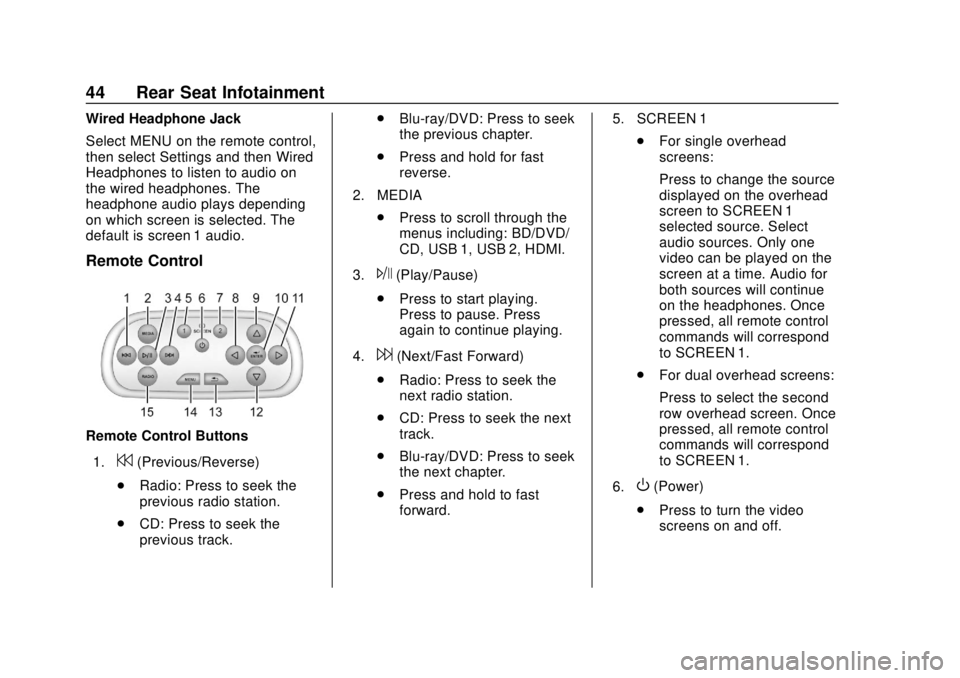
Remote Control
Remote Control Buttons1.
7(Previous/Reverse)
. Radio: Press to seek the
previous radio station.
. CD: Press to seek the
previous track. .
Blu-ray/DVD: Press to seek
the previous chapter.
. Press and hold for fast
reverse.
2. MEDIA .Press to scroll through the
menus including: BD/DVD/
CD, USB 1, USB 2, HDMI.
3.
J(Play/Pause)
. Press to start playing.
Press to pause. Press
again to continue playing.
4.
6(Next/Fast Forward)
. Radio: Press to seek the
next radio station.
. CD: Press to seek the next
track.
. Blu-ray/DVD: Press to seek
the next chapter.
. Press and hold to fast
forward. 5. SCREEN 1
.For single overhead
screens:
Press to change the source
displayed on the overhead
screen to SCREEN 1
selected source. Select
audio sources. Only one
video can be played on the
screen at a time. Audio for
both sources will continue
on the headphones. Once
pressed, all remote control
commands will correspond
to SCREEN 1.
. For dual overhead screens:
Press to select the second
row overhead screen. Once
pressed, all remote control
commands will correspond
to SCREEN 1.
6.
O(Power)
. Press to turn the video
screens on and off.