2020 GMC TERRAIN tire pressure
[x] Cancel search: tire pressurePage 343 of 425

GMC Terrain/Terrain Denali Owner Manual (GMNA-Localizing-U.S./Canada/
Mexico-13556230) - 2020 - CRC - 9/5/19
340 Vehicle Care
Therefore, Steps 13–21 must
be done immediately after
Step 12.
Be careful while handling the
tire sealant and compressor kit
as it could be warm after
usage.
13. Unplug the power plug (9) from the accessory power outlet in
the vehicle.
14. Turn the sealant/air hose (2) counterclockwise to remove it
from the tire valve stem.
15. Replace the tire valve stem cap.
16. Remove the tire sealant canister (4) from the slot on top
of the compressor (6).
17. Turn the air only hose (10) counterclockwise to remove it
from the tire sealant canister
inlet valve (1).
18. Turn the sealant/air hose (2) clockwise onto the sealant
canister inlet valve (1) to
prevent sealant leakage. 19. Return the air only hose (10)
and power plug (9) back to
their original storage location.
20. If the flat tire was able to inflate
to the recommended inflation
pressure, remove the
maximum speed label from the
sealant canister and place it in
a highly visible location.
Do not exceed the speed on
this label until the damaged tire
is repaired or replaced.
21. Return the equipment to its original storage location in the
vehicle.
22. Immediately drive the vehicle 8 km (5 mi) to distribute the
sealant in the tire.
23. Stop at a safe location and check the tire pressure. Refer
to Steps 1–10 under “Using theTire Sealant and Compressor
Kit without Sealant to Inflate a
Tire (Not Punctured).”
If the tire pressure has fallen
more than 68 kPa (10 psi)
below the recommended
inflation pressure, stop driving
the vehicle. The tire is too
severely damaged and the tire
sealant cannot seal the tire.
See
Roadside Assistance
Program 0389.
If the tire pressure has not
dropped more than 68 kPa
(10 psi) from the recommended
inflation pressure, inflate the
tire to the recommended
inflation pressure.
24. Wipe off any sealant from the wheel, tire, or vehicle.
25. Dispose of the used tire sealant canister (4) at a local
dealer or in accordance with
local state codes and practices.
26. Replace it with a new canister available from your dealer.
Page 344 of 425
GMC Terrain/Terrain Denali Owner Manual (GMNA-Localizing-U.S./Canada/
Mexico-13556230) - 2020 - CRC - 9/5/19
Vehicle Care 341
27. After temporarily sealing a tireusing the tire sealant and
compressor kit, take the
vehicle to an authorized dealer
within 161 km (100 mi) of
driving to have the tire repaired
or replaced.
Using the Tire Sealant and
Compressor Kit without
Sealant to Inflate a Tire (Not
Punctured)
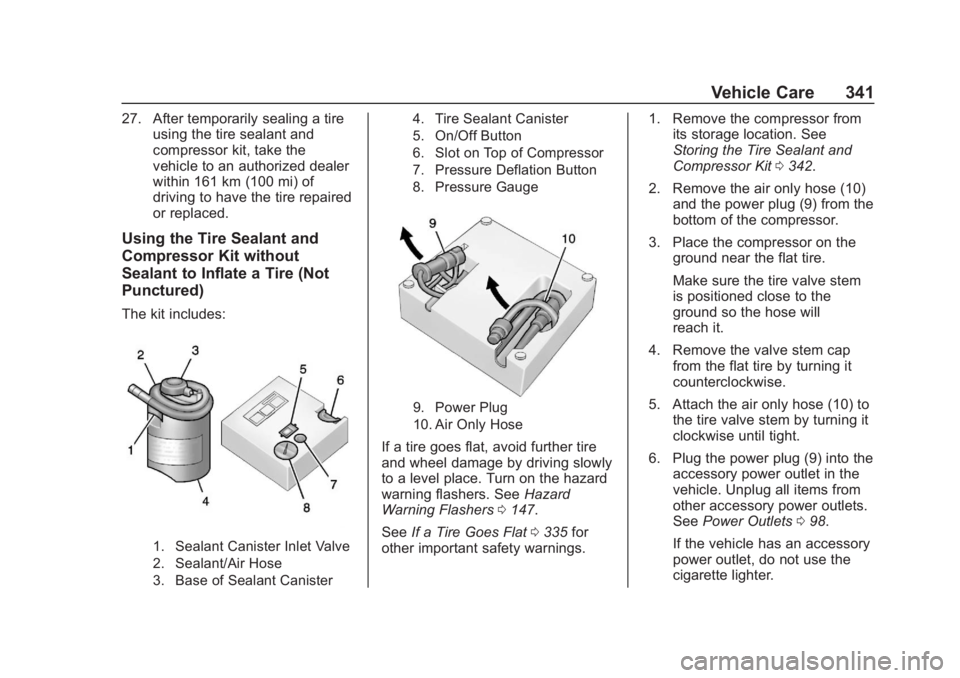
The kit includes:
1. Sealant Canister Inlet Valve
2. Sealant/Air Hose
3. Base of Sealant Canister 4. Tire Sealant Canister
5. On/Off Button
6. Slot on Top of Compressor
7. Pressure Deflation Button
8. Pressure Gauge
9. Power Plug
10. Air Only Hose
If a tire goes flat, avoid further tire
and wheel damage by driving slowly
to a level place. Turn on the hazard
warning flashers. See
Hazard
Warning Flashers 0147.
See If a Tire Goes Flat 0335 for
other important safety warnings. 1. Remove the compressor from
its storage location. See
Storing the Tire Sealant and
Compressor Kit 0342.
2. Remove the air only hose (10) and the power plug (9) from the
bottom of the compressor.
3. Place the compressor on the ground near the flat tire.
Make sure the tire valve stem
is positioned close to the
ground so the hose will
reach it.
4. Remove the valve stem cap from the flat tire by turning it
counterclockwise.
5. Attach the air only hose (10) to the tire valve stem by turning it
clockwise until tight.
6. Plug the power plug (9) into the accessory power outlet in the
vehicle. Unplug all items from
other accessory power outlets.
See Power Outlets 098.
If the vehicle has an accessory
power outlet, do not use the
cigarette lighter.
Page 345 of 425

GMC Terrain/Terrain Denali Owner Manual (GMNA-Localizing-U.S./Canada/
Mexico-13556230) - 2020 - CRC - 9/5/19
342 Vehicle Care
If the vehicle only has a
cigarette lighter, use the
cigarette lighter.
Do not pinch the power plug
cord in the door or window.
7. Start the vehicle. The vehicle must be running while using
the air compressor.
8. Press the on/off button (5) to turn the tire sealant and
compressor kit on.
The compressor will inflate the
tire with air only.
9. Inflate the tire to the recommended inflation
pressure using the pressure
gauge (8). The recommended
inflation pressure can be found
on the Tire and Loading
Information label. See Tire
Pressure 0321.
The pressure gauge (8) may
read higher than the actual tire
pressure while the compressor
is on. Turn the compressor off
to get an accurate pressure reading. The compressor may
be turned on/off until the
correct pressure is reached.
Caution
If the recommended pressure
cannot be reached after
approximately 25 minutes, the
vehicle should not be driven
farther. The tire is too severely
damaged and the tire sealant and
compressor kit cannot inflate the
tire. Remove the power plug from
the accessory power outlet and
unscrew the inflating hose from
the tire valve. See
Roadside
Assistance Program 0389.
10. Press the on/off button (5) to turn the tire sealant and
compressor kit off.
Be careful while handling the
compressor as it could be
warm after usage.
11. Unplug the power plug (9) from the accessory power outlet in
the vehicle. 12. Turn the air only hose (10)
counterclockwise to remove it
from the tire valve stem.
13. Replace the tire valve stem cap.
14. Return the air only hose (10) and power plug (9) back to
their original storage location.
15. Return the equipment to its original storage location in the
vehicle.
The tire sealant and compressor kit
has accessory adapters located in a
compartment on the bottom of its
housing that can be used to inflate
air mattresses, balls, etc.
Storing the Tire Sealant
and Compressor Kit
The tire sealant and compressor kit
is in a bag in the rear compartment
storage area. 1. Open the liftgate. See Liftgate
0 21.
2. Fold the rear part of the load floor to the front.
Page 351 of 425

GMC Terrain/Terrain Denali Owner Manual (GMNA-Localizing-U.S./Canada/
Mexico-13556230) - 2020 - CRC - 9/5/19
348 Vehicle Care
8. Route the strap through thewheel, as shown.
9. Attach the other end of the strap to the other cargo
tie-down in the rear of the
vehicle.
10. Tighten the strap.
The compact spare is for temporary
use only. Replace the compact
spare tire with a full-size tire as
soon as possible.
Compact Spare Tire
{Warning
Driving with more than one
compact spare tire at a time could
result in loss of braking and
handling. This could lead to a
crash and you or others could be
injured. Use only one compact
spare tire at a time.
If this vehicle has a compact spare
tire, it was fully inflated when new;
however, it can lose air over time.
Check the inflation pressure
regularly. It should be 420 kPa
(60 psi).
Stop as soon as possible and check
that the spare tire is correctly
inflated after being installed on the
vehicle. The compact spare tire is
designed for temporary use only. The vehicle will perform differently
with the spare tire installed and it is
recommended that the vehicle
speed be limited to 80 km/h
(50 mph). To conserve the tread of
the spare tire, have the standard tire
repaired or replaced as soon as
convenient and return the spare tire
to the storage area.
When using a compact spare tire,
the AWD (if equipped), ABS, and
Traction Control systems may
engage until the spare tire is
recognized by the vehicle,
especially on slippery roads. Adjust
driving to reduce possible
wheel slip.
Caution
When the compact spare is
installed, do not take the vehicle
through an automatic car wash
with guide rails. The compact
spare can get caught on the rails
which can damage the tire, wheel,
and other parts of the vehicle.
Page 363 of 425

GMC Terrain/Terrain Denali Owner Manual (GMNA-Localizing-U.S./Canada/
Mexico-13556230) - 2020 - CRC - 9/5/19
360 Vehicle Care
Caution (Continued)
dust and ice. Always wash the
chrome with soap and water after
exposure.
Caution
To avoid surface damage on
wheels and wheel trim, do not
use strong soaps, chemicals,
abrasive polishes, cleaners,
or brushes. Use only GM
approved cleaners. Do not drive
the vehicle through an automatic
car wash that uses silicon carbide
tire/wheel cleaning brushes.
Damage could occur and the
repairs would not be covered by
the vehicle warranty.
Brake System
Visually inspect brake lines and
hoses for proper attachment,
connections, binding, leaks, cracks,
chafing, etc. Inspect disc brakepads for wear and rotors for surface
condition. Inspect all other brake
parts for cracks and leaks.
Steering, Suspension, and
Chassis Components
Visually inspect steering,
suspension, and chassis
components for damaged, loose,
or missing parts or signs of wear at
least once a year.
Inspect power steering for proper
attachment, connections, binding,
leaks, cracks, chafing, etc.
Visually check constant velocity joint
boots and axle seals for leaks.
Body Component Lubrication
Lubricate all key lock cylinders,
hood hinges, liftgate hinges, steel
fuel door hinge, and power assist
step hinges, unless the components
are plastic. Applying silicone grease
on weatherstrips with a clean cloth
will make them last longer, seal
better, and not stick or squeak.
Underbody Maintenance
At least twice a year, spring and fall,
use plain water to flush any
corrosive materials from the
underbody. Take care to thoroughly
clean any areas where mud and
other debris can collect.
Do not directly power wash the
transfer case and/or front/rear axle
output seals. High pressure water
can overcome the seals and
contaminate the fluid. Contaminated
fluid will decrease the life of the
transfer case and/or axles and
should be replaced.
Sheet Metal Damage
If the vehicle is damaged and
requires sheet metal repair or
replacement, make sure the body
repair shop applies anti-corrosion
material to parts repaired or
replaced to restore corrosion
protection.
Original manufacturer replacement
parts will provide the corrosion
protection while maintaining the
vehicle warranty.
Page 371 of 425

GMC Terrain/Terrain Denali Owner Manual (GMNA-Localizing-U.S./Canada/
Mexico-13556230) - 2020 - CRC - 9/4/19
368 Service and Maintenance
Maintenance
Schedule
Owner Checks and Services
At Each Fuel Stop
.Check the engine oil level. See
Engine Oil 0283.
Once a Month
. Check the tire inflation
pressures. See Tire Pressure
0 321.
. Inspect the tires for wear. See
Tire Inspection 0328.
. Check the windshield washer
fluid level. See Washer Fluid
0 296.
Engine Oil Change
When the CHANGE ENGINE OIL
SOON message displays, have the
engine oil and filter changed within
the next 1 000 km/600 mi. If driven
under the best conditions, the
engine oil life system may not
indicate the need for vehicle service
for up to a year. The engine oil and filter must be changed at least once
a year and the oil life system must
be reset. Your trained dealer
technician can perform this work.
If the engine oil life system is reset
accidentally, service the vehicle
within 5 000 km/3,000 mi since the
last service. Reset the oil life
system when the oil is changed.
See
Engine Oil Life System 0287.
On vehicles with diesel engines, it is
recommended to drain the diesel
fuel filter of water when the oil is
changed or when the WATER IN
FUEL CONTACT SERVICE
message displays.
Air Conditioning Desiccant
(Replace Every Seven Years)
The air conditioning system requires
maintenance every seven years.
This service requires replacement of
the desiccant to help the longevity
and efficient operation of the air
conditioning system. This service
can be complex. See your dealer.
Tire Rotation and Required
Services Every 12 000 km/
7,500 mi
Rotate the tires, if recommended for
the vehicle, and perform the
following services. See Tire
Rotation 0328.
. Check engine oil level and oil
life percentage. If needed,
change engine oil and filter, and
reset oil life system. See Engine
Oil 0283 and
Engine Oil Life System 0287.
. Check engine coolant level. See
Cooling System 0290.
. Check windshield washer fluid
level. See Washer Fluid 0296.
. Check tire inflation pressures.
See Tire Pressure 0321.
. Inspect tire wear. See Tire
Inspection 0328.
. Visually check for fluid leaks.
. Inspect engine air cleaner filter.
See Engine Air Cleaner/Filter
0 288.
Page 412 of 425

GMC Terrain/Terrain Denali Owner Manual (GMNA-Localizing-U.S./Canada/
Mexico-13556230) - 2020 - CRC - 9/4/19
Connected Services 409
vehicles, the SSID and
password can be changed in
the Wi-Fi Hotspot menu.
After initial set-up, your vehicle’s
Wi-Fi hotspot will connect
automatically to your mobile
devices. Manage data usage by
turning Wi-Fi on or off on your
mobile device, using the myGMC
mobile app, or by contacting an
OnStar Advisor. On some vehicles,
Wi-Fi can also be managed from the
Wi-Fi Hotspot menu.
MyGMC Mobile App (If Available)
Download the myGMC mobile app
to compatible Apple and Android
smartphones. GMC users can
access the following services from a
smartphone:
. Remotely start/stop the vehicle,
if factory-equipped.
. Lock/unlock doors, if equipped
with automatic locks.
. Activate the horn and lamps. .
Check the vehicle’s fuel level,
oil life, or tire pressure,
if factory-equipped with the Tire
Pressure Monitor System.
. Send destinations to the vehicle.
. Locate the vehicle on a map
(U.S. market only).
. Turn the vehicle's Wi-Fi hotspot
on/off, manage settings, and
monitor data consumption,
if equipped.
. Locate a dealer and schedule
service.
. Request roadside assistance.
. Set a parking reminder with pin
drop, take a photo, make a note,
and set a timer.
. Connect with GMC on social
media.
Features are subject to change. For
myGMC mobile app information and
compatibility, see my.gmc.com.
An active OnStar or connected
service plan may be required.
A compatible device,
factory-installed remote start, and power locks are required. Data rates
apply. See www.onstar.com for
details and system limitations.
Remote Services
Contact an OnStar Advisor to
unlock the doors or sound the horn
and flash the lamps.
Marketplace
OnStar Advisors can provide offers
from restaurants and retailers on
your route, help locate hotels,
or book a room. These services
vary by market.
Diagnostics
By monitoring and reporting on the
vehicle's key systems, OnStar
Advanced Diagnostics, if equipped,
provides a way to keep up on
maintenance. Capabilities vary by
model. See www.onstar.com for
details and system limitations.
Features are subject to change. For
updates on feature capabilities, see
my.gmc.com. Message and data
rates may apply.
Page 419 of 425

GMC Terrain/Terrain Denali Owner Manual (GMNA-Localizing-U.S./Canada/-
Mexico-13556230) - 2020 - CRC - 9/4/19
416 Index
LATCH, Lower Anchors andTethers for Children . . . . . . . . . . . . 77
LED Lighting . . . . . . . . . . . . . . . . . . . . 304
Liftgate . . . . . . . . . . . . . . . . . . . . . . . . . . 21
Lighting Entry . . . . . . . . . . . . . . . . . . . . . . . . . 150
Exit . . . . . . . . . . . . . . . . . . . . . . . . . . . 150
Illumination Control . . . . . . . . . . . 149
LED . . . . . . . . . . . . . . . . . . . . . . . . . . 304
Lights Airbag Readiness . . . . . . . . . . . . . .113
Antilock Brake System
(ABS) Warning . . . . . . . . . . . . . . .118
Brake System Warning . . . . . . . .117
Charging System . . . . . . . . . . . . . .115
Check Engine (Malfunction Indicator) . . . . . . . . . . . . . . . . . . . . .115
Cruise Control . . . . . . . . . . . . . . . . 124
Diesel Exhaust Fluid (DEF) . . . 122
Door Ajar . . . . . . . . . . . . . . . . . . . . . 124
Electric Parking Brake . . . . . . . . .118
Engine Oil Pressure . . . . . . . . . . 122
Flash-to-Pass . . . . . . . . . . . . . . . . . 146
Front Fog Lamp . . . . . . . . . . . . . . 123
High-Beam On . . . . . . . . . . . . . . . . 123
High/Low Beam Changer . . . . . 146
Hill Descent Control . . . . . . . . . . .119
Lane Keep Assist . . . . . . . . . . . . . .119 Lights (cont'd)
Low Fuel Warning . . . . . . . . . . . . 122
Seat Belt Reminders . . . . . . . . . . .113
Security . . . . . . . . . . . . . . . . . . . . . . 123
Service Electric Parking
Brake . . . . . . . . . . . . . . . . . . . . . . . .118
StabiliTrak OFF . . . . . . . . . . . . . . . 120
Tire Pressure . . . . . . . . . . . . . . . . . 121
Tow/Haul Mode . . . . . . . . . . . . . . . .119
Traction Control System (TCS)/StabiliTrak . . . . . . . . . . . . 120
Traction Off . . . . . . . . . . . . . . . . . . . 120
Wait to Start . . . . . . . . . . . . . . . . . . 121
Locks
Automatic Door . . . . . . . . . . . . . . . . . 20
Delayed Locking . . . . . . . . . . . . . . . . 19
Door . . . . . . . . . . . . . . . . . . . . . . . . . . . . 17
Lockout Protection . . . . . . . . . . . . . . 20
Power Door . . . . . . . . . . . . . . . . . . . . . 19
Safety . . . . . . . . . . . . . . . . . . . . . . . . . . 20
Loss of Control . . . . . . . . . . . . . . . . . 167
Low Fuel Warning Light . . . . . . . . . 122
Lower Anchors and Tethers for Children (LATCH
System) . . . . . . . . . . . . . . . . . . . . . . . . 77
Lumbar Adjustment . . . . . . . . . . . . . . 40 Front Seats . . . . . . . . . . . . . . . . . . . . . 40M
MaintenanceRecords . . . . . . . . . . . . . . . . . . . . . . 380
Maintenance and Care Additional . . . . . . . . . . . . . . . . . . . . . 374
Maintenance Schedule . . . . . . . . . 368 Recommended Fluids andLubricants . . . . . . . . . . . . . . . . . . . 377
Malfunction Indicator Lamp . . . . . 115
Manual Mode . . . . . . . . . . . . . . . . . . . 205
Memory Seats . . . . . . . . . . . . . . . . . . . 41
Messages Engine Power . . . . . . . . . . . . . . . . 134
Vehicle . . . . . . . . . . . . . . . . . . . . . . . 134
Vehicle Speed . . . . . . . . . . . . . . . . 135
Mirrors Automatic Dimming . . . . . . . . . . . . . 30
Automatic DimmingRearview . . . . . . . . . . . . . . . . . . . . . . 31
Convex . . . . . . . . . . . . . . . . . . . . . . . . . 29
Folding . . . . . . . . . . . . . . . . . . . . . . . . . 30
Heated . . . . . . . . . . . . . . . . . . . . . . . . . 30
Manual Rearview . . . . . . . . . . . . . . . 31
Power . . . . . . . . . . . . . . . . . . . . . . . . . . 30
Tilt in Reverse . . . . . . . . . . . . . . . . . . 30
Mirrors, Interior Rearview . . . . . . . . 31
Mode . . . . . . . . . . . . . . . . . . . . . . . . . . . 214 Driver Control . . . . . . . . . . . . . . . . . 214