2020 FORD RANGER ECO mode
[x] Cancel search: ECO modePage 105 of 478
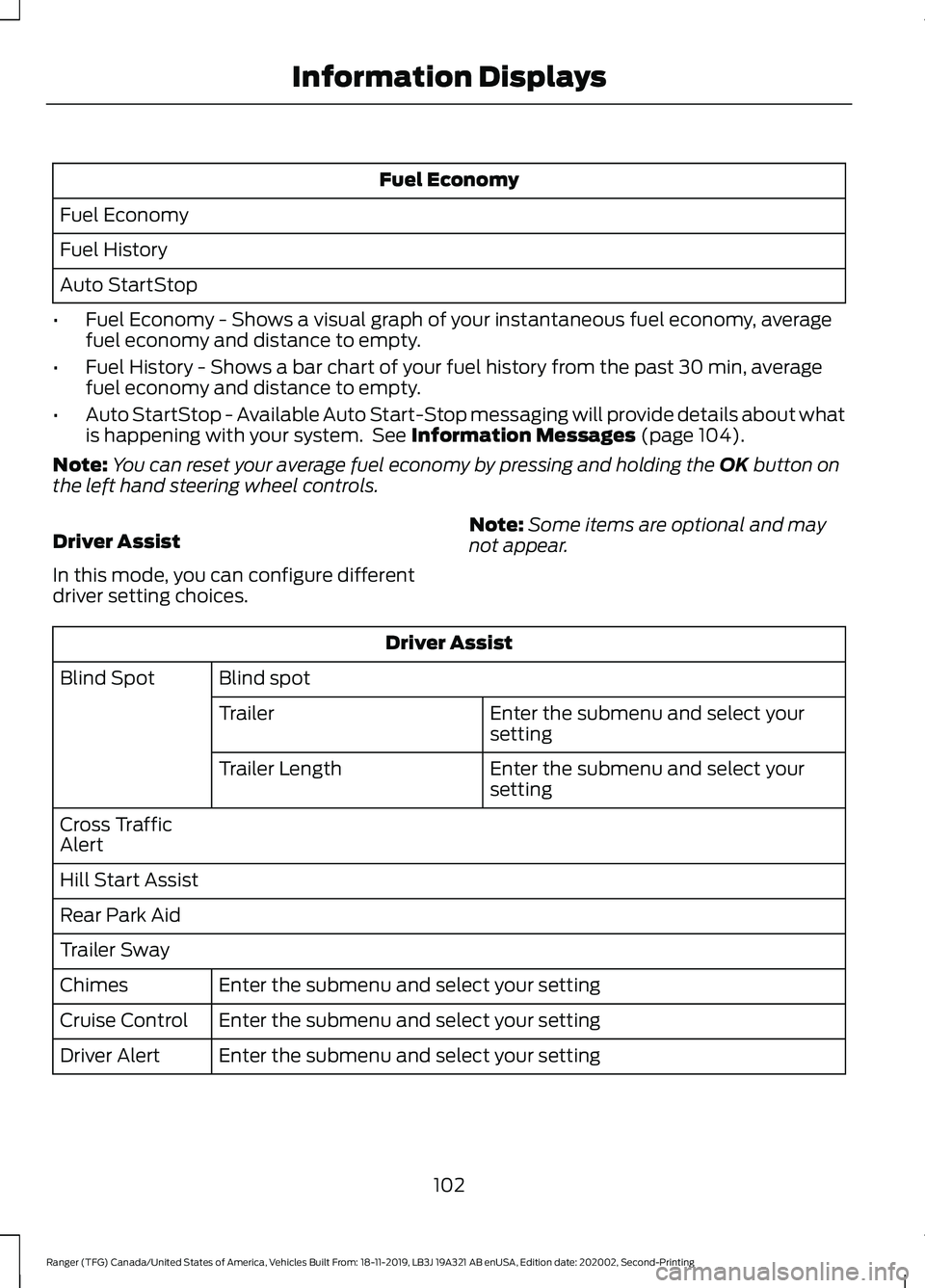
Fuel Economy
Fuel Economy
Fuel History
Auto StartStop
• Fuel Economy - Shows a visual graph of your instantaneous fuel economy, average
fuel economy and distance to empty.
• Fuel History - Shows a bar chart of your fuel history from the past 30 min, average
fuel economy and distance to empty.
• Auto StartStop - Available Auto Start-Stop messaging will provide details about what
is happening with your system. See Information Messages (page 104).
Note: You can reset your average fuel economy by pressing and holding the
OK button on
the left hand steering wheel controls.
Driver Assist
In this mode, you can configure different
driver setting choices. Note:
Some items are optional and may
not appear. Driver Assist
Blind spot
Blind Spot
Enter the submenu and select your
setting
Trailer
Enter the submenu and select your
setting
Trailer Length
Cross Traffic
Alert
Hill Start Assist
Rear Park Aid
Trailer Sway Enter the submenu and select your setting
Chimes
Enter the submenu and select your setting
Cruise Control
Enter the submenu and select your setting
Driver Alert
102
Ranger (TFG) Canada/United States of America, Vehicles Built From: 18-11-2019, LB3J 19A321 AB enUSA, Edition date: 202002, Second-Printing Information Displays
Page 106 of 478

Driver Assist
Enter the submenu and select your setting
Lane Keeping
Sys
Enter the submenu and select your setting
Pre-Collision
Tire Monitor
Tire Monitor
Settings
In this mode, you can configure different
driver setting choices. Note:
Some items are optional and may
not appear. Settings
Enter the submenu and select your setting
Alarm
Vehicle
Auto Engine Off Enter the submenu and select your setting
Lighting
Enter the submenu and select your setting
Locks
Enter the submenu and select your setting
Neutral Tow
XXX% - Hold OK to Reset
Oil Life Reset
Enter the submenu and select your setting
Remote Start
Seatbelts
Enter the submenu and select your setting
Windows
Enter the submenu and select your setting
Wipers
Mykey Status
Mykey Status
MyKey
Hold
OK to Create MyKey
Create MyKey
Always On or User Selectable
911 Assist
Enter the submenu and select your setting
Do Not Disturb
Enter the submenu and select your setting
Traction Control
Enter the submenu and select your setting
Max Speed
Enter the submenu and select your setting
Speed Minder
Volume Limiter
103
Ranger (TFG) Canada/United States of America, Vehicles Built From: 18-11-2019, LB3J 19A321 AB enUSA, Edition date: 202002, Second-Printing Information Displays
Page 114 of 478

Lane Keeping System
Action
Message
The system has malfunctioned. Contact an authorized dealer as soon as possible.
Lane Keeping Sys.
Malfunction Service Required
The system has detected a condition that has caused thesystem to be temporarily unavailable. See Lane Keeping
System (page 197).
Front Camera Tempor-
arily Not Available
The system has detected a condition that requires you toclean the windshield in order for it to operate properly.
Front Camera Low Visib-
ility Clean Screen
The system has malfunctioned. Contact an authorized dealeras soon as possible.
Front Camera Malfunc-
tion Service Required
The system requests you to keep your hands on the steering wheel.
Keep Hands on Steering
Wheel
Maintenance Action
Message
Stop your vehicle as soon as safely possible and turn off the
engine. Check the oil level. If the warning stays on or continues to come on with your engine running, contact an authorized dealer as soon as possible.
Low Engine Oil Pressure
The engine oil life remaining is 10% or less.
Change Engine Oil Soon
The oil life left is at 0%.
Oil Change Required
The brake fluid level is low, inspected the brake systemimmediately.
Brake Fluid Level Low
The brake system needs servicing. Stop your vehicle in a safeplace. Contact an authorized dealer.
Check Brake System
Your vehicle is still in Transport or Factory mode. This may
not allow some features to operate properly. See an author- ized dealer.
Transport / Factory
Mode Contact Dealer
The powertrain needs service due to a powertrain malfunction.
See Manual
111
Ranger (TFG) Canada/United States of America, Vehicles Built From: 18-11-2019, LB3J 19A321 AB enUSA, Edition date: 202002, Second-Printing Information Displays
Page 118 of 478

Trail Control
Action
Message
You must reduce your vehicle speed to use trail control.
Reduce Speed To Enter Trail
Control
You must release the park brake to use trail control.
Trail Control Not Available with
Park Brake Applied
You successfully enabled trail control and must pressSET to activate.
Trail Control Enabled Use SET
Button to Set Speed
A trail control system fault has occurred, the drivermust resume control.
Trail Control Off Driver Resume
Control
The system has switched off.
Trail Control Off
A system fault is present. See What Is Trail Control
(page 180).
Trail Control Fault See Manual
You must switch the cruise control off to use trailcontrol.
Trail Control Not Available with
Cruise Control Active
You must close the door to use trail control.
Trail Control Not Available with
Driver Door Open
Descent control mode is active and you have to pressthe trail control switch to exit.
Descent Control Now Active
Press Trail Control Switch To Exit
Trailer Action
Message
A correct trailer connection is sensed during a givenignition cycle.
Trailer Connected
A trailer connection becomes disconnected, either
intentionally or unintentionally, and has been sensed during a given ignition cycle.
Trailer Disconnected
The trailer sway control has detected trailer sway.
Trailer Sway Reduce Speed
There are certain faults in your vehicle wiring and trailer
wiring/brake system. See Towing a Trailer (page 220).
Trailer Wiring Fault
There is a fault with your trailer turn lamp. Check yourlamp.
Trailer Left Turn Lamps Fault
Check Lamps
115
Ranger (TFG) Canada/United States of America, Vehicles Built From: 18-11-2019, LB3J 19A321 AB enUSA, Edition date: 202002, Second-Printing Information Displays
Page 121 of 478

Switching Maximum Air
Conditioning On and Off
Turn the temperature control
counterclockwise to the lowest
setting.
Note: Recirculated air flows through the
instrument panel air vents, air conditioning
turns on and the blower motor adjusts to
the highest speed.
Switching Maximum Defrost On
and Off Turn the temperature control
clockwise to the highest setting.
Note: Air flows through the windshield air
vents, and the blower motor adjusts to the
highest speed.
You can also use this setting to defog and
clear the windshield of a thin covering of
ice. The heated rear window also turns on
when you select maximum defrost.
Note: To prevent window fogging, you
cannot select recirculated air when
maximum defrost is on.
Switching Recirculated Air On and
Off Press and release the button to
switch between outside air and
recirculated air.
The air currently in the passenger
compartment recirculates. This may
reduce the time needed to cool the interior,
when used with A/C, and reduce unwanted
odors from entering your vehicle.
Note: Recirculated air may turn off, or
prevent you from switching on, in all air flow
modes except MAX A/C to reduce the risk
of fogging. Recirculation may also turn on
and off in various air distribution control
combinations during hot weather to improve
cooling efficiency. AUTOMATIC CLIMATE
CONTROL
Note:
You can switch temperature units
between Fahrenheit and Celsius.
Note: You can control some of the climate
features through the touchscreen.
Setting the Temperature
Press and release + or - on the left-hand
side of the climate control to set the
left-hand temperature.
Note: This control also adjusts the
right-hand side temperature when you
switch off dual zone mode.
Press and release
+ or - on the right-hand
side of the climate control to set the
right-hand temperature.
Setting the Blower Motor Speed Press and release + or - to adjust
the volume of air circulated in
the vehicle.
Switching Auto Mode On and Off Press and release the button to
switch on automatic operation,
then set the temperature.
The system adjusts the blower motor
speed, air distribution, air conditioning
operation, and outside or recirculated air
to reach and maintain the temperature you
have set.
118
Ranger (TFG) Canada/United States of America, Vehicles Built From: 18-11-2019, LB3J 19A321 AB enUSA, Edition date: 202002, Second-Printing Climate Control E318500
Page 122 of 478

Note:
You can also switch off dual zone
mode by pressing and holding the button
for more than two seconds.
Switching the Air Conditioning On
and Off Press and release the button.
Use air conditioning with recirculated air
to improve cooling performance and
efficiency.
Note: In certain conditions such as
maximum defrost, the air conditioning
compressor may continue to operate even
though you switch off the air conditioning.
Switching the Climate Control On
and Off Press and release the button.
Switching Defrost On and Off Press and release the button to
distribute air through the
windshield air vents and
de-mister.
You can also use this setting to defog and
clear the windshield of a thin covering of
ice.
Switching the Heated Seats On
and Off Press and release the button to
cycle through the various heat
settings and off.
See Heated Seats (page 130). Switching Maximum Air
Conditioning On and Off Press and release the button for
maximum cooling.
The left-hand and right-hand settings set
to LO, recirculated air flows through the
instrument panel air vents, air conditioning
turns on and the blower motor adjusts to
the highest speed.
Switching Maximum Defrost On
and Off Press and release the button for
maximum defrosting.
The left-hand and right-hand settings set
to HI, outside air flows through the
windshield air vents, and the blower motor
adjusts to the highest speed.
You can also use this setting to defog and
clear the windshield of a thin covering of
ice.
Note: To prevent window fogging, you
cannot select recirculated air when
maximum defrost is on.
Note: The heated rear window also turns
on when you select maximum defrost.
Switching Recirculated Air On and
Off Press and release the button to
switch between outside air and
recirculated air.
The air currently in the passenger
compartment recirculates. This may
reduce the time needed to cool the interior,
when used with A/C, and reduce unwanted
odors from entering your vehicle.
119
Ranger (TFG) Canada/United States of America, Vehicles Built From: 18-11-2019, LB3J 19A321 AB enUSA, Edition date: 202002, Second-Printing Climate Control
Page 123 of 478

Note:
Recirculated air may turn off, or
prevent you from switching on, in all air flow
modes except MAX A/C to reduce the risk
of fogging. Recirculation may also turn on
and off in various air distribution control
combinations during hot weather to improve
cooling efficiency.
HINTS ON CONTROLLING THE
INTERIOR CLIMATE
General Hints
Note: Prolonged use of recirculated air may
cause the windows to fog up.
Note: You may feel a small amount of air
from the footwell air vents regardless of the
air distribution setting.
Note: To reduce humidity build-up inside
your vehicle, do not drive with the system
switched off or with recirculated air always
switched on.
Note: Do not place objects under the front
seats as this may interfere with the airflow
to the rear seats.
Note: Remove any snow, ice or leaves from
the air intake area at the base of the
windshield. Note:
To improve the time to reach a
comfortable temperature in hot weather,
drive with the windows open until you feel
cold air through the air vents.
Manual Climate Control
Note: To reduce fogging of the windshield
during humid weather, adjust the air
distribution control to the windshield air
vents position.
Automatic Climate Control
Note: Adjusting the settings when your
vehicle interior is extremely hot or cold is
not necessary. The system automatically
adjusts to heat or cool the interior to your
selected temperature as quickly as possible.
For the system to function efficiently, the
instrument panel and side air vents should
be fully open.
Note: If you select
AUTO during cold
temperatures, the system directs airflow to
the windshield and side window vents. In
addition, the fan may run at a slower speed
until the engine warms up.
Note: If you select
AUTO during hot
temperatures and the inside of the vehicle
is hot, the system automatically uses
recirculated air to maximize interior cooling.
Fan speed may also reduce until the air
cools.
Quickly Heating the Interior Automatic climate control
Manual climate control
Press
AUTO.
Adjust the fan speed to the highest
setting.
1
Adjust the temperature control to the
desired setting.
Adjust the temperature control to the
full heat setting.
2
Direct air to the footwell using the air
distribution buttons.
3
120
Ranger (TFG) Canada/United States of America, Vehicles Built From: 18-11-2019, LB3J 19A321 AB enUSA, Edition date: 202002, Second-Printing Climate Control
Page 126 of 478

You can locate the cabin air filter behind
the glove box.
Note:
Make sure you have a cabin air filter
installed at all times. This prevents foreign
objects from entering the system. Running
the system without a filter in place could
result in degradation or damage to the
system.
Replace the filter at regular intervals. See
Scheduled Maintenance (page 412).
For additional cabin air filter information,
or to replace the filter, see an authorized
dealer.
REMOTE START
(IF EQUIPPED)
You can switch this feature on or off and
adjust the settings using the information
display controls. See
Information
Displays (page 96).
The climate control system adjusts the
interior temperature during remote start.
You cannot adjust the climate control
setting during remote start operation.
Switch the ignition on to make
adjustments.
Based on your remote start settings, the
following vehicle-dependent features may
or may not remain on after remote starting
your vehicle:
• Climate controlled seats.
• Heated steering wheel.
• Heated mirrors.
• Heated rear window.
• Windshield wiper de-icer.
Note: For dual zone climate controlled
seats, the passenger seat setting defaults
to match the driver seat during remote start. Automatic Settings
If
Auto is on, the system sets the interior
temperature to 72°F (22°C) and heats or
cools the vehicle interior as required to
achieve comfort.
Note: In cold weather, the heated rear
window and heated mirrors turn on.
Last Settings
If
Last Settings is on, the system uses the
settings last selected before you turned
off the vehicle.
Heated and Cooled Features
In Auto mode, certain heated features may
switch on during cold weather, and cooled
features during hot weather.
123
Ranger (TFG) Canada/United States of America, Vehicles Built From: 18-11-2019, LB3J 19A321 AB enUSA, Edition date: 202002, Second-Printing Climate Control