2020 FORD POLICE INTERCEPTOR warning
[x] Cancel search: warningPage 58 of 395
PEDESTRIAN ALERT SYSTEM
(IF EQUIPPED)
WARNING: The system is not
designed to detect cyclists,
motorcyclists, pedestrians or animals.
Always drive with due care and attention.
Failure to take care may result in a crash.
Due to the quiet operation of hybrid and
electric vehicles at low speeds, the system
creates a subtle sound to alert pedestrians.
The system is on when your vehicle is
running and not in park (P). Some sound
may be audible in the passenger
compartment.
55
Explorer (CTW) Police, Canada/United States of America, Police, enUSA, Edition date: 201902, Second-Printing Pedestrian Protection
Page 59 of 395

GENERAL INFORMATION ON
RADIO FREQUENCIES
This device complies with Part 15 of the
FCC Rules and with Licence exempt RSS
Standards of Industry Canada. Operation
is subject to the following two conditions:
•
This device may not cause harmful
interference, and
• This device must accept any
interference received, including
interference that may cause undesired
operation. WARNING: Changes or
modifications not expressively approved
by the party responsible for compliance
could void the user's authority to operate
the equipment. The term "IC:" before the
radio certification number only signifies
that Industry Canada technical
specifications were met.
The typical operating range for your
transmitter is approximately
33 ft (10 m).
Vehicles with the remote start feature will
have a greater range. One of the following
could cause a decrease in operating range:
• Weather conditions.
• Nearby radio towers.
• Structures around the vehicle.
• Other vehicles parked next to your
vehicle.
Other short distance radio transmissions,
for example amateur radios, medical
equipment, wireless headphones, remote
controls and alarm systems can also use
the radio frequency used by your remote
control. If the frequencies are jammed, you
will not be able to use your remote control.
You can lock and unlock the doors with the
key. Note:
Make sure to lock your vehicle before
leaving it unattended.
Note: If you are in range, the remote control
will operate if you press any button
unintentionally.
Note: The remote control contains sensitive
electrical components. Exposure to moisture
or impact may cause permanent damage.
REMOTE CONTROL
(IF EQUIPPED)
Note: If there is a problem with the remote
entry system, make sure to take all remote
controls with you to an authorized dealer in
order to aid in troubleshooting the problem.
Type 1 56
Explorer (CTW) Police, Canada/United States of America, Police, enUSA, Edition date: 201902, Second-Printing Keys and Remote ControlsE203600
Page 63 of 395
Press and hold both the lock and unlock
buttons on the remote control for three
seconds to change between driver door or
all doors unlock mode. The direction
indicators will flash twice to indicate a
change to the unlocking mode. Driver door
mode only unlocks the driver door when
you press the unlock button once. All door
mode unlocks all doors when you press
the unlock button once. The unlocking
mode applies to the remote control.
Locking the Doors
Press the button to lock all
doors. The direction indicators
flash.
Press the button again within three
seconds to confirm that all the doors
close. The doors lock again, the horn
sounds and the direction indicators flash
if all the doors and the liftgate close.
Note: If any door or the liftgate is open, or
if the hood is open on vehicles with an
anti-theft alarm or remote start, the horn
sounds twice and the direction indicators
do not flash.
Independent Liftgate Unlocking
Feature (If Equipped)
This feature allows you to unlock the
liftgate independently of the other doors.
Unlocking
The liftgate unlocks when you pull and
release the liftgate control on the overhead
console with the ignition on.
Note: The liftgate does not unlock when
you unlock all the doors electronically using
the remote control or power door lock
control.
Liftgate Timed Release (If Equipped)
Switch the ignition to the run, start or
accessory position. Pull and release the liftgate
control on the overhead console.
Note: Only the liftgate unlocks. All other
passenger doors remain in the previous
locking state.
A warning lamp illuminates in the
instrument cluster for 45 seconds.
See
Warning Lamps and Indicators (page
80). You can then open the liftgate using
the exterior liftgate release button.
Once the 45 second timer expires, the
lamp turns off and you can no longer open
the liftgate. Pull and release the liftgate
control on the overhead console again to
restart the timer.
Note: You can also unlock the liftgate by
using the key blade inserted into the liftgate
lock cylinder.
Locking
The liftgate locks when any of the
following occur:
• You open and close the liftgate after
you pull and release the liftgate control
on the overhead console.
• The 45 second timer expires.
Locking and Unlocking the Doors
with the Key Blade
Locking with the Key
Turn the top of the key toward the front of
your vehicle.
Unlocking with the Key
Turn the top of the key toward the rear of
your vehicle.
Note: With the child safety locks on and
you pull the interior handle, you only turn off
the emergency locking, not the child safety
lock. You can only open the doors using the
external door handle.
60
Explorer (CTW) Police, Canada/United States of America, Police, enUSA, Edition date: 201902, Second-Printing Doors and LocksE138623
Page 65 of 395
MANUAL LIFTGATE
WARNING: It is extremely
dangerous to ride in a cargo area, inside
or outside of a vehicle. In a crash, people
riding in these areas are more likely to be
seriously injured or killed. Do not allow
people to ride in any area of your vehicle
that is not equipped with seats and
seatbelts. Make sure everyone in your
vehicle is in a seat and properly using a
seatbelt. Failure to follow this warning
could result in serious personal injury or
death. WARNING:
Make sure that you
fully close the liftgate to prevent exhaust
fumes from entering your vehicle. If you
are unable to fully close the liftgate,
open the air vents or the windows to
allow fresh air to enter your vehicle.
Failure to follow this instruction could
result in personal injury or death.
Note: Be careful when opening or closing
the liftgate in a garage or other enclosed
area to avoid damaging the liftgate.
Note: Do not hang anything, for example
a bike rack, from the glass or liftgate. This
could damage the liftgate and its
components.
Note: Do not leave the liftgate open while
driving. This could damage the liftgate and
its components. Opening with the Outside Control
Button
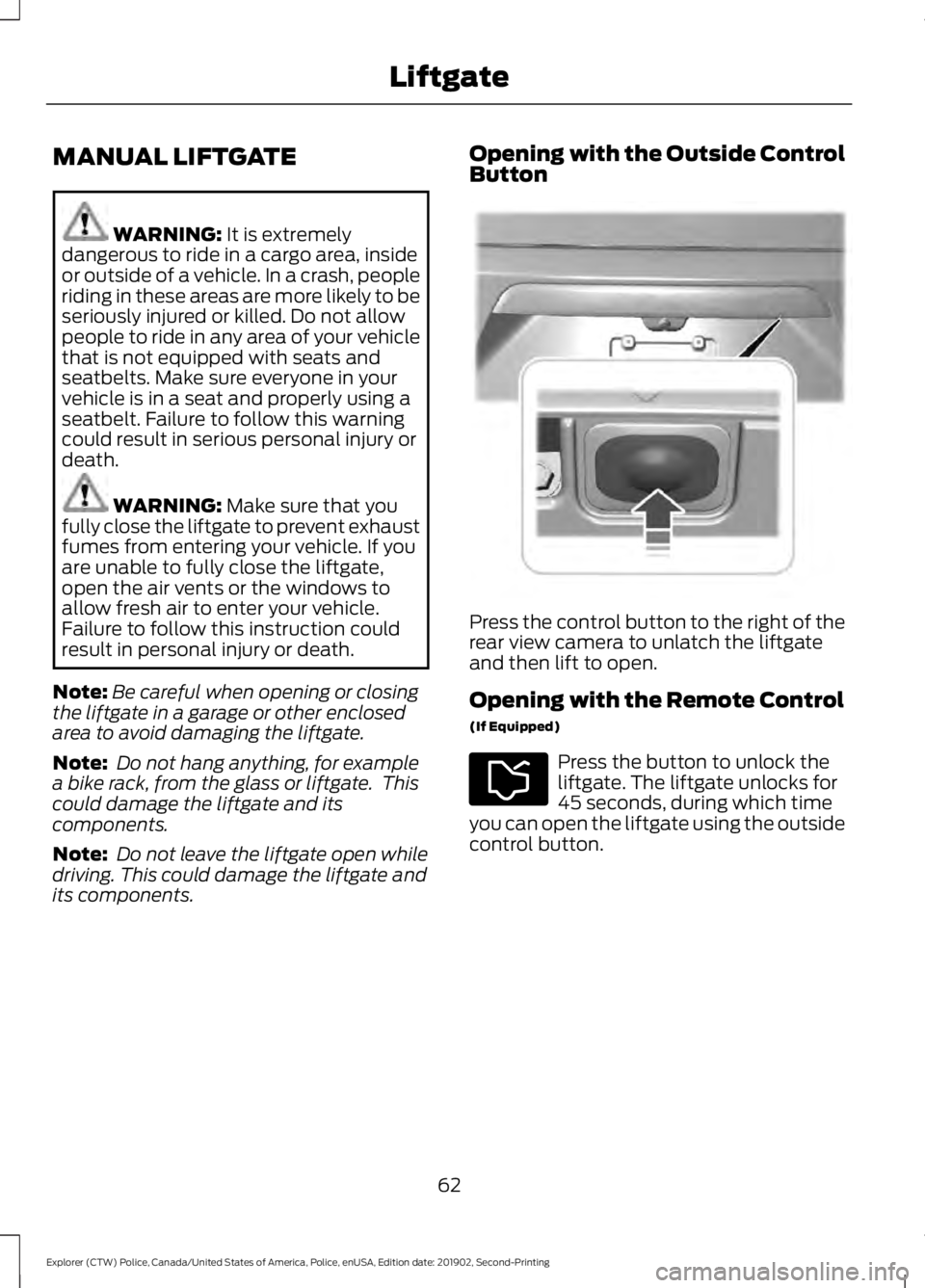
Press the control button to the right of the
rear view camera to unlatch the liftgate
and then lift to open.
Opening with the Remote Control
(If Equipped)
Press the button to unlock the
liftgate. The liftgate unlocks for
45 seconds, during which time
you can open the liftgate using the outside
control button.
62
Explorer (CTW) Police, Canada/United States of America, Police, enUSA, Edition date: 201902, Second-Printing LiftgateE291352
Page 67 of 395

ANTI-THEFT ALARM
Alarm System
The perimeter alarm is a deterrent against
unauthorized access to your vehicle
through the doors, luggage compartment
and the hood.
Triggering the Alarm
Once armed, the alarm is triggered in any
of the following ways:
•
If someone opens a door, cargo area
or the hood without a valid key or
remote control.
If the alarm is triggered, the horn will sound
for 30 seconds and the hazard warning
flasher will flash for five minutes.
Any further attempts to perform one of the
above will trigger the alarm again.
Arming the Alarm
To arm the alarm, lock your vehicle. See
Doors and Locks (page 59).
Disarming the Alarm
Disarm and silence the alarm by unlocking
the doors with the key and switching the
ignition on within 12 seconds, or by
unlocking the doors or the cargo area with
the remote control.
Police Perimeter Alert System
(If
Equipped)
Note: The Police Perimeter Alert System is
primarily intended to monitor moving
pedestrians but also detects objects like
vehicles and bikes. Fast vehicles, stationary
objects and small objects like birds may also
be ignored.
Note: The Police Perimeter Alert System
feature does not function outside of Park
(P) or with any door open. The system uses sensors to monitor
detected objects moving near your parked
vehicle.
Detected moving objects are displayed as
moving dots on the systems instrument
cluster display.
Once the system detects approaching
objects crossing the selected range
perimeter, the vehicle sounds a tone, and
may roll up the windows and lock the
doors.
The system may also activate the rear view
camera if the display is in the Information
and Entertainment screen.
Switching the Police Perimeter
Alert On and Off
64
Explorer (CTW) Police, Canada/United States of America, Police, enUSA, Edition date: 201902, Second-Printing SecurityE298029 E298031
Page 68 of 395

While the vehicle is running and in Park (P),
press and release the button located on
the center of the instrument panel.
Activating the feature will turn on the
Police Perimeter Alert System display in
the instrument cluster.
Note:
When the feature is active an icon
will display on the instrument cluster.
Police Perimeter Alert Settings
Note: When the Police Idle feature is active,
windows will not automatically roll up.
Note: When window or door locking is
active, corresponding icons will display in
the instrument cluster.
Note: When Low mode is active, window
or door locking setting is not available.
The Police Perimeter Alert system has
three range settings Low, Medium or High
via the menu in the instrument cluster
display. Use the steering wheel controls to
adjust the settings when active.
Object Detection
Note: A pedestrian near large obstructions
such as vehicles or walls may not be
detected until the person moves away from
the obstruction.
Note: Sensor reflections from stationary
objects may cause false objects to briefly
appear on the Police Perimeter Alert System
display.
Note: Sensor obstructions such as; dirt,
mud, precipitation, repair compound,
stickers, graphics, bumper guards, trailers,
or bicycle/cargo racks - in front of the
sensors can cause system sensing
degradation.
The Police Perimeter Alert system uses
sensors located behind the rear bumper
on both sides of your vehicle. The sensors
will perform best if the vehicle is parked in
an open area without large obstructions
or walls nearby. System Error
If the system senses a Police Perimeter
Alert System fault, a warning message will
appear in the information display. See
General Information (page 85).
System Configuration
See your authorized dealer for system
configurations.
65
Explorer (CTW) Police, Canada/United States of America, Police, enUSA, Edition date: 201902, Second-Printing SecurityE298030
Page 69 of 395
ADJUSTING THE STEERING
WHEEL
WARNING: Do not adjust the
steering wheel when your vehicle is
moving.
Note: Make sure that you are sitting in the
correct position. See Sitting in the Correct
Position
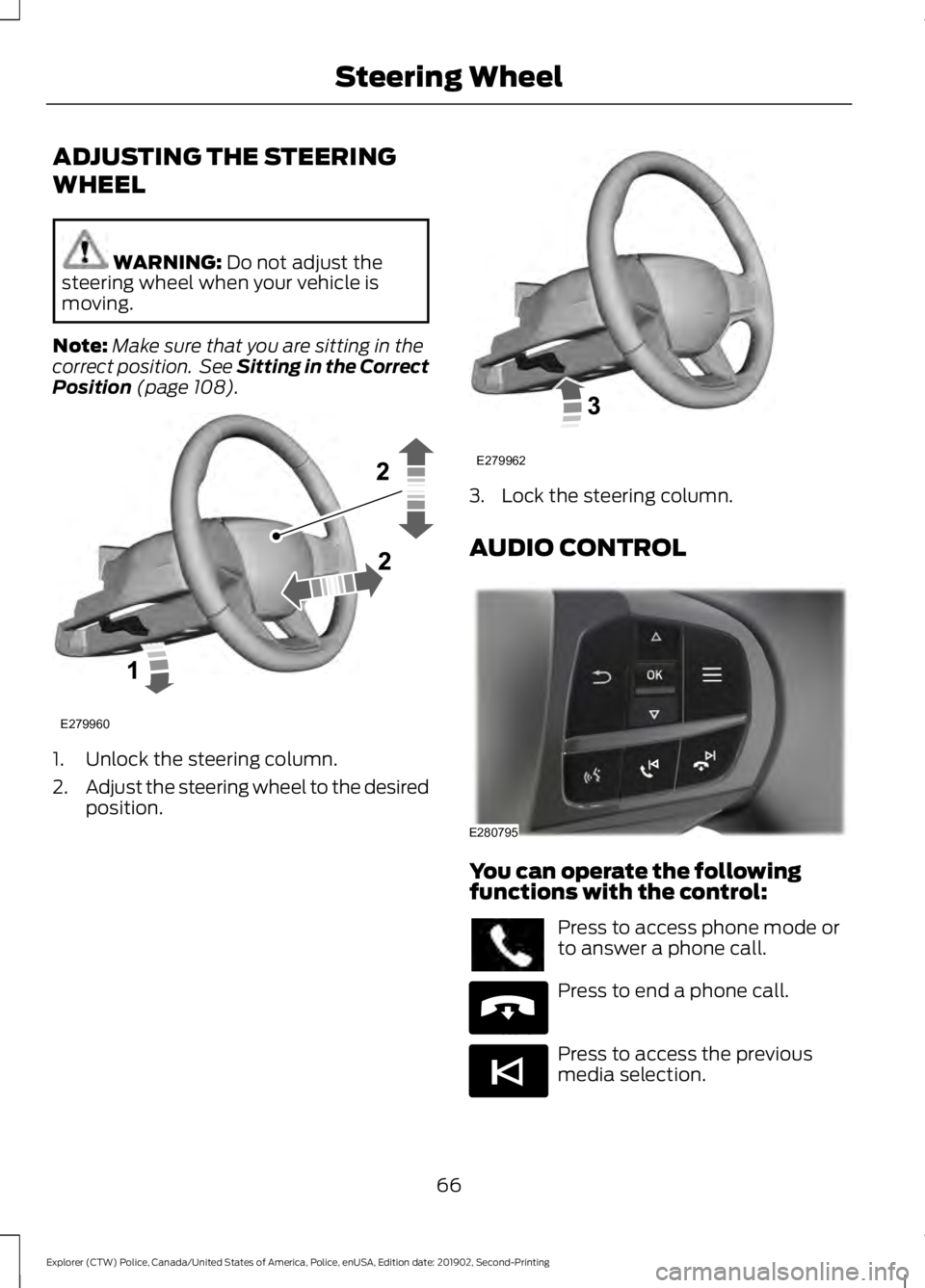
(page 108). 1. Unlock the steering column.
2.
Adjust the steering wheel to the desired
position. 3. Lock the steering column.
AUDIO CONTROL
You can operate the following
functions with the control:
Press to access phone mode or
to answer a phone call.
Press to end a phone call.
Press to access the previous
media selection.
66
Explorer (CTW) Police, Canada/United States of America, Police, enUSA, Edition date: 201902, Second-Printing Steering WheelE279960 E279962 E280795 E265040 E265045
Page 74 of 395

Switching High Beam Headlamps
On and Off
Push the lever away from you to
switch the high beam on.
Push the lever forward again or pull the
lever toward you to switch the high beams
off.
Flashing High Beam Headlamps Pull the lever toward you and release it to
flash the high beam headlamps. AUTOLAMPS WARNING: The system does not
relieve you of your responsibility to drive
with due care and attention. You may
need to override the system if it does not
turn the headlamps on in low visibility
conditions, for example daytime fog.
Autolamps turn the headlamps on in low
light situations or when the wipers operate. Switch the lighting control to the
autolamps position.
The headlamps remain on for a period of
time after you switch the ignition off. Use
the information display controls to adjust
the period of time that the headlamps
remain on.
Note: If you switch the autolamps on, you
cannot switch the high beams on until the
system turns the low beams on.
Windshield Wiper Activated
Headlamps
When you switch the autolamps on, the
headlamps turn on within 10 seconds of
switching the wipers on. They turn off
approximately 60 seconds after you switch
the windshield wipers off.
The headlamps do not turn on with the
wipers:
• During a single wipe.
• When using the windshield washers.
• If the wipers are in intermittent mode.
Note: If you switch the autolamps and the
autowipers on, the headlamps turn on when
the windshield wipers continuously operate.
71
Explorer (CTW) Police, Canada/United States of America, Police, enUSA, Edition date: 201902, Second-Printing LightingE167827 E163268 E281240