2020 FORD MUSTANG light
[x] Cancel search: lightPage 90 of 464
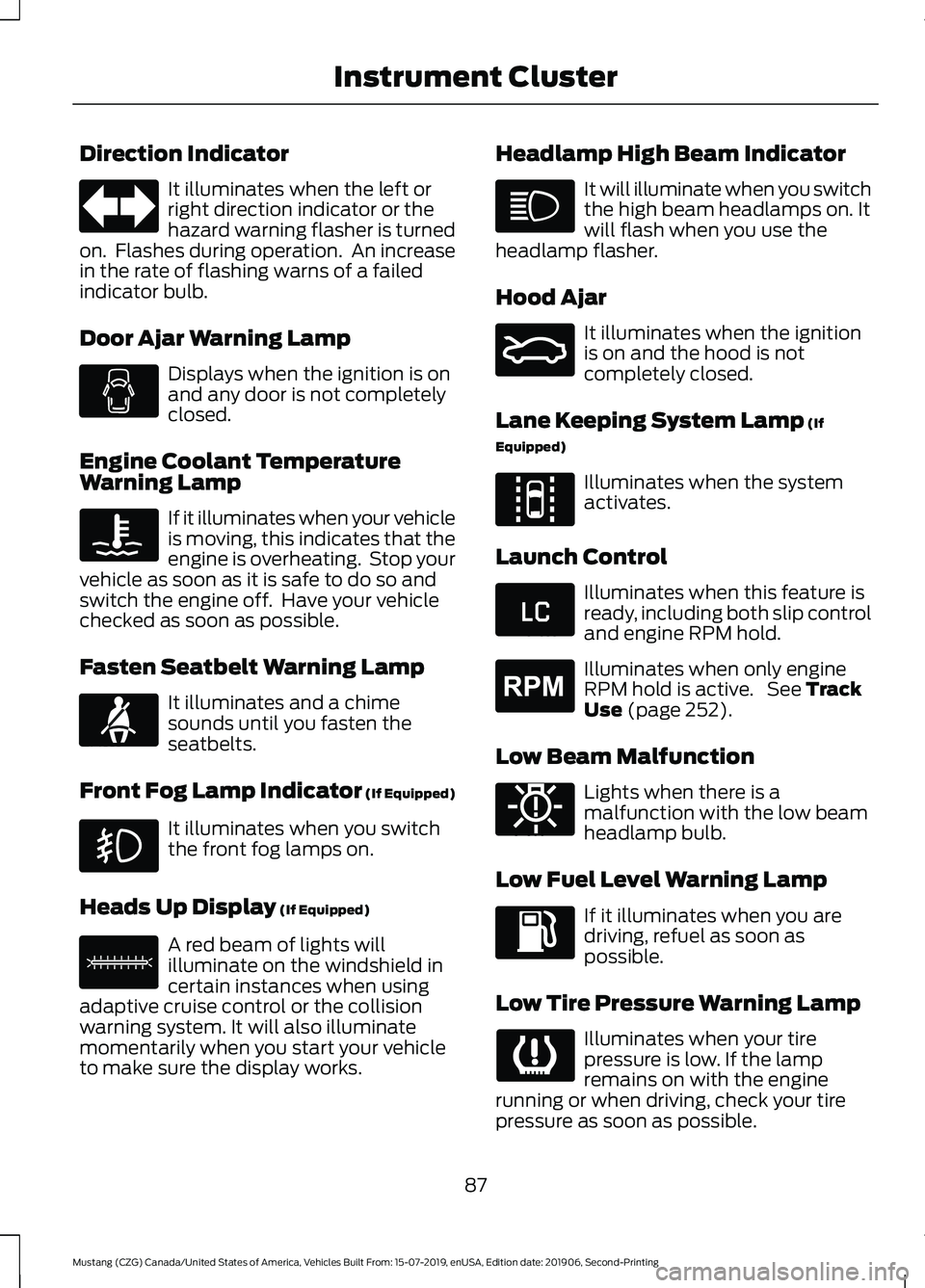
Direction Indicator
It illuminates when the left or
right direction indicator or the
hazard warning flasher is turned
on. Flashes during operation. An increase
in the rate of flashing warns of a failed
indicator bulb.
Door Ajar Warning Lamp Displays when the ignition is on
and any door is not completely
closed.
Engine Coolant Temperature
Warning Lamp If it illuminates when your vehicle
is moving, this indicates that the
engine is overheating. Stop your
vehicle as soon as it is safe to do so and
switch the engine off. Have your vehicle
checked as soon as possible.
Fasten Seatbelt Warning Lamp It illuminates and a chime
sounds until you fasten the
seatbelts.
Front Fog Lamp Indicator (If Equipped) It illuminates when you switch
the front fog lamps on.
Heads Up Display (If Equipped) A red beam of lights will
illuminate on the windshield in
certain instances when using
adaptive cruise control or the collision
warning system. It will also illuminate
momentarily when you start your vehicle
to make sure the display works. Headlamp High Beam Indicator It will illuminate when you switch
the high beam headlamps on. It
will flash when you use the
headlamp flasher.
Hood Ajar It illuminates when the ignition
is on and the hood is not
completely closed.
Lane Keeping System Lamp
(If
Equipped) Illuminates when the system
activates.
Launch Control Illuminates when this feature is
ready, including both slip control
and engine RPM hold.
Illuminates when only engine
RPM hold is active. See
Track
Use (page 252).
Low Beam Malfunction Lights when there is a
malfunction with the low beam
headlamp bulb.
Low Fuel Level Warning Lamp If it illuminates when you are
driving, refuel as soon as
possible.
Low Tire Pressure Warning Lamp Illuminates when your tire
pressure is low. If the lamp
remains on with the engine
running or when driving, check your tire
pressure as soon as possible.
87
Mustang (CZG) Canada/United States of America, Vehicles Built From: 15-07-2019, enUSA, Edition date: 201906, Second-Printing Instrument Cluster E71880 E156133 E159324 E144813 E234583 E255688 E181350
Page 93 of 464

GENERAL INFORMATION
WARNING: Driving while distracted
can result in loss of vehicle control, crash
and injury. We strongly recommend that
you use extreme caution when using any
device that may take your focus off the
road. Your primary responsibility is the
safe operation of your vehicle. We
recommend against the use of any
hand-held device while driving and
encourage the use of voice-operated
systems when possible. Make sure you
are aware of all applicable local laws
that may affect the use of electronic
devices while driving.
You can control various systems on your
vehicle using the information display
controls on the steering wheel. The
information display shows the
corresponding information.
Note: Some options may appear slightly
different or not at all if the items are
optional. Information Display Controls
•
Press the up and down arrow buttons
to scroll through and highlight the
options within a menu.
• Press the right arrow button to enter a
sub-menu.
• Press the left arrow button to exit a
menu.
• Press and hold the left arrow button at
any time to return to the main menu
display (escape button).
• Press the OK button to choose and
confirm settings or messages.
90
Mustang (CZG) Canada/United States of America, Vehicles Built From: 15-07-2019, enUSA, Edition date: 201906, Second-Printing Information DisplaysE249039
Page 98 of 464

Driver Assist
Mode
Lane Keeping Assist
Intensity
Hold OK to Reset
Tire Monitor
Settings Settings
Choose your applicable setting.
Alarm
Vehicle
Easy Entry/Exit Choose your applicable setting.
Lighting
Locks
Percent Oil Life XXX%
Oil Life Reset
Hold OK to Reset
Park Lock Control Choose your applicable setting.
Remote Start
Tire Mobility Kit
Windows
Wipers
Choose your applicable setting.
Gauge Color
MyColor
Halo
Ambient Light
Set MyColor Displays the status of MyKeys,
Admin Keys and MyKey distance.
MyKey Status
MyKey
Hold OK to Create MyKey
Create MyKey
Choose your applicable setting.
911 Assist
AdvanceTrac
Do Not Disturb
95
Mustang (CZG) Canada/United States of America, Vehicles Built From: 15-07-2019, enUSA, Edition date: 201906, Second-Printing Information Displays
Page 100 of 464

Back Button.
A B Arrow Up.
Voice Control Button.
C
Arrow Down.
D
Pony Button.
E
Audio Button.
F
Phone Buttons.
G
Settings Button.
H
Navigation Button.
I
• Press one of the quick action menu
(QAM) buttons to enter a menu.
• Toggle (B) and (D) to scroll through
and highlight the options within a
menu.
• Press the
OK button to enter a
sub-menu.
• Press
(A) to exit a menu.
• Press the open menu's QAM button at
any time to close the menu (escape
button).
• Press the
OK button to choose and
confirm settings or messages.
Settings Settings
Trip/Fuel Info Auto Engine Off
Driver
Assist
Blindspot
Pre-Collision Assist
Cross Traffic Assist
Cruise Control
Driver Alert
Hill Start Assist
97
Mustang (CZG) Canada/United States of America, Vehicles Built From: 15-07-2019, enUSA, Edition date: 201906, Second-Printing Information DisplaysE249038
Page 102 of 464

Pony
Lap Timer
Start Option
Shift Point
Perform-
ance Shift
Indicator Shift Tone
Shift Light Mode
Launch Control
Launch
Control
RPM
Rev Match Show Gauges
Gauges
Configure MyGauges
Primary Color
MyColor
Secondary Color
Ambient Light
Create MyColor
Change with Drive Mode
Cluster
Appear-
ance Normal
Sport
Track
1 See Track Use (page 252).
Note: Quiet Start allows you to schedule when the Exhaust Mode turns on the Quiet
setting. The time window can be from 1 to 24 hours.
Note: Depending on your vehicle
configuration, some features such as
Exhaust Mode and Line Lock may be if
equipped.
Note: The menu options for Performance
Shift Indicator, Launch Control, and Rev
Match are for manual transmissions only.
Phone
See
General Information (page 351). Audio
See
General Information (page 351).
Navigation
(If Equipped)
See
General Information (page 351).
99
Mustang (CZG) Canada/United States of America, Vehicles Built From: 15-07-2019, enUSA, Edition date: 201906, Second-Printing Information Displays
Page 121 of 464
SITTING IN THE CORRECT
POSITION
WARNING: Sitting improperly, out
of position or with the seatback reclined
too far can take weight off the seat
cushion and affect the decision of the
passenger sensing system, resulting in
serious injury or death in the event of a
crash. Always sit upright against your
seat back, with your feet on the floor. WARNING:
Do not recline the
seatback too far as this can cause the
occupant to slide under the seatbelt,
resulting in serious injury in the event of
a collision. WARNING:
Do not place objects
higher than the top of the seat backrest.
Failure to follow this instruction could
result in personal injury or death in the
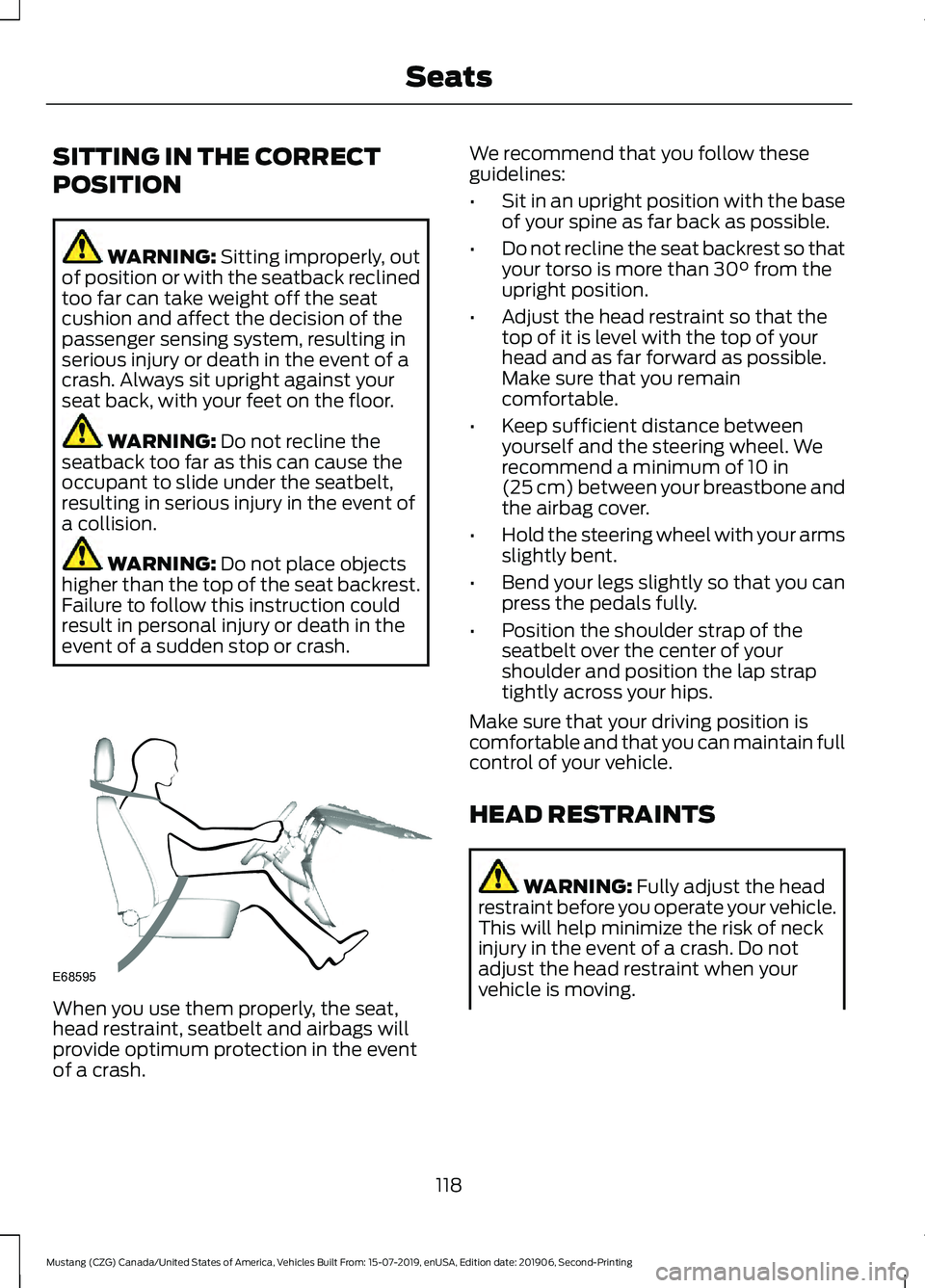
event of a sudden stop or crash. When you use them properly, the seat,
head restraint, seatbelt and airbags will
provide optimum protection in the event
of a crash. We recommend that you follow these
guidelines:
•
Sit in an upright position with the base
of your spine as far back as possible.
• Do not recline the seat backrest so that
your torso is more than
30° from the
upright position.
• Adjust the head restraint so that the
top of it is level with the top of your
head and as far forward as possible.
Make sure that you remain
comfortable.
• Keep sufficient distance between
yourself and the steering wheel. We
recommend a minimum of
10 in
(25 cm) between your breastbone and
the airbag cover.
• Hold the steering wheel with your arms
slightly bent.
• Bend your legs slightly so that you can
press the pedals fully.
• Position the shoulder strap of the
seatbelt over the center of your
shoulder and position the lap strap
tightly across your hips.
Make sure that your driving position is
comfortable and that you can maintain full
control of your vehicle.
HEAD RESTRAINTS WARNING:
Fully adjust the head
restraint before you operate your vehicle.
This will help minimize the risk of neck
injury in the event of a crash. Do not
adjust the head restraint when your
vehicle is moving.
118
Mustang (CZG) Canada/United States of America, Vehicles Built From: 15-07-2019, enUSA, Edition date: 201906, Second-Printing SeatsE68595
Page 127 of 464

cushion. This can cause the heated seat
to overheat. Do not puncture the seat
with pins, needles or other pointed
objects. This damages the heating
element and can cause the heated seat
to overheat. An overheated seat may
cause serious personal injury.
Note: Do not do the following:
• Place heavy objects on the seat.
• Operate the seat heater if water or any
other liquid spills on the seat. Allow the
seat to dry thoroughly.
• Operate the heated seats unless the
engine is running. Doing so can cause
the battery to lose charge. Press the heated seat symbol to cycle
through the various heat settings and off.
More indicator lights indicate warmer
settings.
Cooled Seats
The cooled seats only function when the
engine is running. Press the cooled seat symbol to cycle
through the various cool settings and off.
More indicator lights indicate cooler
settings.
If the engine falls below 350 RPM while
the cooled seats are on, the feature turns
itself off. You will need to reactivate it.
124
Mustang (CZG) Canada/United States of America, Vehicles Built From: 15-07-2019, enUSA, Edition date: 201906, Second-Printing SeatsE146322 E146309
Page 128 of 464

UNIVERSAL GARAGE DOOR
OPENER
HomeLink Wireless Control
System
WARNING: Do not use the system
with any garage door opener that does
not have the safety stop and reverse
feature as required by U.S. Federal
Safety Standards (this includes any
garage door opener manufactured
before April 1, 1982). A garage door
opener which cannot detect an object,
signaling the door to stop and reverse,
does not meet current federal safety
standards. Using a garage door opener
without these features increases the risk
of serious injury or death.
Note: Make sure that the garage door and
security device are free from obstruction
when you are programming. Do not program
the system with the vehicle in the garage.
Note: Make sure you keep the original
remote control transmitter for use in other
vehicles as well as for future system
programming.
Note: We recommend that upon the sale
or lease termination of your vehicle, you
erase the programmed function buttons for
security reasons. See Erasing the Function
Button Codes
later in this section.
Note: You can program a maximum of
three devices. To change or replace any of
the three devices after it has been initially
programmed, you must first erase the
current settings. See Erasing the Function
Button Codes
. The universal garage door opener replaces
the common hand-held garage door
opener with a three-button transmitter
integrated into the driver
’s sun visor.
The system includes two primary features,
a garage door opener and a platform for
remote activation of devices within the
home. You can program garage doors as
well as entry gate operators, security
systems, entry door locks and home or
office lighting.
Additional system information can be
found online at www.homelink.com,
www.youtube.com/user/HomeLinkGentex
or by calling the toll-free help line at
1-800-355-3515.
In-Vehicle Programming
This process is to program your in-vehicle
HomeLink function button with your
hand-held transmitter.
Note: The programming steps below
assume you will be programming HomeLink
that was not previously programmed. If your
HomeLink was previously programmed, you
may need to erase your HomeLink buttons.
See Erasing the Function Button Codes.
Note: Put a new battery in the hand-held
transmitter. This allows for quicker training
and accurate transmission of the
radio-frequency signal.
125
Mustang (CZG) Canada/United States of America, Vehicles Built From: 15-07-2019, enUSA, Edition date: 201906, Second-Printing Garage Door Opener
(If Equipped)E188211