2020 FORD GT brakes
[x] Cancel search: brakesPage 5 of 316

Lighting Control
.............................................58
Adjustable Pedals
Adjusting the Pedals ...................................
60
Wipers and Washers
Windshield Wipers .........................................
61
Windshield Washers .....................................
61
Lighting
General Information .....................................
62
Lighting Control .............................................
62
Autolamps .......................................................
63
Instrument Lighting Dimmer ....................
63
Daytime Running Lamps ............................
63
Direction Indicators ......................................
64
Interior Lamps ................................................
64
Windows and Mirrors
Power Windows ............................................
65
Global Opening ..............................................
65
Exterior Mirrors ...............................................
66
Interior Mirror ..................................................
66
Instrument Cluster
Gauges ...............................................................
67
Warning Lamps and Indicators ...............
69
Audible Warnings and Indicators .............
73
Information Displays
General Information .....................................
74
Information Messages .................................
77
Climate Control
Automatic Climate Control .......................
84
Hints on Controlling the Interior Climate ........................................................................\
..
85
Cabin Air Filter ................................................
86Seats
Sitting in the Correct Position
...................
87
Manual Seats ..................................................
87
Auxiliary Power Points
Auxiliary Power Points ................................
89
Storage Compartments
Cup Holders ....................................................
90
Map Pockets ...................................................
90
Under Seat Storage .....................................
90
Starting and Stopping the Engine
General Information ......................................
91
Keyless Starting ..............................................
91
Steering Wheel Lock ....................................
92
Starting the Engine .......................................
92
Fuel and Refueling
Safety Precautions .......................................
95
Fuel Quality .....................................................
96
Fuel Filler Funnel Location ........................
96
Running Out of Fuel .....................................
96
Refueling ..........................................................
98
Fuel Consumption ........................................
99
Engine Emission Control
Emission Law .................................................
101
Catalytic Converter .....................................
102
Transmission
Automatic Transmission ..........................
105
Brakes
General Information ....................................
110
Hints on Driving With Anti-Lock Brakes ........................................................................\
...
111
Electric Parking Brake ..................................
111
2
Ford GT (CGX) Canada/United States of America, enUSA, Edition date: 201908, First-Printing Table of Contents
Page 9 of 316

Battery
Brake system
Carbon Ceramic Brakes
Cruise control
Damper Control Mode
Direction Indicator
Door Ajar
Engine coolant temperature
Engine oil
Fasten seatbelt
Front airbag
Front Lift Mode Active
Frost Warning Lamp
Hatch Ajar
High Beam Hood Ajar
Hydraulic System Fault
Launch Control
Low Beam Malfunction Warning
Lamp
Low Fuel Level
Low tire pressure warning
Parking Lamps
Powertrain Fault
Rear Fog Lamp
Ride Height System Fault
Service engine soon
Stability control
Stability control Off
Transmission Fault
6
Ford GT (CGX) Canada/United States of America, enUSA, Edition date: 201908, First-Printing Introduction E269429 E71340 E234586 E236449 E71880 E67017 E234582 E236451 E236450 E234584 E234583 E181350 E67040 E234585 E236447 E236448
Page 10 of 316

DATA RECORDING
WARNING: Do not connect
wireless plug-in devices to the data link
connector. Unauthorized third parties
could gain access to vehicle data and
impair the performance of safety related
systems. Only allow repair facilities that
follow our service and repair instructions
to connect their equipment to the data
link connector.
We respect your privacy and are
committed to protecting it. The
information contained in this publication
was correct at the time of going to print
but as technology rapidly changes, we
recommend that you visit the regional Ford
website for the latest information.
Your vehicle has electronic control units
that have data recording functionality and
the ability to permanently or temporarily
store data. This data could include
information on the condition and status of
your vehicle, vehicle maintenance
requirements, events and malfunctions.
The types of data that can be recorded are
described in this section. Some of the data
recorded is stored in event logs or error
logs.
Note: Error logs are reset following a service
or repair.
Note: We may provide information in
response to requests from law enforcement,
other government authorities and third
parties acting with lawful authority or
through a legal process. Such information
could be used by them in legal proceedings. Data recorded includes, for example:
•
Operating states of system
components, for example fuel level,
tire pressure and battery charge level.
• Vehicle and component status, for
example wheel speed, deceleration,
lateral acceleration and seatbelt
status.
• Events or errors in essential systems,
for example headlamps and brakes.
• System responses to driving situations,
for example airbag deployment and
stability control.
• Environmental conditions, for example
temperature.
Some of this data, when used in
combination with other information, for
example an accident report, damage to a
vehicle or eyewitness statements, could
be associated with a specific person.
Service Data
Service data recorders in your vehicle are
capable of collecting and storing
diagnostic information about your vehicle.
This potentially includes information about
the performance or status of various
systems and modules in the vehicle, such
as engine, throttle, steering or brake
systems. In order to properly diagnose and
service your vehicle, Ford Motor Company
(Ford of Canada in Canada), and service
and repair facilities may access or share
among them vehicle diagnostic
information received through a direct
connection to your vehicle when
diagnosing or servicing your vehicle.
Additionally, Ford Motor Company (Ford
of Canada, in Canada) may, where
permitted by law, use vehicle diagnostic
information for vehicle improvement or
with other information we may have about
you, (for example, your contact
information), to offer you products or
services that may interest you. Data may
7
Ford GT (CGX) Canada/United States of America, enUSA, Edition date: 201908, First-Printing Introduction
Page 33 of 316

Using Seatbelts During Pregnancy
WARNING: Always ride and
drive with your seatback upright and
properly fasten your seatbelt. Fit the lap
portion of the seatbelt snugly and low
across the hips. Position the shoulder
portion of the seatbelt across your chest.
Pregnant women must follow this
practice. See the following figure. Pregnant women should always wear their
seatbelt. Position the lap belt portion of a
combination lap and shoulder belt low
across the hips below the belly and worn
as tight as comfort allows. Position the
shoulder belt to cross the middle of the
shoulder and the center of the chest.
Seatbelt Locking Modes
WARNING:
If your vehicle is
involved in a crash, have the seatbelts
and associated components inspected
as soon as possible. Failure to follow this
instruction could result in personal injury
or death. All safety restraints in the vehicle are
combination lap and shoulder belts and
have vehicle sensitive locking mode. In
addition, the front outboard passenger
seatbelts have the automatic locking
mode.
Vehicle Sensitive Mode
This is the normal retractor mode, which
allows free shoulder belt length
adjustment to your movements and
locking in response to vehicle movement.
For example, if the driver brakes suddenly
or turns a corner sharply, or the vehicle
receives an impact of about
5 mph
(8 km/h) or more, the combination
seatbelts lock to help reduce forward
movement of the driver and passenger.
In addition, the retractor is designed to lock
if you pull the webbing out too quickly. If
the seatbelt retractor locks, slowly lower
the height adjuster to allow the seatbelt
to retract. If the retractor does not unlock,
pull the seatbelt out slowly then feed a
small length of webbing back toward the
stowed position.
Automatic Locking Mode
In this mode, the shoulder belt
automatically pre-locks. The belt still
retracts to remove any slack in the
shoulder belt. The automatic locking mode
is not available on the driver seatbelt.
When to Use the Automatic Locking
Mode
Use this mode any time a child safety seat,
except a booster, is installed in the
passenger front seating position. See
Child Safety
(page 19).
30
Ford GT (CGX) Canada/United States of America, enUSA, Edition date: 201908, First-Printing SeatbeltsE142590
Page 73 of 316
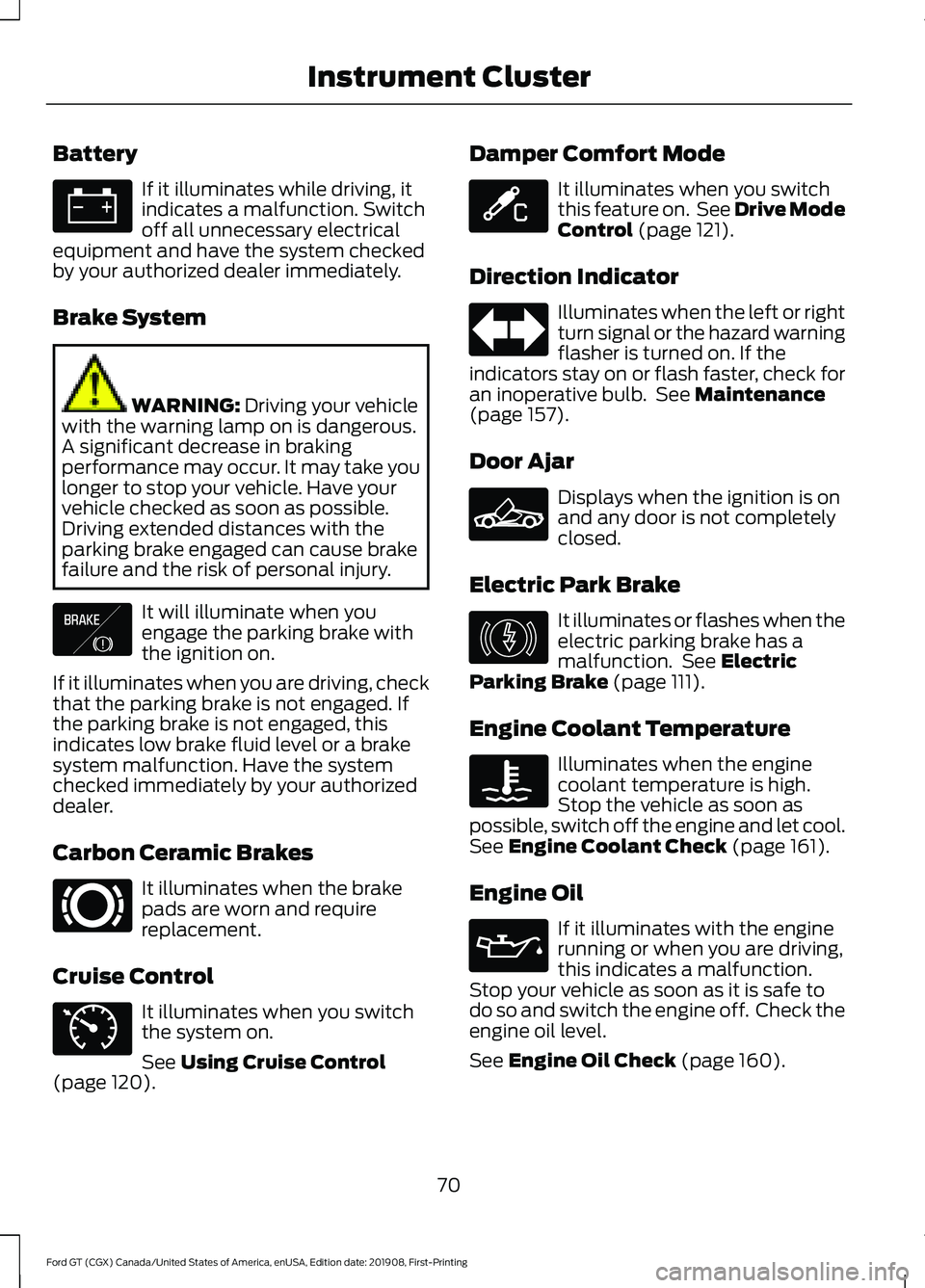
Battery
If it illuminates while driving, it
indicates a malfunction. Switch
off all unnecessary electrical
equipment and have the system checked
by your authorized dealer immediately.
Brake System WARNING: Driving your vehicle
with the warning lamp on is dangerous.
A significant decrease in braking
performance may occur. It may take you
longer to stop your vehicle. Have your
vehicle checked as soon as possible.
Driving extended distances with the
parking brake engaged can cause brake
failure and the risk of personal injury. It will illuminate when you
engage the parking brake with
the ignition on.
If it illuminates when you are driving, check
that the parking brake is not engaged. If
the parking brake is not engaged, this
indicates low brake fluid level or a brake
system malfunction. Have the system
checked immediately by your authorized
dealer.
Carbon Ceramic Brakes It illuminates when the brake
pads are worn and require
replacement.
Cruise Control It illuminates when you switch
the system on.
See
Using Cruise Control
(page 120). Damper Comfort Mode It illuminates when you switch
this feature on. See Drive Mode
Control
(page 121).
Direction Indicator Illuminates when the left or right
turn signal or the hazard warning
flasher is turned on. If the
indicators stay on or flash faster, check for
an inoperative bulb. See
Maintenance
(page 157).
Door Ajar Displays when the ignition is on
and any door is not completely
closed.
Electric Park Brake It illuminates or flashes when the
electric parking brake has a
malfunction. See
Electric
Parking Brake (page 111).
Engine Coolant Temperature Illuminates when the engine
coolant temperature is high.
Stop the vehicle as soon as
possible, switch off the engine and let cool.
See
Engine Coolant Check (page 161).
Engine Oil If it illuminates with the engine
running or when you are driving,
this indicates a malfunction.
Stop your vehicle as soon as it is safe to
do so and switch the engine off. Check the
engine oil level.
See
Engine Oil Check (page 160).
70
Ford GT (CGX) Canada/United States of America, enUSA, Edition date: 201908, First-Printing Instrument Cluster E138644 E269429 E71340 E234586 E236449 E146190
Page 84 of 316

Action
Message
The brake pads need replacement. Contact an authorized dealer.
Ceramic Brakes Replace
All Brake Pads
Your vehicle is still in Transport or Factory mode. This may
not allow some features to operate properly. See an author- ized dealer.
Transport Mode Contact
Dealer
Factory Mode Contact Dealer
Park Brake Action
Message
Displays if you attempt to release the electric parking brakemanually without pressing the brake pedal.
To Release: Press Brake
and Switch
Displays if you must manually release the electric parking brake.
Park Brake Use Switch
to Release
Displays if you have not fully applied the electric parking brake.
Park Brake Not Applied
Displays if you have not fully released the electric parkingbrake.
Park Brake Not Released
Displays if the electric parking brake system enters a specialmode used to allow service of the rear brakes. Contact an authorized dealer.
Park Brake Maintenance
Mode
Displays if the electric park brake system detects a condition
that requires service. Some functionality may still be available. See an authorized dealer.
Park Brake Limited
Function Service Required
Displays if the electric parking brake system detects a condi-tion that requires service. See an authorized dealer.
Park Brake Malfunction
Service Now
Displays if the parking brake is set, the engine is running and
you drive the vehicle more than 3 mph (5 km/h). If the warning stays on after you release the parking brake, contact an authorized dealer.
Park Brake On
Remote Start Action
Message
A reminder to apply the brake and push the start button todrive your vehicle after a remote start.
To Drive: Press Brake
and Start Button
81
Ford GT (CGX) Canada/United States of America, enUSA, Edition date: 201908, First-Printing Information Displays
Page 96 of 316

1.
Place the key fob under the rubber mat
in front of the Engine START/STOP
button.
2. With the key in this position, press the brake pedal and then the Engine
START/STOP button to switch the
ignition on and start your vehicle.
Note: If the vehicle fails to start, replace
the key fob battery.
Fast Restart
The fast restart feature allows you to
restart the engine within 20 seconds of
switching it off, even if a valid key is not
present.
Within 20 seconds of switching the engine
off, press the brake pedal and press the
START/STOP button. After 20 seconds
have expired, you can no longer restart the
engine without the key present inside your
vehicle.
Once the engine has started, it remains
running until you press the START/STOP
button, even if the system does not detect
a valid key. If you open and close a door
while the engine is running, the system
searches for a valid key. You cannot restart
the engine if the system does not detect a
valid key within 20 seconds.
Failure to Start
If you cannot start the engine after three
attempts, wait 10 seconds and follow this
procedure:
1. Fully press the brake pedal.
2. Move the transmission selector to the park (P) position.
3. Fully press the accelerator pedal and hold it there.
4. Press the START/STOP button once. Stopping the Engine When Your
Vehicle is Stationary
1. Move the transmission selector to the
park (P) position.
2. Press the START/STOP button once.
3. Apply the parking brake.
Note: This switches off the ignition, all
electrical circuits, warning lamps and
indicators.
Stopping the Engine When Your
Vehicle is Moving WARNING: Switching off the
engine when your vehicle is still moving
results in a significant decrease in
braking assistance. Higher effort is
required to apply the brakes and to stop
your vehicle. A significant decrease in
steering assistance could also occur. The
steering does not lock, but higher effort
could be required to steer your vehicle.
When you switch the ignition off, some
electrical circuits, for example airbags,
also turn off. If you unintentionally switch
the ignition off, shift into neutral (N) and
restart the engine.
1. Move the transmission selector to the neutral position and use the brakes to
bring your vehicle to a safe stop.
2. When your vehicle has stopped, park (P) will engage automatically.
3. Press and hold the START/STOP button for one second, or press it three
times within two seconds.
4. Apply the parking brake.
93
Ford GT (CGX) Canada/United States of America, enUSA, Edition date: 201908, First-Printing Starting and Stopping the Engine
Page 111 of 316

Use the following chart to help determine
when to manually shift:
Gear 4-7
(RPM)
Gear 1-3
(RPM)
LED Color
6100
5800
Green 1
6200
5900
Green 2
6300
6000
Green 3
6400
6100
Green 4
6500
6200
Green 5
6600
6300
Green 6
6700
6400
Red 1
6750
6500
Red 2
6800
6600
Red 3
6850
6700
Blue 1
6900
6800
Blue 2
6950
6900
Blue 3
7000
7000
Flashing
Red
Brake-Shift Interlock WARNING: When doing this
procedure, you need to take the
transmission out of park (P) which
means your vehicle can roll freely. To
avoid unwanted vehicle movement,
always fully apply the parking brake prior
to doing this procedure. Use wheels
chocks if appropriate. WARNING:
If the parking brake
is fully released, but the brake warning
lamp remains illuminated, the brakes
may not be working properly. Have your
vehicle checked as soon as possible.
Note: You should only use this procedure
in the event that your vehicle is disabled and
you cannot start the engine in order to shift
into Neutral (N) to move it. Use the provided
Transmission Park Override tool to release
the transmission park mechanism and allow
the rear tires to roll freely.
Note: See your authorized dealer as soon
as this procedure is used.
Note: Do not drive your vehicle until you
verify that the brake lamps are working.
Your vehicle is equipped with a brake-shift
interlock feature that prevents moving the
selector from park (P) when the ignition is
in the on position and the brake pedal is
not pressed.
If you cannot move the selector out of park
(P) position with the ignition in the on
position and the brake pedal pressed, a
malfunction may have occurred. It is
possible that a fuse has blown or your
vehicle ’s brake lamps are not operating
properly.
See Fuse Specification Chart
(page 145).
If the fuse is good and the brake lamps are
functioning, then there may be a fault in
the system. To roll the car or to allow the
vehicle to be transported for repair, use the
following procedure to place the
transmission into neutral (N) manually. To
place the transmission into neutral (N) in
the event of a battery failure, or other
electrical fault that prevents the shifter
from working, use this procedure.
108
Ford GT (CGX) Canada/United States of America, enUSA, Edition date: 201908, First-Printing Transmission