2020 FORD GT reset
[x] Cancel search: resetPage 253 of 316

Possible Cause and Resolution
Symptom
–You are not saying the name exactly as it appears on
your device.
•Say the first and last name of the contact exactly
as it appears on your device. Spell out any abbrevi-
ations in the name.
– The name contains special characters, for example *,
- or +.
•Rename the contact on your device or use the
touchscreen to select and call the contact.
The system does not under-
stand the name of a contact
in the phonebook on my
device and calls the wrong
contact.
–You are not saying the name exactly as it appears on
your device.
•Say the first and last name of the contact exactly
as it appears on your device. The system applies
phonetic pronunciation rules of the selected
language to the names of contacts in the phone-
book on your device. Select the name of the
contact on the touchscreen and use the Hear it
option to get an idea of how the system expects
you to pronounce it.
The system does not under-
stand foreign names of
contacts in the phonebook
on my device.
–Device limitation.
•The system uses text-to-speech technology and
uses a synthetically generated voice rather than
pre-recorded human voice.
The system voice prompts
and the pronunciation of
some words does not seem
to be very accurate.
USB and Bluetooth Audio Possible Cause and Resolution
Symptom
I cannot connect my device. –Device malfunction.
•Disconnect your device. Switch your device off,
reset it and try again.
– Cable connection issue.
•Correctly connect the cable to your device and the
vehicle USB port.
– Incompatible cable.
•Use the cable recommended by the manufacturer
of your device.
250
Ford GT (CGX) Canada/United States of America, enUSA, Edition date: 201908, First-Printing SYNC™ 3
Page 255 of 316
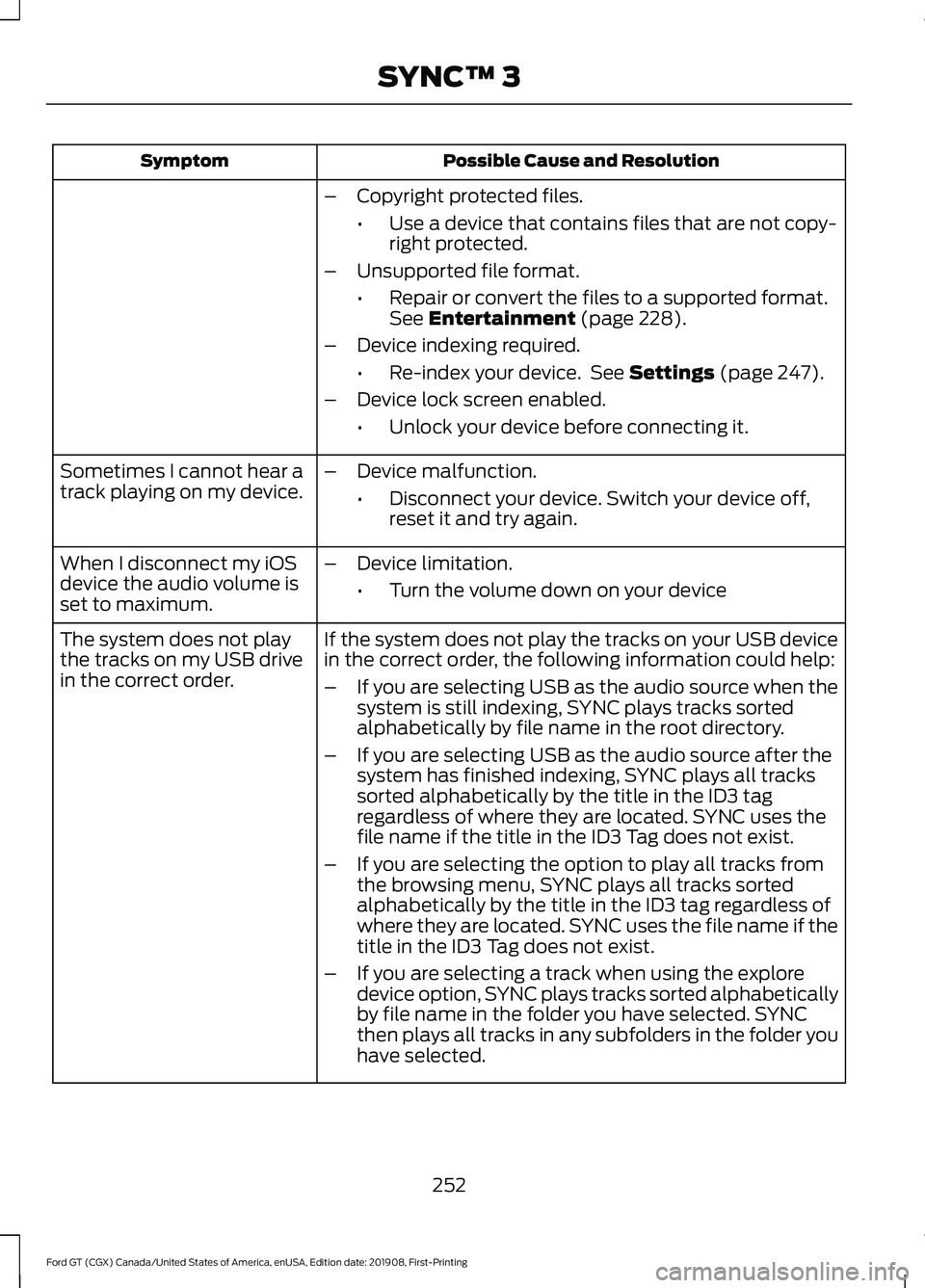
Possible Cause and Resolution
Symptom
–Copyright protected files.
•Use a device that contains files that are not copy-
right protected.
– Unsupported file format.
•Repair or convert the files to a supported format.
See Entertainment (page 228).
– Device indexing required.
•Re-index your device. See
Settings (page 247).
– Device lock screen enabled.
•Unlock your device before connecting it.
Sometimes I cannot hear a
track playing on my device. –
Device malfunction.
•Disconnect your device. Switch your device off,
reset it and try again.
When I disconnect my iOS
device the audio volume is
set to maximum. –
Device limitation.
•Turn the volume down on your device
If the system does not play the tracks on your USB device
in the correct order, the following information could help:
The system does not play
the tracks on my USB drive
in the correct order.
–If you are selecting USB as the audio source when the
system is still indexing, SYNC plays tracks sorted
alphabetically by file name in the root directory.
– If you are selecting USB as the audio source after the
system has finished indexing, SYNC plays all tracks
sorted alphabetically by the title in the ID3 tag
regardless of where they are located. SYNC uses the
file name if the title in the ID3 Tag does not exist.
– If you are selecting the option to play all tracks from
the browsing menu, SYNC plays all tracks sorted
alphabetically by the title in the ID3 tag regardless of
where they are located. SYNC uses the file name if the
title in the ID3 Tag does not exist.
– If you are selecting a track when using the explore
device option, SYNC plays tracks sorted alphabetically
by file name in the folder you have selected. SYNC
then plays all tracks in any subfolders in the folder you
have selected.
252
Ford GT (CGX) Canada/United States of America, enUSA, Edition date: 201908, First-Printing SYNC™ 3
Page 256 of 316

Phone
Possible Cause and Resolution
Symptom
During a call, I can hear
excessive background noise. –
Incorrect cell phone settings.
•Check and adjust the audio settings on your cell
phone. Refer to your cell phone's user manual.
– Cell phone malfunction.
•Switch your cell phone off, reset it and try again.
– Cell phone microphone muted.
•Unmute your cell phone microphone.
During a call, I can hear the
other person but they
cannot hear me.
During a call, I cannot hear
the other person and they
cannot hear me.
–
System restart required.
•Restart the system. Switch the ignition off and
open the door. Close the door and lock the vehicle.
Wait until the touchscreen is off and any illumin-
ated USB ports are not illuminated. Unlock the
vehicle, switch the ignition on and try again.
I cannot download phone-
book. –
Incompatible cell phone.
•Check the compatibility of your cell phone on our
website.
– Incorrect cell phone settings.
•Allow the system to retrieve contacts from your
cell phone. Refer to your cell phone's user manual.
– Incorrect system settings.
•Switch automatic phonebook download on. See
Settings (page 247).
– Cell phone malfunction.
•Switch your cell phone off, reset it and try again.
– Incorrect cell phone settings.
•Allow the system to retrieve contacts from your
cell phone. Refer to your cell phone's user manual.
• Check the location of the missing contacts on your
cell phone. If they are stored on the SIM card, move
them to the cell phone memory.
– Incorrect system settings.
•Switch automatic phonebook download on. See
Settings
(page 247).
A message displays
suggesting that my phone-
book has downloaded but it
is empty or it has missing
contacts.
253
Ford GT (CGX) Canada/United States of America, enUSA, Edition date: 201908, First-Printing SYNC™ 3
Page 257 of 316
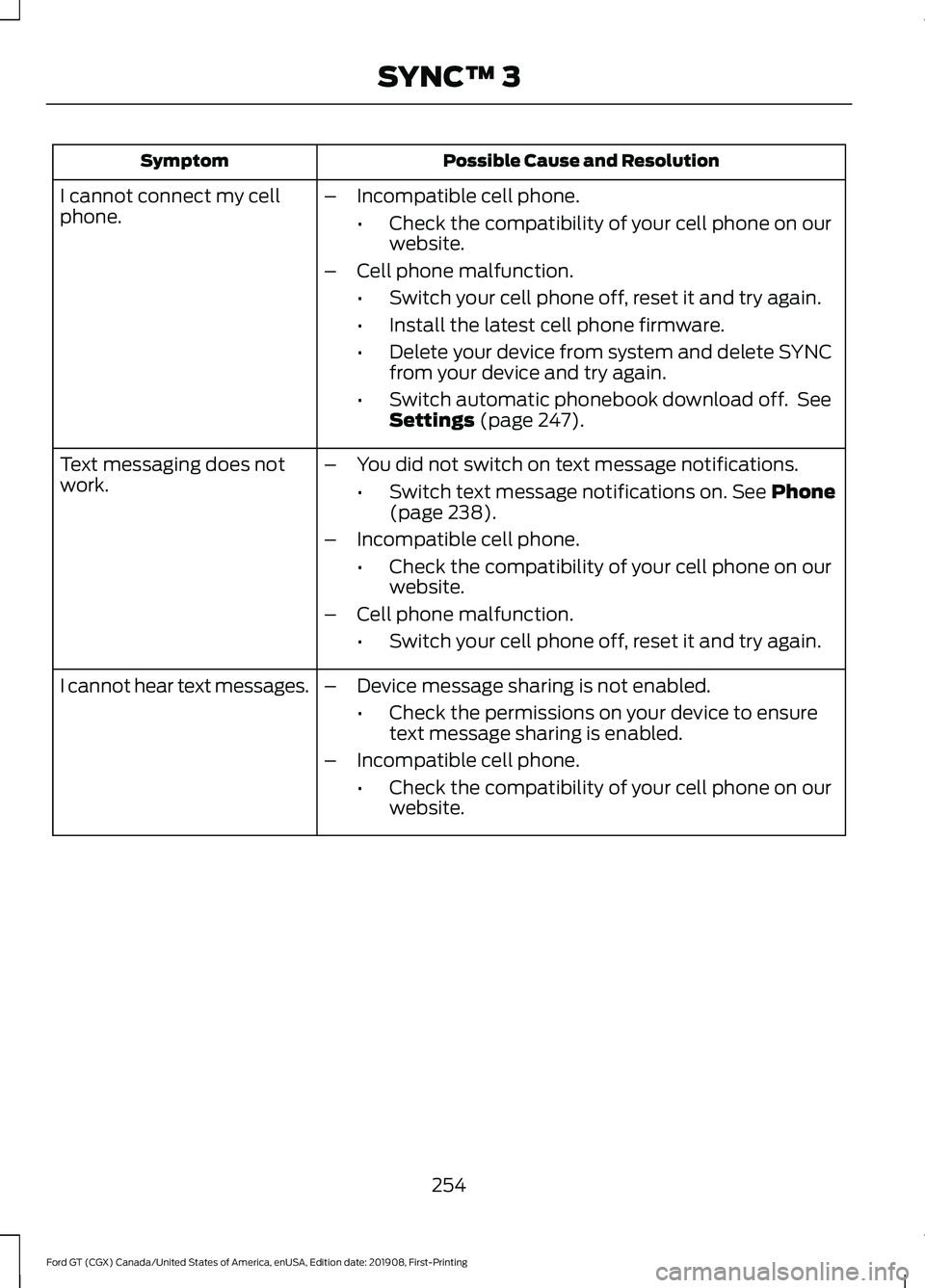
Possible Cause and Resolution
Symptom
–Incompatible cell phone.
•Check the compatibility of your cell phone on our
website.
– Cell phone malfunction.
•Switch your cell phone off, reset it and try again.
• Install the latest cell phone firmware.
• Delete your device from system and delete SYNC
from your device and try again.
• Switch automatic phonebook download off. See
Settings (page 247).
I cannot connect my cell
phone.
Text messaging does not
work.
–
You did not switch on text message notifications.
•Switch text message notifications on.
See Phone
(page 238).
– Incompatible cell phone.
•Check the compatibility of your cell phone on our
website.
– Cell phone malfunction.
•Switch your cell phone off, reset it and try again.
– Device message sharing is not enabled.
•Check the permissions on your device to ensure
text message sharing is enabled.
– Incompatible cell phone.
•Check the compatibility of your cell phone on our
website.
I cannot hear text messages.
254
Ford GT (CGX) Canada/United States of America, enUSA, Edition date: 201908, First-Printing SYNC™ 3
Page 263 of 316

Possible Cause and Solution
Symptom
You are using the old linking method.
Personal Profiles does not support your unsaved settings.
My personalized settings do
not save. A different personal profile is active.
Another user changed the settings for the wrong personal
profile.
You did not create a personal profile.
My profile will not recall. Personal Profiles is turned off.
The profile you requested is already active.
You did not link the memory button you are using to a
profile.
You did not link the remote control you are using to a
profile.
You are using the wrong remote control.
You are pressing a button other than the unlock or remote
start on a linked remote control.
You deleted the personal profile.
You switched the personal profiles off.
My preset positions recall,
but my profile does not.
The vehicle is in motion.
My profile recalls but my
preset positions do not. The preset positions are the same as the guest or previ-
ously active profile.
Unlink and relink your remote control in the Personal
Profiles menu. You may need to see your authorized dealer.
I lost a remote control.
You erased and reprogrammed the remote controls. This
could happen if you let a dealership add a new remote
control to replace a lost one.
I lost all profiles.
Someone performed a master reset without your know-
ledge.
260
Ford GT (CGX) Canada/United States of America, enUSA, Edition date: 201908, First-Printing SYNC™ 3
Page 264 of 316

Resetting the System
1. Simultaneously press and hold the
seek up and the audio unit power
buttons until the screen goes black.
2. Wait three minutes to allow the system
to complete the reset.
3. Press the audio unit power button to switch the system on.
Note: You can reset the system to restore
functionality that has stopped working. The
system reset is designed to restore
functionality and not delete any data that
you have stored.
Additional Information and
Assistance
For additional information and assistance,
we recommend that you contact an
authorized dealer or refer to our website.
261
Ford GT (CGX) Canada/United States of America, enUSA, Edition date: 201908, First-Printing SYNC™ 3
Page 314 of 316
Spare Wheel
See: Changing a Road Wheel....................... 205
Special Notices.................................................11
Additional Warranty Information..................... 11
Certified Ford GT Service Dealer..................... 12
New Vehicle Limited Warranty.......................... 11
On Board Diagnostics Data Link Connector............................................................ 12
Special Instructions.............................................. 12
Special Operating Conditions Scheduled Maintenance..............................................266
Engine Air Filter and Cabin Air Filter Replacement..................................................266
Hot Climate Oil Change Intervals................266
Operating at High Speeds and Track Days................................................................... 266
Speed Control See: Cruise Control............................................ 120
Stability Control
.............................................115
Principle of Operation........................................ 115
Starting and Stopping the Engine............91 General Information............................................. 91
Starting the Engine........................................92 Failure to Start....................................................... 93
Fast Restart............................................................ 93
Guarding Against Exhaust Fumes.................94
Important Ventilating Information................94
Stopping the Engine When Your Vehicle is Moving................................................................. 93
Stopping the Engine When Your Vehicle is Stationary.......................................................... 93
Steering.............................................................121
Steering Wheel Lock.....................................92
Steering Wheel
...............................................56
Storage Compartments..............................90
Supplementary Restraints System.........36 Principle of Operation........................................ 36
Symbols Glossary.............................................5
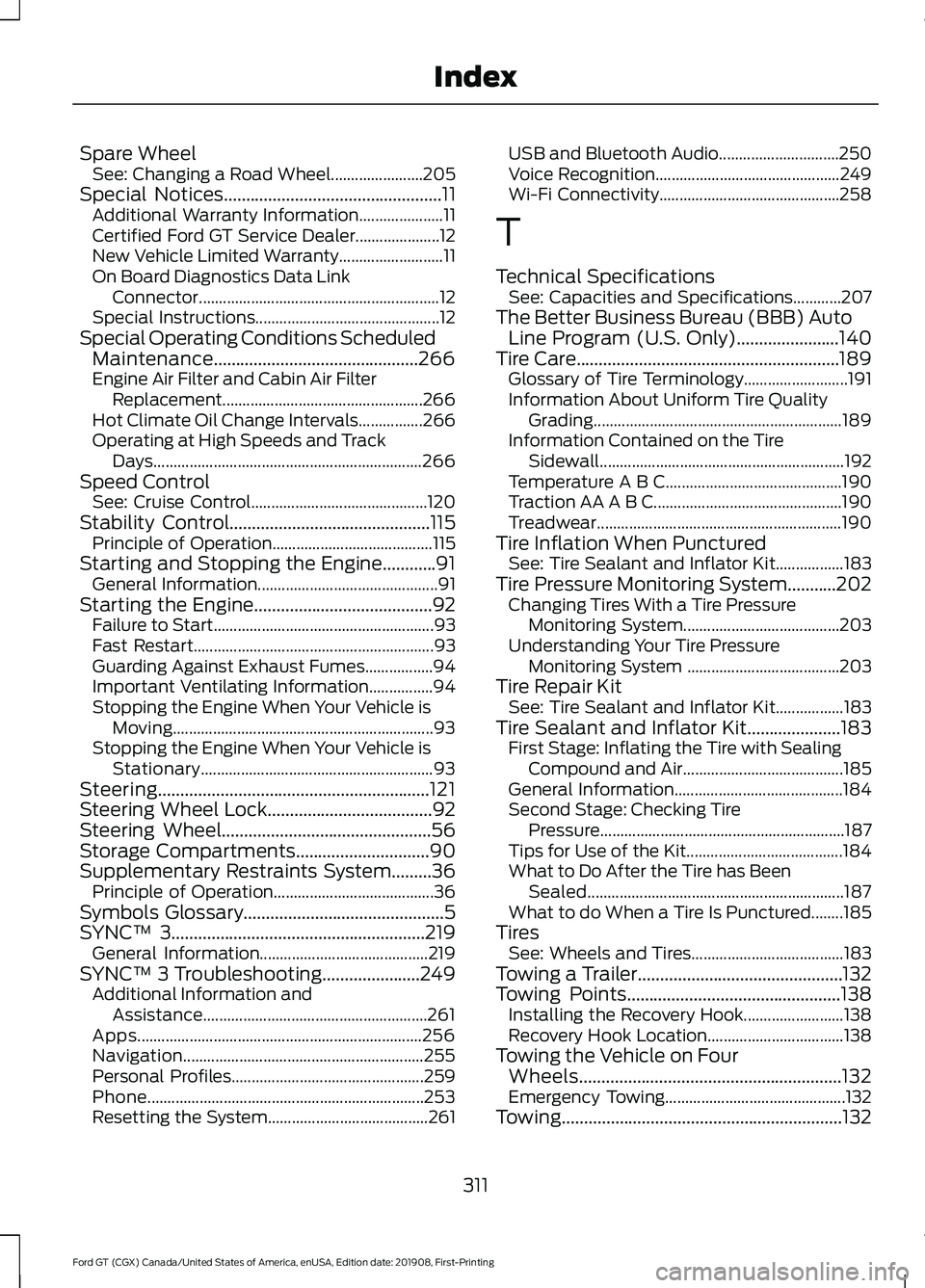
SYNC™ 3
.........................................................219
General Information.......................................... 219
SYNC™ 3 Troubleshooting
......................249
Additional Information and
Assistance........................................................ 261
Apps....................................................................... 256
Navigation............................................................ 255
Personal Profiles................................................ 259
Phone..................................................................... 253
Resetting the System........................................ 261USB and Bluetooth Audio..............................
250
Voice Recognition.............................................. 249
Wi-Fi Connectivity............................................. 258
T
Technical Specifications See: Capacities and Specifications............207
The Better Business Bureau (BBB) Auto Line Program (U.S. Only)
.......................140
Tire Care...........................................................189 Glossary of Tire Terminology.......................... 191
Information About Uniform Tire Quality Grading.............................................................. 189
Information Contained on the Tire Sidewall............................................................. 192
Temperature A B C............................................ 190
Traction AA A B C............................................... 190
Treadwear............................................................. 190
Tire Inflation When Punctured See: Tire Sealant and Inflator Kit.................183
Tire Pressure Monitoring System...........202 Changing Tires With a Tire Pressure
Monitoring System....................................... 203
Understanding Your Tire Pressure Monitoring System ...................................... 203
Tire Repair Kit See: Tire Sealant and Inflator Kit.................183
Tire Sealant and Inflator Kit.....................183 First Stage: Inflating the Tire with Sealing
Compound and Air........................................ 185
General Information.......................................... 184
Second Stage: Checking Tire Pressure............................................................. 187
Tips for Use of the Kit....................................... 184
What to Do After the Tire has Been Sealed................................................................ 187
What to do When a Tire Is Punctured........185
Tires See: Wheels and Tires...................................... 183
Towing a Trailer..............................................132
Towing Points
................................................138
Installing the Recovery Hook......................... 138
Recovery Hook Location.................................. 138
Towing the Vehicle on Four Wheels...........................................................132
Emergency Towing............................................. 132
Towing
...............................................................132
311
Ford GT (CGX) Canada/United States of America, enUSA, Edition date: 201908, First-Printing Index