2020 FORD FUSION brake
[x] Cancel search: brakePage 113 of 497

Keys and Intelligent Access
Action
Message
A reminder to press the brake while starting your vehicle.
To START Press Brake
The system does not detect a key in your vehicle. See KeylessStarting (page 145).
No Key Detected
You pressed the start/stop button to switch off the engine
and your vehicle does not detect your intelligent access key inside your vehicle.
Restart Now or Key is
Needed
Your vehicle is in the run ignition state.
Accessory Power is
Active
There is a problem with your vehicle ’s starting system. Contact
an authorized dealer for service.
Starting System Fault
You have successfully programmed an intelligent access keyto the system.
Key Program Successful
You have failed to program an intelligent access key to thesystem.
Key Program Failure
You have programmed the maximum number of keys to the system.
Max Number of Keys
Learned
You have not programmed enough keys to the system.
Not Enough Keys
Learned
The key battery is low. Change the battery as soon as possible.
Key Battery Low Replace
Soon
An attempt is made to program a spare key using two existing keys.
Could Not Program
Integrated Key
A reminder that you are exiting your vehicle and the engine is on.
Vehicle is ON
110
Fusion (CC7) Canada/United States of America, enUSA, Edition date: 201905, Second-Printing Information Displays
Page 114 of 497

Lane Keeping System
Action
Message
The system has malfunctioned. Contact your authorizeddealer as soon as possible.
Lane Keeping Sys.
Malfunction Service Required
The system has detected a condition that has caused thesystem to be temporarily unavailable.
Front Camera Tempor-
arily Not Available
The system has detected a condition that requires the wind-shield to be cleaned to operate properly.
Front Camera Low Visib-
ility Clean Screen
The system has malfunctioned. Contact your authorizeddealer as soon as possible.
Front Camera Malfunc-
tion Service Required
The system requests you to keep your hands on the steering wheel.
Keep Hands on Steering
Wheel
Maintenance Action
Message
Stop your vehicle as soon as safely possible and turn off the
engine. Check the oil level. If the warning stays on or continues to come on with your engine running, contact an authorized dealer as soon as possible.
Low Engine Oil Pressure
The engine oil life remaining is 10% or less.
Change Engine Oil Soon
The oil life left is at 0%.
Oil Change Required
The brake fluid level is low, inspect the brake system immedi-ately. See Brake Fluid Check (page 268).
Brake Fluid Level Low
The brake system needs servicing. Stop your vehicle in a safeplace. Contact an authorized dealer.
Check Brake System
The engine coolant temperature is excessively high. Stop
your vehicle in a safe place and allow the engine to cool. If the problem persists, contact an authorized dealer. See Engine Coolant Check
(page 262).
Engine Coolant Over
Temperature
111
Fusion (CC7) Canada/United States of America, enUSA, Edition date: 201905, Second-Printing Information Displays
Page 116 of 497
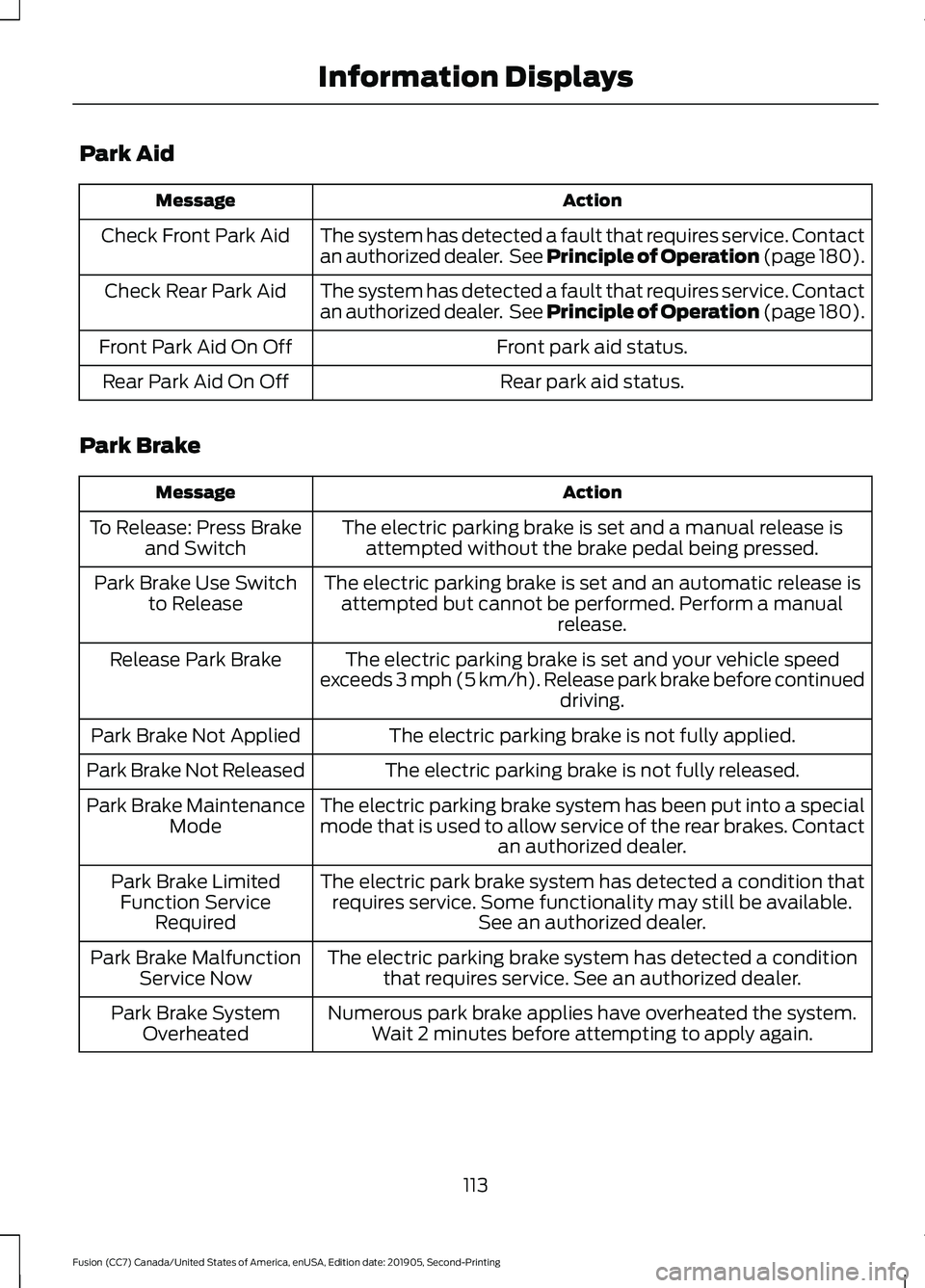
Park Aid
Action
Message
The system has detected a fault that requires service. Contact
an authorized dealer. See Principle of Operation (page 180).
Check Front Park Aid
The system has detected a fault that requires service. Contact
an authorized dealer. See Principle of Operation (page 180).
Check Rear Park Aid
Front park aid status.
Front Park Aid On Off
Rear park aid status.
Rear Park Aid On Off
Park Brake Action
Message
The electric parking brake is set and a manual release isattempted without the brake pedal being pressed.
To Release: Press Brake
and Switch
The electric parking brake is set and an automatic release isattempted but cannot be performed. Perform a manual release.
Park Brake Use Switch
to Release
The electric parking brake is set and your vehicle speed
exceeds 3 mph (5 km/h). Release park brake before continued driving.
Release Park Brake
The electric parking brake is not fully applied.
Park Brake Not Applied
The electric parking brake is not fully released.
Park Brake Not Released
The electric parking brake system has been put into a special
mode that is used to allow service of the rear brakes. Contactan authorized dealer.
Park Brake Maintenance
Mode
The electric park brake system has detected a condition thatrequires service. Some functionality may still be available. See an authorized dealer.
Park Brake Limited
Function Service Required
The electric parking brake system has detected a conditionthat requires service. See an authorized dealer.
Park Brake Malfunction
Service Now
Numerous park brake applies have overheated the system.Wait 2 minutes before attempting to apply again.
Park Brake System
Overheated
113
Fusion (CC7) Canada/United States of America, enUSA, Edition date: 201905, Second-Printing Information Displays
Page 117 of 497

Power Steering
Action
Message
The power steering system detects a condition that requiresservice. Contact an authorized dealer.
Steering Fault Service
Now
The power steering system is not working. Stop your vehiclein a safe place. Contact an authorized dealer.
Steering Loss Stop
Safely
The power steering system detects a condition that requiresservice. Contact an authorized dealer.
Steering Assist Fault
Service Required
Pre-Collision Assist Action
Message
There is a system malfunction with the pre-collision assist
system. The system will be disabled. Contact an authorized dealer as soon as possible.
Pre-Collision Assist
Malfunction
The pre-collision assist system radar is blocked because of
poor radar visibility due to bad weather or ice, mud, water in front of the radar. Driver can typically clean the sensor to
resolve. Contact an authorized dealer as soon as possible.
Pre-Collision Assist Not
Available Sensor Blocked
There is a system malfunction with the pre-collision assist
system. The system will be disabled. Contact an authorized dealer as soon as possible.
Pre-Collision Assist Not
Available
Remote Start Action
Message
A reminder to turn the key on to drive your vehicle after a remote start.
To Drive: Turn Key to On
A reminder to apply the brake and push the gearshift buttonto drive your vehicle after a remote start.
To Drive: Press Brake
and Start Button
114
Fusion (CC7) Canada/United States of America, enUSA, Edition date: 201905, Second-Printing Information Displays
Page 118 of 497

Seats
Action
Message
A reminder that memory seats are not available while driving.
Memory Recall Not
Permitted While Driving
Shows where you have saved your memory setting.
Memory {0} Saved
Starting System Action
Message
A reminder to apply the brake when starting your vehicle.
To START Press Brake
The starter is attempting to start your vehicle.
Engine Start Pending
Please Wait
The system has cancelled the pending start.
Pending Start Cancelled
The starter has exceeded its cranking time in attempting tostart your vehicle.
Cranking Time Exceeded
Tire Pressure Monitoring System Action
Message
One or more tires on your vehicle has low tire pressure. SeeTire Pressure Monitoring System (page 304).
Tire Pressure Low
The tire pressure monitoring system is malfunctioning. If thewarning stays on or continues to come on, contact an
authorized dealer. See
Tire Pressure Monitoring System (page 304).
Tire Pressure Monitor
Fault
A tire pressure sensor is malfunctioning or your spare tire is inuse. See
Tire Pressure Monitoring System (page 304). If
the warning stays on or continues to come on, contact an authorized dealer as soon as possible.
Tire Pressure Sensor
Fault
115
Fusion (CC7) Canada/United States of America, enUSA, Edition date: 201905, Second-Printing Information Displays
Page 119 of 497

Traction Control
Action
Message
The status of the traction control system after you switchedit off or on. See Using Traction Control (page 177).
Traction Control Off /
Traction Control On
A spinout has occurred and the hazards are on.
Spinout Detected
Hazards Activated
Transmission Action
Message
Contact an authorized dealer.
Transmission Malfunc-
tion Service Now
The transmission is overheating and needs to cool. Stop in asafe place as soon as it is possible.
Transmission Over-
heating Stop Safely
The transmission has overheated and needs to cool. Stop ina safe place as soon as it is possible.
Transmission Over
Temperature Stop Safely
Contact an authorized dealer.
Transmission Service
Required
Transmission is getting hot. Stop to let it cool.
Transmission Too Hot
Press Brake
The transmission has limited functionality. See an authorized dealer.
Transmission Limited
Function See Manual
Transmission is too cold. Wait for it to warm up before you drive.
Transmission Warming
Up Please Wait
A reminder to shift into park.
Transmission Not in Park
You need to depress the brake pedal.
Press Brake Pedal
Displays when a button needs to be pressed again to enter
neutral hold. See
Automatic Transmission (page 163).
Select S to confirm Stay
in Neutral Mode
Select L to Confirm Stay in Neutral Mode
The transmission has adjusted the shift strategy.
Transmission Adjusted
116
Fusion (CC7) Canada/United States of America, enUSA, Edition date: 201905, Second-Printing Information Displays
Page 129 of 497

Recommended Settings for
Heating
1. Adjust the blower motor speed to the
center setting.
2. Adjust the temperature control to the midway point of the hot settings.
3. Direct air to the footwell air vents.
Quickly Cooling the Interior
1. Select MAX A/C.
2. Drive with the windows open for a short
period of time.
Recommended Settings for
Cooling
1. Adjust the blower motor speed to the center setting.
2. Adjust the temperature control to the midway point of the cold settings.
3. Direct air to the instrument panel air vents.
Vehicle Stationary for Extended
Periods During Extreme High
Ambient Temperatures
1. Apply the parking brake.
2. Place your vehicle in park (P) or neutral.
3. Select
MAX A/C.
4. Adjust the blower motor speed to the lowest speed setting.
Defogging the Side Windows in
Cold Weather
1. Direct air to the instrument panel and windshield air vents.
2. Press and release
A/C.
3. Adjust the temperature control to the setting you prefer.
4. Adjust the blower motor speed to the highest setting. 5. Direct air toward the side windows.
6. Close the instrument panel air vents.
HEATED REAR WINDOW
Press the button to clear the rear
window of thin ice and fog. The
heated rear window turns off
after a short period of time.
Note: Do not use harsh chemicals, razor
blades or other sharp objects to clean or
remove decals from the inside of the heated
rear window. The vehicle warranty may not
cover damage to the heated rear window
grid lines.
HEATED EXTERIOR MIRRORS
(IF EQUIPPED)
When you switch the heated rear window
on, the heated exterior mirrors turn on.
Note: Do not remove ice from the mirrors
with a scraper or adjust the mirror glass
when it is frozen in place.
Note: Do not clean the mirror housing or
glass with harsh abrasives, fuel or other
petroleum-based cleaning products. The
vehicle warranty may not cover damage
caused to the mirror housing or glass.
CABIN AIR FILTER
Your vehicle is equipped with a cabin air
filter, which gives you and your passengers
the following benefits:
• It improves your driving comfort by
reducing particle concentration.
• It improves the interior compartment
cleanliness.
• It protects the climate control
components from particle deposits.
126
Fusion (CC7) Canada/United States of America, enUSA, Edition date: 201905, Second-Printing Climate ControlE184884
Page 148 of 497

GENERAL INFORMATION
WARNING: Extended idling at high
engine speeds can produce very high
temperatures in the engine and exhaust
system, creating the risk of fire or other
damage. WARNING:
Do not park, idle or
drive your vehicle on dry grass or other
dry ground cover. The emission system
heats up the engine compartment and
exhaust system, creating the risk of fire. WARNING: Do not start the engine
in a closed garage or in other enclosed
areas. Exhaust fumes can be toxic.
Always open the garage door before you
start the engine. WARNING:
Exhaust leaks may
result in entry of harmful and potentially
lethal fumes into the passenger
compartment. If you smell exhaust
fumes inside your vehicle, have your
vehicle inspected immediately. Do not
drive if you smell exhaust fumes.
If you disconnect the battery, your vehicle
may exhibit some unusual driving
characteristics for approximately
5 mi
(8 km) after you reconnect it. This is
because the engine management system
must realign itself with the engine. You
can disregard any unusual driving
characteristics during this period.
The powertrain control system meets all
Canadian interference-causing equipment
standard requirements regulating the
impulse electrical field or radio noise.
When you start the engine, avoid pressing
the accelerator pedal before and during
operation. Only use the accelerator pedal
when you have difficulty starting the
engine. KEYLESS STARTING
Note:
The system may not function if the
intelligent access key is close to metal
objects or electronic devices, for example
keys or a cell phone.
Note: A valid intelligent access key must
be located inside your vehicle to switch the
ignition on and start your vehicle.
Ignition Modes The keyless starting system has three
modes:
Off:
Turns the ignition off.
• Without applying the brake pedal,
press and release the button once
when the ignition is in the on mode, or
when your vehicle is running but is not
moving.
On:
All electrical circuits are operational
and the warning lamps and indicators
illuminate.
• Without applying the brake pedal,
press and release the button once.
Start:
Starts your vehicle. The engine may
not start when your vehicle starts.
• Press the brake pedal, and then press
the button for any length of time. An
indicator light on the button illuminates
when the ignition is on and when your
vehicle starts.
145
Fusion (CC7) Canada/United States of America, enUSA, Edition date: 201905, Second-Printing Starting and Stopping the EngineE144447