2020 FORD F-150 climate control
[x] Cancel search: climate controlPage 512 of 625
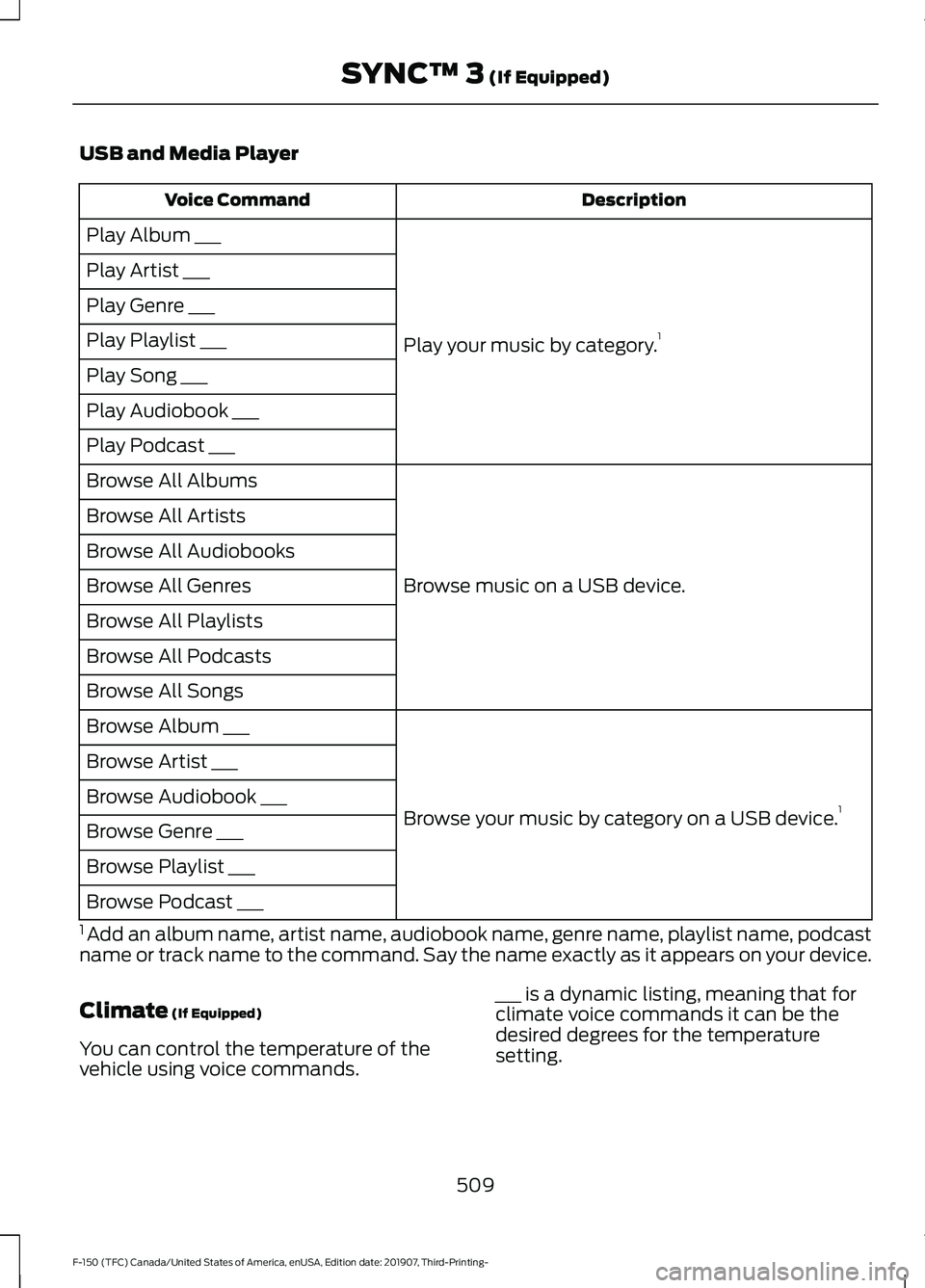
USB and Media Player
Description
Voice Command
Play your music by category. 1
Play Album ___
Play Artist ___
Play Genre ___
Play Playlist ___
Play Song ___
Play Audiobook ___
Play Podcast ___
Browse music on a USB device.
Browse All Albums
Browse All Artists
Browse All Audiobooks
Browse All Genres
Browse All Playlists
Browse All Podcasts
Browse All Songs
Browse your music by category on a USB device. 1
Browse Album ___
Browse Artist ___
Browse Audiobook ___
Browse Genre ___
Browse Playlist ___
Browse Podcast ___
1 Add an album name, artist name, audiobook name, genre name, playlist name, podcast
name or track name to the command. Say the name exactly as it appears on your device.
Climate (If Equipped)
You can control the temperature of the
vehicle using voice commands. ___ is a dynamic listing, meaning that for
climate voice commands it can be the
desired degrees for the temperature
setting.
509
F-150 (TFC) Canada/United States of America, enUSA, Edition date: 201907, Third-Printing- SYNC™ 3
(If Equipped)
Page 526 of 625

Supported USB file systems include: FAT,
exFAT, and NTFS.
SYNC 3 is also able to organize the media
from your USB device by metadata tags.
Metadata tags, which are descriptive
software identifiers embedded in the
media files, provide information about the
file.
If your indexed media files contain no
information embedded in these metadata
tags, SYNC 3 may classify the empty
metadata tags as unknown.
SYNC 3 is capable of indexing up to
50,000 songs per USB device, for up to 10
devices.
CLIMATE
Touch the climate button on the
touchscreen to access your climate control
features.
Note:
You can switch temperature units
between Fahrenheit and Celsius. See
Settings (page 535).
Accessing the Climate Control
Menu Touch the button to access
additional controls for the front
climate system.
Directing the Airflow Touch the button to direct
airflow to the windshield air
vents and de-mister.
Touch the button to direct
airflow to the instrument panel
air vents.
Touch the button to direct
airflow to the footwell air vents. You can direct air through any combination
of these air vents.
Setting the Blower Motor Speed Touch up or down to increase or
decrease the volume of air that
circulates in your vehicle.
Setting the Temperature
Touch up or down on the left-hand
temperature control to set the left-hand
temperature.
Note: This control also adjusts the
right-hand side temperature when you
switch off dual zone mode.
Touch up or down on the right-hand
temperature control to set the right-hand
temperature.
Switching Auto Mode On and Off Touch the button to switch on
automatic operation, then set
the temperature.
The system adjusts the blower motor
speed, air distribution, air conditioning
operation, and outside or recirculated air
to reach and maintain the temperature you
have set.
Switching the Air Conditioning On
and Off A pop-up appears on the screen
to display the air conditioning
options.
MAX A/C:
Touch the button to activate
and maximize cooling. The driver and
passenger temperatures are set to LO,
recirculated air flows through the
instrument panel vents, air conditioning
automatically turns on and the fan
automatically adjusts to the highest speed.
523
F-150 (TFC) Canada/United States of America, enUSA, Edition date: 201907, Third-Printing- SYNC™ 3
(If Equipped)E265038
Page 527 of 625

A/C: Touch to switch the air conditioning
on or off. Use A/C with recirculated air to
improve cooling performance and
efficiency.
Note: In certain conditions, such as
maximum defrost, the air conditioning
compressor may continue to operate even
though you switch off the air conditioning.
Switching the Climate Control On
and Off Touch the button.
Switching the Climate Controlled
Seats On and Off Touch the button to cycle
through the various climate
controlled seat settings.
Switching Dual Zone Mode On and
Off Touch the button to switch on
temperature control for the
right-hand side of the vehicle.
Switching the Heated Exterior
Mirrors On and Off Touch the button.
Switching the Heated Windshield
On and Off Touch the button to clear the
windshield of thin ice and fog.
The heated windshield turns off
after a short period of time. Switching the Heated Rear
Window On and Off Touch the button to clear the
rear window of thin ice and fog.
Switching the Heated Seats On
and Off Touch the button to cycle
through the various heat
settings.
Switching the Heated Steering
Wheel On and Off Touch the button.
Switching Maximum Air
Conditioning On and Off Touch the button for maximum
cooling.
Recirculated air flows through the
instrument panel air vents, air conditioning
turns on and the blower motor adjusts to
the highest speed.
Switching Maximum Defrost On
and Off Touch the button for maximum
defrosting.
Air flows through the windshield air vents,
and the blower motor adjusts to the
highest speed.
You can also use this setting to defog and
clear the windshield of a thin covering of
ice.
Note: To prevent window fogging, you
cannot select recirculated air when
maximum defrost is on.
524
F-150 (TFC) Canada/United States of America, enUSA, Edition date: 201907, Third-Printing- SYNC™ 3
(If Equipped) E265282 E265280 E266189 E184884
Page 528 of 625

Note:
The heated rear window also turns
on when you select maximum defrost.
Switching Recirculated Air On and
Off Touch the button to switch
between outside air and
recirculated air.
The air currently in the passenger
compartment recirculates. This may
reduce the time needed to cool the interior,
when used with A/C, and reduce unwanted
odors from entering your vehicle.
Note: Recirculated air may turn off, or
prevent you from switching on, in all air flow
modes except MAX A/C to reduce the risk
of fogging. Recirculation may also turn on
and off in various air distribution control
combinations during hot weather to improve
cooling efficiency.
Switching the Ventilated Seats On
and Off Touch the button to cycle
through the various ventilated
seat settings.
Accessing Rear Climate Controls Touch the button to access
additional controls for the rear
climate system.
Rear Climate Control Lock
Indicator Touch the button.
When on, you can only operate
the rear passenger settings
through the front controls. Switching Rear Auto Mode On and
Off Touch the button to switch on
rear automatic operation, then
set the temperature.
Switching the Rear Climate
Controlled Seats On and Off Touch the button to cycle
through the various climate
controlled seat settings.
Switching the Rear Heated Seats
On and Off Touch the button to cycle
through the various heat
settings.
Switching the Rear Ventilated
Seats On and Off Touch the button to cycle
through the various ventilated
seat settings.
PHONE WARNING: Driving while distracted
can result in loss of vehicle control, crash
and injury. We strongly recommend that
you use extreme caution when using any
device that may take your focus off the
road. Your primary responsibility is the
safe operation of your vehicle. We
recommend against the use of any
hand-held device while driving and
encourage the use of voice-operated
systems when possible. Make sure you
are aware of all applicable local laws
that may affect the use of electronic
devices while driving.
525
F-150 (TFC) Canada/United States of America, enUSA, Edition date: 201907, Third-Printing- SYNC™ 3
(If Equipped) E268558 E270447 E265289 E265282 E268558
Page 569 of 625

California Fuel Filter Replacement
If you register your vehicle in California, the
California Air Resources Board has
determined that the failure to perform this
maintenance item does not nullify the
emission warranty or limit recall liability
before the completion of your vehicle's
useful life. Ford Motor Company, however,
urges you to have all recommended
maintenance services performed at the
specified intervals and to record all vehicle
service.
Hot Climate Oil Change Intervals
Vehicles operating in the Middle East,
North Africa, Sub-Saharan Africa or
locations with similar climates using an
American Petroleum Institute (API)
Certified for Gasoline Engines (Certification
mark) oil of SM or SN quality, the normal
oil change interval is 3,000 mi (4,800 km).
If the available API SM or SN oils are not
available, then the oil change interval is
1,800 mi (2,900 km).
Engine Air Filter Replacement
The life of the engine air filter is dependent
on exposure to dusty and dirty conditions.
Vehicles operated in these conditions
require frequent inspection and
replacement of the engine air filter. Diesel Particulate Filter
Over time, a slight amount of ash builds
up in the diesel particulate filter, which is
not removed during the regeneration
process. The filter may need to be replaced
with a new or remanufactured part at
approximately 250,000 mi (400,000 km).
Actual mileage varies depending on engine
and vehicle operating conditions.
In this case, the engine control system sets
a service light (wrench icon) to inform you
to bring your vehicle to the dealer for
service. If there are any issues with the
oxidation catalyst or particulate filter
system, a service light (wrench or engine
icon) sets by the engine control system to
inform you to bring your vehicle into a
dealer for service.
SCHEDULED MAINTENANCE
RECORD
After the scheduled maintenance services
are performed, record the Repair Order #,
Distance and Engine Hours in the boxes
provided.
566
F-150 (TFC) Canada/United States of America, enUSA, Edition date: 201907, Third-Printing- Scheduled Maintenance
Page 610 of 625

3
360 Degree Camera...................................250
Camera Views...................................................... 251
Front Camera...................................................... 252
Side Camera........................................................ 252
4
4WD See: Four-Wheel Drive..................................... 223
A
A/C See: Climate Control.......................................... 151
About This Manual...........................................9
ABS See: Brakes........................................................... 233
ABS driving hints See: Hints on Driving With Anti-Lock
Brakes................................................................ 234
Accessories....................................................550
Accessories See: Replacement Parts
Recommendation............................................ 16
ACC See: Using Adaptive Cruise Control - Vehicles
With: Adaptive Cruise Control.................254
Active Park Assist........................................243 Automatic Steering into Parking
Space................................................................ 245
Deactivating the Park Assist Feature.........246
Troubleshooting the System......................... 246
Using Active Park Assist.................................. 244
Adjustable Pedals..........................................92
Adjusting the Headlamps.........................375 Horizontal Aim Adjustment........................... 376
Vertical Aim Adjustment................................. 375
Adjusting the Pedals.....................................92
Adjusting the Steering Wheel - Vehicles With: Manual Adjustable Steering
Column
...........................................................88
Adjusting the Steering Wheel - Vehicles With: Power Adjustable Steering
Column
...........................................................88
End of Travel Position........................................ 89
Memory Feature................................................... 89Airbag Disposal
...............................................59
Air Conditioning See: Climate Control.......................................... 151
Air Filter See: Changing the Engine Air Filter -
Diesel................................................................ 364
See: Changing the Engine Air Filter - Gasoline........................................................... 364
Alarm See: Anti-Theft Alarm........................................ 84
Ambient Lighting
...........................................99
Adjusting the Brightness................................... 99
Switching Ambient Lighting Off..................... 99
Switching Ambient Lighting On..................... 99
Anti-Theft Alarm
............................................84
Arming the Alarm................................................. 85
Disarming the Alarm........................................... 85
Using the System................................................. 85
Appendices.....................................................577
Apps..................................................................532 SiriusXM Traffic and Travel Link................... 534
Using Apps on an Android Device...............533
Using Apps on an iOS Device........................ 533
Using Mobile Navigation on an Android Device................................................................ 533
At a Glance.......................................................20
Audible Warnings and Indicators
............118
Airbag Secondary Warning.............................. 118
Beltminder Warning........................................... 118
Door Ajar Warning............................................... 118
Headlamps On Warning................................... 118
Key in Ignition Warning...................................... 118
Keyless Warning Alert........................................ 118
Parking Brake On Warning............................... 119
Rear Park Aid Warning....................................... 118
Service AdvanceTrac Warning........................ 119
Audio Control
..................................................90
You can operate the following functions
with the control:.............................................. 90
Audio System
................................................478
General Information......................................... 478
Audio Unit - Vehicles With: SYNC 3.......................................................................481
Adjusting the Volume....................................... 481
Changing Radio Stations................................. 481
Selecting the Audio Modes........................... 482
Setting a Memory Preset................................ 482
Switching the Audio Unit On and Off........482
607
F-150 (TFC) Canada/United States of America, enUSA, Edition date: 201907, Third-Printing- Index
Page 611 of 625

Using Seek, Fast Forward and
Reverse............................................................. 482
Audio Unit - Vehicles Without: SYNC 3.......................................................................478
Accessing the Apps Menu.............................. 479
Accessing the Clock Settings........................ 479
Accessing the Media Source Menu.............479
Accessing the Phone Features..................... 479
Accessing the Settings Menu........................ 479
Accessing the Sound Settings...................... 479
Adjusting the Volume....................................... 479
Changing Radio Stations................................ 479
Listening to the Radio..................................... 480
Playing or Pausing Media............................... 480
Switching Radio Text On and Off...............480
Switching Repeat Mode On and Off.........480
Switching Shuffle Mode On and Off.........480
Switching the Audio Unit On and Off.......480
Switching the Display On and Off..............480
Using Seek, Fast Forward and Reverse............................................................ 480
Using the Display Control.............................. 480
Using the Number Block................................ 480
Autolamps........................................................96 Windshield Wiper Activated
Headlamps........................................................ 96
Automatic Climate Control.......................152 Directing the Airflow.......................................... 152
Setting the Blower Motor Speed.................. 153
Setting the Temperature.................................. 153
Switching Auto Mode On and Off................153
Switching Dual Zone Mode On and Off........................................................................\
153
Switching Maximum Air Conditioning On and Off............................................................... 153
Switching Maximum Defrost On and Off........................................................................\
153
Switching Recirculated Air On and Off....................................................................... 154
Switching the Air Conditioning On and Off........................................................................\
153
Switching the Climate Control On and Off........................................................................\
153
Automatic High Beam Control.................101
Automatic High Beam Control Indicators.......................................................101
Automatic Transmission
............................217
Brake-Shift Interlock........................................ 220If Your Vehicle Gets Stuck in Mud or
Snow.................................................................. 222
Understanding the Shift Positions of your Automatic Transmission............................. 217
Understanding your SelectShift™ Automatic Transmission............................. 219
Automatic Transmission Fluid Check..............................................................371
Auto-Start-Stop...........................................190 Disabling Auto-Start-Stop............................... 191
Enabling Auto-Start-Stop.............................. 190
Autowipers
.......................................................93
Auxiliary Power Points................................175
400 Watt AC Power Point............................... 175
DC Power Point.................................................... 175
Locations................................................................ 176
B
Battery See: Changing the 12V Battery...................... 373
Bed Access
....................................................286
Box Side Step..................................................... 286
Bed Extender...................................................80 Grocery Mode......................................................... 81
Tailgate Mode....................................................... 80
Bed Ramps
.....................................................287
Installing the Ramp Holder........................... 289
Stowing the Bed Ramp................................... 288
Using the Bed Ramp......................................... 287
Blind Spot Information System.............266 Blind Spot Information System with Trailer
Tow..................................................................... 267
Switching the System On and Off...............270
System Errors...................................................... 270
Using the Blind Spot Information System.............................................................. 267
BLIS See: Blind Spot Information System.........266
Body Styling Kits.........................................390
Bonnet Lock See: Opening and Closing the Hood..........355
Booster Seats
..................................................35
Types of Booster Seats...................................... 35
Brake Fluid Check.........................................372 Brake Fluid Service Interval............................ 372
Brakes...............................................................233 General Information.......................................... 233
608
F-150 (TFC) Canada/United States of America, enUSA, Edition date: 201907, Third-Printing- Index
Page 613 of 625

Changing a Bulb............................................377
Accessing the Halogen High Beam, Low
Beam and Direction Indicator
Bulbs................................................................... 377
Replacing Brake, Rear, Direction Indicator and Reverse Lamp Bulbs.......................... 380
Replacing Cargo Lamp and High-mount Brake Lamp Bulbs........................................ 380
Replacing Exterior Mounted Mirror Direction Indicator Lamp Bulbs................................... 381
Replacing Fog Lamp Bulbs............................ 379
Replacing LED Brake, Rear, Direction Indicator and Reverse Lamp
Bulbs................................................................. 380
Replacing LED Cargo Lamp, Spot Lamp and High-mount Brake Lamp Bulbs...............381
Replacing LED Direction Indicator and Side Marker Bulbs.................................................. 380
Replacing LED Fog lamp Bulbs................... 380
Replacing LED Headlamp Bulbs.................380
Replacing Side Marker Bulb........................... 379
Replacing the Halogen High Beam, Low Beam and Direction Indicator
Bulbs.................................................................. 378
Replacing the License Plate Lamp Bulb..................................................................... 381
Changing a Fuse...........................................353 Fuses...................................................................... 353
Changing a Road Wheel............................414
Dissimilar Spare Wheel and Tire Assembly
Information...................................................... 414
Jacking the Vehicle............................................ 418
Removing the Spare Tire.................................. 417
Removing the Vehicle Jack and Tool Bag...................................................................... 416
Stowing the Flat or Spare Tire...................... 420
Stowing the Vehicle Jack and Tool Bag..................................................................... 420
Tire Change Procedure..................................... 415
Changing the 12V Battery..........................373 Battery Management System....................... 374
Changing the Engine Air Filter - Diesel............................................................364
Air Filter Restriction Gauge............................ 365
Changing the Engine Air Filter - Gasoline
.......................................................364
Changing the Vehicle Wi-Fi Hotspot Name or Password...................................477 Changing the Wiper Blades......................377
Checking MyKey System Status..............69
MyKey Distance.................................................... 69
Number of Admin Keys...................................... 70
Number of MyKeys.............................................. 70
Checking the Wiper Blades......................376
Child Restraint and Seatbelt Maintenance.................................................48
Child Restraint Positioning..........................37
Child Safety
......................................................22
General Information............................................ 22
Child Safety Locks
.........................................39
Left-Hand Side..................................................... 39
Right-Hand Side................................................... 39
Cleaning Leather Seats.............................387 With King Ranch Edition................................. 387
Without King Ranch Edition.......................... 387
Cleaning Products
.......................................382
Materials............................................................... 382
Cleaning the Engine
...................................384
Cleaning the Exhaust - Diesel................385
Cleaning the Exterior..................................383 Cleaning the Headlamps................................ 383
Exterior Chrome Parts..................................... 383
Exterior Plastic Parts........................................ 383
Stripes or Graphics............................................ 383
Underbody........................................................... 384
Under Hood......................................................... 384
Cleaning the Instrument Panel and Instrument Cluster Lens........................386
Cleaning the Interior...................................385 Mirrors.................................................................... 386
Cleaning the Wheels..................................388
Cleaning the Windows and Wiper Blades...........................................................385
Clearing All MyKeys.......................................69
Climate............................................................523 Accessing Rear Climate Controls................525
Accessing the Climate Control Menu.........523
Directing the Airflow......................................... 523
Rear Climate Control Lock Indicator..........525
Setting the Blower Motor Speed.................523
Setting the Temperature................................. 523
Switching Auto Mode On and Off...............523
Switching Dual Zone Mode On and Off....................................................................... 524
Switching Maximum Air Conditioning On and Off.............................................................. 524
610
F-150 (TFC) Canada/United States of America, enUSA, Edition date: 201907, Third-Printing- Index