2020 FORD F-150 CD player
[x] Cancel search: CD playerPage 511 of 625

Description
Voice Command
Go to the next page.
Next Page
Go to the previous page.
Previous Page
1 Add the name of the feature to the command.
Entertainment
Audio Source Description
Voice Command
Use the radio.
Radio
Use the CD player.
CD Player
Use a Bluetooth device.
Bluetooth Stereo
Use a USB or media player.
USB
Radio Description
Voice Command
Listen to AM radio.
AM
Tune to a specific AM frequency.1
AM ___
Listen to SiriusXM radio.2
Sirius Channel ___
Listen to FM radio.
FM
Tune to a specific FM frequency.1
FM ___
1 Add the radio frequency to two decimal places to the command.
2 You can say the Sirius channel name or number such as "Sirius Channel 16" or "Sirius
The Pulse".
508
F-150 (TFC) Canada/United States of America, enUSA, Edition date: 201907, Third-Printing- SYNC™ 3 (If Equipped)
Page 512 of 625
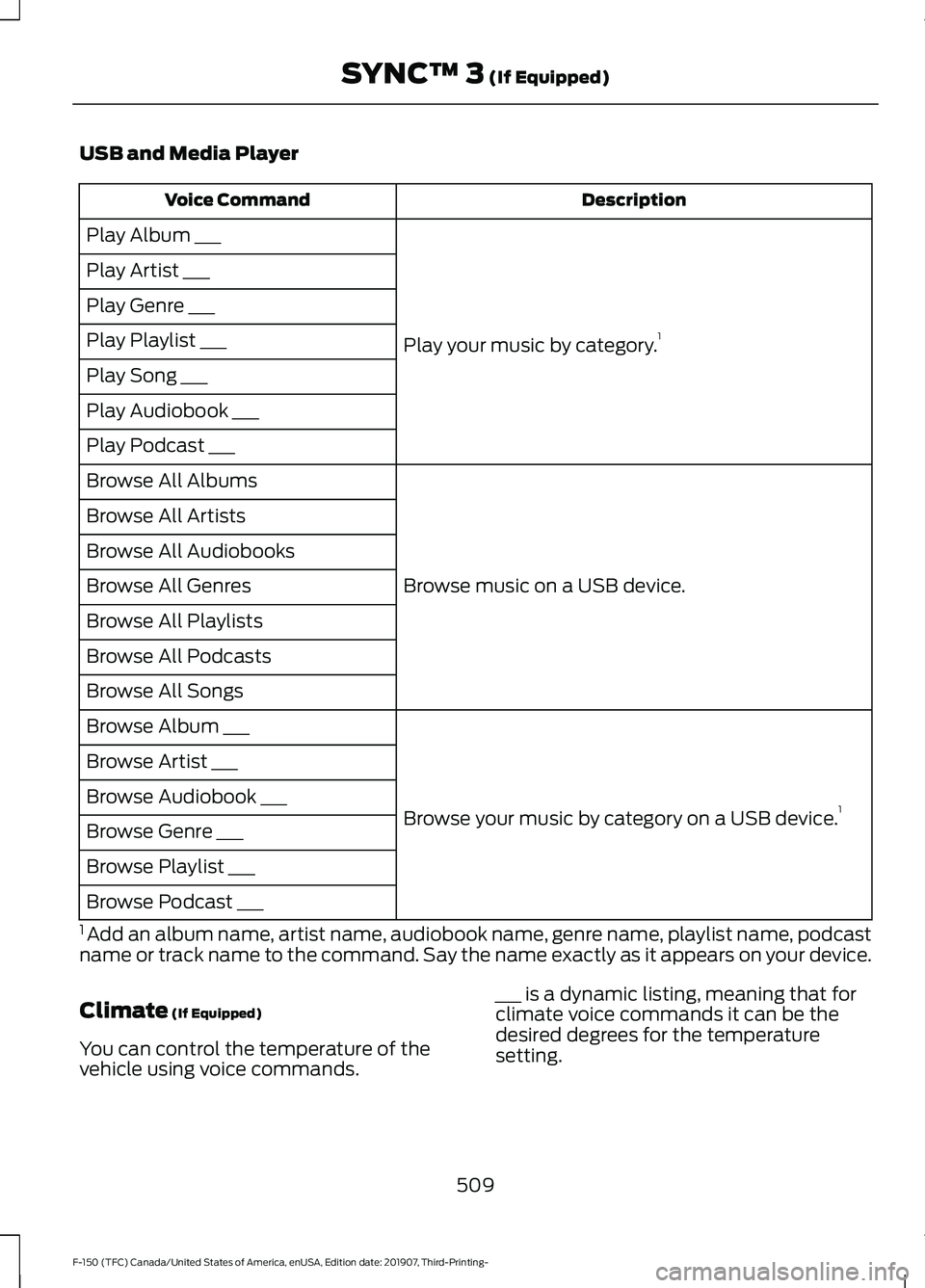
USB and Media Player
Description
Voice Command
Play your music by category. 1
Play Album ___
Play Artist ___
Play Genre ___
Play Playlist ___
Play Song ___
Play Audiobook ___
Play Podcast ___
Browse music on a USB device.
Browse All Albums
Browse All Artists
Browse All Audiobooks
Browse All Genres
Browse All Playlists
Browse All Podcasts
Browse All Songs
Browse your music by category on a USB device. 1
Browse Album ___
Browse Artist ___
Browse Audiobook ___
Browse Genre ___
Browse Playlist ___
Browse Podcast ___
1 Add an album name, artist name, audiobook name, genre name, playlist name, podcast
name or track name to the command. Say the name exactly as it appears on your device.
Climate (If Equipped)
You can control the temperature of the
vehicle using voice commands. ___ is a dynamic listing, meaning that for
climate voice commands it can be the
desired degrees for the temperature
setting.
509
F-150 (TFC) Canada/United States of America, enUSA, Edition date: 201907, Third-Printing- SYNC™ 3
(If Equipped)
Page 518 of 625

SiriusXM® Satellite Radio (If
Activated)
Note:
This feature may not be available in
all markets and requires an active
subscription. SiriusXM satellite radio is a
subscription-based satellite radio service
that broadcasts a variety of music, sports,
news, weather, traffic and entertainment
programming. Your factory-installed
SiriusXM satellite radio system includes
hardware and a limited subscription term
that begins on the date of sale or lease of
your vehicle. See an authorized dealer for
availability.
For more information on extended
subscription terms (a service fee is
required), the online media player and a
list of SiriusXM satellite radio channels,
and other features, please visit
www.siriusxm.com in the United States,
www.siriusxm.ca in Canada, or call
SiriusXM at 1-888-539-7474.
Note:
SiriusXM reserves the unrestricted
right to change, rearrange, add or delete
programming. This includes canceling,
moving or adding particular channels, and
its prices, at any time, with or without notice
to you. We are not responsible for any such
programming changes.
Note: This receiver includes the eCos
real-time operating system. eCos is
published under the eCos License.
The following buttons are available for SiriusXM: Action and Description
Menu Item
Touch this button to see a list of available stations.
Browse
A pop-up appears, allowing you to type in the call numbers of
a station.
Direct Tune
Once you enter the stations call numbers, you can select:The system tunes to the station you select.
Enter
You exit the pop-up and the current station
continues to play.
Cancel
You can press the backspace button to delete the previous
number.
515
F-150 (TFC) Canada/United States of America, enUSA, Edition date: 201907, Third-Printing- SYNC™ 3 (If Equipped)E234451
Page 525 of 625

Function
Button
Playlists
Artist
Albums
Songs
Genres
Podcasts
Audio books
Composers
This button allows you to choose a specific
letter to view within the category you are
browsing.
A-Z Jump
If available, this allows you to browse the
folders and files on your USB device.
Explore Device
USB Ports The USB ports are in the center console or
behind a small access door in the
instrument panel.
This feature allows you to plug in USB
media devices, memory sticks, flash drives
or thumb drives, and charge devices if they
support this feature. Select this option to play audio from your
USB device.
Apps
The system supports the use of certain
audio apps such as iHeartRadio through a
USB or Bluetooth enabled device.
Each app gives you different on-screen
options depending on the app's content.
See Apps (page 532).
Supported Media Players, Formats
and Metadata Information
The system is capable of hosting nearly
any digital media player, including iPod,
iPhone, and most USB drives.
Supported audio formats include MP3,
WMA, WAV, AAC, and FLAC.
Supported audio file extensions include
MP3, WMA, WAV, M4A, M4B, AAC, and
FLAC.
522
F-150 (TFC) Canada/United States of America, enUSA, Edition date: 201907, Third-Printing- SYNC™ 3
(If Equipped)E211463
Page 542 of 625

Possible Cause and Resolution
Symptom
–Incorrect device settings.
•Make sure that your device does not have an auto-
install program or active security settings.
• Check that your device is not set only to charge.
– Device lock screen enabled.
•Unlock your device before connecting it.
The system does not recog-
nize my device. –
Device limitation.
•Do not leave your device in your vehicle during very
hot or very cold weather conditions.
– Cable connection issue.
•Correctly connect the cable to your device and the
vehicle USB port.
– Incompatible cable.
•Use the cable recommended by the manufacturer
of your device.
The system does not under-
stand the name of a track or
artist. –
Device limitation. Bluetooth does not support voice
commands.
•Connect your device to a USB port.
• If you have an iOS device, press and hold the voice
control button on the steering wheel to use Siri to
play specific tracks.
I cannot stream audio from
my Bluetooth device. –
Incompatible device.
•Check the compatibility of your device on our
website.
– Device not connected.
•Pair your device. See Phone (page 525).
– Media player not running.
•Start the media player on your device.
The system does not recog-
nize the music on my device. –
Missing or incorrect audio file metadata, for example
artist, song title, album or genre.
•Repair the files on your device.
– Corrupt files.
•Repair the files on your device.
539
F-150 (TFC) Canada/United States of America, enUSA, Edition date: 201907, Third-Printing- SYNC™ 3
(If Equipped)
Page 616 of 625

Engine Immobilizer
See: Passive Anti-Theft System..................... 82
Engine Oil Check - Diesel..........................362 Adding Engine Oil.............................................. 363
Engine Oil Check - Gasoline.....................361 Adding Engine Oil............................................... 361
Engine Oil Dipstick - Diesel.......................361
Engine Oil Dipstick - Gasoline.................361
Engine Specifications - 2.7L EcoBoost™.................................................424
Drivebelt Routing............................................... 424
Engine Specifications - 3.0L Diesel.............................................................424
Drivebelt Routing............................................... 425
Engine Specifications - 3.3L....................425 Drivebelt Routing............................................... 425
Engine Specifications - 3.5L Ecoboost™.................................................426
Drivebelt Routing............................................... 426
Engine Specifications - 5.0L...................426 Drivebelt Routing................................................ 427
Entertainment................................................513 AM/FM Radio....................................................... 514
Apps........................................................................\
522
Bluetooth Stereo or USB................................. 521
CD (If equipped)................................................ 520
HD Radio ™ Information (If
Available).......................................................... 517
SiriusXM® Satellite Radio (If Activated)......................................................... 515
Sources................................................................... 514
Supported Media Players, Formats and Metadata Information................................. 522
USB Ports.............................................................. 522
Environment.....................................................19
EPB See: Electric Parking Brake............................. 234
Essential Towing Checks...........................314 Before Towing a Trailer.................................... 320
Hitches.................................................................... 315
Integrated Trailer Brake Controller...............316
Launching or Retrieving a Boat or Personal Watercraft (PWC)........................................ 320
Safety Chains....................................................... 316
Trailer Brakes........................................................ 316
Trailer Lamps........................................................ 319
Trailer Towing Connector................................. 314
Using a Step Bumper........................................ 319When Towing a Trailer.....................................
320
Event Data Recording See: Data Recording.............................................. 11
Export Unique Options.................................18
Exterior Mirrors..............................................104 360-Degree Camera......................................... 106
Auto-dimming Feature.................................... 106
Blind Spot Information System..................... 107
Clearance Lamps .............................................. 106
Direction Indicator Mirrors ............................. 106
Fold-Away Exterior Mirrors............................. 104
Heated Exterior Mirrors ................................... 106
Integrated Blind Spot Mirror.......................... 106
Memory Mirrors .................................................. 106
Power Exterior Mirrors...................................... 104
Power-Folding Mirrors...................................... 105
PowerScope ™ Power Telescoping
Mirrors................................................................ 105
Puddle Lamps..................................................... 106
Spot Lamps.......................................................... 106
Telescoping Mirrors............................................ 105
F
Fastening the Seatbelts...............................41 Fastening the Cinch Tongue............................. 42
Rear Inflatable Seatbelt.................................... 44
Seatbelt Locking Modes.................................... 43
Using Seatbelts During Pregnancy................42
Using the Seatbelt with Cinch Tongue (Front Center Seat)......................................... 41
Flat Tire See: Changing a Road Wheel........................ 414
Floor Mats.......................................................329
Fog Lamps - Front See: Front Fog Lamps......................................... 97
Foot Pedals See: Adjusting the Pedals................................. 92
Ford Credit.........................................................16 US Only..................................................................... 16
Ford Protect....................................................551 Ford Protect Extended Service Plan
(CANADA ONLY).......................................... 552
Ford Protect Extended Service Plans (U.S. Only)................................................................... 551
Four-Wheel Drive.........................................223
Front Fog Lamps
............................................97
Front Fog Lamp Indicator.................................. 97
613
F-150 (TFC) Canada/United States of America, enUSA, Edition date: 201907, Third-Printing- Index
Page 624 of 625

Transfer Case Fluid Check.........................371
Transmission Code Designation............432
Transmission...................................................217
Transporting the Vehicle
...........................335
U
Under Hood Overview - 2.7L EcoBoost™.................................................356
Under Hood Overview - 3.0L Diesel.............................................................357
Under Hood Overview - 3.3L...................358
Under Hood Overview - 3.5L Ecoboost™.................................................359
Under Hood Overview - 5.0L
..................360
Unique Driving Characteristics................190
Universal Garage Door Opener.................171 HomeLink Wireless Control System.............171
USB Port
.........................................................487
Using Adaptive Cruise Control - Vehicles With: Adaptive Cruise Control.............254
Automatic Cancellation................................... 257
Blocked Sensor................................................... 259
Canceling the Set Speed................................. 257
Changing the Set Speed................................. 257
Detection Issues.................................................258
Following a Vehicle........................................... 255
Following a Vehicle to a Complete Stop................................................................... 256
Hilly Condition Usage....................................... 258
Overriding the Set Speed................................ 257
Park Brake Application.................................... 258
Resuming the Set Speed................................. 257
Setting the Adaptive Cruise Speed.............255
Setting the Adaptive Cruise Speed When Your Vehicle is Stationary.......................... 255
Setting the Gap Distance............................... 256
Switching Adaptive Cruise Control Off...................................................................... 258
Switching Adaptive Cruise Control On....................................................................... 255
Switching to Normal Cruise Control..........260
System Not Available...................................... 259
Using Four-Wheel Drive
............................223
4WD Indicator Lights........................................ 223
Driving Off-Road With Truck and Utility Vehicles............................................................. 227How Your Vehicle Differs From Other
Vehicles............................................................ 226
Using the 2-Speed Automatic 4WD System.............................................................. 224
Using the Electronic Shift on the Fly 4WD system............................................................... 223
Using Hill Descent Control........................241 Hill descent modes............................................ 241
Using MyKey With Remote Start Systems..........................................................70
Using Power Running Boards
...................86
Automatic Power Deploy.................................. 86
Automatic Power Stow..................................... 86
Bounce-back.......................................................... 87
Enabling and Disabling...................................... 87
Manual Power Deploy........................................ 86
Using Snow Chains.....................................407
Using Stability Control...............................239 AdvanceTrac ™ with Roll Stability Control ™
(RSC™)............................................................ 239
Using SYNC™ With Your Media Player
............................................................495
Audio Voice Commands................................. 496
Media Sources.................................................... 495
Using SYNC™ With Your Phone.............491 Accessing Features through the Phone
Menu.................................................................. 492
Pairing a Phone................................................... 491
Phone Controls................................................... 492
Phone Voice Commands................................. 491
Using Traction Control...............................237 Switching the System Off .............................. 237
System Indicator Lights and Messages.......................................................... 237
Using Voice Recognition
...........................489
Apps........................................................................\
. 512
Automatic Blower Motor Speed Reduction.......................................................... 513
Climate.................................................................. 509
Entertainment.................................................... 508
General.................................................................. 507
Initiating a Voice Session............................... 489
Navigation.............................................................. 511
Phone...................................................................... 510
SiriusXM Traffic and Travel Link.................... 512
System Interaction and Feedback.............490
Voice Settings...................................................... 513
621
F-150 (TFC) Canada/United States of America, enUSA, Edition date: 201907, Third-Printing- Index