2020 FORD EXPLORER J case
[x] Cancel search: J casePage 36 of 555
BOOSTER SEATS
WARNING: Do not put the shoulder
section of the seatbelt or allow the child
to put the shoulder section of the
seatbelt under their arm or behind their
back. Failure to follow this instruction
could reduce the effectiveness of the
seatbelt and increase the risk of injury or
death in a crash.
Use a belt-positioning booster seat for
children who have outgrown or no longer
properly fit in a child safety restraint
(generally children who are less than 57 in
(1.45 m) tall, are greater than age 4 and
less than age 12, and between 40 lb (18 kg)
and
80 lb (36 kg) and upward to 100 lb
(45 kg) if recommended by your child
restraint manufacturer). Many state and
provincial laws require that children use
approved booster seats until they reach
age eight, a height of
57 in (1.45 m) tall, or
80 lb (36 kg).
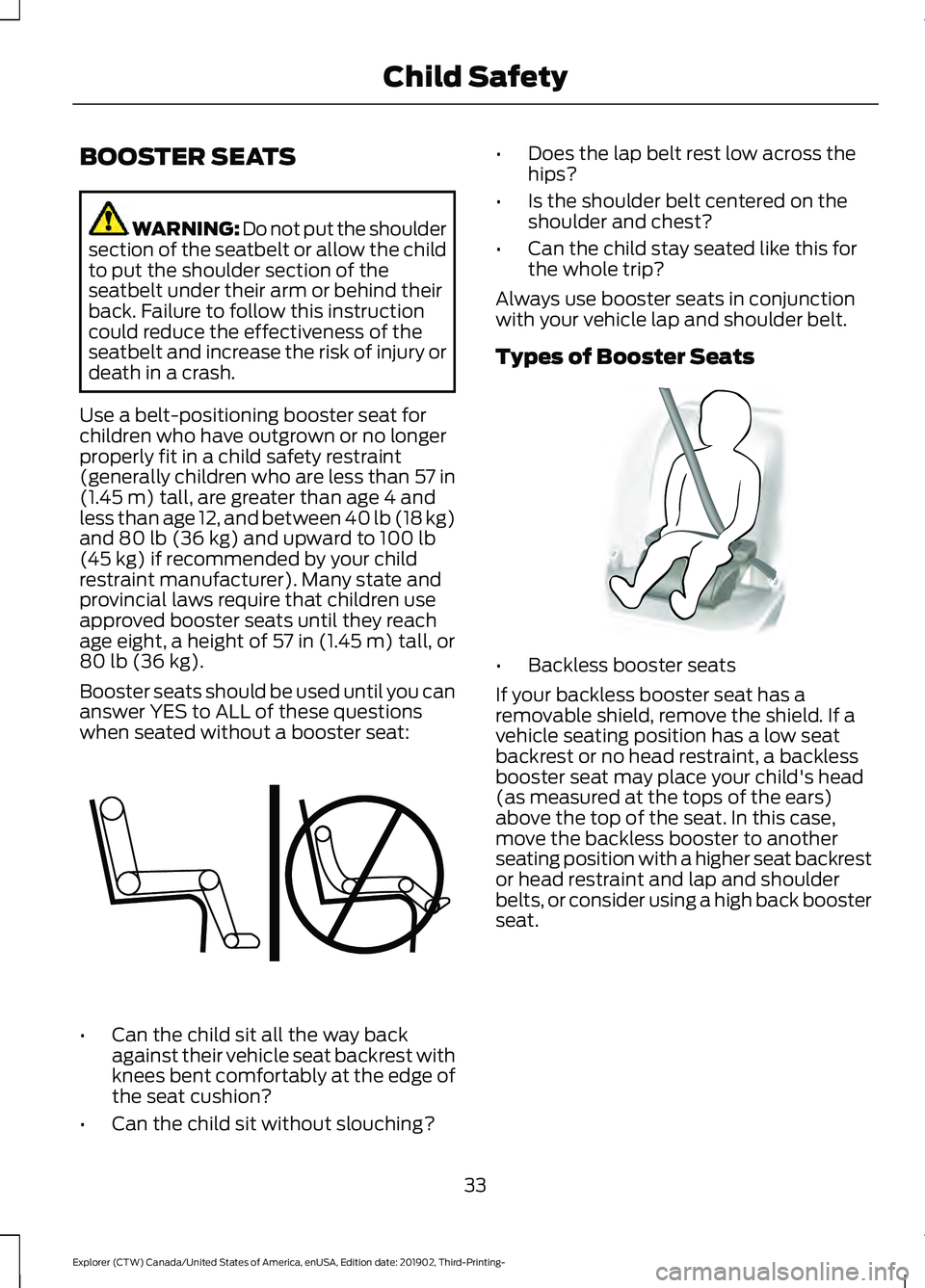
Booster seats should be used until you can
answer YES to ALL of these questions
when seated without a booster seat: •
Can the child sit all the way back
against their vehicle seat backrest with
knees bent comfortably at the edge of
the seat cushion?
• Can the child sit without slouching? •
Does the lap belt rest low across the
hips?
• Is the shoulder belt centered on the
shoulder and chest?
• Can the child stay seated like this for
the whole trip?
Always use booster seats in conjunction
with your vehicle lap and shoulder belt.
Types of Booster Seats •
Backless booster seats
If your backless booster seat has a
removable shield, remove the shield. If a
vehicle seating position has a low seat
backrest or no head restraint, a backless
booster seat may place your child's head
(as measured at the tops of the ears)
above the top of the seat. In this case,
move the backless booster to another
seating position with a higher seat backrest
or head restraint and lap and shoulder
belts, or consider using a high back booster
seat.
33
Explorer (CTW) Canada/United States of America, enUSA, Edition date: 201902, Third-Printing- Child SafetyE142595 E68924
Page 139 of 555
Action
Message
Reminder to remove park brake while in neutral tow.
Neutral Tow Remove
Park Brake for Towing
Displays when the neutral tow is off.
Neutral Tow Disengaged
Displays when neutral tow is on.
Neutral Tow Enabled
Leave Transmission in Neutral
4WD Action
Message
The four wheel drive system has automatically disabled itselfdue to the system overheating.
4WD Temporarily
Disabled
The four wheel drive system is locking up the torque transferclutch to help reduce clutch temperature.
4WD Temporarily
Locked
Displays when the system automatically disables to protect
itself. This may be caused by operating the vehicle with a mini spare tire installed, if the system detects dissimilar size tires,
or if there is an issue with another vehicle system preventing 4WD operation. The system resumes normal operation and
clears this message after you cycle the ignition on and off and drive a short distance with the road tire re-installed or after the other vehicle system issues are resolved.
4WD Off
Displays after the system cools and the four wheel drivesystem resumes normal function.
4WD Restored
The four wheel drive system is not operating properly and thepowertrain fault indicator illuminates. If the warning stays
illuminated or continues to illuminate, contact an authorized dealer as soon as possible.
4WD Fault Service
Required
Displayed when the transfer case fluid requires service.
Change 4WD Power
Transfer Unit Lube
Displayed when the transfer case fluid has been changed and reset to new.
4WD Power Transfer
Unit Lube Set to New
136
Explorer (CTW) Canada/United States of America, enUSA, Edition date: 201902, Third-Printing- Information Displays
Page 158 of 555

1. Pull the strap on the back of the
second row seat. This moves the seat
forward.
2. To return the seat to the seating position, push the seat backrest and
move the track rearward. Make sure
the seat backrest locks in the upright
position.
Folding the Third Row Manual Seat
1. Remove all objects from the seat. 2. Fold the head restraints by pulling the
head restraint release strap. 3. From the rear of the vehicle, fold the
seat backrest by pulling and holding
the strap while pushing the seat
backrest forward. Release the strap
once the seat backrest starts rotating
forward.
Note: Do not use the seat anchors as cargo
tie downs.
Note: Make sure that the area under the
seat is free of objects before stowing it.
Unfolding the Third Row Manual Seat WARNING: Do not place cargo or
any objects behind the seat backrest
before returning it to the original position.
Pull on the seat backrest to make sure
that it has fully latched after returning
the seat backrest to its original position.
An unlatched seat may become
dangerous if you stop suddenly or have
a crash.
Note: Make sure that there are no objects
such as books, purses or briefcases on the
load floor before unstowing the seat. Failure
to remove all objects from the top of the
load floor prior to unstowing it may cause
damage to the seat.
Note: Make sure the area under the load
floor is free of objects before unstowing it. 155
Explorer (CTW) Canada/United States of America, enUSA, Edition date: 201902, Third-Printing- SeatsE291067 E286398 E286399
Page 171 of 555

When the indicator light on the power point
is:
•
On: The power point is working, the
ignition is ON or the vehicle is in
accessory mode.
• Off: The power point is OFF, the ignition
is OFF or the vehicle is not in accessory
mode.
• Flashing: The power point is in fault
mode.
Due to the different technologies used on
its construction, some devices may exceed
the capacity shown on its label when they
are initially plugged-in.
The power outlet temporarily turns off
power when in fault mode if the device
exceeds the 150 watt limit. Unplug your
device and switch the ignition off. Switch
the ignition back on, but do not plug your
device back in. Let the system cool off and
switch the ignition off to reset the fault
mode. Switch the ignition back on and
make sure the indicator light remains on.
Do not use the power point for certain
electric devices, including:
• Cathode-ray, tube-type televisions.
• Motor loads, such as vacuum cleaners,
electric saws and other electric power
tools or compressor-driven
refrigerators. •
Measuring devices, which process
precise data, such as medical
equipment or measuring equipment.
• Other appliances requiring an
extremely stable power supply such as
microcomputer-controlled electric
blankets or touch-sensor lamps.
WIRELESS ACCESSORY
CHARGER (IF EQUIPPED) WARNING:
Wireless charging
devices can affect the operation of
implanted medical devices, including
cardiac pacemakers. If you have any
implanted medical devices, we
recommend that you consult with your
physician.
Note: Devices without built-in Qi wireless
charging receivers require an additional Qi
receiver or sleeve.
Note: For compatible devices with built-in
Qi wireless charging capability, the charging
performance may be affected if your device
is in a case. It may be necessary to remove
the case to wirelessly charge your device.
The system supports one Qi wireless
charging compatible device on the
charging area.
Keep the charging area clean and remove
foreign objects prior to charging a device.
Do not place items with a magnetic strip,
for example passports, parking tickets or
credit cards, near the charging area when
charging a device. Damage may occur to
the magnetic strip.
Do not place metal objects, for example
remote controls, coins and candy
wrappers, on or near the charging area
when charging a device. Metal objects may
heat up and degrade the charging
performance.
168
Explorer (CTW) Canada/United States of America, enUSA, Edition date: 201902, Third-Printing- Auxiliary Power PointsE247586
Page 186 of 555

You may also hear a slight whine or whistle
when operating your vehicle. This is the
normal operation of the electric motor in
the hybrid system.
Braking
Your hybrid has standard hydraulic braking
and regenerative braking. Your
transmission performs regenerative
braking by capturing brake energy and
storing it in the high voltage battery. You
may notice the transmission changing
gears while decelerating. This is normal
and captures the maximum energy back
into the high voltage battery.
You may also notice during extended
downhill driving that your engine continues
to run instead of shutting off. During this
engine braking, the engine stays on, but it
is not using any fuel.
Driving to Optimize Fuel Economy
Note:
Having your engine running is not
always an indication of inefficiency. In some
cases, it is more efficient than driving in
electric mode. Fuel economy improves throughout your
hybrid's break-in period. As with any
vehicle, your driving habits and accessory
usage can significantly impact your fuel
economy. For best results, keep these tips
in mind:
•
Keep the tires properly inflated and
only use the recommended size.
• Aggressive driving increases the
amount of energy required to move
your vehicle. In general, you can
achieve better fuel economy with mild
to moderate acceleration and
deceleration. Moderate braking is
particularly important since it allows
you to maximize the energy captured
by the regenerative braking system.
Additional Tips:
• Do not carry extra loads.
• Be mindful of adding external
accessories that may increase
aerodynamic drag.
• Observe posted speed limits.
• Perform all scheduled maintenance.
• There is no need to wait for your engine
to warm up. The vehicle is ready to
drive immediately after starting.
183
Explorer (CTW) Canada/United States of America, enUSA, Edition date: 201902, Third-Printing- Unique Driving Characteristics
Page 189 of 555
SAFETY PRECAUTIONS
WARNING: Do not overfill the fuel
tank. The pressure in an overfilled tank
may cause leakage and lead to fuel spray
and fire. WARNING:
The fuel system may
be under pressure. If you hear a hissing
sound near the fuel filler inlet, do not
refuel until the sound stops. Otherwise,
fuel may spray out, which could cause
serious personal injury. WARNING: Fuels can cause serious
injury or death if misused or mishandled. WARNING:
Fuel may contain
benzene, which is a cancer-causing
agent. WARNING: When refueling always
shut the engine off and never allow
sparks or open flames near the fuel tank
filler valve. Never smoke or use a cell
phone while refueling. Fuel vapor is
extremely hazardous under certain
conditions. Avoid inhaling excess fumes.
Follow these guidelines when refueling:
• Extinguish all smoking materials and
any open flames before refueling your
vehicle.
• Always switch the engine off before
refueling.
• Automotive fuels can be harmful or
fatal if swallowed. Fuel is highly toxic
and if swallowed can cause death or
permanent injury. If fuel is swallowed
immediately call a physician, even if no
symptoms are immediately apparent.
The toxic effects of fuel may not be
apparent for hours. •
Avoid inhaling fuel vapors. Inhaling fuel
vapor can lead to eye and respiratory
tract irritation. In severe cases,
excessive or prolonged breathing of
fuel vapor can cause serious illness and
permanent injury.
• Avoid getting fuel in your eyes. If you
splash fuel in your eyes, immediately
remove contact lenses (if worn), flush
with water for 15 minutes and seek
medical attention. Failure to seek
proper medical attention could lead to
permanent injury.
• Fuels can be harmful if absorbed
through the skin. If you splash fuel on
your skin, clothing or both, promptly
remove contaminated clothing and
thoroughly wash your skin with soap
and water. Repeated or prolonged skin
contact causes skin irritation.
• Be particularly careful if you are taking
Antabuse or other forms of Disulfiram
for the treatment of alcoholism.
Breathing fuel vapors could cause an
adverse reaction, serious personal
injury or sickness. Immediately call a
physician if you experience any adverse
reactions.
FUEL QUALITY - E85
Choosing the Right Fuel - Flex Fuel
Vehicles
Flex fuel vehicles have one of the following
identifiers:
• Yellow fuel filler cap.
• Yellow bezel around the fuel filler inlet.
• Yellow fuel filler housing.
• Yellow E85 label on the fuel tank filler
door.
186
Explorer (CTW) Canada/United States of America, enUSA, Edition date: 201902, Third-Printing- Fuel and Refueling
Page 203 of 555

Your vehicle may not pass the I/M test if
the service engine soon indicator is on or
not working properly (bulb is burned out),
or if the OBD-II system has determined
that some of the emission control systems
have not been properly checked. In this
case, the vehicle is not ready for I/M
testing.
If the vehicle
’s engine or transmission has
just been serviced, or the battery has
recently run down or been replaced, the
OBD-II system may indicate that the
vehicle is not ready for I/M testing. To
determine if the vehicle is ready for I/M
testing, turn the ignition key to the on
position for 15 seconds without cranking
the engine. If the service engine soon
indicator blinks eight times, it means that
the vehicle is not ready for I/M testing; if
the service engine soon indicator stays on
solid, it means that your vehicle is ready
for I/M testing.
The OBD-II system checks the emission
control system during normal driving. A
complete check may take several days.
If the vehicle is not ready for I/M testing,
you can perform the following driving cycle
consisting of mixed city and highway
driving:
1. 15 minutes of steady driving on an expressway or highway followed by 20
minutes of stop-and-go driving with at
least four 30-second idle periods.
2. Allow your vehicle to sit for at least eight hours with the ignition off. Then,
start the vehicle and complete the
above driving cycle. The vehicle must
warm up to its normal operating
temperature. Once started, do not turn
off the vehicle until the above driving
cycle is complete.
If the vehicle is still not ready for I/M
testing, you need to repeat the above
driving cycle.
200
Explorer (CTW) Canada/United States of America, enUSA, Edition date: 201902, Third-Printing- Engine Emission Control
Page 251 of 555

•
The system does not detect at least
one lane marking or when lanes merge
or split.
• You switch the direction indicator on.
• Limited steering torque input is applied.
• Areas under construction or new
infrastructure.
• When modifications to the steering
system have been made.
• When using a spare tire.
Note: The assistance steering torque is
limited and may not be sufficient for all
driving situations.
Note: In exceptional conditions, the system
may deviate from the center line.
ADAPTIVE CRUISE CONTROL
LIMITATIONS - VEHICLES
WITH: ADAPTIVE CRUISE
CONTROL WITH STOP AND GO
Sensor Limitations WARNING: On rare occasions,
detection issues can occur due to the
road infrastructures, for example bridges,
tunnels and safety barriers. In these
cases, the system may brake late or
unexpectedly. At all times, you are
responsible for controlling your vehicle,
supervising the system and intervening,
if required. WARNING:
If the system
malfunctions, have your vehicle checked
as soon as possible. WARNING:
Large contrasts in
outside lighting can limit sensor
performance. WARNING:
The system only warns
of vehicles detected by the radar sensor.
In some cases there may be no warning
or a delayed warning. Apply the brakes
when necessary. Failure to follow this
instruction could result in personal injury
or death. WARNING:
The system may not
detect stationary or slow moving
vehicles below
6 mph (10 km/h). WARNING:
The system does not
detect pedestrians or objects in the road. WARNING:
The system does not
detect oncoming vehicles in the same
lane. WARNING:
The system may not
operate properly if the sensor is blocked.
Keep the windshield free from
obstruction. WARNING:
The sensor may
incorrectly track lane markings as other
structures or objects. This can result in
a false or missed warning. The camera is mounted on the windshield
behind the interior mirror.
248
Explorer (CTW) Canada/United States of America, enUSA, Edition date: 201902, Third-Printing- Adaptive Cruise Control
(If Equipped)E307893