2020 FORD EXPEDITION tire type
[x] Cancel search: tire typePage 371 of 542

Compliance Certification Label (on the
door hinge pillar, door latch post or the
door edge that meets the door latch
post, next to the driver seat), or Tire
Label on the B-Pillar or the edge of the
driver door. Failure to follow the tire
pressure recommendations can cause
uneven treadwear patterns and
adversely affect the way your vehicle
handles.
Note: The suspension insulation and
bumpers will help prevent vehicle damage.
Do not remove these components from your
vehicle when using snow tires and chains.
The tires on your vehicle have all-weather
treads to provide traction in rain and snow.
However, in some climates, you may need
to use snow tires and cables. If you need
to use cables, it is recommended that steel
wheels (of the same size and
specifications) be used, as cables may chip
aluminum wheels.
Follow these guidelines when using snow
tires and chains:
• If possible, avoid fully loading your
vehicle.
• Use only cable type chains or chains
offered by Ford/Lincoln as an
accessory or equivalent. Other
conventional link type chains may
contact and cause damage to the
vehicle's wheel house and/or body.
• Do not install chains on the front tires
as this may interfere with suspension
components.
• Only certain snow cables or chains
have been approved by Ford/Lincoln
as safe for use on your vehicle with the
following tires: 265/70R17 and
275/65R18.
• You should install snow cables or
chains that have been rated as SAE
Class S. •
Install chains securely, verifying that
the chains do not touch any wiring,
brake lines, or fuel lines.
• Do not exceed 31 mph (50 km/h) or
less if recommended by the chain
manufacturer while using snow chains.
• Drive cautiously. If you hear the chains
rub or bang against your vehicle, stop
and retighten the chains. If this does
not work, remove the chains to prevent
damage to your vehicle.
• Remove the tire chains when they are
no longer needed. Do not use tire
chains on dry roads.
• Purchase chains or cables from a
manufacturer that clearly labels body
to tire dimension restrictions. The snow
chains or cables must be mounted in
pairs on the rear tires only.
If you have any questions regarding snow
chains or cables, please contact your
authorized dealer.
TIRE PRESSURE MONITORING
SYSTEM WARNING:
The tire pressure
monitoring system is not a substitute for
manually checking tire pressures. You
should periodically check tire pressures
using a pressure gauge. Failure to
correctly maintain tire pressures could
increase the risk of tire failure, loss of
control, vehicle rollover and personal
injury.
Note: You should only use tire sealants in
roadside emergencies as they could cause
damage to the tire pressure monitoring
system sensor.
Note: If the tire pressure monitoring system
sensor becomes damaged, it will not
function.
368
Expedition (TB8) Canada/United States of America, enUSA, Edition date: 201907, Third-Printing- Wheels and Tires
Page 375 of 542

How Temperature Affects Your Tire
Pressure
The tire pressure monitoring system
monitors tire pressure in each pneumatic
tire. While driving in a normal manner, a
typical passenger tire inflation pressure
could increase about 2
–4 psi (14– 28 kPa)
from a cold start situation. If the vehicle is
stationary overnight with the outside
temperature significantly lower than the
daytime temperature, the tire pressure
could decrease about
3 psi (21 kPa) for a
drop of 30°F (17°C) in ambient
temperature. This lower pressure value
could be detected by the tire pressure
monitoring system as being significantly
lower than the recommended inflation
pressure and activate the system warning
light for low tire pressure. If the low tire
pressure warning light is on, visually check
each tire to verify that no tire is flat. If one
or more tires are flat, repair as necessary.
Check the air pressure in the road tires. If
any tire is under-inflated, carefully drive
the vehicle to the nearest location where
air can be added to the tires. Inflate all the
tires to the recommended inflation
pressure.
CHANGING A ROAD WHEEL WARNING:
If the tire pressure
monitor sensor becomes damaged it
may not function.
Note: You should only use tire sealants in
roadside emergencies as they may cause
damage to the tire pressure monitoring
system sensor.
Note: The tire pressure monitoring system
indicator light illuminates when the spare
tire is in use. To restore the full function of
the monitoring system, all road wheels
equipped with tire pressure monitoring
sensors must be mounted on this vehicle. If you get a flat tire when driving, do not
apply the brake heavily. Instead, gradually
decrease your speed. Hold the steering
wheel firmly and slowly move to a safe
place on the side of the road.
Have a flat serviced by an authorized
dealer in order to prevent damage to the
system sensors.
See Tire Pressure
Monitoring System (page 368). Replace
the spare tire with a road tire as soon as
possible. During repairing or replacing of
the flat tire, have the authorized dealer
inspect the system sensor for damage.
Dissimilar Spare Wheel and Tire
Assembly Information WARNING:
Failure to follow these
guidelines could result in an increased
risk of loss of vehicle control, injury or
death.
If you have a dissimilar spare wheel and
tire, then it is intended for temporary use
only. This means that if you need to use it,
you should replace it as soon as possible
with a road wheel and tire assembly that
is the same size and type as the road tires
and wheels that were originally provided.
If the dissimilar spare tire or wheel is
damaged, it should be replaced rather than
repaired.
A dissimilar spare wheel and tire assembly
is defined as a spare wheel and tire
assembly that is different in brand, size or
appearance from the road tires and
wheels.
Full-size dissimilar spare
372
Expedition (TB8) Canada/United States of America, enUSA, Edition date: 201907, Third-Printing- Wheels and Tires
Page 376 of 542
When driving with the full-size dissimilar
spare wheel and tire assembly, do not:
•
Exceed 70 mph (113 km/h).
• Use more than one dissimilar spare
wheel and tire assembly at a time.
• Use snow chains on the end of the
vehicle with the dissimilar spare wheel
and tire assembly.
When driving with the full-size dissimilar
spare wheel and tire assembly, it is
recommended that you do not:
• Exceed
50 mph (80 km/h) in 4WD.
• Engage 4WD unless the vehicle is
stationary.
• Use 4WD on dry pavement.
The usage of a full-size dissimilar spare
wheel and tire assembly can lead to
impairment of the following:
• Handling, stability and braking
performance.
• Comfort and noise. •
Ground clearance and parking at curbs.
• Winter weather driving capability.
• Wet weather driving capability.
• Four-wheel driving capability.
When driving with the full-size dissimilar
spare wheel and tire assembly additional
caution should be given to:
• Towing a trailer.
• Driving vehicles equipped with a
camper body.
• Driving vehicles with a load on the
cargo rack.
Drive cautiously when using a full-size
dissimilar spare wheel and tire assembly
and seek service as soon as possible.
Location of the Spare Tire and
Tools
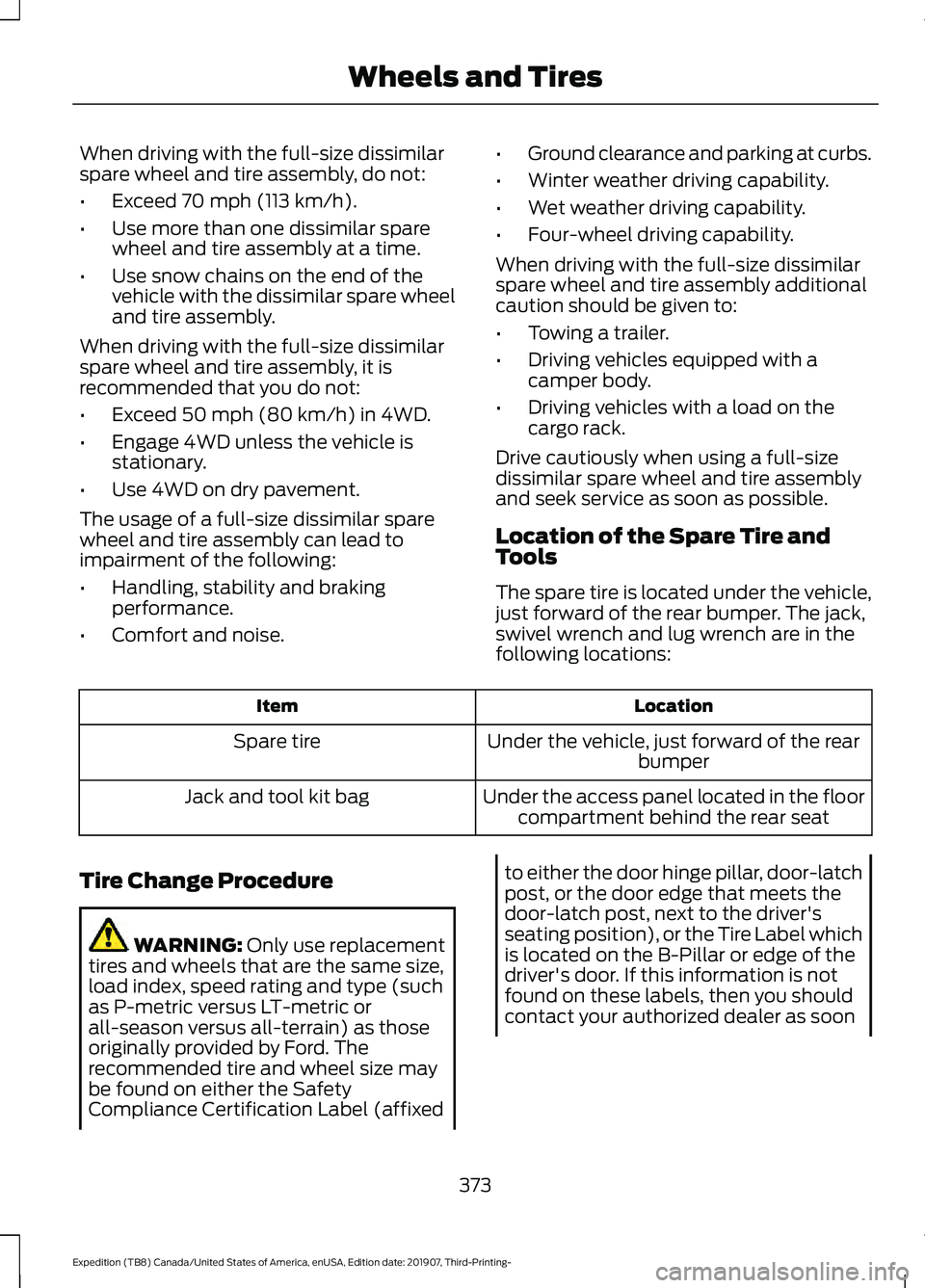
The spare tire is located under the vehicle,
just forward of the rear bumper. The jack,
swivel wrench and lug wrench are in the
following locations: Location
Item
Under the vehicle, just forward of the rearbumper
Spare tire
Under the access panel located in the floorcompartment behind the rear seat
Jack and tool kit bag
Tire Change Procedure WARNING:
Only use replacement
tires and wheels that are the same size,
load index, speed rating and type (such
as P-metric versus LT-metric or
all-season versus all-terrain) as those
originally provided by Ford. The
recommended tire and wheel size may
be found on either the Safety
Compliance Certification Label (affixed to either the door hinge pillar, door-latch
post, or the door edge that meets the
door-latch post, next to the driver's
seating position), or the Tire Label which
is located on the B-Pillar or edge of the
driver's door. If this information is not
found on these labels, then you should
contact your authorized dealer as soon
373
Expedition (TB8) Canada/United States of America, enUSA, Edition date: 201907, Third-Printing- Wheels and Tires
Page 535 of 542

Combining Seatbelt and LATCH Lower
Anchors for Attaching Child Safety
Seats.................................................................... 28
Using Lap and Shoulder Belts......................... 22
Using Lower Anchors and Tethers for CHildren (LATCH)............................................ 27
Using Tether Straps............................................. 28
Instrument Cluster.......................................107
Instrument Lighting Dimmer.....................95
Instrument Panel
............................................18
Interior Lamps.................................................97
Front Interior Lamp.............................................. 97
Interior Lamp Function...................................... 98
Rear Interior Lamps............................................ 98
Switching All of the Interior Lamps Off........................................................................\
. 97
Switching All of the Interior Lamps On........97
Switching the Individual Map Lamps On and Off................................................................. 97
Interior Mirror..................................................103 Automatic Dimming Mirror............................. 104
Manual Dimming Mirror................................... 104
Introduction.........................................................7
J
Jump Starting the Vehicle........................304 Connecting the Jumper Cables.................... 304
Jump Starting..................................................... 305
Preparing Your Vehicle.................................... 304
Removing the Jumper Cables....................... 305
K
Keyless Entry
....................................................72
Displaying the Factory-Set Code.................... 74
Locking and Unlocking....................................... 74
SECURICODE™ KEYLESS ENTRY KEYPAD............................................................... 72
Keyless Starting
.............................................173
Ignition Modes...................................................... 174
Keys and Remote Controls.........................56
L
Lane Keeping System
................................245
Switching the System On and Off..............246
System Display.................................................... 247System Settings.................................................
246
Troubleshooting................................................. 248
Liftgate...............................................................76
Liftgate Window
...........................................106
Opening the Liftgate Window....................... 106
Lighting Control
..............................................94
Flashing the Headlamp High Beam..............95
Headlamp High Beam........................................ 94
Lighting..............................................................94 General Information............................................ 94
Limited Slip Differential
............................208
Locking Function............................................... 208
Spare Tire............................................................. 208
Trailer Towing..................................................... 208
Load Carriers See: Roof Racks and Load Carriers............268
Load Carrying
................................................265
Load Limit......................................................269 Special Loading Instructions for Owners of
Pick-up Trucks and Utility-type
Vehicles............................................................. 273
Vehicle Loading - with and without a Trailer................................................................ 269
Locking and Unlocking................................69 Activating Intelligent Access............................ 70
Autolock.................................................................... 71
Battery Saver.......................................................... 72
Illuminated Entry................................................... 72
Illuminated Exit...................................................... 72
Locking and Unlocking the Doors with the Key Blade............................................................. 71
Power Door Locks................................................ 69
Remote Control.................................................... 69
Smart Unlocks for Integrated Keyhead Transmitter.......................................................... 71
Smart Unlocks for Intelligent Access Keys........................................................................\
71
Lug Nuts See: Changing a Road Wheel........................ 372
M
Maintenance..................................................325 General Information......................................... 325
Manual Climate Control
.............................139
Directing the Airflow.......................................... 139
Locking the Rear Climate Control................140
Setting the Blower Motor Speed.................. 139
532
Expedition (TB8) Canada/United States of America, enUSA, Edition date: 201907, Third-Printing- Index
Page 539 of 542

Seats......................................................................
458
Sound..................................................................... 457
Valet Mode........................................................... 458
Vehicle.................................................................... 457
Voice Control...................................................... 458
Setting the Cruise Control Speed..........236 Changing the Set Speed................................. 236
Side Airbags.....................................................52
Side Sensing System..................................222
Object Distance Indicator............................... 223
Sitting in the Correct Position
..................150
Snow Chains See: Using Snow Chains.................................. 367
Spare Wheel See: Changing a Road Wheel........................ 372
Special Notices
................................................14
New Vehicle Limited Warranty......................... 14
Notice to Owners of Pickup Trucks and Utility Type Vehicles........................................ 15
On Board Diagnostics Data Link Connector............................................................ 15
Special Instructions.............................................. 14
Using Your Vehicle as an Ambulance............15
Using Your Vehicle With a Snowplow...........15
Special Operating Conditions Scheduled Maintenance...............................................481
Exceptions........................................................... 483
Speed Control See: Cruise Control........................................... 236
Stability Control............................................214 Principle of Operation....................................... 214
Starter Switch See: Ignition Switch............................................ 173
Starting a Gasoline Engine........................174 Automatic Engine Shutdown......................... 175
Failure to Start...................................................... 175
Guarding Against Exhaust Fumes.................177
Important Ventilating Information................177
Stopping the Engine When Your Vehicle is Moving................................................................ 176
Stopping the Engine When Your Vehicle is Stationary......................................................... 176
Vehicles with an Ignition Key.......................... 174
Vehicles with Keyless Start............................. 175
Starting and Stopping the Engine
..........173
General Information........................................... 173
Steering...........................................................256 Adaptive Learning.............................................. 257Electric Power Steering...................................
256
Steering Wheel................................................87
Storage Compartments
..............................172
Sunroof See: Moonroof..................................................... 105
Sun Visors
.......................................................104
Illuminated Vanity Mirror................................. 105
Supplementary Restraints System.........48 Principle of Operation........................................ 48
Switching Automatic High Beam Control On and Off.....................................................99
Activating the Automatic High Beam Control................................................................ 99
Switching Cruise Control On and Off..................................................................236
Switching Cruise Control Off......................... 236
Switching Cruise Control On......................... 236
Symbols Glossary
.............................................7
SYNC™ 3........................................................426
General Information......................................... 426
SYNC™ 3 Troubleshooting.....................459 Additional Information and
Assistance......................................................... 471
Apps....................................................................... 466
Navigation............................................................ 465
Personal Profiles............................................... 469
Phone..................................................................... 463
Resetting the System........................................ 471
USB and Bluetooth Audio............................. 460
Voice Recognition............................................. 459
Wi-Fi Connectivity............................................ 468
SYNC™ Applications and Services
.......413
911 Assist................................................................ 413
SYNC Mobile Apps............................................. 415
SYNC™...........................................................409 General Information........................................ 409
SYNC™ Troubleshooting
...........................417
T
Technical Specifications See: Capacities and Specifications...........380
The Better Business Bureau (BBB) Auto Line Program (U.S. Only).......................310
Tire Care
..........................................................353
Glossary of Tire Terminology........................ 354
Information About Uniform Tire Quality Grading............................................................. 353
536
Expedition (TB8) Canada/United States of America, enUSA, Edition date: 201907, Third-Printing- Index