2020 FORD ESCAPE trip
[x] Cancel search: tripPage 33 of 553
•
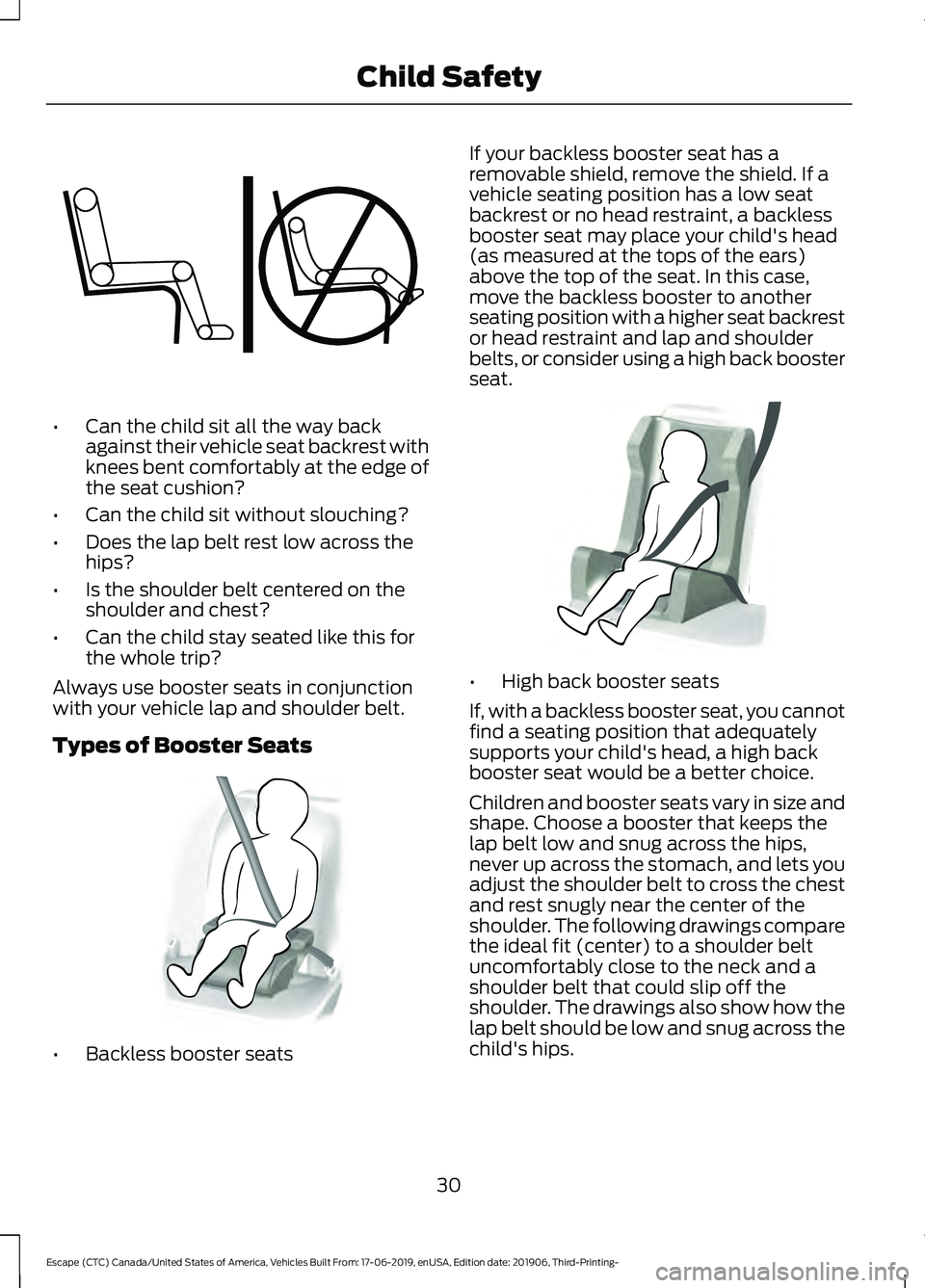
Can the child sit all the way back
against their vehicle seat backrest with
knees bent comfortably at the edge of
the seat cushion?
• Can the child sit without slouching?
• Does the lap belt rest low across the
hips?
• Is the shoulder belt centered on the
shoulder and chest?
• Can the child stay seated like this for
the whole trip?
Always use booster seats in conjunction
with your vehicle lap and shoulder belt.
Types of Booster Seats •
Backless booster seats If your backless booster seat has a
removable shield, remove the shield. If a
vehicle seating position has a low seat
backrest or no head restraint, a backless
booster seat may place your child's head
(as measured at the tops of the ears)
above the top of the seat. In this case,
move the backless booster to another
seating position with a higher seat backrest
or head restraint and lap and shoulder
belts, or consider using a high back booster
seat.
•
High back booster seats
If, with a backless booster seat, you cannot
find a seating position that adequately
supports your child's head, a high back
booster seat would be a better choice.
Children and booster seats vary in size and
shape. Choose a booster that keeps the
lap belt low and snug across the hips,
never up across the stomach, and lets you
adjust the shoulder belt to cross the chest
and rest snugly near the center of the
shoulder. The following drawings compare
the ideal fit (center) to a shoulder belt
uncomfortably close to the neck and a
shoulder belt that could slip off the
shoulder. The drawings also show how the
lap belt should be low and snug across the
child's hips.
30
Escape (CTC) Canada/United States of America, Vehicles Built From: 17-06-2019, enUSA, Edition date: 201906, Third-Printing- Child SafetyE142595 E68924 E70710
Page 114 of 553
Trip Menu
Trip Menu
Trip 1
Trip 2 Select Your Setting
Reset Individual Values
Select Your Setting
Configure View
• Trip Odometer - Registers the distance traveled of individual journeys or the total
distance since the function was last reset.
• Trip Timer - Registers the elapsed time of individual journeys or the total time since
the function was last reset.
• Average Fuel - Indicates the average fuel consumption of individual journeys or the
average fuel consumption since the function was last reset.
• Average Speed - Indicates the average vehicle speed of individual journeys or the
average vehicle speed since the function was last reset.
• Distance to Empty - Indicates the approximate distance your vehicle can travel on
the fuel remaining in the tank. Changes in driving pattern can cause the value to not
only decrease but also increase or stay constant for periods of time.
Note: Press and hold the OK button to reset your trip information.
MyView MyView
Digital Speedometer
Fuel Economy
Trip/Audio
Eco Coach
Calm Screen
Driver Assist. Driver Assist.
Select Your Setting
Eco Coach
111
Escape (CTC) Canada/United States of America, Vehicles Built From: 17-06-2019, enUSA, Edition date: 201906, Third-Printing- Information Displays
Page 118 of 553

The percent displayed is an indication of
the regenerative braking efficiency with
100% representing the maximum amount
of energy recovery. Brake Coach can be
turned on or off in the settings menu.
Trip Summary
The trip summary displays upon shutting
off your vehicle. The values are cumulative
since you last started your vehicle.
The information shown is the same as the
This Trip on demand screen. See
Personalized Settings (page 115).
Vehicle Charging Status
For plug-in vehicles only, vehicle charging
status displays when you shut off your
vehicle, and when you turn on your vehicle
while plugged in. Charging status includes
the charge start or charge end time as
appropriate. You can modify your vehicle's
charge settings through the touchscreen.
PERSONALIZED SETTINGS
Select one of these options to display on
your main screen.
Note:
Some options may appear slightly
different or not at all if the items are
optional.
Note: EV Now information is only available
when in EV Now mode. Select Screens
Calm Screen
Fuel Economy
Trip 1
Trip 2
This Trip 3
EV Coach 3
Electric Efficiency 3
Eco Coach 1
Eco Behavior 2
Tire Pressure
Intelligent AWD
Off Road
Trailer Light Check
115
Escape (CTC) Canada/United States of America, Vehicles Built From: 17-06-2019, enUSA, Edition date: 201906, Third-Printing- Information Displays
Page 119 of 553

Select Screens
Seatbelts
Auto StartStop 4
Now Playing
EV Now 3
1 6 inch display only
2 12 inch display only
3 Hybrid only
4 Non-hybrid only
After making your selection
• Some features offer more information by pressing the OK button.
• You can also hold
OK to reset your fuel economy and trip 1 and 2.
Fuel Economy
An Instant Fuel Economy gauge is provided
along with average fuel economy. Average
fuel economy is continuously averaged
since the last reset.
Hybrid features:
• When the gasoline engine is off the
instant fuel economy gauge is replaced
with a electric driving message.
• For Plug-in vehicles, both electric only
and hybrid operation are included in
the calculation. More electric only
driving will result in greater average fuel
economy.
While viewing this screen you can reset
your average fuel economy by pressing and
holding
OK.
Trip 1 and 2
Provides trip timer, trip average fuel
economy and total trip distance traveled.
For hybrid vehicles, the trip also shows the
distance traveled on electric power only. Hybrid Information
(If Equipped)
This Trip
Provides trip timer, trip average fuel
economy, total trip distance traveled, and
distance traveled on electric power only
with the engine off. If the gasoline engine
has not turned on during the trip then trip
average fuel economy is not shown. This
Trip automatically resets each time you
start your vehicle.
EV Coach
EV Coach can help you to get the most out
of your vehicle ’s electric driving and
regenerative braking capabilities.
When you are accelerating or maintaining
speed you will see a blue or white solid bar
indicating vehicle power. You may also see
a blue rectangular box which shows the
power level at which the engine will turn
on.
116
Escape (CTC) Canada/United States of America, Vehicles Built From: 17-06-2019, enUSA, Edition date: 201906, Third-Printing- Information Displays
Page 168 of 553

Do not place items with a magnetic strip,
for example passports, parking tickets or
credit cards, near the charging area when
charging a device. Damage may occur to
the magnetic strip.
Do not place metal objects, for example
remote controls, coins and candy
wrappers, on or near the charging area
when charging a device. Metal objects may
heat up and degrade the charging
performance.
Note:
The device controls the rate of
charge, or charging power. During charging,
the device and the charger may heat up, this
is normal. If the battery gets hotter than
usual, the charger may stop charging. The charging area is on the
center console or lower
instrument panel.
You can charge a device if the vehicle is
on, when in accessory mode, or anytime
SYNC is on.
To begin charging, place the device on the
center of the charging surface with the
charging side down. The charging stops
after your device reaches a full charge.
Note:
If the system detects a foreign object
or if the device is misaligned on the charging
area, a message appears in the display.
Note: Software and firmware updates may
affect device compatibility, including the
use of unofficial software or firmware. You
should verify charging functionality with your
specific devices when in your vehicle. Description
Behavior
Message
This message appears whenwireless charging begins.
Message on screen display
or pop-up window.
Wireless Charger Active
The system stops chargingyour device if the system detects the phone is
misaligned, or a foreign
metal object is on the char- ging surface.
Pop-up window.
Charging Terminated
Phone misaligned or object
between phone and charger
detected. Correct the condi- tion to resume charging.
165
Escape (CTC) Canada/United States of America, Vehicles Built From: 17-06-2019, enUSA, Edition date: 201906, Third-Printing- Auxiliary Power PointsE297549
Page 182 of 553

EV Now
This mode provides an electric
only driving experience. Do not
use EV Now when towing a
trailer. The electric drive system is not
designed for towing. An EV Now
information on demand screen appears.
This screen allows you to enable your
engine while in EV Now mode.
Your vehicle could accelerate slower and
the top speed could be lower than when
in Auto EV mode.
You can enable your engine at any time by
using one of the following methods:
• Press the OK button on the steering
wheel while viewing the EV Now
information on demand screen. Your
vehicle enables the engine as needed
and returns to EV Now mode when no
longer needed.
• Fully press the accelerator pedal. A
pop-up message appears. Press the
OK button on the steering wheel to
enable the engine. When the engine is
no longer needed, your vehicle returns
to EV Now. The message disappears if
you release the accelerator pedal.
• Press the EV button. This exits EV Now
mode and permits engine operation.
To return to EV Now mode, select it
again using the EV button.
Your vehicle could enter Engine Enabled
mode if system conditions require it. A
message displays if this occurs. This is a
normal function of the system and your
vehicle returns to EV Now mode when
possible.
When you enable EV Now mode, a blue EV
Now icon appears in the information
display. If your vehicle is in Engine Enabled
mode, the EV Now icon is amber. EV Now
exits when your available electric range
reaches zero. EV Later In EV Later, your vehicle runs on
the engine as needed and saves
most of the available electric
range for later use in Auto EV or EV Now
mode.
For example, your initial drive is at high
speeds on open roads, but later your drive
is at low speeds in an urban area where
electric only driving is most efficient. In this
case, you can select EV Later for the higher
speed portion of your trip and then select
Auto EV or EV Now for the urban portion.
When you enable EV Later, a white EV
Later icon appears in the information
display. EV Later resets to Auto EV when
you switch off your vehicle. You may select
EV Later again using the EV button during
your next drive.
When you select EV Later with the vehicle
fully charged or near fully charged, the
battery uses some electric-only driving
range to discharge the battery, and allows
for full operation of the regenerative
braking system.
EV Charge This mode uses your vehicle's
engine to charge the high voltage
battery versus plugging the
vehicle into a utility grid.
The electric range gained through EV
Charge allows you to switch to Auto EV or
EV Now for full electric operation later in
your drive. The battery cannot completely
charge to 100% when in EV Charge mode.
This is to allow for full operation of the
regenerative braking system. When the
battery reaches its EV Charge limit, the
vehicle remains in EV Charge mode and
maintains that charge level, until you select
another EV Mode, or until you switch the
vehicle off.
179
Escape (CTC) Canada/United States of America, Vehicles Built From: 17-06-2019, enUSA, Edition date: 201906, Third-Printing- Unique Driving CharacteristicsE287826 E287824 E287822
Page 193 of 553

Note:
The manual override lever is in the
driver side rear wheel well area.
2. Pull the manual override lever.
3. Switch the ignition off.
4. Complete the refueling process within 20 minutes.
FUEL CONSUMPTION
Advertised Capacity
The advertised capacity is the maximum
amount of fuel that you can add to the fuel
tank when the fuel gauge indicates empty.
See Capacities and Specifications
(page 376). In addition, the fuel tank contains an empty
reserve. The empty reserve is an
unspecified amount of fuel that remains
in the fuel tank when the fuel gauge
indicates empty.
Note:
When refueling your vehicle after the
fuel gauge indicates empty, you might not
be able to refuel the full amount of the
advertised capacity due to the empty
reserve still present in the fuel tank.
Filling the Fuel Tank
For consistent results when refueling:
• Turn the ignition off before fueling; an
inaccurate reading results if the engine
is left running.
• Use the same fill rate
(low-medium-high) each time the tank
is filled.
• Allow no more than one automatic
shut-off when refueling.
Results are most accurate when the filling
method is consistent.
Calculating Fuel Economy
Your vehicle calculates fuel economy
figures through the trip computer average
fuel function.
See Information Displays
(page 110).
The first
1,000 mi (1,500 km) of driving is
the break-in period of the engine. A more
accurate measurement is obtained after
2,000 mi (3,000 km)
.
1. Completely fill the fuel tank and record
the initial odometer reading.
2. Each time you fill the fuel tank, record the amount of fuel added.
3. After at least three fill ups, fill the fuel tank and record the current odometer
reading.
4. Subtract your initial odometer reading from the current odometer reading.
190
Escape (CTC) Canada/United States of America, Vehicles Built From: 17-06-2019, enUSA, Edition date: 201906, Third-Printing- Fuel and RefuelingE297793
Page 199 of 553

GENERAL INFORMATION
WARNING: This battery pack
should only be serviced by an authorized
electric vehicle technician. Improper
handling can result in personal injury or
death. WARNING:
Apply the parking
brake, shift into park (P), switch the
ignition off and remove the key before
you open the hood or have any service
or repair work completed. If you do not
switch the ignition off, the engine could
restart at any time. Failure to follow this
instruction could result in personal injury
or death. WARNING:
Do not touch the
electronic ignition system parts after you
have switched the ignition on or when
the engine is running. The system
operates at high voltage. Failure to
adhere to this warning could result in
serious personal injury or death. WARNING:
Keep your hands and
clothing clear of the engine cooling fan.
Note: The high-voltage battery does not
require regular service maintenance.
Your vehicle consists of various
high-voltage components and wiring. All
of the high-voltage power flows through
specific wiring assemblies labeled as such
or covered with a solid orange convolute,
or orange striped tape, or both. Do not
come in contact with these components.
The high-voltage battery pack contains a
lithium-ion battery. The pack is underneath
the vehicle. The high-voltage battery
system uses an advanced liquid heating
and cooling system to regulate the
high-voltage battery temperature and help
maximize high-voltage battery life. CHARGING THE HIGH
VOLTAGE BATTERY
IMPORTANT SAFETY
INSTRUCTIONS
WARNING:
In Canada, do not use
the 120 volt convenience cord in
commercial garages. WARNING:
This equipment has
arcing or sparking parts. Do not expose
to flammable vapors. Position this
equipment at least
18 in (450 mm)
above the floor.
RISK OF FIRE or ELECTRIC SHOCK WARNING:
The AC wall plug must
fit firmly into the AC outlet. If the
connection feels loose, worn or the AC
outlet is damaged, please have a
qualified electrician replace the AC
outlet. Using a convenience cord with a
worn outlet may cause burns, property
damage and increase the risk of electric
shock. WARNING:
Do not use the 120 V
convenience cord with an extension cord,
two-prong adapter, surge protector,
timer or other adapter. WARNING:
Do not allow charging
equipment to be immersed in water or
liquids. Failure to follow this warning
could result in fire, serious personal injury
or death. WARNING: Do not attempt to open
the charging equipment. Failure to follow
this instruction could result in personal
injury, death or property damage.
196
Escape (CTC) Canada/United States of America, Vehicles Built From: 17-06-2019, enUSA, Edition date: 201906, Third-Printing- High Voltage Battery - Hybrid Electric Vehicle (HEV)/Plug-In
Hybrid Electric Vehicle (PHEV)