2020 FORD ESCAPE brake
[x] Cancel search: brakePage 117 of 553

Settings
Settings
Brake Coach Percent Oil Life Indication XXX%
Hold Ok to Reset
Oil Life
Hold Ok to Reset
Tire Monitor
Hold Ok to Initialize
Neutral Tow
Note: Additional vehicle settings are
available through your touchscreen. See
Settings (page 468).
Display Setup Display Setup
Show Tachometer 3
Show Power Gauge 4
Speedometer Units Select Your Setting
Eco Coach 1
Hold
OK to Reset
Driving History 2
1 12 inch display only
2 Hybrid only
3 12 inch display and non-hybrid only
4 12 inch display and hybrid only
Note: Additional display settings are
available through your touchscreen. See
Settings
(page 468).
Hybrid Display Information
(If
Equipped)
Unique hybrid vehicle information displays
on your information display when you shut
off your vehicle or come to a stop. Brake Coach
The Brake Coach appears after the vehicle
has come to a stop. It coaches you to brake
in a manner that maximizes the amount
of energy returned through the
regenerative braking system.
114
Escape (CTC) Canada/United States of America, Vehicles Built From: 17-06-2019, enUSA, Edition date: 201906, Third-Printing- Information Displays
Page 118 of 553

The percent displayed is an indication of
the regenerative braking efficiency with
100% representing the maximum amount
of energy recovery. Brake Coach can be
turned on or off in the settings menu.
Trip Summary
The trip summary displays upon shutting
off your vehicle. The values are cumulative
since you last started your vehicle.
The information shown is the same as the
This Trip on demand screen. See
Personalized Settings (page 115).
Vehicle Charging Status
For plug-in vehicles only, vehicle charging
status displays when you shut off your
vehicle, and when you turn on your vehicle
while plugged in. Charging status includes
the charge start or charge end time as
appropriate. You can modify your vehicle's
charge settings through the touchscreen.
PERSONALIZED SETTINGS
Select one of these options to display on
your main screen.
Note:
Some options may appear slightly
different or not at all if the items are
optional.
Note: EV Now information is only available
when in EV Now mode. Select Screens
Calm Screen
Fuel Economy
Trip 1
Trip 2
This Trip 3
EV Coach 3
Electric Efficiency 3
Eco Coach 1
Eco Behavior 2
Tire Pressure
Intelligent AWD
Off Road
Trailer Light Check
115
Escape (CTC) Canada/United States of America, Vehicles Built From: 17-06-2019, enUSA, Edition date: 201906, Third-Printing- Information Displays
Page 120 of 553

•
When your power level is within the box
the color of the bar will be blue. This
means you are in Electric operation and
the engine is off.
• When your power level is outside of the
box the color of the bar will be white.
This means you are in Hybrid operation
with a combination of the electric
motor and the engine providing vehicle
power.
When you are decelerating with either your
foot off the accelerator pedal or on the
brake pedal you will see a green or white
solid bar indicating the power being used
to slow down the vehicle. You may also
see a green rectangular box which shows
the amount of power that can be
recaptured by the regenerative braking
system and returned to the high voltage
battery.
• When your power level is completely
within the box the color of the bar will
be all green. This means that the
regenerative braking system is being
used to efficiently slow the vehicle
down and return the maximum
percentage of energy to the high
voltage battery.
• When your power level is outside of the
green box then the bar will be white.
This means that both the regenerative
braking system and conventional
braking system are being used.
Electric Efficiency
Note: This feature applies to Plug-in
vehicles only.
This screen shows your average driving
distance per kWh of electricity used on
your plug-in hybrid vehicle. The value is
calculated only when your available
electric range is being used and the
gasoline engine is off. Distance per full charge is also shown. This
is an estimate of the electric range you
would have if you plugged in and fully
charged your vehicle right now. The higher
your electric efficiency, the higher your
distance per full charge.
Your electric efficiency is affected by your
driving style and route, climate control use,
outside temperature and other factors.
Best efficiency is achieved in mild ambient
temperatures with mild to moderate
acceleration and braking, moderate speeds
and low climate control usage.
INFORMATION MESSAGES
Depending on your vehicle options and
instrument cluster type, not all messages
display or are available.
Note:
The system abbreviates or shortens
certain messages. Press the OK button to acknowledge and
remove some messages from the
information display. The system removes
other messages after a short time.
You need to confirm certain messages
before you can access the menus.
117
Escape (CTC) Canada/United States of America, Vehicles Built From: 17-06-2019, enUSA, Edition date: 201906, Third-Printing- Information DisplaysE222314
Page 123 of 553

Auto-Start-Stop
Action
Message
You need to restart the engine and pressthe brake pedal to start.
Auto StartStop Press Brake to Start Engine
You need to restart the engine and pressthe brake pedal harder to start.
Auto StartStop Press Brake Harder to
Activate
You need to restart the engine and pressany pedal to start.
Auto StartStop Press a Pedal to Start
Engine
Select neutral (N) for the system to restartthe engine.
Auto StartStop Select Neutral To Start
Engine
Select park (P) for the system to restartthe engine.
Auto StartStop Shift to P, then Restart
Engine
The system is not functioning. You need torestart the engine.
Auto StartStop Manual Restart Required
Conditions are not met for the auto-start-stop system to properly function.
Auto StartStop Not Available
120
Escape (CTC) Canada/United States of America, Vehicles Built From: 17-06-2019, enUSA, Edition date: 201906, Third-Printing- Information Displays
Page 127 of 553

Driver Alert
Action
Message
Stop and rest as soon as it is safe to do so.
Driver Alert Warning Rest
Now
Take a rest soon.
Driver Alert Warning Rest
Suggested
Fuel Action
Message
An early reminder of a low fuel condition.
Fuel Level Low
The fuel fill inlet may not be properly closed.
Check Fuel Fill Inlet
Wait for up to 15 seconds while the fuel system depressurizes.
Fuel Door Opening
The fuel system has finished depressurizing and you can begin
to refuel.
Fuel Door Open
A reminder to close the fuel door. Failure to follow this
instruction can cause the check engine light to illuminate.
Close Fuel Door to Avoid
Check Engine Light
There is an error in attempting to refill your vehicle.
Refuel Error See Manual
Hill Start Assist Action
Message
Hill start assist is not available. Contact an authorized dealer.See Hill Start Assist (page 219).
Hill Start Assist Not
Available
Keys and Intelligent Access Action
Message
A reminder to press the brake when starting your vehicle.
To START Press Brake
The system does not detect the key. See
Keyless Starting
(page 167).
No Key Detected
Appears when you need to press the Start Stop button toshut off the engine when the system does not detect an Intelligent Access key inside your vehicle.
Restart Now or Key is
Needed
124
Escape (CTC) Canada/United States of America, Vehicles Built From: 17-06-2019, enUSA, Edition date: 201906, Third-Printing- Information Displays
Page 129 of 553
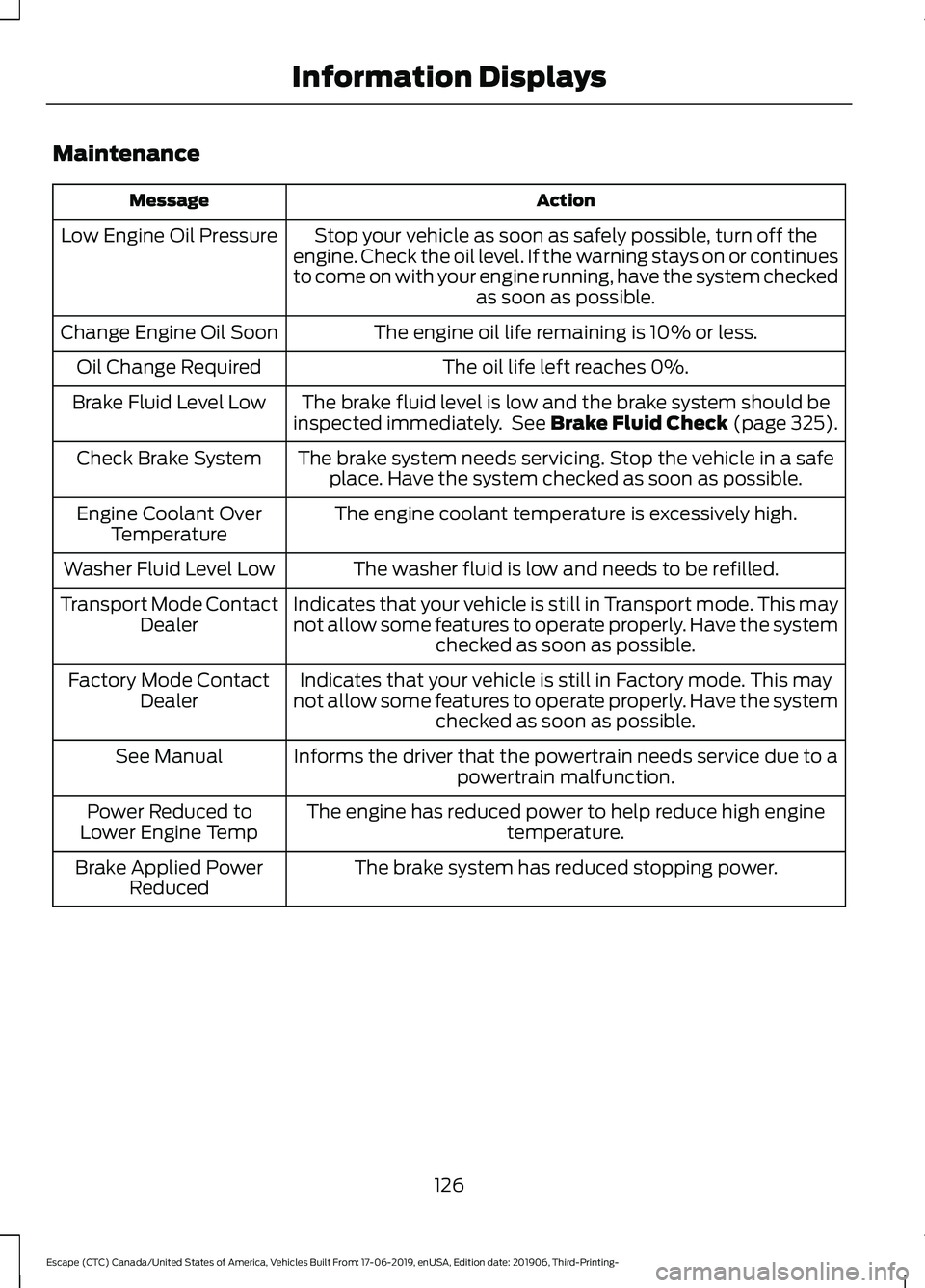
Maintenance
Action
Message
Stop your vehicle as soon as safely possible, turn off the
engine. Check the oil level. If the warning stays on or continues
to come on with your engine running, have the system checked as soon as possible.
Low Engine Oil Pressure
The engine oil life remaining is 10% or less.
Change Engine Oil Soon
The oil life left reaches 0%.
Oil Change Required
The brake fluid level is low and the brake system should be
inspected immediately. See Brake Fluid Check (page 325).
Brake Fluid Level Low
The brake system needs servicing. Stop the vehicle in a safeplace. Have the system checked as soon as possible.
Check Brake System
The engine coolant temperature is excessively high.
Engine Coolant Over
Temperature
The washer fluid is low and needs to be refilled.
Washer Fluid Level Low
Indicates that your vehicle is still in Transport mode. This may
not allow some features to operate properly. Have the systemchecked as soon as possible.
Transport Mode Contact
Dealer
Indicates that your vehicle is still in Factory mode. This may
not allow some features to operate properly. Have the system checked as soon as possible.
Factory Mode Contact
Dealer
Informs the driver that the powertrain needs service due to a powertrain malfunction.
See Manual
The engine has reduced power to help reduce high engine temperature.
Power Reduced to
Lower Engine Temp
The brake system has reduced stopping power.
Brake Applied Power
Reduced
126
Escape (CTC) Canada/United States of America, Vehicles Built From: 17-06-2019, enUSA, Edition date: 201906, Third-Printing- Information Displays
Page 131 of 553

Action
Message
The radar is blocked due to bad weather, ice, mud or water
in front of radar. You can typically clean the sensor to resolve. See Front Parking Aid (page 227).
Front Park Aid Not Avail-
able Sensor Blocked See
Manual
The radar is blocked due to bad weather, ice, mud or water
in front of radar. You can typically clean the sensor to resolve. See
Principle of Operation (page 225).
Park Aid Not Available
Sensor Blocked See Manual
Displays the park aid status.
Front Park Aid On Off
Displays the park aid status.
Rear Park Aid On Off
Park Brake Action
Message
The parking brake is set, the engine is running and you drive
your vehicle more than
3 mph (5 km/h). If the warning stays
on after the parking brake is released, have the system checked as soon as possible.
Park Brake Engaged
The electric parking brake is set and a manual release isattempted without the brake pedal being pressed.
To Release: Press Brake
and Switch
The electric parking brake is set and an automatic release isattempted but cannot be performed. Perform a manual release.
Park Brake Use Switch
to Release
The electric parking brake is set and your vehicle speed
exceeds 3 mph (5 km/h). Release park brake before continued driving.
Release Park Brake
The electric parking brake is not fully applied.
Park Brake Not Applied
The electric parking brake is not fully released.
Park Brake Not Released
The electric parking brake system has been put into a specialmode that is used to allow service of the rear brakes. Have the system checked as soon as possible.
Park Brake Maintenance
Mode
128
Escape (CTC) Canada/United States of America, Vehicles Built From: 17-06-2019, enUSA, Edition date: 201906, Third-Printing- Information Displays
Page 132 of 553

Action
Message
The electric park brake system has detected a condition thatrequires service. Some functionality may still be available. Have the system checked as soon as possible.
Park Brake Limited
Function Service Required
The electric parking brake system has detected a conditionthat requires service. Have the system checked as soon as possible.
Park Brake Malfunction
Service Now
Numerous park brake applies have overheated the system.Wait 2 minutes before attempting to apply again.
Park Brake System
Overheated
Power Steering Action
Message
The power steering system has detected a condition that
requires service. Have the system checked as soon as possible.
Steering Fault Service
Now
The power steering system is not working. Stop your vehicle
in a safe place. Have the system checked as soon as possible.
Steering Loss Stop
Safely
The power steering system has detected a condition withinthe power steering system or passive entry or passive start
system requires service. Have the system checked as soon as possible.
Steering Assist Fault
Service Required
The steering lock system has detected a condition that
requires service. Have the system checked as soon as possible.
Steering Lock Malfunc-
tion Service Now
Pre-Collision Assist Action
Message
You have a blocked sensor due to bad weather, ice, mud or
water in front of the radar sensor. You can typically clean the
sensor to resolve.
Pre-Collision Assist Not
Available Sensor Blocked
A fault with the system has occurred. Have the system
checked as soon as possible.
Pre-Collision Assist Not
Available
129
Escape (CTC) Canada/United States of America, Vehicles Built From: 17-06-2019, enUSA, Edition date: 201906, Third-Printing- Information Displays