2020 FORD EDGE lock
[x] Cancel search: lockPage 124 of 495

Driver Alert
Action
Message
Stop and rest as soon as it is safe to do so.
Driver Alert Warning Rest
Now
Take a rest soon.
Driver Alert Warning Rest
Suggested
Electronic Stability Control Action
Message
The system detects a malfunction due to a blocked sensor.
Service AdvanceTrac
The traction control system status.
AdvanceTrac Off
The traction control system status.
AdvanceTrac On
The traction control system status.
AdvanceTrac SPORT
MODE
Engine Action
Message
Displays when the engine temperature is too high. Stop
your vehicle in a safe place and allow the engine to cool. If the problem persists, see an authorized dealer. See Engine Coolant Check (page 284).
High Engine Temperature
Stop Safely
Engine service is required. See an authorized dealer.
Engine Fault Service Now
Check the engine oil level
See Engine Oil Check (page
281).
Engine Oil Level Low Check
Level
121
Edge (CDQ) Canada/United States of America, enUSA, Edition date: 201907, Third-Printing- Information Displays
Page 129 of 495

Action
Message
The electric parking brake is running a diagnostic check.
Park Brake Maintenance
Mode
The electric parking brake is set but you have not released it.
Park Brake Use Switch
to Release
The electric parking brake is set but you have not released itand your vehicle is moving.
To Release: Press Brake
and Switch
The electric park brake system has detected a condition thatrequires service. See an authorized dealer.
Park Brake Limited
Function Service Required
You have not released the electric parking brake causing it to overheat.
Park Brake System
Overheated
The electric parking brake is set and you have started your vehicle.
Park Brake Not Released
The electric parking brake is set.
Park Brake Applied
You have released the electric parking brake.
Park Brake Released
Power Steering Action
Message
The power steering system has detected a condition thatrequires service. See an authorized dealer.
Steering Lock Malfunc-
tion Service Now
The power steering system is not working. Stop your vehiclein a safe place. Contact an authorized dealer.
Steering Loss Stop
Safely
The power steering system has detected a condition withinthe power steering system or passive entry or passive start system requires service. Contact an authorized dealer.
Steering Assist Fault
Service Required
126
Edge (CDQ) Canada/United States of America, enUSA, Edition date: 201907, Third-Printing- Information Displays
Page 130 of 495

Pre-Collision Warning System
Action
Message
A fault with the system has occurred. Contact an authorized dealer.
Collision Warning
Malfunction
You have a blocked sensor due to bad weather, ice, mud or
water in front of the radar sensor. You can typically clean the sensor to resolve. See Pre-Collision Assist (page 232).
Collision Warning Not
Available Sensor
Blocked See Manual
A fault with the system has occurred. Contact an authorized dealer.
Collision Warning Not
Available
Remote Start Action
Message
A reminder to apply the brake and push the gearshift buttonto drive your vehicle after a remote start.
To Drive: Press Brake
and Gear Shift Button
Seats Action
Message
A reminder that memory seats are not available while driving.
Memory Recall Not
Permitted While Driving
Shows where you have saved your memory setting.
Memory {0} Saved
Starting System Action
Message
A reminder to apply the brake when starting your vehicle .
To START Press Brake
The starter has exceeded its cranking time in attempting tostart your vehicle.
Cranking Time Exceeded
The starter is attempting to start your vehicle.
Engine Start Pending
Please Wait
The system has cancelled the pending start.
Pending Start Cancelled
127
Edge (CDQ) Canada/United States of America, enUSA, Edition date: 201907, Third-Printing- Information Displays
Page 132 of 495
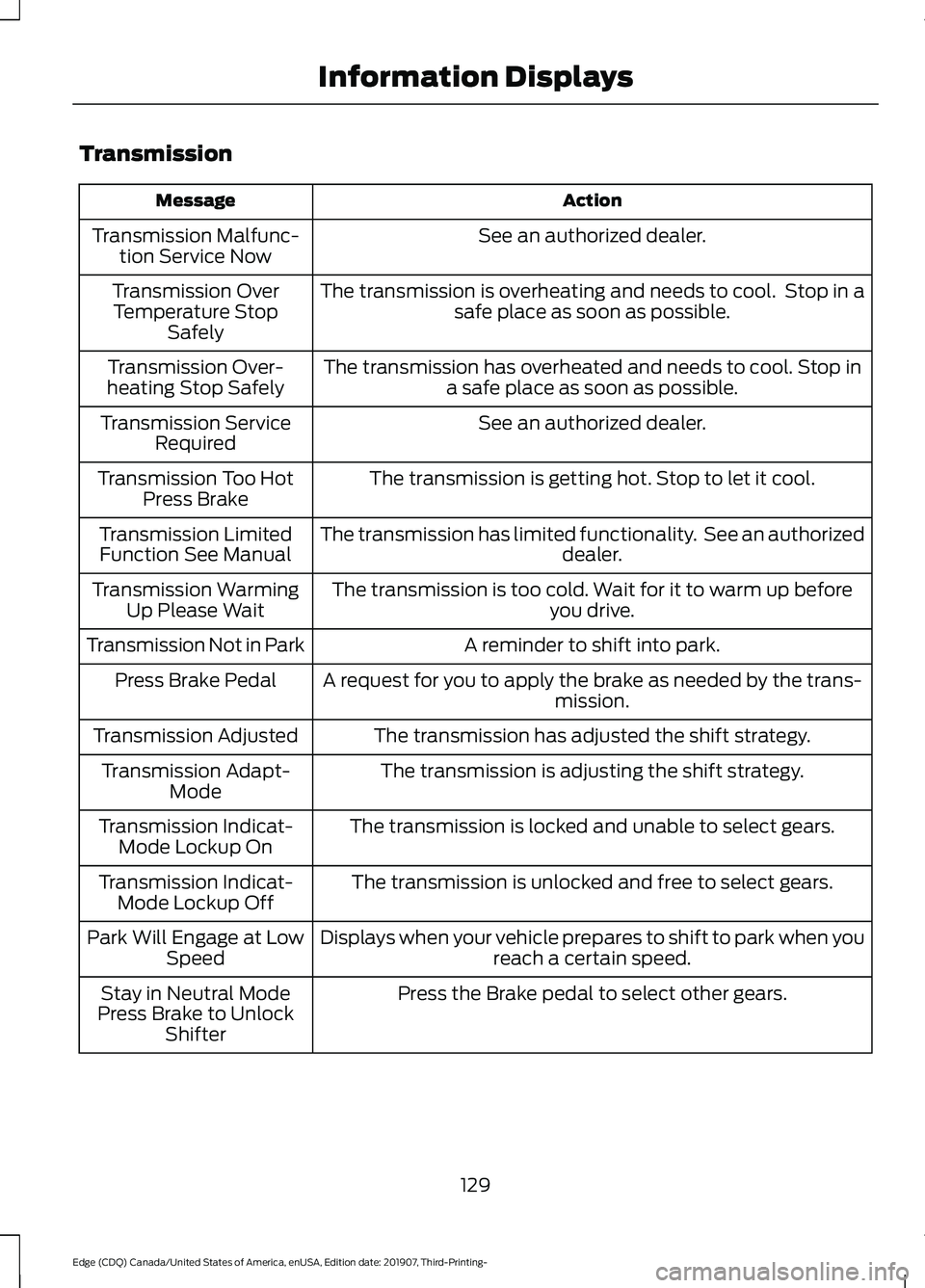
Transmission
Action
Message
See an authorized dealer.
Transmission Malfunc-
tion Service Now
The transmission is overheating and needs to cool. Stop in asafe place as soon as possible.
Transmission Over
Temperature Stop Safely
The transmission has overheated and needs to cool. Stop ina safe place as soon as possible.
Transmission Over-
heating Stop Safely
See an authorized dealer.
Transmission Service
Required
The transmission is getting hot. Stop to let it cool.
Transmission Too Hot
Press Brake
The transmission has limited functionality. See an authorized dealer.
Transmission Limited
Function See Manual
The transmission is too cold. Wait for it to warm up beforeyou drive.
Transmission Warming
Up Please Wait
A reminder to shift into park.
Transmission Not in Park
A request for you to apply the brake as needed by the trans-mission.
Press Brake Pedal
The transmission has adjusted the shift strategy.
Transmission Adjusted
The transmission is adjusting the shift strategy.
Transmission Adapt-
Mode
The transmission is locked and unable to select gears.
Transmission Indicat-
Mode Lockup On
The transmission is unlocked and free to select gears.
Transmission Indicat-
Mode Lockup Off
Displays when your vehicle prepares to shift to park when youreach a certain speed.
Park Will Engage at Low
Speed
Press the Brake pedal to select other gears.
Stay in Neutral Mode
Press Brake to Unlock Shifter
129
Edge (CDQ) Canada/United States of America, enUSA, Edition date: 201907, Third-Printing- Information Displays
Page 141 of 495

WARNING: The head restraint is a
safety device. Whenever possible it
should be installed and properly
adjusted when the seat is occupied.
Failure to adjust the head restraint
properly could reduce its effectiveness
during certain impacts.
Note: Adjust the seat backrest to an upright
driving position before adjusting the head
restraint. Adjust the head restraint so that
the top of it is level with the top of your head
and as far forward as possible. Make sure
that you remain comfortable. If you are
extremely tall, adjust the head restraint to
its highest position.
Front Seat and Rear Seat Outermost
Head Restraints Rear Center Head Restraint The head restraints consist of:
An energy absorbing head
restraint.
A
Two steel stems.
B
Guide sleeve adjust and unlock
button.
C
Guide sleeve unlock and remove
button.
D
Adjusting the Head Restraint
Raising the Head Restraint
Pull the head restraint up.
Lowering the Head Restraint
1. Press and hold button C.
2. Push the head restraint down.
Removing the Head Restraint
1. Pull the head restraint up until it reaches its highest position.
2. Press and hold buttons C and D.
3. Pull the head restraint up.
Note: You cannot remove front seat head
restraints that have entertainment system
video screens.
Installing the Head Restraint
Align the steel stems into the guide sleeves
and push the head restraint down until it
locks.
Tilting Head Restraints
The front head restraints tilt for extra
comfort. To tilt the head restraint, do the
following:
138
Edge (CDQ) Canada/United States of America, enUSA, Edition date: 201907, Third-Printing- SeatsE138642 E138645
Page 142 of 495

1. Adjust the seat backrest to an upright
driving or riding position.
2. Pivot the head restraint forward toward
your head to the desired position.
After the head restraint reaches the
forward-most tilt position, pivoting it
forward again will then release it to the
rearward, un-tilted position.
MANUAL SEATS WARNING: Do not adjust the driver
seat or seat backrest when your vehicle
is moving. This may result in sudden seat
movement, causing the loss of control
of your vehicle. WARNING: Make sure the seat fully
locks into place by rocking it backward
and forward. Not securing the seat into
the locked position can be dangerous in
a crash and could cause serious personal
injury or death. WARNING: Reclining the seatback
can cause an occupant to slide under the
seat's seatbelt, resulting in severe
personal injuries in the event of a crash. The manual seats may consist of:
A bar to move the seat backward
and forward.
A
A control to adjust the lumbar of
the seat backrest (If equipped).
B
A lever to adjust the height of the
seat (If equipped).
C
A control to adjust the angle of
the seat backrest.
D
Adjusting the Seat Backrest
Your vehicle may have one of the controls
shown.
139
Edge (CDQ) Canada/United States of America, enUSA, Edition date: 201907, Third-Printing- SeatsE144727 ABCD
E144631
Page 146 of 495

•
Driver seat.
• Power mirrors.
• Optional power steering column.
The memory control is on the driver door. Saving a PreSet Position
1. Switch the ignition on.
2. Adjust the memory features to your
desired position.
3. Press and hold the desired preset button until you hear a single tone.
You can save up to three preset memory
positions. You can save a memory preset
at any time.
Recalling a PreSet Position
Press and release the preset button
associated with your desired driving
position. The memory features move to
the position stored for that preset.
Note: You can only recall a preset memory
position when you switch the ignition off, or
when the transmission is in park (P) or
neutral (N) and your vehicle is not moving
if the ignition is on. You can also recall a preset memory
position by:
•
Pressing the unlock button on your
intelligent access key fob if it is linked
to a preset position.
• Unlocking the intelligent driver door
handle if a linked key fob is present.
Note: Using a linked key fob to recall your
memory position when the ignition is off
moves the seat to the Easy Entry position.
Note: Pressing any active memory feature
adjustment control, or any memory button
during a memory recall, cancels the
operation.
Linking a PreSet Position to your
Remote Control or Intelligent
Access Key Fob
You can save preset memory positions for
up to three remote controls or intelligent
access (IA) keys.
1. With the ignition on, move the memory
positions to the desired positions.
2. Press and hold the desired preset button for about five seconds. A tone
sounds after about two seconds.
Continue holding until you hear a
second tone.
3. Within three seconds, press the lock button on the remote control you are
linking.
To unlink a remote control, follow the
same procedure – except in step 3, press
the unlock button on the remote control.
Note: If more than one linked remote
control or intelligent access key is in range,
the memory function moves to the settings
of the first key to initiate a memory recall.
143
Edge (CDQ) Canada/United States of America, enUSA, Edition date: 201907, Third-Printing- SeatsE142554
Page 147 of 495

Easy Entry and Exit Feature (If
Equipped)
If you enable the easy entry and exit
feature, it moves the driver seat position
rearward up to 2 in (5 cm) when you switch
the ignition off.
The driver seat returns to the previous
position when you switch the ignition on.
You can enable or disable this feature
through the information display. See
Information Displays
(page 105).
REAR SEATS
Adjusting the Rear Seats WARNING:
To prevent possible
damage to the seat or seatbelts, make
sure that the seatbelts are not fastened
before folding the seatback. WARNING:
When folding or
unfolding the seats, take care not to get
your fingers caught between the seat
backrest and seat frame. Failure to
follow this warning could result in serious
personal injury. WARNING:
When unfolding the
seat backrests, make sure that the
seatbelts are not trapped behind the
seat. WARNING:
Make sure that the
seats and the seat backrests are secure
and fully locked in their catches. Folding the Seat Backrest
With the seat empty, pull the lever up to
fold the seat backrest forward.
Unfolding the Seat Backrest
Rotate the seat backrest up until it latches
in the upright position. The seat backrest
clicks when you lock it into position.
Reclining the Seat Backrest
With the seat occupied, pull the lever up
to recline the seat backrest.
Easy Fold™ Folding Seat (If Equipped)
WARNING:
Do not fold a seat if it
is occupied. Failure to follow this
instruction could result in personal injury.
Note: The power feature operates when
the vehicle is in park (P) and the liftgate is
open for less than 10 minutes.
The controls are on the left-hand rear
quarter trim panel and are accessible from
the liftgate area.
144
Edge (CDQ) Canada/United States of America, enUSA, Edition date: 201907, Third-Printing- SeatsE186789