2020 FIAT 124 SPIDER lights
[x] Cancel search: lightsPage 53 of 228

ODOMETER / TRIP METER
The display mode can be changed from
odometer to “Trip meter A” to “Trip
meter B” and then back to odometer by
pressing the selector 1 fig. 52 while one
of them is displayed. The selected
mode will be displayed.
Trip meter
The trip meter can record the total
distance of two trips. One is recorded in
“Trip A”, and the other is recorded in
“Trip B”.
For instance, “Trip A” can record the
distance from the point of origin, and
“Trip B” can record the distance from
where the fuel tank is filled.
Use this meter to measure trip
distances and to compute fuel
consumption.Versions with Radio 7”: if the fuel
economy data is reset using the fuel
economy monitor, or Trip A is reset
using the trip meter when the function
which synchronizes the fuel economy
monitor and the trip meter is on, the
fuel economy data and Trip A are reset
simultaneously.
NOTE Only the trip meters record
tenths of kilometers (miles).
Trip meter reset
The trip meter will be erased when the
power supply is interrupted (blown fuse
or the battery is disconnected) or when
the vehicle is driven over 9999.9 km
(mile).
INSTRUMENT PANEL
ILLUMINATION
Brightness adjustment
The brightness of the instrument cluster
and dashboard illuminations can be
adjusted by rotating the knob 1 fig. 53:
the brightness decreasesby
rotating the knob to the left. A beep
sound will be heard when the knob has
been rotated to the maximum dim
position;
the brightness increasesby
rotating the knob to the right.Cancelling illumination dimmer
Rotate the knob to the right until a beep
sound is heard while the instrument
cluster is dimmed with the ignition
switched ON. If the instrument cluster's
visibility is reduced due to glare from
surrounding brightness, cancel the
illumination dimmer.
When the illumination dimmer is
canceled, the instrument cluster cannot
be dimmed even if the position lights
are turned on. When the illumination
dimmer is canceled, the screen in the
center display switches to constant
display of the daytime screen.
5205020102-121-001
5305020102-121-001
51
Page 56 of 228

MAINTENANCE
MONITOR
(where provided)
Versions with Radio 7”
Proceed as follows:
select the iconon the home
screen to display the “Applications”
screen;
select “Maintenance” to display the
maintenance list screen;
switch the tab and select the setting
item you want to change: “Scheduled”,
“Tire rotation”, “Oil Change”.
You can customize settings in the setup
display as follows:
Scheduled
Tire rotation
Oil Change
For each function are available following
items: “Setting”/“Time (months)”/
“Distance (km or mile)”/“Reset”.
Only for “Oil Change” you can also set
“Oil life (%)”.
WARNING LIGHTS
AND MESSAGES
IMPORTANT The indication of the
warning light in the instrument panel is
indicative and precautionary and as
such must not be considered as
exhaustive and/or alternative to the
information contained in the Owner
Handbook, which you are advised to
read carefully in all cases. Always refer
to the information in this chapter in the
event of a failure indication.
IMPORTANT The instrument panel
warning light will stay on until the cause
of the failure is eliminated.
Vehicles with Radio 7”
The details for some warnings can be
viewed on the centre display.
Proceed as follows:
If the warning light is turned on,
select
icon on the home screen to
display the application screen;
SelectVehicle Status Monitor;
select “Warning Guidance”to
display the current warnings;
select the applicable warning to view
the warning details.
For the following warning/indicator
lights:
Master warning light;
Brake system warning light;
ABS warning light;
Charging system warning light;
Engine oil warning light;
Check engine light;
High engine coolant temperature
warning light;
Automatic transmission warning light;
Power steering malfunction indicator
light;
Air Bag/Seat Belt pretensioner
system warning light;
Active bonnet warning light;
Seat belt warning light;
Door-ajar warning light;
Tyre Pressure Monitoring System
warning light;
KEY warning light;
LED headlight KEY warning light;
Wrench indicator light;
TCS/DSC indicator light;
DSC OFF indicator light;
Security indicator light;
Passenger Air Bag deactivation
indicator light (where provided).
The light turns on when the ignition is
switched on for an operation check,
and turns off a few seconds later or
when the engine is started. If the light
does not turn on or remains turned on,
have the vehicle inspected at Fiat
Dealership.
Only for “Brake system warning
light”: the light turns on continuously
when the parking brake is applied.
54
KNOWING THE INSTRUMENT PANEL
Page 57 of 228

WARNING LIGHTS ON INSTRUMENT PANEL
Red warning lights
Warning light What it means What to do
PARKING BRAKE WARNING - WARNING
LIGHT INSPECTION / LOW BRAKE FLUID
LEVEL WARNING
Parking brake warning / Warning light
inspection
The light illuminates when the parking brake is
applied with the ignition switched to START or
ON. It turns off when the parking brake is fully
released.
Low brake fluid level warning
If the brake warning light remains illuminated
even though the parking brake is released, the
brake fluid may be low or there could be a
problem with the brake system.
IMPORTANT Do not drive with the brake
system warning light illuminated. Contact a
Fiat Dealership to have the brakes inspected
as soon as possible. Driving with the brake
system warning light illuminated is dangerous.
It indicates that your brakes may not work at
all or that they could completely fail at any
time. If this light remains illuminated, after
checking that the parking brake is fully
released, have the brakes inspected
immediately.
IMPORTANT In addition, the effectiveness of
the braking may diminish so you may need to
depress the brake pedal more strongly than
normal to stop the vehicle.Stop the vehicle in a safe place immediately
and contact a Fiat Dealership.
55
Page 58 of 228

Warning light What it means What to do
EBD (Electronic Brake-force Distribution)
SYSTEM WARNING
If the EBD (Electronic Brake-force Distribution)
control unit determines that some
components are operating incorrectly, the
control unit may illuminate the brake system
warning light and the ABS warning light
simultaneously. The problem is likely to be the
electronic brake force distribution system.Stop the vehicle in a safe place immediately
and contact a Fiat Dealership.
IMPORTANT Do not drive with both the ABS
warning light and brake warning light
illuminated. Contact a Fiat Dealership to have
the brakes inspected as soon as possible.
Driving when the brake system warning light
and ABS warning light are illuminated
simultaneously is dangerous. When both lights
are illuminated, the rear wheels could lock
more quickly in an emergency stop than under
normal circumstances.
CHARGING SYSTEM WARNING LIGHT
If the warning light illuminates while driving, it
indicates a malfunction of the alternator or of
the charging system. Drive to the side of the
road and park off the right-of-way.Stop the vehicle in a safe place immediately
and contact a Fiat Dealership.
IMPORTANT Do not continue driving when the
charging system warning light is illuminated
because the engine could stop unexpectedly.
ENGINE OIL WARNING LIGHT
This warning light indicates low engine oil
pressure.
IMPORTANT Do not run the engine if the oil
pressure is low. Otherwise, it could result in
extensive engine damage.
IMPORTANT Do not run the engine if the oil
level is low. Otherwise, it could result in
extensive engine damage.
If the light remains illuminated even though the
oil level is normal or after adding oil, stop the
engine immediately and contact a Fiat
Dealership.If the light illuminates or the warning indication
is displayed while driving:
drive to the side of the road and park off
the right-of-way on level ground;
turn off the engine and wait 5 minutes for
the oil to drain back into the sump;
inspect the engine oil level. If it's low, add
the appropriate amount of engine oil while
being careful not to overfill;
start the engine and check the warning
light.
DOOR-AJAR WARNING LIGHT
The light turns on if any door is not closed
securely.Close the door securely.
56
KNOWING THE INSTRUMENT PANEL
Page 62 of 228
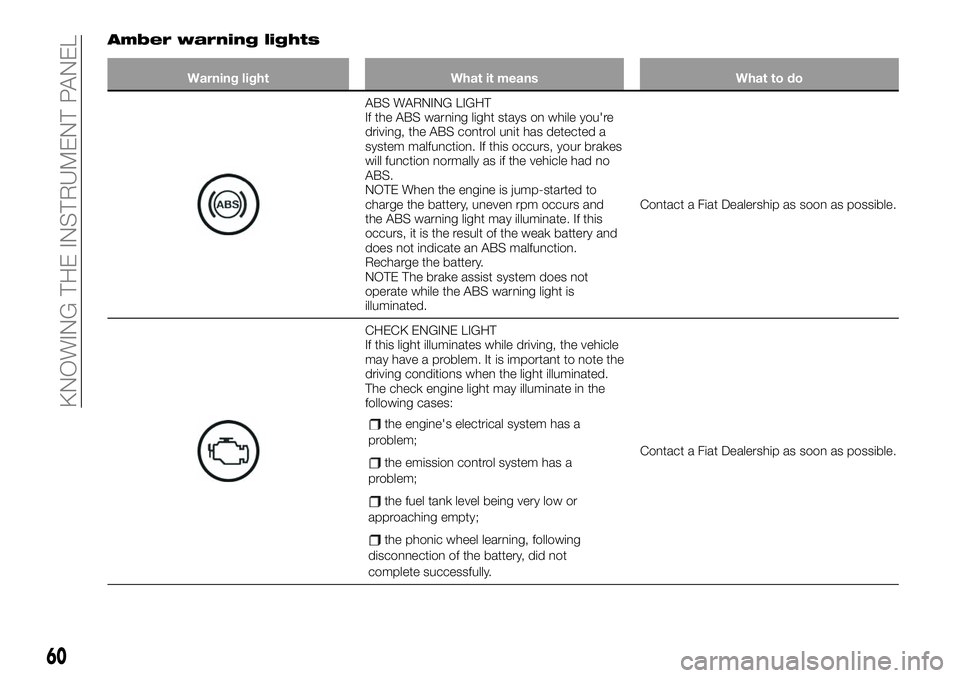
Amber warning lights
Warning light What it means What to do
ABS WARNING LIGHT
If the ABS warning light stays on while you're
driving, the ABS control unit has detected a
system malfunction. If this occurs, your brakes
will function normally as if the vehicle had no
ABS.
NOTE When the engine is jump-started to
charge the battery, uneven rpm occurs and
the ABS warning light may illuminate. If this
occurs, it is the result of the weak battery and
does not indicate an ABS malfunction.
Recharge the battery.
NOTE The brake assist system does not
operate while the ABS warning light is
illuminated.Contact a Fiat Dealership as soon as possible.
CHECK ENGINE LIGHT
If this light illuminates while driving, the vehicle
may have a problem. It is important to note the
driving conditions when the light illuminated.
The check engine light may illuminate in the
following cases:
the engine's electrical system has a
problem;
the emission control system has a
problem;
the fuel tank level being very low or
approaching empty;
the phonic wheel learning, following
disconnection of the battery, did not
complete successfully.
Contact a Fiat Dealership as soon as possible.
60
KNOWING THE INSTRUMENT PANEL
Page 66 of 228

Warning lights What it means What to do
LED HEADLIGHT WARNING LIGHT (where
provided)
This light illuminates if there is a malfunction in
the LED headlight.Contact a Fiat Dealership as soon as possible.
LOW FUEL WARNING LIGHT
The light turns on when the remaining fuel is
about 9.0 litres.
The light illumination timing may vary because
fuel inside the fuel tank moves around
according to the driving conditions and the
vehicle posture.Add fuel.
LOW WASHER FLUID LEVEL WARNING
LIGHT (where provided)
This warning light indicates that little washer
fluid remains.Add washer fluid.
CRUISE CONTROL ACTIVATION (where
provided)
The warning light illuminates when the cruise
control system is activated.
64
KNOWING THE INSTRUMENT PANEL
Page 68 of 228

Green warning lights
Warning light What it means What to do
LEFT DIRECTION INDICATOR
The warning light turns on when the direction
indicator control stalk is moved downwards or,
together with the right direction indicator,
when the hazard warning light button is
pressed.
RIGHT DIRECTION INDICATOR
The warning light turns on when the direction
indicator control stalk is moved upwards or,
together with the left direction indicator, when
the hazard warning light button is pressed.
SIDE LIGHTS AND DIPPED BEAM
HEADLIGHTS
The warning light turns on when side lights or
dipped beam headlights are turned on.
FOG LIGHTS (where provided)
The warning light turns on when the fog lights
are turned on.
CRUISE CONTROL (SET INDICATOR LIGHT)
(where provided)
The warning light turns on when a cruising
speed has been set.
ADJUSTABLE SPEED LIMITER SET
INDICATOR (where provided)
The indicator light illuminates green when a
speed has been set (see “Speed limiter”
paragraph in “Starting and driving” chapter).
66
KNOWING THE INSTRUMENT PANEL
Page 69 of 228

Warning light What it means What to do
KEY INDICATOR LIGHT
Warning light flashing
When the push button start is pressed from
ON to ACC or OFF, the warning light may flash
for approximately 30 seconds indicating that
the remaining battery power of the key is low.Replace with a new battery before the key
becomes unusable.
Blue warning light
Warning light What it means What to do
MAIN BEAM HEADLIGHTS
The warning light switches on when the main
beam headlights are turned on.
LOW ENGINE COOLANT TEMPERATURE
INDICATOR LIGHT
(for versions/markets where provided)
The light illuminates continuously when the
engine coolant temperature is low and turns
off after the engine is warm.
If the low engine coolant temperature indicator
light remains illuminated after the engine has
been sufficiently warmed up, the temperature
sensor could have a malfunction.Contact a Dealership as soon as possible.
67