2020 DODGE GRAND CARAVAN instrument cluster
[x] Cancel search: instrument clusterPage 115 of 380

SAFETY113
Rear Cross Path (RCP)
The Rear Cross Path (RCP) feature is intended
to aid the driver when backing out of parking
spaces where their vision of oncoming vehicles
may be blocked. Proceed slowly and cautiously
out of the parking space until the rear end of the
vehicle is exposed. The RCP system will then
have a clear view of the cross traffic and if an
oncoming vehicle is detected, alert the driver.
RCP Detection Zones
RCP monitors the rear detection zones on both
sides of the vehicle, for objects that are moving
toward the side of the vehicle with a minimum
speed of approximately 3 mph (5 km/h), to
objects moving a maximum of approximately
20 mph (32 km/h), such as in parking lot
situations.
NOTE:
In a parking lot situation, oncoming vehicles can
be obscured by vehicles parked on either side.
If the sensors are blocked by other structures or
vehicles, the system will not be able to alert the
driver.
When RCP is on and the vehicle is in REVERSE,
the driver is alerted using both the visual and
audible alarms, including reducing the radio
volume.
Modes Of Operation
Modes Of Operation With Instrument Cluster
Display
Three selectable modes of operation are
available in the instrument cluster display.
Refer to “Instrument Cluster Display” in
“Getting To Know Your Instrument Panel” for
further information.
WARNING!
Rear Cross Path Detection (RCP) is not a back
up aid system. It is intended to be used to
help a driver detect an oncoming vehicle in a
parking lot situation. Drivers must be careful
when backing up, even when using RCP.
Always check carefully behind your vehicle,
look behind you, and be sure to check for
pedestrians, animals, other vehicles,
obstructions, and blind spots before backing
up. Failure to do so can result in serious
injury or death.
4
20_RT_OM_EN_USC_t.book Page 113
Page 117 of 380

SAFETY115
La operación de este equipo está sujeta a las
siguientes dos condiciones:
1. es posible que este equipo o dispositivo no
cause interferencia perjudicial y
2. este equipo o dispositivo debe aceptar cualquier interferencia, incluyendo la que
pueda causar su operación no deseada.
NOTE:
Changes or modifications not expressly
approved by the party responsible for
compliance could void the user’s authority to
operate the equipment.
Tire Pressure Monitoring System (TPMS)
The Tire Pressure Monitoring System (TPMS)
will warn the driver of a low tire pressure based
on the vehicle recommended cold placard
pressure.
NOTE:
The TPMS Warning Light will illuminate in the
instrument cluster and a chime will sound when
tire pressure is low in one or more of the four
active road tires. When this occurs you must
increase the tire pressure to the recommended
cold placard pressure in order for the TPMS
Warning Light to turn off. The tire pressure will vary with temperature by
approximately 1 psi (7 kPa) for every 12°F
(6.5°C). This means that when the outside
temperature decreases, the tire pressure will
decrease. Tire pressure should always be set
based on cold inflation tire pressure. This is
defined as the tire pressure after the vehicle
has not been driven for at least three hours, or
driven less than 1 mile (1.6 km) after a three
hour period. The cold tire inflation pressure
must not exceed the maximum inflation
pressure molded into the tire sidewall. Refer to
“Tires” in “Servicing and Maintenance” for
information on how to properly inflate the
vehicle’s tires. The tire pressure will also
increase as the vehicle is driven. This is normal
and there should be no adjustment for this
increased pressure.
The TPMS will warn the driver of a low tire
pressure if the tire pressure falls below the
low-pressure warning limit for any reason,
including low temperature effects and natural
pressure loss through the tire.
The TPMS will continue to warn the driver of low
tire pressure as long as the condition exists,
and will not turn off until the tire pressure is at
or above the recommended cold placard
pressure. Once the low tire pressure warning (TPMS Warning Light) illuminates, you must
increase the tire pressure to the recommended
cold placard pressure in order for the TPMS
Warning Light to turn off.
The system will automatically update and the
TPMS Warning Light will turn off once the
system receives the updated tire pressures. The
vehicle may need to be driven for up to
20 minutes above 15 mph (24 km/h) in order
for the TPMS to receive this information.
For example, your vehicle may have a
recommended cold (parked for more than three
hours) placard pressure of 33 psi (227 kPa). If
the ambient temperature is 68°F (20°C) and
the measured tire pressure is 28 psi (193 kPa),
a temperature drop to 20°F (-7°C) will
decrease the tire pressure to approximately
24 psi (165 kPa). This tire pressure is low
enough to turn on the “TPMS Warning Light.”
Driving the vehicle may cause the tire pressure
to rise to approximately 28 psi (193 kPa), but
the TPMS Warning Light will still be on. In this
situation, the TPMS Warning Light will turn off
only after the tires are inflated to the vehicle’s
recommended cold placard pressure value.
4
20_RT_OM_EN_USC_t.book Page 115
Page 119 of 380

SAFETY117
The Tire Pressure Monitoring System (TPMS)
consists of the following components:
Receiver Module
Four Tire Pressure Monitoring sensors
Tire Pressure Monitoring System Warning
Light
Tire Pressure Monitoring Low Tire Pressure
Warnings The TPMS Warning Light will
illuminate in the instrument cluster, a
“LOW TIRE PRESSURE” message will
display in the instrument cluster, and
an audible chime will be activated when one or
more of the four active road tire pressures are
low. Should this occur, you should stop as soon
as possible, check the inflation pressure of
each tire on your vehicle, and inflate each tire to
the vehicle's recommended cold tire placard
pressure value (located on the placard label on
the driver's-side B-Pillar).
NOTE:
When filling warm tires, the tire pressure may
need to be increased up to an additional 4 psi
(28 kPa) above the recommended cold placard
pressure in order to turn the TPMS Warning
Light off. The system will automatically update and the
TPMS Warning Light will extinguish once the
updated tire pressures have been received.
NOTE:
The vehicle may need to be driven for up to
20 minutes above 15 mph (24 km/h) to receive
this information.
Service TPMS
The TPMS Warning Light will flash on and off for
75 seconds, and remain on solid when a system
fault is detected. The system fault will also
sound a chime. If the ignition switch is cycled,
this sequence will repeat, providing the system
fault still exists. The TPMS Warning Light will
turn off when the fault condition no longer
exists. A system fault can occur with any of the
following scenarios:
Jamming due to electronic devices or driving
next to facilities emitting the same radio
frequencies as the TPMS sensors.
Installing some form of aftermarket window
tinting that affects radio wave signals.
Accumulation of excessive snow and/or ice
around the wheels or wheel housings.
Using tire chains on the vehicle.
Using wheels/tires not equipped with TPMS
sensors.
Vehicles With Compact Spare
The compact spare tire (if equipped) does not
have a TPMS sensor. Therefore the TPMS will
not monitor the pressure in the compact
spare tire.
If you install the compact spare tire in place
of a road tire that has a pressure below the
low-pressure warning limit, upon the next
ignition switch cycle, a chime will sound, a
“LOW TIRE PRESSURE” message will be
displayed and the TPMS Warning Light will
turn on.
After driving for up to 20 minutes above
15 mph (24 km/h), the TPMS Warning Light
will flash on and off for 75 seconds and then
remain on solid.
For each subsequent ignition switch cycle, a
chime will sound, the TPMS Warning Light will
flash on and off for 75 seconds and then
remain on solid.
4
20_RT_OM_EN_USC_t.book Page 117
Page 166 of 380
164STARTING AND OPERATING
The engine oil installed in the engine at the
factory is a high-quality energy conserving type
lubricant. Oil changes should be consistent with
anticipated climate conditions under which
vehicle operations will occur. For the
recommended viscosity and quality grades,
refer to “Dealer Service” in “Servicing And
Maintenance”.
NOTE:
A new engine may consume some oil during its
first few thousand miles (kilometers) of
operation. This should be considered a normal
part of the break-in and not interpreted as a
problem.
PARK BRAKE
Before leaving the vehicle, make sure that the
parking brake is fully applied and place the gear
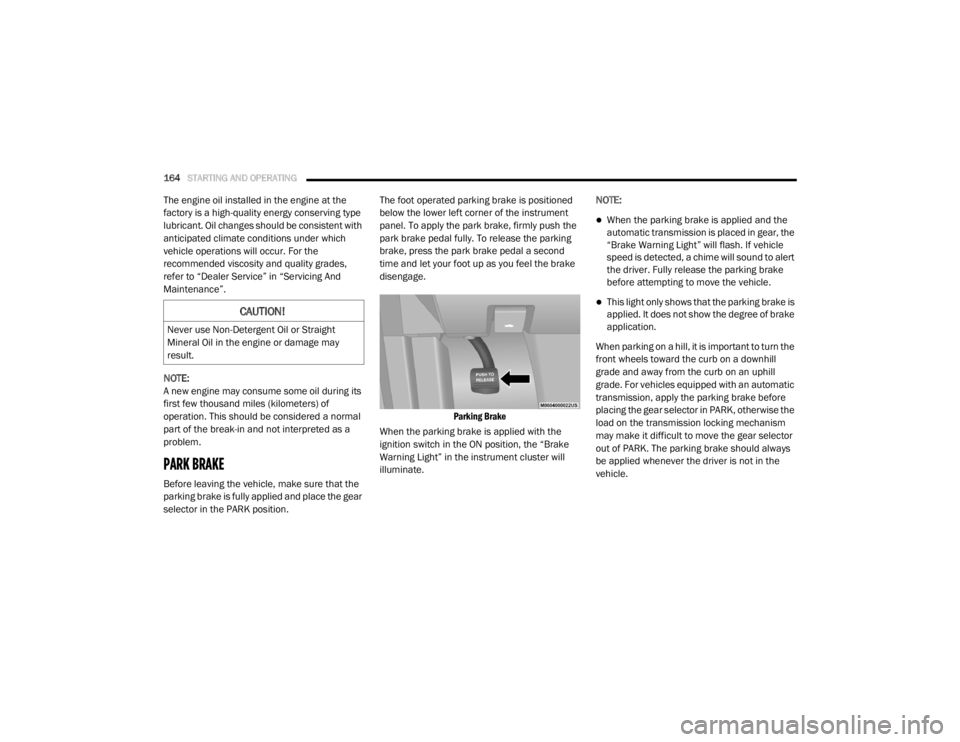
selector in the PARK position. The foot operated parking brake is positioned
below the lower left corner of the instrument
panel. To apply the park brake, firmly push the
park brake pedal fully. To release the parking
brake, press the park brake pedal a second
time and let your foot up as you feel the brake
disengage.
Parking Brake
When the parking brake is applied with the
ignition switch in the ON position, the “Brake
Warning Light” in the instrument cluster will
illuminate. NOTE:
When the parking brake is applied and the
automatic transmission is placed in gear, the
“Brake Warning Light” will flash. If vehicle
speed is detected, a chime will sound to alert
the driver. Fully release the parking brake
before attempting to move the vehicle.
This light only shows that the parking brake is
applied. It does not show the degree of brake
application.
When parking on a hill, it is important to turn the
front wheels toward the curb on a downhill
grade and away from the curb on an uphill
grade. For vehicles equipped with an automatic
transmission, apply the parking brake before
placing the gear selector in PARK, otherwise the
load on the transmission locking mechanism
may make it difficult to move the gear selector
out of PARK. The parking brake should always
be applied whenever the driver is not in the
vehicle.CAUTION!
Never use Non-Detergent Oil or Straight
Mineral Oil in the engine or damage may
result.
20_RT_OM_EN_USC_t.book Page 164
Page 169 of 380

STARTING AND OPERATING167
Fuel Economy (ECON) Mode
The Fuel Economy (ECON) mode can improve
the vehicle's overall fuel economy during
normal driving conditions. Push the “econ”
switch in the center stack of the instrument
panel and a green light will indicate the ECON
mode is engaged.
Fuel Economy Mode Switch
When the Fuel Economy (ECON) Mode is
enabled, the vehicle control systems will
change the following:
The transmission will upshift sooner and
downshift later.
The transmission will skip select gears during
shifts to allow the engine to operate at lower
speeds.
The torque converter clutch may engage at
lower engine speeds and remain on longer.
The engine idle speed will be lower.
The overall driving performance will be more
conservative.
Some ECON mode functions may be tempo -
rarily inhibited based on temperature and
other factors.
Six-Speed Automatic Transmission
The transmission gear position display (located
in the instrument cluster) indicates the
transmission gear range. You must press the
brake pedal to move the gear selector out of
PARK refer to “Brake/Transmission Shift
Interlock System” in this section. To drive, move
the gear selector from PARK or NEUTRAL to the
DRIVE position.
The electronically-controlled transmission
provides a precise shift schedule. The
transmission electronics are self-calibrating;
therefore, the first few shifts on a new vehicle
may be somewhat abrupt. This is a normal
condition, and precision shifts will develop
within a few hundred miles (kilometers).
Gear Selector
Only shift from DRIVE to PARK or REVERSE
when the accelerator pedal is released and the
vehicle is stopped. Be sure to keep your foot on
the brake pedal when shifting between these
gears.
The transmission gear selector has only PARK,
REVERSE, NEUTRAL, and DRIVE shift positions.
Manual downshifts can be made using the
Electronic Range Select (ERS) shift control refer
to “Electronic Range Select (ERS) Operation” in
this section for further information. Moving the
gear selector to the left or right (–/+) while in
the DRIVE position will select the highest
available transmission gear, and will display
that gear in the instrument cluster as 1, 2, 3,
etc.5
20_RT_OM_EN_USC_t.book Page 167
Page 173 of 380

STARTING AND OPERATING171
Electronic Range Select (ERS) Operation
The Electronic Range Select (ERS) shift control
allows the driver to limit the highest available
gear when the transmission is in DRIVE. For
example, if you set the transmission gear limit
to 4 (FOURTH gear), the transmission will not
shift above FOURTH gear (except to prevent
engine overspeed), but will shift through the
lower gears normally.
You can switch between DRIVE and ERS mode
at any vehicle speed. When the gear selector is in the DRIVE position, the transmission will
operate automatically, shifting between all
available gears. Tapping the gear selector to the
left (-) will activate ERS mode, display the
current gear in the instrument cluster, and set
that gear as the top available gear. Once in ERS
mode, tapping the gear selector to the left (-) or
right (+) will change the top available gear.
To exit ERS mode, simply hold the gear selector
to the right (+) until the gear limit display
disappears from the instrument cluster.
NOTE:
To select the proper gear position for maximum deceleration (engine braking), tap the gear selector to the left (-) repeatedly as the vehicle slows. The
transmission will shift to the range from which the vehicle can best be slowed down.WARNING!
Do not downshift for additional engine
braking on a slippery surface. The drive
wheels could lose their grip and the vehicle
could skid, causing a collision or personal
injury.
Transmission Gear Position Display 1 2 3456D
Actual Gear(s) Allowed 11–2 1–3 1–4 1–5 1–6 1–6
5
20_RT_OM_EN_USC_t.book Page 171
Page 176 of 380

174STARTING AND OPERATING
To Activate
Push the on/off button. The Cruise Indicator
Light in the instrument cluster display will
illuminate. To turn the system off, push the
on/off button a second time. The Cruise
Indicator Light will turn off. The system should
be turned off when not in use.
To Set A Desired Speed
Turn the Speed Control on. When the vehicle
has reached the desired speed, push the SET (-)
button and release. Release the accelerator
and the vehicle will operate at the selected
speed.
NOTE:
The vehicle should be traveling at a steady
speed and on level ground before pushing the
SET (-) button.
To Vary The Speed Setting
To Increase Speed
When the Speed Control is set, you can increase
speed by pushing the RES (+) button.
The driver’s preferred units can be selected
through the instrument panel settings (if
equipped). Refer to “Getting To Know Your
Instrument Panel” for more information. The
speed increment shown is dependent on the
chosen speed unit of U.S. (mph) or Metric
(km/h):
U.S. Speed (mph)
Pushing the RES (+) button once will result in
a 1 mph increase in set speed. Each subse -
quent tap of the button results in an increase
of 1 mph.
If the button is continually pushed, the set
speed will continue to increase until the
button is released, then the new set speed
will be established.
Metric Speed (km/h)
Pushing the RES (+) button once will result in
a 1 km/h increase in set speed. Each subse -
quent tap of the button results in an increase
of 1 km/h.
If the button is continually pushed, the set
speed will continue to increase until the
button is released, then the new set speed
will be established.
To Decrease Speed
When the Speed Control is set, you can
decrease speed by pushing the SET (-) button.
The driver’s preferred units can be selected
through the instrument panel settings (if
equipped). Refer to “Getting To Know Your
Instrument Panel” for more information. The
speed decrement shown is dependent on the
chosen speed unit of U.S. (mph) or Metric
(km/h):
U.S. Speed (mph)
Pushing the SET (-) button once will result in
a 1 mph decrease in set speed. Each subse -
quent tap of the button results in a decrease
of 1 mph.
If the button is continually pushed, the set
speed will continue to decrease until the
button is released, then the new set speed
will be established.
WARNING!
Leaving the Speed Control system on when
not in use is dangerous. You could
accidentally set the system or cause it to go
faster than you want. You could lose control
and have an accident. Always leave the
system off when you are not using it.
20_RT_OM_EN_USC_t.book Page 174
Page 178 of 380
176STARTING AND OPERATING
ParkSense Sensors
The four ParkSense sensors, located in the rear
fascia/bumper, monitor the area behind the
vehicle that is within the sensors’ field of view.
The sensors can detect obstacles from approxi -
mately 12 inches (30 cm) up to 79 inches
(200 cm) from the rear fascia/bumper in the
horizontal direction, depending on the location,
type and orientation of the obstacle.
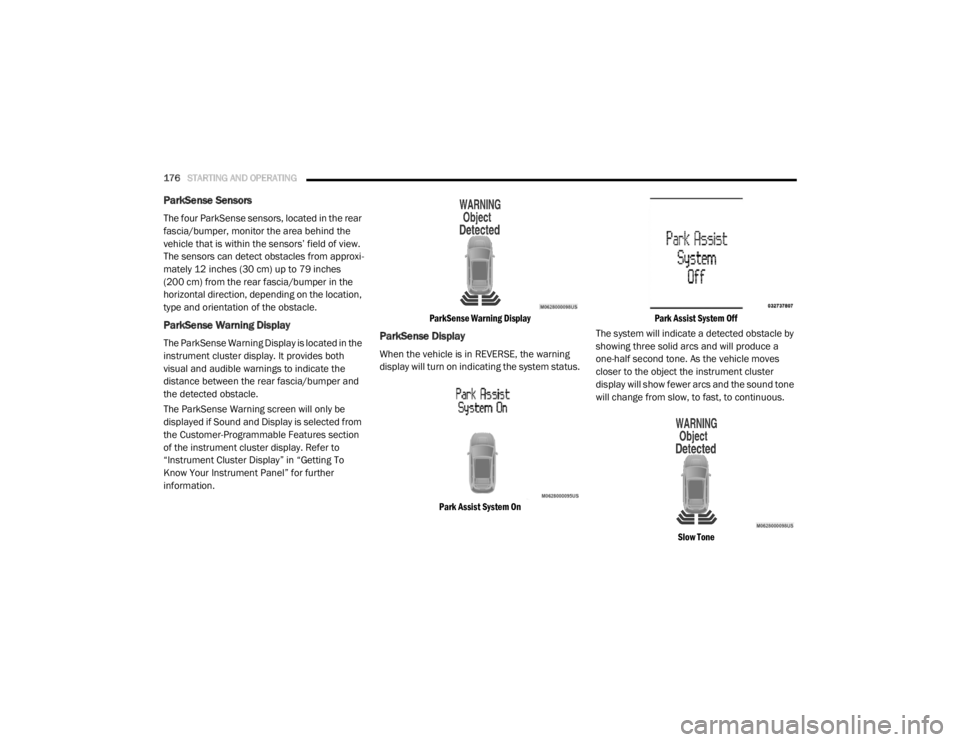
ParkSense Warning Display
The ParkSense Warning Display is located in the
instrument cluster display. It provides both
visual and audible warnings to indicate the
distance between the rear fascia/bumper and
the detected obstacle.
The ParkSense Warning screen will only be
displayed if Sound and Display is selected from
the Customer-Programmable Features section
of the instrument cluster display. Refer to
“Instrument Cluster Display” in “Getting To
Know Your Instrument Panel” for further
information.
ParkSense Warning Display
ParkSense Display
When the vehicle is in REVERSE, the warning
display will turn on indicating the system status.
Park Assist System On Park Assist System Off
The system will indicate a detected obstacle by
showing three solid arcs and will produce a
one-half second tone. As the vehicle moves
closer to the object the instrument cluster
display will show fewer arcs and the sound tone
will change from slow, to fast, to continuous.
Slow Tone
20_RT_OM_EN_USC_t.book Page 176