2020 DODGE GRAND CARAVAN USB
[x] Cancel search: USBPage 301 of 380
MULTIMEDIA299
8. Press the Save button to copy the selected
pictures to the Hard Disk Drive.
9. Select this picture by pressing the “Set as Picture View” button. A check mark
indicates the currently used picture.
Use the PREV or NEXT button to step
through the list of available pictures.
Press the Delete button to delete the pic -
ture from the hard disk drive.
10. Push the Menu button twice and then press the Picture View button to enable the
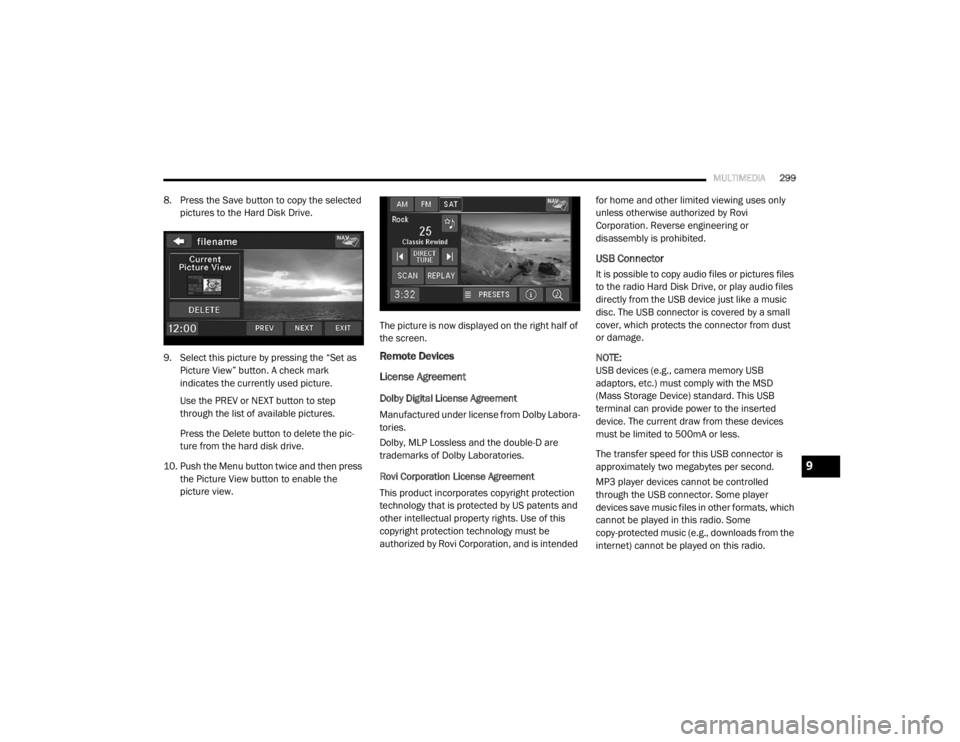
picture view. The picture is now displayed on the right half of
the screen.
Remote Devices
License Agreement
Dolby Digital License Agreement
Manufactured under license from Dolby Labora-
tories.
Dolby, MLP Lossless and the double-D are
trademarks of Dolby Laboratories.
Rovi Corporation License Agreement
This product incorporates copyright protection
technology that is protected by US patents and
other intellectual property rights. Use of this
copyright protection technology must be
authorized by Rovi Corporation, and is intended for home and other limited viewing uses only
unless otherwise authorized by Rovi
Corporation. Reverse engineering or
disassembly is prohibited.
USB Connector
It is possible to copy audio files or pictures files
to the radio Hard Disk Drive, or play audio files
directly from the USB device just like a music
disc. The USB connector is covered by a small
cover, which protects the connector from dust
or damage.
NOTE:
USB devices (e.g., camera memory USB
adaptors, etc.) must comply with the MSD
(Mass Storage Device) standard. This USB
terminal can provide power to the inserted
device. The current draw from these devices
must be limited to 500mA or less.
The transfer speed for this USB connector is
approximately two megabytes per second.
MP3 player devices cannot be controlled
through the USB connector. Some player
devices save music files in other formats, which
cannot be played in this radio. Some
copy-protected music (e.g., downloads from the
internet) cannot be played on this radio.
9
20_RT_OM_EN_USC_t.book Page 299
Page 303 of 380

MULTIMEDIA301
2. Insert the top hooks (1) into the frame first.
3. Then push on the bottom of the flap to
secure in place.
Audio Jack (AUX) Mode
The Audio Jack connector allows you to connect
the headset output of an audio device (e.g.,
MP3 player) to the radio. The audio of the
connected device will then be played through
the radio sound system. Connect a 3.5 mm stereo mini-jack cable as
shown above (not provided with the radio) to the
Audio Jack connector on the radio and to the
earphone connector of your audio device.
The display will switch automatically to the AUX
mode when a 3.5 mm stereo mini-jack cable
has been connected. The radio screen will
revert back to the last tuner mode when the
cable is unplugged.
To change radio modes while the cable is
connected to the unit, push the Media button
located on the faceplate to display the AUX tab.
Press the AUX tab to return to the AUX mode.
Adjust the volume with the On/Off Volume
rotary knob or with the volume of the attached
device.The control of the external device (e.g.,
selecting playlists, play, fast forward, etc.)
cannot be provided by the radio; use the device
controls instead.
NOTE:
Inserting of a mono jack will result in improper
audio playback.
USB Port — If Equipped
The USB Port in the center console or upper
glove box (depending on the vehicle) gives you
access to the audio files on the external USB
device through the AUX Mode. It functions as a
remote control for the currently connected
audio devices mobile digital device, and you can
play audio from the audio device through the
vehicle's speaker system.
Before using the AUX mode, you will need to
connect your audio device to the USB port.
NOTE:The files will not be stored on the internal
hard disk drive and cannot be used in the
HDD mode.
It is recommended you use the latest avail
-
able software for your iPod®/iPhone® and
iTunes®.
CAUTION!
Never force any connector into the ports of
your radio. Make sure your connectors are
the identical shape and size before you
connect.
9
20_RT_OM_EN_USC_t.book Page 301
Page 304 of 380
302MULTIMEDIA
Playing Audio Files From The Audio Device
You can play songs directly from the external
USB device.
Press the Tracks button to display a list view.
Press the button with the desired list item to
select and play the item.
Press the Info button to display the
track information, press the button a
second time to close the display.
Press the Browse button to browse by
categories.
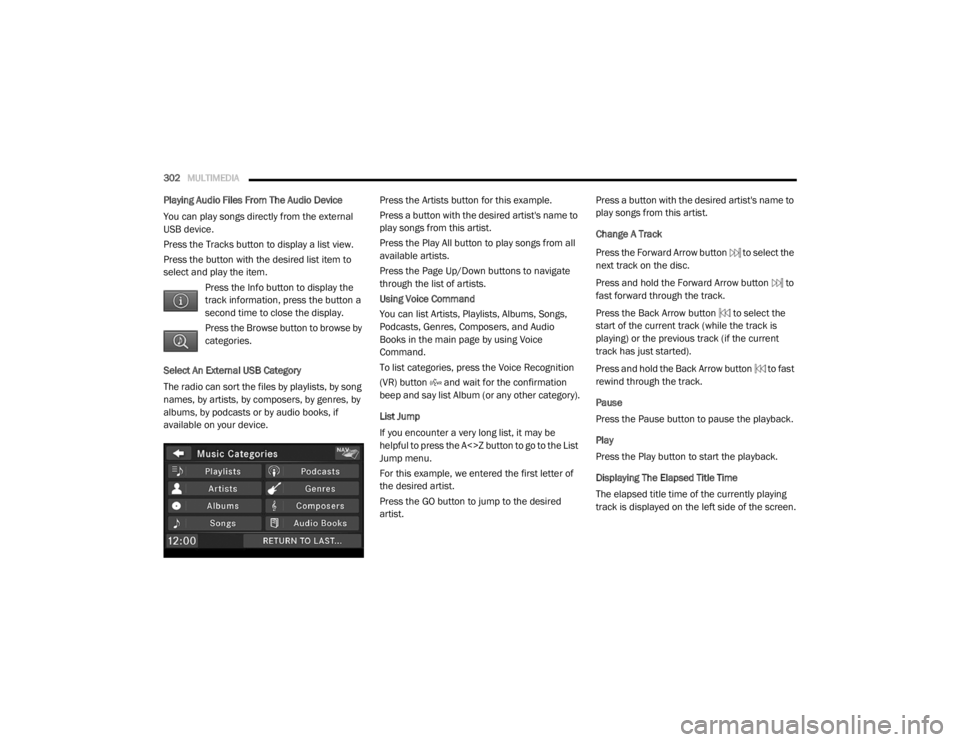
Select An External USB Category
The radio can sort the files by playlists, by song
names, by artists, by composers, by genres, by
albums, by podcasts or by audio books, if
available on your device. Press the Artists button for this example.
Press a button with the desired artist's name to
play songs from this artist.
Press the Play All button to play songs from all
available artists.
Press the Page Up/Down buttons to navigate
through the list of artists.
Using Voice Command
You can list Artists, Playlists, Albums, Songs,
Podcasts, Genres, Composers, and Audio
Books in the main page by using Voice
Command.
To list categories, press the Voice Recognition
(VR) button and wait for the confirmation
beep and say list Album (or any other category).
List Jump
If you encounter a very long list, it may be
helpful to press the A<>Z button to go to the List
Jump menu.
For this example, we entered the first letter of
the desired artist.
Press the GO button to jump to the desired
artist.Press a button with the desired artist's name to
play songs from this artist.
Change A Track
Press the Forward Arrow button to select the
next track on the disc.
Press and hold the Forward Arrow button to
fast forward through the track.
Press the Back Arrow button to select the
start of the current track (while the track is
playing) or the previous track (if the current
track has just started).
Press and hold the Back Arrow button to fast
rewind through the track.
Pause
Press the Pause button to pause the playback.
Play
Press the Play button to start the playback.
Displaying The Elapsed Title Time
The elapsed title time of the currently playing
track is displayed on the left side of the screen.
20_RT_OM_EN_USC_t.book Page 302
Page 331 of 380

MULTIMEDIA329
Language Settings
From the main menu press Settings >
Language .
Voice Personality — sets the language for
voice prompts.
Keyboard — sets the language for your
keyboard.
Keyboard Layout — sets the keyboard layout.
Restoring The Original Language Settings
From the main menu press Settings >
Language > > Restore.
Restoring All Original Settings
From the main menu, press Settings > >
Restore > Yes .
Appendix
About GPS Satellite Signals
The navigation system must acquire satellite
signals in order to navigate.
When the navigation system has acquired
satellite signals, the signal strength bars on the
main menu are full . When it loses satellite
signals, the bars are clear . For more information about GPS, go to
www.garmin.com/aboutGPS
.
Updating The Software
To update the navigation system software, you
must have a USB mass storage device and an
Internet connection.
1. Go to
auto-update.garmin.com
.
2. Find your model and select Software
Updates > Download .
3. Read and accept the terms of the Software License Agreement.
4. Follow the instructions on the Web site to complete the installation of the software
update.
Updating The Map Data
To update the navigation system map, you must
have a USB mass storage device and an
Internet connection, or visit your local dealer for
assistance. A map update can be purchased
once a year.
1. Go to
auto-update.garmin.com
.
2. Select your vehicle from the drop-down lists. 3. Select
Order Map Updates for your unit.
4. Follow the Web site instructions to update your map.
CAUTION
Garmin and FCA US LLC are not responsible for
the accuracy of, or the consequences of using,
a safety camera database.
Safety camera information is available in some
locations. Go to http://www.garmin.com for
availability. For these locations, the navigation
system includes the locations of hundreds of
safety cameras. Your navigation system alerts
you when you are approaching a safety camera
and can warn you if you are driving too fast. The
data is updated at least weekly, so you always
have access to the most up-to-date information.
You can purchase a new region or extend an
existing subscription at any time. Each region
that you purchase has an expiration date.9
20_RT_OM_EN_USC_t.book Page 329
Page 332 of 380

330MULTIMEDIA
Custom POIs (Points of Interest)
NOTE:
Custom POI files must be named “poi.gpi”. and
located on the USB storage device in a folder
named “POI” within a folder named “Garmin”
(Garmin/POI/).
You can manually load custom Points Of
Interest (POI) databases, available from various
companies on the Internet. Some custom POI
databases contain alert information for points
such as safety cameras and school zones. The
navigation system can notify you when you
approach one of these points. You are
responsible for ensuring that your use of safety
camera information is lawful in your area.
CAUTION
Garmin and FCA US LLC are not responsible for
the consequences of using custom POI
databases, or for the accuracy of custom POI
databases. After downloading your POI database, use the
Garmin POI Loader to install the POIs onto a
USB mass storage device. Use the USB mass
storage device to load the POIs. The POI Loader
is available at
garmin.com/products/poiloader.
Refer to the POI Loader Help file for more
information; click Help to open the Help file. The
file name can only be POI.gpi. No other file
name or extension should be used.
NOTE:
Each time you load custom POIs to the
navigation system, any other custom POIs
already saved in the system will be overwritten.
Finding Custom POIs
You can view a list of the custom POIs loaded in
your navigation system.
Press Where To? > Extras > Custom POIs .
Deleting Custom POIs
1. Press
Tools > My Data > Delete Custom
POI(s)
.
2. Press Yes to confirm. NOTE:
All custom POIs will be deleted from your
navigation system.
Saving Trip Logs
Trip logs are recorded while you navigate a
route.
SiriusXM® Travel Link (Radio 430 NAV Only)
Now, in addition to delivering over 130
channels of the best sports, entertainment, talk
and 100% commercial-free music, SiriusXM®
now offers premium infotainment services that
work in conjunction with compatible navigation
systems.
To access SiriusXM® Travel Link, push the
Menu button then press the Travel Link button.
20_RT_OM_EN_USC_t.book Page 330
Page 342 of 380

340MULTIMEDIA
STEERING WHEEL AUDIO CONTROLS — IF
EQUIPPED
Remote Sound System Controls (Back View Of Steering
Wheel)
The remote sound system controls are located
on the rear surface of the steering wheel, at the
three and nine o'clock positions.
The right-hand rocker switch has a push-button
in the center, and controls the volume and
mode of the sound system. Pushing the top of
the rocker switch will increase the volume.
Pushing the bottom of the rocker switch will
decrease the volume. Pushing the center
button changes the operation of the radio from
AM to FM, or to CD mode. The left-hand rocker switch has a push-button in
the center. The function of the left-hand switch
is different, depending on which mode you are
in.
The following describes the left-hand rocker
switch operation in each mode.
Radio Operation
Pushing the top of the switch will Seek Up for
the next listenable station, and pushing the
bottom of the switch will Seek Down for the next
listenable station.
The button located in the center of the left-hand
switch will tune to the next preset station that
you have programmed in the radio preset
push-button.
CD Player
Pushing the top of the switch once will go to the
next track on the CD. Pushing the bottom of the
switch once will go to the beginning of the
current track, or to the beginning of the previous
track if it is within one second after the current
track begins to play.
If you push the switch up or down twice it plays
the second track; three times, it will play the
third, etc.The button in the center of the left-hand switch
has no function in this mode.
USB/MP3 CONTROL — IF EQUIPPED
This feature allows a external USB device to be
plugged into the USB port, located in the glove
compartment. If equipped, there may also be
two USB ports located on the lower trim piece
right behind the driver’s sliding door that are for
charging devices only.
iPod® control supports Mini, 4G, Photo, iPod®
nano, 5G iPod® and iPhone® devices. Some
iPod® software versions may not fully support
the iPod® control features. Please visit
Apple’s® website for software updates.
NOTE:
Connecting a consumer electronic audio device
to the AUX port located in the radio faceplate,
plays media, but does not use the MP3 control
feature to control the connected device.
20_RT_OM_EN_USC_t.book Page 340
Page 343 of 380

MULTIMEDIA341
Connecting The External USB Device
Use the connection cable to connect a external
USB device to the vehicle's USB connector port
which is located in the glove compartment.
USB Port
NOTE:
The glove compartment will have a position
where the consumer electronic audio device
cable can be routed through without damaging
the cable when closing the lid. This allows
routing of the cable without damaging it while
closing the lid. If a cut out is not available in the
glove compartment, route the cable away from
the lid latch and in a place that will allow the lid
to close without damaging the cable. Once the audio device is connected and
synchronized to the vehicle's USB/MP3 control
system (External USB device may take a few
minutes to connect), the audio device starts
charging and is ready for use by pushing radio
buttons.
NOTE:
If the audio device battery is completely
discharged, it may not communicate with the
USB/MP3 control system until a minimum
charge is attained. Leaving the audio device
connected to the USB/MP3 control system may
charge it to the required level.
Using This Feature
By using an external USB device to connect to
the USB port:
The audio device can be played on the
vehicle’s sound system, providing metadata
(artist, track title, album, etc.) information on
the radio display.
The audio device can be controlled using the
radio buttons to Play, Browse, and List the
audio device’s contents.
The audio device battery charges when
plugged into the USB connector (if supported
by the specific audio device).
Controlling The External USB Device Using
Radio Buttons
To enter the AUX/USB/MP3 control mode and
access a connected audio device, either push
the Aux button on the radio faceplate or push
the VR button and say "USB" or "Switch to USB."
Once in the AUX/USB/MP3 control mode, audio
tracks (if available from audio device) start
playing over the vehicle's audio system.
Play Mode
When switched to AUX/USB/MP3 control mode,
the external USB device automatically starts
Play mode. In Play mode, the following buttons
on the radio faceplate may be used to control
the external USB device and display data:
Use the TUNE control knob to select the next
or previous track.
Turning it clockwise (forward) by one
click, while playing a track, skips to the
next track or push the Voice Recognition
(VR) button and say "Next Track".
9
20_RT_OM_EN_USC_t.book Page 341
Page 344 of 380

342MULTIMEDIA
Turning it counterclockwise (backward)
by one click will jump to the previous
track in the list or push the VR button and
say "Previous Track".
Jump backward in the current track by
pushing and holding the << RW button.
Holding the << RW button long enough will
jump to the beginning of the current track.
Jump forward in the current track by pushing
and holding the FF >> button.
A single push backward << RW or forward FF
>> will jump backward or forward respec -
tively, for five seconds.
Use the << SEEK and SEEK >> buttons to
jump to the previous or next track. Pushing
the SEEK >> button during play mode will
jump to the next track in the list, or push the
VR button and say "Next or Previous Track."
While a track is playing, push the INFO button
to see the associated metadata (artist, track
title, album, etc.) for that track. Pushing the
INFO button again jumps to the next screen
of data for that track. Once all screens have
been viewed, the last INFO button push will
go back to the play mode screen on the radio.
Pushing the Repeat button will change the
audio device mode to repeat the current
playing track or push the VR button and say
"Repeat On" or "Repeat Off".
Push the Scan button to use AUX/USB/MP3
device scan mode, which will play the first 10
seconds of each track in the current list and
then forward to the next song. To stop Scan
mode and start playing the desired track,
when it is playing the track, push the Scan
button again. During Scan mode, pushing the
<< SEEK and SEEK >> buttons will select the
previous and next tracks.
RND button: Pushing this button toggles
between Shuffle ON and Shuffle OFF modes
for the external USB device, or push the VR
button and say "Shuffle On" or "Shuffle Off." If
the RND icon is showing on the radio display,
then the shuffle mode is On.
List Or Browse Mode
During Play mode, pushing any of the buttons
described below will bring up List mode. List
mode enables scrolling through the list of
menus and tracks on the audio device. Tune control knob: The Tune control knob
functions in a similar manner as the scroll
wheel on the audio device or external USB
device.
Turning it clockwise (forward) and counter-
clockwise (backward) scrolls through the
lists, displaying the track detail on the radio
display. Once the track to be played is high-
lighted on the radio display, push the Tune
control knob to select and start playing the
track. Turning the TUNE control knob fast will
scroll through the list faster. During fast
scroll, a slight delay in updating the informa
-
tion on the radio display may be noticeable.
In List mode, the radio Preset buttons are used
as shortcuts to the following lists on the
external USB device:
Preset 1 – Playlists
Preset 2 – Artists
Preset 3 – Albums
Preset 4 – Genres
Preset 5 – Audiobooks
Preset 6 – Podcasts
20_RT_OM_EN_USC_t.book Page 342