2020 DODGE CHALLENGER lock
[x] Cancel search: lockPage 333 of 396
MULTIMEDIA331
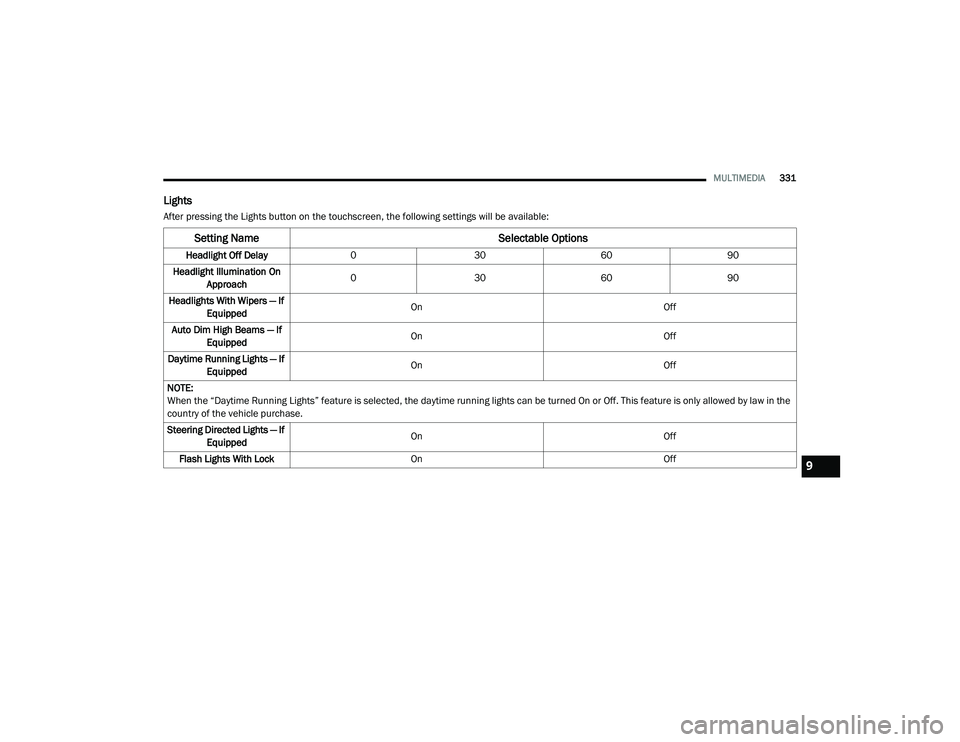
Lights
After pressing the Lights button on the touchscreen, the following settings will be available:
Setting Name Selectable Options
Headlight Off Delay030 6090
Headlight Illumination On Approach 0
30 6090
Headlights With Wipers — If Equipped On
Off
Auto Dim High Beams — If Equipped On
Off
Daytime Running Lights — If Equipped On
Off
NOTE:
When the “Daytime Running Lights” feature is selected, the daytime running lights can be turned On or Off. This feature is only allowed by law in the
country of the vehicle purchase.
Steering Directed Lights — If Equipped On
Off
Flash Lights With Lock On Off
9
20_LA_OM_EN_USC_t.book Page 331
Page 334 of 396

332MULTIMEDIA
Doors & Locks
After pressing the Doors & Locks button on the touchscreen, the following settings will be available:
Setting Name Selectable Options
Auto Door Locks — If EquippedOn Off
Auto Unlocks On Exit On Off
NOTE:
When the “Auto Unlocks On Exit” feature is selected, all doors unlock when the vehicle is stopped, the transmission is in the PARK or NEUTRAL position
and the driver's door is opened. Flash Lights With Lock On Off
NOTE:
When the “Flash Lights With Lock” feature is selected, the exterior lights flash when the doors are locked or unlocked with the key fob, or when using
the passive entry feature. This feature may be selected with or without the “Sound Horn With Lock” feature selected. Sound Horn With Lock Off1st Press 2nd Press
Sound Horn With Remote Start — If Equipped On
Off
1st Press Of Key Fob Unlocks Driver Door All Doors
NOTE:
When "Driver Door" is programmed with 1st Press Of Key Fob Unlocks, only the driver's door unlocks with the first press of the key fob unlock button.
You must press the key fob unlock button twice to unlock the passengers’ doors. When "All Doors" is selected for 1st Press Of Key Fob Unlocks, all
doors unlock on the first press of the key fob unlock button.
If the vehicle is programmed 1st Press Of Key Fob Unlocks “All Doors,” all doors unlock no matter which Passive Entry equipped door handle is
grasped. If 1st Press Of Key Fob Unlocks “Driver Door” is programmed, only the driver’s door unlocks when the driver’s door is grasped. With Passive
Entry, if 1st Press Of Key Fob Unlocks “Driver Door” is programmed, touching the handle more than once results in only the driver’s door opening.
If “Driver Door” is selected, once the driver door is opened, the interior door lock/unlock switch can be used to unlock all doors (or use key fob).
20_LA_OM_EN_USC_t.book Page 332
Page 335 of 396

MULTIMEDIA333
Seats & Comfort — If Equipped
After pressing the Seats & Comfort button on the touchscreen, the following settings will be available:Passive Entry — If Equipped
On Off
NOTE:
The “Passive Entry” feature allows you to lock and unlock the vehicle’s door(s) without having to push the key fob lock or unlock buttons. To make
your selection, press the Passive Entry button on the touchscreen, until a check mark appears next to the setting, showing that the setting has been
selected. Personal Settings Linked To Key Fob — If Equipped On
Off
NOTE:
This feature provides automatic recall of all settings stored to a memory location (driver’s seat, exterior mirrors, power steering column position
and radio station presets) to enhance driver mobility when entering and exiting the vehicle.
The seat returns to the memorized seat location (if Personal Settings Linked To Key Fob is set to On) when the key fob is used to unlock the door.
Setting Name Selectable Options
Setting NameSelectable Options
With Vehicle StartOn Off
9
20_LA_OM_EN_USC_t.book Page 333
Page 343 of 396

MULTIMEDIA341
5. Controls
Press the Controls button on the touch -
screen to adjust the heated and vented
seats or heated steering wheel (if
equipped).
6. Phone Press the Phone button on the touchscreen
to access the Uconnect Phone feature.
7. Settings Press the Settings button on the touch -
screen to access the Uconnect Settings
menu.
Drag & Drop Menu Bar
The Uconnect features and services in the main
menu bar are easily changed for your
convenience. Simply follow these steps:
Uconnect 4 Main Menu
1. Press the Apps button to open the App screen.
2. Press and hold, then drag the selected App to replace an existing shortcut in the main
menu bar.
The new app shortcut, that was dragged down
onto the main menu bar, will now be an active
App/shortcut.
NOTE:
This feature is only available if the vehicle is in
PARK.
RADIO MODE
Radio Controls
The radio is equipped with the following modes:
AM
FM
SiriusXM® Satellite Radio – If Equipped
Press the Radio button on the touchscreen,
bottom left corner, to enter the Radio Mode. The
different tuner modes, AM, FM, and SXM, can
then be selected by pressing the corresponding
buttons in the Radio mode.
Volume/Power Control
Push the Volume/Power control knob to turn off
the screen and mute the radio. Push the
Volume/Power control knob a second time to
turn the screen back on and unmute the radio.
The electronic volume control turns
continuously (360 degrees) in either direction,
without stopping. Turning the Volume/Power
control knob clockwise increases the volume,
and counterclockwise decreases it.
Tune/Scroll Control
When the audio system is turned on, the sound
will be set at the same volume level as last
played.
9
20_LA_OM_EN_USC_t.book Page 341
Page 344 of 396

342MULTIMEDIA
Turn the rotary Tune/Scroll control knob
clockwise to increase or counterclockwise to
decrease the radio station frequency. Push the
Enter/Browse button to choose a selection.
Screen Close
The X button on the touchscreen at the top right,
provides a means to close the Direct Tune
Screen. The Direct Tune Screen also auto
closes if no activity occurs within a few seconds.
Seek And Direct Tune Functions
The Seek Up and Down functions are activated
by pressing the double arrow buttons on the
touchscreen to the right and left of the radio
station display or by pressing the left Steering
Wheel Audio Control up or down.
Seek Up
Press and release the Seek Up button on the
touchscreen to tune the radio to the next
listenable station or channel. During a Seek Up
function, if the radio reaches the starting
station after passing through the entire band
two times, the radio will stop at the station
where it began. Fast Seek Up
Press and hold the Seek Up button on the
touchscreen to advance the radio through the
available stations or channels at a faster rate.
The radio stops at the next available station or
channel when the button on the touchscreen is
released.
Seek Down
Press and release the Seek Down button on the
touchscreen to tune the radio to the next
listenable station or channel. During a Seek
Down function, if the radio reaches the starting
station after passing through the entire band
two times, the radio will stop at the station
where it began.
Fast Seek Down
Press and hold the Seek Down button on the
touchscreen to advance the radio through the
available stations or channel at a faster rate.
The radio stops at the next available station or
channel when the button on the touchscreen is
released.
Direct Tune
Press the Tune button on the touchscreen
located at the bottom of the radio screen. The
Direct Tune button on the touchscreen is
available in AM, FM, and SXM radio modes and
can be used to direct tune the radio to a desired
station or channel.
Press the available number button on the
touchscreen to begin selecting a desired
station. Once a number has been entered, any
numbers that are no longer possible (stations
that cannot be reached) will become
deactivated/grayed out.
Undo
You can backspace an entry by pressing the
bottom left on the touchscreen.
OK
Once the last digit of a station has been
entered, press the OK button, and the Direct
Tune screen will close. The system will
automatically tune to that station.
The selected Station or Channel number is
displayed in the Direct Tune text box.
20_LA_OM_EN_USC_t.book Page 342
Page 356 of 396

354MULTIMEDIA
To use Apple CarPlay®, make sure you are
using iPhone® 5 or later, have Siri enabled in
Settings, ensure your iPhone® is unlocked for
the very first connection only, and then use the
following procedure:
1. Connect your iPhone® to one of the media
USB ports in your vehicle.
NOTE:
Be sure to use the factory-provided Lightning
cable that came with your phone, as after -
market cables may not work.
2. Once the device is connected and recognized, the “Phone” icon on the drag &
drop menu bar changes to the Apple
CarPlay® Icon.
Apple CarPlay®
Once Apple CarPlay® is up and running on your
Uconnect system, the following features can be
utilized using your iPhone’s® data plan:
Phone
Music
Messages
Maps
NOTE:
To use Apple CarPlay® make sure that cellular
data is turned on, and that you are in an area
with cellular coverage. Your data and cellular
coverage is shown on the left side of the radio
screen. NOTE:
Requires compatible iPhone®. See dealer for
phone compatibility. Data plan rates apply.
Vehicle user interface is a product of Apple®.
Apple CarPlay® is a trademark of Apple® Inc.
iPhone® is a trademark of Apple® Inc., regis
-
tered in the US and other countries. Apple®
terms of use and privacy statements apply.
Apple CarPlay® Phone
With Apple CarPlay®, push and hold
the VR button on the steering wheel to
activate a Siri voice recognition
session. You can also press and hold
the Home button within Apple CarPlay® to start
talking to Siri. This allows you to make calls or
listen to voice mail as you normally would using
Siri on your iPhone®.
NOTE:
Only temporarily pushing the VR button on the
steering wheel launches a built-in VR session,
not a Siri session, and it will not function with
Apple CarPlay®.
20_LA_OM_EN_USC_t.book Page 354
Page 382 of 396

380
INDEX
A
About Your Brakes............................... 154, 291Adaptive Cruise Control (ACC)
(Cruise Control).............................................. 169Adding Engine Coolant (Antifreeze)............... 263Adding Washing Fluid.................................... 250Additives, Fuel............................................... 295AdjustForward................................................ 29, 31Rearward.............................................. 29, 31Air Bag........................................................... 122Advance Front Air Bag............................... 122Air Bag Operation...................................... 123Air Bag Warning Light................................ 121Enhanced Accident Response......... 128, 233Event Data Recorder (EDR)....................... 233Front Air Bag............................................. 122If Deployment Occurs................................ 127Knee Impact Bolsters................................ 124Maintaining Your Air Bag System.............. 128Maintenance............................................. 128Redundant Air Bag Warning Light.............122Side Air Bags............................................. 124Transporting Pets...................................... 145
Air Bag Light.................................. 83, 121, 146Air Cleaner, Engine
(Engine Air Cleaner Filter)............................. 255Air Conditioner Maintenance........................ 257Air Conditioner Refrigerant........................... 257Air Conditioner System................................. 257Air Conditioning......................................... 47, 52Air Conditioning Filter..............................54, 258Air Conditioning System................................... 47Air Conditioning, Operating Tips....................... 53Air Filter............................................... 255, 256Air PressureTires......................................................... 277AlarmArm The System................................... 23, 24Panic........................................................... 14Rearm The System...................................... 24Security Alarm...................................... 23, 84Alarm SystemSecurity Alarm............................................. 23All Wheel Drive (AWD)................................... 268Alterations/ModificationsVehicle......................................................... 10
Android Auto................................................. 374Antifreeze (Engine Coolant)......... 263, 297, 298Disposal.................................................... 265Anti-Lock Brake System (ABS)..........................93Anti-Lock Warning Light...................................88Apple CarPlay................................................ 374Arming SystemSecurity Alarm.............................................23Assist, Hill Start................................................98Audio Settings............................................... 347Audio Systems (Radio).................................. 305Auto Down Power Windows..............................55Automatic Door Locks......................................28Automatic Headlights.......................................42Automatic High Beams.....................................41Automatic Temperature Control (ATC)..............52Automatic Transmission................................ 160Adding Fluid......... 268, 299, 301, 302, 304Fluid And Filter Change............................. 268Fluid Change............................................. 268Fluid Level Check............................. 267, 268Fluid Type............ 267, 299, 301, 302, 304Special Additives...................................... 267
20_LA_OM_EN_USC_t.book Page 380
Page 383 of 396

381
Automatic Transmission Limp
Home Mode
............................................ 28, 163AutoPark........................................................ 150Autostick Operation.................................................. 164Aux Mode....................................................... 350Axle Fluid........................... 299, 301, 302, 304Axle Lubrication................. 299, 301, 302, 304
B
Back-Up......................................................... 186Battery.................................................... 84, 251Charging System Light................................. 84Keyless Key Fob Replacement.................... 14Location.................................................... 251Belts, Seat..................................................... 146Blind Spot Monitoring.................................... 100BluetoothConnect Or Disconnect Link Betweenthe Uconnect Phone And Mobile
Phone
................................................... 366Connecting To A Particular Mobile PhoneOr Audio Device After Pairing................361Bluetooth Mode............................................. 351Body Mechanism Lubrication........................ 259B-Pillar Location............................................. 273Brake Assist System........................................ 94Brake Control System...................................... 94Brake Fluid...............266, 299, 301, 302, 304
Brake System...................................... 266, 291Fluid Check.......... 266, 299, 301, 302, 304Master Cylinder........................................ 266Parking..................................................... 154Warning Light.....................................83, 291Brake/Transmission Interlock...................... 160Break-In Recommendations, New Vehicle.... 152Brightness, Interior Lights................................ 44Bulb Replacement........................................ 204Bulbs, Light.......................................... 147, 204
C
Camera, Rear................................................ 186Capacities, Fluid.................................. 297, 298Caps, FillerFuel.......................................................... 188Oil (Engine)...................................... 246, 254Radiator (Coolant Pressure)..................... 264Car Washes................................................... 288Carbon Monoxide Warning................... 145, 296CargoVehicle Loading........................................ 189Cellular Phone.............................................. 368Certification Label......................................... 189Chains, Tire.......................................... 284, 285Changing A Flat Tire...................................... 269Chart, Tire Sizing........................................... 270
Check Engine Light
(Malfunction Indicator Light)............................92Checking Your Vehicle For Safety.................. 145Checks, Safety.............................................. 145Child Restraint.............................................. 130Child RestraintsBooster Seats........................................... 133Child Seat Installation............................... 142How To Stow An unused ALR Seat Belt..... 139Infant And Child Restraints....................... 132Lower Anchors And Tethers For Children................................................ 135Older Children And Child Restraints.......... 132Seating Positions...................................... 134Clean Air Gasoline......................................... 294CleaningWheels...................................................... 283Climate Control................................................47Cold Weather Operation................................ 151Compact Spare Tire...................................... 281Contract, Service........................................... 377Cooling Pressure Cap (Radiator Cap)............ 264Cooling System............................................. 262Adding Coolant (Antifreeze)...................... 263Coolant Level................................... 262, 265Cooling Capacity.............................. 297, 298Disposal Of Used Coolant......................... 26511
20_LA_OM_EN_USC_t.book Page 381