2020 CITROEN C4 brake
[x] Cancel search: brakePage 114 of 260
11 2
Driving
maintained. The speed next to the symbol
disappears from the instrument panel.
Deselecting the system
► Press 1-ASSIST until the symbols disappear
from the instrument panel.
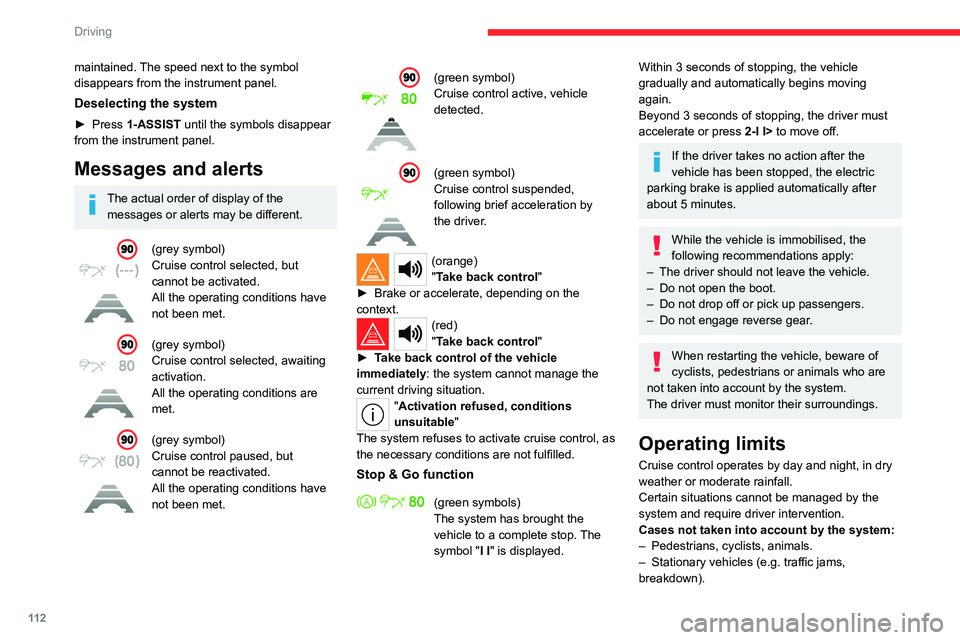
Messages and alerts
The actual order of display of the messages or alerts may be different.
(grey symbol)
Cruise control selected, but
cannot be activated.
All the operating conditions have
not been met.
(grey symbol)
Cruise control selected, awaiting
activation.
All the operating conditions are
met.
(grey symbol)
Cruise control paused, but
cannot be reactivated.
All the operating conditions have
not been met.
(green symbol)
Cruise control active, vehicle
detected.
(green symbol)
Cruise control suspended,
following brief acceleration by
the driver.
(orange)
"Take back control"
►
Brake or accelerate, depending on the
context.
(red)
"Take back control"
►
T
ake back control of the vehicle
immediately: the system cannot manage the
current driving situation.
"Activation refused, conditions
unsuitable "
The system refuses to activate cruise control, as
the necessary conditions are not fulfilled.
Stop & Go function
(green symbols)
The system has brought the
vehicle to a complete stop. The
symbol "I I" is displayed.
Within 3 seconds of stopping, the vehicle
gradually and automatically begins moving
again.
Beyond 3 seconds of stopping, the driver must
accelerate or press 2-I I> to move off.
If the driver takes no action after the
vehicle has been stopped, the electric
parking brake is applied automatically after
about 5 minutes.
While the vehicle is immobilised, the
following recommendations apply:
–
The driver should not leave the vehicle.
–
Do not open the boot.
–
Do not drop off or pick up passengers.
–
Do not engage reverse gear
.
When restarting the vehicle, beware of
cyclists, pedestrians or animals who are
not taken into account by the system.
The driver must monitor their surroundings.
Operating limits
Cruise control operates by day and night, in dry
weather or moderate rainfall.
Certain situations cannot be managed by the
system and require driver intervention.
Cases not taken into account by the system:
–
Pedestrians, cyclists, animals.
–
Stationary vehicles (e.g.
traffic jams,
breakdown).
Page 115 of 260

11 3
Driving
6
– Vehicles crossing your lane.
– V ehicles driving in the opposite direction.
Situations where the driver must suspend the
system:
– Vehicles in a tight bend.
– When approaching a roundabout.
– When following a narrow vehicle.
Reactivate the system when conditions allow .
Situations in which the driver is prompted to
immediately resume control:
–
Excessively sharp deceleration by the vehicle
in front of you.
– When a vehicle cuts in sharply between your
vehicle and the one in front.
Some vehicles on the road may be
poorly perceived or interpreted by the
camera and/or the radar (e.g.
truck), which
can lead to an incorrect evaluation of
distances and result in inappropriate
acceleration or braking of the vehicle.
Pay particular attention:
– When motorcycles are present and
when there are vehicles staggered across the
traffic lane.
–
When entering a tunnel or crossing a
bridge.
If any of the following malfunctions
occurs, do not use the system:
–
Following an impact on the windscreen
close to the camera or on the front bumper
(versions with radar).
–
Brake lamps not working.
If the vehicle has undergone any of the
following modifications, do not use the
system:
–
Carrying long objects on roof bars.
–
Towing.
–
Use of the "space-saver" type spare wheel
(depending on version).
–
Front end of the vehicle modified (for
example by adding long-range headlamps or
painting the front bumper).
–
Obstructed radar and/or camera.
Malfunction
In the event of a malfunction,
dashes are displayed instead of
the speed setting.
This warning lamp comes on, accompanied by a message and an
audible signal, to confirm the malfunction.
Have it checked by a CITROËN dealer or a
qualified workshop.
Lane positioning assist
For more information, refer to the
General recommendations on the use
of driving and manoeuvring aids .
Page 116 of 260

11 4
Driving
The system identifies the limits of the traffic
lane and steers the vehicle inside this lane to
maintain it in the lateral position chosen by the
driver.
To do this, the system uses a camera placed on
the upper part of the windscreen.
This function is primarily suitable for driving on
motorways and main roads.
Activation/Deactivation
The Lane positioning assist system is
automatically activated, after selecting Highway
Driver Assist mode.
For more information on the Highway Driver
Assist system, refer to the corresponding
section.
The selection is confirmed by the display of
the symbols on the instrument panel or on the
head-up display (if fitted), representing the
steering wheel and the side lines.
The colour of the symbols depends on the
operating state of the system:
(grey)
One or more operating conditions is not
met; the system is paused.
(green)
All operating conditions are met; the system is
active.
(orange)
System malfunction.
If the driver no longer wishes to use the system
for some time, they can deactivate it by pressing
the button again (confirmed when the symbol
disappears).
The system status is saved when the ignition is switched off.
Operating conditions
– Adaptive cruise control active.
– ESC system operational.
–
ASR system activated.
–
No trailer detected.
–
No 'space-saver' spare wheel in use.
–
V
ehicle not subject to strong lateral g-forces.
–
Direction indicators not activated.
Regulation
The driver must hold the steering wheel
properly.
When regulation is activated, the symbols are
displayed in green: with small steering inputs,
the system steers the vehicle and keeps it in the
position chosen by the driver in the traffic lane.
This position is not necessarily the centre of the
lane.
The driver can feel movements in the steering
wheel.
At any time, the driver can change the position of
the vehicle by intervening on the steering wheel
and maintaining the position until the system has
taken it into account. If the chosen position is too
off-centre, an automatic re-centering manoeuvre
can occur. The system adjusts to the newly
defined position.
Pausing/Suspending the
system
The driver must act promptly if they believe that the traffic conditions or the
state of the road surface require their
intervention, by moving the steering wheel to
temporarily suspend system operation. Any
action on the brake pedal that causes the
Adaptive cruise control
system to be paused
will also cause the system to be paused.
If the system detects that the driver is not
holding the wheel firmly enough, it
triggers a series of gradual alerts and then
deactivates itself if there is no response from
the driver.
If the function is suspended due to the
prolonged release of the force holding
the steering wheel, the system must be
reactivated by pressing the button again.
Page 117 of 260

11 5
Driving
6Automatic suspension
Suspension of the system is accompanied by a
specific audible signal.
–
T
riggering of the ESC system.
–
Insufficient lane detection. In this case, the
Active lane departure warning system function
can take over
, and the system will reactivate itself once the operating conditions are met
again.Paused by the driver
– Travelling outside the lane limits.
–
T oo tight a grip on the steering wheel or
dynamic action on the steering wheel. –
Action on the brake pedal (resulting in a pause
until cruise control is reactivated) or accelerator
pedal (suspension for as long as the pedal is
depressed).
–
Pausing of the Adaptive cruise control system.
–
Deactivation of the
ASR system.
Driving situations and related alerts
The tables below describe the displays associated with the main driving situations. The actual order of display of these alerts may be different.
The locations of these symbols vary according to the display mode select\
ed on the instrument panel and whether or not the head-up display is act\
ivated (if
fitted to vehicle).
Symbols Comments
(grey)
Cruise control paused.
Lane positioning assist not selected.
(green)
Cruise control on.
Lane positioning assist not selected.
Page 122 of 260
120
Driving
Function statusDisplayComments
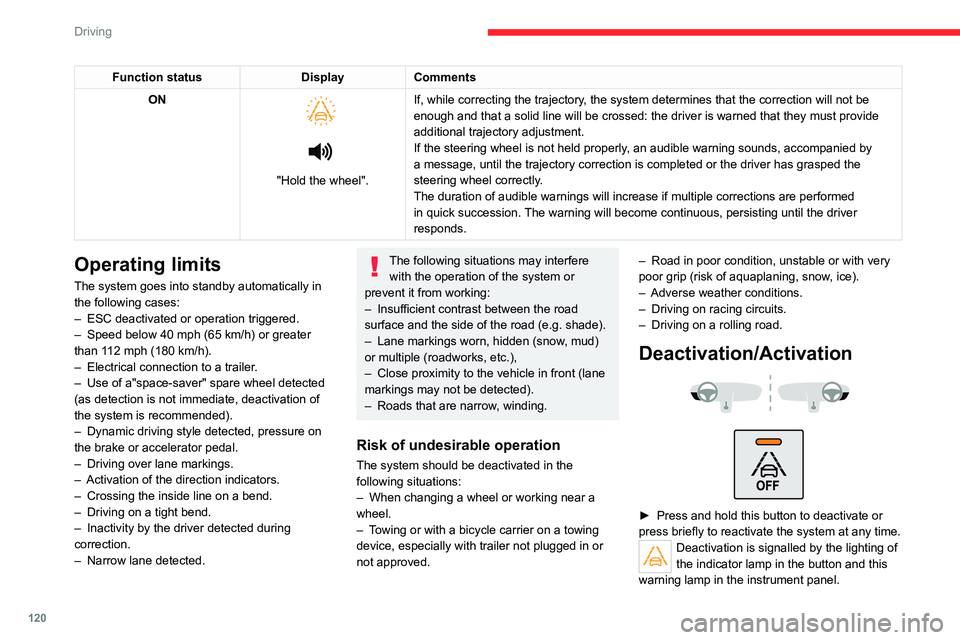
ON
"Hold the wheel". If, while correcting the trajectory, the system determines that the correction will not be
enough and that a solid line will be crossed: the driver is warned that \
they must provide
additional trajectory adjustment.
If the steering wheel is not held properly, an audible warning sounds, accompanied by
a message, until the trajectory correction is completed or the driver ha\
s grasped the
steering wheel correctly.
The duration of audible warnings will increase if multiple corrections a\
re performed
in quick succession. The warning will become continuous, persisting until the driver
responds.
Operating limits
The system goes into standby automatically in
the following cases:
–
ESC deactivated or operation triggered.
–
Speed below 40 mph (65
km/h) or greater
than 112 mph (180
km/h).
–
Electrical connection to a trailer
.
–
Use of a"space-saver" spare wheel detected
(as detection is not immediate, deactivation of
the system is recommended).
–
Dynamic driving style detected, pressure on
the brake or accelerator pedal.
–
Driving over lane markings.
–
Activation
of the direction indicators.
–
Crossing the inside line on a bend.
–
Driving on a tight bend.
–
Inactivity by the driver detected during
correction.
–
Narrow lane detected.
The following situations may interfere with the operation of the system or
prevent it from working:
–
Insufficient contrast between the road
surface and the side of the road (e.g. shade).
–
Lane markings worn, hidden (snow
, mud)
or multiple (roadworks, etc.),
–
Close proximity to the vehicle in front (lane
markings may not be detected).
–
Roads that are narrow
, winding.
Risk of undesirable operation
The system should be deactivated in the
following situations:
–
When changing a wheel or working near a
wheel.
–
T
owing or with a bicycle carrier on a towing
device, especially with trailer not plugged in or
not approved. –
Road in poor condition, unstable or with very
poor grip (risk of aquaplaning, snow
, ice).
–
Adverse weather conditions.
–
Driving on racing circuits.
–
Driving on a rolling road.
Deactivation/Activation
► Press and hold this button to deactivate or
press briefly to reactivate the system at any time.
Deactivation is signalled by the lighting of
the indicator lamp in the button and this
warning lamp in the instrument panel.
Page 124 of 260

122
Driving
No alert is triggered in the following conditions:
– presence of stationary objects (e.g. parked
vehicles, safety rails, lampposts, signs).
–
vehicles travelling in the opposite direction.
–
on winding roads or in case of sharp turns.
–
when overtaking or being overtaken by a
very long vehicle (e.g.
truck, bus), which is both
detected in a blind spot from behind and present
in the driver's field of vision from the front.
–
quick overtaking manoeuvre.
–
very heavy traffic: vehicles detected in front
and behind are confused with a lorry or a
stationary object.
–
activation of
the Park Assist function.
Malfunction
If the event of a malfunction, this warning
lamp comes on in the instrument panel,
accompanied by the display of a message.
Have it checked by a CITROËN dealer or a
qualified workshop.
The system may be temporarily disturbed by certain climatic conditions (e.g. rain,
hail).
In particular, driving on a wet road or going
from a dry to a wet area can cause false
alerts (e.g.
presence of a cloud of water
droplets in the blind spot interpreted as a
vehicle).
In bad or wintry weather, ensure that the
sensors are not covered by mud, ice or snow.
Take care not to cover the warning zone in
the door mirrors, or the detection zones on
the front and rear bumpers with adhesive
labels or other objects; they may hamper
correct operation of the system.
Active Safety Brake with Collision Risk Alert and
Intelligent emergency
braking assistance
For more information, refer to the
General recommendations on the use
of driving and manoeuvring aids .
This system:
–
warns the driver that their vehicle is at risk of
collision with the vehicle in front, a pedestrian or
,
depending on version, a cyclist.
–
reduces the vehicle's speed to avoid a
collision or limit its severity
.
The speed will be reduced by a maximum of 12 mph (20 km/h) (versions
with camera only) or by a maximum of 31
mph (50
km/h) (versions with camera and
radar).
The system also takes motorcyclists into account.
This system is comprised of three functions:
–
Collision
Risk Alert.
–
Intelligent emergency braking assistance
(iEBA).
–
Active Safety Brake (automatic emergency
braking).
Page 125 of 260

123
Driving
6
The vehicle has a multifunction camera located
at the top of the windscreen and, depending on
version, a radar located in the front bumper.
This system does not replace the need for vigilance on the part of the driver.
This system is designed to assist the driver
and improve road safety.
It is the driver's responsibility to continuously
monitor traffic conditions in accordance with
applicable driving regulations.
As soon as the system detects a potential obstacle, it prepares the braking
circuit in case automatic braking is needed.
This may cause a slight noise and a slight
sensation of deceleration.
Deactivation/Activation
By default, the system is automatically activated
at every engine start.
The settings are changed via the Driving/Vehicle touch screen menu.
Deactivation of the system is signalled by
the illumination of this warning lamp,
accompanied by the display of a message.
Operating conditions and
limits
Vehicle moving forward.
ESC system operational.
Seat belts fastened for all passengers.
Stabilised speed on roads with few bends.
In the following cases, deactivating the system
via the vehicle's configuration menu is advised:
–
T
owing a trailer.
–
Carrying long objects on roof bars.
–
V
ehicle with snow chains fitted.
–
Before using an automatic car wash, with the
engine running.
–
Before placing the vehicle on a rolling road in
a workshop.
–
T
owed vehicle, engine running.
–
Following
an impact to the windscreen close to
the detection camera.
The system is automatically deactivated when the use of certain types of
"space-saver" spare wheel (smaller diameter)
is detected, or if a fault with the brake pedal
switch or at least two brake lamps is detected.
It can be dangerous to drive if the brake
lamps are not in perfect working order.
It is possible that warnings are not given,
are given too late or seem unjustified.
The driver must always stay in control of the
vehicle and be prepared to react at any time
to avoid an accident.
Following an impact, the system is
automatically deactivated.
Have it checked by a CITROËN dealer or a
qualified workshop.
Collision Risk Alert
This function warns the driver that their vehicle
is at risk of a collision with the vehicle in front, or
with a pedestrian or cyclist present in their traffic
lane.
Modifying the alert trigger threshold
This trigger threshold determines the sensitivity
with which the function warns of the risk of
collision.
The threshold is set via theDriving/Vehicle touch screen menu.
►
Select one of the three pre-defined
thresholds: "Far", "Normal" or "Close".
The last threshold selected is memorised when
the ignition is switched off.
Operation
Depending on the degree of risk of collision
detected by the system and the alert trigger
threshold chosen by the driver, several different
Page 126 of 260

124
Driving
levels of alert may be triggered and displayed on
the instrument panel.
The system takes account of the vehicle
dynamics, the speed of your vehicle and the one
in front, the environmental conditions and the
operation of the vehicle (actions on the pedals,
steering wheel, etc.) to trigger the alert at the
most relevant moment.
Level 1 (orange): visual alert only,
warning that the vehicle in front is very
close.
The message
"Vehicle close" is displayed.
Level 2 (red): visual and audible alert,
warning that a collision is imminent.
The message "Brake! " is displayed.
Level 3: in some cases, a vibration alert in the
form of micro-braking can be given, confirming
the risk of collision.
Where the speed of your vehicle is too
high approaching another vehicle, the
first level of alert may not be displayed: the
level 2 alert may be displayed directly.
Important: the level 1 alert is not displayed
when there is a stationary obstacle or
when the "Near " trigger threshold has been
selected.
Intelligent emergency
braking assistance (iEBA)
This function supplements braking in the event
that the driver brakes, but not enough to avoid a
collision.
This assistance will only be provided if the driver
presses the brake pedal.
Active Safety Brake
This function, also called automatic emergency
braking, intervenes following the alerts if the
driver does not react quickly enough and does
not operate the vehicle's brakes.
The system aims to reduce the speed of impact
or avoid a collision where the driver fails to react.
The speed will be reduced by a maximum of 12 mph (20 km/h) (versions
with camera only) or by a maximum of 31
mph (50
km/h) (versions with camera and
radar).
Operation
The system operates in the following speed
ranges:
–
Between 3 mph and 50 mph (5
km/h and
80
km/h) when a stationary vehicle is detected.
–
Between 3 mph and 50 mph (5
km/h and
80
km/h) when a pedestrian is detected.
–
Between 3 mph and 50 mph (5
km/h and
80
km/h) when a cyclist is detected (versions
with camera and radar only).
–
Between 3 mph and 50 mph (5
km/h and
80
km/h) (versions with camera only) or 87 mph
(140
km/h) (versions with cameras and radar)
when a moving vehicle is detected.
This warning lamp flashes (for approximately 10 seconds) as soon as
the function applies the vehicle’s brakes.
With an automatic gearbox or drive selector,
in the event of automatic emergency braking
bringing the vehicle to a complete stop, keep the
brake pedal depressed to prevent the vehicle
from moving off again.
With a manual gearbox, in the event of automatic
emergency braking bringing the vehicle to a
complete stop, the engine may stall.