2020 CITROEN C4 brake light
[x] Cancel search: brake lightPage 94 of 260

92
Driving
From this point onwards, only the manual
functions, using the control, allow the parking
brake to be applied and released.
►
Follow this procedure again to reactivate
automatic operation (confirmed by the indicator
lamp on the instrument panel going out).
Emergency braking
If depressing the brake pedal fails to provide
effective braking or in exceptional circumstances
(e.g.
driver unwell, assisted driving), the vehicle
can be braked by sustained pulling on the
electric parking brake control. Braking continues
for as long as the control is kept pulled, and
ceases when the control is released.
The ABS and DSC systems stabilise the vehicle
during emergency braking.
If emergency braking malfunctions, the message
"Parking brake fault" will be displayed on the
instrument panel.
If the ABS and DSC systems
malfunction, indicated by lighting
one or both warning lamps on the instrument
panel, the vehicle’s stability is no longer ensured.
►
In this case, ensure the vehicle's stability by
successive and repeated "pull-release" actions
on the electric parking brake control until the
vehicle comes to a complete stop.
6-speed manual gearbox
Engaging 5th or 6th gear
► Move the gear selector fully to the right to
engage 5th or 6th gear.
Failure to follow this instruction could
cause permanent damage to the gearbox
(inadvertent engagement of 3
rd or 4th gear).
Engaging reverse gear
► Raise the ring under the knob and move the
gear selector to the left, then forwards.
Only engage reverse gear when the
vehicle is stationary with the engine at
idle.
As a safety precaution and to facilitate starting the engine:
–
Always select neutral.
–
Press the clutch pedal.
Automatic gearbox
Automatic 8-speed gearbox with push selector. It also offers a manual mode with gear changes
via control paddles located
behind the steering
wheel.
Push selector
P. Auto Park
Press this button to switch to Parking mode.
For parking the vehicle: the front wheels are
blocked.
R. Reverse
N. Neutral
To free-wheel and move the vehicle, with the
ignition off.
For more information on Free-wheeling, refer
to the corresponding section.
D. Driving in automatic mode
The gearbox manages gear changes
according to the style of driving, the road
profile and the vehicle load.
Page 97 of 260

95
Driving
6P.Park
Button for parking the vehicle: the front
wheels are locked (the button lights up to
indicate that it is activated).
R. Reverse
To engage reverse gear, with your foot on the
brake pedal.
N. Neutral
To move the vehicle with the ignition off and
so allow it to free-wheel.
For more information on Free-wheeling, refer
to the corresponding section.
D. Drive (automatic forward gear)
B. Brake (regenerative braking)
Button for changing to Drive/automatic
forward gear
mode with regenerative braking
function (the button lights up to indicate that it
is activated).
Information displayed on
the instrument panel
When the ignition is switched on, the drive
selector status is displayed on the instrument
panel:
P : Park.
R : Reverse.
N : Neutral.
D : Drive (automatic forward gear).
B : Brake (automatic forward gear with
regenerative braking function activated).
Operation
► In mode N, with your foot on the brake pedal,
push without passing the point of resistance: •
Forwards, mode
R is selected.
•
Backwards, mode D
is selected.
Release the selector fully after each push; it
will then return to its initial position.
Special cases
To avoid mode N (quick change from D to R and
back again):
►
In mode
R, push backwards past the point of
resistance, mode D is selected.
►
In mode
D, push forwards past the point of
resistance,
mode R is selected.
►
T
o return to mode N, push without passing
the point of resistance.
Regenerative braking
With the Brake function and when
decelerating
The Brake function emulates engine braking,
slowing the vehicle with no need to depress the
brake pedal. The vehicle slows more quickly
when the driver releases the accelerator pedal.
The energy recovered when the accelerator
pedal is released is then used to partially
recharge the traction battery, thereby increasing
the vehicle's driving range.
The resulting deceleration of the vehicle does not cause the brake lamps to come
on.
► From mode D, press button B to activate/
deactivate the function (the button lights up when
the function is activated).
B is displayed on the instrument panel.
The system status is not saved when the ignition
is switched off.
In some situations (e.g. battery full,
extreme temperatures), the amount of
regenerative braking may be temporarily
limited, resulting in less deceleration.
The driver must remain alert to traffic
conditions and must always be ready to use
the brake pedal.
With the brake pedal
When the brake pedal is depressed, the
intelligent braking system automatically recovers
some of the energy and uses it to recharge the
traction battery.
This energy recovery also reduces use of the
brake pads, thereby limiting their wear.
The driver may experience a different sensation when depressing the brake
pedal compared to a vehicle without
regenerative braking.
Driving modes
The driving modes available depend on the engine and equipment of the vehicle.
Page 122 of 260
120
Driving
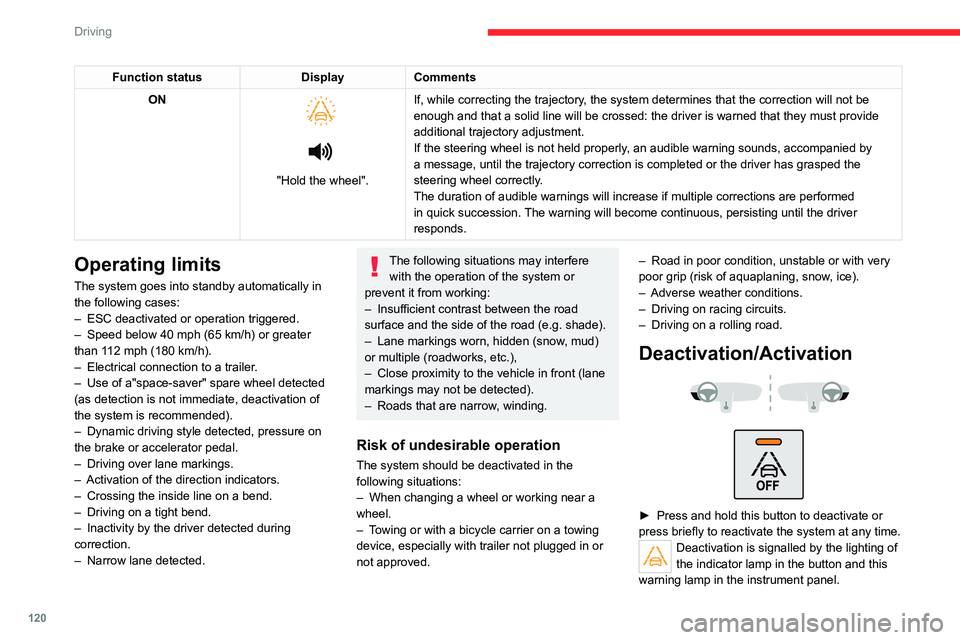
Function statusDisplayComments
ON
"Hold the wheel". If, while correcting the trajectory, the system determines that the correction will not be
enough and that a solid line will be crossed: the driver is warned that \
they must provide
additional trajectory adjustment.
If the steering wheel is not held properly, an audible warning sounds, accompanied by
a message, until the trajectory correction is completed or the driver ha\
s grasped the
steering wheel correctly.
The duration of audible warnings will increase if multiple corrections a\
re performed
in quick succession. The warning will become continuous, persisting until the driver
responds.
Operating limits
The system goes into standby automatically in
the following cases:
–
ESC deactivated or operation triggered.
–
Speed below 40 mph (65
km/h) or greater
than 112 mph (180
km/h).
–
Electrical connection to a trailer
.
–
Use of a"space-saver" spare wheel detected
(as detection is not immediate, deactivation of
the system is recommended).
–
Dynamic driving style detected, pressure on
the brake or accelerator pedal.
–
Driving over lane markings.
–
Activation
of the direction indicators.
–
Crossing the inside line on a bend.
–
Driving on a tight bend.
–
Inactivity by the driver detected during
correction.
–
Narrow lane detected.
The following situations may interfere with the operation of the system or
prevent it from working:
–
Insufficient contrast between the road
surface and the side of the road (e.g. shade).
–
Lane markings worn, hidden (snow
, mud)
or multiple (roadworks, etc.),
–
Close proximity to the vehicle in front (lane
markings may not be detected).
–
Roads that are narrow
, winding.
Risk of undesirable operation
The system should be deactivated in the
following situations:
–
When changing a wheel or working near a
wheel.
–
T
owing or with a bicycle carrier on a towing
device, especially with trailer not plugged in or
not approved. –
Road in poor condition, unstable or with very
poor grip (risk of aquaplaning, snow
, ice).
–
Adverse weather conditions.
–
Driving on racing circuits.
–
Driving on a rolling road.
Deactivation/Activation
► Press and hold this button to deactivate or
press briefly to reactivate the system at any time.
Deactivation is signalled by the lighting of
the indicator lamp in the button and this
warning lamp in the instrument panel.
Page 125 of 260

123
Driving
6
The vehicle has a multifunction camera located
at the top of the windscreen and, depending on
version, a radar located in the front bumper.
This system does not replace the need for vigilance on the part of the driver.
This system is designed to assist the driver
and improve road safety.
It is the driver's responsibility to continuously
monitor traffic conditions in accordance with
applicable driving regulations.
As soon as the system detects a potential obstacle, it prepares the braking
circuit in case automatic braking is needed.
This may cause a slight noise and a slight
sensation of deceleration.
Deactivation/Activation
By default, the system is automatically activated
at every engine start.
The settings are changed via the Driving/Vehicle touch screen menu.
Deactivation of the system is signalled by
the illumination of this warning lamp,
accompanied by the display of a message.
Operating conditions and
limits
Vehicle moving forward.
ESC system operational.
Seat belts fastened for all passengers.
Stabilised speed on roads with few bends.
In the following cases, deactivating the system
via the vehicle's configuration menu is advised:
–
T
owing a trailer.
–
Carrying long objects on roof bars.
–
V
ehicle with snow chains fitted.
–
Before using an automatic car wash, with the
engine running.
–
Before placing the vehicle on a rolling road in
a workshop.
–
T
owed vehicle, engine running.
–
Following
an impact to the windscreen close to
the detection camera.
The system is automatically deactivated when the use of certain types of
"space-saver" spare wheel (smaller diameter)
is detected, or if a fault with the brake pedal
switch or at least two brake lamps is detected.
It can be dangerous to drive if the brake
lamps are not in perfect working order.
It is possible that warnings are not given,
are given too late or seem unjustified.
The driver must always stay in control of the
vehicle and be prepared to react at any time
to avoid an accident.
Following an impact, the system is
automatically deactivated.
Have it checked by a CITROËN dealer or a
qualified workshop.
Collision Risk Alert
This function warns the driver that their vehicle
is at risk of a collision with the vehicle in front, or
with a pedestrian or cyclist present in their traffic
lane.
Modifying the alert trigger threshold
This trigger threshold determines the sensitivity
with which the function warns of the risk of
collision.
The threshold is set via theDriving/Vehicle touch screen menu.
►
Select one of the three pre-defined
thresholds: "Far", "Normal" or "Close".
The last threshold selected is memorised when
the ignition is switched off.
Operation
Depending on the degree of risk of collision
detected by the system and the alert trigger
threshold chosen by the driver, several different
Page 127 of 260

125
Driving
6The driver can maintain control of the vehicle at any time by firmly turning the
steering wheel and/or firmly depressing the
accelerator pedal.
The brake pedal may vibrate slightly while the function is operating.
If the vehicle comes to a complete stop,
automatic braking is maintained for 1 to 2
seconds.
Malfunction
In the event of a malfunction, this warning
lamp lights up on the instrument panel,
accompanied by the display of a message and
an audible signal.
Have it checked by a CITROËN dealer or a
qualified workshop.
If these warning lamps come on
after the engine has been switched
off and then restarted, contact a CITROËN
dealer or a qualified workshop to have the
system checked.
These warning lamps light up on the instrument panel to indicate
that the driver's and/or front passenger's seat
belt is not fastened (depending on version). The
automatic braking system is deactivated until the
seat belts are fastened.
Distraction detection
For more information, refer to the
General recommendations on the use
of driving and manoeuvring aids .
Depending on version, the function consists of
either the "Coffee Break Alert" system alone or
combined with the "Driver Attention Warning"
system.
These systems are in no way designed to keep the driver awake or to prevent
the driver from falling asleep at the wheel.
It is the driver’s responsibility to stop if feeling
tired.
Take a break if you are feeling tired or at least
every 2 hours.
Activation/Deactivation
This function is set via the touch screen Driving/Vehicle menu.
The function is activated by default when the
ignition is switched on.
Coffee Break Alert
The system triggers an alert when it detects that the driver has not taken a
break after two hours of driving at a speed above
43 mph (70
km/h).
This alert is issued via the display of a message
encouraging the driver to take a break,
accompanied by an audible signal.
If the driver does not follow this advice, the alert
is repeated hourly until the vehicle is stopped.
The system resets itself if one of the following
conditions is met:
–
With the engine running, the vehicle has been
stationary for more than 15 minutes.
–
The ignition has been switched off for a few
minutes.
–
The driver's seat belt is unfastened and their
door is opened.
As soon as the speed of the vehicle drops below 43 mph (70 km/h), the
system goes into standby.
Driving time starts being counted again once
the speed reaches above 43
mph (70 km/h).
Driver Attention Warning
Depending on version, the Coffee Break Alert
system may be combined with the Driver
Attention Warning system.
Page 174 of 260

172
In the event of a breakdown
after the lamps have been on for a few
minutes.
Never look too closely at the light beam
of LED technology lamps - risk of serious
eye injury!
The headlamps have polycarbonate lenses with a protective coating:
–
Do not clean them with a dry or abrasive
cloth, nor with detergent or solvent
products.
–
Use a sponge and soapy water or a pH
neutral product.
–
When using a high-pressure washer on
persistent marks, do not keep the lance
directed towards the headlamps, lamps or
their edges for too long, so as not to damage
their protective coating and seals.
Changing a bulb must only be done with
the ignition off and after the headlamp /
lamp has been switched off for several
minutes - risk of serious burns!
Do not touch the bulb directly with your
fingers; use a lint-free cloth.
It is essential only to use anti-ultraviolet
(UV) type bulbs, so as not to damage the
headlamp.
Always replace a failed bulb with a new bulb
of the same type and specification. To avoid
lighting imbalance, replace the bulbs in pairs.
Refitting the lamp units
Perform the operations in the reverse
order to dismantling.
Light-emitting diode (LED)
headlamps and lamps
Depending on version, the affected types of
headlamps/lamps are:
–
"LED" technology headlamps.
–
Front foglamps.
–
Daytime running lamps/sidelamps.
–
Direction indicator side repeaters.
–
Side spotlamps.
–
Third brake lamp.
–
Number plate lamps.
If you need to replace this type of bulb,
you must contact a CITROËN dealer or a
qualified workshop.
Do not touch the LED technology bulbs - risk
of electrocution!
Front lamps
Model with LED headlamps
1. Daytime running lamps/Sidelamps
2. Dipped beam headlamps
3. Main beam headlamps
4. Direction indicators
5. Foglamps
Page 240 of 260

238
Alphabetical index
Charging connector (Electric) 140, 145,
147–148
Charging flap (Electric)
140, 145, 147–148
Charging system (Electric)
5, 8, 26, 138, 156
Charging the traction battery
(Electric)
21, 138, 142, 145, 147–148
CHECK
22
Checking the engine oil level
19
Checking the levels
156–157
Checking tyre pressures
(using the kit)
166, 168
Checks
155, 158–160
Checks, routine
158–159
Child lock
83
Children
72, 78–80
Children (safety)
83
Child seats
72, 75–78
Child seats, conventional
78, 81–82
Child seats, i-Size
80–82
Child seats, ISOFIX
78–79, 81–82
Cleaning (advice)
139, 162–163
Closing the boot
31, 35
Closing the doors
31, 35
Collision Risk Alert
122–123
Configuration, vehicle
25–26
Connected applications
221
ConnectedCAM Citroën™
100
Connection, Bluetooth
201–202,
221–222, 226–227
Connection, Wi-Fi network
222
Connectivity
220
Consumption figures
26Container, AdBlue® 160–161
Control, emergency boot release
35
Control, emergency door
32–33
Control, heated seats
42, 45
Controls, steering mounted
93–94
Control stalk, lighting
57–58
Control stalk, wipers
62–63
Control unit
141–142
Courtesy lamps
55
Cruise control
104–105, 107–108
Cruise control, adaptive
104–105, 109
Cruise control by speed limit
recognition
104–105
D
DAB (Digital Audio Broadcasting) -
Digital radio
199–200, 224
Date (setting)
206, 229
Daytime running lamps
58, 173
Deactivating the passenger airbag
74, 77
Deadlocking
29, 31
Deferred charging
27
Deferred charging
(Electric)
26–27, 140, 145, 148
Defrosting
43, 50
Defrosting, front
50
Demisting
43, 50
Demisting, front
50
Demisting, rear
51
Demisting, rear screen
51
Dials and gauges 9–10
Digital instrument panel
10
Dimensions
185
Dipstick
19, 156
Direction indicators
58, 173–174
Display, head-up
11
Display screen, instrument panel
9
Domestic charging
(Electric)
142, 147–148, 184
Doors
35
Drive Assist Plus
109
Driver’s attention warning
125
Drive selector (Electric)
94
Driving
84–85
Driving aids camera (warnings)
101
Driving aids (recommendations)
101
Driving economically
7
Driving modes
95–96
Dynamic stability control (DSC)
70
E
EBFD 69
Eco-driving (advice)
7
ECO mode
96
Economy mode
153
Electric motor
5, 8, 22, 26, 138,
150, 156, 175, 178, 184
Electric windows
37
Electronic brake force distribution (EBFD)
69
Emergency braking assistance (EBA)
70
Page 241 of 260

239
Alphabetical index
Emergency call 67–68
Emergency switching off
88–89
Emergency warning lamps
66, 165
Emissions control system, SCR
21, 160
Energy economy mode
153
Energy flows
22, 26
Energy recovery
21, 95
Engine
160
Engine compartment
155
Engine, Diesel
137, 155, 165, 183
Engine, petrol
155, 182
Engines
181–183
Environment
7, 34, 85
ESC (electronic stability control)
69
Expanded traffic sign recognition
105
Exterior lighting
60
F
Fatigue detection 125
Filling the AdBlue® tank
158, 161
Filling the fuel tank
137–138
Filter, air
158
Filter, oil
158
Filter, particle
158
Filter, passenger compartment
46, 158
Fitting a wheel
169, 171
Fitting roof bars
152–153
Fittings, boot
55
Fittings, interior
52
Flap, fuel filler
137–138
Flashing indicators 58, 173
Floor, boot, adjustable
56
Fluid, brake
157
Fluid, engine coolant
157
Foglamp, rear
57, 174
Foglamps, front
57, 61
Folding the rear seats
44–45
Frequency (radio)
223
Fuel
7, 137
Fuel consumption
7
Fuel tank
137–138
Fuses
174
G
Gauge, fuel 137
Gearbox, automatic
92–94, 96, 159, 175
Gearbox, manual
92, 96, 159
Gear lever, manual gearbox
92
Gear shift indicator ~ Gear efficiency
indicator
97
Glove box
52
G.P.S.
217
H
Hazard warning lamps 66, 165
Headlamp adjustment
59
Headlamps, automatic dipping
60–61
Headlamps, automatic illumination
59
Headlamps, dipped beam 173
Headlamps, halogen
59, 173
Headlamps, main beam
60, 173
Head restraints, front
40
Head restraints, rear
44–45
Head-up display
10–11
Heated steering wheel
42
Heating
45, 47
Heating, programmable
27, 51
Hi-Fi system
54
High voltage
138
Hill start assist
96–97
Histogramme, fuel consumption
26–27
Horn
67
I
Ignition 88, 227
Ignition on
88
Ignition switch
86–87
Immobiliser, electronic
86
Indicator, AdBlue® range
20
Indicator, coolant temperature
19
Indicator, engine oil level
19
Indicators, direction
58, 173
Inflating tyres
159, 185
Inflating tyres and accessories
(using the kit)
166, 168
Information, vehicle
9, 234
Infrared camera
102
Instrument panel
9, 22, 24, 102