2020 CITROEN C3 AIRCROSS gears
[x] Cancel search: gearsPage 127 of 308
125
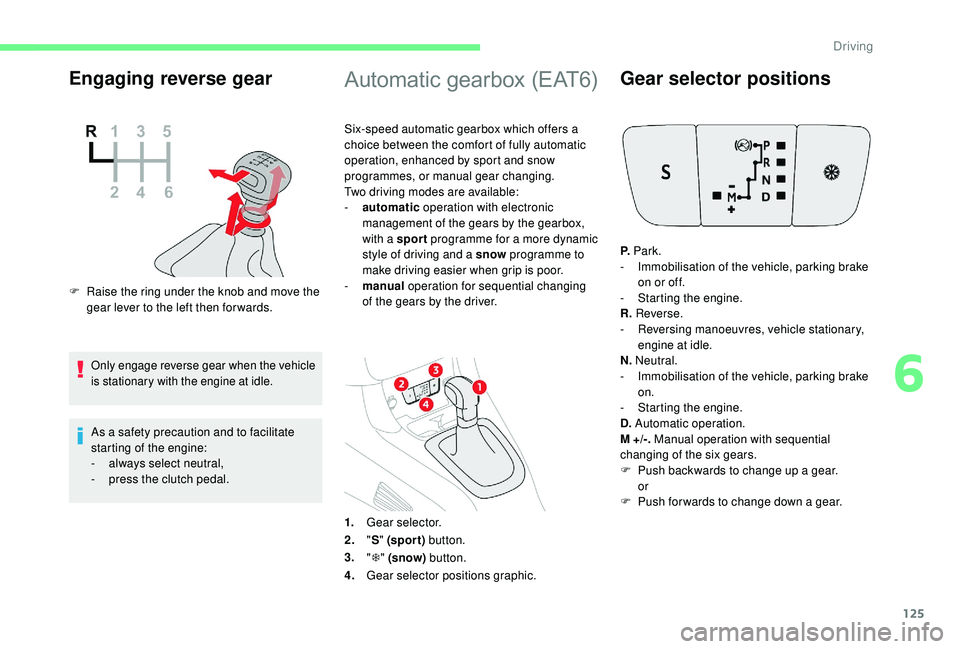
Engaging reverse gear
F Raise the ring under the knob and move the gear lever to the left then for wards.
Only engage reverse gear when the vehicle
is stationary with the engine at idle.
As a safety precaution and to facilitate
starting of the engine:
-
a
lways select neutral,
-
p
ress the clutch pedal.
Automatic gearbox (EAT6)
Six-speed automatic gearbox which offers a
choice between the comfort of fully automatic
operation, enhanced by sport and snow
programmes, or manual gear changing.
Two driving modes are available:
-
a
utomatic operation with electronic
management of the gears by the gearbox,
with a sport programme for a more dynamic
style of driving and a snow programme to
make driving easier when grip is poor.
-
man
ual operation for sequential changing
of the gears by the driver.
1. Gear selector.
2. "S " (spor t) button.
3. "T " (snow) button.
4. Gear selector positions graphic.
Gear selector positions
P. Park.
- I mmobilisation of the vehicle, parking brake
on or off.
-
S
tarting the engine.
R. Reverse.
-
R
eversing manoeuvres, vehicle stationary,
engine at idle.
N. Neutral.
-
I
mmobilisation of the vehicle, parking brake
on.
-
S
tarting the engine.
D. Automatic operation.
M +/-. Manual operation with sequential
changing of the six gears.
F
P
ush backwards to change up a gear.
or
F
P
ush forwards to change down a gear.
6
Driving
Page 128 of 308

126
Displays in the instrument panel
P.Parking.
R. Reverse.
N. Neutral.
D. Drive (automatic driving).
S. Sport programme.
T . Snow
programme.
1 2 3 4 5 6. Gears engaged during manual
operation.
-. Invalid value during manual
operation
Foot on the brake pedal
F Press the brake pedal when
this indicator lamp is displayed
or a message tells you to do so
on the instrument panel (e.g.
starting the engine).
Starting the vehicle
F Apply the parking brake.
F Sel ect position P or N .
F
S
tart the engine.
If these conditions are not met, there is an
audible signal, accompanied by the display of a
warning message.
F
W
ith the engine running, press the brake
pedal.
F
R
elease the parking brake.
F
Sel
ect position R , D or M.
F
G
radually release the brake pedal.
The vehicle moves off immediately.
If position N is selected inadvertently while
driving, allow the engine to return to idle,
then select position D to accelerate.
If the temperature is below -23°C, the
engine should be left at idle for four
minutes, to ensure the correct operation
and durability of the engine and gearbox.
When you move the selector to select a
position, the corresponding indicator is
displayed in the instrument panel.
When the engine is running at idle, with
the brakes released, if position R
, D or
M is selected, the vehicle moves even
without the accelerator being pressed.
Do not leave children unsuper vised inside
the vehicle when the engine is running.
When carrying out maintenance with the
engine running, apply the parking brake
and select position P .
Automatic operation
F Select position D for automatic changing of
the six gears.
The gearbox then operates in auto-adaptive
mode, without any action needed from the
driver. It continuously selects the most suitable
gear according to the style of driving, the profile
of the road and the load in the vehicle.
For maximum acceleration without touching
the selector, press the accelerator pedal down
fully (kick down). The gearbox changes down
automatically or maintains the gear selected
until the maximum engine speed is reached.
On braking, the gearbox changes down
automatically to provide efficient engine
braking.
Driving
Page 129 of 308

127
If you release the accelerator sharply, the
gearbox will not change to a higher gear for
safety reasons.Never select position N while the vehicle
is moving.
Never select position P or R unless the
vehicle is completely stationary.
Sport and snow programmes
These two special programmes supplement the
automatic operation in very specific conditions
of use.
Sport programme "S"
F With the engine running, press button S.
The gearbox automatically favours a dynamic
style of driving.
S appears on the instrument panel.
Snow programme " T"
F With the engine running, press the " T"
button.
The gearbox adapts to driving on slippery
roads.
Return to standard
automatic operation
F At any time, press the selected button again to quit the programme engaged and return
to auto-adaptive mode.
Manual operation
This programme improves starting and
handling when traction is poor.
T appears in the instrument panel.
F
Sel
ect the M position for sequential
changing of the six gears.
F
M
ove the selector towards the + sign to
change up a gear.
F
M
ove the selector towards the – sign to
change down a gear.
Gears are changed only if the vehicle’s
speed and engine speed allow; other wise, the
gearbox will operate temporarily in automatic
mode. It is possible to change from position D
(automatic) to position M (manual) at any time.
When the vehicle is stationary or crawling, the
gearbox engages first gear automatically.
The sport and snow programmes are inactive
in manual mode.
Invalid value during manual
operation
This symbol is displayed if a gear
is not engaged correctly (selector
between two positions).
Stopping the vehicle
Before switching off the engine, you can engage
position P or N to place the gearbox in neutral.
In both cases, apply the parking brake to
immobilise the vehicle.
D disappears, and the gears engaged appear
in succession on the instrument panel.
If the engine is under-revving or over-revving,
the gear selected flashes for a few seconds,
then the actual gear engaged is displayed.
If the selector is not in position P
, when the
driver's door is opened or approximately
45 seconds after the ignition is switched
off, a warning message appears in the
screen.
F R eturn the selector to position P; the
message disappears.
When driving on flooded roads or when
crossing a ford, proceed at walking pace.
6
Driving
Page 130 of 308

128
Malfunction
When the ignition is on, the lighting
of this warning lamp, accompanied
by an audible signal and a message
in the screen, indicates a gearbox
fault.
In this case, the gearbox switches to back-up
mode and is locked in 3
rd gear. You may feel
a substantial knock when changing from P
to R and from N to R. This will not cause any
damage to the gearbox.
Do not exceed 60
mph (100 km/h), local speed
restrictions permitting.
Contact a CITROËN dealer or a qualified
workshop as soon as possible.
There is a risk of damage to the gearbox:
-
i
f you press the accelerator and brake
pedals at the same time,
-
i
f you force the movement of the
selector from position P to another
position when the battery is flat.
To reduce fuel consumption when at
a prolonged standstill with the engine
running (traffic jam, etc.), put the
selector in position N and apply the
parking brake. If your vehicle has an automatic gearbox,
never try to start the engine by pushing
the vehicle.
Gear efficiency indicator
System which reduces fuel consumption by
recommending the most appropriate gear.
Operation
Depending on the driving situation and your
vehicle's equipment, the system may advise
you to skip one (or more) gear(s). You can
follow this instruction without engaging the
intermediate gears.
Gear shift recommendations should not be
considered obligatory. The configuration of the
road, the amount of traffic and safety remain
determining factors when choosing the best
gear. The driver thus remains responsible
for deciding whether to follow or ignore the
system's instructions.
This function cannot be deactivated.
With an automatic gearbox, the system is
only active in manual mode. On BlueHDi Diesel versions with manual
gearbox, in certain driving conditions the
system may suggest changing into neutral so
that the engine can go into standby (STOP
mode of Stop & Start). In this case, N is
displayed in the instrument panel.
Example:
-
Y
ou are in 3
rd g e a r.
-
Y
ou press the accelerator pedal.
-
T
he system may suggest that you engage a
higher gear.
The system adapts its gear change
recommendations according to the
driving conditions (slope, load, etc.)
and the demands of the driver (power,
acceleration, braking, etc.).
The system never suggests:
-
e
ngaging first gear,
-
enga
ging reverse gear,
-
enga
ging a lower gear.
The information appears in the instrument
panel in the form of an arrow.
Driving
Page 157 of 308

155
Zoom view
Obstacles may appear further away than
they actually are.
It is important to check the sides of the
vehicle during the manoeuvre, using the
mirrors.
The rear parking sensors also provide
information on the vehicle's surroundings.
The camera records the vehicle's surroundings
during the manoeuvre in order to create a
view from above the rear of the vehicle in its
near surroundings, allowing the vehicle to be
manoeuvred around obstacles nearby.
This view is available with AUTO mode or in the
view selection menu.
180° view
Quick start mode
Park Assist
This system provides active assistance with
parking: it detects a parking space then
operates the steering system to park in this
space.
With a manual gearbox, the driver manages
the accelerator, brakes, gears and clutch.
With an automatic gearbox , the driver
manages the accelerator, brakes and gears.
The 180° view facilitates reversing out of a
parking bay, making it possible to see the
approach of vehicles, pedestrians and cyclists.
This view is not recommended for carrying out
a complete manoeuvre.
It is made up of 3 areas: left A
, centre B and
right C .
This view is available only from the view
selection menu. This mode displays, as quickly as possible, the
contextual view (left-hand part) and the view
from above the vehicle.
A message is displayed advising you to check
your vehicle's surroundings before starting the
manoeuvre.
6
Driving