2020 CHEVROLET SONIC warning
[x] Cancel search: warningPage 115 of 329

Chevrolet Sonic Owner Manual (GMNA-Localizing-U.S./Canada-13566834) -
2020 - CRC - 10/4/19
114 Instruments and Controls
28 :Check Right Rear Turn
Signal Lamp
35 : Replace Battery In Remote Key
36 : Stabilitrak/Electronic Stability
Control (ESC) Initializing
49 : Lane Departure Warning
Unavailable
52 : Change Timing Belt
53 : Tighten Gas Cap
56 : Pressure Imbalance Front
57 : Pressure Imbalance Rear
59 : Open, Then Close Driver
Window
60 : Open, Then Close Passenger
Window
61 : Open, Then Close Left Rear
Window
62 : Open, Then Close Right Rear
Window
65 : Theft Attempted
66 : Service Theft Alarm
67 : Service Steering Column Lock
68 : Service Power Steering, Drive
with Care 70 :
Service Leveling System
75 : Service AC System
77 : Service Front Camera System
78 : Service Pedestrian Protection
79 : Engine Oil Low –Add Oil
81 : Service Transmission
82 : Change Engine Oil Soon
84 : Engine Power Is Reduced
88 : Use Transmitter Pocket to Start
89 : Service Vehicle Soon
91 : No Remote Detected
92 : No Remote Detected, Press
Brake To Restart
93 : Press Button Again To Turn
Engine Off
94 : Shift to Park
95 : Service Airbag
99 : Pedestrian Protection System
Disabled
120 : Reduce Speed For Hill
Descent Control
136 : Service Park Assist 145 :
Washer Fluid Low —Add
Fluid
151 : Press Clutch to Start
174 : Low Battery
258 : Park Assist Off
:% CHANGE
This message displays when the
engine oil needs to be changed.
When changing the engine oil, be
sure to reset the Oil Life System.
See Engine Oil Life System 0210,
Engine Oil 0208, and Maintenance
Schedule 0278.
LF XX, RF XX, LR XX,
or RR XX
A message displays when the tire
pressure is low. It shows the
location of the low tire and the
approximate pressure of the low tire.
If a tire pressure message appears,
stop as soon as you can. Inflate the
tires by adding air until the tire
pressure is equal to the values
shown on the Tire and Loading
Page 117 of 329

Chevrolet Sonic Owner Manual (GMNA-Localizing-U.S./Canada-13566834) -
2020 - CRC - 10/4/19
116 Instruments and Controls
The menu may contain the
following:
Rear Seat Reminder
This allows for a chime and a
message when the rear door has
been opened before or during
operation of the vehicle.
Touch Off or On.
Collision / Detection Systems
Touch and the following may
display:
.Park Assist
. Rear Camera Park Assist
Symbols
Park Assist
This feature can assist in backing
up and parking the vehicle. See
Park Assist 0193.
Touch Off or On.
Rear Camera Park Assist Symbols
When on and an object is detected
behind the vehicle, the warning
symbols appear on the infotainment
display. See Park Assist0193. Touch Off or On.
Comfort and Convenience
Touch and the following may
display:
.
Chime Volume
. Auto Wipe in Reverse Gear
Chime Volume
This allows the selection of the
chime volume level.
Touch the controls on the
infotainment display to adjust the
volume.
Auto Wipe in Reverse Gear
When on and the front wiper is on,
the rear wiper will automatically
activate when the vehicle is shifted
to R (Reverse).
Touch Off or On.
Lighting
Touch and the following may
display:
. Vehicle Locator Lights
. Exit Lighting Vehicle Locator Lights
This feature will flash the exterior
lamps and allows some exterior
lamps and most interior lamps to
turn on briefly when
Kon the
Remote Keyless Entry (RKE)
transmitter is pressed to locate the
vehicle.
Touch Off or On.
Exit Lighting
This allows the selection of how
long the exterior lamps stay on
when leaving the vehicle when it is
dark outside.
Touch Off, 30 Seconds, 60 Seconds,
or 120 Seconds.
Power Door Locks
Touch and the following may
display:
. Open Door Anti Lock Out
. Auto Door Unlock
. Delayed Door Lock
Page 120 of 329
Chevrolet Sonic Owner Manual (GMNA-Localizing-U.S./Canada-13566834) -
2020 - CRC - 10/4/19
Lighting 119
Lighting
Exterior Lighting
Exterior Lamp Controls . . . . . . . 119
Headlamp High/Low-BeamChanger . . . . . . . . . . . . . . . . . . . . 120
Flash-to-Pass . . . . . . . . . . . . . . . . 120
Daytime Running Lamps (DRL) . . . . . . . . . . . . . . . 120
Automatic Headlamp System . . . . . . . . . . . . . . . . . . . . . . 121
Hazard Warning Flashers . . . . . 121
Turn and Lane-Change Signals . . . . . . . . . . . . . . . . . . . . . . 121
Fog Lamps . . . . . . . . . . . . . . . . . . . 122
Interior Lighting
Instrument Panel Illumination Control . . . . . . . . . . . . . . . . . . . . . . 123
Courtesy Lamps . . . . . . . . . . . . . . 123
Dome Lamps . . . . . . . . . . . . . . . . . 123
Reading Lamps . . . . . . . . . . . . . . 123
Lighting Features
Entry Lighting . . . . . . . . . . . . . . . . 124
Exit Lighting . . . . . . . . . . . . . . . . . . 124
Battery Load Management . . . 124
Battery Power Protection . . . . . 125
Exterior Lighting Battery Saver . . . . . . . . . . . . . . . . . . . . . . . 125Exterior Lighting
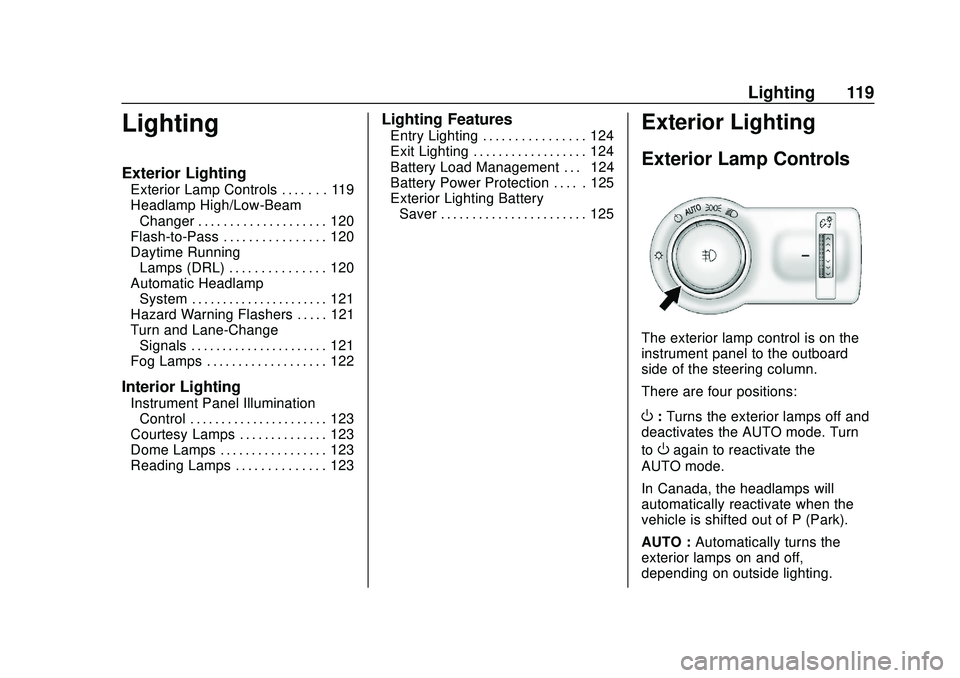
Exterior Lamp Controls
The exterior lamp control is on the
instrument panel to the outboard
side of the steering column.
There are four positions:
O: Turns the exterior lamps off and
deactivates the AUTO mode. Turn
to
Oagain to reactivate the
AUTO mode.
In Canada, the headlamps will
automatically reactivate when the
vehicle is shifted out of P (Park).
AUTO : Automatically turns the
exterior lamps on and off,
depending on outside lighting.
Page 121 of 329

Chevrolet Sonic Owner Manual (GMNA-Localizing-U.S./Canada-13566834) -
2020 - CRC - 10/4/19
120 Lighting
;:Turns on the parking lamps
including all lamps except the
headlamps.
5: Turns the headlamps on
together with the parking lamps and
instrument panel lights. A warning
chime sounds if the driver door is
opened when the ignition switch is
off and the headlamps are on.
#: If equipped with fog lamps,
press to turn the lamps on or off.
See Fog Lamps 0122.
When the lights are on,
;will be
lit. See Lamps On Reminder 0108.
Headlamp High/
Low-Beam Changer
3:Push the turn signal lever away
from you to turn the high beams on. Push the lever again or pull the
lever toward you to return to low
beams.
This indicator light turns on in the
instrument cluster when the
high-beam headlamps are on.
Flash-to-Pass
To flash the high beams, pull the
turn signal lever all the way toward
you. Then release it.
Daytime Running
Lamps (DRL)
DRL can make it easier for others to
see the front of your vehicle during
the day. Fully functional DRL are
required on all vehicles first sold in
Canada.
The DRL system makes the
low-beam headlamps come on at a
reduced brightness when the
following conditions are met:
.
The ignition is on.
. The exterior lamp control is
in AUTO.
. The engine is running.
When the DRL are on, only the
low-beam headlamps, at a reduced
level of brightness, will be on. The
taillamps, sidemarker, instrument
panel, and other lamps will not
be on.
The headlamps automatically
change from DRL to the regular
headlamps depending on the
darkness of the surroundings. The
other lamps that come on with the
headlamps will also come on.
When it is bright enough outside,
the headlamps go off and the DRL
come on.
To turn the DRL lamps off or on
again, turn the exterior lamp control
to
Oand then release. For vehicles
Page 122 of 329

Chevrolet Sonic Owner Manual (GMNA-Localizing-U.S./Canada-13566834) -
2020 - CRC - 10/4/19
Lighting 121
first sold in Canada, the DRL can
only be turned off when the vehicle
is parked.
Automatic Headlamp
System
When it is dark enough outside and
the exterior lamp control is in the
automatic position, the headlamps
come on automatically. SeeExterior
Lamp Controls 0119.
The vehicle has a light sensor on
top of the instrument panel. Make
sure it is not covered, or the
headlamps will be on when they are
not needed.
The system may also turn on the
headlamps when driving through a
parking garage or tunnel.
Lights On with Wipers
If the windshield wipers are
activated in daylight with the engine
on, and the exterior lamp control is
in AUTO, the headlamps, parking
lamps, and other exterior lamps
come on. The transition time for the
lamps coming on varies based on
wiper speed. When the wipers are
not operating, these lamps turn off.
Move the exterior lamp control to
P
or;to disable this feature.
Hazard Warning Flashers
|:Press and momentarily hold
this button to make the front and
rear turn signal lamps flash on and
off. This warns others that you are
having trouble. Press and
momentarily hold again to turn the
flashers off.
Turn and Lane-Change
Signals
Move the lever all the way up or
down to signal a turn.
An arrow on the instrument cluster
will flash in the direction of the turn
or lane change.
Raise or lower the lever until the
arrow starts to flash to signal a lane
change. Hold it there until the lane
Page 127 of 329

Chevrolet Sonic Owner Manual (GMNA-Localizing-U.S./Canada-13566834) -
2020 - CRC - 10/4/19
126 Infotainment System
Infotainment
System
Introduction
Introduction . . . . . . . . . . . . . . . . . . . 126
Overview . . . . . . . . . . . . . . . . . . . . . 127
Using the System . . . . . . . . . . . . 129
Radio
AM-FM Radio . . . . . . . . . . . . . . . . 131
Satellite Radio . . . . . . . . . . . . . . . . 133
Radio Reception . . . . . . . . . . . . . . 133
Backglass Antenna . . . . . . . . . . . 133
Multi-Band Antenna . . . . . . . . . . 134
Audio Players
Avoiding Untrusted MediaDevices . . . . . . . . . . . . . . . . . . . . . 134
USB Port . . . . . . . . . . . . . . . . . . . . . 134
Auxiliary Jack . . . . . . . . . . . . . . . . 137
Bluetooth Audio . . . . . . . . . . . . . . 138
OnStar System
OnStar System . . . . . . . . . . . . . . . 139
Phone
Bluetooth (Overview) . . . . . . . . . 140
Bluetooth (Pairing and Using a Phone) . . . . . . . . . . . . . . . . . . . . . . 141
Apple CarPlay and Android Auto . . . . . . . . . . . . . . . . 146
Settings
Settings . . . . . . . . . . . . . . . . . . . . . . 147
Trademarks and License
Agreements
Trademarks and License
Agreements . . . . . . . . . . . . . . . . . 151
Introduction
Read the following pages to
become familiar with the features.
{Warning
Taking your eyes off the road for
too long or too often while using
any infotainment feature can
cause a crash. You or others
could be injured or killed. Do not
give extended attention to
infotainment tasks while driving.
Limit your glances at the vehicle
displays and focus your attention
on driving. Use voice commands
whenever possible.
The infotainment system has built-in
features intended to help avoid
distraction by disabling some
functions when driving. These
functions may gray out when they
are unavailable. Many infotainment
features are also available through
the instrument cluster and steering
wheel controls.
Page 159 of 329
Chevrolet Sonic Owner Manual (GMNA-Localizing-U.S./Canada-13566834) -
2020 - CRC - 10/4/19
158 Driving and Operating
Driving and
Operating
Driving Information
Driving for Better FuelEconomy . . . . . . . . . . . . . . . . . . . . 159
Distracted Driving . . . . . . . . . . . . 159
Defensive Driving . . . . . . . . . . . . . 160
Drunk Driving . . . . . . . . . . . . . . . . . 160
Control of a Vehicle . . . . . . . . . . . 160
Braking . . . . . . . . . . . . . . . . . . . . . . . 160
Steering . . . . . . . . . . . . . . . . . . . . . . 161
Off-Road Recovery . . . . . . . . . . . 162
Loss of Control . . . . . . . . . . . . . . . 162
Driving on Wet Roads . . . . . . . . 163
Hill and Mountain Roads . . . . . 163
Winter Driving . . . . . . . . . . . . . . . . 164
If the Vehicle Is Stuck . . . . . . . . 165
Vehicle Load Limits . . . . . . . . . . . 166
Starting and Operating
New Vehicle Break-In . . . . . . . . . 170
Ignition Positions (Keyless Access) . . . . . . . . . . . . . . . . . . . . . 170
Ignition Positions (Key Access) . . . . . . . . . . . . . . . . . . . . . 172
Starting the Engine . . . . . . . . . . . 174
Engine Heater . . . . . . . . . . . . . . . . 176 Retained Accessory
Power (RAP) . . . . . . . . . . . . . . . . 177
Shifting Into Park . . . . . . . . . . . . . 177
Shifting out of Park . . . . . . . . . . . 178
Parking over Things That Burn . . . . . . . . . . . . . . . . . . . 179
Extended Parking (Keyless Access) . . . . . . . . . . . . . . . . . . . . . 179
Engine Exhaust
Engine Exhaust . . . . . . . . . . . . . . 179
Running the Vehicle WhileParked . . . . . . . . . . . . . . . . . . . . . . 180
Automatic Transmission
Automatic Transmission . . . . . . 180
Manual Mode . . . . . . . . . . . . . . . . . 182
Brakes
Antilock BrakeSystem (ABS) . . . . . . . . . . . . . . . 183
Parking Brake . . . . . . . . . . . . . . . . 184
Brake Assist . . . . . . . . . . . . . . . . . . 184
Hill Start Assist (HSA) . . . . . . . . 184
Ride Control Systems
Traction Control/Electronic Stability Control . . . . . . . . . . . . . 185
Cruise Control
Cruise Control . . . . . . . . . . . . . . . . 187
Driver Assistance Systems
Driver Assistance Systems . . . 190
Rear Vision Camera (RVC) . . . 191
Park Assist . . . . . . . . . . . . . . . . . . . 193
Forward Collision Alert (FCA)System . . . . . . . . . . . . . . . . . . . . . . 194
Lane Departure Warning (LDW) . . . . . . . . . . . . . 196
Fuel
Top Tier Fuel . . . . . . . . . . . . . . . . . 197
Recommended Fuel . . . . . . . . . . 198
Prohibited Fuels . . . . . . . . . . . . . . 198
Fuels in Foreign Countries . . . 198
Fuel Additives . . . . . . . . . . . . . . . . 198
Filling the Tank . . . . . . . . . . . . . . . 199
Filling a Portable FuelContainer . . . . . . . . . . . . . . . . . . . 200
Trailer Towing
General Towing
Information . . . . . . . . . . . . . . . . . . 201
Conversions and Add-Ons
Add-On ElectricalEquipment . . . . . . . . . . . . . . . . . . 201
Page 161 of 329

Chevrolet Sonic Owner Manual (GMNA-Localizing-U.S./Canada-13566834) -
2020 - CRC - 10/4/19
160 Driving and Operating
.Avoid stressful conversations
while driving, whether with a
passenger or on a cell phone.
{Warning
Taking your eyes off the road too
long or too often could cause a
crash resulting in injury or death.
Focus your attention on driving.
Refer to the infotainment section for
more information on using that
system and the navigation system,
if equipped, including pairing and
using a cell phone.
Defensive Driving
Defensive driving means “always
expect the unexpected.” The first
step in driving defensively is to wear
the seat belt. See Seat Belts044.
. Assume that other road users
(pedestrians, bicyclists, and
other drivers) are going to be
careless and make mistakes.
Anticipate what they may do and
be ready. .
Allow enough following distance
between you and the driver in
front of you.
. Focus on the task of driving.
Drunk Driving
Death and injury associated with
drinking and driving is a global
tragedy.
{Warning
Drinking and then driving is very
dangerous. Your reflexes,
perceptions, attentiveness, and
judgment can be affected by even
a small amount of alcohol. You
can have a serious —or even
fatal —collision if you drive after
drinking.
Do not drink and drive or ride with
a driver who has been drinking.
Ride home in a cab; or if you are
with a group, designate a driver
who will not drink.
Control of a Vehicle
Braking, steering, and accelerating
are important factors in helping to
control a vehicle while driving.
Braking
Braking action involves perception
time and reaction time. Deciding to
push the brake pedal is perception
time. Actually doing it is
reaction time.
Average driver reaction time is
about three-quarters of a second. In
that time, a vehicle moving at
100 km/h (60 mph) travels 20 m
(66 ft), which could be a lot of
distance in an emergency.
Helpful braking tips to keep in mind
include:
. Keep enough distance between
you and the vehicle in front
of you.
. Avoid needless heavy braking.
. Keep pace with traffic.