2020 CHEVROLET SONIC clock
[x] Cancel search: clockPage 200 of 329
Chevrolet Sonic Owner Manual (GMNA-Localizing-U.S./Canada-13566834) -
2020 - CRC - 10/4/19
Driving and Operating 199
(9,000 mi), whichever occurs first.
TOP TIER Detergent Gasoline and
ACDelco Fuel System Treatment
Plus−Gasoline will help keep your
vehicle’s engine fuel deposit free
and performing optimally.
Filling the Tank
An arrow on the fuel gauge
indicates which side of the vehicle
the fuel door is on. SeeFuel Gauge
0 97.
{Warning
Fuel vapors and fuel fires burn
violently and can cause injury or
death.
Follow these guidelines to help
avoid injuries to you and others:
. Read and follow all the
instructions on the fuel
pump island.
. Turn off the engine when
refueling.
(Continued)
Warning (Continued)
.Keep sparks, flames, and
smoking materials away
from fuel.
. Do not leave the fuel pump
unattended.
. Avoid using electronic
devices while refueling.
. Do not re-enter the vehicle
while pumping fuel.
. Keep children away from
the fuel pump and never let
children pump fuel.
. Before touching the fill
nozzle, touch a metallic
object to discharge static
electricity from your body.
. Fuel can spray out if the fuel
cap is opened too quickly.
This spray can happen if the
tank is nearly full, and is
more likely in hot weather.
Open the fuel cap slowly
and wait for any hiss noise
to stop, then unscrew the
cap all the way.
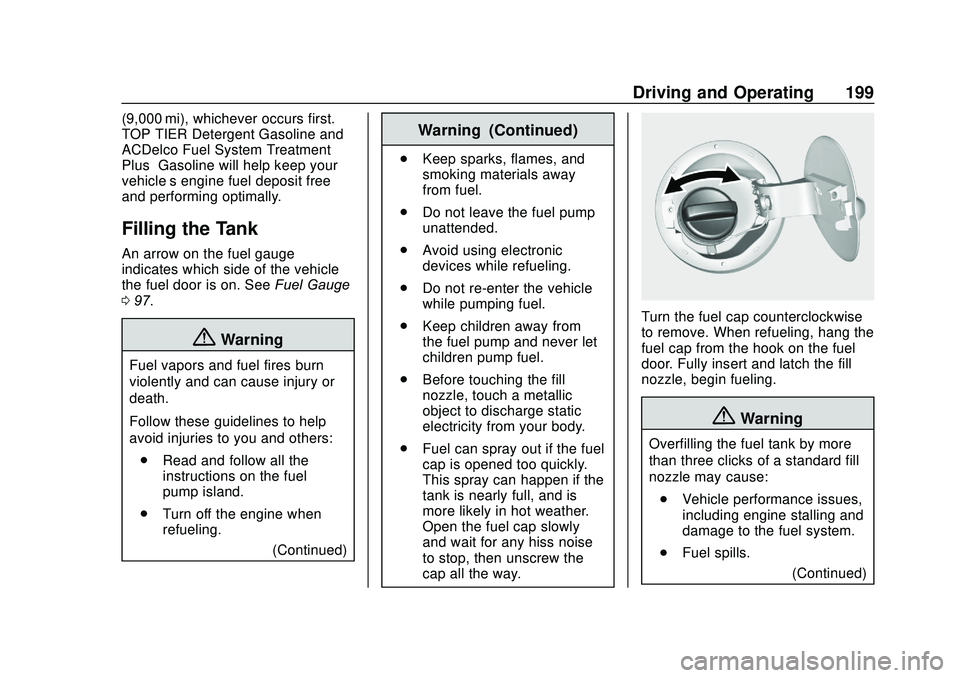
Turn the fuel cap counterclockwise
to remove. When refueling, hang the
fuel cap from the hook on the fuel
door. Fully insert and latch the fill
nozzle, begin fueling.
{Warning
Overfilling the fuel tank by more
than three clicks of a standard fill
nozzle may cause:
. Vehicle performance issues,
including engine stalling and
damage to the fuel system.
. Fuel spills.
(Continued)
Page 201 of 329

Chevrolet Sonic Owner Manual (GMNA-Localizing-U.S./Canada-13566834) -
2020 - CRC - 10/4/19
200 Driving and Operating
Warning (Continued)
.Under certain conditions,
fuel fires.
Be careful not to spill fuel. Wait
five seconds after you have finished
pumping before removing the fill
nozzle. Clean fuel from painted
surfaces as soon as possible. See
Exterior Care 0266. Reinstall the
cap by turning it clockwise until it
clicks. Push the fuel door closed.
{Warning
If a fire starts while you are
refueling, do not remove the fill
nozzle. Shut off the flow of fuel by
shutting off the pump or by
notifying the station attendant.
Leave the area immediately.
Caution
If a new fuel cap is needed, get
the right type of cap from your
dealer. The wrong type of fuel cap
may not fit properly, may turn on
the malfunction indicator lamp,
and could damage the fuel
system and emissions system.
See Malfunction Indicator Lamp
(Check Engine Light) 0100.
Filling a Portable Fuel
Container
{Warning
Never fill a portable fuel container
while it is in the vehicle. Static
electricity discharge from the
container can ignite the fuel
vapor. You or others could be
badly burned and the vehicle
could be damaged. To help avoid
injury to you and others:
(Continued)
Warning (Continued)
.Dispense fuel only into
approved containers.
. Do not fill a container while
it is inside a vehicle, in a
vehicle's trunk, in a pickup
bed, or on any surface other
than the ground.
. Bring the fill nozzle in
contact with the inside of
the fill opening before
operating the nozzle.
Maintain contact until filling
is complete.
. Keep sparks, flames, and
smoking materials away
from fuel.
. Do not use electronic
devices while pumping fuel.
Page 217 of 329

Chevrolet Sonic Owner Manual (GMNA-Localizing-U.S./Canada-13566834) -
2020 - CRC - 10/4/19
216 Vehicle Care
1. Remove the coolant surge tankpressure cap when the cooling
system, including the coolant
surge tank pressure cap and
upper radiator hose, is no
longer hot.
Turn the pressure cap slowly
counterclockwise about
one-quarter of a turn. If you
hear a hiss, wait for that to
stop. This will allow any
pressure still left to be vented
out the discharge hose.
2. Keep turning the pressure cap slowly and remove it.3. Fill the coolant surge tank withthe proper mixture to the
indicated level mark.
4. With the coolant surge tank pressure cap off, start the
engine and let it run until you
can feel the upper radiator
hose getting hot. Watch out for
the engine cooling fan.
By this time, the coolant level
inside the coolant surge tank
may be lower. If the level is
lower, add more of the proper
mixture to the coolant surge
tank until the level reaches the
indicated level mark.
5. Replace the pressure cap tightly.
Check the level in the coolant surge
tank when the cooling system has
cooled down. If the coolant is not at
the proper level, repeat Steps 1–
3 and reinstall the pressure cap.
If the coolant still is not at the proper
level when the system cools down
again, see your dealer.Caution
If the pressure cap is not tightly
installed, coolant loss and engine
damage may occur. Be sure the
cap is properly and tightly
secured.
Engine Overheating
The vehicle has an indicator to warn
of the engine overheating.
If the decision is made not to lift the
hood when this warning appears,
get service help right away. See
Roadside Assistance Program
0 298.
If the decision is made to lift the
hood, make sure the vehicle is
parked on a level surface.
Then check to see if the engine
cooling fan is running. If the engine
is overheating, the fan should be
running. If it is not, do not continue
to run the engine. Have the vehicle
serviced.
Page 227 of 329

Chevrolet Sonic Owner Manual (GMNA-Localizing-U.S./Canada-13566834) -
2020 - CRC - 10/4/19
226 Vehicle Care
one-quarter turn
counterclockwise and pulling it
straight up and out of the
bottle.
3. Remove the headlamp bulbaccess cover.
4. Turn the bulb counterclockwise and pull straight back.
5. Disconnect the wiring harness connector from the bulb.
6. Install the new bulb in the headlamp assembly by turning
clockwise.
7. Reconnect the wiring harness connector. 8. Install the headlamp bulb
access cover.
9. For the driver side bulb, replace the windshield washer
bottle filler neck by turning it
one-quarter turn clockwise into
the bottle.
Turn Signal Lamp
1. Open the hood. See Hood
0 205.
2. Remove the turn signal lamp
bulb socket from the headlamp
assembly by turning
counterclockwise. 3. Remove the bulb from the bulb
socket by pulling it straight out.
4. Install the new bulb in the bulb socket.
5. Install the bulb socket into the headlamp assembly by turning
clockwise.
Taillamps, Turn Signal,
Stoplamps, and Back-Up
Lamps
Sedan Taillamp Shown, Hatchback
Taillamp Similar
1. Back-up Lamp
2. Stoplamp/Taillamp
Page 228 of 329

Chevrolet Sonic Owner Manual (GMNA-Localizing-U.S./Canada-13566834) -
2020 - CRC - 10/4/19
Vehicle Care 227
3. Turn Signal Lamp
4. Taillamp
To replace one of these bulbs:1. Open the trunk.
2. Remove the two screws, which secure the taillamp assembly.
3. Remove the taillamp assembly by pulling it straight back until
the two posts disengage from
the grommets.
4. Remove the bulb socket from the taillamp assembly by
turning it counterclockwise. 5. Remove the bulb by pulling it
straight out.
6. Install a new bulb into the bulb socket.
7. Install the bulb socket into the taillamp assembly by turning it
clockwise.
8. Install the taillamp assembly and tighten the two screws.
License Plate Lamp
Lamp Assembly
Bulb Assembly
1. Bulb Socket
2. Bulb
3. Lamp Assembly
To replace one of these bulbs:
1. Push the left end of the lamp assembly toward the right.
2. Turn the lamp assembly down to remove it.
3. Turn the bulb socket (1) counterclockwise to remove it
from the lamp assembly (3).
4. Pull the bulb (2) straight out of the bulb socket (1).
Page 229 of 329

Chevrolet Sonic Owner Manual (GMNA-Localizing-U.S./Canada-13566834) -
2020 - CRC - 10/4/19
228 Vehicle Care
5. Push the replacement bulbstraight into the bulb socket
and turn the bulb socket
clockwise to install it into the
lamp assembly.
6. Turn the lamp assembly into the lamp assembly opening
engaging the clip side first.
7. Push on the lamp side opposite the clip until the lamp assembly
snaps into place.Electrical System
Electrical System
Overload
The vehicle has fuses and circuit
breakers to protect against an
electrical system overload.
When the current electrical load is
too heavy, the circuit breaker opens
and closes, protecting the circuit
until the current load returns to
normal or the problem is fixed. This
greatly reduces the chance of circuit
overload and fire caused by
electrical problems.
Fuses and circuit breakers protect
power devices in the vehicle.
Replace a bad fuse with a new one
of the identical size and rating.
If there is a problem on the road and
a fuse needs to be replaced, the
same amperage fuse can be
borrowed. Choose some feature of
the vehicle that is not needed to use
and replace it as soon as possible.
Headlamp Wiring
An electrical overload may cause
the lamps to go on and off, or in
some cases to remain off. Have the
headlamp wiring checked right away
if the lamps go on and off or
remain off.
Windshield Wipers
If the wiper motor overheats due to
heavy snow or ice, the windshield
wipers will stop until the motor cools
and will then restart.
Although the circuit is protected
from electrical overload, overload
due to heavy snow or ice may
cause wiper linkage damage.
Always clear ice and heavy snow
from the windshield before using the
windshield wipers.
If the overload is caused by an
electrical problem and not snow or
ice, be sure to get it fixed.
Page 233 of 329

Chevrolet Sonic Owner Manual (GMNA-Localizing-U.S./Canada-13566834) -
2020 - CRC - 10/4/19
232 Vehicle Care
FusesUsage
DLIS Discrete logic ignition switch
DLC Data link connector
CIGAR APO Cigar lighter accessory power
outlet
L/GATE Liftgate PWR
WNDW REAR Rear power
window
BCM8 Body control module 8
BCM7 Body control module 7
BCM6 Body control module 6
BCM5 Body control module 5
BCM4 Body control module 4
BCM3 Body control module 3
BCM2 Body control module 2 Fuses
Usage
BCM1 Body control module 1
IPC Instrument panel cluster
TELEMATICS Telematics PAS/SBSA Park assist system/ Side blind spot
alert system
RAIN SNSR Rain sensing wiper AUDIO Audio
LDW/FCA Lane departure warning/Front
collision alert
CGM Central gateway module
HVAC1 Heating, ventilation, and air
conditioning 1
HLLD SW Automatic headlamp leveling
switch Fuses
Usage
IPC/AOS Instrument cluster/ Automatic
occupant sensing
display
SPARE –
CLOCK
SPRING Clock spring
HVAC2 Heating, ventilation, and air
conditioning 2
HTD
STR WHL Heated steering
wheel
SPARE –
S/ROOF SW Sunroof switch CIGAR APO Cigar auxiliary power outlet
ESCL Electric steering column lock
PWR WNDW FRONT Front power
windows
IRAP ACCY IRAP accessory
BATT CONN Battery connector
Page 256 of 329

Chevrolet Sonic Owner Manual (GMNA-Localizing-U.S./Canada-13566834) -
2020 - CRC - 10/4/19
Vehicle Care 255
3. Turn the retainercounterclockwise and remove it
from the compact spare.
4. Remove the compact spare tire. See Compact Spare Tire
0 259 for more information.
5. Remove the jack and tools from their container and place
them near the tire being
changed.
Removing the Flat Tire and
Installing the Spare Tire
1. Do a safety check beforeproceeding. See If a Tire Goes
Flat 0253.
2. Remove the wheel cover, if the
vehicle has one, to reach the
wheel bolts.
3. Turn the wheel nutscounterclockwise to loosen
them. Do not remove them yet.
Caution
Make sure that the jack lift head
is in the correct position or you
may damage your vehicle. The
repairs would not be covered by
your warranty.
4. Place the jack at the positionmarked with a half circle.