2020 CHEVROLET EQUINOX engine
[x] Cancel search: enginePage 22 of 415
Chevrolet Equinox Owner Manual (GMNA-Localizing-U.S./Canada/Mexico-
13555863) - 2020 - CRC - 8/2/19
Keys, Doors, and Windows 21
Doors
Liftgate
{Warning
Exhaust gases can enter the
vehicle if it is driven with the
liftgate or trunk/hatch open,
or with any objects that pass
through the seal between the
body and the trunk/hatch or
liftgate. Engine exhaust contains
carbon monoxide (CO) which
cannot be seen or smelled. It can
cause unconsciousness and even
death.
If the vehicle must be driven with
the liftgate or trunk/hatch open:. Close all of the windows.
. Fully open the air outlets on
or under the instrument
panel.
(Continued)
Warning (Continued)
.Adjust the climate control
system to a setting that
brings in only outside air
and set the fan speed to the
highest setting. See
“Climate Control Systems”
in the Index.
. If the vehicle is equipped
with a power liftgate, disable
the power liftgate function.
See Engine Exhaust 0190.
Caution
To avoid damage to the liftgate or
liftgate glass, make sure the area
above and behind the liftgate is
clear before opening it.
Manual Liftgate
To unlock the liftgate, pressKon
the power door lock switch or press
Kon the Remote Keyless Entry (RKE) transmitter twice within
five seconds. See
Remote Keyless
Entry (RKE) System Operation 08.
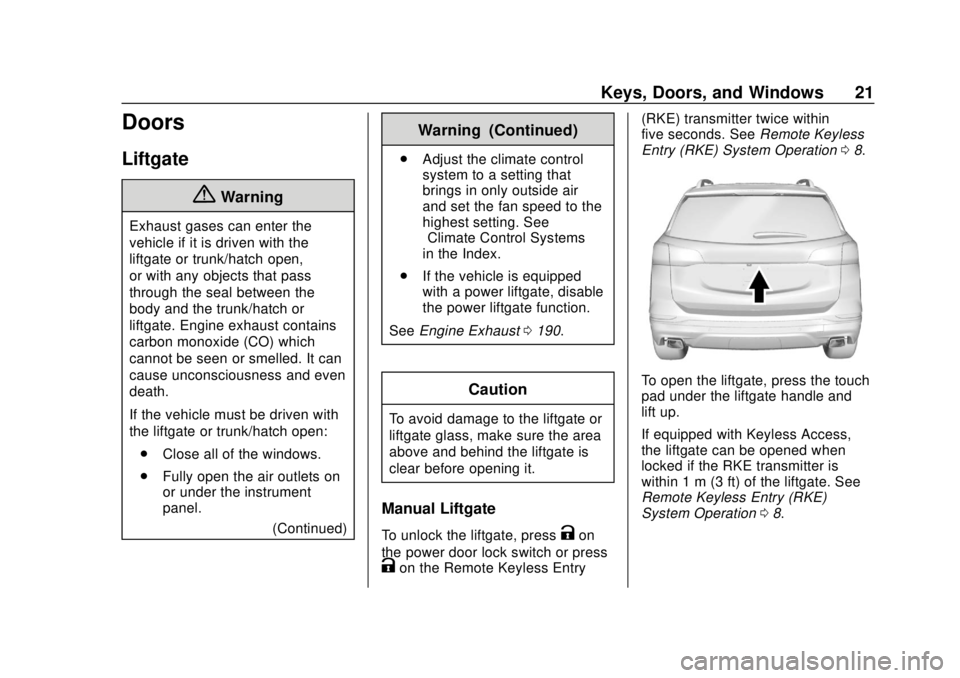
To open the liftgate, press the touch
pad under the liftgate handle and
lift up.
If equipped with Keyless Access,
the liftgate can be opened when
locked if the RKE transmitter is
within 1 m (3 ft) of the liftgate. See
Remote Keyless Entry (RKE)
System Operation 08.
Page 28 of 415

Chevrolet Equinox Owner Manual (GMNA-Localizing-U.S./Canada/Mexico-
13555863) - 2020 - CRC - 8/2/19
Keys, Doors, and Windows 27
To avoid setting off the alarm by
accident:
.Lock the vehicle after all
occupants have left the vehicle
and all doors are closed.
. Always unlock a door with the
RKE transmitter.
Unlocking the driver door with the
key will not disarm the system or
turn off the alarm.
How to Detect a Tamper
Condition
IfKis pressed on the RKE
transmitter and the horn chirps and
the lights flash three times, an alarm
occurred previously while the alarm
system was armed.
If the alarm has been activated, a
message will appear on the DIC.
Immobilizer
See Radio Frequency Statement
0 387.
Immobilizer Operation
This vehicle has a passive
theft-deterrent system.
The system does not have to be
manually armed or disarmed.
The vehicle is automatically
immobilized when the vehicle is
turned off.
The immobilization system is
disarmed when the ignition is on or
in ACC/ACCESSORY and a valid
transmitter is present in the vehicle.
The security light, in the instrument
cluster, comes on if there is a
problem with arming or disarming
the theft-deterrent system.
The system has one or more RKE
transmitters matched to an
immobilizer control unit in your
vehicle. Only a correctly matched RKE transmitter will start the
vehicle. If the transmitter is ever
damaged, you may not be able to
start your vehicle.
When trying to start the vehicle, the
security light may come on briefly
when the ignition is turned on.
If the engine does not start and the
security light stays on, there is a
problem with the system. Turn the
ignition off and try again.
If the vehicle will not change ignition
modes, and the RKE transmitter
appears to be undamaged, try
another transmitter. Or, you may try
placing the transmitter in the
cupholder. See
“Starting the Vehicle
with a Low Transmitter Battery” in
Remote Keyless Entry (RKE)
System Operation 08.
If the ignition mode will not change
with the other transmitter or in the
cupholder, your vehicle needs
service. If the ignition does change
modes, the first transmitter may be
faulty. See your dealer who can
Page 33 of 415
Chevrolet Equinox Owner Manual (GMNA-Localizing-U.S./Canada/Mexico-
13555863) - 2020 - CRC - 8/2/19
32 Keys, Doors, and Windows
Automatic Reversal System
Override
{Warning
If automatic reversal system
override is active, the window will
not reverse automatically. You or
others could be injured and the
window could be damaged.
Before using automatic reversal
system override, make sure that
all people and obstructions are
clear of the window path.
When the engine is on, override the
automatic reversal system by pulling
and holding the window switch if
conditions prevent it from closing.
Programming the Power
Windows
Programming may be necessary if
the vehicle's battery has been
disconnected or discharged. If the
window is unable to express-up,
program the window: 1. Close all doors. 2. Turn the ignition on or to ACC/
ACCESSORY.
3. Partially open the window to be programmed, then close it and
continue to pull the switch
briefly after the window has
fully closed.
4. Open the window and continue to press the switch briefly after
the window has fully opened.
Remote Window Operation
If equipped, this feature allows all
the windows to be opened remotely.
If enabled in vehicle personalization,
press and hold
Kon the RKE
transmitter. See Vehicle
Personalization 0134.
Sun Visors
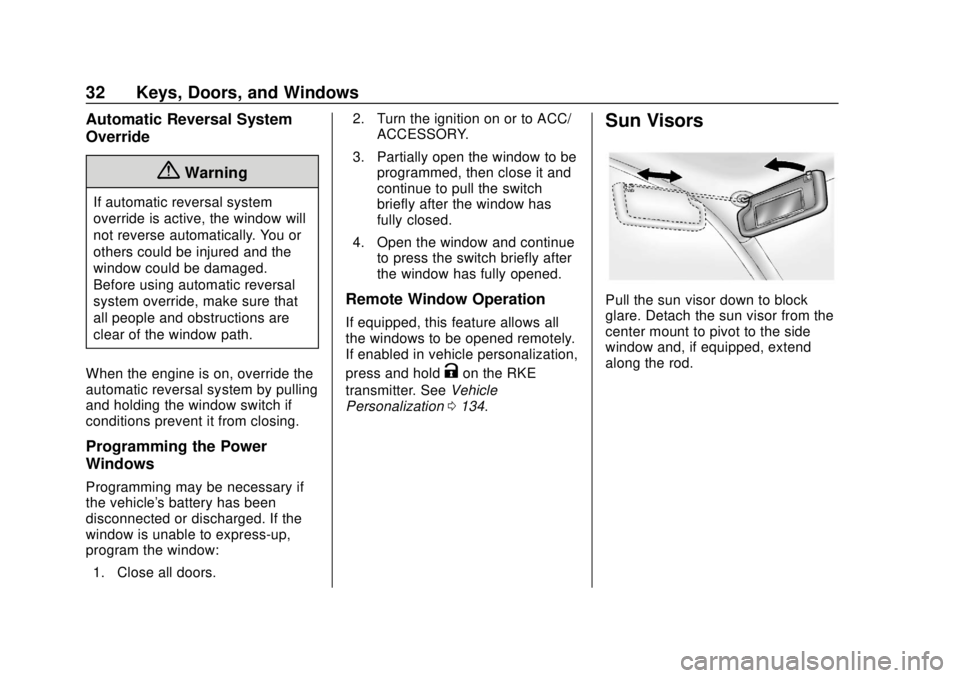
Pull the sun visor down to block
glare. Detach the sun visor from the
center mount to pivot to the side
window and, if equipped, extend
along the rod.
Page 44 of 415

Chevrolet Equinox Owner Manual (GMNA-Localizing-U.S./Canada/Mexico-
13555863) - 2020 - CRC - 8/2/19
Seats and Restraints 43
saved to. Try storing the position to
the other memory button or try the
other RKE transmitter.
Seat Exit Memory
Seat Exit Memory is not linked to an
RKE transmitter. The position saved
to
Bis used for all drivers. To turn
Seat Exit Memory on or off, see
"Vehicle Personalization Settings"
previously in this section and
Vehicle Personalization 0134.
If turned on, the position saved to
Bis automatically recalled when
one of the following occurs:
. The vehicle is turned off and the
driver door is opened within a
short time.
. The vehicle is turned off with the
driver door open.
To stop Seat Exit Memory
movement, press any of the
following memory controls:
. Power seat
. Memory SET, 1, 2, or
B
.Power mirror, with the driver or
passenger side mirror selected
Obstructions
If something has blocked the driver
seat while recalling a memory
position, the recall may stop.
Remove the obstruction and try the
recall again. If the memory position
still does not recall, see your dealer.
Heated and Ventilated
Front Seats
{Warning
If temperature change or pain to
the skin cannot be felt, the seat
heater may cause burns. To
reduce the risk of burns, use care
when using the seat heater,
especially for long periods of
time. Do not place anything on
the seat that insulates against
heat, such as a blanket, cushion,
cover, or similar item. This may
cause the seat heater to (Continued)
Warning (Continued)
overheat. An overheated seat
heater may cause a burn or may
damage the seat.
If available, the buttons are on the
climate control panel. To operate,
the engine must be running.
Press
LorMto heat the driver or
passenger seat cushion and
seatback.
Page 63 of 415
Chevrolet Equinox Owner Manual (GMNA-Localizing-U.S./Canada/Mexico-
13555863) - 2020 - CRC - 8/2/19
62 Seats and Restraints
The feature may also activate,
without airbag inflation, after an
event that exceeds a predetermined
threshold. After turning the ignition
off and then on again, the fuel
system will return to normal
operation; the doors can be locked,
the interior lamps can be turned off,
and the hazard warning flashers can
be turned off using the controls for
those features. If any of these
systems are damaged in the crash
they may not operate as normal.
{Warning
A crash severe enough to inflate
the airbags may have also
damaged important functions in
the vehicle, such as the fuel
system, brake and steering
systems, etc. Even if the vehicle
appears to be drivable after a
moderate crash, there may be
concealed damage that could
make it difficult to safely operate
the vehicle.(Continued)
Warning (Continued)
Use caution if you should attempt
to restart the engine after a crash
has occurred.
In many crashes severe enough to
inflate the airbag, windshields are
broken by vehicle deformation.
Additional windshield breakage may
also occur from the front outboard
passenger airbag.
. Airbags are designed to inflate
only once. After an airbag
inflates, you will need some new
parts for the airbag system.
If you do not get them, the
airbag system will not be there
to help protect you in another
crash. A new system will include
airbag modules and possibly
other parts. The service manual
for the vehicle covers the need
to replace other parts.
. The vehicle has a crash sensing
and diagnostic module which
records information after a crash. See
Vehicle Data
Recording and Privacy 0389
and
Event Data Recorders 0389.
. Let only qualified technicians
work on the airbag systems.
Improper service can mean that
an airbag system will not work
properly. See your dealer for
service.
Passenger Sensing
System
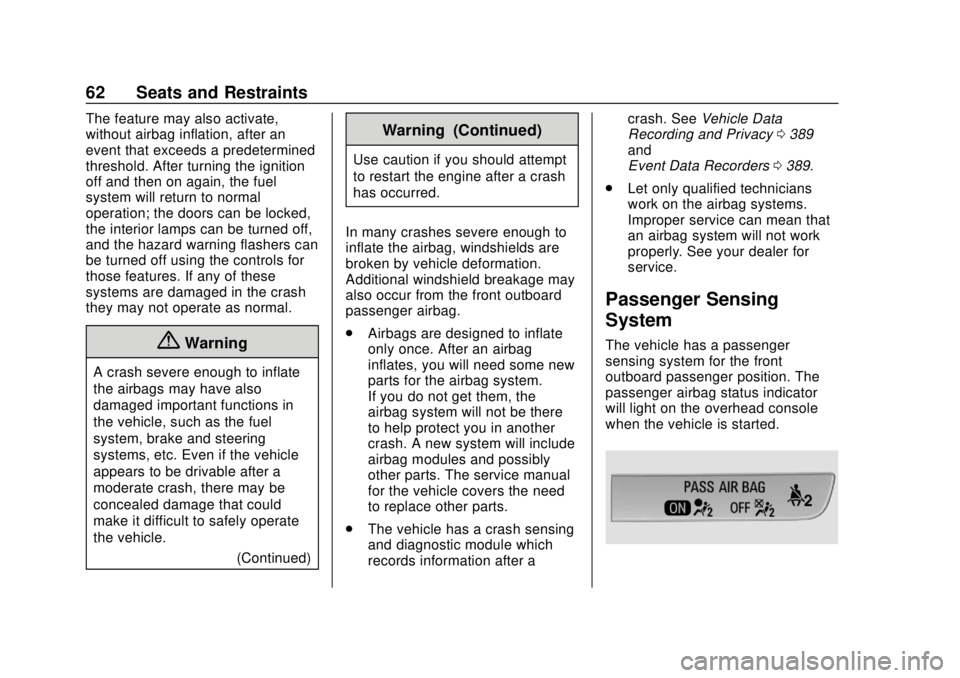
The vehicle has a passenger
sensing system for the front
outboard passenger position. The
passenger airbag status indicator
will light on the overhead console
when the vehicle is started.
Page 94 of 415

Chevrolet Equinox Owner Manual (GMNA-Localizing-U.S./Canada/Mexico-
13555863) - 2020 - CRC - 8/2/19
Instruments and Controls 93
Instruments and
Controls
Controls
Steering Wheel Adjustment . . . . 94
Steering Wheel Controls . . . . . . . 94
Heated Steering Wheel . . . . . . . . 94
Horn . . . . . . . . . . . . . . . . . . . . . . . . . . . 94
Windshield Wiper/Washer . . . . . . 94
Rear Window Wiper/Washer . . . 96
Compass . . . . . . . . . . . . . . . . . . . . . . 96
Clock . . . . . . . . . . . . . . . . . . . . . . . . . . 97
Power Outlets . . . . . . . . . . . . . . . . . 97
Wireless Charging . . . . . . . . . . . . . 98
Warning Lights, Gauges, and
Indicators
Warning Lights, Gauges, andIndicators . . . . . . . . . . . . . . . . . . . 101
Instrument Cluster (Base and Midlevel) . . . . . . . . . . . . . . . . . . . . 102
Instrument Cluster (Uplevel) . . . . . . . . . . . . . . . . . . . . 106
Speedometer . . . . . . . . . . . . . . . . . 109
Odometer . . . . . . . . . . . . . . . . . . . . . 109
Trip Odometer . . . . . . . . . . . . . . . . 109
Tachometer . . . . . . . . . . . . . . . . . . . 109
Fuel Gauge . . . . . . . . . . . . . . . . . . . 110 Engine Coolant Temperature
Gauge . . . . . . . . . . . . . . . . . . . . . . . 111
Seat Belt Reminders . . . . . . . . . . 112
Airbag Readiness Light . . . . . . . 112
Passenger Airbag Status Indicator . . . . . . . . . . . . . . . . . . . . . 113
Charging System Light . . . . . . . 114
Malfunction Indicator Lamp (Check Engine Light) . . . . . . . . 114
Brake System Warning Light . . . . . . . . . . . . . . . . . . . . . . . . 116
Electric Parking Brake Light . . . . . . . . . . . . . . . . . . . . . . . . 117
Service Electric Parking Brake Light . . . . . . . . . . . . . . . . . . . . . . . . 117
Antilock Brake System (ABS) Warning Light . . . . . . . . . . . . . . . 117
Tow/Haul Mode Light . . . . . . . . . 118
Lane Keep Assist (LKA) Light . . . . . . . . . . . . . . . . . . . . . . . . 118
Vehicle Ahead Indicator . . . . . . . 118
Pedestrian Ahead Indicator . . . 119
Traction Off Light . . . . . . . . . . . . . 119
StabiliTrak OFF Light . . . . . . . . . 119
Traction Control System (TCS)/ StabiliTrak Light . . . . . . . . . . . . . 120
Wait-to-Start Light . . . . . . . . . . . . 120
Tire Pressure Light . . . . . . . . . . . 120
Engine Oil Pressure Light . . . . 121
Low Fuel Warning Light . . . . . . 121 Diesel Exhaust Fluid (DEF)
Warning Light . . . . . . . . . . . . . . . 122
Security Light . . . . . . . . . . . . . . . . . 122
High-Beam On Light . . . . . . . . . . 122
Front Fog Lamp Light . . . . . . . . . 123
Lamps On Reminder . . . . . . . . . 123
Cruise Control Light . . . . . . . . . . 123
Information Displays
Driver Information Center (DIC) (Base Level and Midlevel) . . . 123
Driver Information Center (DIC) (Uplevel) . . . . . . . . . . . . . . . . . . . . 129
Vehicle Messages
Vehicle Messages . . . . . . . . . . . . 133
Engine Power Messages . . . . . 134
Vehicle Speed Messages . . . . . 134
Vehicle Personalization
Vehicle Personalization . . . . . . . 134
Universal Remote System
Universal Remote System . . . . 140
Universal Remote SystemProgramming . . . . . . . . . . . . . . . 140
Universal Remote System Operation . . . . . . . . . . . . . . . . . . . 142
Page 102 of 415

Chevrolet Equinox Owner Manual (GMNA-Localizing-U.S./Canada/Mexico-
13555863) - 2020 - CRC - 8/2/19
Instruments and Controls 101
OF LIABILITY, WHETHER IN
CONTRACT, STRICT LIABILITY,
OR TORT (INCLUDING
NEGLIGENCE OR OTHERWISE)
ARISING IN ANY WAY OUT OF
THE USE OF THIS SOFTWARE,
EVEN IF ADVISED OF THE
POSSIBILITY OF SUCH DAMAGE.Warning Lights,
Gauges, and
Indicators
Warning lights and gauges can
signal that something is wrong
before it becomes serious enough
to cause an expensive repair or
replacement. Paying attention to the
warning lights and gauges could
prevent injury.
Some warning lights come on briefly
when the engine is started to
indicate they are working. When
one of the warning lights comes on
and stays on while driving, or when
one of the gauges shows there may
be a problem, check the section that
explains what to do. Waiting to do
repairs can be costly and even
dangerous.
Page 110 of 415

Chevrolet Equinox Owner Manual (GMNA-Localizing-U.S./Canada/Mexico-
13555863) - 2020 - CRC - 8/2/19
Instruments and Controls 109
to cancel or resume route guidance,
mute or unmute voice guidance,
or access Recents or Favorites.
Phone
In the Phone menu, if there is no
active phone call, view recent calls,
scroll through contacts, select from
the favorites, or change the phone
source. If there is an active call,
mute the phone or switch to handset
operation.
Options
Pressworxto scroll through
items in the Options menu. Press
V
to select the item. Pressoto exit
the item.
Traction and Stability : To turn the
Traction Control System (TCS) on
or off, choose Traction. To turn
StabiliTrak/Electronic Stability
Control (ESC) on or off, choose
Stability. See Traction Control/
Electronic Stability Control 0208.
Units : Choose US or Metric units.
A selected mark will be displayed
next to the selected item. Info Page Options :
Select the
items to be displayed in the Info
app. A selected mark will be
displayed next to the selected item.
Home Page Options : Select the
available elements to display. Not all
elements will be available on all
vehicles: Speedometer, Active
Safety, Speed Sign, Time, and Fuel
Range.
Speed Warning : Allows the driver
to set a speed that they do not want
to exceed. To set the Speed
Warning, press
Vwhen Speed
Warning is displayed. Use
worx
to adjust the value. PressVto set
the speed. Once the speed is set,
this feature can be turned off by
pressing the thumbwheel while
viewing this page. If the selected
speed limit is exceeded, a pop-up
warning is displayed with a chime.
Software Information : Displays
open source software information.
Speedometer
The speedometer shows the
vehicle's speed in either kilometers
per hour (km/h) or miles per
hour (mph).
Odometer
The odometer shows how far the
vehicle has been driven, in either
kilometers or miles.
Trip Odometer
The trip odometer shows how far
the vehicle has been driven since
the trip odometer was last reset.
The trip odometer is accessed and
reset through the Driver Information
Center (DIC). See Driver
Information Center (DIC) (Base
Level and Midlevel) 0123 or
Driver Information Center (DIC)
(Uplevel) 0129.
Tachometer
The tachometer displays the engine
speed in revolutions per
minute (rpm).