2020 CHEVROLET CORVETTE ECU
[x] Cancel search: ECUPage 87 of 336

Chevrolet Corvette Owner Manual (GMNA-Localizing-U.S./Canada/Mexico-
12470550) - 2020 - CRC - 4/23/20
86 Instruments and Controls
Instruments and
Controls
Controls
Steering Wheel Adjustment . . . . 87
Steering Wheel Controls . . . . . . . 87
Heated Steering Wheel . . . . . . . . 87
Horn . . . . . . . . . . . . . . . . . . . . . . . . . . . 87
Windshield Wiper/Washer . . . . . . 87
Compass . . . . . . . . . . . . . . . . . . . . . . 88
Clock . . . . . . . . . . . . . . . . . . . . . . . . . . 89
Power Outlets . . . . . . . . . . . . . . . . . 89
Wireless Charging . . . . . . . . . . . . . 90
Warning Lights, Gauges, and
Indicators
Warning Lights, Gauges, andIndicators . . . . . . . . . . . . . . . . . . . . 93
Instrument Cluster . . . . . . . . . . . . . 94
Speedometer . . . . . . . . . . . . . . . . . . 98
Odometer . . . . . . . . . . . . . . . . . . . . . . 98
Trip Odometer . . . . . . . . . . . . . . . . . 98
Tachometer . . . . . . . . . . . . . . . . . . . . 98
Fuel Gauge . . . . . . . . . . . . . . . . . . . . 98
Engine Coolant Temperature Gauge . . . . . . . . . . . . . . . . . . . . . . . . 99
Transmission Temperature Gauge . . . . . . . . . . . . . . . . . . . . . . . . 99 Seat Belt Reminders . . . . . . . . . . . 99
Airbag Readiness Light . . . . . . . 100
Passenger Airbag Status
Indicator . . . . . . . . . . . . . . . . . . . . 100
Charging System Light . . . . . . . 101
Malfunction Indicator Lamp
(Check Engine Light) . . . . . . . . 102
Front Lift System Light . . . . . . . 103
Brake System Warning Light . . . . . . . . . . . . . . . . . . . . . . . . 104
Electric Parking Brake Light . . . . . . . . . . . . . . . . . . . . . . . . 104
Service Electric Parking Brake Light . . . . . . . . . . . . . . . . . . . . . . . . 105
Antilock Brake System (ABS) Warning Light . . . . . . . . . . . . . . . 105
Traction Off Light . . . . . . . . . . . . . 105
Traction Control System (TCS)/ Electronic Stability Control
Light . . . . . . . . . . . . . . . . . . . . . . . . 106
Electronic Stability Control (ESC) Off Light . . . . . . . . . . . . . . 106
Tire Pressure Light . . . . . . . . . . . 106
Engine Oil Pressure Light . . . . 107
Security Light . . . . . . . . . . . . . . . . . 107
High-Beam On Light . . . . . . . . . . 107
Lamps On Reminder . . . . . . . . . 108
Cruise Control Light . . . . . . . . . . 108
Door Ajar Light . . . . . . . . . . . . . . . 108
Information Displays
Driver Information Center (DIC) . . . . . . . . . . . . . . . . 108
Head-Up Display (HUD) . . . . . . 110
Vehicle Messages
Vehicle Messages . . . . . . . . . . . . 114
Engine Power Messages . . . . . 115
Vehicle Speed Messages . . . . . 115
Vehicle Personalization
Vehicle Personalization . . . . . . . 116
Universal Remote System
Universal Remote System . . . . 121
Universal Remote System Programming . . . . . . . . . . . . . . . 121
Universal Remote System Operation . . . . . . . . . . . . . . . . . . . 123
Page 108 of 336

Chevrolet Corvette Owner Manual (GMNA-Localizing-U.S./Canada/Mexico-
12470550) - 2020 - CRC - 4/23/20
Instruments and Controls 107
and inflate the tires to the pressure
value shown on the Tire and
Loading Information label. SeeTire
Pressure 0253.
When the Light Flashes First and
Then Is On Steady
If the light flashes for about a minute
and then stays on, there may be a
problem with the TPMS. If the
problem is not corrected, the light
will come on at every ignition cycle.
See Tire Pressure Monitor
Operation 0256.
Engine Oil Pressure Light
Caution
Lack of proper engine oil
maintenance can damage the
engine. Driving with the engine oil
low can also damage the engine.
The repairs would not be covered
by the vehicle warranty. Check
the oil level as soon as possible.
Add oil if required, but if the oil
level is within the operating range
(Continued)
Caution (Continued)
and the oil pressure is still low,
have the vehicle serviced. Always
follow the maintenance schedule
for changing engine oil.
This light should come on briefly as
the engine is started. If it does not
come on, have the vehicle serviced
by your dealer.
If the light comes on and stays on, it
means that oil is not flowing through
the engine properly. The vehicle
could be low on oil and may have
some other system problem. See
your dealer.
Security Light
The security light should come on
briefly as the engine is started. If it
does not come on, have the vehicle
serviced by your dealer. If the
system is working normally, the
indicator light turns off.
If the light stays on and the engine
does not start, there could be a
problem with the theft-deterrent
system. SeeImmobilizer Operation
0 28.
High-Beam On Light
Page 109 of 336

Chevrolet Corvette Owner Manual (GMNA-Localizing-U.S./Canada/Mexico-
12470550) - 2020 - CRC - 4/23/20
108 Instruments and Controls
This light comes on when the
high-beam headlamps are in use.
SeeHeadlamp High/Low-Beam
Changer 0126.
Lamps On Reminder
This light comes on when the
exterior lamps are in use. See
Exterior Lamp Controls 0125.
Cruise Control Light
For vehicles with cruise control, the
cruise control light is white when the
cruise control is on and ready, and
turns green when the cruise control
is set and active.
The light turns off when the cruise
control is turned off. See Cruise
Control 0196.
Door Ajar Light
This light comes on when a door is
open or not securely latched. Before
driving, check that all doors are
properly closed.
Information Displays
Driver Information
Center (DIC)
The Info application is only available
when the ignition is on. The displays
show the status of many vehicle
systems.
SorT:Press to move left or right
between the interactive display
zones in the cluster. Press the
thumbwheel to select.
Page 115 of 336

Chevrolet Corvette Owner Manual (GMNA-Localizing-U.S./Canada/Mexico-
12470550) - 2020 - CRC - 4/23/20
114 Instruments and Controls
Metric
English
Vehicle Alerts : Alerts can be
dismissed in the instrument cluster.
All alerts are not displayed in
the HUD.
Care of the HUD
Clean the inside of the windshield to
remove any dirt or film that could
reduce the sharpness or clarity of
the HUD image.
Clean the HUD lens with a soft cloth
sprayed with glass cleaner. Wipe
the lens gently, then dry it.
HUD Troubleshooting
Check that:
. Nothing is covering the
HUD lens.
. HUD brightness setting is not
too dim or too bright.
. HUD is adjusted to the proper
height.
. Polarized sunglasses are
not worn.
. Windshield and HUD lens are
clean.
If the HUD image is not correct,
contact your dealer.
The windshield is part of the HUD
system. See Windshield
Replacement 0236.
Vehicle Messages
Messages displayed on the DIC
indicate the status of the vehicle or
some action that may be needed to
correct a condition. Multiple
messages may appear one after
another.
The messages that do not require
immediate action can be
acknowledged and cleared by
pressing
V. The messages that
require immediate action cannot be
cleared until that action is
performed.
All messages should be taken
seriously; clearing the message
does not correct the problem.
If a SERVICE message appears,
see your dealer.
Follow the instructions given in the
messages. The system displays
messages regarding the following
topics:
. Service Messages
. Fluid Levels
. Vehicle Security
Page 122 of 336
Chevrolet Corvette Owner Manual (GMNA-Localizing-U.S./Canada/Mexico-
12470550) - 2020 - CRC - 4/23/20
Instruments and Controls 121
Universal Remote
System
SeeRadio Frequency Statement
0 312.
The FCC Grant of Equipment
Authorization Certificate number is
NZLSAHL5B.
The Canadian Registration ID
number is 4112A-SAHL5B.
Universal Remote System
Programming
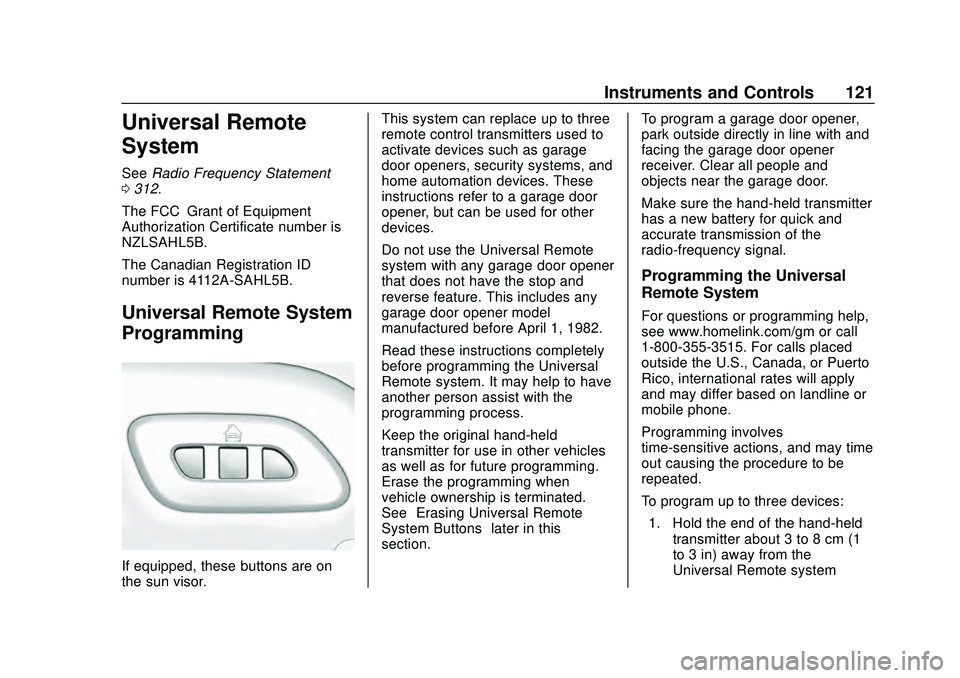
If equipped, these buttons are on
the sun visor. This system can replace up to three
remote control transmitters used to
activate devices such as garage
door openers, security systems, and
home automation devices. These
instructions refer to a garage door
opener, but can be used for other
devices.
Do not use the Universal Remote
system with any garage door opener
that does not have the stop and
reverse feature. This includes any
garage door opener model
manufactured before April 1, 1982.
Read these instructions completely
before programming the Universal
Remote system. It may help to have
another person assist with the
programming process.
Keep the original hand-held
transmitter for use in other vehicles
as well as for future programming.
Erase the programming when
vehicle ownership is terminated.
See
“Erasing Universal Remote
System Buttons” later in this
section. To program a garage door opener,
park outside directly in line with and
facing the garage door opener
receiver. Clear all people and
objects near the garage door.
Make sure the hand-held transmitter
has a new battery for quick and
accurate transmission of the
radio-frequency signal.
Programming the Universal
Remote System
For questions or programming help,
see www.homelink.com/gm or call
1-800-355-3515. For calls placed
outside the U.S., Canada, or Puerto
Rico, international rates will apply
and may differ based on landline or
mobile phone.
Programming involves
time-sensitive actions, and may time
out causing the procedure to be
repeated.
To program up to three devices:
1. Hold the end of the hand-held transmitter about 3 to 8 cm (1
to 3 in) away from the
Universal Remote system
Page 133 of 336

Chevrolet Corvette Owner Manual (GMNA-Localizing-U.S./Canada/Mexico-
12470550) - 2020 - CRC - 4/23/20
132 Infotainment System
Infotainment
System
Introduction
Infotainment . . . . . . . . . . . . . . . . . . 132
Performance Data
Recorder (PDR)
Performance DataRecorder (PDR) . . . . . . . . . . . . . 132
Introduction
Infotainment
See the infotainment manual for
information on the radio, audio
players, phone, navigation system,
and voice or speech recognition.
It also includes information on
settings.
Active Noise Cancellation (ANC)
If equipped, ANC reduces engine
noise in the vehicle’s interior. ANC
requires the factory-installed audio
system, radio, speakers, amplifier (if
equipped), induction system, and
exhaust system to work properly.
Deactivation is required by your
dealer if related aftermarket
equipment is installed.
Performance Data
Recorder (PDR)
If equipped, the PDR icon displays
on the Home Page.
Important Information
Use of the PDR may be prohibited
or legally restricted in certain
countries and situations. Ensure
compliance with applicable laws and
regulations, including, but not
limited to: privacy laws, laws related
to camera surveillance and
recordings, road traffic and security
laws, and laws on the protection of
publicity and personality rights.
. Do not use the PDR if it causes
distraction.
. Do not rely on camera footage to
steer the vehicle.
. Comply with any notice and
consent requirements before
capturing and/or recording the
voices or images of other
persons or before collecting
other personal data.
Page 155 of 336

Chevrolet Corvette Owner Manual (GMNA-Localizing-U.S./Canada/Mexico-
12470550) - 2020 - CRC - 4/23/20
154 Driving and Operating
4. Apply the brakes 25 times from100 km/h (60 mph) to 50 km/h
(30 mph) while decelerating at
0.4 g. This is a medium brake
application. Drive for at least
1 km (0.6 mi) between
applications.
As with all high performance brake
systems, some amount of brake
squeal is normal.
Alternative Closed Course Brake
Burnishing Procedure
This brake burnish procedure
should only be run on vehicles with
the J55 Z51 factory equipped brake
system.
This procedure should only be run
on a track and only on dry
pavement. Brake pedal fade will
occur during this track burnish
procedure and can cause brake
pedal travel and force to increase.
This could extend stopping distance
until the brakes are fully burnished. 1. Start track lapping at lower speeds and lower braking
efforts for three minutes of driving. Allow for increased
braking distances due to
reduced brake output.
2. After Step 1, increase speed and braking effort for the next
six minutes of lapping,
gradually ending up at 90%
effort. Continue to allow for
increased braking distance due
to reduced brake output.
3. Cool the brakes by lapping with minimal light braking for six
minutes.
Brake Cooling Kit
Prior to any track event, high speed
driving event, or competitive driving,
the following should be completed:
. Ensure all brake cooling parts
are correctly and securely
installed.
. Install the rear lower control arm
cooling ducts per the instructions
included with the kit. After any
track event or competitive
driving, remove the rear lower
control arm cooling ducts. These
parts are for track use only. .
Inspect for and remove any
blockage in the ducts.
. Inspect and replace any duct
that has damage.
Passenger Side Front Shown,
Driver Side Front Similar
1. Front Brake Cooling Duct
2. Front Lower Control Arm Deflector
Page 164 of 336

Chevrolet Corvette Owner Manual (GMNA-Localizing-U.S./Canada/Mexico-
12470550) - 2020 - CRC - 4/23/20
Driving and Operating 163
Caution
Overloading the vehicle may
cause damage. Repairs would not
be covered by the vehicle
warranty. Do not overload the
vehicle.
{Warning
Things you put inside your
vehicle can strike and injure
people in a sudden stop or
turn, or in a crash.
.Put things in the rear
area of your vehicle. Try
to spread the weight
evenly.
.Never stack heavier
things, like suitcases,
inside the vehicle so that
some of them are above
the tops of the seats.
(Continued)
Warning (Continued)
.Do not leave an
unsecured child restraint
in your vehicle.
.When you carry
something inside the
vehicle, secure it
whenever you can.
Starting and
Operating
New Vehicle Break-In
Follow these recommended
guidelines during the first 2 414 km
(1,500 mi) of driving this vehicle.
Parts have a break-in period and
performance will be better in the
long run.
During the first 800 km (500 mi),
engine torque will be limited in low
gears.
For the first 322 km (200 mi):
. To break in new tires, drive at
moderate speeds and avoid hard
cornering.
. New brake linings also need a
break-in period. Avoid making
hard stops. This is
recommended every time brake
linings are replaced.
For the first 800 km (500 mi):
. Avoid full throttle starts and
abrupt stops.
. Do not exceed 4000 rpm.