2020 CHEVROLET COLORADO tow
[x] Cancel search: towPage 104 of 368

Chevrolet Colorado Owner Manual (GMNA-Localizing-U.S./Canada/Mexico-
13566640) - 2020 - CRC - 9/30/19
Instruments and Controls 103
Engine Coolant
Temperature Gauge
Metric
English
This gauge shows the engine
coolant temperature.
If the pointer moves toward the
warning area at the high end of the
gauge, the engine is too hot.
This reading indicates the same
thing as the warning light. It means
that the engine coolant has
overheated. If the vehicle has been
operating under normal driving
conditions, pull off the road, stop the
vehicle, and turn off the engine as
soon as possible. See Engine
Overheating 0239.
Seat Belt Reminders
Driver Seat Belt Reminder
Light
There is a driver seat belt reminder
light on the instrument cluster.
When the vehicle is started, this
light flashes and a chime may come
on to remind the driver to fasten
their seat belt. Then the light stays
on solid until the belt is buckled.
This cycle may continue several
times if the driver remains or
becomes unbuckled while the
vehicle is moving.
If the driver seat belt is buckled,
neither the light nor the chime
comes on.
Page 107 of 368

Chevrolet Colorado Owner Manual (GMNA-Localizing-U.S./Canada/Mexico-
13566640) - 2020 - CRC - 9/30/19
106 Instruments and Controls
When this light comes on, the Driver
Information Center (DIC) also
displays a message.
If a short distance must be driven
with the light on, be sure to turn off
all accessories, such as the radio
and air conditioner.
Malfunction Indicator
Lamp (Check Engine
Light)
This light is part of the vehicle’s
emission control on-board
diagnostic system. If this light is on
while the engine is running, a
malfunction has been detected and
the vehicle may require service. The
light should come on to show that it
is working when the ignition is on
and the engine is not running. See
Ignition Positions0160.
Malfunctions are often indicated by
the system before any problem is
noticeable. Being aware of the light
and seeking service promptly when
it comes on may prevent damage.
Caution
If the vehicle is driven continually
with this light on, the emission
control system may not work as
well, the fuel economy may be
lower, and the vehicle may not
run smoothly. This could lead to
costly repairs that might not be
covered by the vehicle warranty.
Caution
Modifications to the engine,
transmission, exhaust, intake,
or fuel system, or the use of
replacement tires that do not
meet the original tire
specifications, can cause this light
to come on. This could lead to
(Continued)
Caution (Continued)
costly repairs not covered by the
vehicle warranty. This could also
affect the vehicle’s ability to pass
an Emissions Inspection/
Maintenance test. See
Accessories and Modifications
0224.
If the light is flashing : A
malfunction has been detected that
could damage the emission control
system and increase vehicle
emissions. Diagnosis and service
may be required.
To help prevent damage, reduce
vehicle speed and avoid hard
accelerations and uphill grades.
If towing a trailer, reduce the
amount of cargo being hauled as
soon as possible.
If the light continues to flash, find a
safe place to park. Turn the vehicle
off and wait at least 10 seconds
before restarting the engine. If the
light is still flashing, follow the
Page 109 of 368

Chevrolet Colorado Owner Manual (GMNA-Localizing-U.S./Canada/Mexico-
13566640) - 2020 - CRC - 9/30/19
108 Instruments and Controls
Brake System Warning
Light
MetricEnglish
This light should come on briefly
when the vehicle is turned on. If it
does not come on then, have it fixed
so it will be ready to warn you if
there is a problem.
When the vehicle is on, the brake
system warning light also comes on
when the parking brake is set. The
light stays on if the parking brake
does not fully release. If it stays on
after the parking brake is fully
released, there is a brake problem.
Have the brake system inspected
right away.
If the light comes on while driving,
pull off the road and stop carefully.
The brake pedal might be harder to
push, or the brake pedal may go
closer to the floor. It could take longer to stop. If the light is still on,
have the vehicle towed for service.
See
Towing the Vehicle 0299.
{Warning
The brake system might not be
working properly if the brake
system warning light is on.
Driving with the brake system
warning light on can lead to a
crash. If the light is still on after
the vehicle has been pulled off
the road and carefully stopped,
have the vehicle towed for
service.
Antilock Brake System
(ABS) Warning Light
This light comes on briefly when the
engine is started. If the light does not come on, have it
fixed so it will be ready to warn if
there is a problem.
If the light comes on while driving,
stop as soon as it is safely possible
and turn off the vehicle. Then start
the engine again to reset the
system. If the ABS light stays on,
or comes on again while driving, the
vehicle needs service. A chime may
also sound when the light comes on
steady.
If the ABS light is the only light on,
the vehicle has regular brakes, but
the antilock brakes are not
functioning.
Engagement of the front axle lock
will disable the ABS and illuminate
the ABS warning light. The ABS
light will turn off when the front axle
lock is disengaged.
If both the ABS and the brake
system warning light are on, the
vehicle's antilock brakes are not
functioning and there is a problem
with the regular brakes. See your
dealer for service.
Page 110 of 368

Chevrolet Colorado Owner Manual (GMNA-Localizing-U.S./Canada/Mexico-
13566640) - 2020 - CRC - 9/30/19
Instruments and Controls 109
SeeBrake System Warning Light
0 108.
Tow/Haul Mode Light
For vehicles with the Tow/Haul
Mode feature, this light comes on
when the Tow/Haul Mode has been
activated.
See Tow/Haul Mode 0173.
Hill Descent Control Light
If equipped, the Hill Descent Control
light comes on when the system is
ready for use. When the light
flashes, the system is active. See
Hill Descent Control (HDC)
0 185.
Lane Departure Warning
(LDW) Light
If equipped, this light comes on
briefly while starting the vehicle. If it
does not come on, have the vehicle
serviced.
This light is green if LDW is on and
ready to operate.
This light changes to amber and
flashes to indicate that the lane
marking has been crossed without
using a turn signal in that direction.
See Lane Departure Warning (LDW)
0 197.
Vehicle Ahead Indicator
If equipped, this indicator will
display green when a vehicle is
detected ahead and amber when
you are following a vehicle ahead
much too closely.
See Forward Collision Alert (FCA)
System 0195.
Traction Off Light
This light comes on briefly while
starting the engine. If it does not,
have the vehicle serviced by your
Page 122 of 368

Chevrolet Colorado Owner Manual (GMNA-Localizing-U.S./Canada/Mexico-
13566640) - 2020 - CRC - 9/30/19
Instruments and Controls 121
Rear Seat Reminder
This allows for a chime and a
message when the rear door has
been opened before or during
operation of the vehicle.
Touch Off or On.
Climate and Air Quality
Touch and the following may
display:
.Auto Fan Speed
. Auto Defog
. Auto Rear Defog
Auto Fan Speed
This setting specifies the amount of
airflow when the climate control fan
setting is Auto Fan.
Touch Low, Medium, or High.
Auto Defog
This setting automatically turns the
front defogger on when the engine
is started.
Touch Off or On. Auto Rear Defog
This setting automatically turns the
rear defogger on when the engine is
started.
Touch Off or On.
Collision/Detection Systems
Touch and the following may
display:
.
Park Assist
. Rear Camera Park Assist
Symbols
Park Assist
This allows the feature to be turned
on or off. See Assistance Systems
for Parking or Backing 0192.
Select Off, On, or On with Towbar.
Rear Camera Park Assist Symbols
This setting enables the Rear
Camera Park Assist Symbols. See
Assistance Systems for Parking or
Backing 0192.
Touch Off or On.
Comfort and Convenience
Touch and the following may
display:
. Chime Volume
Chime Volume
This determines the chime volume
level.
Touch the controls on the
infotainment display to adjust the
volume.
Lighting
Touch and the following may
display:
. Vehicle Locator Lights
. Exit Lighting
Vehicle Locator Lights
This setting flashes the vehicle’ s
headlamps when
Kis pressed on
the Remote Keyless Entry (RKE)
transmitter.
Touch Off or On.
Page 126 of 368

Chevrolet Colorado Owner Manual (GMNA-Localizing-U.S./Canada/Mexico-
13566640) - 2020 - CRC - 9/30/19
Lighting 125
AUTO :Automatically turns on the
headlamps at normal brightness,
together with the following:
. Parking Lamps
. Instrument Panel Lights
. Taillamps
. License Plate Lamps
. Front/Rear Sidemarker Lamps
When the vehicle is turned off and
the headlamps are in AUTO, the
headlamps turn off. When the key is
removed, they automatically turn on
for a set time. The time of the delay
can be changed using the DIC. See
Driver Information Center (DIC)
(Base Level) 0114 or
Driver Information Center (DIC)
(Uplevel) 0116.
;:Turns on the parking lamps
including all lamps, except the
headlamps.
2: Turns on the headlamps
together with the parking lamps and
instrument panel lights. When the headlamps are turned on
while the vehicle is on, the
headlamps turn off automatically
10 minutes after the ignition is
turned off. When the headlamps are
turned on while the vehicle is off,
the headlamps will stay on for
10 minutes before turning off to
prevent the battery from being
drained. Turn the headlamp control
off and then back to the headlamp
on position to make the headlamps
stay on for an additional 10 minutes.
To keep the lamps on for more than
10 minutes, the ignition must be on
or in ACC/ACCESSORY.
#:
If equipped, this turns on the fog
lamps. See Fog Lamps0128.
Exterior Lamps Off
Reminder
A reminder chime sounds when the
headlamps or parking lamps are
manually turned on, the ignition is
off, and a door is open. To disable
the chime, turn the lamps off.
Headlamp High/
Low-Beam Changer
Push the turn signal lever toward
the instrument panel to change the
headlamps from low to high beam.
Pull the turn signal lever toward you
and release it to return to low-beam
headlamps.
When the high-beam headlamps are
on, this indicator light on the
instrument cluster will also be on.
Flash-to-Pass
This feature lets you use the
high-beam headlamps to signal a
driver in front of you that you want
to pass. It works even if the
headlamps are in the automatic
position.
Page 127 of 368
Chevrolet Colorado Owner Manual (GMNA-Localizing-U.S./Canada/Mexico-
13566640) - 2020 - CRC - 9/30/19
126 Lighting
To use it, pull the turn signal lever
toward you, then release it.
If the headlamps are in the
automatic position or on low beam,
the high-beam headlamps will turn
on. They will stay on as long as you
hold the lever toward you. The
high-beam indicator on the
instrument cluster will come on.
Release the lever to return to
normal operation.
Daytime Running
Lamps (DRL)
DRL can make it easier for others to
see the front of the vehicle during
the day. Fully functional DRL are
required on all vehicles first sold in
Canada.
The DRL system comes on when
the following conditions are met:
.The ignition is on.
. The exterior lamp control is
in AUTO.
. The parking brake is released or
the vehicle is not in P (Park). .
The light sensor determines it is
daytime.
When the DRL system is on, only
the DRL are on. The taillamps,
sidemarker lamps, instrument panel
lights, and other lamps will not
be on.
When it begins to get dark, the
automatic headlamp system
switches from DRL to the
headlamps.
To turn off the DRL, turn the exterior
lamp control to
Oand then release.
For vehicles first sold in Canada, off
will only work when the vehicle is
parked.
Automatic Headlamp
System
When the exterior lamp control is
set to AUTO and it is dark enough
outside, the headlamps come on
automatically.
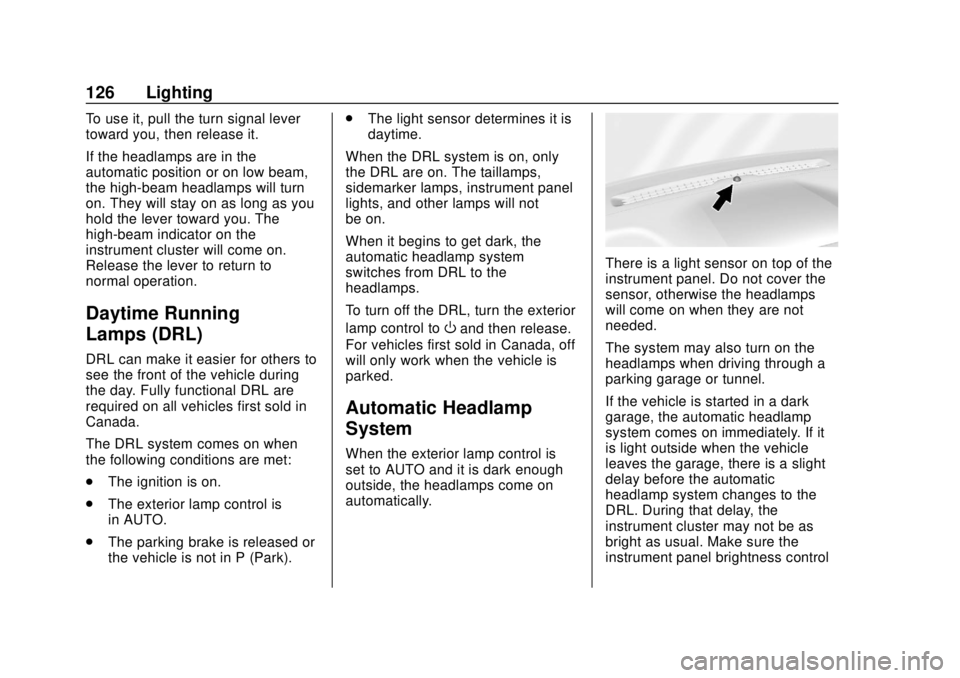
There is a light sensor on top of the
instrument panel. Do not cover the
sensor, otherwise the headlamps
will come on when they are not
needed.
The system may also turn on the
headlamps when driving through a
parking garage or tunnel.
If the vehicle is started in a dark
garage, the automatic headlamp
system comes on immediately. If it
is light outside when the vehicle
leaves the garage, there is a slight
delay before the automatic
headlamp system changes to the
DRL. During that delay, the
instrument cluster may not be as
bright as usual. Make sure the
instrument panel brightness control
Page 141 of 368

Chevrolet Colorado Owner Manual (GMNA-Localizing-U.S./Canada/Mexico-
13566640) - 2020 - CRC - 9/30/19
140 Driving and Operating
Driving and
Operating
Driving Information
Driving for Better FuelEconomy . . . . . . . . . . . . . . . . . . . . 141
Distracted Driving . . . . . . . . . . . . 141
Defensive Driving . . . . . . . . . . . . . 142
Drunk Driving . . . . . . . . . . . . . . . . . 142
Control of a Vehicle . . . . . . . . . . . 143
Braking . . . . . . . . . . . . . . . . . . . . . . . 143
Steering . . . . . . . . . . . . . . . . . . . . . . 143
Off-Road Recovery . . . . . . . . . . . 144
Loss of Control . . . . . . . . . . . . . . . 144
Off-Road Driving . . . . . . . . . . . . . 145
Driving on Wet Roads . . . . . . . . 149
Hill and Mountain Roads . . . . . 150
Winter Driving . . . . . . . . . . . . . . . . 151
If the Vehicle Is Stuck . . . . . . . . 152
Vehicle Load Limits . . . . . . . . . . . 153
Truck-Camper Loading Information . . . . . . . . . . . . . . . . . . 159
Starting and Operating
New Vehicle Break-In . . . . . . . . . 159
Ignition Positions . . . . . . . . . . . . . 160
Starting the Engine . . . . . . . . . . . 162
Engine Heater . . . . . . . . . . . . . . . . 163 Retained Accessory
Power (RAP) . . . . . . . . . . . . . . . . 164
Shifting Into Park . . . . . . . . . . . . . 164
Shifting out of Park . . . . . . . . . . . 166
Parking over Things That Burn . . . . . . . . . . . . . . . . . . . 166
Active Fuel Management . . . . . 166
Engine Exhaust
Engine Exhaust . . . . . . . . . . . . . . 167
Running the Vehicle While Parked . . . . . . . . . . . . . . . . . . . . . . 167
Automatic Transmission
Automatic Transmission . . . . . . 168
Manual Mode . . . . . . . . . . . . . . . . . 171
Tow/Haul Mode . . . . . . . . . . . . . . . 173
Drive Systems
Four-Wheel Drive . . . . . . . . . . . . . 173
Brakes
Antilock BrakeSystem (ABS) . . . . . . . . . . . . . . . 180
Parking Brake . . . . . . . . . . . . . . . . 181
Brake Assist . . . . . . . . . . . . . . . . . . 181
Hill Start Assist (HSA) . . . . . . . . 181
Ride Control Systems
Traction Control/Electronic Stability Control . . . . . . . . . . . . . 182
Hill Descent Control (HDC) . . . 185 Driver Mode Control . . . . . . . . . . 185
Limited-Slip Differential . . . . . . . 186
Locking Rear Axle . . . . . . . . . . . . 186
Locking Front Axle . . . . . . . . . . . 187
Cruise Control
Cruise Control . . . . . . . . . . . . . . . . 189
Driver Assistance Systems
Driver Assistance Systems . . . 191
Assistance Systems for
Parking or Backing . . . . . . . . . . 192
Forward Collision Alert (FCA) System . . . . . . . . . . . . . . . . . . . . . . 195
Lane Departure Warning (LDW) . . . . . . . . . . . . . 197
Fuel
Top Tier Fuel . . . . . . . . . . . . . . . . . 198
Recommended Fuel . . . . . . . . . . 199
Prohibited Fuels . . . . . . . . . . . . . . 199
Fuels in Foreign Countries . . . 199
Fuel Additives . . . . . . . . . . . . . . . . 199
Filling the Tank . . . . . . . . . . . . . . . 200
Filling a Portable FuelContainer . . . . . . . . . . . . . . . . . . . 201
Trailer Towing
General TowingInformation . . . . . . . . . . . . . . . . . . 202
Driving Characteristics and Towing Tips . . . . . . . . . . . . . . . . . 202