2020 CADILLAC CT4 lane assist
[x] Cancel search: lane assistPage 5 of 356

Cadillac CT4 Owner Manual (GMNA-Localizing-U.S./Canada-13183937) -
2020 - crc - 4/28/20
4 INTRODUCTION
B:Engine Coolant Temperature
_:Flame/Fire Prohibited
H: Flammable
[:Forward Collision Alert
R:Fuse Block Cover Lock Location
+:Fuses
j:ISOFIX/LATCH System Child
Restraints
Q: Keep Fuse Block Covers Properly
Installed
|: Lane Change Alert
@:Lane Departure Warning
A:Lane Keep Assist
*: Malfunction Indicator Lamp
::Oil Pressure
X:Park Assist
~:Pedestrian Ahead Indicator
O:Power
7:Rear Cross Traffic Alert
I:Registered Technician
S:Remote Vehicle Start
>:Seat Belt Reminders
I:Side Blind Zone Alert
h:Stop/Start
7:Tire Pressure Monitor
d:Traction Control/StabiliTrak/
Electronic Stability Control (ESC)
a: Under Pressure
V: Vehicle Ahead Indicator
Page 7 of 356
Cadillac CT4 Owner Manual (GMNA-Localizing-U.S./Canada-13183937) -
2020 - crc - 4/28/20
6 INTRODUCTION
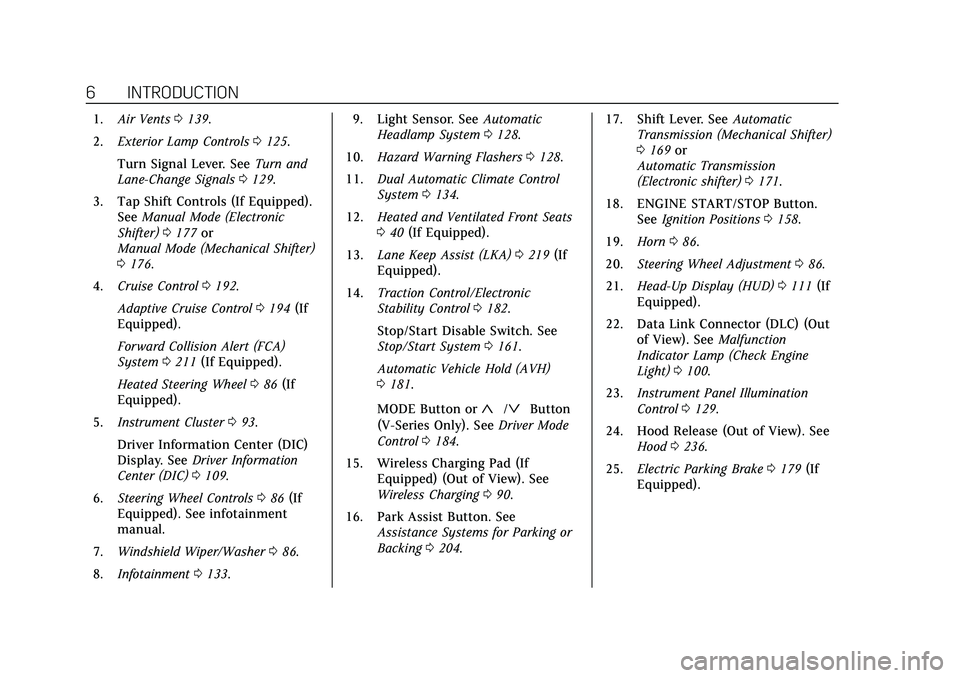
1.Air Vents 0139.
2. Exterior Lamp Controls 0125.
Turn Signal Lever. See Turn and
Lane-Change Signals 0129.
3. Tap Shift Controls (If Equipped). See Manual Mode (Electronic
Shifter) 0177 or
Manual Mode (Mechanical Shifter)
0 176.
4. Cruise Control 0192.
Adaptive Cruise Control 0194 (If
Equipped).
Forward Collision Alert (FCA)
System 0211 (If Equipped).
Heated Steering Wheel 086 (If
Equipped).
5. Instrument Cluster 093.
Driver Information Center (DIC)
Display. See Driver Information
Center (DIC) 0109.
6. Steering Wheel Controls 086 (If
Equipped). See infotainment
manual.
7. Windshield Wiper/Washer 086.
8. Infotainment 0133. 9. Light Sensor. See
Automatic
Headlamp System 0128.
10. Hazard Warning Flashers 0128.
11. Dual Automatic Climate Control
System 0134.
12. Heated and Ventilated Front Seats
040 (If Equipped).
13. Lane Keep Assist (LKA) 0219 (If
Equipped).
14. Traction Control/Electronic
Stability Control 0182.
Stop/Start Disable Switch. See
Stop/Start System 0161.
Automatic Vehicle Hold (AVH)
0 181.
MODE Button or
«/ªButton
(V-Series Only). See Driver Mode
Control 0184.
15. Wireless Charging Pad (If Equipped) (Out of View). See
Wireless Charging 090.
16. Park Assist Button. See Assistance Systems for Parking or
Backing 0204. 17. Shift Lever. See
Automatic
Transmission (Mechanical Shifter)
0 169 or
Automatic Transmission
(Electronic shifter) 0171.
18. ENGINE START/STOP Button. SeeIgnition Positions 0158.
19. Horn 086.
20. Steering Wheel Adjustment 086.
21. Head-Up Display (HUD) 0111 (If
Equipped).
22. Data Link Connector (DLC) (Out of View). See Malfunction
Indicator Lamp (Check Engine
Light) 0100.
23. Instrument Panel Illumination
Control 0129.
24. Hood Release (Out of View). See Hood 0236.
25. Electric Parking Brake 0179 (If
Equipped).
Page 86 of 356

Cadillac CT4 Owner Manual (GMNA-Localizing-U.S./Canada-13183937) -
2020 - crc - 4/28/20
INSTRUMENTS AND CONTROLS 85
Instruments and
Controls
Controls
Steering Wheel Adjustment . . . . . . . 86
Steering Wheel Controls . . . . . . . . . . 86
Heated Steering Wheel . . . . . . . . . . . . 86
Horn . . . . . . . . . . . . . . . . . . . . . . . . . . . . . . . . 86
Windshield Wiper/Washer . . . . . . . . 86
Compass . . . . . . . . . . . . . . . . . . . . . . . . . . . . 88
Clock . . . . . . . . . . . . . . . . . . . . . . . . . . . . . . . 89
Power Outlets . . . . . . . . . . . . . . . . . . . . . . 89
Wireless Charging . . . . . . . . . . . . . . . . . 90
Warning Lights, Gauges, and
Indicators
Warning Lights, Gauges, andIndicators . . . . . . . . . . . . . . . . . . . . . . . . . 92
Instrument Cluster . . . . . . . . . . . . . . . . 93
Speedometer . . . . . . . . . . . . . . . . . . . . . . . 96
Odometer . . . . . . . . . . . . . . . . . . . . . . . . . . . 96
Trip Odometer . . . . . . . . . . . . . . . . . . . . . 96
Tachometer . . . . . . . . . . . . . . . . . . . . . . . . 96
Fuel Gauge . . . . . . . . . . . . . . . . . . . . . . . . . 96
Engine Coolant Temperature Gauge . . . . . . . . . . . . . . . . . . . . . . . . . . . . . 97
Seat Belt Reminders . . . . . . . . . . . . . . . 97
Airbag Readiness Light . . . . . . . . . . . . 98 Passenger Airbag Status
Indicator . . . . . . . . . . . . . . . . . . . . . . . . . . 99
Charging System Light . . . . . . . . . . . . 99
Malfunction Indicator Lamp (Check Engine Light) . . . . . . . . . . . 100
Brake System Warning Light . . . . 102
Electric Parking Brake Light . . . . . 102
Service Electric Parking Brake Light . . . . . . . . . . . . . . . . . . . . . . . . . . . . . 102
Antilock Brake System (ABS) Warning Light . . . . . . . . . . . . . . . . . . 103
Automatic Vehicle Hold (AVH) Light . . . . . . . . . . . . . . . . . . . . . . . . . . . . . 103
Lane Keep Assist (LKA) Light . . . 103
Vehicle Ahead Indicator . . . . . . . . . 104
Pedestrian Ahead Indicator . . . . . . 104
Traction Off Light . . . . . . . . . . . . . . . . 104
StabiliTrak OFF Light . . . . . . . . . . . . 104
Traction Control System (TCS)/ StabiliTrak Light . . . . . . . . . . . . . . . . 105
Engine Coolant Temperature Warning Light . . . . . . . . . . . . . . . . . . 105
Driver Mode Control Light . . . . . . . 106
Tire Pressure Light . . . . . . . . . . . . . . . 106
Engine Oil Pressure Light . . . . . . . . 107
Low Fuel Warning Light . . . . . . . . . 107
Security Light . . . . . . . . . . . . . . . . . . . . . 107
High-Beam On Light . . . . . . . . . . . . . 107
Lamps On Reminder . . . . . . . . . . . . . 108
Cruise Control Light . . . . . . . . . . . . . . 108 Door Ajar Light . . . . . . . . . . . . . . . . . . . 108
Information Displays
Driver Information
Center (DIC) . . . . . . . . . . . . . . . . . . . . . 109
Head-Up Display (HUD) . . . . . . . . . 111
Vehicle Messages
Vehicle Messages . . . . . . . . . . . . . . . . . 115
Engine Power Messages . . . . . . . . . . 115
Vehicle Speed Messages . . . . . . . . . 115
Vehicle Personalization
Vehicle Personalization . . . . . . . . . . 116
Universal Remote System
Universal Remote System . . . . . . . . 121
Universal Remote System Programming . . . . . . . . . . . . . . . . . . . 121
Universal Remote System
Operation . . . . . . . . . . . . . . . . . . . . . . . . 124
Page 104 of 356

Cadillac CT4 Owner Manual (GMNA-Localizing-U.S./Canada-13183937) -
2020 - crc - 4/28/20
INSTRUMENTS AND CONTROLS 103
On some vehicles the service electric
parking brake light should come on
briefly when the vehicle is started.
If it does not come on, have it fixed so
it will be ready to warn if there is a
problem. For vehicles with the
reconfigurable cluster, this light may
not come on when the vehicle is
started.
If this light stays on, the vehicle
should be taken to a dealer as soon as
possible. SeeElectric Parking Brake
0 179. A message may also display in
the Driver Information Center (DIC).
Antilock Brake System
(ABS) Warning Light
This warning light should come on
briefly when the vehicle is turned on.
If the light does not come on, have it
fixed so it will be ready to warn if
there is a problem. If the light comes on while driving,
safely stop as soon as it is possible
and turn off the vehicle. Then turn on
the vehicle again to reset the system.
If the ABS warning light stays on,
or comes on again while driving, the
vehicle needs service. A chime may
also sound when the light stays on.
If the ABS warning light is the only
light on, the vehicle has regular
brakes, but ABS is not functioning.
If both the ABS warning light and the
brake system warning light are on,
ABS is not functioning and there is a
problem with the regular brakes. See
your dealer for service.
See
Brake System Warning Light 0102.
Automatic Vehicle Hold
(AVH) Light
This light comes on when AVH is
turned on. See Automatic Vehicle Hold
(AVH) 0181.
Lane Keep Assist (LKA)
Light
After the vehicle is started, this light
turns off and stays off if LKA has not
been turned on or is unavailable.
If equipped, this light is white if LKA
is turned on, but not ready to assist.
This light is green if LKA is turned on
and is ready to assist.
LKA may assist by gently turning the
steering wheel if the vehicle
approaches a detected lane marking.
The LKA light is amber when
assisting.
Page 105 of 356

Cadillac CT4 Owner Manual (GMNA-Localizing-U.S./Canada-13183937) -
2020 - crc - 4/28/20
104 INSTRUMENTS AND CONTROLS
This light flashes amber as a Lane
Departure Warning (LDW) alert, to
indicate that the lane marking has
been crossed.
LKA will not assist or alert if the turn
signal is active in the direction of lane
departure, or if LKA detects that you
are accelerating, braking, or actively
steering.
SeeLane Keep Assist (LKA) 0219.
Vehicle Ahead Indicator
If equipped, this indicator will display
green when a vehicle is detected
ahead and amber when you are
following a vehicle ahead much too
closely.
See Forward Collision Alert (FCA)
System 0211.
Pedestrian Ahead Indicator
If equipped, this indicator will display
amber when a nearby pedestrian is
detected in front of the vehicle.
See Front Pedestrian Braking (FPB)
System 0214.
Traction Off Light
This light comes on briefly while
starting the engine. If it does not,
have the vehicle serviced by your
dealer. If the system is working
normally, the indicator light then
turns off. The traction off light comes on when
the Traction Control System (TCS) has
been turned off by pressing and
releasing the TCS/StabiliTrak/
Electronic Stability Control (ESC)
button.
This light and the StabiliTrak OFF
light come on when StabiliTrak/ESC is
turned off.
If the TCS is off, wheel speed will be
limited when necessary to protect the
driveline from damage. Adjust driving
accordingly.
See
Traction Control/Electronic Stability
Control 0182.
StabiliTrak OFF Light
This light comes on briefly while
starting the engine. If it does not,
have the vehicle serviced by your
dealer.
Page 112 of 356

Cadillac CT4 Owner Manual (GMNA-Localizing-U.S./Canada-13183937) -
2020 - crc - 4/28/20
INSTRUMENTS AND CONTROLS 111
switches to the gap setting page. This
page shows the current gap setting
along with the vehicle ahead telltale.
Driver Assistance :If equipped,
shows information for Lane Keep
Assist (LKA) and Forward Collision
Alert (FCA).
Battery Voltage : Shows the current
battery voltage.
Coolant Temperature : Shows the
engine coolant temperature in either
degrees Celsius (°C) or degrees
Fahrenheit (°F).
Oil Temperature : Shows the engine
oil temperature in either degrees
Celsius (°C) or degrees Fahrenheit (°F).
Engine Hours (Hourmeter) : Shows
the total number of hours the engine
has run. The display also shows the
engine idle hours.
Engine Boost : Displays engine
manifold pressure relative to ambient
air pressure. It will display boost
pressure generated by the
turbocharging system. Transmission Fluid Temperature :
Shows the temperature of the
automatic transmission fluid in either
degrees Celsius (°C) or degrees
Fahrenheit (°F).
Info Page Options :
Scroll to choose
which info pages appear on the DIC.
Press the thumbwheel to select or
deselect.
Blank Page : Allows for no
information to be displayed in the
cluster info display areas.
Head-Up Display (HUD)
{Warning
If the HUD image is too bright or
too high in your field of view, it
may take you more time to see
things you need to see when it is
dark outside. Be sure to keep the
HUD image dim and placed low in
your field of view.
If equipped with HUD, some
information concerning the operation
of the vehicle is projected onto the windshield. The information is
projected through the HUD lens on
the driver side of the instrument
panel and focused out toward the
front of the vehicle.
Caution
If you try to use the HUD image as
a parking aid, you may misjudge
the distance and damage your
vehicle. Do not use the HUD image
as a parking aid.
The HUD information can be
displayed in various languages. The
speedometer reading and other
numerical values can be displayed in
either English or metric units.
The language selection is changed
through the radio and the units of
measurement is changed through the
instrument cluster. See “Settings”in
the Infotainment Manual and
"Options" under Instrument Cluster
0 93.
Page 114 of 356

Cadillac CT4 Owner Manual (GMNA-Localizing-U.S./Canada-13183937) -
2020 - crc - 4/28/20
INSTRUMENTS AND CONTROLS 113
CANCEL can also be selected to cancel
the setting. The vehicle must be in
P (Park). SeeInstrument Cluster 093.
HUD Views
There are four views in the HUD.
Some vehicle information and vehicle
messages or alerts may be displayed
in any view.
Metric
English
Speed View : This displays digital
speed in English or metric units,
speed limit, vehicle ahead indicator,
Lane Departure Warning/Lane Keep
Assist, and Adaptive Cruise Control and set speed. Some information only
appears on vehicles that have these
features, and when they are active.
Metric
English
Audio/Phone View : This displays
digital speed, indicators from speed
view along with audio/phone
information. The current radio station,
media type, and incoming calls will be
displayed.
All HUD views may briefly display
audio information when the driver
uses the steering wheel controls to
adjust the audio settings appearing in
the instrument cluster. Incoming phone calls appearing in the
instrument cluster may also display in
any HUD view.
Metric
English
Navigation View : This displays
digital speed, indicators from speed
view along with Turn-by-Turn
Navigation information in some
vehicles. The compass heading is
displayed when navigation routing is
not active.
Navigation Turn-by-Turn Alerts
shown in the instrument cluster may
also be displayed in any HUD view.
Page 119 of 356

Cadillac CT4 Owner Manual (GMNA-Localizing-U.S./Canada-13183937) -
2020 - crc - 4/28/20
118 INSTRUMENTS AND CONTROLS
Ionizer
If equipped and on, this feature helps
clean the air inside the vehicle and
remove contaminants such as pollen,
odors, and dust. SeeDual Automatic
Climate Control System 0134.
Touch Off or On.
Collision / Detection Systems
Touch and the following may display:
. Alert Type
. Forward Collision System
. Front Pedestrian Detection
. Adaptive Cruise Go Notifier
. Lane Change Alert
. Rear Camera Park Assist Symbols
. Rear Cross Traffic Alert
Alert Type
This setting specifies the type of
vehicle feedback provided, either a
beep or seat vibration, when you are
in danger of colliding with an object.
Touch Beeps or Safety Alert Seat. Forward Collision System
This setting controls the vehicle
response when detecting a vehicle
ahead of you. The Off setting disables
all FCA and AEB functions. With the
Alert and Brake setting, both FCA and
AEB are available. The Alert setting
disables AEB. See
Automatic
Emergency Braking (AEB) 0213.
Touch Off, Alert, or Alert and Brake.
Front Pedestrian Detection
This feature may help avoid or reduce
the harm caused by front-end crashes
with nearby pedestrians.
See Front Pedestrian Braking (FPB)
System 0214.
Touch Off, Alert, or Alert and Brake.
Adaptive Cruise Go Notifier
This setting determines if an alert will
appear when Adaptive Cruise Control
brings the vehicle to a complete stop
and the vehicle ahead of you starts
moving again. See Adaptive Cruise
Control 0194.
Touch Off or On. Lane Change Alert
This setting specifies if an alert will
display on the outside mirror to help
you avoid crashing into a vehicle in
your blind spot, or rapidly
approaching your blind spot, during a
lane change maneuver. See
Lane
Change Alert (LCA) 0217.
Touch Off or On.
Rear Camera Park Assist Symbols
This setting enables the Rear Camera
Park Assist Symbols. See Assistance
Systems for Parking or Backing 0204.
Touch Off or On.
Rear Cross Traffic Alert
This setting specifies if an alert will
display when the vehicle detects
approaching rear cross traffic when in
R (Reverse). See Assistance Systems for
Parking or Backing 0204.
Touch Off or On.
Comfort and Convenience
Touch and the following may display:
. Chime Volume
. Reverse Tilt Mirror