2020 BUICK REGAL steering
[x] Cancel search: steeringPage 124 of 378

Buick Regal Owner Manual (GMNA-Localizing-U.S./Canada-13557849) -
2020 - CRC - 6/25/19
Instruments and Controls 123
If the light comes on while driving,
safely stop as soon as it is possible
and turn off the vehicle. Then turn
on the vehicle again to reset the
system.
If the ABS warning light stays on,
or comes on again while driving, the
vehicle needs service. A chime may
also sound when the light stays on.
If the ABS warning light is the only
light on, the vehicle has regular
brakes, but ABS is not functioning.
If both the ABS warning light and
the brake system warning light are
on, ABS is not functioning and there
is a problem with the regular brakes.
See your dealer for service.
SeeBrake System Warning Light
0 121.Lane Keep Assist (LKA)
Light
After the vehicle is started, this light
turns off and stays off if LKA has not
been turned on or is unavailable.
If available, this light is white if LKA
is turned on, but not ready to assist.
This light is green if LKA is turned
on and is ready to assist.
LKA may assist by gently turning
the steering wheel if the vehicle
approaches a detected lane
marking. The LKA light is amber
when assisting.
This light flashes amber as a Lane
Departure Warning (LDW) alert, to
indicate that the lane marking has
been crossed. LKA will not assist or alert if the turn
signal is active in the direction of
lane departure, or if LKA detects
that you are accelerating, braking,
or actively steering.
See
Lane Keep Assist (LKA) 0215.
Vehicle Ahead Indicator
If equipped, this indicator will
display green when a vehicle is
detected ahead and amber when
you are following a vehicle ahead
much too closely.
See Forward Collision Alert (FCA)
System 0207.
Page 135 of 378

Buick Regal Owner Manual (GMNA-Localizing-U.S./Canada-13557849) -
2020 - CRC - 6/25/19
134 Instruments and Controls
Warning (Continued)
dark outside. Be sure to keep the
HUD image dim and placed low in
your field of view.
If equipped with HUD, some
information concerning the
operation of the vehicle is projected
onto the windshield. The information
is projected through the HUD lens
on the driver side of the instrument
panel and focused out toward the
front of the vehicle.
Caution
If you try to use the HUD image
as a parking aid, you may
misjudge the distance and
damage your vehicle. Do not use
the HUD image as a parking aid.
The HUD information can be
displayed in various languages. The
speedometer reading and other
numerical values can be displayed
in either English or metric units. The language selection is changed
through the radio and the units of
measurement is changed through
the instrument cluster. See
“Settings”
in the Infotainment
Manual and “Options”under
Instrument Cluster 0107.
HUD Display on the Windshield
The HUD may display some of the
following vehicle information and
vehicle messages or alerts:
. Speed
. Audio
. Phone
. Navigation .
Performance
. Driver Assistance Features
. Vehicle Messages
Some vehicle messages or alerts
displayed in the HUD may be
cleared by using the steering wheel
controls. See Vehicle Messages
0 137.
The HUD control is to the left of the
steering wheel.
To adjust the HUD image:
1. Adjust the driver seat.
2. Start the engine.
3. Use the following settings to adjust the HUD.
$:Press or lift to center the HUD
image. The HUD image can only be
adjusted up and down, not side
to side.
Page 136 of 378

Buick Regal Owner Manual (GMNA-Localizing-U.S./Canada-13557849) -
2020 - CRC - 6/25/19
Instruments and Controls 135
!:Press to select the display
view. Each press will change the
display view.
D: Lift and hold to brighten the
display. Press and hold to dim the
display. Continue to hold to turn the
display off.
The HUD image will automatically
dim and brighten to compensate for
outside lighting. The HUD
brightness control can also be
adjusted as needed.
The HUD image can temporarily
light up depending on the angle and
position of sunlight on the HUD
display. This is normal.
Polarized sunglasses could make
the HUD image harder to see.
Head-Up Display (HUD) Rotation
Option
If equipped, this feature allows the
angle of the HUD image to be
adjusted. Press
Von the steering wheel
controls while Head-up Display
Rotation is highlighted to enter
Adjust Mode. Press
yorzto
adjust the angle of the HUD display.
Press
SorTto highlight OK, then
press
Vto save the setting.
CANCEL can also be selected to
cancel the setting. The vehicle must
be in P (Park).
HUD Views
There are four views in the HUD.
Some vehicle information and
vehicle messages or alerts may be
displayed in any view.
Metric
English
Speed View : This displays digital
speed in English or metric units,
speed limit, vehicle ahead indicator,
Lane Departure Warning/Lane Keep
Assist, and Adaptive Cruise Control
and set speed. Some information
only appears on vehicles that have
these features, and when they are
active.
Metric
Page 137 of 378

Buick Regal Owner Manual (GMNA-Localizing-U.S./Canada-13557849) -
2020 - CRC - 6/25/19
136 Instruments and Controls
English
Audio/Phone View : This displays
digital speed, indicators from speed
view along with audio/phone
information. The current radio
station, media type, and incoming
calls will be displayed.
All HUD views may briefly display
audio information when the steering
wheel controls are used to adjust
the audio settings appearing in the
instrument cluster.
Incoming phone calls may display in
any HUD view.Metric
English
Navigation View : This displays
digital speed, indicators from speed
view along with Turn-by-Turn
Navigation information in some
vehicles. The compass heading is
displayed when navigation routing is
not active.
Navigation Turn-by-Turn Alerts
shown in the instrument cluster may
also be displayed in any HUD view.
Metric
English
Performance View : This displays
digital speed, indicators from speed
view along with rpm reading,
transmission positions, and gear
shift indicator (if equipped).
Care of the HUD
Clean the inside of the windshield
as needed to remove any dirt or film
that could reduce the sharpness or
clarity of the HUD image.
Clean the HUD lens with a soft cloth
sprayed with glass cleaner. Wipe
the lens gently, then dry it.
Page 138 of 378

Buick Regal Owner Manual (GMNA-Localizing-U.S./Canada-13557849) -
2020 - CRC - 6/25/19
Instruments and Controls 137
HUD Troubleshooting
If you cannot see the HUD image
when the ignition is on, check that:
.Nothing is covering the
HUD lens.
. The HUD brightness setting is
not too dim or too bright.
. The HUD is adjusted to the
proper height.
. Polarized sunglasses are
not worn.
. The windshield and HUD lens
are clean.
If the HUD image is not correct,
contact your dealer.
The windshield is part of the HUD
system. See Windshield
Replacement 0254.
Vehicle Messages
Messages displayed on the DIC
indicate the status of the vehicle or
some action that may be needed to
correct a condition. Multiple
messages may appear one after
another.
The messages that do not require
immediate action can be
acknowledged and cleared by
pressing
V. The messages that
require immediate action cannot be
cleared until that action is
performed.
All messages should be taken
seriously; clearing the message
does not correct the problem.
If a SERVICE message appears,
see your dealer.
Follow the instructions given in the
messages. The system displays
messages regarding the following
topics:
. Service Messages
. Fluid Levels
. Vehicle Security .
Brakes
. Steering
. Ride Control Systems
. Driver Assistance Systems
. Cruise Control
. Lighting and Bulb Replacement
. Wiper/Washer Systems
. Doors and Windows
. Seat Belts
. Airbag Systems
. Engine and Transmission
. Tire Pressure
. Battery
Engine Power Messages
ENGINE/PROPULSION POWER
IS REDUCED
This message displays when the
vehicle's propulsion power is
reduced. Reduced propulsion power
can affect the vehicle's ability to
accelerate. If this message is on,
but there is no observed reduction
Page 139 of 378

Buick Regal Owner Manual (GMNA-Localizing-U.S./Canada-13557849) -
2020 - CRC - 6/25/19
138 Instruments and Controls
in performance, proceed to your
destination. The performance may
be reduced the next time the vehicle
is driven. The vehicle may be driven
while this message is on, but
maximum acceleration and speed
may be reduced. Anytime this
message stays on, or displays
repeatedly, the vehicle should be
taken to your dealer for service as
soon as possible. Under certain
operating conditions, propulsion will
be disabled. Try restarting after the
ignition has been off for 30 seconds.
Vehicle Speed Messages
SPEED LIMITED TO
XXX KM/H (MPH)
This message shows that the
vehicle speed has been limited to
the speed displayed. The limited
speed is a protection for various
propulsion and vehicle systems,
such as lubrication, thermal, brakes,
suspension, Teen Driver if
equipped, or tires.
Vehicle
Personalization
The following are all possible
vehicle personalization features.
Depending on the vehicle, some
may not be available.
For System, Apps, and Personal
features and functions, see
“Settings”in the infotainment
manual.
To access the vehicle
personalization menu:
1. Touch the Settings icon on the Home Page of the infotainment
display.
2. Touch Vehicle to display a list of available options.
3. Touch to select the desired feature setting.
4. Touch
9orRto turn a feature
off or on.
5. Touch
zto go to the top level
of the Settings menu. The menu may contain the
following:
Rear Seat Reminder
This allows for a chime and a
message when the rear door has
been opened before or during
operation of the vehicle.
Touch Off or On.
Sport Mode Customization
These settings allow the driver to
customize the steering, suspension,
and AWD settings in Sport Mode.
See
Selective Ride Control (GS
Models Only) 0192.
Touch and the following may
display:
. Sport Steering
. Sport Suspension
. Sport AWD
Sport Steering
Touch Off or On.
Sport Suspension
Touch Off or On.
Page 144 of 378

Buick Regal Owner Manual (GMNA-Localizing-U.S./Canada-13557849) -
2020 - CRC - 6/25/19
Instruments and Controls 143
Seating Position
Touch and the following may
display:
.Seat Entry Memory
. Seat Exit Memory
Seat Entry Memory
This feature automatically recalls
the previously stored 1 or 2 button
positions when the ignition is
changed from off to on or ACC/
ACCESSORY. See Memory Seats
0 45.
Touch On or Off.
Seat Exit Memory
This feature automatically moves
the driver seat rearward when
exiting the vehicle. See Memory
Seats 045.
Touch Off or On.
Teen Driver
See “Teen Driver” under“Settings”
in the infotainment manual.
Valet Mode
This will lock the infotainment
system and steering wheel controls.
It may also limit access to vehicle
storage locations, if equipped.
To enable valet mode:
1. Enter a four-digit code on the keypad.
2. Select Enter to go to the confirmation screen.
3. Re-enter the four-digit code.
Touch Lock or Unlock to lock or
unlock the system. Touch Back to
go back to the previous menu.
Universal Remote
System
See Radio Frequency Statement
0 350.
Universal Remote System
Programming
If equipped, these buttons are in the
overhead console.
This system can replace up to three
remote control transmitters used to
activate devices such as garage
door openers, security systems, and
home automation devices. These
Page 148 of 378
Buick Regal Owner Manual (GMNA-Localizing-U.S./Canada-13557849) -
2020 - CRC - 7/1/19
Lighting 147
Lighting
Exterior Lighting
Exterior Lamp Controls . . . . . . . 147
Exterior Lamps OffReminder . . . . . . . . . . . . . . . . . . . 148
Headlamp High/Low-Beam Changer . . . . . . . . . . . . . . . . . . . . 148
Flash-to-Pass . . . . . . . . . . . . . . . . 148
Daytime Running Lamps (DRL) . . . . . . . . . . . . . . . 148
Automatic Headlamp System . . . . . . . . . . . . . . . . . . . . . . 148
Adaptive Forward Lighting (AFL) . . . . . . . . . . . . . . . 149
Hazard Warning Flashers . . . . . 150
Turn and Lane-Change Signals . . . . . . . . . . . . . . . . . . . . . . 150
Fog Lamps . . . . . . . . . . . . . . . . . . . 150
Interior Lighting
Instrument Panel Illumination Control . . . . . . . . . . . . . . . . . . . . . . 151
Dome Lamps . . . . . . . . . . . . . . . . . 151
Reading Lamps . . . . . . . . . . . . . . 152
Lighting Features
Entry Lighting . . . . . . . . . . . . . . . . 152
Exit Lighting . . . . . . . . . . . . . . . . . . 152
Battery Load Management . . . 153
Battery Power Protection . . . . . 153
Exterior Lighting Battery Saver . . . . . . . . . . . . . . . . . . . . . . . 154Exterior Lighting
Exterior Lamp Controls
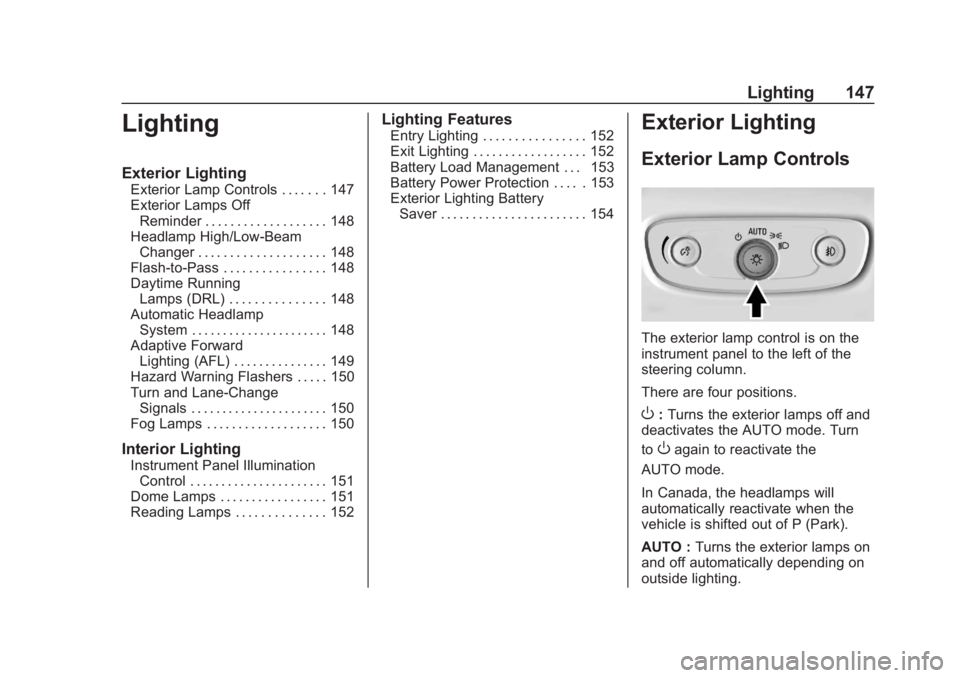
The exterior lamp control is on the
instrument panel to the left of the
steering column.
There are four positions.
O: Turns the exterior lamps off and
deactivates the AUTO mode. Turn
to
Oagain to reactivate the
AUTO mode.
In Canada, the headlamps will
automatically reactivate when the
vehicle is shifted out of P (Park).
AUTO : Turns the exterior lamps on
and off automatically depending on
outside lighting.