2020 BUICK REGAL change time
[x] Cancel search: change timePage 134 of 378

Buick Regal Owner Manual (GMNA-Localizing-U.S./Canada-13557849) -
2020 - CRC - 6/25/19
Instruments and Controls 133
holdVfor several seconds while
the Oil Life display is active. See
Engine Oil Life System 0240.
Tire Pressure : Shows the
approximate pressures of all four
tires. Tire pressure is displayed in
either kilopascal (kPa) or pounds
per square inch (psi). If the pressure
is low, the value for that tire is
shown in amber. See Tire Pressure
Monitor System 0274 and
Tire Pressure Monitor Operation
0 275.
Timer : This display can be used as
a timer. To start the timer, press
V
while this display is active. The
display will show the amount of time
that has passed since the timer was
last reset. To stop the timer, press
V
briefly while this display is active
and the timer is running. To reset
the timer to zero, press and hold
V
while this display is active, or
press
Tand select reset. Speed Signs :
If equipped, shows
sign information, which comes from
a roadway database in the onboard
navigation.
Follow Distance : If equipped, the
current follow time to the vehicle
ahead is displayed as a time value
on this page.
Driver Assistance : If equipped,
shows information for Lane Keep
Assist (LKA), Lane Departure
Warning (LDW), and Forward
Collision Alert (FCA).
Battery Voltage : Displays the
current battery voltage, if equipped.
Battery voltage changes are normal
while driving. See Charging System
Light 0119. If there is a problem
with the battery charging system,
the DIC will display a message.
Top Consumers : Shows a list of
the features that are currently
impacting the fuel economy, in order
from highest to lowest. If a feature is
turned off, it will be removed from
the list. ECO Index :
Provides feedback on
the efficiency of current driving
behavior. The bar graph shows a
value that is based on current fuel
consumption compared to what is
expected from the vehicle with good
and bad driving habits.
Economy Trend : Shows history of
the Average Fuel Economy from the
last 50 km (30 mi). Each bar
represents about 5 km (3 mi) of
driving. During driving the bars will
shift to always reflect the most
recent distance on the right side.
Press and hold
Vto clear the graph
or press
Tto reset through
the menu.
Head-Up Display (HUD)
{Warning
If the HUD image is too bright or
too high in your field of view, it
may take you more time to see
things you need to see when it is
(Continued)
Page 145 of 378

Buick Regal Owner Manual (GMNA-Localizing-U.S./Canada-13557849) -
2020 - CRC - 6/25/19
144 Instruments and Controls
instructions refer to a garage door
opener, but can be used for other
devices.
Do not use the Universal Remote
system with any garage door opener
that does not have the stop and
reverse feature. This includes any
garage door opener model
manufactured before April 1, 1982.
Read these instructions completely
before programming the Universal
Remote system. It may help to have
another person assist with the
programming process.
Keep the original hand-held
transmitter for use in other vehicles
as well as for future programming.
Erase the programming when
vehicle ownership is terminated.
See“Erasing Universal Remote
System Buttons” later in this
section.
To program a garage door opener,
park outside directly in line with and
facing the garage door opener
receiver. Clear all people and
objects near the garage door. Make sure the hand-held transmitter
has a new battery for quick and
accurate transmission of the
radio-frequency signal.
Programming the Universal
Remote System
For questions or programming help,
see www.homelink.com/gm or call
1-800-355-3515.
Programming involves
time-sensitive actions, and may time
out causing the procedure to be
repeated.
To program up to three devices:
1. Hold the end of the hand-held transmitter about 3 to 8 cm
(1 to 3 in) away from the
Universal Remote system
buttons with the indicator light
in view. The hand-held
transmitter was supplied by the
manufacturer of the garage
door opener receiver.
2. At the same time, press and hold both the hand-held
transmitter button and one of
the three Universal Remote system buttons to be used to
operate the garage door. Do
not release either button until
the indicator light changes from
a slow to a rapid flash. Then
release both buttons.
Some garage door openers
may require substitution of
Step 2 with the procedure
under
“Radio Signals for
Canada and Some Gate
Operators” later in this section.
3. Press and hold the newly programmed Universal Remote
system button for five seconds
while watching the indicator
light and garage door
activation.
.If the indicator light stays on
continuously or the garage
door moves when the
button is pressed, then
programming is complete.
There is no need to
complete Steps 4–6.
. If the indicator light does
not come on or the garage
door does not move, a
Page 146 of 378

Buick Regal Owner Manual (GMNA-Localizing-U.S./Canada-13557849) -
2020 - CRC - 6/25/19
Instruments and Controls 145
second button press may
be required. For a second
time, press and hold the
newly programmed button
for five seconds. If the light
stays on or the garage door
moves, programming is
complete.
. If the indicator light blinks
rapidly for two seconds,
then changes to a solid light
and the garage door does
not move, continue with
programming Steps 4–6.
Learn or Smart Button
4. After completing Steps 1–3, locate the Learn or Smart
button inside the garage on the
garage door opener receiver. The name and color of the
button may vary by
manufacturer.
5. Press and release the Learn or Smart button. Step 6 must be
completed within 30 seconds of
pressing this button.
6. Inside the vehicle, press and hold the newly programmed
Universal Remote system
button for two seconds and
then release it. If the garage
door does not move or the
lamp on the garage door
opener receiver does not flash,
press and hold the same
button a second time for
two seconds, then release it.
Again, if the door does not
move or the garage door lamp
does not flash, press and hold
the same button a third time for
two seconds, then release it.
The Universal Remote system
should now activate the
garage door. Repeat the process for
programming the two remaining
buttons.
Radio Signals for Canada and
Some Gate Operators
For questions or programming help,
see www.homelink.com/gm or call
1-800-355-3515.
Canadian radio-frequency laws and
some U.S. gate operators require
transmitter signals to time out or quit
after several seconds of
transmission. This may not be long
enough for the Universal Remote
system to pick up the signal during
programming.
If the programming did not work,
replace Step 2 under
“Programming
the Universal Remote System” with
the following:
Press and hold the Universal
Remote system button while
pressing and releasing the
hand-held transmitter button every
two seconds until the signal has
been successfully accepted by the
Universal Remote system. The
Universal Remote system indicator
Page 148 of 378
Buick Regal Owner Manual (GMNA-Localizing-U.S./Canada-13557849) -
2020 - CRC - 7/1/19
Lighting 147
Lighting
Exterior Lighting
Exterior Lamp Controls . . . . . . . 147
Exterior Lamps OffReminder . . . . . . . . . . . . . . . . . . . 148
Headlamp High/Low-Beam Changer . . . . . . . . . . . . . . . . . . . . 148
Flash-to-Pass . . . . . . . . . . . . . . . . 148
Daytime Running Lamps (DRL) . . . . . . . . . . . . . . . 148
Automatic Headlamp System . . . . . . . . . . . . . . . . . . . . . . 148
Adaptive Forward Lighting (AFL) . . . . . . . . . . . . . . . 149
Hazard Warning Flashers . . . . . 150
Turn and Lane-Change Signals . . . . . . . . . . . . . . . . . . . . . . 150
Fog Lamps . . . . . . . . . . . . . . . . . . . 150
Interior Lighting
Instrument Panel Illumination Control . . . . . . . . . . . . . . . . . . . . . . 151
Dome Lamps . . . . . . . . . . . . . . . . . 151
Reading Lamps . . . . . . . . . . . . . . 152
Lighting Features
Entry Lighting . . . . . . . . . . . . . . . . 152
Exit Lighting . . . . . . . . . . . . . . . . . . 152
Battery Load Management . . . 153
Battery Power Protection . . . . . 153
Exterior Lighting Battery Saver . . . . . . . . . . . . . . . . . . . . . . . 154Exterior Lighting
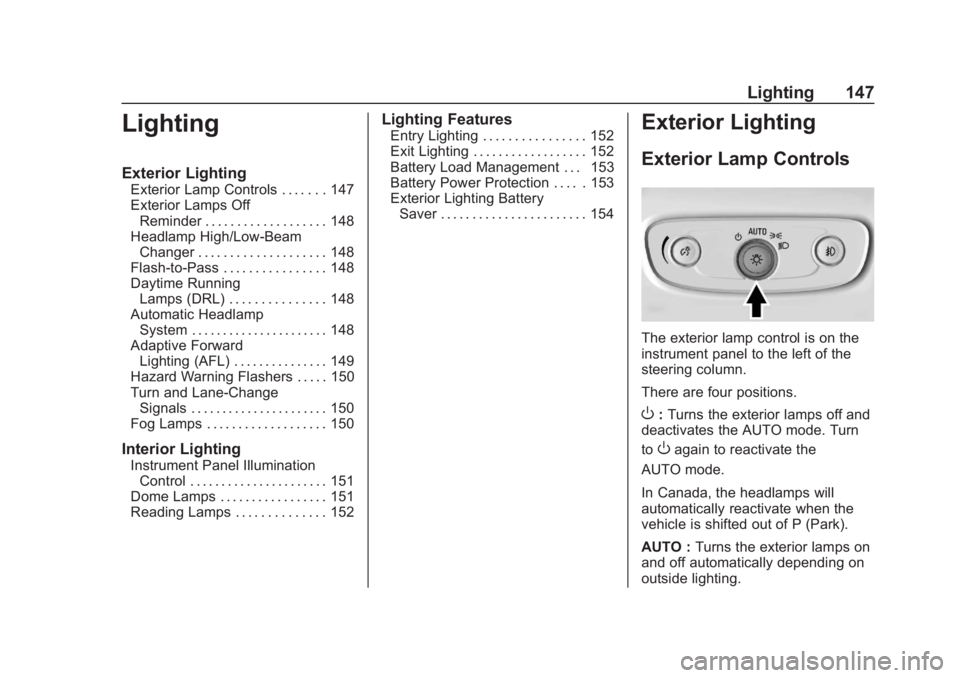
Exterior Lamp Controls
The exterior lamp control is on the
instrument panel to the left of the
steering column.
There are four positions.
O: Turns the exterior lamps off and
deactivates the AUTO mode. Turn
to
Oagain to reactivate the
AUTO mode.
In Canada, the headlamps will
automatically reactivate when the
vehicle is shifted out of P (Park).
AUTO : Turns the exterior lamps on
and off automatically depending on
outside lighting.
Page 149 of 378

Buick Regal Owner Manual (GMNA-Localizing-U.S./Canada-13557849) -
2020 - CRC - 7/1/19
148 Lighting
;:Turns on the parking lamps
including all lamps, except the
headlamps.
5: Turns on the headlamps
together with the parking lamps and
instrument panel lights.
Exterior Lamps Off
Reminder
A warning chime sounds if the driver
door is opened while the ignition is
off and the exterior lamps are on.
Headlamp High/
Low-Beam Changer
Push the turn signal lever away
from you and release to turn the
high beams on. To return to low
beams, push the lever again or pull
it toward you and release.
This indicator light turns on in the
instrument cluster when the
high-beam headlamps are on.
Flash-to-Pass
To flash the high beams, pull the
turn signal lever toward you, and
release.
Daytime Running
Lamps (DRL)
DRL can make it easier for others to
see the front of your vehicle during
the day. Fully functional DRL are
required on all vehicles first sold in
Canada.
The DRL will come on when all of
the following conditions are met:
. The ignition is on.
. The exterior lamps control is
in AUTO.
. The light sensor determines it is
daytime.
. The parking brake is released or
the vehicle is not in P (Park). When the DRL are on, the taillamps,
sidemarker lamps, instrument panel
lights, and other lamps will not
be on.
The DRL turn off when the
headlamps are turned to
Oor the
ignition is off. For vehicles first sold
in Canada, the DRL can only be
turned off when the vehicle is
parked.
This vehicle may have a DRL
disabling function. When the DRL
are on and a turn signal is activated,
the DRL on that side will be off until
the turn signal goes off.
Automatic Headlamp
System
When the exterior lamp control is
set to AUTO and it is dark enough
outside, the headlamps come on
automatically.
Page 150 of 378

Buick Regal Owner Manual (GMNA-Localizing-U.S./Canada-13557849) -
2020 - CRC - 7/1/19
Lighting 149
There is a light sensor on top of the
instrument panel. Do not cover the
sensor; otherwise the headlamps
will come on when they are not
needed.
The system may also turn on the
headlamps when driving through a
parking garage or tunnel.
When it is bright enough outside,
the headlamps will turn off or may
change to Daytime Running
Lamps (DRL).
The automatic headlamp system
turns off when the exterior lamp
control is turned to
Oor the ignition
is off.
Adaptive Forward
Lighting (AFL)
If equipped, the AFL pivots the
headlamps horizontally to provide
greater road illumination while
turning. To enable AFL, set the
exterior lamp control to the AUTO
position. Moving the switch out of
the AUTO position deactivates the
system. AFL operates when the
vehicle speed is greater than 3 km/h
(2 mph). AFL does not operate
when the transmission is in
R (Reverse). AFL is not immediately
operable after starting the vehicle;
driving a short distance is required
to calibrate the AFL. See Exterior
Lamp Controls 0147.
LED Headlamp System
This system automatically controls
the LED headlamps light intensity
and distribution based on the
lighting condition, road type, and
driving situation. The vehicle adapts
the headlamps automatically to
enable optimal lighting while driving.
The Intelligent Light Distribution
feature can be enabled or disabled. See
“Adaptive Forward Lighting”
under Vehicle Personalization
0 138.
The following lighting functions are
available when the exterior lamp
control is in the AUTO or
5
position.
Curve Lighting
Certain LEDs turn on automatically
to improve lighting in curves. This is
based on the steering wheel
position and vehicle speeds from
40 km/h (25 mph) to 70 km/h
(43 mph).
Corner Lighting
If equipped with cornering lamps,
certain LEDs automatically come on
when all of the following occur:
. The turn signals are activated or
the steering wheel is at a
calibrated angle.
. The vehicle is traveling up to a
speed of 40 km/h (25 mph).
Page 151 of 378

Buick Regal Owner Manual (GMNA-Localizing-U.S./Canada-13557849) -
2020 - CRC - 7/1/19
150 Lighting
Hazard Warning Flashers
|:Press to make the front and
rear turn signal lamps flash on and
off. Press again to turn the
flashers off.
The hazard warning flashers turn on
automatically if the airbags deploy.
Turn and Lane-Change
Signals
Move the lever all the way up or
down to signal a turn.
An arrow on the instrument cluster
flashes in the direction of the turn or
lane change.
Raise or lower the lever until the
arrow starts to flash to signal a lane
change. Hold it there until the lane
change is completed. If the lever is
briefly pressed and released, the
turn signal flashes three times.
The turn and lane-change signal
can be turned off manually by
moving the lever back to its original
position. If after signaling a turn or lane
change the arrow flashes rapidly or
does not come on, a signal bulb
might be burned out.
Have any burned out bulbs
replaced. If the bulb is not burned
out, check the fuse. See
Fuses and
Circuit Breakers 0259.
Fog Lamps
The fog lamps button is on the
instrument panel to left of the
steering wheel.
To turn on the fog lamps, the ignition
and the headlamps or parking lamps
must be on.
Page 154 of 378

Buick Regal Owner Manual (GMNA-Localizing-U.S./Canada-13557849) -
2020 - CRC - 7/1/19
Lighting 153
The exterior lamps and dome lamp
remain on for a set amount of time,
then automatically turn off.
The exterior lamps turn off
immediately by turning the exterior
lamp control off.
This feature can be changed. See
Vehicle Personalization0138.
Battery Load
Management
The vehicle has Electric Power
Management (EPM) that estimates
the battery's temperature and state
of charge. It then adjusts the voltage
for best performance and extended
life of the battery.
When the battery's state of charge
is low, the voltage is raised slightly
to quickly bring the charge back up.
When the state of charge is high,
the voltage is lowered slightly to
prevent overcharging. If the vehicle
has a voltmeter gauge or a voltage
display on the Driver Information
Center (DIC), you may see the voltage move up or down. This is
normal. If there is a problem, an
alert will be displayed.
The battery can be discharged at
idle if the electrical loads are very
high. This is true for all vehicles.
This is because the generator
(alternator) may not be spinning fast
enough at idle to produce all of the
power needed for very high
electrical loads.
A high electrical load occurs when
several of the following are on, such
as: headlamps, high beams, rear
window defogger, climate control fan
at high speed, heated seats, engine
cooling fans, trailer loads, and loads
plugged into accessory power
outlets.
EPM works to prevent excessive
discharge of the battery. It does this
by balancing the generator's output
and the vehicle's electrical needs.
It can increase engine idle speed to
generate more power whenever
needed. It can temporarily reduce
the power demands of some
accessories.Normally, these actions occur in
steps or levels, without being
noticeable. In rare cases at the
highest levels of corrective action,
this action may be noticeable to the
driver. If so, a DIC message might
be displayed and it is recommended
that the driver reduce the electrical
loads as much as possible.
Battery Power Protection
The battery saver feature is
designed to protect the vehicle's
battery.
If the exterior lamps or any interior
lamp is left on and the ignition is
turned off, the battery rundown
protection system automatically
turns the lamp off after about
10 minutes.