2020 BUICK ENVISION oil change
[x] Cancel search: oil changePage 5 of 363
Buick Envision Owner Manual (GMNA-Localizing-U.S./Canada/Mexico-
13555857) - 2020 - CRC - 2/25/19
4 Introduction
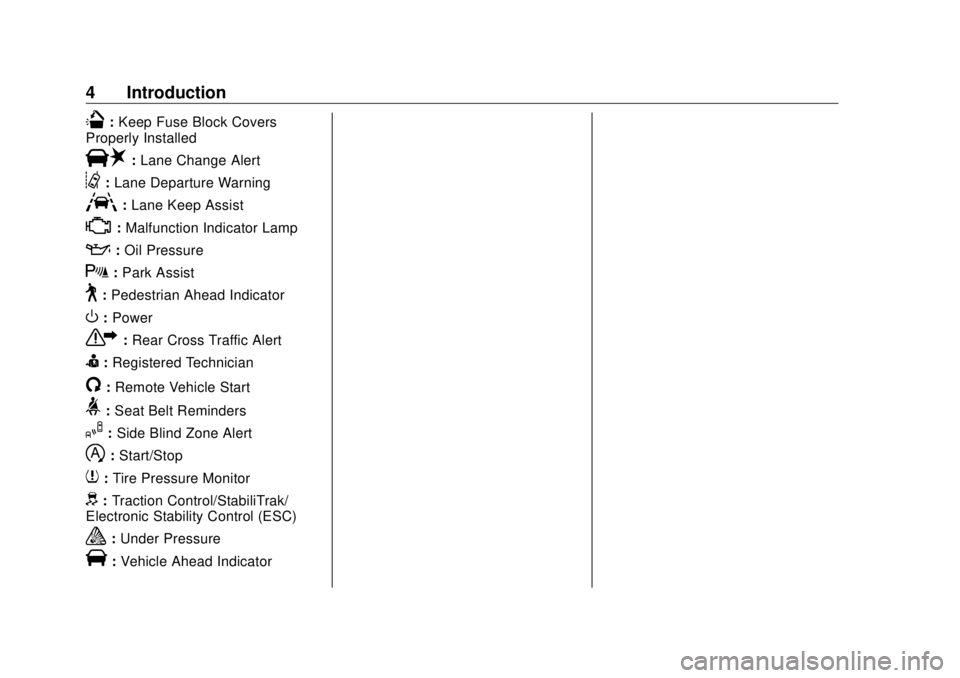
Q : Keep Fuse Block Covers
Properly Installed
| : Lane Change Alert
@ : Lane Departure Warning
A : Lane Keep Assist
* : Malfunction Indicator Lamp
: : Oil Pressure
X : Park Assist
~ : Pedestrian Ahead Indicator
O : Power
7 : Rear Cross Traffic Alert
I : Registered Technician
/ : Remote Vehicle Start
> : Seat Belt Reminders
I : Side Blind Zone Alert
h : Start/Stop
7 : Tire Pressure Monitor
d : Traction Control/StabiliTrak/
Electronic Stability Control (ESC)
a : Under Pressure
V : Vehicle Ahead Indicator
Page 123 of 363

Buick Envision Owner Manual (GMNA-Localizing-U.S./Canada/Mexico-
13555857) - 2020 - CRC - 2/25/19
122 Instruments and Controls If the light comes on and stays on, it
means that oil is not flowing through
the engine properly. The vehicle
could be low on oil and might have
some other system problem. See
your dealer.
Low Fuel Warning Light
This light is near the fuel gauge and
comes on briefly when the ignition is
turned on as a check to show it is
working.
It also comes on when the fuel tank
is low on fuel. The light turns off
when fuel is added. If it does not,
have the vehicle serviced. Security Light The security light should come on
briefly as the engine is started. If it
does not come on, have the vehicle
serviced by your dealer. If the
system is working normally, the
indicator light turns off.
If the light stays on and the engine
does not start, there could be a
problem with the theft-deterrent
system. See Immobilizer Operation
0 26 .
High-Beam On Light This light comes on when the
high-beam headlamps are in use.
See Headlamp High/Low-Beam
Changer 0 146 .
IntelliBeam Light
This light comes on when the
IntelliBeam system, if equipped, is
enabled. See Exterior Lamp
Controls 0 144 .
Front Fog Lamp Light
If equipped, this light comes on
when the fog lamps are on.
Page 126 of 363

Buick Envision Owner Manual (GMNA-Localizing-U.S./Canada/Mexico-
13555857) - 2020 - CRC - 2/25/19
Instruments and Controls 125economy over recent driving history
and the amount of fuel remaining in
the fuel tank.
Also displays the current fuel
economy in liters per
100 kilometers (L/100 km) or miles
per gallon (mpg). This number
reflects only the approximate fuel
economy that the vehicle has right
now and changes frequently as
driving conditions change.
Average Speed : Displays the
average speed of the vehicle in
kilometers per hour (km/h) or miles
per hour (mph). This average is
calculated based on the various
vehicle speeds recorded since the
last reset of this value. The average
speed can be reset by pressing and
holding
V while this display is
active.
Timer : To start the timer, press
Vwhile this display is active. The
display will show the amount of time
that has passed since the timer was
last reset. To stop the timer, press
Vbriefly while this display is active and the timer is running. To reset
the timer to zero, press and hold
Vwhile this display is active.
Oil Life : Displays an estimate of
the oil's remaining useful life.
If REMAINING OIL LIFE 99% is
displayed, that means 99% of the
current oil life remains.
When the remaining oil life is low,
the CHANGE ENGINE OIL SOON
message will appear on the display.
The oil should be changed as soon
as possible. See Engine Oil 0 237 .
In addition to the engine oil life
system monitoring the oil life,
additional maintenance is
recommended. See Maintenance
Schedule 0 311 .
The Oil Life display must be reset
after each oil change. It will not
reset itself. Do not reset the Oil Life
display accidentally at any time
other than when the oil has just
been changed. It cannot be reset
accurately until the next oil change.
To reset the engine oil life system,
press and hold
V for several seconds while the Oil Life display is
active. See Engine Oil Life System
0 239 .
Coolant Temperature : Displays
the coolant temperature in degrees
Celsius (°C) or degrees
Fahrenheit (°F).
Tire Pressure : Displays the
approximate pressures of all four
tires. Tire pressure is displayed in
kilopascal (kPa) or pounds per
square inch (psi). If the pressure is
low, the value for that tire is shown
in amber. See Tire Pressure Monitor
System 0 274 and
Tire Pressure Monitor Operation
0 275 .
Battery Voltage : Displays the
current battery voltage. The battery
voltage can fluctuate while viewing
this information on the DIC. This is
normal.
Follow Distance Indicator/Gap
Setting : The current follow time to
the vehicle ahead is displayed as a
time value on this page when ACC
is not engaged. When ACC has
been engaged, the Follow Distance
Page 129 of 363

Buick Envision Owner Manual (GMNA-Localizing-U.S./Canada/Mexico-
13555857) - 2020 - CRC - 2/25/19
128 Instruments and Controls Oil Life : Displays an estimate of
the oil's remaining useful life.
If REMAINING OIL LIFE 99% is
displayed, that means 99% of the
current oil life remains.
When the remaining oil life is low,
the CHANGE ENGINE OIL SOON
message will appear on the display.
The oil should be changed as soon
as possible. See Engine Oil 0 237 .
In addition to the engine oil life
system monitoring the oil life,
additional maintenance is
recommended. See Maintenance
Schedule 0 311 .
The Oil Life display must be reset
after each oil change. It will not
reset itself. Do not reset the Oil Life
display accidentally at any time
other than when the oil has just
been changed. It cannot be reset
accurately until the next oil change.
To reset the engine oil life system,
press and hold
V for several
seconds while the Oil Life display is
active. See Engine Oil Life System
0 239 . Tire Pressure : Displays the
approximate pressures of all four
tires. Tire pressure is displayed in
kilopascal (kPa) or pounds per
square inch (psi). If the pressure is
low, the value for that tire is shown
in amber. See Tire Pressure Monitor
System 0 274 and
Tire Pressure Monitor Operation
0 275 .
Fuel Economy : The right side
displays the best average fuel
economy (AFE) that is achieved for
a selected distance. The left side
displays a running average of fuel
economy for the most recently
traveled selected distance. The
center bar graph displays the
instantaneous fuel economy.
Quickly press
V to display a page
for selecting one of the distance
options. Move the up/down arrow to
choose the selection, and
V to
change the setting. When viewing
best AFE, a several second press
and hold of
V will reset the best
value. The best value will show “ - - - ” until the selected distance has
been traveled. The display provides
feedback on how current driving
behavior in the bar graph affects the
running average in the left display
and how well recent driving
compares to the best that has been
achieved.
Speed Limit : Displays sign
information, which comes from a
roadway database in the onboard
navigation.
Follow Distance Indicator/Gap
Setting : The current follow time to
the vehicle ahead is displayed as a
time value on this page when ACC
is not engaged. When ACC has
been engaged, the Follow Distance
Indicator page switches to the Gap
Setting page. This page shows the
current gap setting along with the
vehicle ahead indicator.
ECO Index : The bar graph on the
left side provides feedback on the
efficiency of current driving
behavior. The graph shows
a percentage value that is based on
Page 177 of 363

Buick Envision Owner Manual (GMNA-Localizing-U.S./Canada/Mexico-
13555857) - 2020 - CRC - 2/25/19
176 Driving and Operating CautionDo not try to shift to P (Park) if the
vehicle is moving. If you do, you
could damage the transmission.
Shift to P (Park) only when the
vehicle is stopped.
CautionIf you add electrical parts or
accessories, you could change
the way the engine operates. Any
resulting damage would not be
covered by the vehicle warranty.
See Add-On Electrical Equipment
0 228 .
Starting Procedure
1. With the Keyless Access
system, the RKE transmitter
must be in the vehicle. Press
ENGINE START/STOP with the
brake pedal applied. When the
engine begins cranking, let go
of the button. The idle speed will go down as
the engine gets warm. Do not
race the engine immediately
after starting it.
CautionCranking the engine for long
periods of time, by returning the
ignition to the START position
immediately after cranking has
ended, can overheat and damage
the cranking motor, and drain the
battery. Wait at least 15 seconds
between each try, to let the
cranking motor cool down.
2. If the engine does not start
after five to 10 seconds,
especially in very cold weather
(below − 18 °C or 0 °F), it could
be flooded with too much
gasoline. Try pushing the
accelerator pedal all the way to
the floor and holding it there as
you hold ENGINE START/
STOP for up to a maximum of
15 seconds. Wait at least
15 seconds between each try, to allow the cranking motor to
cool down. When the engine
starts, let go of the button and
the accelerator. If the vehicle
starts briefly but then stops
again, do the same thing. This
clears the extra gasoline from
the engine. Do not race the
engine immediately after
starting it. Operate the engine
and transmission gently until
the oil warms up and lubricates
all moving parts.
Stop/Start System The Stop/Start system will shut off
the engine to help conserve fuel.
It has components designed for the
increased number of starts.
{ Warning
The automatic engine Stop/Start
feature causes the engine to shut
off while the vehicle is still on. Do
not exit the vehicle before shifting
to P (Park). The vehicle may
(Continued)
Page 218 of 363

Buick Envision Owner Manual (GMNA-Localizing-U.S./Canada/Mexico-
13555857) - 2020 - CRC - 2/25/19
Driving and Operating 217System Treatment Plus − Gasoline to
the vehicle ’ s gasoline fuel tank at
every oil change or 15,000 km
(9,000 mi), whichever occurs first.
TOP TIER Detergent Gasoline and
ACDelco Fuel System Treatment
Plus − Gasoline will help keep your
vehicle ’ s engine fuel deposit free
and performing optimally.
Filling the Tank An arrow on the fuel gauge
indicates which side of the vehicle
the fuel door is on. See Fuel Gauge
0 109 .
{ WarningFuel vapors and fuel fires burn
violently and can cause injury or
death.
Follow these guidelines to help
avoid injuries to you and others:
.
Read and follow all the
instructions on the fuel
pump island.
(Continued) Warning (Continued) .
Turn off the engine when
refueling.
.
Keep sparks, flames, and
smoking materials away
from fuel.
.
Do not leave the fuel pump
unattended.
.
Avoid using electronic
devices while refueling.
.
Do not re-enter the vehicle
while pumping fuel.
.
Keep children away from
the fuel pump and never let
children pump fuel.
.
Before touching the fill
nozzle, touch a metallic
object to discharge static
electricity from your body.
.
Fuel can spray out if the fill
nozzle is inserted too
quickly. This spray can
happen if the tank is nearly
full, and is more likely in hot
(Continued) Warning (Continued) weather. Insert the fill nozzle
slowly and wait for any hiss
noise to stop before
beginning to flow fuel.
To open the fuel door, push and
release the rearward center edge of
the door.
The capless refueling system does
not have a fuel cap. Fully insert and
latch the fill nozzle, begin fueling.
Page 221 of 363
Buick Envision Owner Manual (GMNA-Localizing-U.S./Canada/Mexico-
13555857) - 2020 - CRC - 2/25/19
220 Driving and Operating important for your safety and that of
your passengers. Read this section
carefully before pulling a trailer.
When towing a trailer:
.
Become familiar with and follow
all state and local laws that
apply to trailer towing. These
requirements vary from state to
state.
.
State laws may require the use
of extended side view mirrors.
Even if not required, you should
install extended side view
mirrors if your visibility is limited
or restricted while towing.
.
Do not tow a trailer during the
first 800 km (500 mi) of vehicle
use to prevent damage to the
engine, axle, or other parts.
.
It is recommended to perform
the first oil change before heavy
towing.
.
During the first 800 km (500 mi)
of trailer towing, do not drive
over 80 km/h (50 mph) and do
not make starts at full throttle. .
Vehicles can tow in D (Drive).
If the transmission downshifts
too often, a lower gear may be
selected using Manual Mode.
See Manual Mode 0 184 .
If equipped, the following driver
assistance features should be
turned off when towing a trailer:
.
Adaptive Cruise Control (ACC)
.
Super Cruise Control
.
Lane Keep Assist (LKA)
.
Park Assist
.
Automatic Parking Assist (APA)
.
Reverse Automatic
Braking (RAB)
If equipped, the following driver
assistance features should be
turned to alert or off when towing a
trailer:
.
Automatic Emergency
Braking (AEB)
.
Intelligent Brake Assist (IBA)
.
Front Pedestrian Braking (FPB) If equipped with Lane Change Alert
(LCA), the LCA detection zones that
extend back from the side of the
vehicle do not move further back
when a trailer is towed. Use caution
while changing lanes when towing a
trailer.
If equipped with Rear Cross Traffic
Alert (RCTA), use caution while
backing up when towing a trailer, as
the RCTA detection zones that
extend out from the back of the
vehicle do not move further back
when a trailer is towed.
{ WarningTo prevent serious injury or death
from carbon monoxide (CO),
when towing a trailer:
.
Do not drive with the
liftgate, trunk/hatch,
or rear-most window open.
.
Fully open the air outlets on
or under the instrument
panel.
(Continued)
Page 238 of 363

Buick Envision Owner Manual (GMNA-Localizing-U.S./Canada/Mexico-
13555857) - 2020 - CRC - 3/12/19
Vehicle Care 2371. Engine Air Cleaner/Filter 0 241 .
2. Engine Duct.
3. Engine Oil Fill Cap. See
Engine Oil 0 237 .
4. Engine Oil Dipstick. See
Engine Oil 0 237 .
5. Engine Cover.
6. Brake Fluid Reservoir. See
Brake Fluid 0 250 .
7. Engine Coolant Surge Tank
and Pressure Cap. See
Cooling System 0 243 .
8. Battery - North America 0 251 .
9. Windshield Washer Fluid
Reservoir. See Washer Fluid
0 248 .
10. Engine Compartment Fuse
Block 0 258 .
Engine Oil To ensure proper engine
performance and long life, careful
attention must be paid to engine oil.
Following these simple, but
important steps will help protect
your investment: .
Use engine oil approved to the
proper specification and of the
proper viscosity grade. See
“ Selecting the Right Engine Oil ”
in this section.
.
Check the engine oil level
regularly and maintain the
proper oil level. See “ Checking
Engine Oil ” and “ When to Add
Engine Oil ” in this section.
.
Change the engine oil at the
appropriate time. See Engine Oil
Life System 0 239 .
.
Always dispose of engine oil
properly. See “ What to Do with
Used Oil ” in this section.
Checking Engine Oil Check the engine oil level regularly,
every 650 km (400 mi), especially
prior to a long trip. The engine oil
dipstick handle is a loop. See
Engine Compartment Overview
0 234 for the location.{ WarningThe engine oil dipstick handle
may be hot; it could burn you.
Use a towel or glove to touch the
dipstick handle.
If a low oil Driver Information Center
(DIC) message displays, check the
oil level.
Follow these guidelines:
.
To get an accurate reading, park
the vehicle on level ground.
Check the engine oil level after
the engine has been off for at
least two hours. Checking the
engine oil level on steep grades
or too soon after engine shutoff
can result in incorrect readings.
Accuracy improves when
checking a cold engine prior to
starting. Remove the dipstick
and check the level.
.
If unable to wait two hours, the
engine must be off for at least
15 minutes if the engine is
warm, or at least 30 minutes if