2020 BUICK ENVISION instrument panel
[x] Cancel search: instrument panelPage 156 of 363

Buick Envision Owner Manual (GMNA-Localizing-U.S./Canada/Mexico-
13555857) - 2020 - CRC - 2/25/19
Climate Controls 155To change the current mode, select
one or more of the following:
X : Clears the windows of fog or
moisture. Air is directed to the
windshield.
Y : Air is directed to the instrument
panel outlets.
[ : Air is directed to the floor
outlets.
0 MAX : Air is directed to the
windshield and the fan runs at a
higher speed. Fog or frost is cleared
from the windshield more quickly.
When the button is pressed again,
the system returns to the previous
mode setting.
For best results, clear all snow and
ice from the windshield before
defrosting.
A/C : Press to turn the air
conditioning system on or off. If the
climate control system is turned off
or the outside temperature falls
below freezing, the air conditioner
will not run. Pressing this button cancels
automatic air conditioning and turns
off the air conditioner. Press AUTO
to return to automatic operation and
the air conditioner runs
automatically as needed. When the
indicator light is on, the air
conditioner runs automatically to
cool the air inside the vehicle or to
dry the air needed to defog the
windshield faster.
@ : Press to turn on recirculation.
An indicator light comes on. Air is
recirculated to quickly cool the
inside of the vehicle or to reduce the
entry of outside air and odors.
Auto Defog : The climate control
system may have a sensor to
automatically detect high humidity
inside the vehicle. When high
humidity is detected, the climate
control system may adjust to
outside air supply and turn on the
air conditioner. The fan speed may
slightly increase to help prevent
fogging. If the climate control
system does not detect possible
window fogging, it returns to normal
operation. To turn Auto Defog off or on, see
“ Climate and Air Quality ” under
Vehicle Personalization 0 133 .
Ionizer : If equipped with an ionizer,
this feature helps to clean the air
inside the vehicle and remove
contaminants such as pollen, odors,
and dust. If the climate control
system is on and the ionizer is
enabled, the ionizer status indicator
will be lit on the climate control
display. To turn the ionizer on or off,
see “ Climate and Air Quality ” under
Vehicle Personalization 0 133 .
Rear Window Defogger
K : Press to turn the rear window
defogger on or off. An indicator light
on the button comes on to show that
the rear window defogger is on.
The defogger can be turned off by
turning the ignition to off or ACC/
ACCESSORY.
The rear window defogger can be
set to automatic operation. See
“ Climate and Air Quality ” under
Vehicle Personalization 0 133 .
When auto rear defog is selected,
the rear window defogger turns on
Page 157 of 363
Buick Envision Owner Manual (GMNA-Localizing-U.S./Canada/Mexico-
13555857) - 2020 - CRC - 2/25/19
156 Climate Controls automatically when the interior
temperature is cold and the outside
temperature is about 7 °C (44 °F)
and below. The auto rear defogger
turns off automatically.
If equipped, the heated outside
mirrors turn on when the rear
window defogger button is on and
help to clear fog or frost from the
surface of the mirror. See Heated
Mirrors 0 28 .
CautionDo not try to clear frost or other
material from the inside of the
front windshield and rear window
with a razor blade or anything
else that is sharp. This may
damage the rear window
defogger grid and affect the
radio's ability to pick up stations
clearly. The repairs would not be
covered by the vehicle warranty.
J or
z : Press
J or
z ,
if equipped, to heat the driver or
passenger seat. Press
C or
{ , if equipped, to
ventilate the driver or passenger
seat. See Heated and Ventilated
Front Seats 0 41 .
Sensor The solar sensor, on top of the
instrument panel near the
windshield, monitors the solar heat.
The climate control system uses the
sensor information to adjust the
temperature, fan speed,
recirculation, and air delivery mode
for best comfort.
Do not cover the sensor; otherwise
the automatic climate control system
may not work properly.
Rear Climate Control
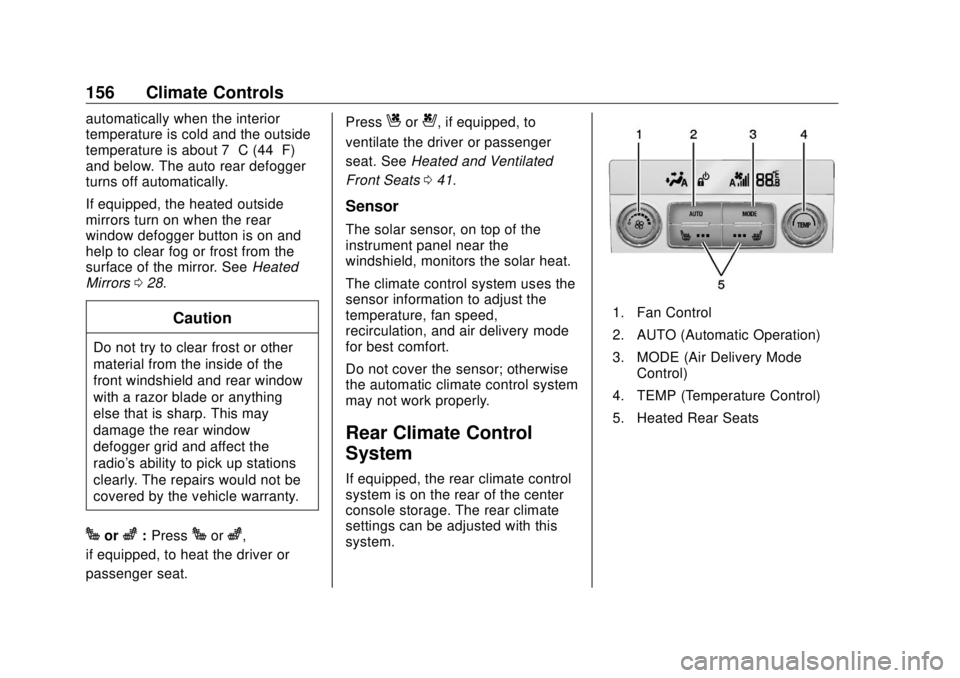
System If equipped, the rear climate control
system is on the rear of the center
console storage. The rear climate
settings can be adjusted with this
system. 1. Fan Control
2. AUTO (Automatic Operation)
3. MODE (Air Delivery Mode
Control)
4. TEMP (Temperature Control)
5. Heated Rear Seats
Page 169 of 363

Buick Envision Owner Manual (GMNA-Localizing-U.S./Canada/Mexico-
13555857) - 2020 - CRC - 2/25/19
168 Driving and Operating than when on dry pavement.
See Antilock Brake System
(ABS) 0 185 .
.
Allow greater following distance
and watch for slippery spots. Icy
patches can occur on otherwise
clear roads in shaded areas.
The surface of a curve or an
overpass can remain icy when
the surrounding roads are clear.
Avoid sudden steering
maneuvers and braking while
on ice.
.
Turn off cruise control.
Blizzard Conditions Stop the vehicle in a safe place and
signal for help. Stay with the vehicle
unless there is help nearby.
If possible, use Roadside
Assistance. See Roadside
Assistance Program 0 330 . To get
help and keep everyone in the
vehicle safe:
.
Turn on the hazard warning
flashers.
.
Tie a red cloth to an outside
mirror. { WarningSnow can trap engine exhaust
under the vehicle. This may
cause exhaust gases to get
inside. Engine exhaust contains
carbon monoxide (CO), which
cannot be seen or smelled. It can
cause unconsciousness and even
death.
If the vehicle is stuck in snow:
.
Clear snow from the base of
the vehicle, especially any
blocking the exhaust pipe.
.
Open a window about 5 cm
(2 in) on the vehicle side
that is away from the wind,
to bring in fresh air.
.
Fully open the air outlets on
or under the instrument
panel.
.
Adjust the climate control
system to circulate the air
inside the vehicle and set
(Continued) Warning (Continued) the fan speed to the highest
setting. See “ Climate
Control Systems. ”
For more information about CO,
see Engine Exhaust 0 181 .
To save fuel, run the engine for
short periods to warm the vehicle
and then shut the engine off and
partially close the window. Moving
about to keep warm also helps.
If it takes time for help to arrive,
when running the engine, push the
accelerator pedal slightly so the
engine runs faster than the idle
speed. This keeps the battery
charged to restart the vehicle and to
signal for help with the headlamps.
Do this as little as possible, to
save fuel.
If the Vehicle Is Stuck Slowly and cautiously spin the
wheels to free the vehicle when
stuck in sand, mud, ice, or snow.
Page 221 of 363
Buick Envision Owner Manual (GMNA-Localizing-U.S./Canada/Mexico-
13555857) - 2020 - CRC - 2/25/19
220 Driving and Operating important for your safety and that of
your passengers. Read this section
carefully before pulling a trailer.
When towing a trailer:
.
Become familiar with and follow
all state and local laws that
apply to trailer towing. These
requirements vary from state to
state.
.
State laws may require the use
of extended side view mirrors.
Even if not required, you should
install extended side view
mirrors if your visibility is limited
or restricted while towing.
.
Do not tow a trailer during the
first 800 km (500 mi) of vehicle
use to prevent damage to the
engine, axle, or other parts.
.
It is recommended to perform
the first oil change before heavy
towing.
.
During the first 800 km (500 mi)
of trailer towing, do not drive
over 80 km/h (50 mph) and do
not make starts at full throttle. .
Vehicles can tow in D (Drive).
If the transmission downshifts
too often, a lower gear may be
selected using Manual Mode.
See Manual Mode 0 184 .
If equipped, the following driver
assistance features should be
turned off when towing a trailer:
.
Adaptive Cruise Control (ACC)
.
Super Cruise Control
.
Lane Keep Assist (LKA)
.
Park Assist
.
Automatic Parking Assist (APA)
.
Reverse Automatic
Braking (RAB)
If equipped, the following driver
assistance features should be
turned to alert or off when towing a
trailer:
.
Automatic Emergency
Braking (AEB)
.
Intelligent Brake Assist (IBA)
.
Front Pedestrian Braking (FPB) If equipped with Lane Change Alert
(LCA), the LCA detection zones that
extend back from the side of the
vehicle do not move further back
when a trailer is towed. Use caution
while changing lanes when towing a
trailer.
If equipped with Rear Cross Traffic
Alert (RCTA), use caution while
backing up when towing a trailer, as
the RCTA detection zones that
extend out from the back of the
vehicle do not move further back
when a trailer is towed.
{ WarningTo prevent serious injury or death
from carbon monoxide (CO),
when towing a trailer:
.
Do not drive with the
liftgate, trunk/hatch,
or rear-most window open.
.
Fully open the air outlets on
or under the instrument
panel.
(Continued)
Page 230 of 363

Buick Envision Owner Manual (GMNA-Localizing-U.S./Canada/Mexico-
13555857) - 2020 - CRC - 3/12/19
Vehicle Care 229
Vehicle Care General Information General Information . . . . . . . . . . 230
California Proposition
65 Warning . . . . . . . . . . . . . . . . . 230
California Perchlorate
Materials Requirements . . . . . 231
Accessories and
Modifications . . . . . . . . . . . . . . . . 231
Vehicle Checks Doing Your Own
Service Work . . . . . . . . . . . . . . . 231
Hood . . . . . . . . . . . . . . . . . . . . . . . . . 232
Engine Compartment
Overview . . . . . . . . . . . . . . . . . . . . 234
Engine Oil . . . . . . . . . . . . . . . . . . . . 237
Engine Oil Life System . . . . . . . 239
Automatic Transmission
Fluid . . . . . . . . . . . . . . . . . . . . . . . . 240
Engine Air Cleaner/Filter . . . . . . 241
Cooling System . . . . . . . . . . . . . . 243
Engine Overheating . . . . . . . . . . 247
Washer Fluid . . . . . . . . . . . . . . . . . 248
Brakes . . . . . . . . . . . . . . . . . . . . . . . 249
Brake Fluid . . . . . . . . . . . . . . . . . . . 250
Battery - North America . . . . . . 251
All-Wheel Drive . . . . . . . . . . . . . . . 252 Starter Switch Check . . . . . . . . . 252
Park Brake and P (Park)
Mechanism Check . . . . . . . . . . 252
Wiper Blade Replacement . . . . 252
Windshield Replacement . . . . . 254
Gas Strut(s) . . . . . . . . . . . . . . . . . . 254
Headlamp Aiming Headlamp Aiming . . . . . . . . . . . . 255
Bulb Replacement Bulb Replacement . . . . . . . . . . . . 256
Halogen Bulbs . . . . . . . . . . . . . . . . 256
High Intensity Discharge (HID)
Lighting . . . . . . . . . . . . . . . . . . . . . 256
License Plate Lamp . . . . . . . . . . 256
Electrical System Electrical System Overload . . . 257
Fuses and Circuit Breakers . . . 258
Engine Compartment Fuse
Block . . . . . . . . . . . . . . . . . . . . . . . . 258
Instrument Panel Fuse
Block . . . . . . . . . . . . . . . . . . . . . . . . 261
Rear Compartment Fuse
Block . . . . . . . . . . . . . . . . . . . . . . . . 263
Wheels and Tires
Tires . . . . . . . . . . . . . . . . . . . . . . . . . . 265
All-Season Tires . . . . . . . . . . . . . . 266
Winter Tires . . . . . . . . . . . . . . . . . . 266
Summer Tires . . . . . . . . . . . . . . . . 267 Tire Sidewall Labeling . . . . . . . . 267
Tire Designations . . . . . . . . . . . . . 269
Tire Terminology and
Definitions . . . . . . . . . . . . . . . . . . 270
Tire Pressure . . . . . . . . . . . . . . . . . 272
Tire Pressure Monitor
System . . . . . . . . . . . . . . . . . . . . . . 274
Tire Pressure Monitor
Operation . . . . . . . . . . . . . . . . . . . 275
Tire Inspection . . . . . . . . . . . . . . . . 279
Tire Rotation . . . . . . . . . . . . . . . . . 279
When It Is Time for New
Tires . . . . . . . . . . . . . . . . . . . . . . . . 280
Buying New Tires . . . . . . . . . . . . . 281
Different Size Tires and
Wheels . . . . . . . . . . . . . . . . . . . . . . 282
Uniform Tire Quality
Grading . . . . . . . . . . . . . . . . . . . . . 283
Wheel Alignment and Tire
Balance . . . . . . . . . . . . . . . . . . . . . 284
Wheel Replacement . . . . . . . . . . 284
Tire Chains . . . . . . . . . . . . . . . . . . . 285
If a Tire Goes Flat . . . . . . . . . . . . 285
Tire Changing . . . . . . . . . . . . . . . . 287
Compact Spare Tire . . . . . . . . . . 292
Jump Starting
Jump Starting - North
America . . . . . . . . . . . . . . . . . . . . . 293
Page 233 of 363

Buick Envision Owner Manual (GMNA-Localizing-U.S./Canada/Mexico-
13555857) - 2020 - CRC - 3/12/19
232 Vehicle Care If equipped with remote vehicle
start, open the hood before
performing any service work to
prevent remote starting the vehicle
accidentally. See Remote Vehicle
Start 0 14 .
Keep a record with all parts receipts
and list the mileage and the date of
any service work performed. See
Maintenance Records 0 322 .
CautionEven small amounts of
contamination can cause damage
to vehicle systems. Do not allow
contaminants to contact the fluids,
reservoir caps, or dipsticks.
Hood
{ Warning
Turn the vehicle off before
opening the hood. If the vehicle is
on, the engine will start when the
hood is opened. You or others
could be injured. { WarningComponents under the hood can
get hot from running the engine.
To help avoid the risk of burning
unprotected skin, never touch
these components until they have
cooled, and always use a glove or
towel to avoid direct skin contact.
Clear any snow from the hood
before opening.
To open the hood:
1. Pull the hood release lever with
the
i symbol. It is on the
lower left side of the instrument
panel. 2. Go to the front of the vehicle
and locate the secondary
release lever under the front
center of the hood. Push the
secondary hood release lever
to the right to release.
3. After you have partially lifted
the hood, the gas strut system
will automatically lift the hood
and hold it in the fully open
position.
To close the hood:
1. Before closing the hood, be
sure all filler caps are on
properly, and all tools are
removed.
Page 259 of 363

Buick Envision Owner Manual (GMNA-Localizing-U.S./Canada/Mexico-
13555857) - 2020 - CRC - 3/12/19
258 Vehicle Care
Fuses and Circuit
Breakers The wiring circuits in the vehicle are
protected from short circuits by a
combination of fuses and circuit
breakers. This greatly reduces the
chance of damage caused by
electrical problems.
{ DangerFuses and circuit breakers are
marked with their ampere rating.
Do not exceed the
specified amperage rating when
replacing fuses and circuit
breakers. Use of an oversized
fuse or circuit breaker can result
in a vehicle fire. You and others
could be seriously injured or
killed.
To check a fuse, look at the
silver-colored band inside the fuse.
If the band is broken or melted,
replace the fuse. Be sure to replace
a bad fuse with a new one of the
identical size and rating. Fuses of the same amperage can
be temporarily borrowed from
another fuse location, if a fuse goes
out. Replace the fuse as soon as
possible.
To identify and check fuses, circuit
breakers, and relays, see Engine
Compartment Fuse Block 0 258 ,
Instrument Panel Fuse Block 0 261 ,
and Rear Compartment Fuse Block
0 263 .
Engine Compartment
Fuse Block To remove the fuse block cover,
squeeze the clips on the cover and
lift it straight up. See Engine
Compartment Overview 0 234 .
Caution
Spilling liquid on any electrical
component on the vehicle may
damage it. Always keep the
covers on any electrical
component.
Page 262 of 363

Buick Envision Owner Manual (GMNA-Localizing-U.S./Canada/Mexico-
13555857) - 2020 - CRC - 3/12/19
Vehicle Care 261Relays Usage
K13 Low-beam
headlamps
K14 Run/Crank
K15 Rear window/Mirror
defogger
Instrument Panel Fuse
Block
The instrument panel fuse block is
in the glove box. To access the
fuses, open the fuse panel door
from the passenger side by pulling
it out. To reinstall the door, insert the tabs
on the top of the door into the
console first, then push the door
back into its original location.
The vehicle may not be equipped
with all of the fuses, relays, and
features shown.