2020 BUICK ENCLAVE instrument cluster
[x] Cancel search: instrument clusterPage 150 of 381
Buick Enclave Owner Manual (GMNA-Localizing-U.S./Canada/Mexico-
13527524) - 2020 - CRC - 4/10/19
Lighting 149
Daytime Running
Lamps (DRL) DRL can make it easier for others to
see the front of your vehicle during
the day. Fully functional DRL are
required on all vehicles first sold in
Canada.
The dedicated DRL will come on
when all of the following conditions
are met:
.
The ignition is on.
.
The exterior lamp control is
in AUTO.
.
The light sensor determines it is
daytime.
.
The parking brake is released or
the vehicle is not in P (Park).
The taillamps, instrument panel
lights, and other lamps will not
be on.
The DRL turn off when the
headlamps are turned to
O or the
ignition is off. For vehicles sold in
Canada, this control only works
when the vehicle is parked. Automatic Headlamp
System When the exterior lamp control is
set to AUTO and it is dark enough
outside, the headlamps come on
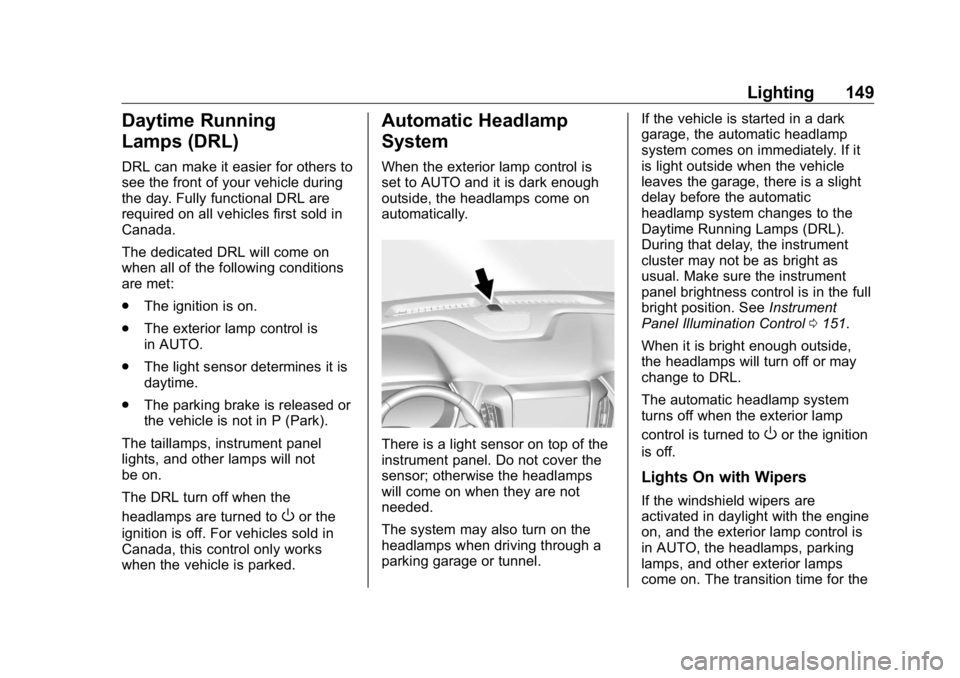
automatically.
There is a light sensor on top of the
instrument panel. Do not cover the
sensor; otherwise the headlamps
will come on when they are not
needed.
The system may also turn on the
headlamps when driving through a
parking garage or tunnel. If the vehicle is started in a dark
garage, the automatic headlamp
system comes on immediately. If it
is light outside when the vehicle
leaves the garage, there is a slight
delay before the automatic
headlamp system changes to the
Daytime Running Lamps (DRL).
During that delay, the instrument
cluster may not be as bright as
usual. Make sure the instrument
panel brightness control is in the full
bright position. See Instrument
Panel Illumination Control 0 151 .
When it is bright enough outside,
the headlamps will turn off or may
change to DRL.
The automatic headlamp system
turns off when the exterior lamp
control is turned to
O or the ignition
is off.
Lights On with Wipers
If the windshield wipers are
activated in daylight with the engine
on, and the exterior lamp control is
in AUTO, the headlamps, parking
lamps, and other exterior lamps
come on. The transition time for the
Page 151 of 381

Buick Enclave Owner Manual (GMNA-Localizing-U.S./Canada/Mexico-
13527524) - 2020 - CRC - 4/10/19
150 Lighting lamps coming on varies based on
wiper speed. When the wipers are
not operating, these lamps turn off.
Move the exterior lamp control to
Oor
; to disable this feature.
Hazard Warning Flashers
| : Press to make the front and
rear turn signal lamps flash on and
off. This warns others that you are
having trouble.
Press
| again to turn the
flashers off. Turn and Lane-Change
Signals
Move the lever all the way up or
down to signal a turn.
An arrow on the instrument cluster
will flash in the direction of the turn
or lane change. Raise or lower the lever until the
arrow starts to flash to signal a lane
change. Hold it there until the lane
change is complete. If the lever is
moved momentarily to the lane
change position, the arrow will flash
three times. It will flash six times if
Tow/Haul Mode is active.
The lever returns to its starting
position when it is released.
If after signaling a turn or lane
change, the arrow flashes rapidly or
does not come on, a signal bulb
may be burned out.
Have any burned out bulbs
replaced. If a bulb is not burned out,
check the fuse. See Instrument
Panel Fuse Block 0 277 .
Page 152 of 381

Buick Enclave Owner Manual (GMNA-Localizing-U.S./Canada/Mexico-
13527524) - 2020 - CRC - 4/10/19
Lighting 151
Interior Lighting Instrument Panel
Illumination Control
The brightness of the instrument
cluster display, infotainment display
and controls, steering wheel
controls, and all other illuminated
controls, as well as feature status
indicators can be adjusted.
The knob for this feature is on the
instrument panel beside the steering
column.
Push the knob in all the way until it
extends out and then turn the knob
clockwise or counterclockwise to
brighten or dim the lights. Courtesy Lamps The courtesy lamps come on when
any door is opened unless the dome
lamp override is activated. To
deactivate the dome lamp override,
press
j OFF and the indicator
light on the button will turn off.
The reading lamps, located on the
front overhead console and the
headliner above the rear seat
passengers, can be controlled
independently of the courtesy
lamps.
Dome Lamps The dome lamp controls are in the
overhead console.
To operate, press the following
buttons:
j OFF : Press to turn off the
dome lamps when a door is open.
An indicator light on the button will
turn on when the dome lamp
override is activated. Press
j OFF again to deactivate this feature
and the indicator light will turn off.
The dome lamps will come on when
doors are opened.
+ ON/OFF : Press to turn the dome
lamps on manually. Press again to
turn the dome lamps off.
Reading Lamps There are reading lamps on the
overhead console and over the rear
seats. These lamps come on when
any door is opened.
Page 188 of 381

Buick Enclave Owner Manual (GMNA-Localizing-U.S./Canada/Mexico-
13527524) - 2020 - CRC - 4/10/19
Driving and Operating 187Leaving the Vehicle with the
Engine Running
{ WarningIt can be dangerous to leave the
vehicle with the engine running.
It could overheat and catch fire.
It is dangerous to get out of the
vehicle if the vehicle is not in
P (Park) with the parking brake
set. The vehicle can roll.
Do not leave the vehicle when the
engine is running. If you have left
the engine running, the vehicle
can move suddenly. You or others
could be injured. To be sure the
vehicle will not move, even when
you are on fairly level ground,
always set the parking brake and
shift to P (Park). See Shifting Into
Park 0 186 . If you are towing a
trailer, see Driving Characteristics
and Towing Tips 0 234 . If you have to leave the vehicle with
the engine running, be sure the
vehicle is in P (Park) and the
parking brake is set before you
leave it. After you have pressed the
P (Park) button, hold down the
brake pedal. If you cannot see the
P (Park) indicator in the instrument
cluster, it means that the vehicle is
not in P (Park).
If you are towing a trailer and
parking on a hill, see Driving
Characteristics and Towing Tips
0 234 .
Shifting out of Park This vehicle is equipped with an
electronic transmission. The shift
lock release button is designed to
prevent inadvertent shifting out of
P (Park) unless the ignition is in on,
the brake pedal is applied, and the
shift lock release button is pressed.
The shift lock control is always
functional except in the case of an
uncharged or low voltage (less than
9-volt) battery. If the vehicle has an uncharged
battery or a battery with low voltage,
try charging or jump starting the
battery. See Jump Starting - North
America 0 311 .
To shift out of P (Park):
1. Ensure the engine is running.
2. Apply the brake pedal.
3. Press and hold the shift lock
release button.
4. Move the shift lever to the
desired position.
Page 202 of 381

Buick Enclave Owner Manual (GMNA-Localizing-U.S./Canada/Mexico-
13527524) - 2020 - CRC - 4/10/19
Driving and Operating 201vehicle wheel brakes to assist the
driver in keeping the vehicle on the
intended path.
If cruise control is being used and
TCS or StabiliTrak/ESC begins to
limit wheel spin, cruise control will
disengage. Cruise control may be
turned back on when road
conditions allow. TCS and
StabiliTrak/ESC will automatically
turn on when cruise control is set.
Both systems come on
automatically when the vehicle is
started and begins to move. The
systems may be heard or felt while
they are operating or while
performing diagnostic checks. This
is normal and does not mean there
is a problem with the vehicle.
It is recommended to leave both
systems on for normal driving
conditions, but it may be necessary
to turn TCS off if the vehicle gets
stuck in sand, mud, ice, or snow.
See If the Vehicle Is Stuck 0 176
and “ Turning the Systems Off and
On ” later in this section. The indicator light for both systems
is in the instrument cluster. This
light will:
.
Flash when TCS is limiting
wheel spin.
.
Flash when StabiliTrak/ESC is
activated.
.
Turn on and stay on when either
system is not working.
If either system fails to turn on or to
activate, a message displays in the
Driver Information Center (DIC), and
d comes on and stays on to
indicate that the system is inactive
and is not assisting the driver in
maintaining control. The vehicle is
safe to drive, but driving should be
adjusted accordingly.
If
d comes on and stays on:
1. Stop the vehicle. 2. Turn the engine off and wait
15 seconds.
3. Start the engine.
4. Drive the vehicle.
If
d comes on and stays on, see
your dealer.
Turning the Systems Off
and On
Page 203 of 381

Buick Enclave Owner Manual (GMNA-Localizing-U.S./Canada/Mexico-
13527524) - 2020 - CRC - 4/10/19
202 Driving and Operating CautionDo not repeatedly brake or
accelerate heavily when TCS is
off. The vehicle driveline could be
damaged.
To turn off only TCS, press and
release
g . The Traction Off light
idisplays in the instrument cluster
and the appropriate DIC message
displays.
To turn TCS on again, press and
release
g . The Traction Off light
idisplayed in the instrument cluster
will turn off.
If TCS is limiting wheel spin when
gis pressed, the system will not turn
off until the wheels stop spinning.
To turn off both TCS and StabiliTrak/
ESC, press and hold
g until the
Traction Off light
i and StabiliTrak/
ESC OFF light
g come on and stay
on in the instrument cluster. The
appropriate DIC message displays. To turn TCS and StabiliTrak/ESC on
again, press and release
g . The
Traction Off light
i and StabiliTrak/
ESC OFF light
g in the instrument
cluster turn off.
StabiliTrak will automatically turn on
if the vehicle exceeds 56 km/h (35
mph). Traction control will
remain off.
Adding accessories can affect the
vehicle performance. See
Accessories and Modifications
0 249 .
Driver Mode Control Driver Mode Control attempts to add
a sportier feel, provide a more
comfortable ride, or assist in
different weather conditions or
terrain. This system simultaneously
changes the software calibration of
various sub-systems. Depending on
the option package, available
features, and mode selected, the
suspension, steering, and
powertrain will change calibrations
to achieve the desired mode
characteristics. If equipped, the vehicle may have
the following modes: All-Wheel
Drive (AWD), Tour, Sport, and/or
Tow/Haul. When not in AWD, the
vehicle is in Front-Wheel Drive
(FWD) which will provide better fuel
economy. All drive modes may
display indicator or mode on
message in the Driver Information
Center (DIC) except FWD.
AWD Mode
AWD Mode is intended for
conditions which demand more
traction. In AWD Mode, the AWD
system delivers power to all four
wheels and the system adjusts as
Page 205 of 381

Buick Enclave Owner Manual (GMNA-Localizing-U.S./Canada/Mexico-
13527524) - 2020 - CRC - 4/10/19
204 Driving and Operating If equipped with the Traction Control
System (TCS), the system may
begin to limit wheel spin while you
are using cruise control. If this
happens, the cruise control will
automatically disengage. See
Traction Control/Electronic Stability
Control 0 200 . If a collision alert
occurs when cruise control is
activated, cruise control is
disengaged. See Forward Collision
Alert (FCA) System 0 221 . When
road conditions allow you to safely
use it again, cruise control can be
turned back on.
Cruise control will disengage if
either TCS or StabiliTrak/Electronic
Stability Control (ESC) is turned off.
If the brakes are applied, cruise
control disengages. 5 : Press to turn cruise control on
or off. A white indicator comes on in
the instrument cluster.
RES+ : If there is a set speed in
memory, press the control up briefly
to resume to that speed or press
and hold to accelerate. If cruise
control is already engaged, use to
increase vehicle speed.
SET − : Press the control down
briefly to set the speed and activate
cruise control. If cruise control is
already engaged, use to decrease
vehicle speed. * : Press to disengage cruise
control without erasing the set
speed from memory.
The speedometer reading can be
displayed in either English or metric
units. See Instrument Cluster (Base
Level) 0 111 or
Instrument Cluster (Uplevel) 0 114 .
The increment value used depends
on the units displayed.
Setting Cruise Control
If
5 is on when not in use, SET − or
RES+ could get pressed and go into
cruise when not desired. Keep
5 off when cruise is not being used.
1. Press
5 to turn the cruise
system on.
2. Get to the speed desired.
3. Press and release SET − . The
desired set speed briefly
appears in the instrument
cluster.
4. Take your foot off the
accelerator pedal.
Page 206 of 381

Buick Enclave Owner Manual (GMNA-Localizing-U.S./Canada/Mexico-
13527524) - 2020 - CRC - 4/10/19
Driving and Operating 205The cruise control indicator on the
instrument cluster turns green after
the cruise control has been set to
the desired speed. See Instrument
Cluster (Base Level) 0 111 or
Instrument Cluster (Uplevel) 0 114 .
Resuming a Set Speed
If the cruise control is set at a
desired speed and then the brakes
are applied or
* is pressed, the
cruise control is disengaged without
erasing the set speed from memory.
Once the vehicle reaches about
40 km/h (25 mph) or more, press
RES+ up briefly. The vehicle returns
to the previously set speed.
Increasing Speed While Using
Cruise Control
Do one of the following:
.
Press and hold RES+ up until
the vehicle accelerates to the
desired speed, then release it. .
To increase vehicle speed in
small increments, press RES+
up briefly. For each press, the
vehicle goes about 1 km/h
(1 mph) faster.
Reducing Speed While Using
Cruise Control
Do one of the following:
.
Press and hold SET − down until
the desired lower speed is
reached, then release it.
.
To slow down in small
increments, press SET − down
briefly. For each press, the
vehicle goes about 1 km/h
(1 mph) slower.
Passing Another Vehicle While
Using Cruise Control
Use the accelerator pedal to
increase the vehicle speed. When
you take your foot off the pedal, the
vehicle will slow down to the
previously set cruise speed. While
pressing the accelerator pedal or
shortly following the release to override cruise control, briefly
pressing SET − will result in cruise
set to the current vehicle speed.
Using Cruise Control on Hills
How well the cruise control will work
on hills depends upon the vehicle
speed, load, and the steepness of
the hills. When going up steep hills,
you might have to step on the
accelerator pedal to maintain your
speed. When going downhill, you
might have to brake or shift to a
lower gear to keep your speed
down. If the brake pedal is applied,
cruise control will disengage.
Ending Cruise Control
There are four ways to end cruise
control:
.
Step lightly on the brake pedal.
.
Press
* .
.
Shift the transmission to
N (Neutral).
.
To turn off cruise control,
press
5 .