2020 AUDI Q3 park assist
[x] Cancel search: park assistPage 4 of 278

Table of contents
About this Owner's Manual......
SUMIMALY: ; « ss6% : osen ss sean cs poe s
QC CCeS Skis: si esis a 6 ores os ewe
Cockpit... 2... ee eee eee eee
Indicator lights overview...........0.
Display and operation............
Instrument cluster...............
Instrument cluster overview...........
Operating. ecco ws swacemn o © aero o erm 9
Adjusting the display.................
Coolant temperature display...........
Tachometer’. series s ewie so sie ¥ & overs
Odometer............ 0. cee eee eee eee
Outside temperature display...........
Vehicle functions « se-0 2. ese ve eee ees
Touch’ display . 22... : secs ie eses ees
General
touch display operation........
Multi Media Interface................
Voice operation..................
Generalinformation.................
Voice recognition system..............
External voice operation..............
Global functions.................
Additional function buttons...........
Starting and driving.............
Personalization..................
Luggage compartment lid.............
Child safety lock sa04 45 eec4 es eee e ee ees
Power Windows. . 6 sce « 6 umes #6 enna o
Panoramic glass roof................-
Garage door Opener’: sens ss esas se cess
Lights and Vision.................
Exterior lighting sees < = sees « « eee% sv oe
Interior liQhtingios . esas + exe ee ews x
VISION... eee eee
NOD
OO
13)
16 16 18
24 24 24
25
26 26 27 27 27 28 28
32
34
38 38
40
40
44 44
47 48
Windshield wipers............--..+-- 50
Digital compass............0 000 eens 52
Sitting correctly and safely...... 54
Correct passenger seating position...... 54
FRONUSGAtS s + astns s ¢ ewes +o eo te eoeee F 54
Rearseats sic 2 sea oo awn oo coon 7 9 oe 56
SLEEKIMG WHEEL esses 4 0 sneceas » s sxereye 9 6 eunaece 57
Head restraints..................000. 58
Safety belts: « ssa: s 2 wens 5 2 worms x s sawn 59
Airbag system... .. cc eee eee eee 62
Child safety seats..............0.00.. 67
Stowing and using............... 73
Power SOUrCeES ...... eee eee eee 73
Cup Holders: « saws = ¢ seme + ¢ eas ¢ e ees 73
Additional storage...............005. 74
Luggage compartment............... 74
ROOT ACK: « a waxem 2 2 soem 4 x em Foe tee oY 77
Warm and cold................... 78
Climate control system.............0. 78
Steering wheel heating............... 80
Fluids in the A/Csystem.............. 81
PICEVITIG:: ¢ ecces « 2 wees & o pees 5 oe oc oe 82
Starting the vehicle..............000- 82
When driving............. ee eee eee ee 84
Drive sySteliteves: + « wwe & & ews so eee es we 89
Start/Stop'system « sce ee ewer vo essere a « 90
Brakes. .............0000 0c cece eee 91
Electromechanical parking brake....... 93
Special driving situations.............. 94
Driving dynamic.................. 97
Audi driveiseleetss «isis ss naan a 2 cain a ve 97
Suspension.........-..00 eee eee eee 97
StGOriNG « awu & x Secs 5 = Hoves + F RevOS FE 98
All wheel drive (quattro).............. 99
Electronic Stabilization Control......... 99,
Trailer towing.................... 102
Driving with atrailer................. 102
Assist systems................005 105
Assist systems................005 105
Generalinformation................. 105
Surrounding area detection............ 106
Page 5 of 278

83A012721BB
Table of contents
Driving information.............. 109
Speed warning system.........-..000- 109
Traffic light information.............. 109
Driver assistance................. Ut
Cruise control systeM.......... 000 eee 111
Adaptive speed/cruise assist........... 112
Distance warning.................005 119
Lane departure warning............... 120
AUdi PrOSONsSe & seis + 2 mews 2» nee 2 oem 122
Sid erassiStsasis so sae o x mnewsae 9 o, sea wo ame 125
Parking and maneuvering....... 127
IMEROMUCKION s sive wo oxsuaee sa onawams «+ states 127
Parking system plus...............04. 127
Rearview camera and peripheral cameras. 129
Rear cross-traffic assist... .......00.4.. 133
Assisted parking .............0.00005- 134
Parkeassist': wwe x 2 noup a 2 seyen 4 @ aoe & 136
Infotainment system............ 139
TeEl@PHOHE.« . < cce5 ce hens cb eee ee tee 139
IMEFOMUERION « = cece © 2 sorase w a swaiaies 2S wesw 139
Setup... eee eee 139
Using the Audi phone box............. 141
Using the telephoné:s. ¢ « weiss ¢ wes ve ae 143
MESSAGCS ssn. < + sxeusns © 5 sneniens «6 saereee @ ot sane 147
SettingS ... 6... cece cece eee eee eee 149
Mobile phone network settings......... 150
Instrument cluster.............2..00. 151
Troubleshooting...............00000- 151
Aud! CONMMECE «oi. 6 sees se cee ve oe 152
Generalinformation................. 152
Audi connect Infotainment............ 152
Using a Wi-Fi hotspot...............- 153
Audi connect Infotainment services..... 153
SOttinGSiecs « « sees ¢ » sees s Sees : Hew 154
Troubleshooting sss < v-aew w ¥ waren wo ssanve 156
Navigation........................ 157
Opening navigation.................. 157
myAudi navigation.................0. 157
Entering adestination................ 158
Stopping route guidance.............. 162
Ma Pine = = cxowins + x cvovne w a cttenete + © onnatts 7 mats 163
Personal route assistance............. 165
Alternative routes...............0005 165
Additional functions................. 166
Satellite map.......... cece eee 167
Map update’: « saas ¢ » exaw gs aves ce eae 168
Trafficinformationivc « © asec «a cmon © a wae 169
Options and settings...............0. 170
Troubleshooting «<< <= eccn ss yews sp es 172
Radio... .. cece eee 173
Opening the radio................... 173
Radio functions sss. s ease ss eeen es wean 174
Options and settings...............0. 178
Troubleshooting..................5-. 179
PASTS cesses 6 aswsne w : anavinn a © auncina wo eowrene 180
General information................. 180
SDicard readers « exes « ¢ sama « avew 6 e pers 180
Bluetooth audio player............... 180
Online media..................0000. 181
IAMAZOnAleXales: 2 ¢ saves « ¢ qos & a anes g 2: 182
Multimedia connections.............. 182
Playing media..............00- eee 183
Options and settings................. 187
Supported media and file formats...... 188
Troubleshooting.................0005 189
Audi smartphone interface...... 194.
SOCLUP « came oo samen + 4 ean 3 2 tame & sano 191
Troubleshooting............0-eeee eee 192
Additional settings.............. 193
System settings...................0. 193
Connected devices «vias si eae sc geap ae 194
Legal information. . ce. . 2 ene. se cron 195
Maintenance and Care........... 197
Checking and Filling............. 197
Fuel... cee eee eee 197
RetuelinGiccs + « xcs ss heen so Ree v oe 198
Emissions control system............. 200
Engine compartment................. 201
Engineoil...... 2... eee eee eee 203
CoolingsysSteM’'s « seems se canes sv eases yo we 207
BrakerPluidian. « onansss = ciesnes © sewome a = sme 209
Electrical system. .......-...00--005 209
Battery’: + « sss 2 s see 1 6 seek go eee eb 210
Windshield washer system............ 212
Service interval display............... 213
Page 8 of 278

Quick access
Quick access
Cockpit
3 3 3
q
i
Fig. 1 Cockpit
@ Door handle @® Climate control system .......... 78
@ Central locking switch ........... 29 @ MMIOn/Off button ............. 18, 26
® Air vent with thumbwheel @ Depending on equipment, buttons
@ Lever for: for:
—Turn signals and high beams .... 45 ardrive Select woes. 5 caws sess ee 97
—High beam assistant .......... 45 — Electronic Stabilization Control
—Lane departure warning ........ 120 (ESC) «0. eee eee eee eee 100
© Multifunction steering wheel with: ~ Start/Stop system ............ 90
— Horn ber —Emergency flashers ........... 46
=(Driveris.airbag) » esas» » wecens = ae 62 ~ Farking alg & MGIES SF EGHHE 3 EMER 127
— Operating buttons ............ 12, 26 = HathsaSSioE ts = stats 23 secon 3 2 =
— Shift paddles 86 —Hill hold assist ............04. 95
© Instrument cluster 11 @ Audi music interface ............ 182
@ Windshield washer system lever .. 50 @ Depending on equipment:
Center display .............000- 18 = Cup halder* vee conten a
© Lockable glove compartment with: = Mounttorimobile’device
—SDcardreader ........000.005 180 fee, Bch sacs yeman uncom 2g vom 2 8
@ Front passenger's airba 62 @ Electromechanical parking brake
P - Bi mene snes button <= ¢ case x yereg ec pew sv eee 93>
GB) Kineetairbagy sac. a ssowees x x ansesse v soans 62
Page 9 of 278
![AUDI Q3 2020 Owners Manual 83A012721BB
Quick access
Selector lever (automatic transmis-
SION) 2... cee eee ee tee eee 85
Audi phone Dox scsiie + sine © o cere 141
START ENGINE STOP] button .... 82
®®® Dep](/manual-img/6/57625/w960_57625-8.png "AUDI Q3 2020 Owners Manual 83A012721BB
Quick access
Selector lever (automatic transmis-
SION) 2... cee eee ee tee eee 85
Audi phone Dox scsiie + sine © o cere 141
START ENGINE STOP] button .... 82
®®® Dep")
83A012721BB
Quick access
Selector lever (automatic transmis-
SION) 2... cee eee ee tee eee 85
Audi phone Dox scsiie + sine © o cere 141
START ENGINE STOP] button .... 82
®®® Depending on equipment:
— Starting the engine when there is
amalfunction ............2... 83
—Ignition lock ................. 82
@3) Steering wheel adjustment ...... 57
@4 Lever for:
— Cruise control system ......... 111
— Adaptive cruise assist .......... 112
@3) Data link connector for On Board
Diagnostic System (OBD) ........ 253
@8 Hood release ...............0.. 202
@) Buttons for:
— LIGHES ws s 2 seme x ¢ seme Fo oem es 44
—All-weather lights ............ 44
Luggage compartment lid button . 34
@3 Exterior mirror adjustment ...... 48
G9 Buttons for:
— Power windows .............- 38
—Child safety lock .............. 38
@ Tips
Some the equipment listed here is only instal-
led in certain models or is available as an op-
tion.
Indicator lights overview
The indicator lights in the instrument cluster
blink or turn on. They indicate functions or mal-
functions.
With some indicator lights, messages may ap-
pear and warning signals may sound. The indica-
tor lights and messages may be covered by other
displays. To show them again, select the second
tab for messages with the multifunction steering
wheel > page 12.
Some indicator lights in the display can display in
several colors.
A\ Central indicator light
If the wa or A indicator light turns on, check
the message in the instrument cluster.
Some indicator lights turn on briefly as a function
check
when you switch the ignition on. These sys-
tems are marked with a V in the following tables.
If one of these indicator lights does not turn on,
there is a malfunction in that system.
The following indicator lights may be available,
depending on the vehicle equipment:
Red indicator lights
Central indicator light ¥
=> page 7,
Instrument cluster
=>page 11
Safety belt ¥
=> page 61
Transmission
=> page 88
Drive system
=> page 89
Electromechanical parking brake
=> page 94
Electromechanical parking brake
=> page 94
Brake system ¥
=> page 92, > page 94,
=> page 209
Brake system ¥
=> page 92, > page 94,
=> page 209
Steering ¥
=> page 98
Steering lock
=> page 98
Electrical system
=> page 209
Engine oil pressure
=> page 204
Page 10 of 278

Quick access
Cooling system
=> page 207
Hood
=> page 202
Loose wheel warning
=> page 229
Distance warning
=>page 119
Safe start monitor
=> page 118,
Driver intervention request
=>page 118
Lane departure warning
=> page 121
Lane departure warning
=> page 121
Audi pre sense
=> page 123
Yellow indicator lights
Central indicator light
> page 7
Safety systems ¥
=> page 63
Transmission/clutch
> page 88
Drive system
=> page 89
Engine start system
=> page 83
Keys
=> page 83
Electromechanical parking brake
=> page 94
Electronic Stabilization Control
(ESC) ¥
=> page 99
Electronic Stabilization Control
(ESC) ¥
=> page 99
Electronic Stabilization Control
(ESC)
=> page 100
Anti-lock braking system (ABS) /
=> page 101 > page 92
Anti-lock braking system (ABS) ¥
=> page 101 > page 92
Steering
=> page 98
Steering lock
=> page 98
All wheel drive
=> page 99
Suspension control
=> page 98
Engine speed limitation
=> page 13
Tank system
=> page 199
Electrical system
=> page 209
Engine oil level (MIN)
= page 204
Engine oil sensor
=> page 204
Malfunction Indicator Lamp
(MIL)Y
=> page 200,
Washer fluid level
= page 212
Engine warm-up request
=> page 204
Windshield wipers
=> page 52
Parking system plus
=> page 129
Park assist
=> page 138
Rear cross-traffic assist
=> page 133
Tire pressure ¥
> page 232
Tire pressure
=> page 232
Page 11 of 278

83A012721BB
Quick access
Loose wheel warning
=> page 229
Bulb failure indicator
=> page 47
Adaptive light
=> page 47
Light/rain sensor
=> page 47, > page 52
Door lock
=> page 30
Battery in vehicle key
> page 34
Distance warning
>page 119
Side assist
=> page 126
Adaptive cruise assist
=>page 119
Steering intervention request
=>page 121
Lane departure warning
=> page 122
Audi pre sense
=> page 124
Other indicator lights
Start/Stop system
=> page 90
Turn signals
=>page 45
Low beam headlight
> page 44
Parking light
=> page 44
Cruise control system
=> page 111
Cruise control system
=>page 111
Adaptive cruise assist
>page 114
Adaptive cruise assist
=>page 114 ai
Adaptive cruise assist
= page 114
Adaptive cruise assist
=>page 114
Adaptive cruise assist
=>page 114
Lane departure warning
> page 121
High beams
=>page45
High beam assistant
=> page 61
Transmission/clutch
=> page 88
Start/Stop system
= page 90
Transmission/clutch
=> page 88
Convenience key
=> page 83
Electromechanical parking brake
=> page 94
Electromechanical parking brake
> page 94
Hill hold assist
=> page 94
Park
assist
> page 138
High beam assistant
=>page 45
Door lock
=> page 30
Child safety lock
=> page 38
Speed warning system
= page 109
Speed warning system
= page 109
Cruise control system
=> page 111
Page 46 of 278
Lights and Vision
Lights and Vision
Exterior lighting
Sitar MeL Lats eal
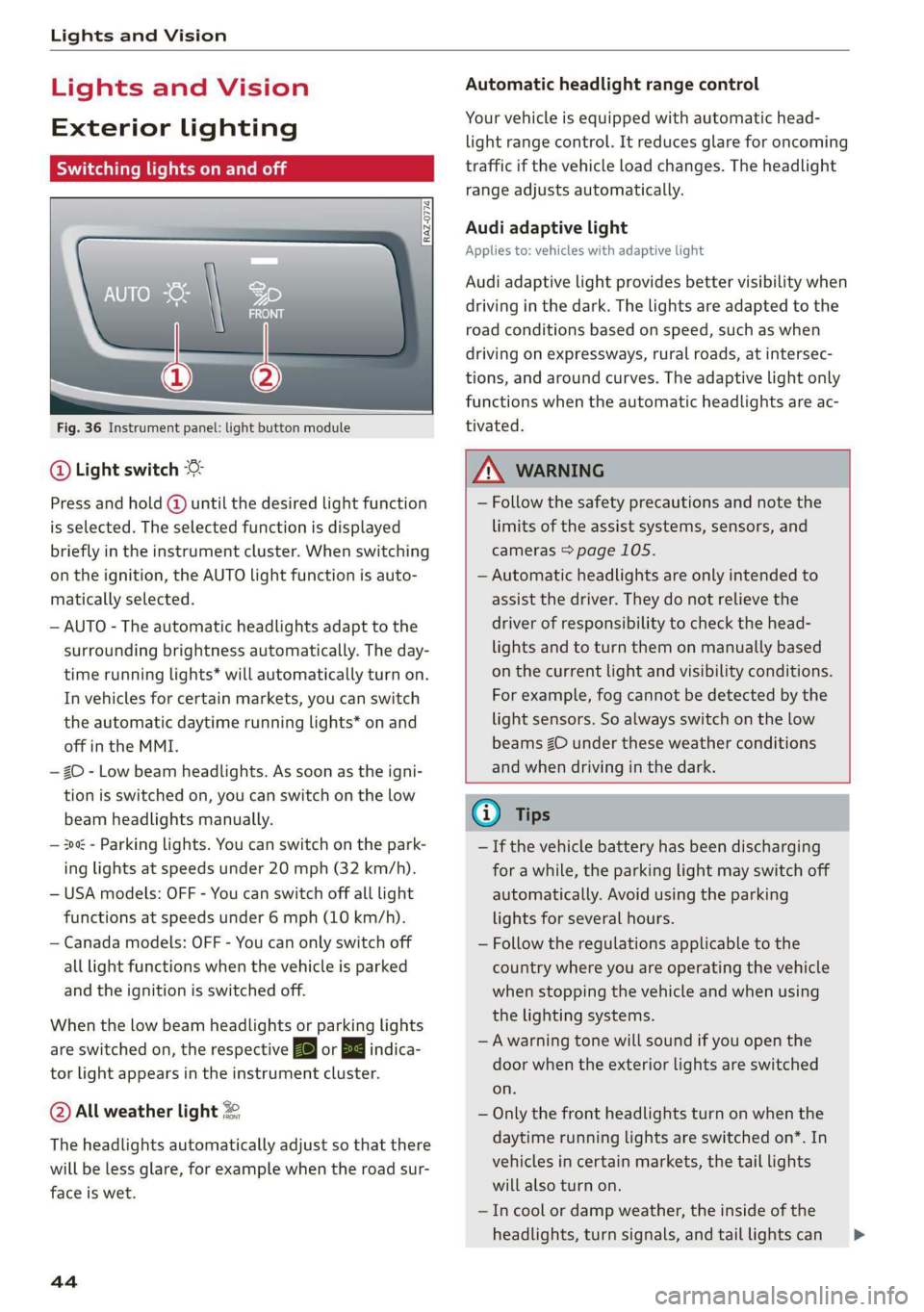
Fig. 36 Instrument panel: light button module
@ Light switch &
Press and hold @ until the desired light function
is selected. The selected function is displayed
briefly in the instrument cluster. When switching
on the ignition, the AUTO light function is auto-
matically selected.
— AUTO - The automatic headlights adapt to the
surrounding brightness automatically. The day-
time running lights* will automatically turn on.
In vehicles for certain markets, you can switch
the automatic daytime running lights* on and
off in the MMI.
— 20 - Low beam headlights. As soon as the igni-
tion is switched on, you can switch on the low
beam headlights manually.
— 30a - Parking lights. You can switch on the park-
ing lights at speeds under 20 mph (32 km/h).
— USA models: OFF - You can switch off all light
functions at speeds under 6 mph (10 km/h).
— Canada models: OFF - You can only switch off
all light functions when the vehicle is parked
and the ignition is switched off.
When the low beam headlights or parking lights
are switched on, the respective Ba or Ea indica-
tor light appears in the instrument cluster.
@ All weather light 2
The headlights automatically adjust so that there
will be less glare, for example when the road sur-
face is wet.
44
Automatic headlight range control
Your vehicle is equipped with automatic head-
light range control. It reduces glare for oncoming
traffic if the vehicle load changes. The headlight
range adjusts automatically.
Audi adaptive light
Applies to: vehicles with adaptive light
Audi adaptive light provides better visibility when
driving in the dark. The lights are adapted to the
road conditions based on speed, such as when
driving on expressways, rural roads, at intersec-
tions, and around curves. The adaptive light only
functions when the automatic headlights are ac-
tivated.
A WARNING
— Follow the safety precautions and note the
limits of the assist systems, sensors, and
cameras > page 105.
— Automatic headlights are only intended to
assist the driver. They do not relieve the
driver of responsibility to check the head-
lights and to turn them on manually based
on the current light and visibility conditions.
For example, fog cannot be detected by the
light sensors. So always switch on the low
beams ZO under these weather conditions
and when driving in the dark.
@ Tips
— If the vehicle battery has been discharging
for a while, the parking light may switch off
automatically. Avoid using the parking
lights for several hours.
— Follow the regulations applicable to the
country where you are operating the vehicle
when stopping the vehicle and when using
the lighting systems.
—Awarning tone will sound if you open the
door when the exterior lights are switched
on.
— Only the front headlights turn on when the
daytime running lights are switched on*. In
vehicles in certain markets, the tail lights
will also turn on.
—Incool or damp weather, the inside of the
headlights, turn signals, and tail lights can >
Page 47 of 278

83A012721BB
Lights and Vision
fog over due to the temperature difference
between the inside and outside. They will
clear shortly after switching them on. This
does not affect the service life of the light-
ing.
— When the parking lights are switched on
and the ignition is switched off, the 200: sym-
bol appears in the light switch module.
Turn signal and high beam lever
©
gS
©
Fig. 37 Lever: switching on the turn signal and high beams
The lever operates the turn signals, the high
beams and the headlight flasher.
Turn signals @ >
The turn signal activates when you move the lev-
er into a turn signal position when the ignition is
switched on. The respective a or B indicator
light flashes.
@ - Right turn signal
@ - Left turn signal
The turn signal blinks three times if you tap the
lever (convenience turn signal).
If an indicator light blinks twice as fast as usual,
a turn signal bulb has failed. Carefully drive to an
authorized Audi dealer or authorized Audi Service
Facility immediately to have the malfunction cor-
rected.
High beams ZO and headlight flasher
> Move the lever to the corresponding position:
@® - High beams on (vehicles with high beam as-
sistant*) > page 45
@ - High beams off or headlight flasher
The 0) indicator light in the instrument cluster
will turn on.
Z\ WARNING
High beams can cause glare for other drivers,
which increases the risk of an accident. For
this reason, only use the high beams or the
headlight flasher when they will not create
glare for other drivers.
thm Teel
Applies to: vehicles with high beam assistant
The high beam assistant automatically turns the
high beams on or off depending on the surround-
ing conditions.
A camera on the rearview mirror mount can de-
tect light sources from other road users. The high
beams switch on or off automatically depending
on the position of vehicles driving ahead and on-
coming vehicles, the vehicle speed as well as oth
er environmental factors and traffic conditions.
Switching on the high beam assistant
Requirement: the automatic headlights must be
set and the high beam assistant must be switch-
ed on > page 46.
> To activate the high beam assistant, tap the
lever forward @) > page 45, fig. 37. The M4 in-
dicator light appears in the instrument cluster
display and the high beams are switched on or
off automatically. If the high beams were com-
pletely or partially switched on, the Ea indica-
tor light will turn on.
Switching the high beams on or off manually
If the high beams did not switch on or off auto-
matically as expected, you may switch them on or
off manually instead:
> To switch the high beams on manually, tap the
lever
forward @) > page 45, fig. 37. The EJ in-
dicator light turns on.
> To switch the high beams off manually, pull the
lever
back @) > page 45, fig. 37. The high beam
assistant is deactivated.
4s