2020 AUDI E-TRON maintenance
[x] Cancel search: maintenancePage 6 of 316
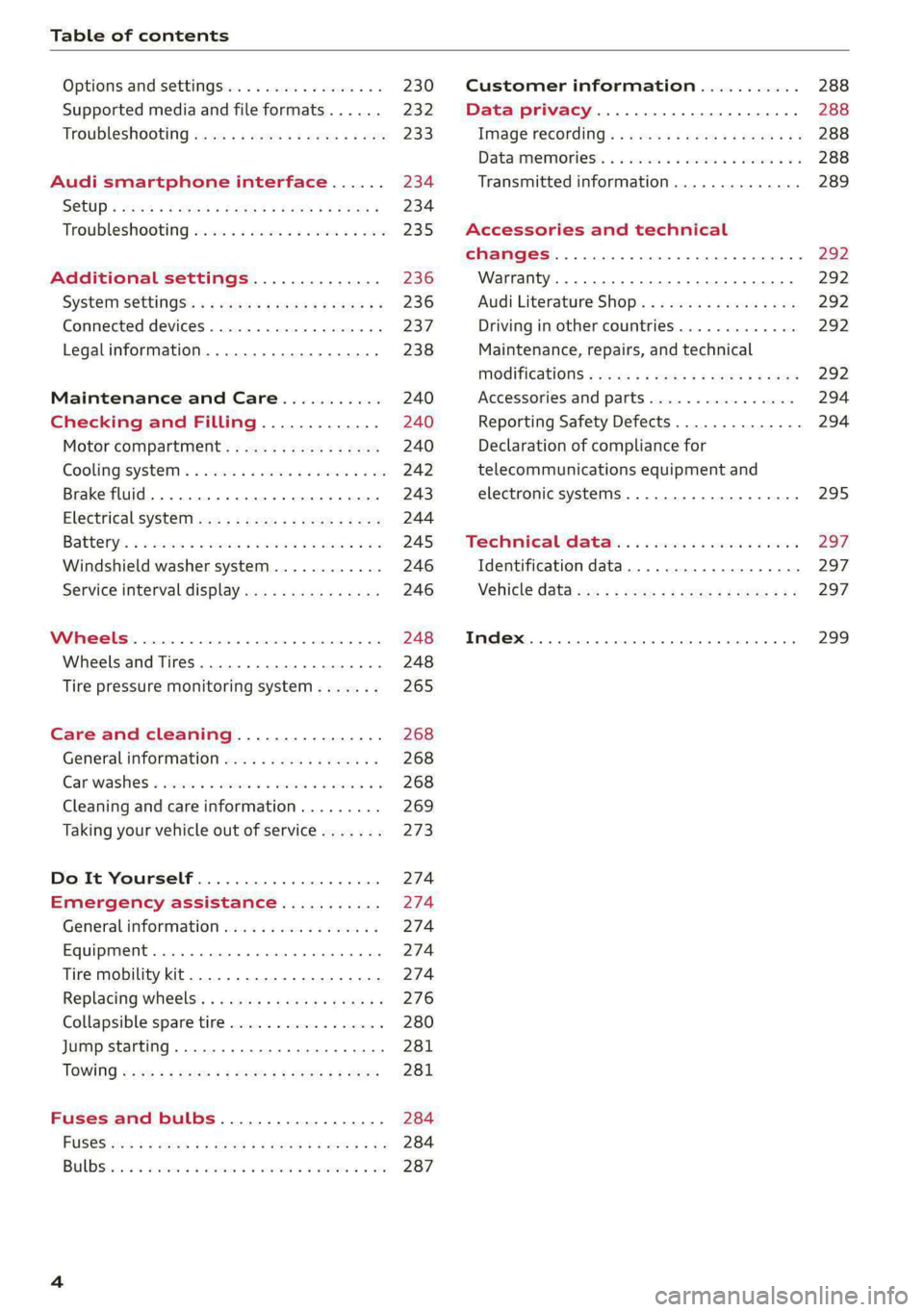
Table of contents
Options and settings................. 230
Supported media and file formats...... 232
Troubleshooting wv s & wees se cows 6 bey 233
Audi smartphone interface...... 234
SGtUP = stain ¢ 2 eeuis = Hae x Rae GR ROE 234
Troubleshooting swies 2 osc se enw so exe 235
Additional settings.............. 236
SYStETISECLINGS: « + eaws « + caves 5 3 seems 5 236
Connected devices............0 000s 237
Legalinformation................... 238
Maintenance and Care........... 240
Checking and Filling............. 240
Motor'compartment’. sc. ¢ « wcen es oes 240
COOliMgISyStEIM ss sumsivs aw swseee ew smnvews oo ane 242
Brake fluid. ........ 0.0.0.0 c eee eee 243
Electrical SVSt@liccs « s scum 2 : sare o 2 wae 244
Battenyis ¢ «sic s 6 wen 2 9 ween oy were 2 ere 245
Windshield washer system...........- 246
Service interval display............... 246
WWINGOIS : ceciices co costes 6 a sncewvs ow oneners 0 at 248
Wheels and Tires . . 248
Tire pressure monitoring system....... 265
Care and cleaning................ 268
Generalinformation................. 268
Car washes « swe: vx awa: oo amin 0 x snanae #2 268
Cleaning and care information......... 269
Taking your vehicle out of service....... 273
Do It Yourself .................... 274
Emergency assistance........... 274
General information................. 274
Equipment............. 0c eee eee 274
Tire mobility kit..................00. 274
Replacing wheels. ........:cceeeeeees 276
Collapsible spare tire..............0.. 280
Jump starting ..............e eee eee 281
IQWING were: worms 5 cee 9 + eee + eee 281
Fuses and bulbs.................. 284
FUSES 3 2 amow 4 meme a 2 mee ay ome 2 284
Bel DSyonsn = secaais 2s omens a orate vw acct =e aa 287
Customer information........... 288
Data privacy..................008. 288
Image recording. ...........eeeeenees 288
Dataiimenmtoniess: ss scams x x wus ov eee o 3 6 288
Transmitted information.............. 289
Accessories and technical
CHANGE|S.... 1... eee eee 292
Warranty..........0. 000. e eee eee ee 292
Audi Literature Shop..............00. 292
Driving in other countries............. 292
Maintenance, repairs, and technical
MODIFICATIONS + sayse x e neu ¢ x caw x x cues 292
Accessories and parts................ 294
Reporting Safety Defects.............. 294
Declaration of compliance for
telecommunications equipment and
electronic systems............--.0005 295
Technical data... . «60.6 even ee ves 297
Identification data................04. 297
Vehicle data acc = s sews =: eens oy ees eee 297
INdeX 0... ee eee 299
Page 36 of 316
![AUDI E-TRON 2020 Owners Manual Opening and closing
—To turn the alarm off, press the red [PANIC] but-
ton again.
Lost key/replacing a key
If a vehicle key is lost, contact an authorized Audi
dealer or authorized](/manual-img/6/57623/w960_57623-35.png "AUDI E-TRON 2020 Owners Manual Opening and closing
—To turn the alarm off, press the red [PANIC] but-
ton again.
Lost key/replacing a key
If a vehicle key is lost, contact an authorized Audi
dealer or authorized")
Opening and closing
—To turn the alarm off, press the red [PANIC] but-
ton again.
Lost key/replacing a key
If a vehicle key is lost, contact an authorized Audi
dealer or authorized Audi Service Facility. Have
this vehicle key deactivated. It is important to
bring all keys with you.
If a key is lost, you should report it to your insur-
ance company.
Electronic immobilizer
The immobilizer prevents unauthorized use of
the vehicle.
In some cases, it may not be possible to start the
vehicle if there is a vehicle key from a different
vehicle manufacturer on the key chain.
Data in the vehicle key
When driving, service and maintenance-relevant
data is continuously stored in your vehicle key. An
authorized Audi dealer or authorized Audi Service
Facility can read out this data and tell you about
the work your vehicle needs.
ZA WARNING
Observe the safety precautions > page 29.
@) Note
Protect the key against high temperatures
and direct sunlight.
@ For the sake of the environment
XE Do not dispose of vehicle keys in household
trash. They contain materials that can be re-
cycled. Contact an authorized Audi dealer or
authorized Audi Service Facility for more in-
formation.
@) Tips
— The vehicle key function can be temporarily
disrupted by interference from transmitters
near the vehicle working in the same fre-
quency range (such as a mobile device or ra-
dio equipment). Always check if your vehicle
is locked.
34
— Applies to: MMI: You can display the num-
ber of vehicle keys programmed to the vehi-
cle: Select on the home screen: VEHICLE >
Settings & Service > Vehicle information.
— For an explanation on conformity with the
FCC regulations in the United States and the
Industry Canada regulations, see
=> page 295.
Unlocking and locking the vehicle
[RAZ-0025]
Fig. 26 Door handle: sensor for locking
You can unlock and lock your vehicle using either
the buttons on the vehicle key or using the sen-
sors* in the door handles. The settings in the
MMI specify which doors will unlock > page 30.
Unlocking or locking using the vehicle key
buttons
> To unlock the vehicle, press the @ button
=> page 33, fig. 25.
> To lock the vehicle, press the & button once.
Unlocking or locking using the sensors
Applies to: vehicles with convenience key
> To unlock a door or the luggage compartment
lid, grasp the door handle or luggage compart-
ment lid handle.
> To lock the vehicle, close the doors and touch
the outer sensor on the door handle once
=> fig. 26. Do not grasp the door handle while
locking the vehicle, or else the vehicle will not
lock. The door cannot be opened for a brief pe-
riod directly after locking it. This way you have
the opportunity to check if the doors locked
correctly.
Page 96 of 316

Driving
Vehicle sound
The electric drive system generates considerably
less noise than a combustion engine. An artificial
engine sound is generated when driving electri-
cally so that the vehicle can be heard from the
outside when driving. The vehicle sound auto-
matically fades out at higher speeds when the
sounds from the tires and wind start increasing.
ZA WARNING
Other road users may not be able to defini-
tively hear electric vehicles when they are
driving. This increases the risk of an accident
particularly when driving in areas with little
traffic, when maneuvering, or when driving in
reverse.
IAT eMaL eLUN or da aCe
Your driving style greatly influences the amount
of fuel and energy consumed, the environmental
impact, and the wear on the motor, brakes, and
tires. Note the following information for efficient
and environmentally-conscious driving:
— Select the Audi drive select* efficiency mode.
— Turn off electrical equipment that is not need-
ed, for example seat heating*.
— Anticipate upcoming traffic situations while
driving to avoid unnecessary acceleration and
braking.
— Avoid driving at high speeds.
— Avoid adding extra weight to the vehicle if pos-
sible, for example by not leaving roof racks or
bike racks installed when they are not needed.
— Make sure the tire pressure is correct.
— Have maintenance performed regularly on the
vehicle.
— Do not drive with winter tires during the summ-
er.
— Brake early and evenly to use recuperation.
Messages
B Drive system: malfunction! Safely stop vehi-
cle
94
There is a malfunction in the drive system. The
vehicle can no longer be driven. Park the vehicle
in a safe location as soon as possible. See an au-
thorized Audi dealer or authorized Audi Service
Facility for assistance.
EB rive system: malfunction! Please contact
Service
There is a malfunction in the drive system. Drive
slowly to an authorized Audi dealer or authorized
Audi Service Facility to have the malfunction cor-
rected.
a Drive system: warning! Limited performance
The driving power is limited. The high-voltage
battery may not be sufficiently charged or is at
the operating temperature threshold, for exam-
ple, when the outside temperatures are extreme-
ly cold.
BS Vehicle sound: malfunction! Pedestrians
cannot hear vehicle. Please contact Service
There is a malfunction in the vehicle sound func-
tion. Drive extremely carefully, since other road
users may not be able to hear your electric vehi-
cle. Drive to an authorized Audi dealer or author-
ized Audi Service Facility immediately to have the
malfunction corrected.
Brakes
General information
You can apply the vehicle's brakes using the brake
pedal.
Operating noise
Noises may occur when braking depending on the
speed, braking force, and outside conditions such
as temperature and humidity.
When the vehicle is stationary, the brake system
performs system tests at regular intervals. This
can cause brief noise and haptic feedback effects
on the brake pedal.
Braking effect
The response time from the brakes depends on
the weather and environmental conditions. To
ensure the optimal braking effect, the brake >
Page 109 of 316

4KE012721BE
High-voltage system
High-voltage system
General information
Introduction
All work done on the high-voltage system must
only be performed by certified high-voltage tech-
nicians at authorized Audi dealers or authorized
Audi Service Facilities in accordance with Audi
guidelines.
The high-voltage system is composed of the fol-
lowing high-voltage components, among other
things: the high-voltage battery, the power elec-
tronics, the electric motors, the high-voltage A/C
compressor, the high-voltage heater, the charg-
ing system and charging port as well as the or-
ange high-voltage wiring.
The high-voltage battery is located on the vehicle
underbody and does not require any maintenance
from the driver.
ZA WARNING
The voltage in the high-voltage system is high
enough to cause fatal injuries. Touching a
damaged high-voltage component can result
in a fatal electric shock. The components in
the high-voltage system are marked with a
warning label which warns against the high-
voltage.
— The voltage level in the high-voltage system
is still dangerous and potentially life-threat-
ening when the ignition is switched off.
— Never perform work on the orange high-
voltage cables or on other high-voltage
components. Only authorized repair facili-
ties that are certified may perform work on
the high-voltage system.
— Never damage, alter or remove the orange
high-voltage cable or disconnect it from the
high-voltage system.
— Never perform any work using cutting, shap-
ing or sharp-edged tools or heat sources
near the high-voltage system and high-volt-
age cables.
— Gases that escape from the high-voltage
battery can be poisonous or flammable.
— Damage to the high-voltage battery could
cause the high-voltage battery to leak im-
mediately or in the future, and poisonous or
flammable gases could escape. Do not in-
hale the gases!
— Do not expose yourself to any leaking fluids
and do not come into contact with them.
— The high-voltage battery electrolyte fluid is
caustic. If electrolyte fluid comes into con-
tact with the skin, flush the affected area for
at least 15 minutes with clean water. Then
wash the affected area with soap. Have the
affected area examined by a medical profes-
sional.
— In the event of a technical emergency, in-
form the responders that the vehicle is
equipped with a high-voltage battery.
@) Note
The high-voltage system can be damaged if
the vehicle underbody comes into contact
with the ground. Immediately drive your vehi-
cle to an authorized repair facility and have it
inspected.
107
Page 212 of 316
Navigation
Map updates settings
Applies to: vehicles with a navigation system and Audi con-
nect Infotainment
» Applies to: MMI: Select on the home screen:
SETTINGS > System maintenance.
Automatic online map update: when the func-
tion is switched on, map updates will be auto-
matically downloaded and installed.
©) Note
Read the information about Audi connect, and
be sure to note the connectivity costs section
=@ in General information on page 187.
Traffic information
Introduction
Applies to: vehicles with navigation system
a) a)
Fi Delay along the route: 30 Min
i Possible saved time: 15 Min
al (coy 2
(coe)
Cs
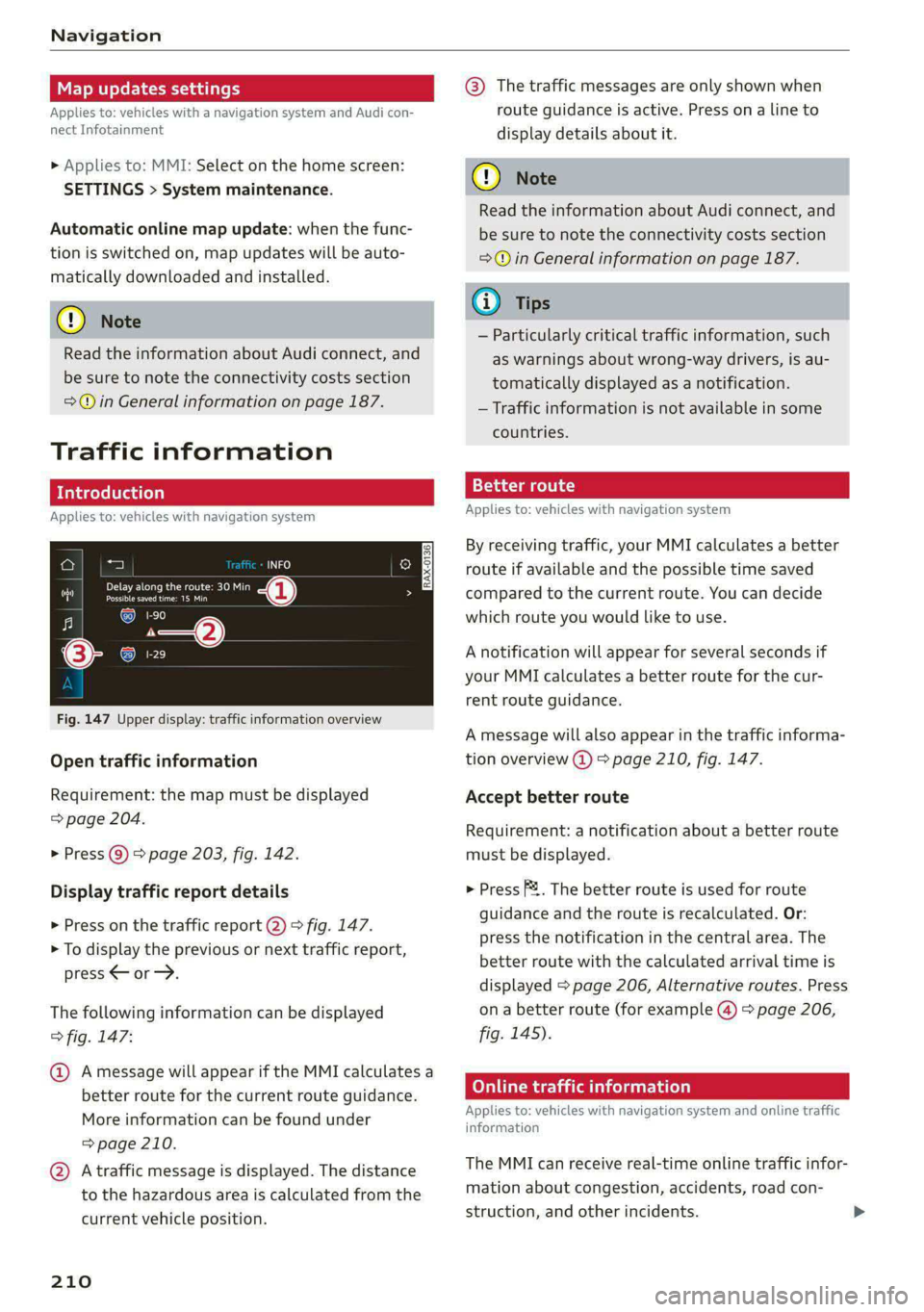
Fig. 147 Upper display: traffic information overview
Open traffic information
Requirement: the map must be displayed
=> page 204.
> Press Q) > page 203, fig. 142.
Display traffic report details
> Press on the traffic report 2) > fig. 147.
> To display the previous or next traffic report,
press < or.
The following information can be displayed
> fig. 147:
@ Amessage will appear if the MMI calculates a
better route for the current route guidance.
More information can be found under
= page 210.
@ Atraffic message is displayed. The distance
to the hazardous area is calculated from the
current vehicle position.
210
@® The traffic messages are only shown when
route guidance is active. Press ona line to
display details about it.
C) Note
Read the information about Audi connect, and
be sure to note the connectivity costs section
=@ in General information on page 187.
G) Tips
— Particularly critical traffic information, such
as warnings about wrong-way drivers, is au-
tomatically displayed as a notification.
— Traffic information is not available in some
countries.
13{-3 aaa colt) a)
Applies to: vehicles with navigation system
By receiving traffic, your MMI calculates a better
route if available and the possible time saved
compared to the current route. You can decide
which route you would like to use.
A notification will appear for several seconds if
your MMI calculates a better route for the cur-
rent route guidance.
A message will also appear in the traffic informa-
tion overview @) > page 210, fig. 147.
Accept better route
Requirement: a notification about a better route
must be displayed.
> Press F&. The better route is used for route
guidance and the route is recalculated. Or:
press the notification in the central area. The
better route with the calculated arrival time is
displayed > page 206, Alternative routes. Press
ona better route (for example @) > page 206,
fig. 145).
Online traffic information
Applies to: vehicles with navigation system and online traffic
information
The MMI can receive real-time online traffic infor-
mation about congestion, accidents, road con-
struction, and other incidents.
Page 239 of 316

4KE012721BE
Additional settings
Bluetooth
> Applies to: MMI: Select on the home screen:
SETTINGS > Connection settings > Bluetooth.
Bluetooth
You can select a setting for visibility of the MMI
to other Bluetooth devices. To connect a new
Bluetooth device, the Visible setting must be se-
lected. If Invisible is selected, a Bluetooth con-
nection will only be possible with paired devices.
If Off is selected, no Bluetooth device can be con-
nected.
Bluetooth audio player
When this function is switched on, the profile
will load automatically when your Bluetooth au-
dio player is within range.
Bluetooth name
The MMI’s Bluetooth name is displayed and can
be changed.
Toy aaU eM oer ha)
> Applies to: MMI: Select on the home screen:
SETTINGS > System maintenance > Software
update.
> If necessary, insert a storage medium with the
update data into the corresponding drive
=> page 232.
> Press Search for updates.
> Press on the desired update.
> Press Next.
> Follow the system instructions.
ZA\ WARNING
— Perform the installation only when the vehi-
cle is stationary. Otherwise, this increases
the risk of an accident
— If the installation fails, contact an author-
ized Audi dealer or authorized Audi Service
Facility immediately to have the malfunction
corrected.
©) Note
The connection costs for the software update
are included in the Audi connect pricing.
@) Tips
The length of the process depends on the size
of the update.
Tale arclinee adie}
> Applies to: MMI: Select on the home screen:
SETTINGS > System maintenance > Restore
factory settings.
>» Select the desired functions individually, or
> Select the option Select all.
> Press Apply. The settings will be reset. The key
user will remain stored.
> To also delete the key user, press Remove key
user.
> To completely delete a smartphone that is
paired with the Audi smartphone interface, re-
set Audi smartphone interface and Bluetooth.
G) Tips
— Make sure that not only the settings were
deleted but also the stored data, if necessa-
ry.
— The system may restart when the settings
are reset. This may take a few minutes.
Connected devices
(eee eels (is
Requirement: the vehicle must be stationary and
the ignition must be switched on.
> Applies to: MMI: Select on the home screen:
SETTINGS > Connected devices.
Possible menu items:
— Telephone 1
— Telephone 2
— Audio player
— Wi-Fi hotspot
— Headset
myAudi app
This function is available if the myAudi app is in-
stalled on your mobile device and started, and if
the mobile device is connected with the vehicle’s
Wi-Fi hotspot.
237
>
Page 268 of 316

Wheels
As an added safety feature, your vehicle has been
equipped with a tire pressure monitoring system
(TPMS) that illuminates a low tire pressure tell-
tale when one or more of your tires is significant-
ly under-inflated. Accordingly, when the low tire
pressure telltale illuminates, you should stop and
check your tires as soon as possible, and inflate
them to the proper pressure. Driving ona signifi-
cantly under-inflated tire causes the tire to over-
heat and can lead to tire failure. Under-inflation
also reduces fuel efficiency and tire tread life,
and may affect the vehicle's handling and stop-
ping
ability.
Please note that the TPMS is not a substitute for
proper tire maintenance, and it is the driver's re-
sponsibility to maintain correct tire pressure,
even if under-inflation has not reached the level
to trigger illumination of the TPMS low tire pres-
sure telltale.
Your vehicle has also been equipped with a TPMS
malfunction indicator to indicate when the sys-
tem is not operating properly. The TPMS mal-
function indicator is combined with the low tire
pressure telltale. When the system detects a
malfunction, the telltale will flash for approxi-
mately one minute and then remain continuously
illuminated. This sequence will continue upon
subsequent vehicle start-ups as long as the mal-
function exists.
When the malfunction indicator is illuminated,
the system may not be able to detect or signal
low tire pressure as intended. TPMS malfunctions
may occur for a variety of reasons, including the
installation of replacement or alternate tires or
wheels on the vehicle that prevent the TPMS
from functioning properly. Always check the
TPMS malfunction telltale after replacing one or
more tires or wheels on your vehicle to ensure
that the replacement or alternate tires and
wheels allow the TPMS to continue to function
properly.
266
If the tire pressure monitoring indicator
Eye) tLe
Applies to: vehicles with Tire Pressure Monitoring System in-
dicator
The tire pressure indicator in the instrument
cluster informs you if the tire pressure is too low
or if there is a system malfunction.
Using the ABS sensors, the tire pressure monitor-
ing system compares the tire tread circumference
and vibration characteristics of the individual
tires. If the pressure changes in one or more
tires, this is indicated in the instrument cluster
display with an indicator light @ and a message.
If only one tire is affected, the location of that
tire will be indicated.
The tire pressures must be stored again each
time you change the pressures (switching be-
tween partial and full load pressure) or after
changing or replacing a tire on your vehicle
= page 267. The tire pressure monitoring system
only monitors the tire pressure you have stored.
Refer to the tire pressure label for the recom-
mended tire pressure for your vehicle
=> page 258, fig. 164.
Tire tread circumference and vibration character-
istics can change and cause a tire pressure warn-
ing if:
— The tire pressure in one or more tires is too low
— The tires have structural damage
— The tire was replaced or the tire pressure was
changed and it was not stored > page 267
— Tires that are only partially used are replaced
with new tires
Indicator lights
If the @ indicator light turns on, there is a loss
of pressure in at least one tire > A\ Check the
tires and replace or repair if necessary. Check and
correct the pressures of all four tires and store
the pressure again > page 267.
ITPMS| Tire pressure: malfunction! See owner's
manual
Ifo appears after switching the ignition on or
while driving and the indicator light in the in-
strument cluster blinks for approximately one >
Page 289 of 316

4KE012721BE
Fuses and bulbs
Fuse panel (3) (black)
No. Equipment
Trailer hitch
Passenger’s side rear safety belt tensioner
Driver’s side rear safety belt tensioner
Trailer hitch socket
Left trailer hitch light
Rear seat heating
Ola;
AD)
M/A]
W]e
Left tail light
Luggage compartment, charging port cen-
11 tral locking
12 | Luggage compartment lid
Fuse panel @) (red)
No. | Equipment
Not assigned
Fuse panel (8) (brown)
No. | Equipment
1 | Driver assistance systems control module
2 | Audi phone box
3 | Right front lumbar support
4 | Side assist
5 | Service disconnect switch
6 |Tire pressure monitoring system
7 |Auxiliary climate control
8 | Exterior antenna
9 | Rear climate control system control panel
Bb oO
TV tuner, data exchange and telematics
control module
LL
Virtual exterior mirrors, convenience ac-
cess and start authorization control mod-
ule
12 Garage door opener
13. Rearview camera, peripheral cameras
14 Right tail light
15
Right trailer hitch light
Bulbs
Your vehicle is equipped with maintenance-free
headlights and tail lights. However, if a light bulb
needs to be replaced, please contact an author-
ized Audi dealer or authorized Audi Service Facili-
ty.
287