2020 AUDI E-TRON alarm
[x] Cancel search: alarmPage 31 of 316

4KE012721BE
Opening and closing
Opening and closing
Central locking
General information
Z\ WARNING
— If you leave the vehicle, switch the ignition
off and take the key with you. This applies
particularly when children remain in the ve-
hicle. Otherwise, children could start the ve-
hicle or operate electrical equipment (such
as power windows), which increases the risk
of an accident.
— Applies to: vehicles with anti-theft alarm
system: No one, especially children, should
stay in the vehicle when it is locked from the
outside, because the windows can no longer
be opened from the inside > page 32, Anti-
theft alarm system. Locked doors make it
more difficult for emergency workers to en-
ter the vehicle, which puts lives at risk.
All doors and the luggage compartment lid can
be centrally unlocked and locked at once. You can
select in the MMI if the entire vehicle or only the
driver's door should unlock when unlocking the
vehicle > page 30. The turn signals flash twice
when you unlock the vehicle and flash once when
you lock the vehicle. If they do not flash when
locking, check if all doors and lids are closed.
Depending on the vehicle equipment, you may
have different options for centrally unlocking and
locking your vehicle.
— Vehicle key > page 34
— Sensors in the door handles > page 34
— Lock cylinder on the driver's door > page 32
— Central locking switch inside > page 31
Vehicle key
The term “vehicle key” refers to the remote con-
trol key or convenience key*. The convenience
key* is a remote control key with special func-
tions > page 34 and > page 88.
Power closing*
When closing a door or the luggage compart-
ment lid, you only have to Let it fall lightly into
the latch. It then closes automatically > A.
Automatic locking
If you unlock the vehicle but then do not open
any of the doors, the luggage compartment, or
the hood within a short period time, the vehicle
locks again automatically. This feature prevents
the vehicle from being accidentally left unlocked
for a long period of time.
Automatic locking (Auto Lock)
The Auto Lock function locks all doors and the
luggage compartment lid once the speed has ex-
ceeded approximately 9 mph (15 km/h). The ve-
hicle will unlock again if the unlock function in
the central locking switch is pressed, the “P” gear
is engaged, or the ignition is switched off.
You can open the doors individually from the in-
side by pulling the door handle one time. To open
the rear doors individually, you must pull the
door handle twice.
In the event of a crash with airbag deployment,
the doors will also automatically unlock to allow
access to the vehicle.
Unintentionally locking yourself out
Only lock your vehicle when all of the doors and
the luggage compartment lid are closed and
there is no key in the vehicle. This reduces the
risk of locking yourself out accidentally.
The
following features help to reduce the risk of
locking your vehicle key in the vehicle:
— If the driver's door is open, the vehicle cannot
be locked by pressing the & button on the re-
mote control key or by touching the locking
sensor* on a door.
— If the vehicle key that was used most recently is
inside the luggage compartment, the luggage
compartment lid will automatically open again
after it closes > ©.
— If the last vehicle key that was used is detected
inside the vehicle, it will not be possible to lock >
29
Page 34 of 316

Opening and closing
forcefully pulling the door handle beyond its no-
ticeable resistance two times. Then press the
door handle back into its original position, if nec-
essary.
Mechanically unlocking and locking the
doors
If the central locking fails, you must unlock or
lock the doors separately.
RAZ-0026,
5 a S 2
<
go a
Fig. 24 Door: mechanically locking
Unlocking or locking the driver's door with
the mechanical key
> Remove the mechanical key > page 33.
> Insert the mechanical key into the slot under
the door handle and pry the cap off > fig. 23.
> To unlock the driver's door, turn the key to the
unlock position in the direction of arrow @)
> fig. 23.
> Pull firmly on the door handle to open the driv-
er's door. The door handle swings out slightly
farther than normal.
> To lock the driver's door, select the "P" position
and turn the key once to the close position
@°A.
32
Locking the front passenger's door and rear
doors using the mechanical key
The mechanical lock is located on the edge of the
doors. It is only visible when the door is open.
> Remove the mechanical key > page 33.
>» Remove the cap from the opening > fig. 24.
> Insert the mechanical key into the slot on the
inside and turn it all the way to the left (when
locking the right door), or to the right (when
locking the left door).
> Install the cap in the opening and close the
door.
Once the doors are closed, it is no longer possible
to open them from the outside. The front doors
can be opened from the inside by pulling the
door handle one time. The rear doors can be un-
locked from the inside by pulling the door handle
one time and then opened by pulling the door
handle again. If the vehicle is without power, the
doors can be unlocked from the inside by first
pulling the door handle beyond its noticeable re-
sistance. The doors can then can be opened by
pulling the handle again. If the child safety lock
in one of the rear doors is activated, you must
first pull the door handle from the inside. Then
you can open the door from the outside.
ZA\ WARNING
Observe the safety precautions > page 29.
ON aa
Applies to: vehicles with anti-theft alarm system
If the anti-theft alarm system detects a vehicle
break-in, audio and visual warning signals are
triggered. The anti-theft alarm system is switch-
ed on or off when locking or unlocking your vehi-
cle. If the alarm is triggered, it will shut off auto-
matically after a certain amount of time.
Switching the alarm off manually
> To switch the alarm off, press the G button on
the vehicle key or switch the ignition on.
Depending on the vehicle equipment, the anti-
theft alarm system may have the following fea-
tures:
Page 35 of 316
4KE012721BE
Opening and closing
Break-in security feature
The alarm will sound if there is a break-in at the
doors, hood, and/or luggage compartment lid.
Interior/towing protection monitor
The alarm will be triggered if there are move-
ments detected in the vehicle interior (for exam-
ple, by animals) or if there is a change in the vehi-
cle angle (for example, when the vehicle is being
towed).
You can prevent the alarm from being triggered
by deactivating the interior/towing protection
monitor.
Deactivating the interior/towing protection
monitor
There are the following options for deactivating
the interior/towing protection monitor:
> Press the & button on the vehicle key a second
time within two seconds. Or
> Applies to: vehicles with convenience key:
Touch the sensor on the door handle a second
time within two seconds. Or
> Turn the mechanical key in the door lock to the
close position a second time within 2 seconds.
If you lock the vehicle, then the interior/towing
protection monitor will stay off until the next
time the vehicle is unlocked.
ZA\ WARNING
No one, especially children, should stay in the
vehicle when it is locked from the outside, be-
cause the windows can no longer be opened
from the inside. Locked doors make it more
difficult for emergency workers to enter the
vehicle, which puts lives at risk.
@) Tips
The interior/towing protection monitor only
functions correctly when the windows and the
panorama glass roof* are closed.
RAZ-0621
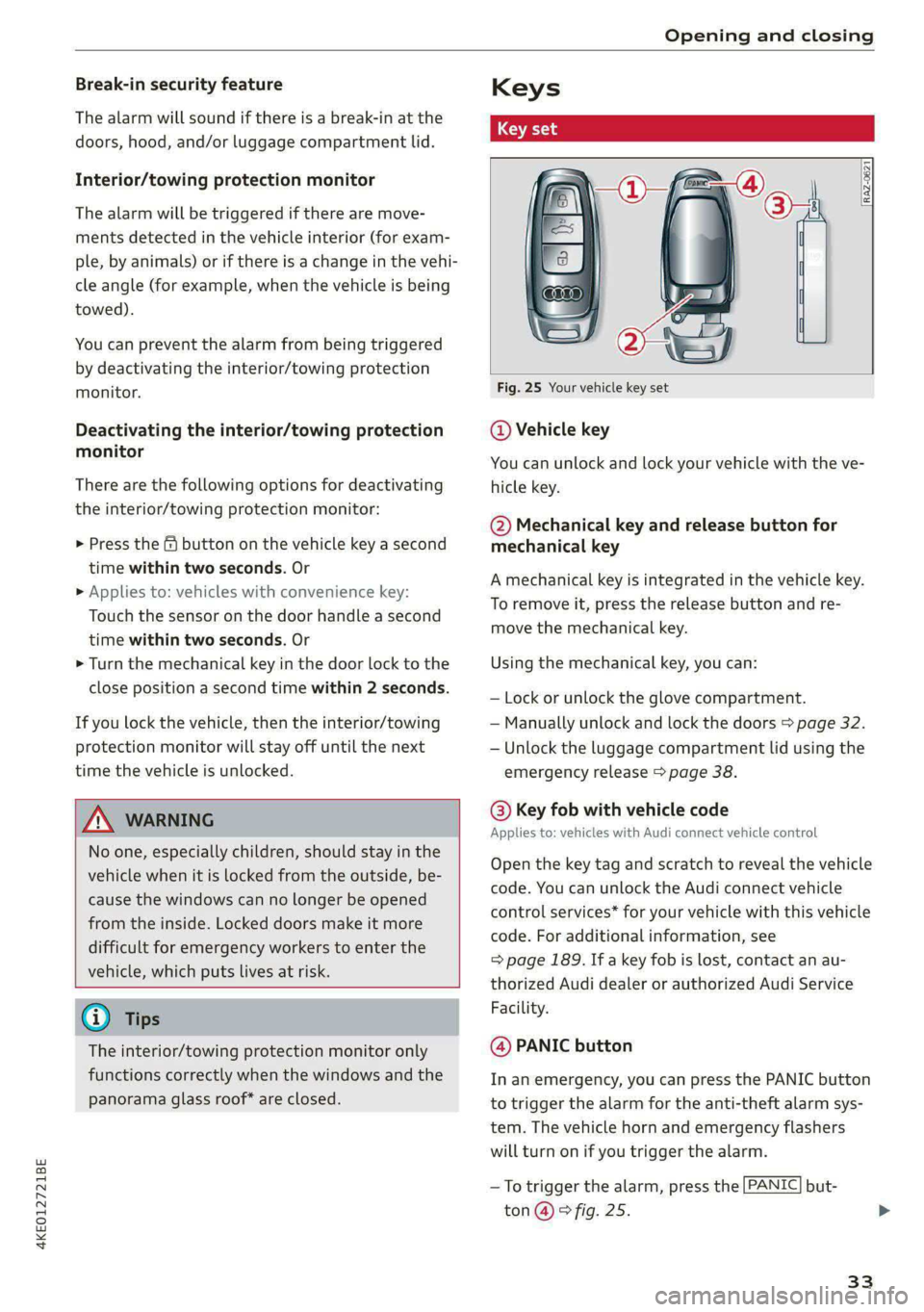
Fig. 25 Your vehicle key set
@ Vehicle key
You can unlock and lock your vehicle with the ve-
hicle key.
@ Mechanical key and release button for
mechanical key
A mechanical key is integrated in the vehicle key.
To remove it, press the release button and re-
move the mechanical key.
Using the mechanical key, you can:
— Lock or unlock the glove compartment.
— Manually unlock and lock the doors > page 32.
— Unlock the luggage compartment lid using the
emergency release > page 38.
@ Key fob with vehicle code
Applies to: vehicles with Audi connect vehicle control
Open the key tag and scratch to reveal the vehicle
code. You can unlock the Audi connect vehicle
control services* for your vehicle with this vehicle
code. For additional information, see
= page 189. If a key fob is lost, contact an au-
thorized Audi dealer or authorized Audi Service
Facility.
@ PANIC button
In an emergency, you can press the PANIC button
to trigger the alarm for the anti-theft alarm sys-
tem. The vehicle horn and emergency flashers
will turn on if you trigger the alarm.
—To trigger the alarm, press the [PANIC] but-
ton @ © fig. 25.
33
Page 36 of 316
![AUDI E-TRON 2020 Owners Manual Opening and closing
—To turn the alarm off, press the red [PANIC] but-
ton again.
Lost key/replacing a key
If a vehicle key is lost, contact an authorized Audi
dealer or authorized](/manual-img/6/57623/w960_57623-35.png "AUDI E-TRON 2020 Owners Manual Opening and closing
—To turn the alarm off, press the red [PANIC] but-
ton again.
Lost key/replacing a key
If a vehicle key is lost, contact an authorized Audi
dealer or authorized")
Opening and closing
—To turn the alarm off, press the red [PANIC] but-
ton again.
Lost key/replacing a key
If a vehicle key is lost, contact an authorized Audi
dealer or authorized Audi Service Facility. Have
this vehicle key deactivated. It is important to
bring all keys with you.
If a key is lost, you should report it to your insur-
ance company.
Electronic immobilizer
The immobilizer prevents unauthorized use of
the vehicle.
In some cases, it may not be possible to start the
vehicle if there is a vehicle key from a different
vehicle manufacturer on the key chain.
Data in the vehicle key
When driving, service and maintenance-relevant
data is continuously stored in your vehicle key. An
authorized Audi dealer or authorized Audi Service
Facility can read out this data and tell you about
the work your vehicle needs.
ZA WARNING
Observe the safety precautions > page 29.
@) Note
Protect the key against high temperatures
and direct sunlight.
@ For the sake of the environment
XE Do not dispose of vehicle keys in household
trash. They contain materials that can be re-
cycled. Contact an authorized Audi dealer or
authorized Audi Service Facility for more in-
formation.
@) Tips
— The vehicle key function can be temporarily
disrupted by interference from transmitters
near the vehicle working in the same fre-
quency range (such as a mobile device or ra-
dio equipment). Always check if your vehicle
is locked.
34
— Applies to: MMI: You can display the num-
ber of vehicle keys programmed to the vehi-
cle: Select on the home screen: VEHICLE >
Settings & Service > Vehicle information.
— For an explanation on conformity with the
FCC regulations in the United States and the
Industry Canada regulations, see
=> page 295.
Unlocking and locking the vehicle
[RAZ-0025]
Fig. 26 Door handle: sensor for locking
You can unlock and lock your vehicle using either
the buttons on the vehicle key or using the sen-
sors* in the door handles. The settings in the
MMI specify which doors will unlock > page 30.
Unlocking or locking using the vehicle key
buttons
> To unlock the vehicle, press the @ button
=> page 33, fig. 25.
> To lock the vehicle, press the & button once.
Unlocking or locking using the sensors
Applies to: vehicles with convenience key
> To unlock a door or the luggage compartment
lid, grasp the door handle or luggage compart-
ment lid handle.
> To lock the vehicle, close the doors and touch
the outer sensor on the door handle once
=> fig. 26. Do not grasp the door handle while
locking the vehicle, or else the vehicle will not
lock. The door cannot be opened for a brief pe-
riod directly after locking it. This way you have
the opportunity to check if the doors locked
correctly.
Page 37 of 316

4KE012721BE
Opening and closing
ZA WARNING
Observe the safety precautions > page 29.
@) Tips
— Only use the vehicle key when you can see
the
vehicle.
— The vehicle can only be locked when the "P”
selector lever position is engaged.
— Do not use the vehicle key to lock and un-
lock when you are inside the vehicle. Other-
wise, you could trigger the anti-theft
alarm*. If this happens, press the &@ unlock
button.
@) Tips
Applies to: vehicles with convenience key
— When unlocking or locking the vehicle, the
convenience key cannot be more than ap-
proximately 4 feet (1.5 m) away from the
door handle or luggage compartment.
— Unlocking with the convenience key (keyless
access) can be deactivated in the MMI sys-
tem > page 30.
— To prevent the vehicle battery from dis-
charging, the energy management gradual-
ly switches off convenience functions that
are not needed. You then may no longer be
able to unlock your vehicle with the sensors.
BTM yl aela alma
RAZ-0622
Fig. 27 Vehicle key: removing the battery holder
LED in the vehicle key
The LED @) indicates the vehicle key function.
> If you press a button briefly, the LED blinks
once.
> If you press and hold a button (convenience
opening/closing), the LED blinks several times.
> If the LED does not blink, the vehicle key bat-
tery is drained. Replace the battery in the vehi-
cle key.
Replacing the vehicle key battery
> Remove the mechanical key > page 33 and in-
sert it at an angle into the opening > fig. 27.
> Push the mechanical key in the opening in the
direction of the arrow to operate the release
button on the inside @). To reduce the risk of
damage, do not try to pry off the cover.
> Remove the cover from the battery tray.
> Insert the new battery with the “+” symbol fac-
ing up.
> Close the battery tray with the cover.
> Insert the mechanical key.
@) For the sake of the environment
Discharged batteries must be disposed of us-
ing
methods that will not harm the environ-
ment. Do not dispose of them in household
trash.
@) Tips
Replacement batteries for the vehicle key
must meet the same specifications as the
original battery.
Luggage compartment
lid
General information
ZA WARNING
— Applies to: vehicles with anti-theft alarm
system: No one, especially children, should
stay in the vehicle when it is locked from the
outside, because the windows can no longer
be opened from the inside > page 32.
Locked doors make it more difficult for
emergency workers to enter the vehicle,
which puts lives at risk.
— Always close and lock the luggage compart-
ment lid and the doors when the vehicle is
not in use. Otherwise someone such as a >
35
Page 193 of 316

4KE012721BE
Audi connect
— Start or stop climate control
— Program the timer
— Deactivate or activate the timer
For additional information, see > page 85.
Alert services
Requirement: a key user must be set in the vehi-
cle > page 190.
You can adjust the following services in the
myAudi app. You will be notified by a push notifi-
cation and/or e-mail if an alarm is triggered for
your vehicle.
— Geofencing Alert: a permitted/prohibited zone
was entered.
— Speed Alert: a set speed was exceeded.
— Valet Alert: a set speed was exceeded or a per-
mitted/prohibited zone was entered.
ZA\ WARNING
— Do not ignore messages and warning or indi-
cator lights that turn on in the vehicle be-
cause of the information in the vehicle sta-
tus report. This could lead to break downs in
on the road, accidents and serious injuries.
— Only perform the climate control functions
if your vehicle was shut off correctly and the
ignition is switched off.
— Only perform charging functions on the
high-voltage battery if the vehicle is shut off
correctly, is connected to a suitable socket
and if the ignition is switched off.
@) Tips
For some services, you can select if you would
like to be notified with a push notification
and/or an e-mail.
Settings
Ce) atolnl Mariano) 4
> Applies to: MMI: Select on the home screen:
SETTINGS > Connection settings > Mobile
phone network.
Depending on the country, vehicle equipment,
and connection type, the following functions may
be available:
Data connection settings
Using the Data connection settings menu, you
can set when the system should connect to the
Internet. The Internet connection disconnects
automatically once the requested Audi connect
Infotainment service no longer requires any data.
— Data roaming: data roaming is switched off at
the factory. To use a data connection outside of
the country, data roaming must be switched
on. The setting is stored for the current SIM
card or the mobile device that is currently con-
nected.
— Allow MMI online services: when this function
is switched on, a data connection is automati-
cally established in order to use Audi connect
Infotainment services.
— Allow Wi-Fi devices: when the function is
switched on, mobile devices can use the Inter-
net connection through the Wi-Fi hotspot.
Access point
The connection is configured automatically based
on the SIM card being used. The following values
can be changed. You can obtain more information
from your cell phone service provider.
— Access Point Name (APN): the access point de-
pends on the cell phone service provider and is
assigned automatically.
— User name: your cell phone service provider as-
signs the user name for your online profile.
— Password: your cell phone service provider as-
signs the password for your online profile.
— Apply settings: saves the changed settings.
— Reset configuration: resets the connection set-
tings.
Data usage counter
Your current data usage is displayed.
— Reset counter: you can reset your usage statis-
tics to zero.
— Warning limit: you can set a warning limit for
your data usage (GB/MB).
191
>
Page 288 of 316

Fuses and bulbs
Fuse panel (a) (black) Fuse panel (4) (brown)
9 |Instrument cluster No. | Equipment
10 | Volume control 2 | Right front safety belt tensioner
11 | Light switch, switch panels 4 |Left front safety belt tensioner
12 | Steering column electronics 5 |Air suspension/suspension control
15 | Steering column adjustment 6 |Right headlight
16 | Steering wheel heating 7 |Left headlight
Fuse panel @) (black) 8 Left rear door control module
No. Equipment 9 |Right rear door control module
1 |Front seat heating 10 | Infotainment system control module
2 |Cimatecantral system 11 | Driver assistance systems control module
3 | Left headlight electronics 12 | Diagnostic intentawe
4 |Panoramic glass roof Fuse panel (5) (black)
5 |Left front door control module No. | Equipment
6 | Sockets 1 Seat electronics, front seat ventilation,
8 | Instrument panel rearview mirror, diagnostic connection
9 | Right headlight electronics 2 Vehicle electrical system control module,
Windshield washer system/headlight diagnostic interface
10 washer system 3 | Exterior sound generator
12 | Parking lock 5 | Electric drive
- 7 |Active accelerator pedal
iss cares) 8 | Night vision assist
Baia Equipment 9 |Adaptive cruise assist
1 | Anti thettalarmisystem Intersection assistant, driver assist sys-
2 |Drive system control module 11 terns
3 | Emergency call system 15 |USB input
4 | Selector lever
5 [Horn eer ggage comp:
6 |Parking brake
7 High-voltage battery, battery monitoring iB ° 5] 5 ny ~ a (a |
control module A) LD.
8 | Roof electronics control module
10 | Airbag control module
11 | Left front lumbar support
12 | Diagnostic connector, light/rain sensor
14 | Right front door control module
15 | Climate control system, body electronics Fig. 183 Left side of the luggage compartment: fuse panel
16 | Climate control system blower with plastic clip >
286
Page 301 of 316

4KE012721BE
Index
A
A/C cooling mode..........-. eee eee eee ee
Accelerator pedal.............--0000 000
also refer to Accelerator pedal...........
AccessorieS ...... 0.0000 c ee eee eee 75,
Active lane assist
refer to Lane departure warning.........
refer to Lane guidance................
Adaptive cruise assist................00.
Cleaning sensors... ... 0... cee eee eee
Predictive control....................
Adaptive cruise control
refer to Adaptive cruise assist..........
Adaptive dampers « wea sv saws ss meme : 2 oe
Adjusting the air distribution.............
Adjusting the brightness.................
Adjusting the sound..............-..00-
Adjusting the temperature...............
Adjusting the vents ............0eceee eee
Adjusting the volume...............00005
Adjusting the volume (announcements) .. . .
Adjusting the welcome sound............
Airbag SySteM « » seme s eeu s = oem et Sa Eee
Air suspension..............0..00.000.
Alarm system
refer to Anti-theft alarm system..........
Alignment pin (changing the wheel).......
All-weather lights .............. eee eee ee
Allseason tires. ..... 00. .2.000200200005
All wheel drive
FOfEF TO QUAL eis << scces cs wees ce eee
Amazon Alexa integration
Media playback.............--.0-+-05
QPeration « anes «6 cases © o cusses » x ceotane ¥ # ee¥ve
AMI
refer to Audi music interface...........
Android Auto
refer to Audi smartphone interface......
Anti-freeze
Windshield washer system.............
Anti-lock braking system .............00.
Anti-Slip Regulation.................04.
Anti-theft alarm system ..........--..00--
Anti-theft wheel bolts..................
Apple CarPlay
refer to Audi smartphone interface...... 234
Aspect ratio (video) ..........-...-. 228, 230
ASR
refer to Anti-Slip Regulation............ 104
Audi adaptive light..................005. 45
Audi connect
referto CONNECt. . .c..s cc ives esas ae ss 187
Audi connect Remote & Control
refer to Vehicle control services......... 189
Audidrive'selecticn, « + sau oz scum « x newe yoo 101
Audi e-tron compact charging system..... 117
Adjusting the charging power level...... 118
Changing or attaching the power cable... 122
S@CUTING . 6... eee eee eee eee 122
Status and malfunction indicators....... 118
Audi musicinterface...........000 0c ee 225
AUGIG TINGS css = ¢ cans & ¢ eee 5s eee £ eee 226
Audi phone box. ..........00-.00 eevee 175
Audi presens@... 2.0... 0. c cece eee eee 154
M@SSAQES vcers « 5 ery § 2 eae Fe ERGY Fd eee 158
Audi pre sense front..............eeeee 155
Audi side assist
refer to Side assist............--.-+--5 158
Audi smartphone interface.............. 234
Legalinformation ¢ cscs os wae ae ewes «2 238
Audi virtual cockpit
refer to Instrument cluster.............. 11
AUTO
Automatic headlights................0- 4S
Climate control system..............0-5 83
Auto Lock (central locking) ............... 29
Automatic climate control system
refer to Climate control system.......... 82
Automatic luggage compartment lid.... 37,38
Automatic wipe/wash system............. 51
Auxiliary climate control................. 85
Average consumption.............00000. 14
Average speed .... 2.0... . cee eee eee eee 14
B
Bag hooks ......... 00 eee eee eee eee 76
Battery
Charge level display.................0.. 11
Charging (12 Volt vehicle battery)....... 246
High-voltage battery.................. 107