2020 AUDI E-TRON brake
[x] Cancel search: brakePage 101 of 316

4KE012721BE
Driving
Offroad driving
Your vehicle is not an offroad vehicle. Note the
following points when driving offroad:
— Drive slowly and carefully.
—To reduce the risk of underbody damage, pay
attention to the vehicle's ground clearance and
drive across raised areas of the ground with the
wheels on one side of the vehicle, instead of al-
lowing the center of the vehicle to pass over the
raised areas.
—To reduce the risk of becoming stuck, drive
through sandy or swampy areas at a steady
speed and without stopping, if possible.
If necessary, use the following functions:
— Audi drive select* dynamic mode > page 101
— Hill descent assist* > page 99
— Raising the vehicle > page 102
— Limit ESC > page 105
ZA\ WARNING
Only drive in terrain that is suitable for the ve-
hicle and your driving ability.
@) For the sake of the environment
Avoid actions that are damaging to the envi-
ronment. Show respect for the natural envi-
ronment and remain on marked routes.
@) Tips
Clean your vehicle after driving offroad. Dirt
and stones falling off your vehicle can affect
other road users.
PUN Mule mules
If you must drive through water, follow these in-
structions:
— Check the stability of the ground, the current,
and the water depth. If the ground is unstable,
there is a strong current, or there are waves,
the water must only reach up to the lower edge
of the body at the most.
— Drive carefully and no faster than at walking
speeds to prevent the front of the vehicle from
creating waves, because they could splash
above the lower edge of the body. Oncoming
vehicles could also create waves.
— Do not stop the vehicle while in the water.
— Drive in reverse.
— Do not switch off the drive system.
Z\ WARNING
After driving through water, press the brake
pedal carefully to dry the brakes so that the
full braking effect will be restored.
C) Note
Vehicle components such as the motor, drive
system, suspension, or electrical system, can
be severely damaged by driving through wa-
it
er.
Tips
If possible, avoid driving through salt water
because it increases the risk of corrosion. Use
fresh water to clean any vehicle components
that come into contact with salt water.
Hill descent assist
Applies to: vehicles with hill hold assist
The “2 button is located in the function bar on
the lower display. It lights up when the system is
turned on.
Hill descent assist can assist you when driving
down hills by maintaining a constant vehicle
speed by automatically braking all four wheels.
You can adjust the speed using the accelerator
and brake pedals. The regulation depends on the
hill and the vehicle speed.
> Switching on: press “2.
> Switching off: press “2 again.
Active regulation
Regulation begins shortly after you start driving
and is possible at speeds up to approximately 19
mph (30 km/h) and on hills that have an approxi-
mately 6-60% grade. If these conditions are met,
regulation will be activated and the Ba indicator
light will turn on. >
99
Page 102 of 316

Driving
Ready mode
If one of the requirements for active regulation is
not met, the system will be in ready mode. The
indicator light will turn on. Once the require-
ments are met again, the system will be able to
provide active regulation again.
— Be ready to apply the brakes at all times
when using the hill hold assist.
— Always adjust the speed to the visibility,
weather, road, and traffic conditions. The
system cannot replace the driver's atten-
tion.
— The system cannot maintain a constant vehi-
cle speed in all situations, for example when
on smooth or slippery ground. This can in-
crease the risk of an accident.
If you select the Audi drive select* offroad
mode, hill descent assist will switch on.
100
Page 106 of 316

Driving dynamic
dealer or authorized Audi Service Facility to have
the malfunction repaired.
ZA\ WARNING
Do not tow your vehicle if there is a malfunc-
tion in the electronic steering lock because
this increases the risk of an accident.
@ Tips
If the & or a indicator light only stays on
for a short time, then you may continue driv-
ing.
ALL wheel drive (quattro)
Applies to: vehicles with all wheel drive
The all-wheel drive system distributes the driving
power variably to the front and rear axle to im-
prove the driving characteristics. It works togeth-
er with selective wheel torque control, which can
activate when driving around curves > page 105.
The all-wheel drive system is designed for high
motor power. Your vehicle is exceptionally power-
ful and has excellent driving characteristics both
under normal driving conditions and on snow and
ice. Always read and follow safety precautions
oA.
ZA WARNING
— Even in vehicles with all wheel drive, you
should adapt your driving style to the cur-
rent road and traffic conditions to reduce
the risk of an accident.
— The braking ability of your vehicle is limited
to the traction of the wheels. In this way, it
is not different from a two wheel drive vehi-
cle. Do not drive too fast because this in-
creases the risk of an accident.
— Note that on wet streets, the front wheels
can “hydroplane’” if driving at speeds that
are too high. Unlike front wheel drive
vehicles, the motor RPM does not increase
suddenly when the vehicle begins hydro-
planing. Adapt your speed to the road condi-
tions to reduce the risk of an accident.
104
IY ett Tel -1
EH All-wheel drive: malfunction! Limited stabil-
ity. Please contact Service
Driving stability is reduced. Continue driving with
caution. Drive to an authorized Audi dealer or au-
thorized Audi Service Facility immediately.
Electronic Stabilization
Control
Electronic Stabilization Control (ESC) supports
driver safety. It reduces the risk of slipping and
improves driving stability. ESC detects critical sit-
uations, such oversteering and understeering of
the vehicle, the drive wheels spinning, or the risk
of the vehicle tipping.
The brakes are applied or the motor torque is re-
duced in order to stabilize the vehicle.
The following stabilization functions are integrat-
ed into the ESC, among others:
Anti-lock braking system (ABS)
ABS prevents the wheels from locking when brak-
ing. The vehicle can still be steered even during
hard braking. Apply steady pressure to the brake
pedal. Do not pump the pedal.
Noises will indicate when the system is working.
Anti-Slip Regulation (ASR)
ASR reduces drive power when the wheels begin
spinning and adapts the power to the road condi-
tions. This will increase the driving stability.
Electronic Differential Lock (EDL)
The EDL applies the brakes to wheels that are
slipping and transfers the drive power to the oth-
er wheels. This function is not available at higher
speeds.
In extreme cases, EDL automatically switches off
to keep the brake on the braked wheel from over-
heating. The vehicle is still functioning correctly.
EDL will switch on again automatically when con-
ditions have returned to normal.
Page 108 of 316

Driving dynamic
ZA\ WARNING
— When the ESC is switched off or limited,
there will be no vehicle stabilization or it will
be limited. The driving wheels could spin
and the vehicle could swerve, especially on
slick or slippery road surfaces. When there is
a heavy vehicle load and sudden driving ma-
neuvers, it may not be possible to prevent
the vehicle from tipping under certain cir-
cumstances, which increases the risk of an
accident.
— Because of the increased risk of an accident,
only drive with the ESC switched off or limit-
ed when it is necessary. Reactivate the ESC
as soon as possible.
@ Tips
— If you select the Audi drive select* offroad
mode, hill descent assist will switch on.
— If the ESC is limited, switched off, or mal-
functioning, systems with an automatic
braking intervention function may not be
fully available.
— If malfunctions occur in other systems or
certain driver assist systems are active, the
ESC must be switched on by the system. The
ESC
may switch on automatically and can-
not be operated with the button.
B Ss / B & Stabilization control (ESC/
ABS): malfunction! See owner's manual
There is a malfunction in the ABS or EDL. This al-
so causes the ESC to malfunction. The brakes still
function with their normal power, but ABS is not
active.
Drive to an authorized Audi dealer or authorized
Audi Service Facility immediately to have the
malfunction corrected.
Other indicator lights
it a blinks while driving, the ESC is actively reg-
ulating. Operating noises may occur. If the indi-
cator light stays on, the ESC has been switched
off due to system needs. The indicator light turns
off when the system is fully functional.
106
Page 113 of 316

4KE012721BE
High-voltage system
temperature has lowered back within the
normal range.
Fig. 87 Left front side of the vehicle: opening the high-
voltage charging port door
Fig. 88 Charging unit: charging port and LED
Connecting the charging cable
If you charge your vehicle at a charging station,
the following sequence of steps may vary. Follow
the manufacturer guidelines and operating in-
structions for the charging station.
Requirement: the “P” gear must be selected, the
parking brake must be set, and drive ready mode
must have ended.
— If necessary, remove the charging cable from
the vehicle > page 117, Transport.
— Remove the cap from the charging cable if nec-
essary.
— First connect the charging cable to the power
supply, or remove it from the charging station.
— Unwind the charging cable completely.
— Unlock the vehicle.
— Press the center of the button @ to open the
charging port door on the driver's side or front
passenger's side*.
— If you would like to use quick charging at public
direct current (DC) charging stations, open the
charging port cover (4).
— Plug the charging connector into the vehicle
charging port.
Starting to charge automatically (immediate
charging)
If charging is not delayed with a timer, the charg-
ing process will begin immediately. If necessary,
the charging station may need to be activated.
Follow the manufacturer guidelines and operat-
ing instructions for the charging station.
You can also adjust the charging process to your
preferences > page 113, Setting the charging
target, > page 114, Setting the timer,
=> page 114, Advanced charging settings.
While charging
The charging display on the charging unit @) will
pulse green while charging. It will pulse & in
the instrument cluster. A label on the charging
unit @ informs you about the various displays
=> page 113.
The charging connector is locked while charging
and cannot be removed.
Depending on the selected view > page 12, the
following information about the charging process
is displayed in the instrument cluster:
— Hv: Range
— I: remaining charging time until the charging
process is complete
— ©: current battery charge level
— ©): date and time of when the charging process
was completed
—&: charging speed (additional range per hour)
—4: charging power (depends on the selected
power source)
To view information about the charging process
later, select in the instrument cluster: Vehicle
functions tab > E) button > Charging.
Ending the charging process
You can interrupt the charging process at any
time.
— Unlock the vehicle.
111
Page 114 of 316
High-voltage system
— Press the center of the button @.
— Remove the charging connector. If the charging
connector is not removed within 30 seconds, it
will automatically relock and the charging proc-
ess may continue.
— After removing the charging connector, the
charging port door will close automatically;
otherwise, press on the center of the button (@)
to close the charging port door.
— Disconnect the charging cable from the power
supply if necessary or return it securely to the
charging station.
— Install the protective caps on the charging ca-
ble again.
—If you are transporting the charging cable in
the vehicle, store it securely > page 117.
If the charging connector cannot be disconnected
from the vehicle, perform the following steps in
the order listed and try again to disconnect the
charging connector:
— Switch the ignition on/off.
— Lock/unlock the vehicle.
— Make sure the auxiliary air conditioning is not
activated > page 85.
If the charging connector still cannot be discon-
nected, you must unlock it manually > page 114.
If you cannot disconnect the charging connector
from the charging station, authenticate yourself
again at the charging station and then try again
to disconnect the charging connector. If you still
cannot disconnect the charging connector from
the charging station, contact the charging sta-
tion operator.
— Never drive with the charging port door
open. An open charging port door could hit
other road users, which increases the risk of
injury.
— Ifa charging unit is damaged, the vehicle
must not be charged at the damaged charg-
ing port or at the charging port on the other
side* to reduce the risk of injury.
— If the charging unit is damaged or the
charging port door cannot close or is miss-
ing, drive immediately to an authorized Audi
dealer or authorized Audi Service Facility
and have the malfunction corrected to re-
duce the risk of injury.
ZA\ WARNING
— When closing the charging port door, make
sure the area where the door is closing is
clear to reduce the risk of injury.
— Do not disconnect the charging cable from
the socket or the vehicle charging port while
the vehicle is charging. End the charging
process before removing the charging cable
from the socket in order to reduce the risk of
damaging the connector contacts from
sparks.
112
@) Note
— If you drive with the charging unit open,
both the charging port door and the elec-
tronics installed behind it could be dam-
aged. Check each time after charging if the
port door is locked before you start driving
the vehicle.
— Applies to: vehicles with charging ports on
the driver’s and front passenger’s side: Nev-
er attempt to charge the vehicle using both
charging ports at the same time, because
this could damage the charging equipment.
(i) Tips
— Applies to: MMI: In addition to other set-
tings, you can also select if the charging
connector should be released automatically
after the immediate charging process is
complete. To do this, select on the home
screen: VEHICLE > Charging & Efficiency >
Charging > %} > DC connector: unlock after
charging has ended.
— If the parking brake is set, it could create
noises
when the charging connector is con-
nected.
— Remove ice and snow in the charging unit
using a hand brush and solvent-free deicing
spray.
— The vehicle radio and TV systems may have
limited reception when charging the vehicle.
Page 115 of 316
4KE012721BE
High-voltage system
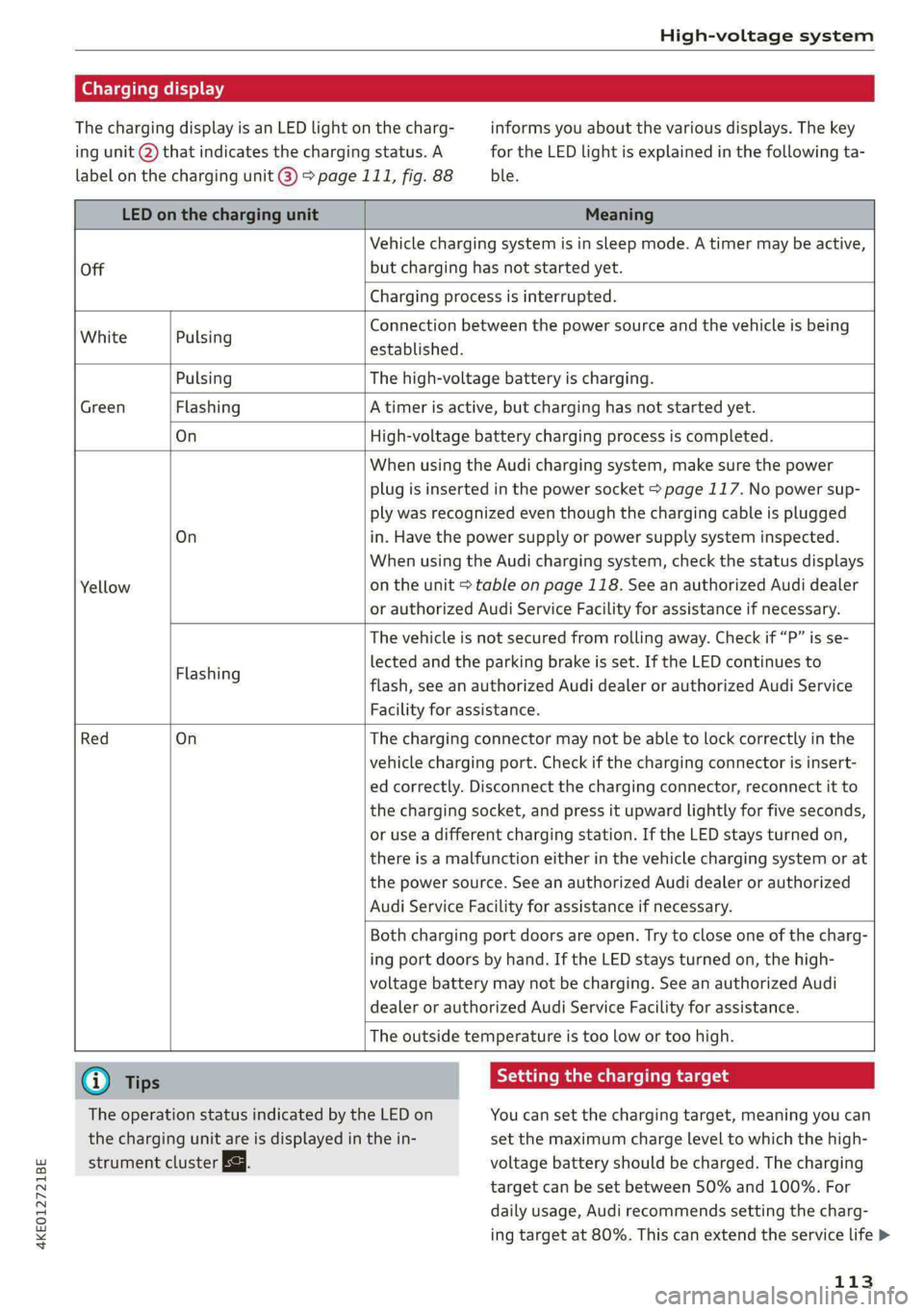
Charging display
The charging display is an LED light on the charg- informs you about the various displays. The key
ing unit @ that indicates the charging status. A for the LED light is explained in the following ta-
label on the charging unit @) 9 page 111, fig. 88 ble.
LED on the charging unit Meaning
Off
Vehicle charging system is in sleep mode. A timer may be active,
but charging has not started yet.
Charging process is interrupted.
White Pulsing
Connection between the power source and the vehicle is being
established.
Pulsing The high-voltage battery is charging.
Green Flashing A timer is active, but charging has not started yet.
On High-voltage battery charging process is completed.
On
Yellow
When using the Audi charging system, make sure the power
plug is inserted in the power socket > page 117. No power sup-
ply was recognized even though the charging cable is plugged
in. Have the power supply or power supply system inspected.
When using the Audi charging system, check the status displays
on the unit > table on page 118. See an authorized Audi dealer
or authorized Audi Service Facility for assistance if necessary.
Flashing
The vehicle is not secured from rolling away. Check if “P” is se-
lected and the parking brake is set. If the LED continues to
flash, see an authorized Audi dealer or authorized Audi Service
Facility for assistance.
Red On
The charging connector may not be able to lock correctly in the
vehicle charging port. Check if the charging connector is insert-
ed correctly. Disconnect the charging connector, reconnect it to
the charging socket, and press it upward lightly for five seconds,
or use a different charging station. If the LED stays turned on,
there is a malfunction either in the vehicle charging system or at
the power source. See an authorized Audi dealer or authorized
Audi Service Facility for assistance if necessary.
Both charging port doors are open. Try to close one of the charg-
ing port doors by hand. If the LED stays turned on, the high-
voltage battery may not be charging. See an authorized Audi
dealer or authorized Audi Service Facility for assistance.
The outside temperature is too low or too high.
G) Tips Seem Melee mle (id
The operation status indicated by the LED on You can set the charging target, meaning you can
the charging unit are is displayed in the in- set the maximum charge level to which the high-
strument cluster Eg. voltage battery should be charged. The charging
target can be set between 50% and 100%. For
daily usage, Audi recommends setting the charg-
ing target at 80%. This can extend the service life >
113
Page 126 of 316

Trailer towing
Trailer towing
Driving with a trailer
er else)
Your vehicle is primarily intended for transport-
ing people and luggage. However, if you drive
with a trailer, follow the technical requirements,
the operation and driving tips, and the legal reg-
ulations.
Driving with a trailer affects the vehicle's energy
usage, performance, and wear. It also requires
higher concentration from the driver.
Z\ WARNING
Do not transport any people in a trailer due to
the risk of fatal injury.
Technical requirements
Trailer hitch
Only use a trailer hitch with a removable ball
hitch mount and ball hitch. The trailer hitch must
be permitted for the vehicle, the trailer and the
permitted total weight of the trailer being
pulled. Above all, it must be securely and safely
attached to the vehicle trailer.
Never mount a trailer hitch on the bumper. The
trailer hitch must be mounted in a way that does
not impair the function of the bumper. Do not
make any changes to the exhaust system and the
brake system.
Check regularly if the trailer hitch is securely
mounted. Always follow the instructions given by
the trailer hitch manufacturer.
Trailer brakes
If the trailer has its own brake system, then fol-
low the manufacturer specifications. However,
the brake system on the trailer must never be
connected to the vehicle brake system.
Z\ WARNING
— Never mount a "weight-distributing" or
"load-balancing" trailer coupler as the trailer
hitch. The vehicle was not designed for
124
these types of trailer hitches. The trailer
hitch can malfunction and the trailer can
break off from the vehicle.
— If the trailer is equipped with electronic
brakes, these brakes cannot be activated by
a factory-installed control system, which in-
creases the risk of an accident.
—To reduce the risk of injury, always remove
the ball hitch mount if no trailer is mount-
ed.
Operating instructions
Towing capacity
The permitted towing capacity must not be ex-
ceeded under any circumstances > page 298.
You can drive up larger inclines if you are not us-
ing the maximum towing capacity.
Tongue weight
The maximum permitted tongue weight of the
trailer drawbar on the trailer hitch ball head must
not be exceeded.
For driving safety, always using the maximum
permitted tongue weight is recommended, but
not exceed it. Distributing the cargo in the trailer
correctly will help to achieve this weight. Having
the tongue weight too low affects the vehicle's
handling.
You can determine the tongue weight using a
tongue weight scale, a bathroom scale, or a pub-
lic weigh station, for example.
The permitted tongue weight of your vehicle can
be found in the vehicle documentation or in
=> page 298.
Load distribution
Poor cargo load and distribution can negatively
impact vehicle handling. Load the trailer based
on the following criteria as much as possible:
— Store objects in the vehicle luggage compart-
ment, if possible. The vehicle should always
carry the heaviest possible load and the trailer
should have the lightest possible load.