2020 AUDI E-TRON instrument cluster
[x] Cancel search: instrument clusterPage 41 of 316

4KE012721BE
Opening and closing
>» Fold the backrest on the rear bench seat for-
ward > page 79.
> Remove the mechanical key > page 33 or the
screwdriver > page 274.
> Using the mechanical key/screwdriver ), pry
the cover &> off the luggage compartment lid
trim panel.
> Press the lever with the mechanical key in the
direction of the arrow to release the luggage
compartment lid.
ZA WARNING
Observe the safety precautions > page 35.
ZA\ WARNING
If you have folded the backrests into the up-
right position, always check if the lock is cor-
rectly engaged by pulling forward on the
backrest.
Child safety lock
The child safety lock prevents the rear doors
from being opened from the inside and the rear
power windows from being operated.
(AZ-1026|
[Ri
Fig. 32 Driver's door: controls
> To activate or deactivate the child safety lock
(rear power windows and interior door handle)
for the rear doors, press the left and/or right 8
button in the driver's door > fig. 32. The indica-
tor light in the button turns on/blinks.
> Make sure the child safety lock is working by
checking the function on the rear power win-
dow switch and door handle.
D_ Use the flat side of the reversible screwdriver blade.
> Applies to: vehicles with controls for the cli-
mate control system in the rear and MMI: To al-
so restrict the operation of the climate control
system in the rear, select on the home screen:
SETTINGS > Display & brightness > Operation
in rear.
When the child safety lock is switched on, the
following functions are disabled:
—The rear inner door handles
— The rear power windows
— The control panel* for the climate control sys-
tem in the rear
Message in the instrument cluster display
@®/8 Child safety lock: malfunction! Please
contact Service
There is a malfunction in the child safety lock.
Press the button again.
If the message stays on, drive immediately to an
authorized Audi dealer or authorized Audi Service
Facility to have the malfunction repaired.
Z\ WARNING
— Observe the safety precautions > page 29.
—A malfunction in the child safety lock could
allow
the rear doors to be opened from the
inside, which increases the risk of an acci-
dent.
Power windows
Opening and closing the windows
Fig. 33 Driver's door: power window switch
39
Page 47 of 316

4KE012721BE
Lights and Vision
Lights and Vision
Exterior lighting
Switching the lights on and off
Fig. 35 Instrument panel: light button module
© Light sensor
Press and hold @ until the desired light function
is selected. The selected function is displayed
briefly in the instrument cluster. When switching
on the ignition, the AUTO light function is auto-
matically selected.
— AUTO - The automatic headlights adapt to the
surrounding brightness automatically. The day-
time running lights* will automatically turn on.
In vehicles for certain markets, you can switch
the automatic daytime running lights* on and
off in the MMI.
— 20 - You can switch the low beam headlights on
manually once the ignition is switched on.
— 2 - You can switch the parking lights on at
speeds below 20 mph (32 km/h).
— USA models: OFF - You can switch off all light
functions at speeds below 6 mph (10 km/h).
— Canada models: OFF - You can switch off all
light functions when the ignition is switched off
while the vehicle is stationary.
When the low beam headlights or parking lights
are switched on, the respective Ba or EB indica-
tor light appears in the instrument cluster.
@ All-weather lights 2
The headlights automatically adjust so that there
will be less glare, for example when the road sur-
face is wet.
Automatic headlight range control
Your vehicle is equipped with automatic head-
light range control. It reduces glare for oncoming
traffic if the vehicle load changes. The headlight
range adjusts automatically.
Audi adaptive light
Applies to: vehicles with adaptive light
Audi adaptive light provides better visibility when
driving in the dark. The lights are adapted to the
road conditions based on speed, such as when
driving on expressways, rural roads, at intersec-
tions, and around curves. The adaptive light only
functions when the automatic headlights are ac-
tivated.
Z\ WARNING
— Observe the safety precautions and note the
limits of the assist systems, sensors, and
cameras > page 127.
— Automatic headlights are only intended to
assist the driver. They do not relieve the
driver of responsibility to check the head-
lights and to turn them on manually based
on the current light and visibility conditions.
For example, fog cannot be detected by the
light sensors. So always switch on the low
beams ZO under these weather conditions
and when driving in the dark.
@ Tips
— If the vehicle battery has been discharging
for a while, the parking light may switch off
automatically. Avoid using the parking
lights for several hours.
— Follow the regulations applicable to the
country where you are operating the vehicle
when stopping the vehicle and when using
the lighting systems.
— Only the front headlights turn on when the
daytime running lights are switched on*. In
vehicles in certain markets, the tail lights
will also turn on.
—Incool or damp weather, the inside of the
headlights, turn signals, and tail lights can
fog
over due to the temperature difference
between the inside and outside. They will
clear shortly after switching them on. This
4s
>
Page 48 of 316
Lights and Vision
does not affect the service life of the light-
ing.
— When the parking lights are switched on
and the ignition is switched off, the 200-} sym-
bol appears in the light switch module.
Turn signal and high beam lever
BFV-0012
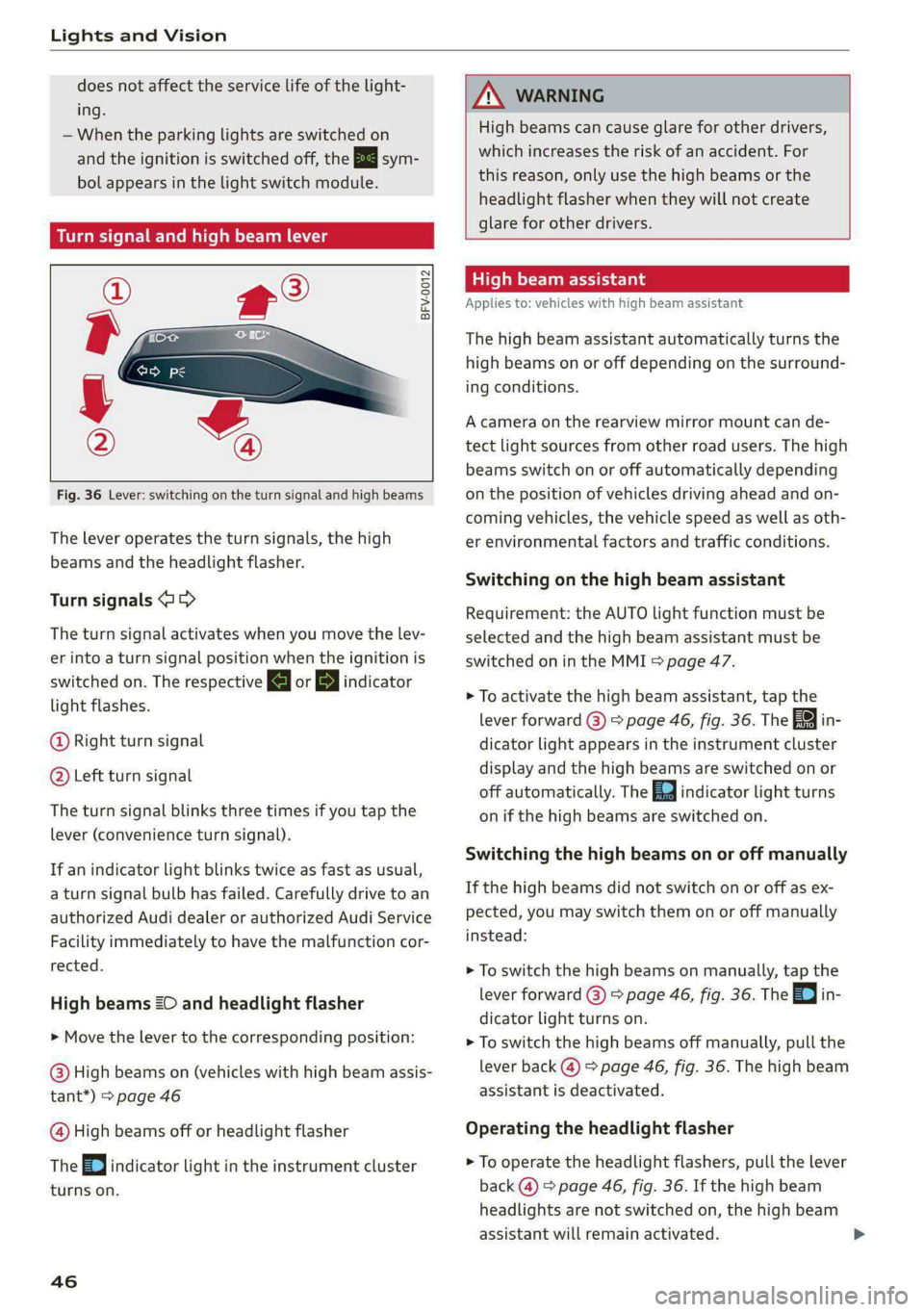
Fig. 36 Lever: switching on the turn signal and high beams
The lever operates the turn signals, the high
beams and the headlight flasher.
Turn signals (>>
The turn signal activates when you move the lev-
er into a turn signal position when the ignition is
switched on. The respective a or B indicator
light flashes.
@ Right turn signal
@ Left turn signal
The turn signal blinks three times if you tap the
lever (convenience turn signal).
If an indicator light blinks twice as fast as usual,
a turn signal bulb has failed. Carefully drive to an
authorized Audi dealer or authorized Audi Service
Facility immediately to have the malfunction cor-
rected.
High beams 20 and headlight flasher
> Move the lever to the corresponding position:
@) High beams on (vehicles with high beam assis-
tant*) > page 46
@ High beams off or headlight flasher
The EJ indicator light in the instrument cluster
turns on.
46
AN WARNING
High beams can cause glare for other drivers,
which increases the risk of an accident. For
this reason, only use the high beams or the
headlight flasher when they will not create
glare for other drivers.
item
Applies to: vehicles with high beam assistant
The high beam assistant automatically turns the
high beams on or off depending on the surround-
ing conditions.
A camera on the rearview mirror mount can de-
tect light sources from other road users. The high
beams switch on or off automatically depending
on the position of vehicles driving ahead and on-
coming vehicles, the vehicle speed as well as oth-
er environmental factors and traffic conditions.
Switching on the high beam assistant
Requirement: the AUTO light function must be
selected and the high beam assistant must be
switched on in the MMI > page 47.
> To activate the high beam assistant, tap the
lever
forward (@) > page 46, fig. 36. The fag i
dicator light appears in the instrument cluster
display and the high beams are switched on or
off automatically. The Ed indicator light turns
on if the high beams are switched on.
Switching the high beams on or off manually
If the high beams did not switch on or off as ex-
pected, you may switch them on or off manually
instead:
> To switch the high beams on manually, tap the
lever
forward @) > page 46, fig. 36. The =O] in-
dicator light turns on.
> To switch the high beams off manually, pull the
lever
back @) > page 46, fig. 36. The high beam
assistant is deactivated.
Operating the headlight flasher
> To operate the headlight flashers, pull the lever
back @) > page 46, fig. 36. If the high beam
headlights are not switched on, the high beam
assistant will remain activated.
Page 59 of 316

4KE012721BE
Sitting correctly and safely
— The distance between your upper body and the
steering wheel or instrument panel is at least
10 inches (25 cm)
— The distance between your knees and the in-
strument panel is at least 4 inches (10 cm)
— Your thighs are lightly supported by the front
surface of the seat
— The backrest is in an upright position and your
back
is resting against it
— You have a sufficient view of the area around
the vehicle
— You have a clear view of the instrument cluster,
indicator lights, and the head-up display*
Seat settings menu: quick access
Applies to: vehicles wit seat settings in the MMI
If you press on the image of the driver's or front
passenger's seat in the climate control system
menu © page 82, fig. 81 @, you will go directly
to the seat settings for that seat.
ZA WARNING
— If you are too close to the steering wheel or
instrument panel, the airbag system cannot
provide the optimal protection, which in-
creases the risk of injury and death.
—To reduce the risk of injury in the event of
sudden braking maneuvers or accidents,
never drive with the backrest reclined very
far. The airbag system and seat belts can on-
ly provide optimal protection when the back-
rest is in an upright position and the driver
is wearing the seat belt correctly. If the
backrest is angled back too far, the safety
belt can shift to soft areas of the body, such
as the stomach, which increases the risk of
injury.
—To reduce the risk of an accident, only adjust
the seats when the vehicle is stationary.
— Be careful when adjusting the seat. Lack of
control or attention when adjusting can re-
sult in injuries due to pinching to vehicle oc-
cupants both in the front seats and rear
seats.
— Never place objects in the driver's footwell.
Objects could shift and enter the area
around the pedals, which could prevent you
from using them. You would then be unable
to use the pedals if sudden driving or brak-
ing maneuvers were needed, which increas-
es the risk of an accident.
— Make sure that the floor mats are always se-
curely attached.
—To reduce the risk of an accident, never place
additional floor mats or other floor covers
over the installed floor mats, because this
reduces the pedal's range of motion and can
impair pedal operation.
—To reduce the risk of injury, never place your
feet on the instrument panel, out of the
window, or on the seat surfaces. This also
applies to passengers in the rear seats.
@) Note
To reduce the risk of damage, be very careful
when adjusting the seat to make sure the
head restraints do not come into contact with
the headliner or the sunroof*.
G@) Tips
At the same time, only move the respective
seat using the controls.
Adjusting the front power seats
[RAz-0172
Fig. 49 Front seat: seat adjustment buttons
You can adjust the basic settings using the but-
tons.
The settings depend on the vehicle equipment.
Adjusting the seat position
> To adjust the seat forward or backward, push
the button @ forward or backward.
57
Page 67 of 316

4KE012721BE
Sitting correctly and safely
— In an emergency, the recall process can be
canceled by pressing the seat adjustment
button on that seat.
Airbag system
General information
ZA\ WARNING
— If you have not fastened your safety belt,
you are in an incorrect seating position, or
you are too close to the airbag system, the
airbag system will not be able to protect
you. This increases the risk of serious or fa-
tal
injuries. Make sure that every vehicle
passenger has their safety belt correctly fas-
tened and is sitting in a correct seating posi-
tion = page 56. This is necessary regardless
of whether the seat is equipped with an air-
bag or not.
— Never place your feet on the instrument
panel, out of the window, or on the seat sur-
faces. To help ensure that the airbag system
can deploy correctly, never bend forward or
lean on the door or the side window. Other-
wise, serious and possibly fatal injuries can
occur if the airbags deploy.
— People, animals, or objects between the
passengers and the airbag system can inter-
fere with the correct deployment of the air-
bag or can be thrown through the vehicle in-
terior, increasing the risk of serious or fatal
injuries. Make sure that nothing is located
between the vehicle occupants and the air-
bag system. Do not secure or transport any
objects within the deployment zone of the
airbag systems, especially on the steering
wheel, on the instrument panel, on the
doors, on the windows, or in the footwell.
— Never put stickers on the airbag system cov-
ers or cover them with any objects.
— Only lightweight clothing should be hung
from the garment hooks in the vehicle. Do
not use clothes hangers to hang clothing.
The pockets of the clothing must not con-
tain any heavy, breakable, or sharp-edged
objects. This could impair the effectiveness
of the side curtain airbags.
— You must not use seat or protective covers
that are not specifically approved for use on
Audi seats with side airbags. Since the side
airbags deploy from the seat backrest, such
covers could impair the protective function
of the side airbags.
— Damage to the original seat covers in the
side airbag deployment area must always be
repaired by an authorized Audi dealer or au-
thorized Audi Service Facility.
— Airbag system components are installed at
various locations in your vehicle. Incorrect
work or repairs on the vehicle could damage
the airbag system components or impair
their functionality. This may prevent the air-
bags from deploying or cause them to de-
ploy incorrectly in the event of an accident,
which increases the risk of serious or fatal
injuries. Only have an authorized Audi dealer
or authorized Audi Service Facility make re-
pairs or modifications to a vehicle.
— The airbag system can only provide protec-
tion during one collision. If there is another
collision, the airbag system will not deploy
again. If the airbag system has deployed,
have it replaced immediately by an author-
ized Audi dealer or authorized Audi Service
Facility.
— Fine dust may appear if the airbags deploy.
This is completely normal and does not indi-
cate a fire in the vehicle. The fine dust can ir-
ritate the skin and mucous membranes in
the eyes and can cause difficulty breathing,
particularly for individuals who have or have
had asthma or other health issues that af-
fect breathing. Exit the vehicle or open the
windows or doors to get access to fresh air.
@) Tips
If you are transporting children in the vehicle,
read the information and observe the safety
precautions > page 69.
Safety systems monitoring
The Ea indicator light in the instrument cluster
monitors the safety systems such as the airbags
(including the control modules, sensors, and
65
>
Page 70 of 316

Sitting correctly and safely
—The PASSENGER AIR BAG OFF ®, ON @
indicator light in the headliner: this indicates if
the front passenger's airbag is activated or de-
activated
- indicator light in the instrument cluster:
this monitors the function of the Advanced Air-
bag System components to ensure they are
functioning correctly
How the components function together
The passenger occupant detection sensor in the
front passenger's seat detects if the front pas-
senger's seat is occupied. The passenger occu-
pant detection sensor measures the electrical ca-
pacity on the front passenger’s seat. The pas-
senger's airbag is activated or deactivated de-
pending on the electrical capacity that is meas-
ured.
The passenger's airbag is activated if:
— The electrical capacity is higher than the
threshold stored in the control module
— The electrical capacity is the same as or greater
than the electrical capacity of a typical adult
The passenger's airbag is deactivated if:
— The electrical capacity is lower than the thresh-
old stored in the control module
— The electrical capacity is the same as or less
than the electrical capacity of a typical one-
year-old child in a child safety seat that has
been used for certification in accordance with
FMVSS 208
If the front passenger's airbag is activated, the
PASSENGER AIR BAG ON @ indicator light
will turn on. If the front passenger's airbag is de-
activated, the PASSENGER AIR BAG OFF #;
indicator light will turn on.
The deployment force of the front airbags adapts
based on whether or not the safety belt is used
and the distance between the seat and the steer-
ing wheel/instrument panel. For example, if a
person is too close to the front airbag, the front
airbag will deploy with less force to help reduce
the risk of injury.
68
Meaning of PASSENGER AIR BAG OFF 3, ON
® indicator light
When the ignition is switched on, the system de-
tects whether the front passenger's seat is occu-
pied. PASSENGER AIR BAG OFF #;, ON @
will turn on for several seconds during this proc-
ess. Then it will indicate whether the front pas-
senger's airbag is activated or deactivated.
— PASSENGER AIR BAG OFF %;: the front
passenger's airbag is deactivated and will not
deploy in the event of an accident.
— PASSENGER AIR BAG ON ®:: the front pas-
senger's airbag is activated and could deploy in
the event of an accident.
If a change to the occupancy status of the front
passenger's seat is detected,
PASSENGER AIR BAG OFF #; ON @ will
flash for several seconds and will then display the
status of the front passenger's airbag.
Always make sure the indicator light corresponds
to the occupancy of the front passenger's seat.
— Adults or individuals with a similar stature sit-
ting in the front passenger seat: The front pas-
senger's airbag must be activated.
PASSENGER AIR BAG ON ® must remain
on.
— Individuals with a smaller stature (for exam-
ple, adolescents or smaller adults) sitting in
the front passenger seat: The front passeng-
er's airbag must be activated.
PASSENGER AIR BAG ON @ must remain
on.
— Child in a child safety seat secured on the
front passenger seat: The front passenger's air-
bag must be deactivated.
PASSENGER AIR BAG OFF #%; must remain
on.
— Front passenger seat is not occupied: The front
passenger's airbag must be deactivated.
PASSENGER AIR BAG OFF 4; must remain
on.
Z\ WARNING
— An adult or a person with a small stature
(such as a young person or small adult) seat-
ed on the front passenger's seat willnotbe |>
Page 113 of 316

4KE012721BE
High-voltage system
temperature has lowered back within the
normal range.
Fig. 87 Left front side of the vehicle: opening the high-
voltage charging port door
Fig. 88 Charging unit: charging port and LED
Connecting the charging cable
If you charge your vehicle at a charging station,
the following sequence of steps may vary. Follow
the manufacturer guidelines and operating in-
structions for the charging station.
Requirement: the “P” gear must be selected, the
parking brake must be set, and drive ready mode
must have ended.
— If necessary, remove the charging cable from
the vehicle > page 117, Transport.
— Remove the cap from the charging cable if nec-
essary.
— First connect the charging cable to the power
supply, or remove it from the charging station.
— Unwind the charging cable completely.
— Unlock the vehicle.
— Press the center of the button @ to open the
charging port door on the driver's side or front
passenger's side*.
— If you would like to use quick charging at public
direct current (DC) charging stations, open the
charging port cover (4).
— Plug the charging connector into the vehicle
charging port.
Starting to charge automatically (immediate
charging)
If charging is not delayed with a timer, the charg-
ing process will begin immediately. If necessary,
the charging station may need to be activated.
Follow the manufacturer guidelines and operat-
ing instructions for the charging station.
You can also adjust the charging process to your
preferences > page 113, Setting the charging
target, > page 114, Setting the timer,
=> page 114, Advanced charging settings.
While charging
The charging display on the charging unit @) will
pulse green while charging. It will pulse & in
the instrument cluster. A label on the charging
unit @ informs you about the various displays
=> page 113.
The charging connector is locked while charging
and cannot be removed.
Depending on the selected view > page 12, the
following information about the charging process
is displayed in the instrument cluster:
— Hv: Range
— I: remaining charging time until the charging
process is complete
— ©: current battery charge level
— ©): date and time of when the charging process
was completed
—&: charging speed (additional range per hour)
—4: charging power (depends on the selected
power source)
To view information about the charging process
later, select in the instrument cluster: Vehicle
functions tab > E) button > Charging.
Ending the charging process
You can interrupt the charging process at any
time.
— Unlock the vehicle.
111
Page 134 of 316

Driving information
Driving information
Speed warning system
Applies to: vehicles with speed warning system
The speed warning system helps the driver to
stay below a specified maximum speed. A warn-
ing threshold can be set in the MMI for this pur-
pose.
Once the speed slightly exceeds the stored
threshold, the speed warning system will alert
the driver with an indicator in the instrument
cluster and a warning tone. Once the speed drops
below the stored maximum speed, the indicator
will turn off.
Setting a threshold is recommended if you would
like to be reminded when you reach a certain
maximum speed. Situations where you may want
to do so include driving in a country with a gener-
al speed limit or if there is a specified maximum
speed for winter tires.
@ Tips
Regardless of the speed warning system, you
should always monitor your speed using the
speedometer and make sure you are following
the legal speed limit.
Setting the warning threshold
Applies to: vehicles with speed warning system
> Applies to: MMI: Select on the home screen:
VEHICLE > Driver assistance. > ({23) > Speed
warning.
Messages
Applies to: vehicles with speed warning system
ol Manually set (XY) speed limit warning
threshold exceeded
The stored speed was exceeded.
132
Camera-based traffic
sign recognition
Applies to: vehicles with camera-based traffic sign recognition
Fig. 99 Instrument cluster: traffic sign recognition
The traffic sign recognition shows the traffic
signs detected by the front camera in the instru-
ment cluster display and in the head-up display”.
Data from the navigation system is also included
in the display. Up to three traffic signs can be dis-
played in the instrument cluster at once. The
speed limit that is currently applicable is dis-
played in the status line. If necessary, it will be
hidden if the system detects that turning right is
prohibited at a red light. The display in the head-
up display* can be switched off > page 23.
Within the limits of the system and depending
on the market, speed limit restrictions @ in
school zones, highways, construction zones, or at
night may be displayed.
Limitations
The traffic sign recognition is subject to certain
system limitations and may be unavailable or on-
ly partially available in the following situations:
— When visibility is poor, such as in snow, rain,
fog, or heavy spray
— When there is glare, for example from oncom-
ing traffic or the sun
— At high speeds
— If the camera's visual field > page 128 is cov-
ered, for example by dirt or stickers. Cleaning
information > page 268
— If the traffic signs are completely or partially
covered, for example by trees, snow, dirt, or
other vehicles