2020 AUDI A8 Rear seat
[x] Cancel search: Rear seatPage 4 of 360

Table of contents
About this Owner's Manual......
SUMIMALY: ; « ss6% : osen ss sean cs poe s
QC CCeS Skis: si esis a 6 ores os ewe
Cockpit... 2... ee eee eee eee
Indicator lights overview...........0.
Display and operation............
Instrument cluster...............
Instrument cluster overview...........
Loading a personal profile.............
Operating. ........ 20.00. cece eee eee
Adjusting the display.................
Coolant temperature display...........
Tachometer............. eee eee eee
POWErIMEEEr ss 5 2 sags & e eaters # eee < ae
Odometer wack «sce o sesvens we oon wo ereeees
Outside temperature display...........
Engine oil temperature indicator.......
Boost indicator’. wis as caren se owen oo ocers
Vehicle functions ..............000 00
TOUCHHAISPLAYS). w:suis 6 6 sere sx eee oo
General touch display operation........
Multi Media Interface................
Rear Seat Remote « wiws s essa ss nena ss
Rear Seat Entertainment (Audi tablet) . . .
Head-up display..................
DESCRIPTION. 6 & wisn ox saosin + & asexiue 6 v sirosius
Voice recognition system........
General information.................
Operating...............0..0..0000-
External voice operation..............
Global functions.................
Additional function buttons...........
Starting and driving.............
Personalization..................
Opening and closing.............
Cenittal locking #acx <= zene es ese s eran:
NOD
OO
13
18
18
20
25
29 37 37 38 38 38 39
40 40
4l 41 Al
Power windOwS sevice vs seca ¥ & aenios 6 v aware 54
Panoramic glass roof.............0005 55
Valet parking’: s ¢ sewn s 2 seus « eee gc oe 56
Garage door opener...........--.00-- 5H
Lights and Vision................. 60
Exterior lighting « ssscs< <2 coos 2 eeeme + aes 60
Tmterior UQhting)ecoo 6. secre» «scones 6 + euniece 64
VISION... ke eee eee 66
Windshield wipers................... 68
Digital compass............... 000 eee 70
Sitting correctly and safely...... 72
Correct passenger seating position...... 72
Front seatS 1.2... . 0. e eee eee ee eee 72
REAP SEAUS sass = = seeps © ¢ syns F = sees 7 oe 76
Steering wheel wie. <6 ese oy eee ee eee 80
Head restraints ..........0.-..0000005 81
Safety belts’: « sees + ¢ weve ss wae oe eee 82
Memory function's 5 sce << seas sv evan sx 85
Airbag system... 22... ee eee eee eee 86
Child safety seats.............2..000. 91
Stowing and using............... 97.
Power SOUrCeS ... 2... ee eee eee eee 97
Cup holders’: « ssa s ¢ sews s 5 eeies & 2 wees 98
Storage and compartments............ 98
Luggage compartment............... 100
ROOTTSCK:
« = cwwea « ¢ mee 4 2 awa ts ewe ea 102
Warm and cold................... 104
Climate control system.........-.0005 104
Steering wheel heating............... 108
Auxiliary climate control.............. 108
Fluids in the A/C system.............. 109
Driving................. 0.00.00. 00. Ltt
Starting the vehicle................0- 11
When drivingjen <2 neve se eree ve sen eos 112
Drive system... 0... eee ee eee ee 118
Start/Stop system...........--00000- 121
Brakes, « s wees + pase ss pose ss meee ss TET 123
Electromechanical parking brake....... 124
Special driving situations.............. 126
Driving dynamic.................. 128
Audi drive select...............00000. 128
SUSPENSION e « « sues g « omen 3 e eee a ¥ es 129
Page 5 of 360

4N0012721BD
Table of contents
SEOOKING assess © & secwens + + anes ww ceawien Hewes 131
All wheel drive (quattro).............. 132
Electronic Stabilization Control......... 133
High-voltage system............. 136
General information...........0..5.5 136
Charging the high-voltage battery...... 137
Charging equipment................. 143
TANS COWINIG ss 5 & cews 4c ous ce ewe LSL
Driving with atrailer................. 151
Assist systems.................0. 154
Assist systems................... 154
Generalinformation................. 154
Surrounding area detection............ 155
Switching the systems on and off....... 157
Driving information.............. 159
Speed warning system................ 159
Camera-based traffic sign recognition... 159
Traffic light information.............. 161
LAP Mer as « 2 eons x = nevos ¢ 6 aus ¢ 8 em 162
Night vision assist..............-.04. 163
Driver assistance................. 166
Cruise control system.............0-5 166
Efficiency assist.............02--004. 167
Adaptive cruise assist............00-. 170
Distance Warning « « wse« 6 3 sone se eee oa LID:
Lane departure warning.............4. 180
Audi presense............-.22+--05- 182
Side@rassist esses: sv vows © v ememe © 2 suman 2 eae 186
Exit warning ...........-.....2.0000. 188
Intersection assistant................ 189
Emergeneyassists. «ican & wacen 3 3 woes ¥ 5 190
Parking and maneuvering....... 192
INEFODUCKION « » sey: x « caus 4 2 wasn 4 & Rees 192
Parking system plus...............00. 192
Rearview camera and peripheral cameras. 194
Rear cross-traffic assist... 2.2.2.0... 198
Infotainment system............ 200
TELEBNOMEs: 5 «ees & Cees 4 e oeew eee 200
IMtrOdUGEION « 2 asaces < a asomee x a wma Sewanee 200
Setup... eee eee ee eee 200
Using the Audi phone box............. 202
Using the telephone.................. 204
MessageS ... 0... cece cece eee eee 208
SOCtinGS eva 3 x espa o Kae 5s BER Bo ee 210
Instrument:cluster css vo evn ee ween eae 212
Using the Rear Seat Remote........... 212
Troubleshooting «<< <= eccn ss yews sp es 215
Audi connect..................0.. 216
Generalinformation................. 216
Audi connect Infotainment............ 216
Using a Wi-Fi hotspot................ 217
Audi connect Infotainment services..... 217
Audi connect vehicle control services.... 218
SCttINGS come
EMe@ngency CALL. « «ccc 6 i cs 6 vee « 223
Overview... ... 0. eee eee eee 223
Emergency Call « cas « wean s + gee os pee 223
Online roadside assistance............ 224
Navigation....................005- 225
Opening navigation.................. 225
myAudi navigation...............000% 226
Entering adestination................ 226
Stopping route guidance.............. 231
MapPinceins i + cxanees i ¥ scree © sammee @ =m ommeae #0 oe 2231.
Personal route assistance............. 233
Alternative routes...............000- 234
Additional functions................. 234
Satellite map......... 0... eee eee eee 236
Eleetric'rangeé acc sv sees 5 ¢ eee se Hews: 236
Mapiupdater, « sss + a cssmee + & nen «5 enaens 236
Traffic information................00- 238
Options aNd 'SEtNGS is « x see s x sews 4 vs 239
Troubleshooting wees «= wer = o wees ov eee 241
Ragios: sce ¢ = nae ¢ ¢ seuss 2 2 eeu 2 2 eee 242
Opening the radio...............000. 242
Radio functions.................0-4. 243
Options and settings...............0. 247
Troubleshooting esc 2 2 wee ts wie oo wee 249
Media............ cc eee eee 250
Generalinformation................. 250
SD card reader... ..... cc eee eee eee 250
DVD drive... 2... eee eee eee 250
Bluetooth audio player............... 252
Page 21 of 360

4N0012721BD
Touch displays
Rotating
Applies to: touch displays
Fig. 12 Touch display: rotating
Rotating the view or perspective
> Rotate the item using two fingers.
Dragging
Applies to: touch displays
Fig. 13 Touch display: @ dragging with one finger, @
dragging with two fingers
Scrolling or browsing through menus/lists
> To scroll through menus and lists, swipe up-
ward or downward with one finger.
> To browse through menus and lists, swipe to
the right or left with one finger.
Tilting 3D displays
> Drag upward or downward with two fingers.
Dragging away from/toward the edge of
the screen
Applies to: touch displays
Fig. 14 Touch display: dragging away from the edge of the
screen
Opening hidden menus
The E=] symbol indicates that there is a hidden
menu.
>» Use your finger to drag inward from the upper
or lower edge of the screen, or
> Press the =] button.
Closing hidden menus
> Press within the menu and drag it toward the
upper or lower edge of the screen.
icleueleClae cola Ue rary
This guide shows you at a glance the paths for
opening a desired menu and its settings and
functions.
Example of a path
> Applies to: MMI: Select on the home screen:
SETTINGS > General > Date & time.
Following the path
> First, determine in which display the path
should be entered. In this example, it is the
MMI display.
>» Applies to: MMI: To open the home screen,
press ().
> Applies to: Rear Seat Remote/Audi tablet: To
open the home screen, close any open menus
and press (.
> If the SETTINGS button is not displayed, use
your finger to swipe to the left or right until it
appears.
19
>
Page 27 of 360
4N0012721BD
Touch displays
Accepting suggested words or selecting
entries from the results list
> To accept a suggested word (2) or select an en-
try from the results list @), press on it.
> To display more content in the results list, drag
your finger upward or downward on the screen.
Setting the input language or keyboard
layout
> Applies to MMI: Select on the home screen:
SETTINGS > Language & keyboard > Keyboard.
> To define additional input languages, press the
© button.
> To change the keyboard layout for an input lan-
guage, press >. For example, you can select be-
tween QWERTZ and QWERTY.
Rear Seat Remote
Applies to: vehicles with Rear Seat Remote
With Rear Seat Remote, you can control conven-
ience and Infotainment system functions in the
rear of the vehicle, such as the climate control
system or the media playback in the vehicle.
ZA WARNING
— As the driver, do not allow usage of the Rear
Seat Remote to distract you from driving, as
this could increase the risk of an accident.
For example, do not reach behind you while
driving to operate the Rear Seat Remote.
— The Rear Seat Remote can only be operated
when the vehicle is stationary or when the
remote is securely positioned in the desig-
nated holder in the vehicle. Like all loose ob-
jects, it could be thrown through the vehicle
and
cause serious injuries in a collision. If
the Rear Seat Remote is not in the designat-
ed holder, it must always be securely stowed
while driving.
— Do not use any wireless devices on the front
seats within range of the airbags while driv-
ing. Also read the warnings in the chapter
> page 86.
— The Rear Seat Remote can become hot while
charging. Pay attention to the housing and
display temperature, and be careful when
removing the Rear Seat Remote from the
holder.
— There are magnets located on the back of
the Rear Seat Remote and in the designated
holder. For people with pacemakers, the
electromagnetic radiation may impair pace-
maker function. Always maintain a mini-
mum distance of approximately 6 in (15 cm)
from the magnets.
CG) Note
— Always follow the information found in 9®
in General information on page 216.
— Protect the Rear Seat Remote against pro-
longed exposure to direct sunlight.
— Extremely high or low temperatures that
can occur inside vehicles can damage the
Rear Seat Remote and/or impair the device
performance. Never leave your Rear Seat
Remote in the vehicle in extremely high or
low temperatures.
— Protect the Rear Seat Remote from coming
into contact with any fluids.
G) Tips
— Please note that the Rear Seat Remote can
be used only when the ignition is switched
on and within range of your vehicle's active
Wi-Fi hotspot.
— Please note that a Wi-Fi connection does
not automatically make it possible to use
the
Internet. For additional information,
see the chapter > page 216.
— When playing online media sources, there
may be longer loading times or restrictions
on media playback, depending on the Inter-
net connection or the Wi-Fi usage (for ex-
ample, if there is intensive usage by multi-
ple devices on the hotspot).
— Signals from Bluetooth devices and Wi-Fi
hotspots within range of the vehicle may
impair the vehicle Wi-Fi services. If multiple
Bluetooth devices and Wi-Fi hotspots are
within range of the vehicle, it may cause re-
duced data transfer rates, connection inter-
ruptions, or limitations when streaming me-
dia.
25
Page 28 of 360
![AUDI A8 2020 Owners Manual Touch displays
Lea TN]
Applies to: vehicles with Rear Seat Remote
Lt
=.
S
Fig. 19 Rear Seat Remote: overview
[RAH-9143]
@ Microphone
@ Volume button (decrease/mute)
@® Volu](/manual-img/6/57606/w960_57606-27.png "AUDI A8 2020 Owners Manual Touch displays
Lea TN]
Applies to: vehicles with Rear Seat Remote
Lt
=.
S
Fig. 19 Rear Seat Remote: overview
[RAH-9143]
@ Microphone
@ Volume button (decrease/mute)
@® Volu")
Touch displays
Lea TN]
Applies to: vehicles with Rear Seat Remote
Lt
=.
S
Fig. 19 Rear Seat Remote: overview
[RAH-9143]
@ Microphone
@ Volume button (decrease/mute)
@® Volume button (increase)
@ Speaker
©) Display
Using the holder
Applies to: vehicles with Rear Seat Remote
[RAH-9144)
Fig. 20 Rear center armrest/full-length center console:
Rear Seat Remote holder
Depending on the equipment, the Rear Seat Re-
mote may be located in the rear center armrest
or on the full-length center console.
Removing the Rear Seat Remote
> To release the Rear Seat Remote, press the A
button @.
26
>» Remove the Rear Seat Remote from the holder
using both hands > A\ in Introduction on
page 25.
Securing the Rear Seat Remote
> Hold the Rear Seat Remote in both hands so
that the volume buttons @) and @) > page 26,
fig. 19 face upward.
> Carefully press the Rear Seat Remote toward
the holder until the Rear Seat Remote locks in-
to place.
Charging the battery
Applies to: vehicles with Rear Seat Remote
Requirement: the ignition must be switched on.
> To charge the battery, secure the Rear Seat Re-
mote in the holder > page 26. The battery will
charge automatically.
@) Note
The Rear Seat Remote battery is permanently
installed and may only be replaced by an au-
thorized Audi dealer or authorized Audi Serv-
ice Facility. If the battery replacement is not
done correctly, it may cause malfunctions and
increase the risk of damaging the Rear Seat
Remote.
@ Tips
— Batteries have a limited service life. If the
operating time decreases significantly, the
battery should be replaced. Contact an au-
thorized Audi dealer or authorized Audi
Service Facility if you need a new battery.
— The Rear Seat Remote is equipped with an
intelligent battery management system to
provide a long battery service life. There-
fore, the battery may not be charged to its
full capacity, especially when temperatures
are high or low.
Page 29 of 360
4N0012721BD
Touch displays
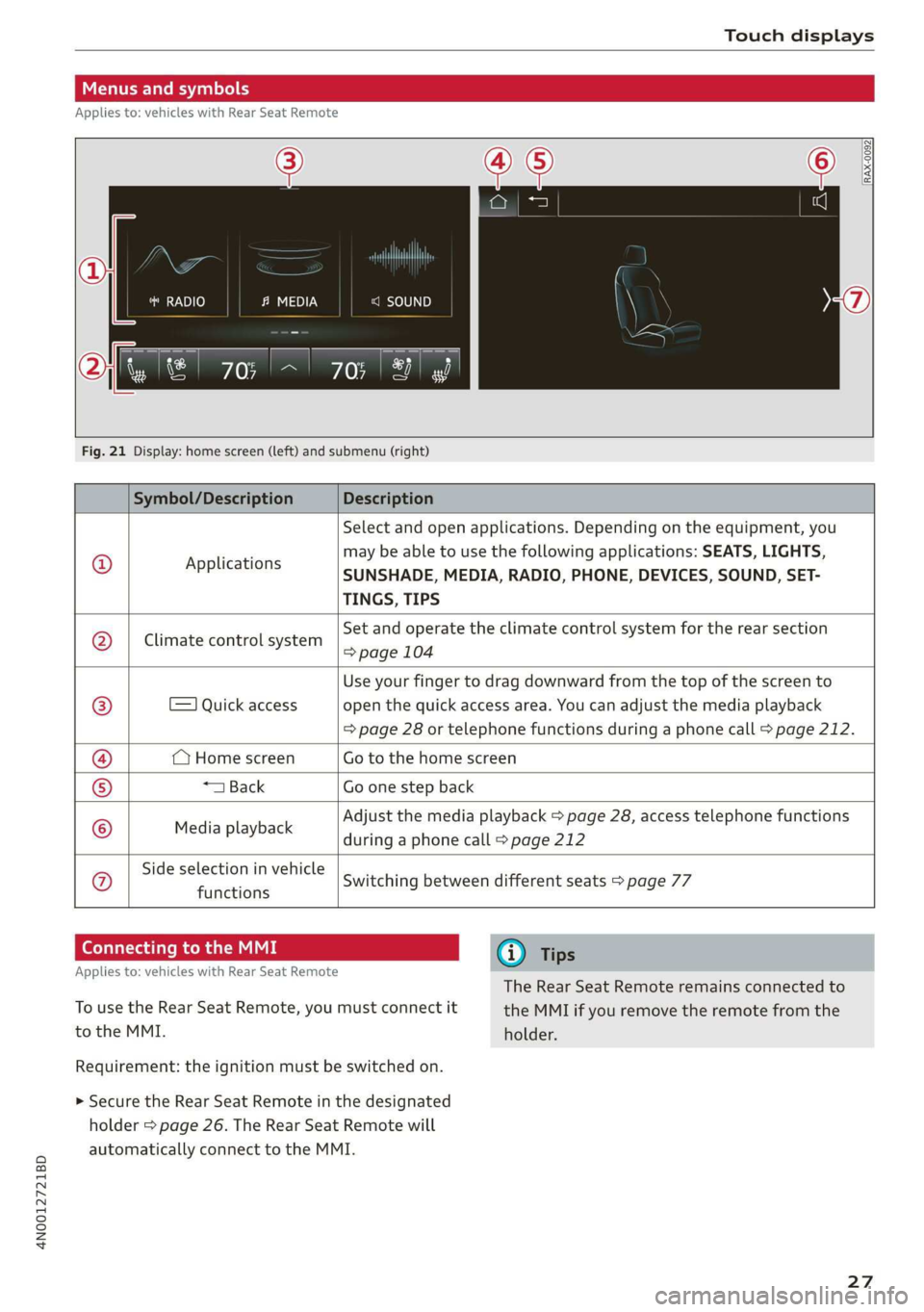
Menus and symbols
Applies to: vehicles with Rear Seat Remote
RADIO c=)
RAX-0092
Smet) (7)
Fig. 21 Display: home screen (left) and submenu (right)
Symbol/Description Description
© Applications
Select and open applications. Depending on the equipment, you
may be able to use the following applications: SEATS, LIGHTS,
SUNSHADE, MEDIA, RADIO, PHONE, DEVICES, SOUND, SET-
TINGS, TIPS
Climate control system
Set and operate the climate control system for the rear section
=> page 104
=) Quick access
Use your finger to drag downward from the top of the screen to
open the quick access area. You can adjust the media playback
=> page 28 or telephone functions during a phone call > page 212.
(Home screen Go to the home screen
*1 Back Go one step back
Media playback
Adjust the media playback > page 28, access telephone functions
during a phone call > page 212
Side selection in vehicle
functions Q}]e
|@Oe|
©
|
0
Switching between different seats > page 77
Connecting to the MMI G@) Tips
Applies to: vehicles with Rear Seat Remote
The Rear Seat Remote remains connected to
To use the Rear Seat Remote, you must connect it the MMI if you remove the remote from the
to the MMI. holder.
Requirement: the ignition must be switched on.
> Secure the Rear Seat Remote in the designated
holder > page 26. The Rear Seat Remote will
automatically connect to the MMI.
27
Page 30 of 360
Touch displays
Adjusting media playback
Applies to: vehicles with Rear Seat Remote
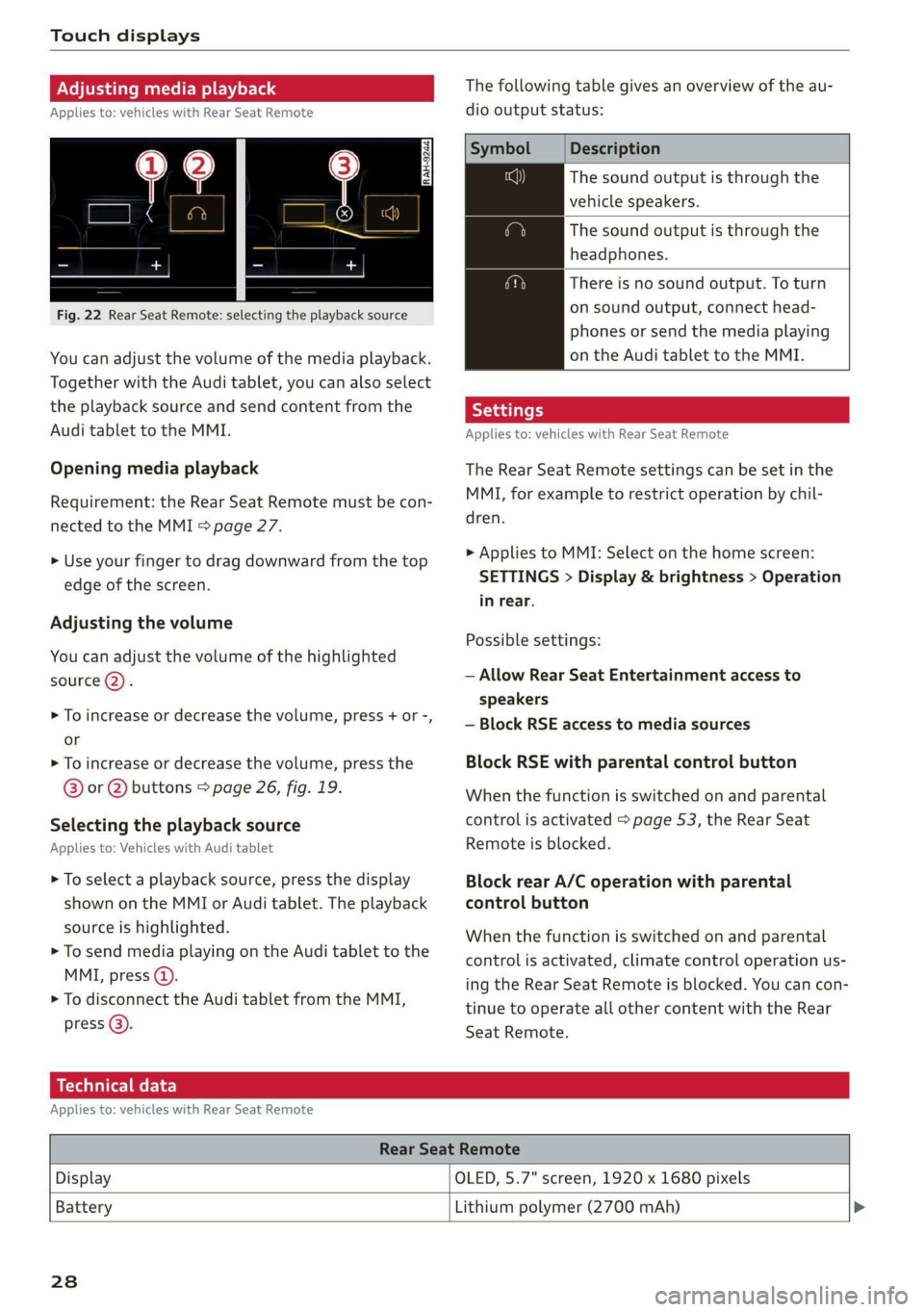
Fig. 22 Rear Seat Remote: selecting the playback source
You can adjust the volume of the media playback.
Together with the Audi tablet, you can also select
the playback source and send content from the
Audi tablet to the MMI.
Opening media playback
Requirement: the Rear Seat Remote must be con-
nected to the MMI > page 27.
> Use your finger to drag downward from the top
edge of the screen.
Adjusting the volume
You can adjust the volume of the highlighted
source (2).
>» To increase or decrease the volume, press + or -,
or
> To increase or decrease the volume, press the
@® or @ buttons > page 26, fig. 19.
Selecting the playback source
Applies to: Vehicles with Audi tablet
> To select a playback source, press the display
shown on the MMI or Audi tablet. The playback
source is highlighted.
> To send media playing on the Audi tablet to the
MMI, press @).
> To disconnect the Audi tablet from the MMI,
press @).
The following table gives an overview of the au-
dio output status:
Description
The sound output is through the
vehicle speakers.
The sound output is through the
headphones.
There is no sound output. To turn
on sound output, connect head-
phones or send the media playing
on the Audi tablet to the MMI.
Applies to: vehicles with Rear Seat Remote
The Rear Seat Remote settings can be set in the
MMI, for example to restrict operation by chil-
dren.
> Applies to MMI: Select on the home screen:
SETTINGS > Display & brightness > Operation
in rear.
Possible settings:
— Allow Rear Seat Entertainment access to
speakers
— Block RSE access to media sources
Block RSE with parental control button
When the function is switched on and parental
control is activated > page 53, the Rear Seat
Remote is blocked.
Block rear A/C operation with parental
control button
When the function is switched on and parental
control is activated, climate control operation us-
ing the Rear Seat Remote is blocked. You can con-
tinue to operate all other content with the Rear
Seat
Remote.
Technical data
Applies to: vehicles with Rear Seat Remote
Rear Seat Remote
Display OLED, 5.7" screen, 1920 x 1680 pixels
Battery
Lithium polymer (2700 mAh) >
238
Page 31 of 360
4N0012721BD
Touch displays
Rear Seat Remote
Dimensions (height x width x depth) 3.39 in x 6.38 in x 0.43 in (86 mm x 162 mmx
11 mm)
Weight
0.58 lbs (261 g)
Rear Seat Entertainment
(Audi tablet)
Introduction
Applies to: vehicles with Audi tablet
You can control available sources in the vehicle
(such as the radio) using the Audi tablet and lis-
ten to them through the vehicle speakers or
headphones. You can also display vehicle infor-
mation (such as the next oil change service). The
Audi tablet also has applications and functions
that are not related to the vehicle.
ZA WARNING
— As the driver, do not allow usage of the Audi
tablet to distract you from driving, as this
could increase the risk of an accident. For
example, do not reach behind you while
driving to operate the Audi tablet.
— Children in rear-facing child safety seats in
the rear: remove the Audi tablet from the
backrest on the front seat to reduce the risk
of
injury. Read the instructions in the chap-
ter > page 91.
— The Audi tablet can only be operated when
the vehicle is stationary or when it is secure-
ly positioned in the designated holder in the
vehicle. Like all loose objects, it could be
thrown through the vehicle and cause seri-
ous injuries in a collision. If the Audi tablet
is not in the designated holder, it must al-
ways be securely stowed while driving.
— Do not use any wireless devices on the front
seats within range of the airbags while driv-
ing. Also read the warnings in the chapter
=> page 86.
— The back of the Audi tablet can become hot
while charging. Pay attention to the housing
temperature, and be careful when removing
the Audi tablet from the holder.
@) Note
— Always follow the information found in >®
in General information on page 216.
— Protect the Audi tablet against prolonged
exposure to direct sunlight.
— Extremely high or low temperatures that
can occur inside vehicles may damage the
Audi tablet or impair its performance. Never
leave your Audi tablet in the vehicle in ex-
tremely high or low temperatures.
— Protect the Audi tablet from coming into
contact with any fluids.
G) Tips
— If the Audi tablet is used when the ignition
is switched off or outside of the range of the
MMI, then only the non-vehicle applications
and functions will be available.
— Vehicle settings are only possible through
the MMI.
— Please note that a Wi-Fi connection does
not automatically make it possible to use
the
Internet. For additional information,
see the chapter > page 216.
— The Audi tablet makes it possible to access
services from external providers. Permanent
availability cannot be guaranteed, because
that depends on the service provider.
— When playing online media sources, there
may be longer loading times or restrictions
on media playback, depending on the Inter-
net connection or the Wi-Fi usage (for ex-
ample, if there is intensive usage by multi-
ple devices on the hotspot, such as tablets
or laptops).
— The Audi tablet has an anti-theft protection
feature: it can only connect to the MMI of
the associated vehicle. Also, the Audi tablet
will be disabled if it has not been connected
to the MMI for longer than 30 days. To ena-
ble it again, connect the Audi tablet to the
29
>