2020 AUDI A8 lights
[x] Cancel search: lightsPage 312 of 360

Care and cleaning
height and width of the inside of the car
wash.
ZA WARNING
—To reduce the risk of accidents, only wash
the vehicle when the ignition is off and fol-
low the instructions from the car wash oper-
ator.
—To reduce the risk of cuts, protect yourself
from sharp metal components when wash-
ing the underbody or the inside of the wheel
housings.
— After washing the vehicle, the braking effect
may be delayed due to moisture on the
brake rotors or ice in the winter. This in-
creases the risk of an accident. The brakes
must be dried with a few careful brake appli-
cations.
—To reduce the risk of paint damage, do not
wash the vehicle in direct sunlight.
—To reduce the risk of damage, do not wash
decorative decals* with a pressure washer.
—To reduce the risk of damage to the surface,
do not use insect removing sponges, kitchen
sponges, or similar items.
— When washing matte finish painted vehicle
components:
— To reduce the risk of damage to the sur-
face, do not use polishing agents or hard
wax.
— Never use protective wax. It can destroy
the matte finish effect.
@) Note — Do not place any stickers or magnetic
signs on vehicle components painted with
matte finish paint. The paint could be
damaged when the stickers or magnets
are removed.
— If you wash the vehicle in an automatic car
wash, you must fold the exterior mirrors in
to reduce the risk of damage to the mirrors.
Power folding exterior mirrors* must only
be folded in and out using the power folding @) For the sake of the environment
function.
—To reduce the risk of damage to the rims
and tires, compare the width between the
wheels on your vehicle with the distance be-
tween the guide rails in the car wash.
—To reduce the risk of damage, compare the
height and width of your vehicle with the
Only wash the vehicle in facilities specially de-
signed for that purpose. This will reduce the
risk of dirty water contaminated with oil from
entering the sewer system.
Cleaning and care information
When cleaning and caring for individual vehicle are not listed, consult an authorized Audi dealer
components, refer to the following tables. The or authorized Audi Service Facility. Also follow
information contained there is simply recommen- __ the information found in > A.
dations. For questions or for components that
Exterior cleaning
Component Situation Solution
Windshield wiper | Deposits Soft cloth with glass cleaner > page 69
blades
Headlights/ Deposits Soft sponge with a mild soap solution®
Tail lights
Sensors/ Deposits Sensors: soft cloth with a solvent-free cleaning solution
camera lenses Camera lenses: soft cloth with an alcohol-free cleaning sol-
ution
Snow/ice Hand brush/solvent-free de-icing spray >
310
Page 315 of 360
4N0012721BD
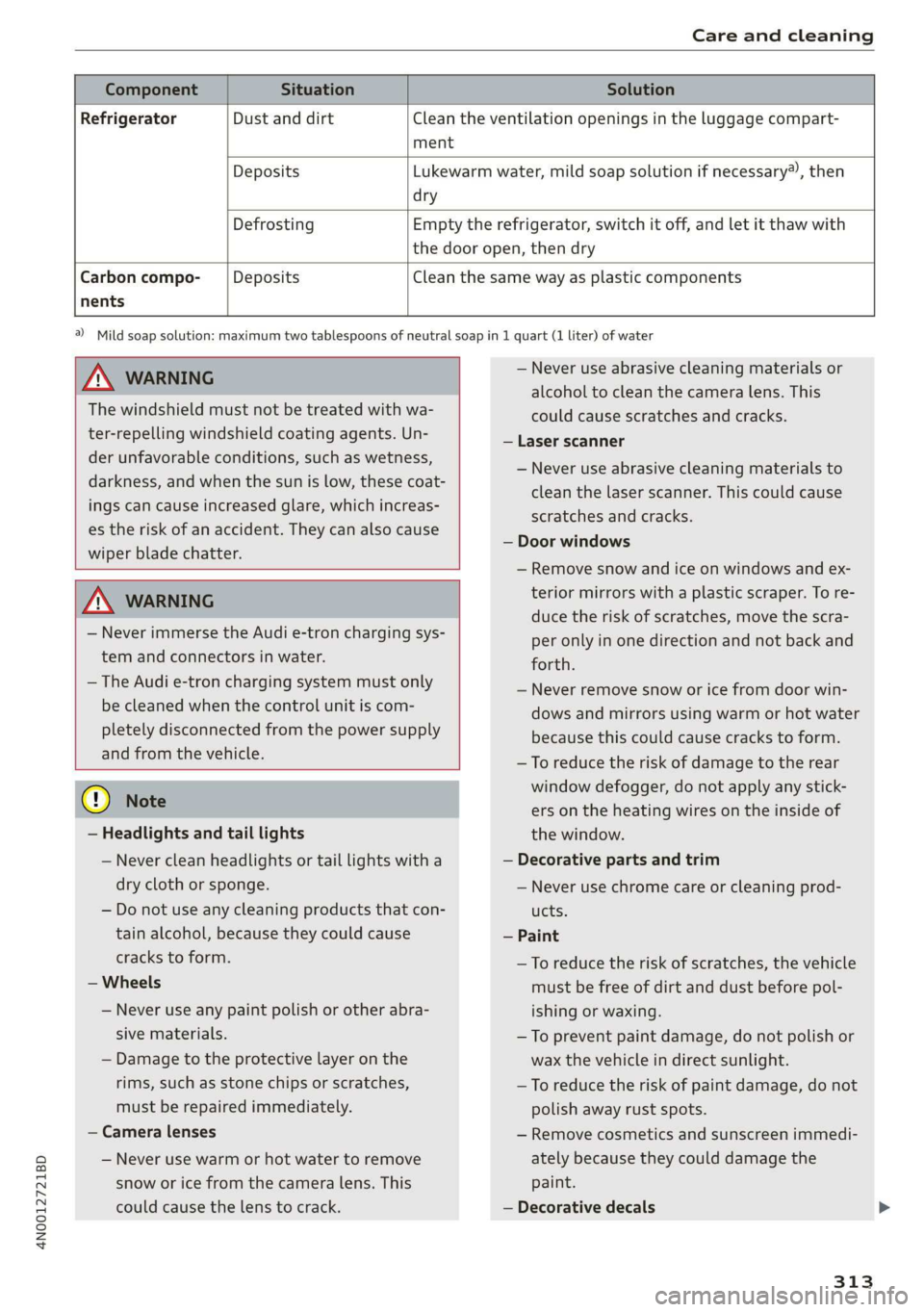
Care and cleaning
nents
Component Situation Solution
Refrigerator Dust and dirt Clean the ventilation openings in the luggage compart-
ment
Deposits Lukewarm water, mild soap solution if necessary), then
dry
Defrosting Empty the refrigerator, switch it off, and let it thaw with
the door open, then dry
Carbon compo- Deposits Clean the same way as plastic components
Z\ WARNING
The windshield must not be treated with wa-
ter-repelling windshield coating agents. Un-
der
unfavorable conditions, such as wetness,
darkness, and when the sun is low, these coat-
ings can cause increased glare, which increas-
es the risk of an accident. They can also cause
wiper blade chatter.
Z\ WARNING
— Never immerse the Audi e-tron charging sys-
tem and connectors in water.
— The Audi e-tron charging system must only
be cleaned when the control unit is com-
pletely disconnected from the power supply
and from the vehicle.
@) Note
— Headlights and tail lights
— Never clean headlights or tail lights with a
dry cloth or sponge.
— Do not use any cleaning products that con-
tain alcohol, because they could cause
cracks to form.
— Wheels
— Never use any paint polish or other abra-
sive materials.
— Damage to the protective layer on the
rims, such as stone chips or scratches,
must be repaired immediately.
— Camera lenses
— Never use warm or hot water to remove
snow or ice from the camera lens. This
could cause the lens to crack.
a) Mild soap solution: maximum two tablespoons of neutral soap in 1 quart (1 liter) of water
— Never use abrasive cleaning materials or
alcohol to clean the camera lens. This
could cause scratches and cracks.
— Laser scanner
— Never use abrasive cleaning materials to
clean the laser scanner. This could cause
scratches and cracks.
— Door windows
— Remove snow and ice on windows and ex-
terior mirrors with a plastic scraper. To re-
duce the risk of scratches, move the scra-
per only in one direction and not back and
forth.
— Never remove snow or ice from door win-
dows and mirrors using warm or hot water
because this could cause cracks to form.
—To reduce the risk of damage to the rear
window defogger, do not apply any stick-
ers on the heating wires on the inside of
the window.
— Decorative parts and trim
— Never use chrome care or cleaning prod-
ucts.
— Paint
—To reduce the risk of scratches, the vehicle
must be free of dirt and dust before pol-
ishing or waxing.
— To prevent paint damage, do not polish or
wax the vehicle in direct sunlight.
—To reduce the risk of paint damage, do not
polish away rust spots.
— Remove cosmetics and sunscreen immedi-
ately because they could damage the
paint.
— Decorative decals
313
Page 326 of 360

Emergency assistance
4. Attach the other end of the negative cable
(black) to the jump-start pin @) on the vehi-
cle.
Starting the engine
> Start the engine in the vehicle giving the charge
and let it run at idle.
> Now start the engine in your vehicle, which has
the
drained battery.
> If the engine does not start, stop the starting
procedure after 10 seconds and then repeat it
after approximately 30 seconds.
> Turn on the rear window defogger in your vehi-
cle in order to reduce any voltage peaks that
may occur when disconnecting the jump start
cables. The headlights must be switched off.
> With the engines running, remove the cables in
reverse order of the way they were installed.
> Close the red cover on the positive terminal.
ZA WARNING
— Never connect the jump start cable directly
to your vehicle battery. Only use the connec-
tions in the engine compartment.
— Do not touch the non-insulated parts of the
terminal clamps. The cable must also not
come into contact with vehicle components
that conduct electricity when it is connected
to the positive vehicle battery terminal. This
can cause a short circuit.
— The plugs on the battery cells must not be
opened.
— Keep ignition sources (such as open flames,
burning cigarettes, etc.) away from the vehi-
cle batteries to reduce the risk of an explo-
sion.
— Route the jump start cables so they cannot
get caught in the moving parts in the other
vehicle's engine compartment.
@ Note
Please note that the connecting process previ-
ously described for the jump start cables is in-
tended for when your vehicle is being jump
started.
324
G) Tips
Make sure that the connected jump start ca-
bles have sufficient contact with metal.
Towing
General information
You should only perform the steps that follow if
you have the necessary tools and technical ex-
pertise.
Towing requires a certain amount of practice.
Audi recommends contacting a towing company
to have the vehicle transported.
You should only have your vehicle towed by an-
other vehicle when disabled in exceptional cir-
cumstances. Inexperienced drivers should not
tow.
Notes on towing
When the engine is stopped, the transmission
will not be sufficiently lubricated if traveling at
high speeds and long distances:
— The maximum permitted towing speed is 30
mph (50 km/h).
— The maximum permitted towing distance is 30
miles (50 km).
Additional information on towing with a tow
truck
The vehicle may only be towed with the front axle
raised. Do not wrap any chains or cables around
the brake lines.
Tow bar and towing cable
The vehicle can be towed with a tow bar or tow-
ing cable. Both drivers should be familiar with
the
special considerations when towing, especial-
ly when using a towing cable.
Always make sure the traction force does not ex-
ceed the permitted level and there are no shock
loading conditions. There is always the risk of the
coupling becoming overloaded when driving off-
road.
For the most safety and security, drive with a tow
bar. You should use a towing cable only ifatow >
Page 331 of 360

4N0012721BD
Fuses and bulbs
Windshield washer system/headlight
washer system
Right headlight electronics
Front seat heating
Right rear door control module
Sockets
Left front door control module
Parking heater
. | Equipment
Anti-theft alarm system
Engine control module
Horn
Parking brake
Gateway control module (diagnosis)
Interior headliner lights
Driver assist systems control module
Airbag control module
Electronic Stabilization Control (ESC), An-
ti-Lock Braking System (ABS)
12
Rear climate control unit, diagnostic con-
nector,
light/rain sensor
13) Climate control system
14 Right front door control module
15 Climate control system, body electronics
16 Brake system
13 | Radiator fan
14 | Engine control module
15 | Engine sensors
16 | Fuel pump
Fuse assignment - luggage compartment
Fig. 213 Luggage compartment: fuse panel with plastic
bracket
No. Equipment
Fus 1 |Thermal management
No. | Equipment 5 |Air suspension
2 |Engine components 6 |Automatic transmission
3 | Engine components 7 |Right rear seat adjustment
4 | Engine components 8 |Rear seat heating
5 | Brake light sensor 9 |Central locking, left tail light
6 |Engine components 10 | Front belt tensioner on driver's side
7 |Engine components 11 | Central locking, rear blind, fuel filler door
8 | Engine components 12 |Luggage compartment lid
9 | Engine components
10 | Oil pressure sensor, oil temperature sensor
bh BR Engine start
Bb N
Engine components
No. | Equipment
1 | Rear climate control system blower >
329
Page 332 of 360

Fuses and bulbs
Fuse panel @) (red) Fuse panel (4) (black)
3 | Exhaust treatment, sound actuator 8 | Night vision assist, active suspension
4 |Rear climate control system control panel 9 | Adaptive cruise assist
5 |Right trailer hitch light ll Intersection assistant, driver assist sys-
6 | Trailer hitch positioning motor tems
7 |Trailer hitch 12 | Exterior sound
8 |Left trailer hitch light 14 | Right headlight
9 |Trailer hitch socket 15 [Left headlight
10 | Sport differential Fuse panel (5) (red)
11 | Exhaust treatment No. | Equipment
Fuse panel (8) (brown) 1 |Active suspension
No. | Equipment 2 |Service disconnect switch
1 | Driver assist systems control module 3_ | Refrigerator
2 |Rear Audi phone box 4 | Electric motor
3 | Rear seat adjustment 5 | Brake system
4 |Side assist 6 |High-voltage battery water pump
5 | Rear seat entertainment 7 |Interior climate control
6 |Tire pressure monitoring system 8 |A/C compressor
7 | Emergency call system 9 | Auxiliary battery control module
g | Parking heater radio receiver, fuel tank 10 |High-voltage battery
monitoring 11 |High-voltage battery
9 |Automatic transmission selector lever 14 | Thermal management
10 |TV tuner, data exchange control module 15 | Thermal management
11 | Vehicle opening/start (NFC) Fuse panel © (white)
12 | Garage door opener No. Equipment
13 | Rearview camera, peripheral cameras 1 | Reamecenter armrest heanng
14 | Central locking, tail lights 2 | Rear sliding sunroof
15 | Left rear seat adjustment 3 | CD/DVD player
16 trent belt tensioner on front passenger's 5 lac socket
6 | Passenger’s side rear safety belt tensioner
Fuse panel (4) (black) 7 |Front center armrest heating
No. | Equipment 8 |Rear footrest heating
Seat ventilation, rear seat heating, rear- 11 |Rear Seat Remote
1 |viewsmirror,.cefrigerator, diagnostic:con- 12 |Driver’s side rear safety belt tensioner
nector
2 |Gateway control module (communication) Bulbs
3 |Sound actuator
4 | Transmission heating valve Cs
5 | Engine start, electric motor Your vehicle is equipped with maintenance-free
7 |Active accelerator pedal headlights and tail lights. However, if a light bulb >
330
Page 345 of 360

4N0012721BD
Index
A
A/C cooling mode.............. eee eee ee 105
Accelerator pedal..............--000005 115
also refer to Accelerator pedal.......... 115
AccessorieS .. 0.00... cece eee eee ee 338
Active lane assist
refer to Lane departure warning......... 180
refer to Lane guidance................ 180
Active suspensioniicss + « sss so sasusia vs ssuen s o 129
Adaptive cruise assist................00. 170
Cleaning the sensors..............000- 310
Predictive control.................... 169
Adaptive speed assist
refer to Adaptive cruise assist........... 170
Adjusting the air distribution............ 105
Adjusting the brightness................. 65
Adjusting the sound..............-...0- 266
Adjusting the temperature.............. 105
Adjusting the volume..............000005 40
Adjusting the volume (announcements) .... 266
Adjusting the welcome sound............ 266
AirbagisySteM « + aims x eaen 3 = seme se OE a Zs 86
Ait GUality displayie. sy ees x s eeu 5 e wee a 108
Airsuspension...........2...0.00.0005 129
Airtransport................0.00.00005 136
Alarm system
refer to Anti-theft alarm system.......... 46
Alignment pin (changing the wheel)....... 316
All-weather lights...............-.00000. 60
Allseason tires... 2.2.00... 22020 305
All wheel drive
refer to quattro... 2... eee eee eee 132
Amazon Alexa integration
Média playback’: ¢ sos s ¢ wees ¢ 4 orem b eae 253
Operation « sion ss aac sv rere © omen wa ar 39
AMI
refer to Audi music interface....... 253,254
Android Auto
refer to Audi smartphone interface...... 264
Anti-freeze
Windshield washer system............. 287
Anti-lock braking system. ........-....-. 133
Anti-Slip Regulation.................0.. 133
Anti-theft alarm system...........-..00-- 46
Anti-theft wheel bolts................0. 319
Apple CarPlay
refer to Audi smartphone interface...... 264
Aspect ratio (video) ..........-..00. 258, 259
ASR
refer to Anti-Slip Regulation............ 133
Audi adaptive light.................0005. 60
Audi connect
refer to CONNECt:. « s ccascs seas ieeeee oe 216
Audi connect Remote & Control
refer to Vehicle control services......... 218
Audirdrive seletticy: « + sven « x cee x ¢ neem ¢ 2 2 128
Audi e-tron compact charging system..... 144
Adjusting the charging power level...... 145
Changing or attaching the power cable... 149
S@CUTING . 6... eee eee eee eee 150
Status and malfunction indicators....... 145
Audi music interface ioc. . ies. een ea ee 253
AUGIO TINGS crx = ¢ ces & ¢ cee £ & aeee Fc eS 25S
Audi phone box...........0.-. cee eee eee 202
Audi presense.... 6.6... 0. cece ee eee eee 182
MESSAGES vcr « 5 wey § 2 eee Fs eee 8 6 Ree 185
Audi pre sense front.............-..000- 183
Audi side assist
refer to Side assist............-..20--5 186
Audi smartphone interface.............. 264
Legal information: ¢ css os vei se owen oe 269
Auditableties « «cei + 2 some a 2 awa 3 eee ¢ 29
Device setup... 2.0... cece eee eee eee 30
Device test... 2.2... cece cece eee 35
Legal information's swe ss eae se eee oa 269
LIGENSES: scsi 6 0 cites 6 o veces © eeemeni © aperetne 269
Menus and symbols.............02+-00- 33
Operating’: « « wss6 s secu ss see ss eee s 18, 33
Regulatory information................ 269
Audi virtual cockpit
refer to Instrument cluster.............. 12
AUTO
Automatic headlights.................- 60
Climate control system ............005- 105
Auto Lock (central locking) ............... 43
Automatic climate control system
refer to Climate control system......... 104
Automatic luggage compartment lid.... 51,52
Automatic transmission............-.455 113
Parking lock emergency release......... 116
Automatic wipe/wash system............. 68
343
Page 347 of 360

4N0012721BD
Child:safety:seats © wc cs cnc so wane ov emcee 91
Securing to the top tether anchor........ 95
Securing with a safety belt.............. 94
Securing with LATCH...............0--5 93
GIGANING was: «2 wesc a 2 wee 2 2 er ee oe a 2 309
Cleaning Alcantara............2-.00000- 312
Cleaning artificial leather............... 312
Cleaning carbon components........ 311,313
Cleaning controls..............00 ee eee 312
Cleaning decorative parts/trim........... 311
Cleaning exhaust tail pipes.............. 311
Cleaning:plastio parts: 5 2 sacs + ssn « 4 sex 312
Cleaming:textiles cision a x saves x a noms v x onan 312
Climate control system..............0.. 104
Climate control system controls in the rear
Childisafety lO¢Kiisne » + iscsi © © snemoss a o ammuaue w 4 53
Closing
Automatic luggage compartment lid...... 51
Convenience closing...........eeeeeaee 54
HOO « wissen oo scawiee a vane v4 ames ao oie a a 276
Luggage compartment lid............... 50
Luggage compartment lid with foot motion . 52
Panoramic glass roof...............204. 55
Rear window sunshade..............005 56
Sunshade (roof) ................00.0005 55
Sunshade (windows) .............0.0005 54
WENGOWS « ssncsie = s cosmsne % « cosmins o coanees wo a seme 54
Closing aid (power closing doors).......... 43
COASTING sam s wen «ore ao wee ae re a 118
Cockpit diMMING « « sss + ¢ wows se ces +e oes 65
Cockpit (OVERVIEW) « = aims se swag s pase a x res 6
GOlGFNUMBEr: ¢ sess sy poem 5 eae 5 e eRR « 341
Combustion engine.................005 118
Combustion engine startup.............. 116
Comfort auxiliary air conditioning......... 109
Comfort entry...... 0.00... eee eee eee ee 129
Coming home/Leaving home
refer to Entry/exit lighting.............. 63
Compact spare tire................0.00. 322
COMPAFEMENESS « sccwn « 0 wince 2 6 eeewene @ 0 ommete 98
Compass inthe mirror............-....-- 70
Compliance. « seve ss wesw sv exces 2 ora ¥ os 339
Configuration wizard.................00. 20
CONNMEGts ¢ 2 wwe x y meme 2 eRe ty eee Re 216
Data plans: « win os wesc vo cman o mane oe 221
Data Privacy. ...... eee eee eee eee eee 334
Emergency/calll «sci © wens e ¥ een 2 3 esecoee 223
Infotainment.......... 0. cece eee eee 216
Infotainment’services. . ci. . evew a ee 217
Online roadside assistance............. 224
Vehicle control services................ 218
Connected devices
Device overvieW.........-..02- 00s eee 268
Connections
fefer to Médidies: = s sews s ¢ news + eee 250, 255
Consumer information.................. 336
Consumption
Reducing « « cas « wows « + wees o x pew so me 121
Consumption (fuel) ........ 2... e eee ee eee 16
Contacts
‘Add destinations « sscis a sass 6 & avian « & a0 235
Importing and exporting.............. 211
MGITIONY: CAPaCity cu s & saces 2 & nas 4 £ Sana 211
Opening (business card)............... 205
Updating inthe MMI.................. 211
Convenience key’: «sini ee eye ev ere as owe 43
Convenience closing.................-. 54
also refer to Vehicle key.............00. 47
Convenience opening and closing
SSUNSHAPE secre «a wine a & siemens
Coolant temperature display.............. 14
Cooling MOC iis. ce ssw ee eevee ov eevee oo oe 105
Cooling system
AddING
COOLANT: cies a + essing © 1 erecnse nw nome 282
Checking the coolant level............. 282
GOGLANE evccs 2 owe ov samen 2 o ome 7 o eR 281
Cornering light <. « «ees : s sews se eee se es 60
Cross traffic assist (intersection assistant) .. 189
Cruise control system..........-...00-5 166
Cup holders......... 0... cece eee eee 98
Current consumption.................005 16
Curve tilting function..............0000. 129
D
Data plans cosces x « smones x 5 sweets a 6 ononens © ot ones 221
Data: PrivaGy’. 2 sien a sree x x vessieie 6 3 oooueue ¥ 6 334
DAtG cence. is comsas 2 2 rocuow vo nae + 8 Bee = RR 16
SOLE Gh + sucseie « senna ou snenene # 6 ecewse oo) asus 266
Daytime running lights.................. 60
Declaration of compliance............... 339
DEF (instrument cluster)...............0. 12
Page 350 of 360

Index
Glossary of tire and loading terminology... 292
Glove compartment.............0000 98,99
Valet parking........... 02. eee e eee eee 56
Gross Axle Weight Rating (GAWR)........ 342
Gross Vehicle Weight Rating (GVWR)...... 342
GVWR
refer to Gross Vehicle Weight
Ratifig (GVWR) « sas ¢ suene ¢ ¢ eet 8 o nee 342
H
Handset
refer to Rear Seat Remote............... 25
Handstrees « seve x s wasn a ¢ wom § ze oe A ee 201
Hands Free) Profile... sc.ua cine aaiean es 201
Head-up display
AGJUStING aes = s gee = e eee s berg e wees as 37
Adjusting the brightness................ 65
Operating...............0.. 2.00 eee eee 37
Headlight range control..............0005 60
Headlights
Cleaning......... 06. e eee eee eee 310
Headlight range control................ 60
Washer system.......... 0.0.00 eee eee 68
Head restraints
Adjusting ............ 2c cece e eee 81
Removing and installing................ 81
Heated rear window.............-..005- 106
Heated steering wheel...............0-. 108
Heating... . 0. cece eee cece 104
HFP
refer to Hands Free Profile............. 200
High-voltage battery................05. 136
Audi e-tron compact charging system.... 144
CHarginGiicns so sessive oo arene ow amen © 137,139,
Charging display on the vehicle......... 140
Charging equipment.............ee08- 143
Charging methods.................... 137
Charging ports on the vehicle........... 137
Charging times: = x sees ss eees se ewes ee 137
Connecting the charging cable.......... 139
Messages while driving
Not running for long periods of time..... 138
Opening the charging port door......... 139
Quick charging...............002 eee 137
Setting the timer............0. ee eeaee 141
Transporting charging equipment....... 144
348
High-voltage system............-..00-- 136
High beams
High beam assistant................... 61
Highway lights..................000000. 60
Hill.descent:control... . «ese se ese ve eee « 126
HilLHold:assistss scccww + acon ee mason oo eves & 113
Home
refer to Home address................ 234
Home. address: «ssc a wenn ¥ 0 een ov one 234
HomeLink
refer to Garage door opener............. 57
HOMESGRCE isn « « sxeriw + comune + ormmnes a 5 wana © 19
HOMME: « cece w x sneer 2 eames we meReD Ze HONE GH ae 6
Hotspot
refer to Wi-Fi.... 0.0... cece eee eee ee 221
I
Ignition
Switching on and off...............06- iT
Imbalance (wheels) ............0 eee eee 298
Immobilizer
refer to Electronic immobilizer........... 47
Indicator lights... 2... 0. . eee eee 7
Inspection interval..............000000e 287
Instrument cluster............00 00 eee ee 12
Adjusting the layout................... 13
GLEAMING is: ¢ + mw 3 v new s wows oe mame do 312
Engine code.......... 20... eee eee eee 269
Failure... 2... ee eee eee 12
On-board computer .........2.+e0eee eee 16
Operating’: = = sere © = swans + x cuenise n coven «© 13
Personal profile................0000005 12
Service interval display...............- 287
Software information..............005 269
Switching tabs..................000005 13
Switching the VieWs. + ecw. se ees ce ees se 13
Vehicle functions. « sii xo evan +o amen +e ae 16
Version information..............000- 269
Instrument illumination................. 65
Integrated assistance................0-. 20
Intelligent search
Navigation........ 0.0.0 c eee eee eee eee 227
Interference-Causing Equipment Standard
(ICES)... eee eee eee eee 340
Interior lighting..................00- 64,65
Interior monitoring.............-.0-005- 46