2020 AUDI A7 park assist
[x] Cancel search: park assistPage 179 of 310

4K8012721BC
Audi connect
services. The cell phone network, for exam-
ple, must be available to use these services.
Applies to: vehicles with Audi connect vehicle control
> Register at my.audi.com.
> Set the key user > page 31.
> Install the myAudi app on your mobile device
and log in with your access information.
G@) Tips
It may also be necessary to enter your 4-digit
PIN set at my.audi.com when accessing some
Audi connect vehicle control services.
Yate]
Applies to: vehicles with Audi connect vehicle control
Depending on the country and the vehicle equip-
ment, the following services may be available:
Locking and unlocking the vehicle by remote
control
Requirement: the vehicle must be parked and the
ignition must be switched off.
This service allows you to unlock or lock your ve-
hicle.
Vehicle status report
This service transfers driver information system
data to a server. Depending on the vehicle equip-
ment, certain data may be accessed, such as the
remaining range or mileage. The values may dif-
fer from the values displayed in the vehicle.
Car Finder
This service transmits the parking location to a
server when the ignition is switched off. The vehi-
cle location, your location, or the route to your
vehicle can be displayed. The new parking loca-
tion cannot be determined with this service if the
vehicle is moved after shutting the vehicle off
and without switching the ignition on and off
again, for example if the vehicle is towed or sto-
len.
Online Audi service request
Requirement: the service must be activated on-
line at my.audi.com and an authorized Audi deal-
er or authorized Audi service facility must be se-
lected.
This service transmits service-relevant data to
your selected authorized Audi dealer or author-
ized Audi service facility. They will contact you
before your next service appointment.
Stolen Vehicle Locator
This service assists you in locating your vehicle if
it is stolen.
— Contact the police. You receive a Case ID.
— Call the service hotline and give your Case ID.
The service hotline will forward the established
data to the police. You receive the Audi Service
hotline number when you purchase your vehicle.
Geofencing Alert
Requirement: a key user must be set in the vehi-
cle > page 31.
This service allows you to set permitted and for-
bidden zones for your vehicle as well as set time
limits for these zones. If your vehicle leaves a
permitted zone or enters a forbidden zone, you
will be notified with a push notification and/or an
e-mail.
Speed Alert
Requirement: a key user must be set in the vehi-
cle > page 31.
You can set up to two speed limits for your vehi-
cle using this service. If your vehicle exceeds a set
speed limit, you will be notified with a push noti-
fication and/or e-mail.
Valet Alert
Requirement: a key user must be set in the vehi-
cle > page 177.
If you give your vehicle to a parking service, you
can set a zone and a speed limit using the myAu-
di app. If the vehicle leaves the zone or exceeds
the speed limit, you will be notified with a push
notification and/or e-mail.
177
>
Page 269 of 310

4K8012721BC
Emergency assistance
Emergency assistance
General information
> Park the vehicle as far as possible from moving
traffic in the event of a breakdown. In the event
of a flat tire, park the vehicle ona level surface.
If you are ona steep hill, be especially careful.
> Set the parking brake.
> Switch the emergency flashers on.
> Have the passengers exit the vehicle. They
should move to a safe place, for example be-
hind a guard rail.
Z\ WARNING
Follow the steps given above. This is for your
protection and the for the safety of others on
the road.
Equipment
Vehicle tool kit, tire
vehicle jack
Applies to: vehicles with the vehicle tool kit, tire mobility kit,
and vehicle jack
yi aYaLaL eae Tale|
Fig. 157 Luggage compartment: cargo floor cover
The vehicle tool kit, vehicle jack*, tire mobility
kit*, and compressor* are stored in the luggage
compartment under the cargo floor cover
> fig. 157.
> Lift the cargo floor using the handle > fig. 157.
> Applies to: vehicles with spare tire: Turn the
handle counter-clockwise and remove the spare
tire.
Depending on the equipment, the vehicle tool
kit* may be located under the spare tire*, under
another cover, or in the tool box.
G) Tips
The vehicle jack* does not require any mainte-
nance.
Tire mobility kit
Applies to: vehicles with tire mobility kit
> Read and follow the important safety precau-
tions > page 267.
>» Set the parking brake.
> Select the “P” position.
> Check if a repair with the tire mobility kit is pos-
sible > page 267.
UE Raimi) LaLa
Applies to: vehicles with tire mobility kit
B8U-0100
Fig. 158 Tire: tire damage that cannot be repaired
The tire repair is only meant for temporary use.
Change the damaged tire as soon as possible
SA.
If the tire is pierced by an object such as a nail,
do not remove the object from the tire.
The tire mobility kit can be used at temperatures
as low as -4 °F (-20 °C).
The tire mobility kit must not be used:
—If the tire has cuts or punctures that are larger
than 0.16 in (4 mm) @ & fig. 158
— If the rim is damaged (2)
— If you have driven with very low tire pressure or
without air in the tire @)
See an authorized Audi dealer or authorized Audi
Service Facility for assistance in these situations. >
267
Page 271 of 310
4K8012721BC
Emergency assistance
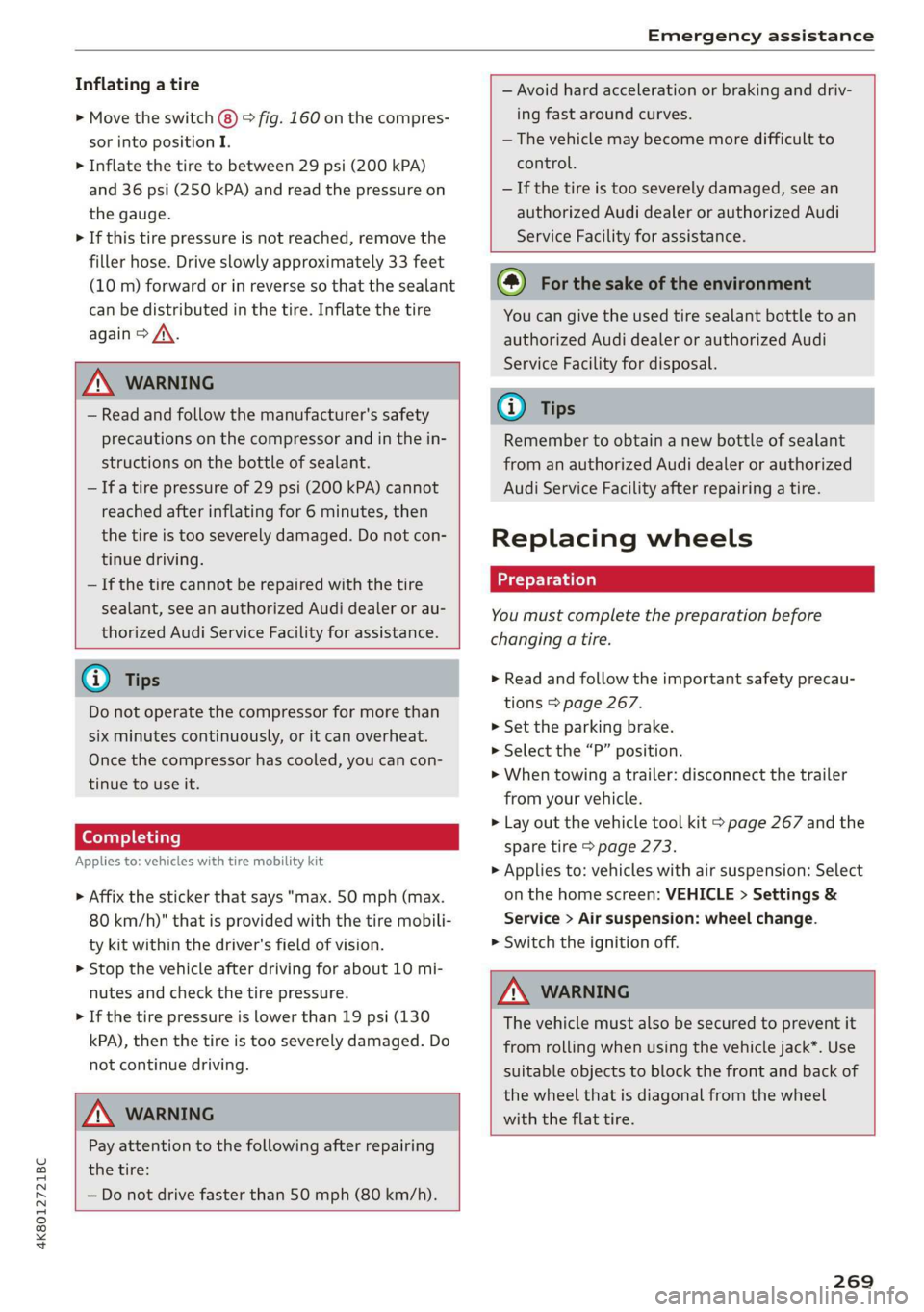
Inflating a tire
> Move the switch (8) > fig. 160 on the compres-
sor into position I.
> Inflate the tire to between 29 psi (200 kPA)
and 36 psi (250 kPA) and read the pressure on
the gauge.
> If this tire pressure is not reached, remove the
filler hose. Drive slowly approximately 33 feet
(10 m) forward or in reverse so that the sealant
can be distributed in the tire. Inflate the tire
again > A\.
Z\ WARNING
— Read and follow the manufacturer's safety
precautions on the compressor and in the in-
structions on the bottle of sealant.
— Ifa tire pressure of 29 psi (200 kPA) cannot
reached after inflating for 6 minutes, then
the tire is too severely damaged. Do not con-
tinue driving.
— If the tire cannot be repaired with the tire
sealant, see an authorized Audi dealer or au-
thorized Audi Service Facility for assistance.
@® Tips
Do not operate the compressor for more than
six minutes continuously, or it can overheat.
Once the compressor has cooled, you can con-
tinue to use it.
(eyaay)Clalale)
Applies to: vehicles with tire mobility kit
> Affix the sticker that says "max. 50 mph (max.
80 km/h)" that is provided with the tire mobili-
ty kit within the driver's field of vision.
> Stop the vehicle after driving for about 10 mi-
nutes and check the tire pressure.
> If the tire pressure is lower than 19 psi (130
kPA), then the tire is too severely damaged. Do
not continue driving.
ZA WARNING
Pay attention to the following after repairing
the tire:
— Do not drive faster than 50 mph (80 km/h).
— Avoid hard acceleration or braking and driv-
ing fast around curves.
— The vehicle may become more difficult to
control.
— If the tire is too severely damaged, see an
authorized Audi dealer or authorized Audi
Service Facility for assistance.
@) For the sake of the environment
You can give the used tire sealant bottle to an
authorized Audi dealer or authorized Audi
Service Facility for disposal.
@ Tips
Remember to obtain a new bottle of sealant
from an authorized Audi dealer or authorized
Audi Service Facility after repairing a tire.
Replacing wheels
You must complete the preparation before
changing a tire.
> Read and follow the important safety precau-
tions > page 267.
>» Set the parking brake.
> Select the “P” position.
> When towing a trailer: disconnect the trailer
from your vehicle.
> Lay out the vehicle tool kit > page 267 and the
spare tire > page 273.
> Applies to: vehicles with air suspension: Select
on the home screen: VEHICLE > Settings &
Service > Air suspension: wheel change.
> Switch the ignition off.
Z\ WARNING
The vehicle must also be secured to prevent it
from rolling when using the vehicle jack*. Use
suitable objects to block the front and back of
the wheel that is diagonal from the wheel
with the flat tire.
269
Page 277 of 310

4K8012721BC
Emergency assistance
that conduct electricity when it is connected
to the positive vehicle battery terminal. This
can cause a short circuit.
— The plugs on the battery cells must not be
opened.
— Keep ignition sources (such as open flames,
burning cigarettes, etc.) away from the vehi-
cle batteries to reduce the risk of an explo-
sion.
— Route the jump start cables so they cannot
get caught in the moving parts in the other
vehicle's engine compartment.
@) Note
Please note that the connecting process previ-
ously described for the jump start cables is in-
tended for when your vehicle is being jump
started.
@) Tips
Make sure that the connected jump start ca-
bles have sufficient contact with metal.
Towing
General information
You should only perform the steps that follow if
you have the necessary tools and technical ex-
pertise.
Towing requires a certain amount of practice.
Audi recommends contacting a towing company
to have the vehicle transported.
You should only have your vehicle towed by an-
other vehicle when disabled in exceptional cir-
cumstances. Inexperienced drivers should not
tow.
Notes on towing
When the engine is stopped, the transmission
will not be sufficiently lubricated if traveling at
high speeds and long distances:
— The maximum permitted towing speed is 30
mph (50 km/h).
— The maximum permitted towing distance is 30
miles (50 km).
Additional information on towing with a tow
truck
The vehicle may only be towed with the front axle
raised. Do not wrap any chains or cables around
the brake lines.
Tow bar and towing cable
The vehicle can be towed with a tow bar or tow-
ing cable. Both drivers should be familiar with
the special considerations when towing, especial-
ly when using a towing cable.
Always make sure the traction force does not ex-
ceed the permitted level and there are no shock
loading conditions. There is always the risk of the
coupling becoming overloaded when driving off-
road.
For the most safety and security, drive with a tow
bar. You should use a towing cable only if a tow
bar is not available. Use a towing cable made of
synthetic elastic cable similar elastic material.
ZA WARNING
— Towing highly increases the risk of an acci-
dent, for example from colliding with the
towing vehicle.
—To reduce the risk of an accident, do not al-
low anyone to remain inside the vehicle
when it is being transported by a tow truck
or a special transporter.
CG) Note
— If normal towing is not possible, for exam-
ple if the transmission is faulty or if the
towing distance is greater than 30 miles
(50 km), then transport the vehicle on a
special carrier.
— If the vehicle is towed by a tow truck at the
axle that is not permitted, this can cause se-
vere damage to the transmission.
— The vehicle must not be tow started for
technical reasons.
(i) Tips
— If the power supply is interrupted, then it
will not be possible to move the selector
lever out of the "P" position. The parking
lock must be released using the emergency >
275
Page 278 of 310

Emergency assistance
release before towing the vehicle
=>page 95.
— Switch Audi pre sense* off > page 146 when
loading the vehicle onto a vehicle carrier,
train, ship, or other type of transportation,
or when towing the vehicle. This can prevent
an undesired intervention from the pre
sense* system.
— Follow the local legal regulations for tow-
ing.
Read and follow the important information under
=>page 275.
Preparations
> Only secure the towing cable or tow bar at the
designated towing loops > page 276,
=> page 277.
> Make sure the towing cable is not twisted. Oth-
erwise it could disconnect from the towing loop
while towing.
> Switch the emergency flashers on in both
vehicles > page 52. However, do not do this if it
prohibited by law.
Towing vehicle (front)
> Only start to drive when the towing cable is
taut.
> Press the brake pedal very carefully.
> Avoid sudden braking or driving maneuvers.
Vehicle being towed (rear)
> Make sure the ignition is switched on so that
the steering wheel is not locked and so that you
can use the turn signals, the horn, and the
windshield wipers if needed > A\.
> Switching it off before the vehicle has stopped
may impair the function of the brake booster
and power steering. You would then need to
use more force to steer and brake the vehicle.
> Release the parking brake > page 101.
> Select the “N” selector lever position.
> Make sure the towing cable is always taut.
276
A WARNING
Never tow a vehicle using a tow bar or towing
cable if the vehicle does not have electrical
power.
Front towing loop
Fig. 170 Front bumper: installing the towing loop
The threaded opening for the towing loop is lo-
cated on the right side of the front bumper.
> Remove the towing loop from the vehicle tool
kit > page 267.
> Press the cap inward with brief, strong pressure
=> fig. 170. The cap will loosen from the bump-
er.
> Tighten the towing loop in the threaded open-
ing until it stops and then tighten it with a
wheel wrench.
> After using, place the towing loop back in the
vehicle tool kit.
ZX WARNING
If the towing loop is not tightened until it
stops when installing, the threads may be
pulled out when towing the vehicle and result
in an accident.
G) Tips
Depending on the model, the shape of the
cover can vary.
Page 282 of 310
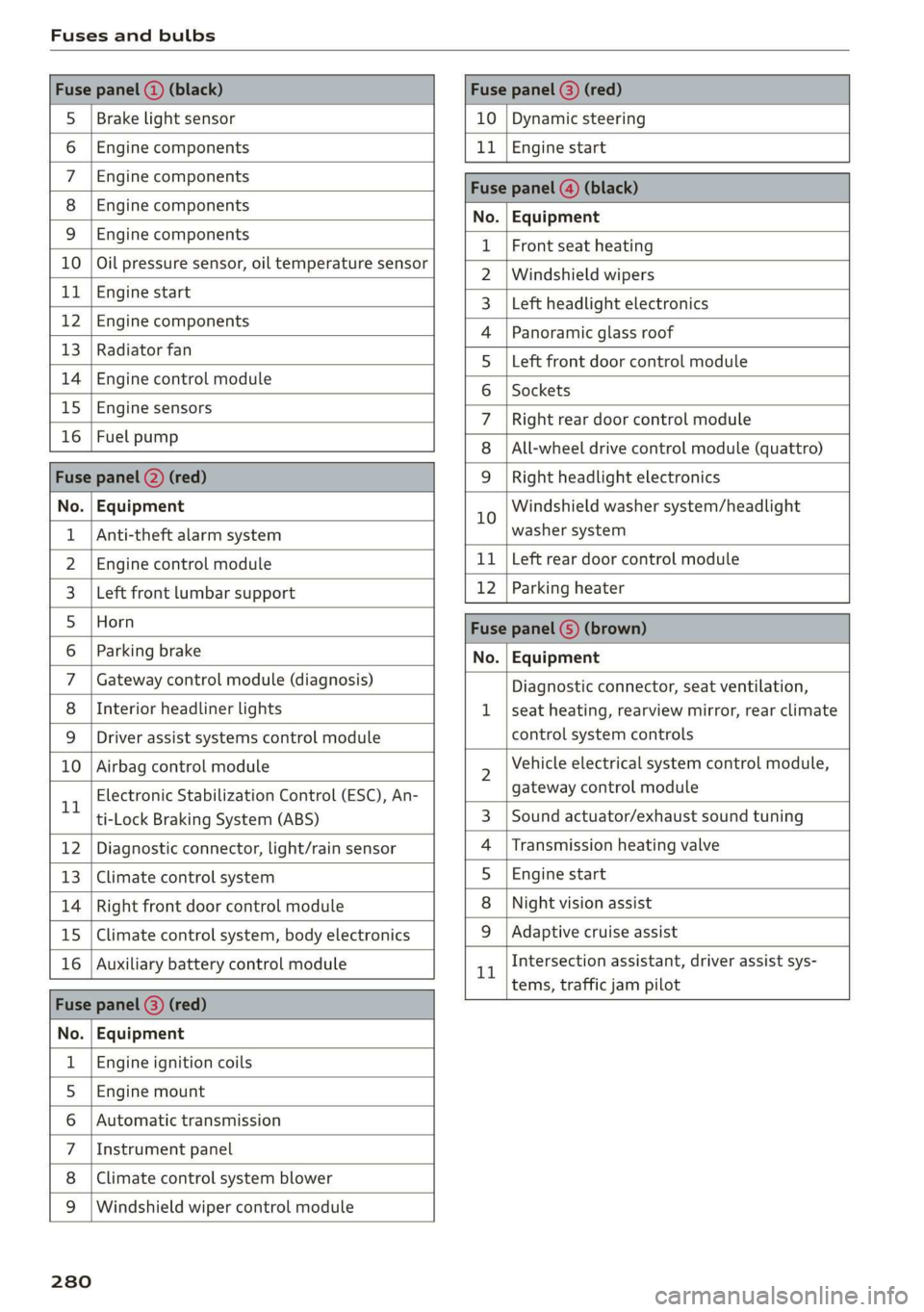
Fuses and bulbs
Fuse panel () (black) Fuse panel © (red)
S_ | Brake light sensor 10 | Dynamic steering
6 |Engine components 11 | Engine start
7 | Engine components Fase Parevauacn
8 | Engine components Na: Equipment
3_|Engine components 1 |Front seat heating
10 | Oil pressure sensor, oil temperature sensor 2 |Windshield wipers
ub BGI start 3 |Left headlight electronics
12 engine components 4 |Panoramic glass roof
13 | Radiator fal 5 |Left front door control module
14 | Engine control module 6 | sackats
15 |Engine sensors 7 |Right rear door control module
26 | ROBLBUTGD 8 | All-wheel drive control module (quattro)
Fuse panel (2) (red) 9 |Right headlight electronics
No. | Equipment 10 Windshield washer system/headlight
1 | Anti-theft alarm system washer system
2. |Engine control module 11 | Left rear door control module
3. | Left front lumbar support 12 | Parking heater
5_|Horn Fuse panel (5) (brown)
6 |Parking brake No. | Equipment
7 | Gateway control module (diagnosis) Diagnostic connector, seat ventilation,
8 | Interior headliner lights 1 |seat heating, rearview mirror, rear climate
9 | Driver assist systems control module control system controls
10 | Airbag control module 2 Vehicle electrical system control module,
11 Electronic Stabilization Control (ESC), An- gateway control module
ti-Lock Braking System (ABS) 3 | Sound actuator/exhaust sound tuning
12 | Diagnostic connector, light/rain sensor 4 |Transmission heating valve
13 | Climate control system 5 |Engine start
14 | Right front door control module 8 | Night vision assist
15 | Climate control system, body electronics 9 |Adaptive cruise assist
16 | Auxiliary battery control module 1 Intersection assistant, driver assist sys-
= tems, traffic jam pilot
Fuse panel (2) (red)
No. | Equipment
1 | Engine ignition coils
5 | Engine mount
6 |Automatic transmission
7 |Instrument panel
8 | Climate control system blower
9 |Windshield wiper control module
280
Page 283 of 310

4K8012721BC
Fuses and bulbs
Fuse assignment - luggage compartment
[RAZ-0196
Cen
5
cs
i
-
fr) =)
ea
Fig. 176 Luggage compartment floor: fuse panel with
plastic clip
Fuse panel (@) (brown)
3 | Right front lumbar support
Side assist
4
6 |Tire pressure monitoring system
7 Emergency call system
Parking heater radio receiver, fuel tank
8 ae
monitoring
9 |Automatic transmission selector lever
10 |TV tuner, data exchange control module
11 | Vehicle opening/start (NFC)
12 | Garage door opener
13 | Rearview camera, peripheral cameras
14 | Central locking, tail lights
Front belt tensioner on front passenger's
16 side
Fuse panel @) (black)
No. | Equipment
Not assigned
Fuse panel (5) (red)
Fuse panel ( (black) No. | Equipment
No. | Equipment
Passenger’s side rear safety belt tensioner
Driver’s side rear safety belt tensioner
Air suspension
Automatic transmission
Rear sliding sunroof, rear spoiler
Rear seat heating
W}@O;N|
AD)
Mm)
BR)
Ww
Central locking, left tail light
10 | Front belt tensioner on driver's side
11 | Central locking, rear blind, fuel filler door
12 | Luggage compartment lid
Fuse panel (2) (red)
No. | Equipment
5 | Brake system
Auxiliary battery control module
Fuse panel (3) (brown)
No. | Equipment
Driver assist systems control module
2 |Audi phone box, roof antenna
Exhaust treatment, sound actuator, AC
socket
Rear climate control system control panel
Right trailer hitch light
Trailer hitch
Left trailer hitch light
Trailer hitch socket
10 | Sport differential
11 | Exhaust treatment
WOl/oOIN|
un]
Bulbs
Your vehicle is equipped with maintenance-free
headlights and tail lights. However, if a light bulb
needs to be replaced, please contact an author-
ized Audi dealer or authorized Audi Service Facili-
ty.
281
Page 295 of 310

4K8012721BC
Index
A
A/C cooling mode............. ee eee eee ee
Accelerator pedal.............--00000005
also refer to Accelerator pedal...........
ACCeSSOFICS . 6... eee
Active lane assist
refer to Lane departure warning.........
refer to Lane guidance................
Adaptive cruise assist..............-000.
Cleaning the sensors...........00 ee eee
Predictive control....................
Adaptive dampers...........--0000-00-
Adaptive speed assist
refer to Adaptive cruise assist...........
Adjusting the air distribution.............
Adjusting the brightness.................
Adjusting the sound..............-...0-
Adjusting the temperature...............
Adjusting the vents ...........0 cece eens
Adjusting the volume..............000005
Adjusting the volume (announcements) ... .
Adjusting the welcome sound............
Airbag SySteM « » ene s ews 4 5 Hemme tee Eee
Air quality display................2.2.00.
Air suspension..............00.00-0008
Alarm system
refer to Anti-theft alarm system..........
Alignment pin (changing the wheel).......
All-weather lights...............-.00000.
Allseason tires... 2.2.00... 22020
All wheel drive
refer to quattro... 2... eee eee eee
Amazon Alexa integration
Média playback’: ¢ sos s ¢ wees ¢ 4 orem b eae
Operation « sion ss aac sv rere © omen wa ar
AMI
refer to Audi music interface...........
Android Auto
refer to Audi smartphone interface......
Anti-freeze
Windshield washer system.............
Anti-lock braking system. ........-....-.
Anti-Slip Regulation.................0..
Anti-theft alarm system...........-..00--
Anti-theft wheel bolts................0.
Apple CarPlay
refer to Audi smartphone interface...... 217
Aspect ratio (video) ..........-..00. 211,.213
ASR
refer to Anti-Slip Regulation............ 108
Audi adaptive light.................0005. 48
Audi connect
refer to CONNECt:. « s ccascs seas ieeeee oe 174
Audi connect Remote & Control
refer to Vehicle control services......... 176
Audirdrive seletticy: « + sven « x cee x ¢ neem ¢ 2 2 104
Audi music interface...............20-- 208
Audio files.......... 00.0000 c cece 209
Audi phone box............ 00: e eee eee 163
Audi presense......... 0... e ee eee eee 143
Messages ............ 0.02. e eee eee 146
Audi pre sense front.............--..0-- 144
Audi side assist
refer to Side assist. ...... 0.00.00 eee eee 147
Audi smartphone interface.............. 217
Legalinformation.................005 221
Audi virtual cockpit
refer to Instrument cluster.............. 12
AUTO
Automatic headlights.................. 48
Climate control system.............0005 86
Auto Lock (central locking) ............... 32
Automatic climate control system
refer to Climate control system.......... 85
Automatic luggage compartment lid.... 40,41
Automatic transmission............-.0005 92
Parking lock emergency release.......... 95
Automatic wipe/wash system............. 55
Average consumption................... 16
Average speed.... 2.2... - ee eee eee eee 16
B
Bag hooks... ..... cece eee eee eee eee 80
Battery
Charging (12 Volt vehicle battery)....... 239
Vehicle battery (12 Volt)............... 237
Winter operation (12 Volt vehicle battery) . 237
BOCK rOUEE sicccans + 2 woewene © o sirens © ¥ ecevonT «ones 190
293