2020 Acura RDX Clean
[x] Cancel search: CleanPage 491 of 657

uuAcuraWatchTMuFront Sensor Camera
490
Driving
1Front Sensor Camera
If the Some Driver Assist Systems Cannot
Operate: Camera Temperature Too High message
appears:
•Use the climate control system to cool down the
interior and, if necessary, also use defroster mode
with the airflow directed towards the camera.
•Start driving the vehicle to lower the windshield
temperature, which cool s down the area around
the camera.
If the Some Driver Assist Systems Cannot
Operate: Clean Front Windshield message
appears:
•Park your vehicle in a sa fe place, and clean the
windshield. If the message does not disappear after
you have cleaned the windshield and driven for a
while, have your vehicle checked by a dealer.
20 ACURA RDX-31TJB6111.book 490 ページ 2020年2月11日 火曜日 午後2時6分
Page 492 of 657

491
uuAcuraWatchTMuRadar Sensor
Driving
Radar Sensor
The radar sensor is behind the emblem.1Radar Sensor
Avoid strong impacts to the radar sensor cover.
For the CMBS
TM to work properly:
•Always keep the radar sensor cover clean.•Never use chemical solvents or polishing powder
for cleaning the sensor cove r. Clean it with water
or a mild detergent.
•Do not put a sticker on th e radar sensor cover or
replace the radar sensor cover.
If you need the radar sensor to be repaired, or
removed, or the radar se nsor cover is strongly
impacted, turn off the system by using the CMBS
TM
off button and take your vehicle to a dealer.
2 CMBS
TM On and Off P. 453
If the vehicle is involved in any of the following
situations, the radar sensor may not work properly.
Have your vehicle checked by a dealer:
•Your vehicle is involved in a frontal collision•Your vehicle drives th rough deep water or is
submerged in deep water
•Your vehicle strongly strikes a bump, curb, chock,
or embankment that co uld jar the radar sensor
Radar
Sensor
The radar sensor is
behind the emblem.
20 ACURA RDX-31TJB6111.book 491 ページ 2020年2月11日 火曜日 午後2時6分
Page 509 of 657

uuParking Your Vehicle uCross Traffic Monitor*
508
Driving
The system activates when:
• The power mode is in ON.
• The Cross Traffic Monitor is turned on.
2 Cross Traffic Monitor On and Off P. 510
•The transmission is in (R.
• Your vehicle is moving at 3 mph (5 km/h) or
lower.
When a vehicle is detected approaching from a rear corner, Cross Traffic Monitor
alerts you with a buzzer and a displayed warning.
The system will not detect a vehicle that approaches from directly behind your
vehicle, nor will it provide alerts about a detected vehicle when it moves directly
behind your vehicle.
The system does not provide alerts for a vehicle that is moving away from your
vehicle, and it may alert for pedestri ans, bicycles, or stationary objects.
■How the System Works1Cross Traffic Monitor*
Cross traffic monitor may not detect or may delay
alerting an approach ing vehicle, or may alert without
an approaching vehicle under the following
conditions:
•An obstacle, such as a nother vehicle and a wall,
near your vehicle’s rear bumper, is blocking the
radar sensor’s scope.
•Your vehicle is moving at the speed of about 3 mph
(5 km/h) or higher.
•A vehicle is approaching at the speed other than
between about 6 mph (10 km/h) and 16 mph (25
km/h).
•The system picks up external interference such as
other radar sensors from an other vehicle or strong
radio wave transmitted fr om a facility nearby.
•Either corner of the rear bumper is covered with
snow, ice, mud or dirt.
•When there is bad weather.
•Your vehicle is on an incline.
•Your vehicle is tilted due to a heavy load in the rear.•Your vehicle is reversing towards a wall, a pole, a
vehicle, and so on.
The rear bumper or the se nsors have been improperly
repaired or the rear bum per has been deformed.
Have your vehicle checked by a dealer.
For proper operation, always keep the rear bumper
corner area clean.
Do not cover the rear bumper corner area with labels
or stickers of any kind.
Radar sensors:
Underneath the rear bumper
corners
* Not available on all models
20 ACURA RDX-31TJB6111.book 508 ページ 2020年2月11日 火曜日 午後2時6分
Page 510 of 657

Continued509
uuParking Your Vehicle uCross Traffic Monitor*
Driving
An arrow icon appears on the side a vehicle is approaching on the audio/information
screen.
■When the System Detects a Vehicle1When the System Detects a Vehicle
If the on the lower right changes to in amber
when the gear position is in
( R, obstructions (mud,
snow, ice, etc.) may have ac cumulated in the vicinity
of the sensor. The system is temporarily canceled.
Check the bumper corners for any obstructions, and
thoroughly clean the area if necessary.
If the comes on in ambe r when the gear position
is in
( R, there may be a problem with the Cross
Traffic Monitor system. Do not use the system and
have your vehicle ch ecked by a dealer.
If the display remains the same with the transmission
in
( R, there may be a problem with the rear camera
system and the Cross Traffic Monitor system.
Do not use the system and have your vehicle checked
by a dealer.
Wide View Normal View
Arrow IconTop Down View
Models with multi-view rear camera system
Models with surround view camera system
Arrow Icon
Rear Wide View Rear Ground View
20 ACURA RDX-31TJB6111.book 509 ページ 2020年2月11日 火曜日 午後2時6分
Page 512 of 657

511Continued
Driving
Multi-View Rear Camera
About Your Multi-View Rear Camera
The audio/information screen can display your vehicle’s rear view. The display
automatically changes to the rear view when the transmission is put into
(R.
■Multi-View Rear Camera Display Area
1About Your Multi-View Rear Camera
The rear camera view is restricted. You cannot see
the corner ends of the bum per or what is underneath
the bumper. Its unique le ns also makes objects
appear closer or farther than they actually are.
Visually confirm that it is safe to drive before backing
up. Certain conditions (such as weather, lighting, and
high temperatures) may also restrict the rear view. Do
not rely on the rearview display which does not give
you all information about conditions at the back of
your vehicle.
If the rear camera lens is covered with dirt or
moisture, activate the rearview camera washer
* or
use a soft, moist cloth to keep the lens clean and free
of debris. 2 Rear Wiper/Washer P. 196
Guidelines appear when you put the transmission
into
( R.
You can change the Guidelines setting. 2 Customized Features P. 335
Off: Guidelines do not appear.
Fixed: Fixed Guidelines appear.
Dynamic: Guidelines that move according to the
steering wheel direction appear.
Both: Fixed guidelines and dynamic guidelines
appear.
Guidelines
Bumper
Camera
Approx. 20 inches
(50 cm)
Tailgate Open Range Approx. 39 inches
(1 m)
Wide View Mode
Normal View Mode
Top Down View Mode
Approx. 20 inches (50 cm)
Tailgate Open Range Approx. 39 inches (1 m)
* Not available on all models
20 ACURA RDX-31TJB6111.book 511 ページ 2020年2月11日 火曜日 午後2時6分
Page 515 of 657

514
uuSurround View Camera System*uDisplaying an Image From the Surround View Cameras
Driving
Displaying an Image From the Surround View
Cameras
■For frontal views:
Press the CAMERA button when the vehicle is
stationary or moving at 12 mph (20 km/h) or
slower. Press the butto n again to switch
camera views.
■For rear reviews:
Change the gear position to
(R when the
vehicle is stationary. Press the CAMERA
button to switch to rear view mode.
You can customize the display setting.
2 Customized Features P. 335
1Surround View Camera System*
The surround view ca mera system does not eliminate
all blind spots. The system is for your convenience
only.
If the rear camera lens is covered with dirt or
moisture, activate the rearview camera washer
* or
use a soft, moist cloth to keep the lens clean and free
of debris.
2 Rear Wiper/Washer P. 196
CAMERA
Button
1 Displaying an Image From the Surround View Cameras
The navigation system is disabled when the gear
position is in
(R.
Pressing the (home) or (back) button while
the surround view camera syst em screen is displayed
cancels the front view sc reen of the surround view
camera system.
If you press the CAMERA button while the vehicle
speed is more than 16 mph (25 km/h), the standby
screen appears.
When the vehicle speed is reduced below 12 mph (20
km/h), the screen switches to a surround view camera
system image.
* Not available on all models
20 ACURA RDX-31TJB6111.book 514 ページ 2020年2月11日 火曜日 午後2時6分
Page 521 of 657

520
uuSurround View Camera System*uUsing the Surround View Camera System
Driving
The system may not work properly under the following conditions.
■Surround View Camera System Limitations
ConditionsSolutions
The images may not
appear clearly when:●You activate the system in bad weather (heavy rain,
snow, fog, etc.) or in the dark.
●Camera temperatures are high.●A sudden change between lig ht and dark such as an
entrance or exit of a tunnel.
●You drive into the sunlight (e.g., at dawn or dusk.)
Do not use the surround view camera system but rely
only on visual confirmation until the conditions allow
the system to work properly.
●A camera lens is covered with dirt, moisture, or
debris.
●A camera lens is scratched.
Clean rear camera lenses with the rearview camera
washer* or a soft cloth moisturized with water, mild
detergent or glass cleaner.
2 Rear Wiper/Washer P. 196
The audio/information screen is dirty.Wipe off the screen using a soft dry cloth.
A camera angle is
altered.A camera or the area around the camera has been
severely impacted.Do not use the surround view camera system and
contact a dealer.
An error message is displayed while the surround view camera system is in use.
* Not available on all models
20 ACURA RDX-31TJB6111.book 520 ページ 2020年2月11日 火曜日 午後2時6分
Page 525 of 657
524
Driving
Fuel Economy and CO2 Emissions
Improving Fuel Economy and Reducing CO2 Emissions
Achieving fuel economy and reducing CO2 emissions is dependent on several
factors, including driving conditions, load weight, idling time, driving habits, and
vehicle condition. Depending on these and other factors, you may not achieve the
rated fuel economy of this vehicle.
You can optimize your fuel economy with proper maintenance of your vehicle.
Always maintain your vehicle in accord ance with the messages displayed on the
multi-information display.
• Use the recommended viscosity engine oil.
2 Recommended Engine Oil P. 541
•Maintain the specified tire pressure.
• Do not load the vehicl e with excess cargo.
• Keep your vehicle clean. A buildup of snow or mud on your vehicle’s underside
adds weight and increases wind resistance.
■Maintenance and Fuel Economy
1Improving Fuel Economy and Reducing CO2 Emissions
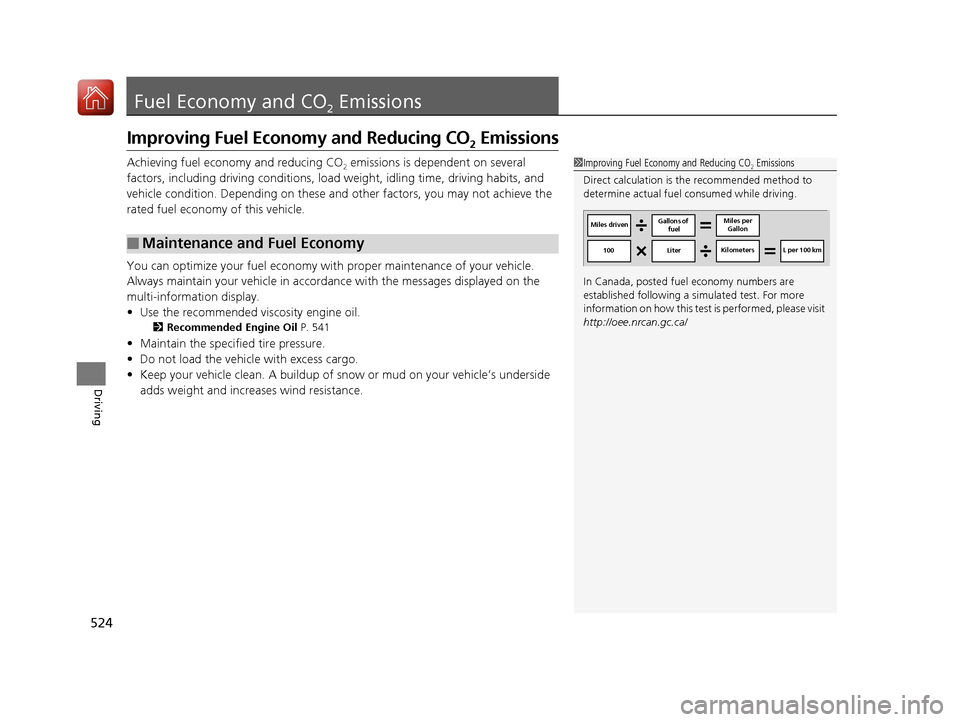
Direct calculation is the recommended method to
determine actual fuel consumed while driving.
In Canada, posted fuel economy numbers are
established following a simulated test. For more
information on how this test is performed, please visit
http://oee.nrcan.gc.ca/
Miles driven Gallons of
fuel Miles per
Gallon
100 LiterKilometers L per 100 km
20 ACURA RDX-31TJB6111.book 524 ページ 2020年2月11日 火曜日 午後2時6分