Page 14 of 657

13
Quick Reference Guide
Wipers and Washers
(P 194)
Wiper/Washer Control LeverAdjustment Ring
(-: Low Sensitivity*1
: Lower speed, fewer sweeps*2
(+: High Sensitivity*1
: Higher speed, more sweeps*2
MIST
OFF
AUTO
*1: Wiper speed varies automatically
INT*2: Low speed with intermittent
LO : Low speed wipe
HI : High speed wipe Pull toward
you to spray
washer fluid.
*1 : Models with automatic intermittent wipers
*2 : Models without automatic intermittent
wipers
AUTO should always be turned OFF before
the following situations in order to prevent
severe damage to the wiper system:
● Cleaning the windshield
● Driving through a car wash
● No rain present
Steering Wheel (P 203)
● To adjust, push the adjustment lever
down, adjust to the desired position, then
lock the lever back in place.
Models with automatic intermittent wipersUnlocking the Front
Doors from the Inside
(P 160)
●Pull either front door inner handle to
unlock and open it at the same time.
● Unlocking and opening the driver’s door
from the inner handle unlocks all the
other doors.
20 ACURA RDX-31TJB6111.book 13 ページ 2020年2月11日 火曜日 午後2時6分
Page 15 of 657
14
Quick Reference Guide
Tailgate (P 163)
● Press the tailgate outer handle to unlock
and open the tailgate when you carry the
keyless access remote.
● Press the power tailgate button on the
driver’s door or the remote transmitter to
open and close the power tailgate.Use a forward and back kicking motion
under the center of the rear bumper to
open or close the power tailgate while
carrying the keyless access remote.
Models with Hands Free Access
1 sec.
Power Door Mirrors
(P 205)
●With the power mode in ON, move the
selector switch to L or R .
● Push the appropriate edge of the
adjustment switch to adjust the mirror.
● Press the folding button
* to fold in and
out the door mirrors.
Selector Switch
Adjustment SwitchFolding Button*
20 ACURA RDX-31TJB6111.book 14 ページ 2020年2月11日 火曜日 午後2時6分
Page 16 of 657
15
Quick Reference Guide
Power Windows (P 176)
● With the power mode in ON, open and
close the power windows.
● If the power window lock button is in the
off position, each passenger’s window
can be opened and closed with its own
switch.
● If the power window lock button is in the
on position (indicator is on), each
passenger’s window switch is disabled.
Power Window Lock Button
Window Switch
Indicator
*
Not available on all models
20 ACURA RDX-31TJB6111.book 15 ページ 2020年2月11日 火曜日 午後2時6分
Page 17 of 657
16
Quick Reference Guide
Climate Control System (P 230)
● Press the AUTO button to activate the climate control system.
● Press the button to turn the system on or off.
● Press the button to de frost the windshield.
Driver’s Side Temperature
Control Buttons
(Windshield Defroster) Button
A/C (Air Conditioning) Button
Air flows from floor and
windshield defroster vents. Air flows from floor vents. Air flows from floor and
dashboard vents, and back
of the center console. Air flows from dashboard
vents and back of the
center console. SYNC
(Synchronization) Button
(Recirculation) Button
AUTO Button
Passenger’s Side Temperature
Control Buttons
MODE Control Button (ON/OFF) Button
Fan Control Button
20 ACURA RDX-31TJB6111.book 16 ページ 2020年2月11日 火曜日 午後2時6分
Page 18 of 657
17
Quick Reference Guide
Features (P 237)
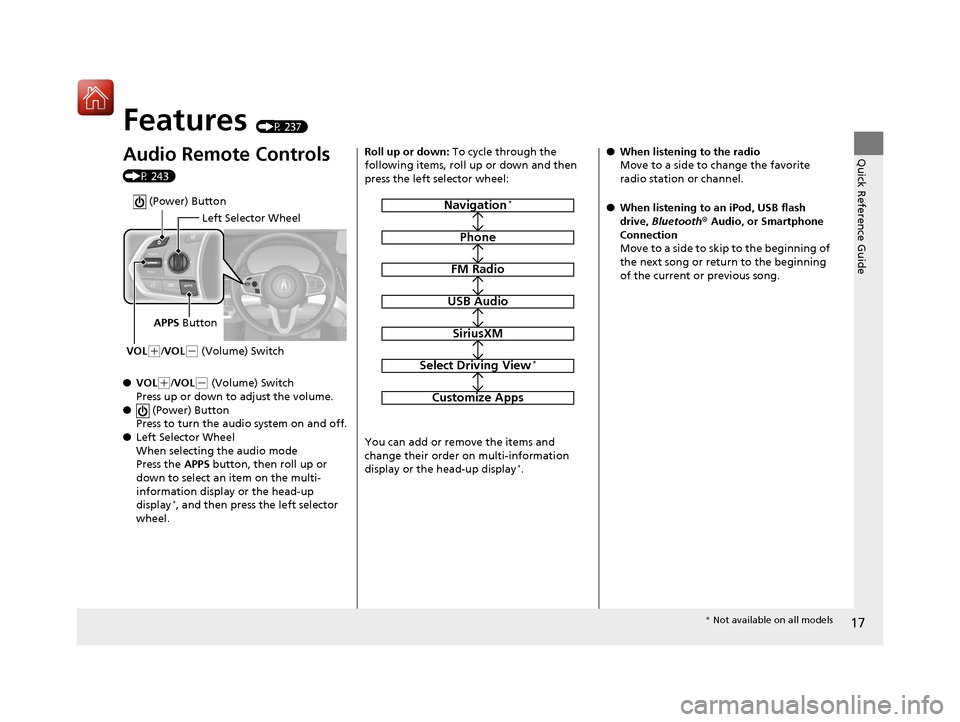
Audio Remote Controls
(P 243)
●VOL
(+/VOL( - (Volume) Switch
Press up or down to adjust the volume.
● (Power) Button
Press to turn the audio system on and off.
● Left Selector Wheel
When selecting the audio mode
Press the APPS button, then roll up or
down to select an item on the multi-
information display or the head-up
display
*, and then press the left selector
wheel.
Left Selector Wheel
APPS Button
VOL
( +/VOL(- (Volume) Switch
(Power) Button
Roll up or down: To cycle through the
following items, roll up or down and then
press the left selector wheel:
You can add or remove the items and
change their order on multi-information
display or the head-up display
*.
Navigation*
Phone
FM Radio
USB Audio
SiriusXM
Select Driving View*
Customize Apps
● When listening to the radio
Move to a side to change the favorite
radio station or channel.
● When listening to an iPod, USB flash
drive, Bluetooth® Audio, or Smartphone
Connection
Move to a side to skip to the beginning of
the next song or return to the beginning
of the current or previous song.
* Not available on all models
20 ACURA RDX-31TJB6111.book 17 ページ 2020年2月11日 火曜日 午後2時6分
Page 20 of 657
19
Quick Reference Guide
Driving (P 399)
Automatic Transmission (P420)
● Select
(P and depress the brake pedal when starting the engine.
Park
Press the
(P button.
Used when parking or before
turn off or start the engine.
Transmission is locked.
Reverse
Pull back the
( R button.
Used when reversing.
Neutral
Press the
( N button.
Transmission is not locked. Drive/S Position
Each time you press the button, the mode
switches between Drive and S Position mode.
●Normal driving (gears change between 1st
and 10th automatically)
●Temporarily driving in the sequential mode
●Automatically changing gears between 1st
and 8th (8th gear is used only at high speed)
●Driving in the sequential mode
D/S
Drive
S Position
Gear Position Indicator
The gear position indicator and the
shift button indicator indicate the
current gear selection.
Gear Position Indicator Shift Button
Indicator
Gear selection
20 ACURA RDX-31TJB6111.book 19 ページ 2020年2月11日 火曜日 午後2時6分
Page 21 of 657
20
Quick Reference Guide
Sequential Mode (P426)
Paddle shifters allow you to shift gears much like a manual
transmission (1st through 10th). This is useful for engine braking.
When the transmission is in (D●The transmission will shift back to
automatic mode once the system
detects that the vehicle is cruising.
When the transmission is in (S●Holds the selected gear, and the
M (sequential mode) indicator
comes on.
● The sequential mode gear
selection is shown in the
instrument panel.
Gear Position Indicator
Shift Down
(-
Paddle Shifter Shift Up (
+
Paddle Shifter
Selected Gear Number M
Indicator
20 ACURA RDX-31TJB6111.book 20 ページ 2020年2月11日 火曜日 午後2時6分
Page 24 of 657
23
Quick Reference Guide
Maintenance (P 527)
Under the Hood (P 538)
● Check engine oil, engine coolant, and windshield washer
fluid. Add when necessary.
● Check brake fluid.
● Check the battery condition monthly.
aPull the hood release handle under the corner of the
dashboard.
bLocate the hood latch lever, push it to the side, and then
raise the hood. Once you have raised the hood slightly, you
can release the lever.
cWhen finished, close the hood and make sure it is firmly
locked in place.
Lights (P 551)
● Inspect all lights regularly.
Wiper Blades (P 555)
● Replace blades if they leave streaks
across the windshield.
Tires (P 560)
● Inspect tires and wheels regularly.
● Check tire pressures regularly.
● Install snow tires for winter
driving.
* Not available on all models
20 ACURA RDX-31TJB6111.book 23 ページ 2020年2月11日 火曜日 午後2時6分


