Page 493 of 701
492
uuWhen Driving uAdaptive Cruise Control (ACC) with Low Speed Follow
Driving
When driving at slower than about 25 mph (40 km/h): If the vehicle is moving
and the brake pedal is not depressed, pres sing the switch fixes the set speed to
about 25 mph (40 km/h) regardless of current vehicle speed. While stationary and a
vehicle is ahead of you, the vehicle speed can be set, even with the brake pedal
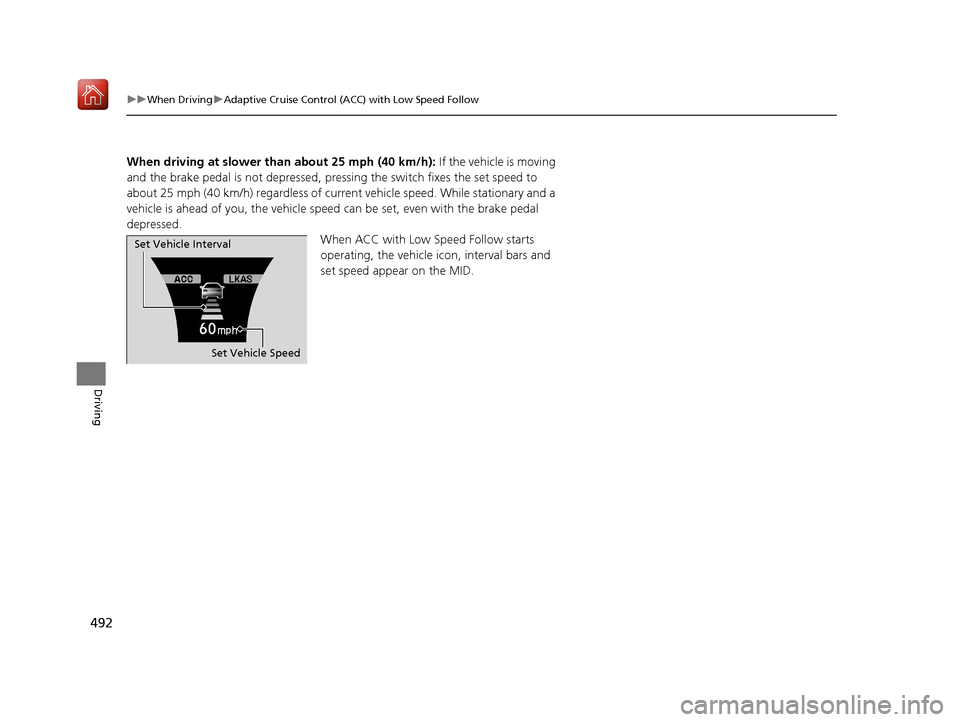
depressed. When ACC with Low Speed Follow starts
operating, the vehicle icon, interval bars and
set speed appear on the MID.
Set Vehicle Speed
Set Vehicle Interval
20 ACURA MDX-31TZ56600.book 492 ページ 2019年4月24日 水曜日 午後5時44分
Page 494 of 701

Continued493
uuWhen Driving uAdaptive Cruise Control (ACC) with Low Speed Follow
Driving
■There is a vehicle ahead
ACC with Low Speed Follow monitors if a vehicle ahead of you enters the ACC with
Low Speed Follow range. If a vehicle is de tected doing so, the ACC with Low Speed
Follow system maintains or decelerates your vehicle’s set speed in order to keep the
vehicle’s set following-interval from the vehicle ahead.
2 To Set or Change Following-interval P. 499
When a vehicle whose speed is slower than
your set speed is detected in front of you, your
vehicle starts to slow down.
■When in Operation1 When in Operation
If the vehicle detected ahead of you slows down
abruptly, or if a nother vehicle is de tected cutting in
front of you, the beep er sounds and a message
appears on the MID, and the head-up warning lights
*
come on.
Depress the brake pedal, and keep an appropriate
interval from the vehicle ahead.
Even if the interval betw een your vehicle and the
vehicle detected ahead is short, ACC with Low Speed
Follow may start accelerati ng your vehicle under the
following circumstances:
•The vehicle ahead of you is going at almost the
same speed as, or faster than, your vehicle.
•A vehicle that cuts in front of you is going faster
than your vehicle, gradua lly increasing the interval
between the vehicles.
Beep
Head-up Warning
Lights
*
ACC with Low Speed Follow Range: 394 ft. (120 m)
A vehicle icon appears
on the MID.
* Not available on all models
20 ACURA MDX-31TZ56600.book 493 ページ 2019年4月24日 水曜日 午後5時44分
Page 495 of 701

uuWhen Driving uAdaptive Cruise Control (ACC) with Low Speed Follow
494
Driving
■There is no vehicle ahead
Your vehicle maintains the set speed without
having to keep your foot on the brake or
accelerator pedal.
If there previously was a vehicle detected
ahead that kept your vehicle from traveling at
the set speed, ACC with Low Speed Follow
accelerates your vehicle to the set speed, and
then maintains it.
While stationary and no vehicle is detected,
ACC with Low Speed Follow automatically
cancels and a beeper sounds.
■When you depress the accelerator pedal
You can temporarily increase the vehicle speed. In this ca se, there is no audible or
visual alert even if a vehicle is in the ACC with Low Speed Follow range.
ACC with Low Speed Follow stays on unless you cancel it. Once you release the
accelerator pedal, the system resumes the set speed.
There are times when the vehicle speed will decrease when the accelerator pedal is
lightly applied.
A vehicle icon with dotted-line
contour appears on the MID.
1 When in Operation
You can also set the system to beep when a vehicle in
front of you comes in and goes out of the ACC with
Low Speed Follow detect ing range. Change the ACC
Forward Vehicle Detect Beep setting.
2 Customized Features P. 126, 358
Limitations
You may need to use the brake to maintain a safe
interval when using ACC with Low Speed Follow.
Additionally, ACC with Lo w Speed Follow may not
work properly under certain conditions.
2 ACC with Low Speed Follow Conditions
and Limitations P. 496
20 ACURA MDX-31TZ56600.book 494 ページ 2019年4月24日 水曜日 午後5時44分
Page 498 of 701

Continued497
uuWhen Driving uAdaptive Cruise Control (ACC) with Low Speed Follow
Driving
■Detection limitations
• A vehicle or pedestrian suddenly crosses in front of you.
• The interval between your vehicle and the vehicle or pedestrian ahead of you is
too short.
• A vehicle cuts in front of you at a slow speed, and it brakes suddenly.
• When you accelerate rapidly and approach the vehicl e or pedestrian ahead of you
at high speed.
• The vehicle ahead of you is a motorcycle, bicycle, mobility scooter, or other small
vehicle.
• When there are animals in front of your vehicle.
• When you drive on a curved or winding or undulating road that makes it difficult
for the sensor to properly detect a vehicle or a pedestrian in front of you.
• The speed difference between your vehi cle and a vehicle in front of you is
significantly large.
• An oncoming vehicle suddenly comes in front of you.
• Your vehicle abruptly crosses over in front of an oncoming vehicle.
• When driving through a narrow iron bridge.
• When the vehicle ahead of you brakes suddenly.
• When the vehicle ahead of you has a unique shape.
• When your vehicle or the vehicle ahead of you is driving on one edge of the lane.1ACC with Low Speed Follow Conditions and Limitations
If you need the radar sensor to be repaired, or
removed, or the radar se nsor cover is strongly
impacted, turn off the system by pressing the MAIN
button and take your vehicle to a dealer.
Have your vehicle checked by a dealer if you find any
unusual behavior of the system (e.g., the warning
message appears too frequently).
If the front of the vehicle is impacted in any of the
following situations, the ra dar sensor may not work
properly. Have your vehi cle checked by a dealer:
•The vehicle impacted a bump, curb, chock,
embankment, etc.
•You drive the vehicle where the water is deep.
•Your vehicle has a frontal collision.
20 ACURA MDX-31TZ56600.book 497 ページ 2019年4月24日 水曜日 午後5時44分
Page 499 of 701
uuWhen Driving uAdaptive Cruise Control (ACC) with Low Speed Follow
498
Driving
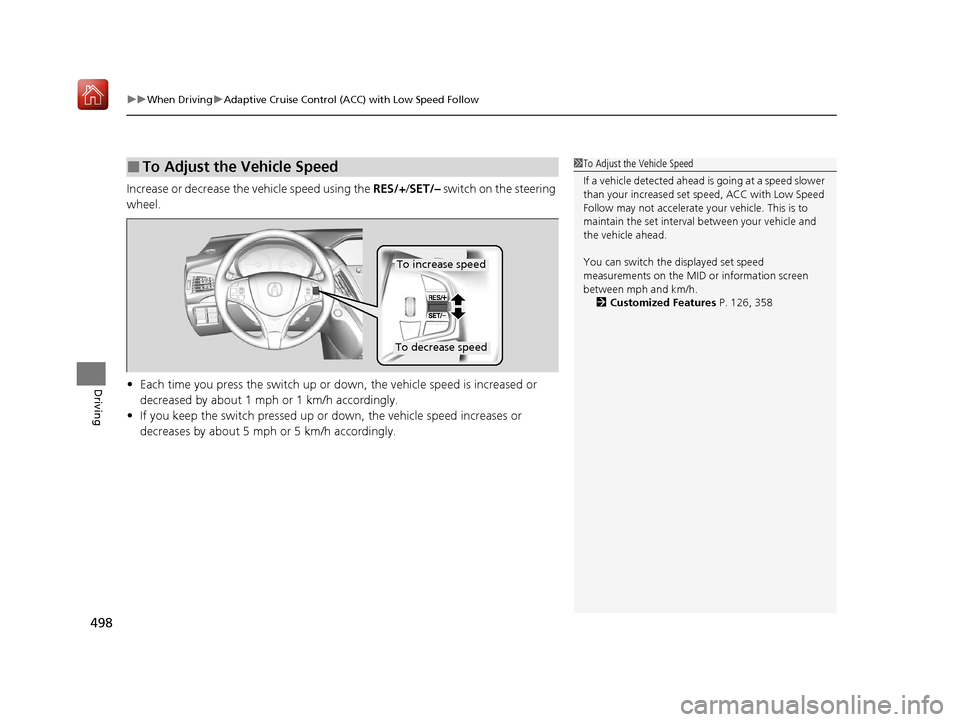
Increase or decrease the vehicle speed using the RES/+/SET/– switch on the steering
wheel.
• Each time you press the switch up or do wn, the vehicle speed is increased or
decreased by about 1 mph or 1 km/h accordingly.
• If you keep the switch pressed up or down, the vehicle speed increases or
decreases by about 5 mph or 5 km/h accordingly.
■To Adjust the Vehicle Speed1 To Adjust the Vehicle Speed
If a vehicle detected ahead is going at a speed slower
than your increased set speed, ACC with Low Speed
Follow may not accelerate y our vehicle. This is to
maintain the set interval between your vehicle and
the vehicle ahead.
You can switch the displayed set speed
measurements on the MID or information screen
between mph and km/h. 2 Customized Features P. 126, 358
To increase speed
To decrease speed
20 ACURA MDX-31TZ56600.book 498 ページ 2019年4月24日 水曜日 午後5時44分
Page 500 of 701
499
uuWhen Driving uAdaptive Cruise Control (ACC) with Low Speed Follow
Continued
Driving
Press the (interval) button to change the
ACC with Low Speed Follow following-
interval.
Each time you press th e button, the following-
interval (the interval behind a vehicle detected
ahead of you) setting cycles through short,
middle, long, and extra long following-
intervals.
Determine the most appropriate following-
interval setting based on your specific driving
conditions. Be sure to adhere to any
following-interval requirements set by local
regulation.
■To Set or Change Following-interval
Interval Button
20 ACURA MDX-31TZ56600.book 499 ページ 2019年4月24日 水曜日 午後5時44分
Page 501 of 701
500
uuWhen Driving uAdaptive Cruise Control (ACC) with Low Speed Follow
Driving
The higher your vehicle’s following-speed is, the longer the short, middle, long or
extra long following-interval becomes. See the following examples for your
reference.
When your vehicle stops automatically beca use a vehicle detected ahead of you has
stopped, the interval between the two vehi cles will vary based on the ACC with Low
Speed Follow interval setting.
Following-intervalWhen the Set Speed is:
50 mph (80 km/h)65 mph (104 km/h)
Short
83 feet
25 meters 1.1 sec100 feet
31 meters 1.1 sec
Middle
110 feet
33 meters
1.5 sec137 feet
42 meters
1.5 sec
Long
154 feet
47 meters 2.1 sec200 feet
61 meters 2.1 sec
Extra
Long204 feet
62 meters 2.8 sec265 feet
81 meters 2.8 sec
20 ACURA MDX-31TZ56600.book 500 ページ 2019年4月24日 水曜日 午後5時44分
Page 504 of 701

Continued503
uuWhen Driving uAdaptive Cruise Control (ACC) with Low Speed Follow
Driving
Press and hold the (i nterval) button for one
second. Cruise Mode Selected appears on
the MID for two seconds, and then the mode
switches to Cruise.
To switch back to ACC with Low Speed
Follow, press and hold the button again for
one second. ACC Mode Selected appears on
the MID for two seconds.
■When to use
Desired speed in a range above roughly 25 mph (40 km/h) ~.
Take your foot off the pedal and press the RES/+/SET/– switch down when you
reach the desired speed.
The moment you release the RES/+/SET/– switch, the set speed is fixed, and cruise
control begins. The CRUISE CONTROL indicator comes on.
Each time you press the RES/+/SET/– switch up or down, the vehicle speed is
increased or decreased by about 1 mph (1.6 km/h).
If you keep the RES/+/SET/– switch pressed up or down, the vehicle speed increases
or decreases until you release it. This speed is then set.
■To Switch ACC with Low Speed Follow to Cruise Control1To Switch ACC with Low Speed Follow to Cruise Control
Always be aware which mode you are in. When you
are driving in Cruise mode, the system will not assist
you to maintain a following-interval from a vehicle
ahead of you.
You can switch the displayed set speed
measurements on the MID or information screen
between mph and km/h.
2 Customized Features P. 126, 358
ACC with
Low Speed
Follow ONCruise
Control ON
■To Set the Vehicle Speed
■To Adjust the Vehicle Speed
20 ACURA MDX-31TZ56600.book 503 ページ 2019年4月24日 水曜日 午後5時44分