2019 YAMAHA XT1200Z lock
[x] Cancel search: lockPage 28 of 118

Instrument and control functions
3-14
3
“km/L” shows the number of kilo-
meters traveled on one liter of fuel.
“L/100km” shows how many liters
of fuel is needed to travel 100 km.
“MPG” shows the number of miles
traveled per Imp.gallon of fuel.
TIP
See “Selecting the units” on page 3-16
to change the kilometer-based fuel
consumption units or to switch to
miles.
To reset the average fuel consumption,
push the “RESET” button briefly so
that the average fuel consumption dis-
play flashes, and then push and hold
the “RESET” button for 2 seconds.
TIP
After resetting the average fuel con-
sumption, “_ _._” will be shown until
the vehicle has traveled 1 km (0.6 mi).
NOTICE
ECA15474
If there is a malfunction, “– –.–” will
be continuously displaye d. Have a
Yamaha dealer check the vehicle.
Instantaneous fuel consumption:
This function calculates the instanta-
neous fuel consumption under current
riding conditions. The instantaneous
fuel consumption can be displayed as
“km/L”, “L/100km” or “MPG”.
“km/L” shows the number of kilo-
meters traveled on one liter of fuel.
“L/100km” shows how many liters
of fuel is needed to travel 100 km.
“MPG” shows the number of miles
traveled per Imp.gallon of fuel.
TIP
See “Selecting the units” on page
3-16 to change the kilometer-
based fuel consumption units or
to switch to miles.
When traveling under 10 km/h (6
mi/h), “_ _._” will be displayed.
NOTICE
ECA15474
If there is a malfunction, “– –.–” will
be continuously displaye d. Have a
Yamaha dealer check the vehicle.
Settin g mo de
The setting mode allows you to set, se-
lect, or reset the items shown in the in-
formation display and its pages.
TIP
The transmission must be in neu-
tral and the vehicle must be
stopped to change settings in this
mode.
Shifting the transmission into gear
and starting off, or turning the key
to “OFF”, saves all setting chang-
es made and exits the setting
mode.
12.3
CRNT FUEL km/L
1. Setting mode display
MENUMaintenanceTime TripUnitDisplayBrightnessClockAll Reset
1
UBP8E1E0.book Page 14 Friday, September 14, 2018 11:35 AM
Page 29 of 118

Instrument and control functions
3-15
3
Push and hold the menu switch
“MENU” for 2 seconds to enter the set-
ting mode. To exit the setting mode
and return to the normal display, push
and hold the menu switch “MENU”
again for 2 seconds.
Resetting the maintenance intervals
1. Use the select switch to highlight
“Maintenance”. 2. Push the menu switch “MENU”,
and then push the “RESET” but-
ton to select the item to reset.
3. While the selected item is flashing, push and hold the “RESET” but-
ton for 2 seconds.
4. Push the menu switch “MENU” to return to the setting mode main
screen.
Checking and resetting “TIME–2” and
“TIME–3”
1. Use the select switch to highlight “Time Trip”.
Display Description
Check and reset the “OIL”
oil change interval (dis-
tance traveled since last
oil change), and the
“FREE-1” and “FREE-2”
maintenance intervals.
Check and reset the
“TIME–2” and “TIME–3”
timers. These timers show
the total elapsed time that
the key has been in the
“ON” position. When the
key is turned to “OFF”,
these timers stop counting
but are not reset. The
maximum time that can be
shown is 99:59.
When the time trips ex-
ceed 99:59, they will reset
and continue counting.
Switch the multi-function
meter distance units be-
tween kilometers and
miles. When kilometers are
selected, the fuel con-
sumption units can be
switched between
“L/100km” and “km/L”.
Arrange the items shown
in the 3 information display
pages.
Adjust the brightness of
the multi-function meter
unit.
Set the clock. The clock
displays time in 12-hour
format.
Reset all items, except the
odometer and the clock.
Maintenance
Time Trip
Unit
Display
Brightness
Clock
All Reset
MENU
Maintenance
Time Trip
Unit
Display
Brightness
Clock
All Reset
20
OIL km
10
FREE-1km
10
FREE-2km
Maintenance
UBP8E1E0.book Page 15 Friday, September 14, 2018 11:35 AM
Page 30 of 118

Instrument and control functions
3-16
3
2. Push the menu switch “MENU” to
display “TIME–2” and “TIME–3”.
To reset a time trip, push the “RE-
SET” button to select the item to
reset.
3. While the selected item is flashing, push and hold the “RESET” but-
ton for 2 seconds.
4. Push the menu switch “MENU” to return to the setting mode main
screen.
Selecting the units
1. Use the select switch to highlight “Unit”. 2. Push the menu switch “MENU”.
The unit setting display will be
shown and “km or mile” will flash
in the display.
3. Push the menu switch “MENU”. “km” or “mile” will flash in the dis-
play.
4. Use the select switch to select “km” or “mile”, and then push the
menu switch “MENU”.
MENU
Maintenance
Time Trip
Unit
Display
Brightness
Clock
All Reset
TIME-20:07
TIME-30:07
Time Trip
MENU
Maintenance
Time Trip
Unit
Display
Brightness
Clock
All Reset
Unit
km or mile
km
km/L or L/100km
km/L
Unit
km or mile
km
km/L or L/100km
km/L
UBP8E1E0.book Page 16 Friday, September 14, 2018 11:35 AM
Page 31 of 118
Instrument and control functions
3-17
3
TIP
When “km” is selected, “L/100km” or
“km/L” can be set as the fuel con-
sumption units. To set the fuel con-
sumption units, proceed as follows. If
“mile” was selected, skip steps 5 and
6.
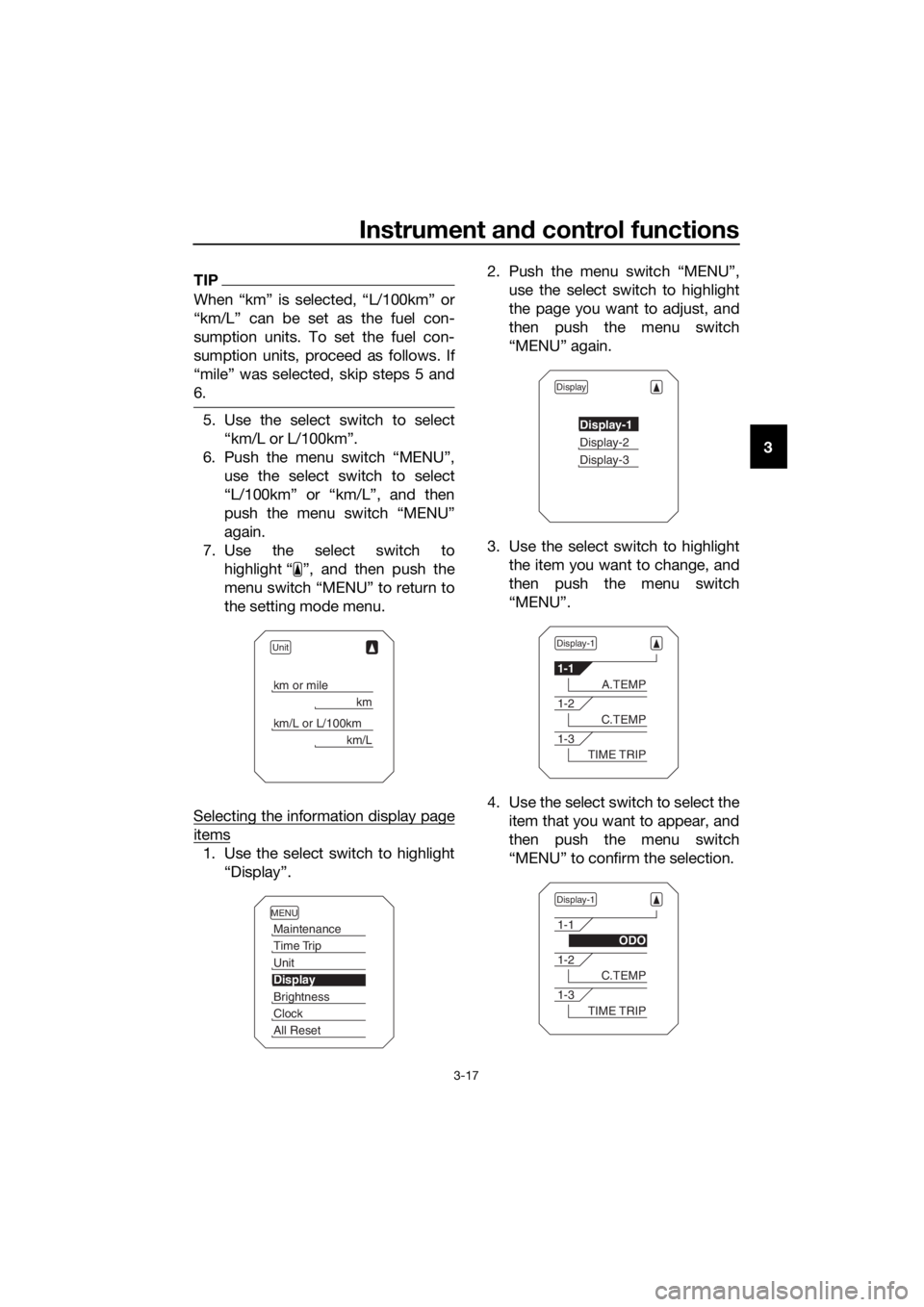
5. Use the select switch to select
“km/L or L/100km”.
6. Push the menu switch “MENU”, use the select switch to select
“L/100km” or “km/L”, and then
push the menu switch “MENU”
again.
7. Use the select switch to highlight “ ”, and then push the
menu switch “MENU” to return to
the setting mode menu.
Selecting the information display page
items
1. Use the select switch to highlight “Display”. 2. Push the menu switch “MENU”,
use the select switch to highlight
the page you want to adjust, and
then push the menu switch
“MENU” again.
3. Use the select switch to highlight the item you want to change, and
then push the menu switch
“MENU”.
4. Use the select switch to select the item that you want to appear, and
then push the menu switch
“MENU” to confirm the selection.
Unit
km or mile
km
km/L or L/100km
km/L
MENU
Maintenance
Time Trip
Unit
Display
Brightness
Clock
All Reset
Display
Display-1
Display-2
Display-3
Display-1
1-1
A.TEMP
1-2
C.TEMP
1-3
TIME TRIP
Display-1
1-1
ODO
1-2
C.TEMP
1-3
TIME TRIP
UBP8E1E0.book Page 17 Friday, September 14, 2018 11:35 AM
Page 32 of 118
Instrument and control functions
3-18
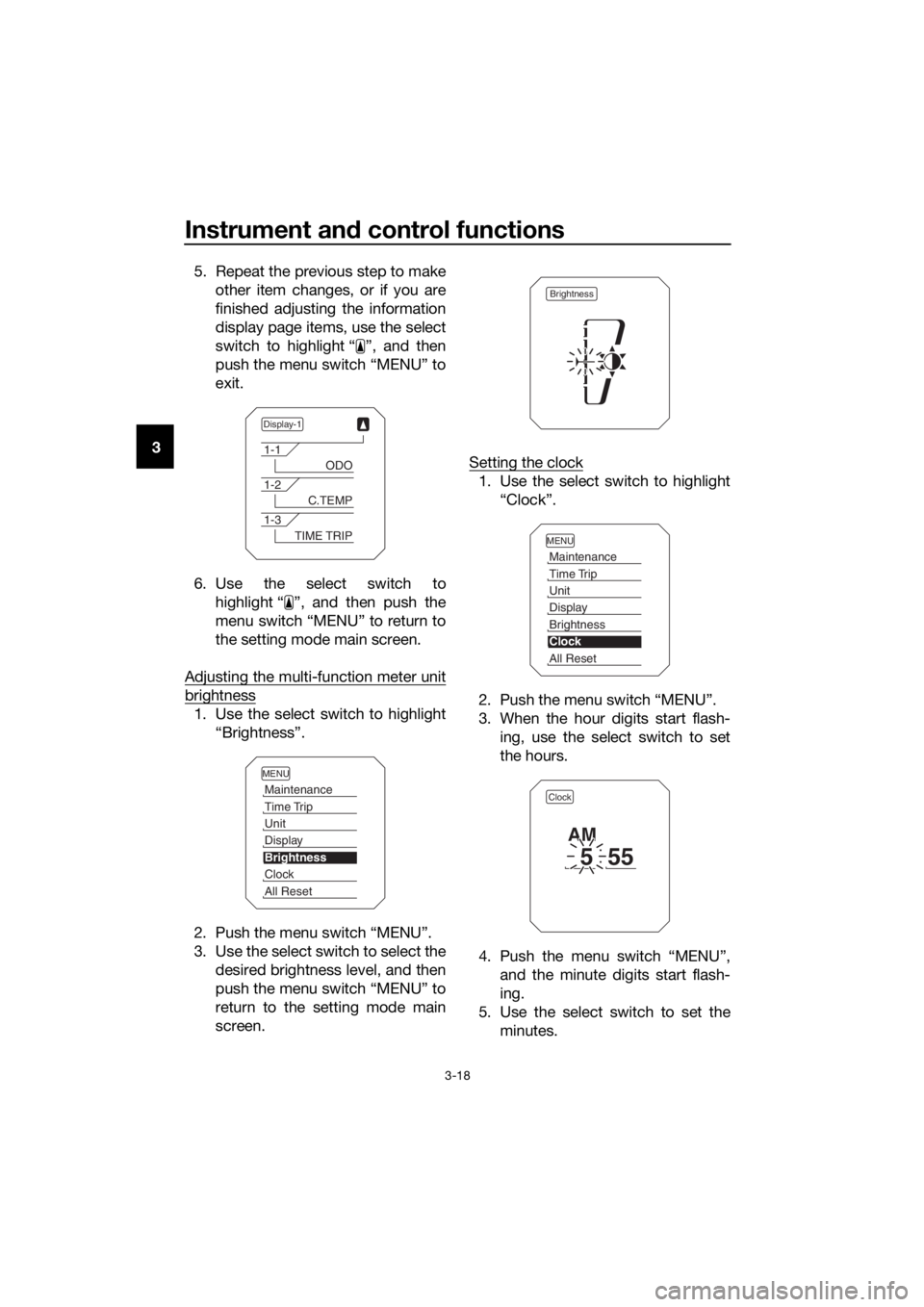
3 5. Repeat the previous step to make
other item changes, or if you are
finished adjusting the information
display page items, use the select
switch to highlight “ ”, and then
push the menu switch “MENU” to
exit.
6. Use the select switch to highlight “ ”, and then push the
menu switch “MENU” to return to
the setting mode main screen.
Adjusting the multi-function meter unit
brightness
1. Use the select switch to highlight “Brightness”.
2. Push the menu switch “MENU”.
3. Use the select switch to select the desired brightness level, and then
push the menu switch “MENU” to
return to the setting mode main
screen. Setting the clock
1. Use the select switch to highlight
“Clock”.
2. Push the menu switch “MENU”.
3. When the hour digits start flash- ing, use the select switch to set
the hours.
4. Push the menu switch “MENU”, and the minute digits start flash-
ing.
5. Use the select switch to set the minutes.
Display-1
1-1
ODO
1-2
C.TEMP
1-3
TIME TRIP
MENU
Maintenance
Time Trip
Unit
Display
Brightness
Clock
All Reset
Brightness
MENU
Maintenance
Time Trip
Unit
Display
Brightness
Clock
All Reset
Clock
555
AM
UBP8E1E0.book Page 18 Friday, September 14, 2018 11:35 AM
Page 33 of 118

Instrument and control functions
3-19
3
6. Push the menu switch “MENU” to
return to the setting mode main
screen.
Resetting all of the display items
1. Use the select switch to highlight “All Reset”.
2. Push the menu switch “MENU”.
3. Use the select switch to highlight “YES”, and then push the menu
switch “MENU”.
TIP
The odometer and the clock will not be
reset.
EAU49433
D-mo de ( drive mo de)
D-mode is an electronically controlled
engine performance system with two
mode selections (touring mode “T” and
sports mode “S”).
Push the drive mode switch “MODE”
to switch between modes. (See page
3-21 for an explanation of the drive
mode switch.)
TIP
Before using D-mode, make sure you
understand its operation along with the
operation of the drive mode switch.
Tourin g mo de “T”
The touring mode “T” is suitable for
various riding conditions.
This mode allows the rider to enjoy
smooth drivability from the low-speed
range to the high-speed range.
Sports mod e “S”
This mode offers a sportier engine re-
sponse in the low- to mid-speed range
compared to the touring mode.
MENU
Maintenance
Time Trip
Unit
Display
Brightness
Clock
All Reset
All Reset
YES
NO
1. Drive mode switch “MODE”
M ODE
STOP
RUNSTA R
T
1
UBP8E1E0.book Page 19 Friday, September 14, 2018 11:35 AM
Page 38 of 118
Instrument and control functions
3-24
3
EAU49484
Brake ped al
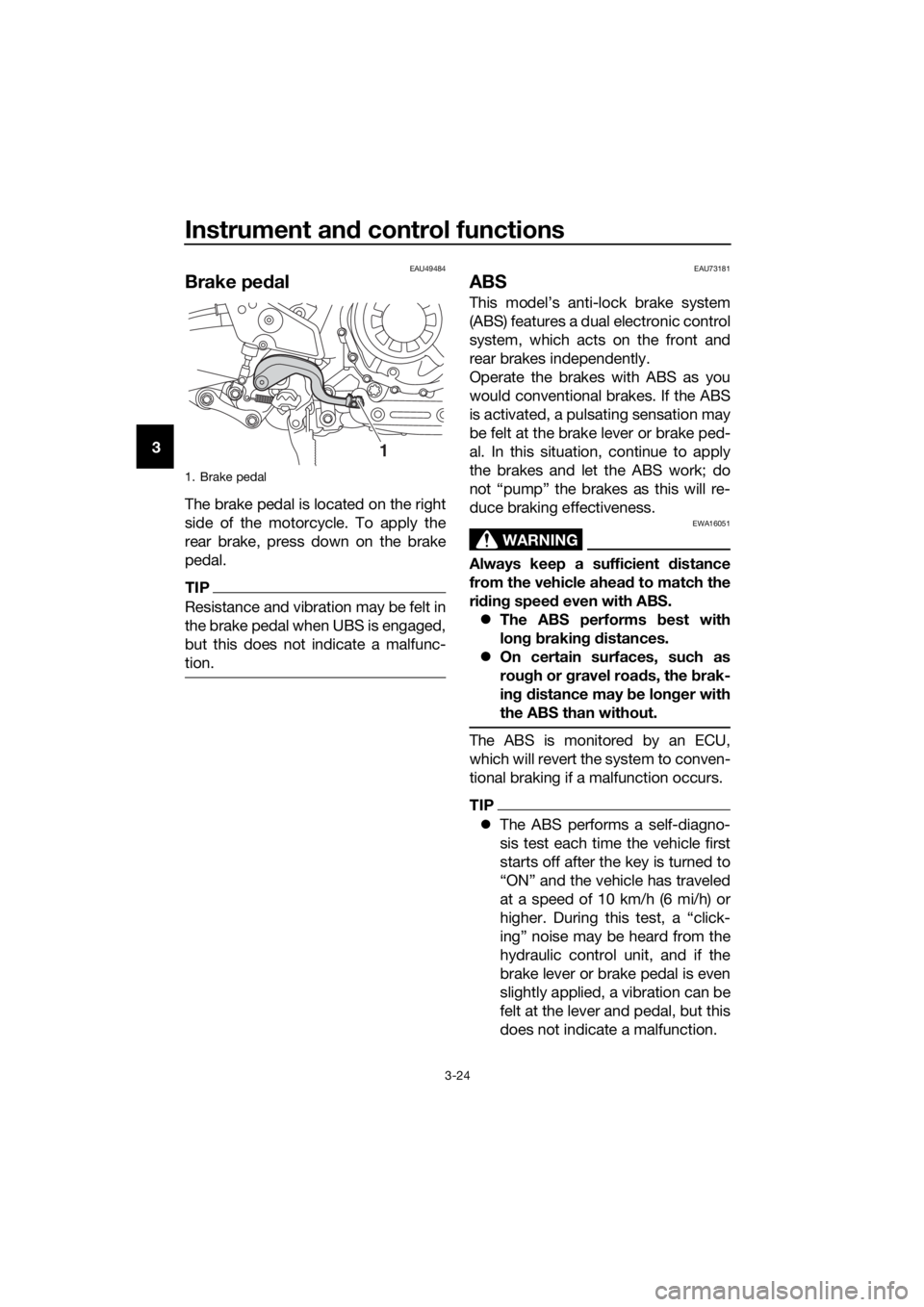
The brake pedal is located on the right
side of the motorcycle. To apply the
rear brake, press down on the brake
pedal.
TIP
Resistance and vibration may be felt in
the brake pedal when UBS is engaged,
but this does not indicate a malfunc-
tion.
EAU73181
ABS
This model’s anti-lock brake system
(ABS) features a dual electronic control
system, which acts on the front and
rear brakes independently.
Operate the brakes with ABS as you
would conventional brakes. If the ABS
is activated, a pulsating sensation may
be felt at the brake lever or brake ped-
al. In this situation, continue to apply
the brakes and let the ABS work; do
not “pump” the brakes as this will re-
duce braking effectiveness.
WARNING
EWA16051
Always keep a sufficient d istance
from the vehicle ahead to match the
ri din g speed even with ABS.
The ABS performs b est with
lon g b rakin g d istances.
On certain surfaces, such as
rou gh or g ravel roa ds, the b rak-
in g d istance may be lon ger with
the ABS than without.
The ABS is monitored by an ECU,
which will revert the system to conven-
tional braking if a malfunction occurs.
TIP
The ABS performs a self-diagno-
sis test each time the vehicle first
starts off after the key is turned to
“ON” and the vehicle has traveled
at a speed of 10 km/h (6 mi/h) or
higher. During this test, a “click-
ing” noise may be heard from the
hydraulic control unit, and if the
brake lever or brake pedal is even
slightly applied, a vibration can be
felt at the lever and pedal, but this
does not indicate a malfunction.
1. Brake pedal
1
UBP8E1E0.book Page 24 Friday, September 14, 2018 11:35 AM
Page 41 of 118

Instrument and control functions
3-27
3
4. Have a Yamaha dealer check the
vehicle and turn off the engine
trouble warning light.
EAU13076
Fuel tank cap
To open the fuel tank cap
Open the fuel tank cap lock cover, in-
sert the key into the lock, and then turn
it 1/4 turn clockwise. The lock will be
released and the fuel tank cap can be
opened.
To close the fuel tank cap
With the key still inserted in the lock,
push down the fuel tank cap. Turn the
key 1/4 turn counterclockwise, remove
it, and then close the lock cover.
TIP
The fuel tank cap cannot be closed un-
less the key is in the lock. In addition,
the key cannot be removed if the cap is
not properly closed and locked.
WARNING
EWA11092
Make sure that the fuel tank cap is
properly close d after fillin g fuel.
Leakin g fuel is a fire hazar d.
1. Fuel tank cap lock cover
2. Unlock.
1
2
UBP8E1E0.book Page 27 Friday, September 14, 2018 11:35 AM